lights LEXUS NX300h 2015 Workshop Manual
[x] Cancel search | Manufacturer: LEXUS, Model Year: 2015, Model line: NX300h, Model: LEXUS NX300h 2015Pages: 681, PDF Size: 9.14 MB
Page 302 of 681

302 4-5. Using the driving support systems
NX300h_U_OM78007U NOTICE ■
How to use the camera ●
The parking assist monitor may not oper ate properly in the following cases.
• If the back of the vehicle is hit, the position and mounting angle of the camera may
change.
• As the camera has a water proof construction, do not detach, disassemble or
modify it. This may cause incorrect operation.
• When cleaning the camera lens, flush the camera with a large quantity of water,
rinse the camera lens with water and wipe it with a soft and wet cloth. Failure to do
so may cause the camera lens to be scratched and unable to transmit a clear
image.
• Do not allow organic solvent, car wax, window cleaner or glass coat to adhere to
the camera. If this happens, wipe it off as soon as possible.
• If the temperature changes rapidly, such as when hot water is poured on the vehi-
cle in cold weather, the system may not operate normally.
• When washing the vehicle, do not apply intensive bursts of water to the camera or
camera area. Doing so may result in the camera malfunctioning.
• When the camera is used under fluorescen t lights, sodium light or mercury light
etc., the lights and the illuminate d areas may appear to flicker.●
Do not expose the camera to strong impa ct as this could cause a malfunction.
If this happens, have the vehicle inspected by your Lexus dealer as soon as possible.
Page 325 of 681

3254-6. Driving tips
4
Driving
NX300h_U_OM78007U ◆ Delays
Repeated acceleration and deceleration, as well as long waits at traffic lights,
will lead to bad fuel economy. Check traffic reports before leaving and avoid
delays as much as possible. When drivin g in a traffic jam, gently release the
brake pedal to allow the vehicle to move forward slightly while avoiding over-
use of the accelerator pedal. Doing so can help control excessive gasoline
consumption.
◆ Highway driving
Control and maintain the vehicle at a co nstant speed. Before stopping at a toll
booth or similar, allow plenty of time to release the accelerator and gently
apply the brakes. A greater amount of electrical energy can be regenerated
when slowing down.
◆ Air conditioning
Use the air conditioning only when necessary. Doing so can help reduce
excessive gasoline consumption.
In summer: When the ambient temperature is high, use the recirculated air
mode. Doing so will help to reduce th e burden on the air conditioning system
and reduce fuel consumption as well.
In winter: Because the gasoline engine will not automatically cut out until it
and the interior of the vehicle are warm, it will consume fuel. Also, fuel con-
sumption can be improved by avoiding overuse of the heater.
◆ Checking tire inflation pressure
Make sure to check the tire inflation pressure frequently. Improper tire infla-
tion pressure can cause poor fuel economy.
Also, as snow tires can cause large amou nts of friction, their use on dry roads
can lead to poor fuel economy. Use ti res that are appropriate for the season.
◆ Luggage
Carrying heavy luggage will lead to poor fuel economy. Avoid carrying
unnecessary luggage. Installing a large roof rack will also cause poor fuel
economy.
◆ Warming up before driving
Since the gasoline engine starts up and cuts out automatically when cold,
warming up the engine is unnecessary. Moreover, frequently driving short dis-
tances will cause the engine to repeated ly warm up, which can lead to excess
fuel consumption.
Page 326 of 681
326 4-6. Driving tips
NX300h_U_OM78007UWinter driving tips ●
Use fluids that are appropriate to the prevailing outside temperatures.
•Engine oil
• Engine/power control unit coolant
• Washer fluid ●
Have a service technician inspect the condition of the 12-volt battery. ●
Have the vehicle fitted with four snow tires or purchase a set of tire chains for
the front tires
* . Ensure that all tires are the same size and br and, and that chains match the size of the
tires.
* : Tire chains cannot be mounted on the 225/60R18 tires.
Perform the following according to the driving conditions: ●
Do not try to forcibly open a window or move a wiper that is frozen. Pour
warm water over the frozen area to melt the ice. Wipe away the water imme-
diately to prevent it from freezing. ●
To ensure proper operation of the climate control system fan, remove any
snow that has accumulated on the air inlet vents in front of the windshield. ●
Check for and remove any excess ice or snow that may have accumulated on
the exterior lights, vehicle’s roof, chassis, around the tires or on the brakes. ●
Remove any snow or mud from the bottom of your shoes before getting in the
vehicle.Carry out the necessary preparations and inspections before driving the vehi-
cle in winter. Always drive the vehicle in a manner appropriate to the prevail-
ing weather conditions.
Pre-winter preparations
Before driving the vehicle
Page 352 of 681
352 5-2. Setup
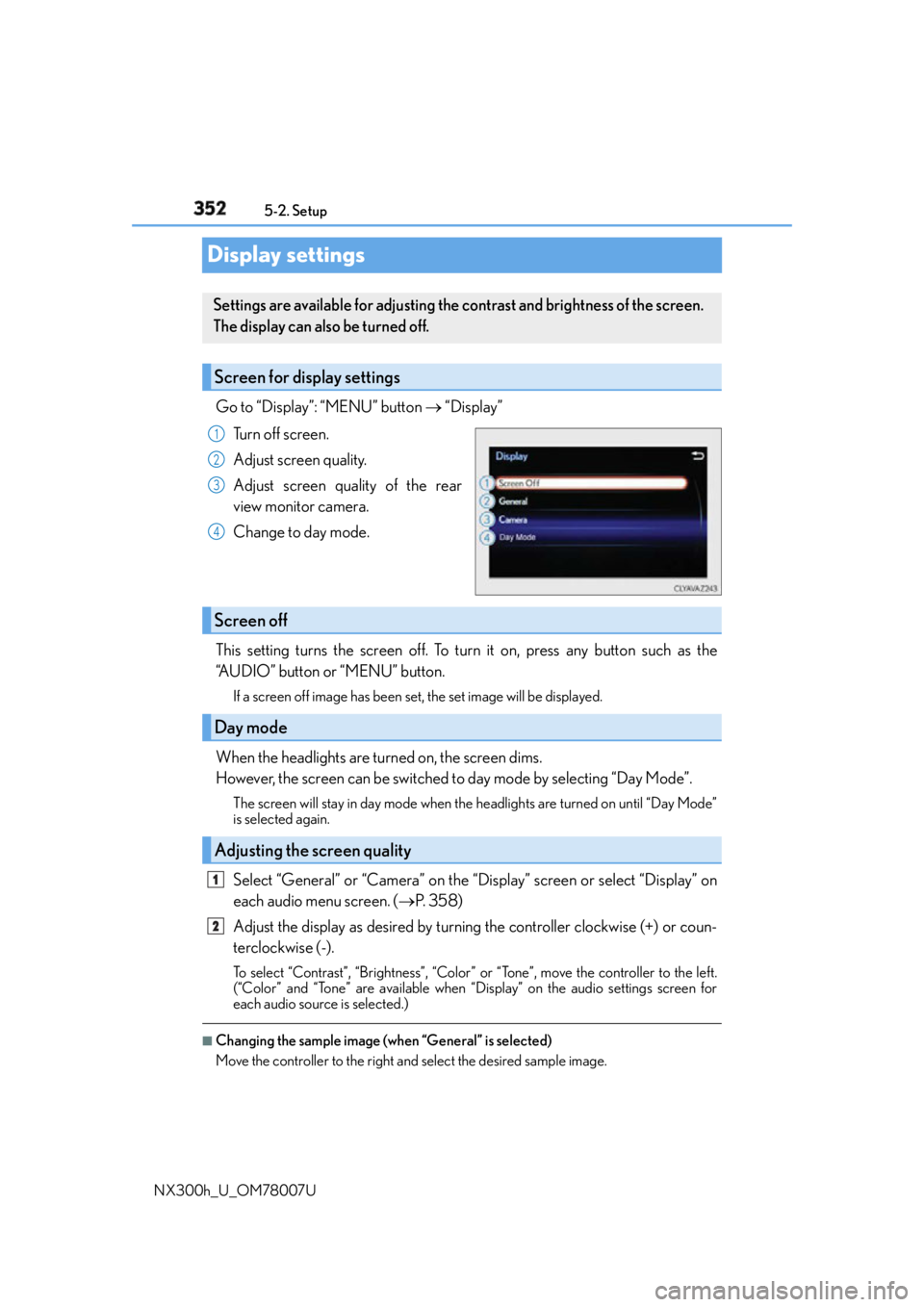
NX300h_U_OM78007UDisplay settings Go to “Display”: “MENU” button “Display”
Turn off screen.
Adjust screen quality.
Adjust screen quality of the rear
view monitor camera.
Change to day mode.
This setting turns the screen off. To turn it on, press any button such as the
“AUDIO” button or “MENU” button. If a screen off image has been set, the set image will be displayed.
When the headlights are turned on, the screen dims.
However, the screen can be switched to day mode by selecting “Day Mode”. The screen will stay in day mode when the headlights are turned on until “Day Mode”
is selected again.
Select “General” or “Camera” on the “Display” screen or select “Display” on
each audio menu screen. ( P. 3 5 8 )
Adjust the display as desired by turning the controller clockwise (+) or coun-
terclockwise (-). To select “Contrast”, “Brightness”, “Color” or “Tone”, move the controller to the left.
(“Color” and “Tone” are available when “Display” on the audio settings screen for
each audio source is selected.) ■
Changing the sample image (when “General” is selected)
Move the controller to the right and select the desired sample image.Settings are available for adjusting the contrast and brightness of the screen.
The display can also be turned off.
Screen for display settings 1
2
3
4
Screen off
Day mode
Adjusting the screen quality 1
2
Page 429 of 681

429
6Interior features
NX300h_U_OM78007U 6-1. Using the air conditioning
system and defogger
Automatic air conditioning
system ......................................... 430
Heated steering wheel/
seat heaters/
seat ventilators......................... 440
6-2. Using the interior lights
Interior lights list..........................443
• Front interior light ................444
• Personal lights........................444
• Rear interior light ................. 445 6-3. Using the storage features
List of storage features ............ 446
• Glove box ............................... 447
• Console box........................... 447
•Cup holders/
bottle holders.........................448
• Sunglass holder .................... 449
Luggage compartment
features........................................ 450
6-4. Other interior features
Other interior features ............ 455
• Sun visors ................................ 455
• Vanity mirrors ........................ 455
• Clock ........................................ 456
• Power outlet (12 VDC)...... 456
• Power outlet (120 VAC) ... 457
• Wireless charger .................. 458
• Armrest .................................... 465
• Assist grips.............................. 465
• Coat hooks ............................. 466
Garage door opener................ 467
Compass ........................................473
Safety Connect ............................477
Page 443 of 681
4436-2. Using the interior lights
6
Interior features
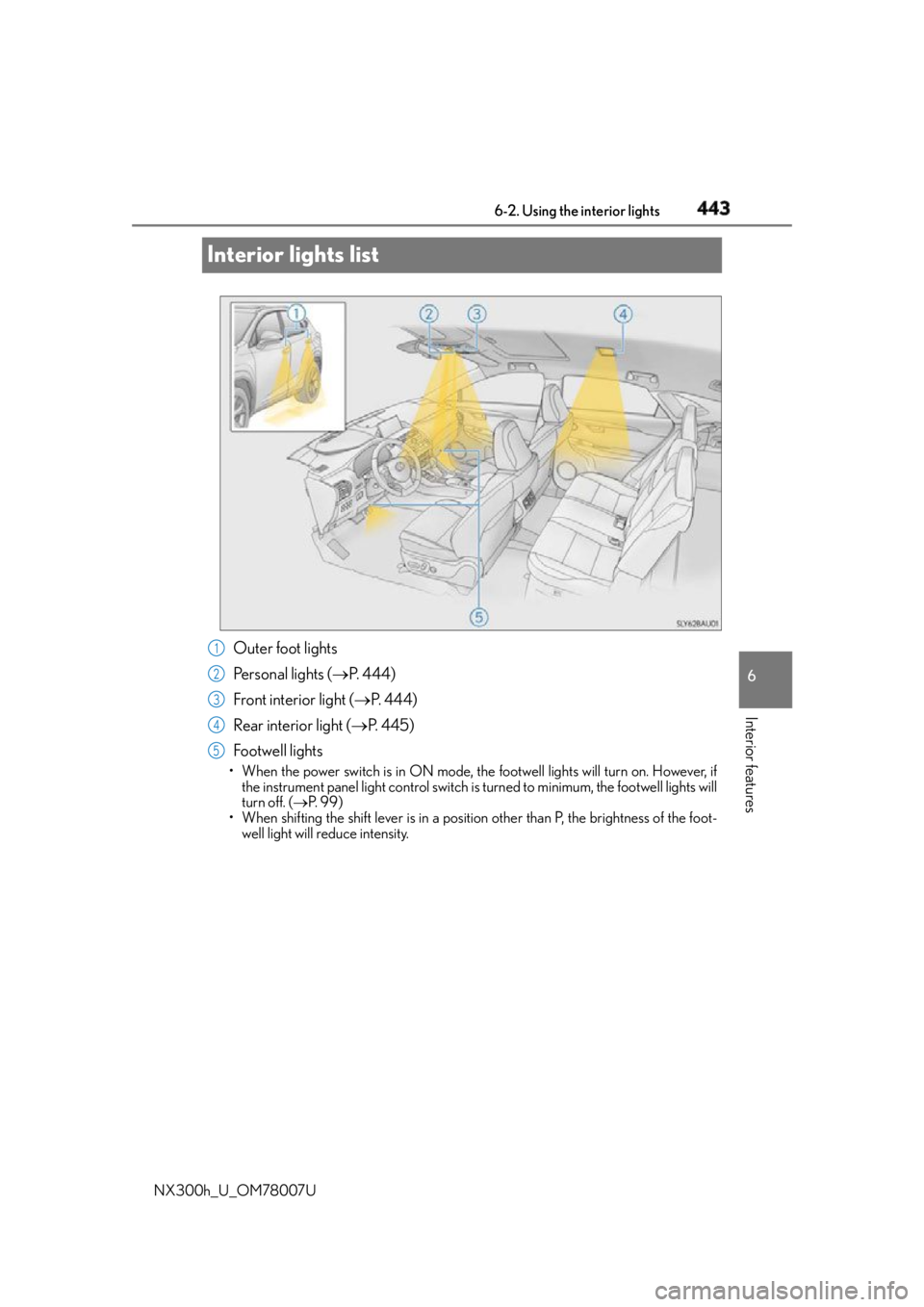
NX300h_U_OM78007UInterior lights list
Outer foot lights
Personal lights ( P. 444)
Front interior light ( P. 444)
Rear interior light ( P. 4 4 5 )
Footwell lights • When the power switch is in ON mode, th e footwell lights will turn on. However, if
the instrument panel light cont rol switch is turned to minimum, the footwell lights will
turn off. ( P. 9 9 )
• When shifting the shift lever is in a position other than P, the br ightness of the foot-
well light will reduce intensity. 1
2
3
4
5
Page 444 of 681
444 6-2. Using the interior lights
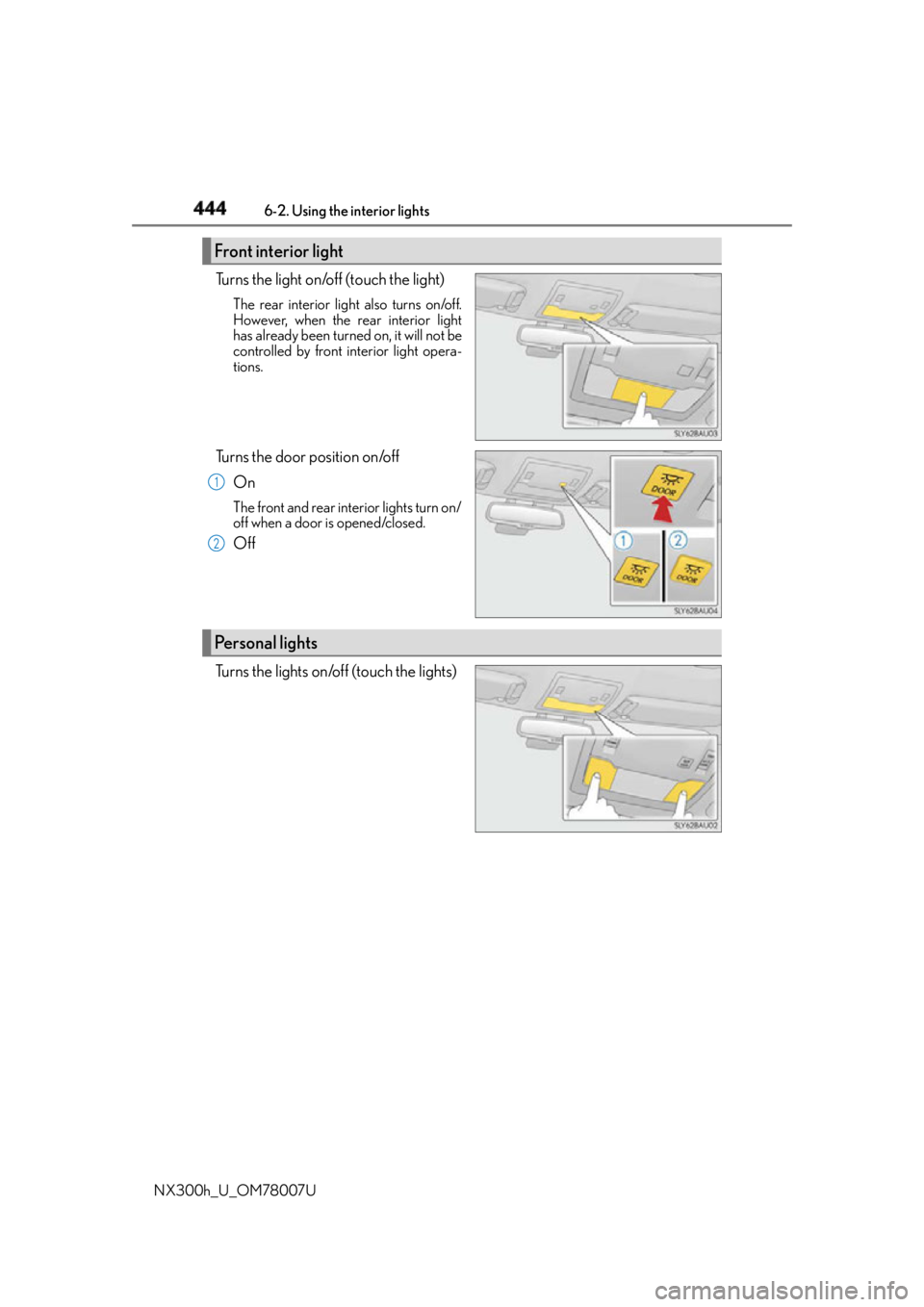
NX300h_U_OM78007U Turns the light on/off (touch the light) The rear interior light also turns on/off.
However, when the rear interior light
has already been turned on, it will not be
controlled by front interior light opera-
tions.
Turns the door position on/off
On The front and rear interior lights turn on/
off when a door is opened/closed.
Off
Turns the lights on/off (touch the lights)Front interior light 1
2
Personal lights
Page 445 of 681
4456-2. Using the interior lights
6
Interior features
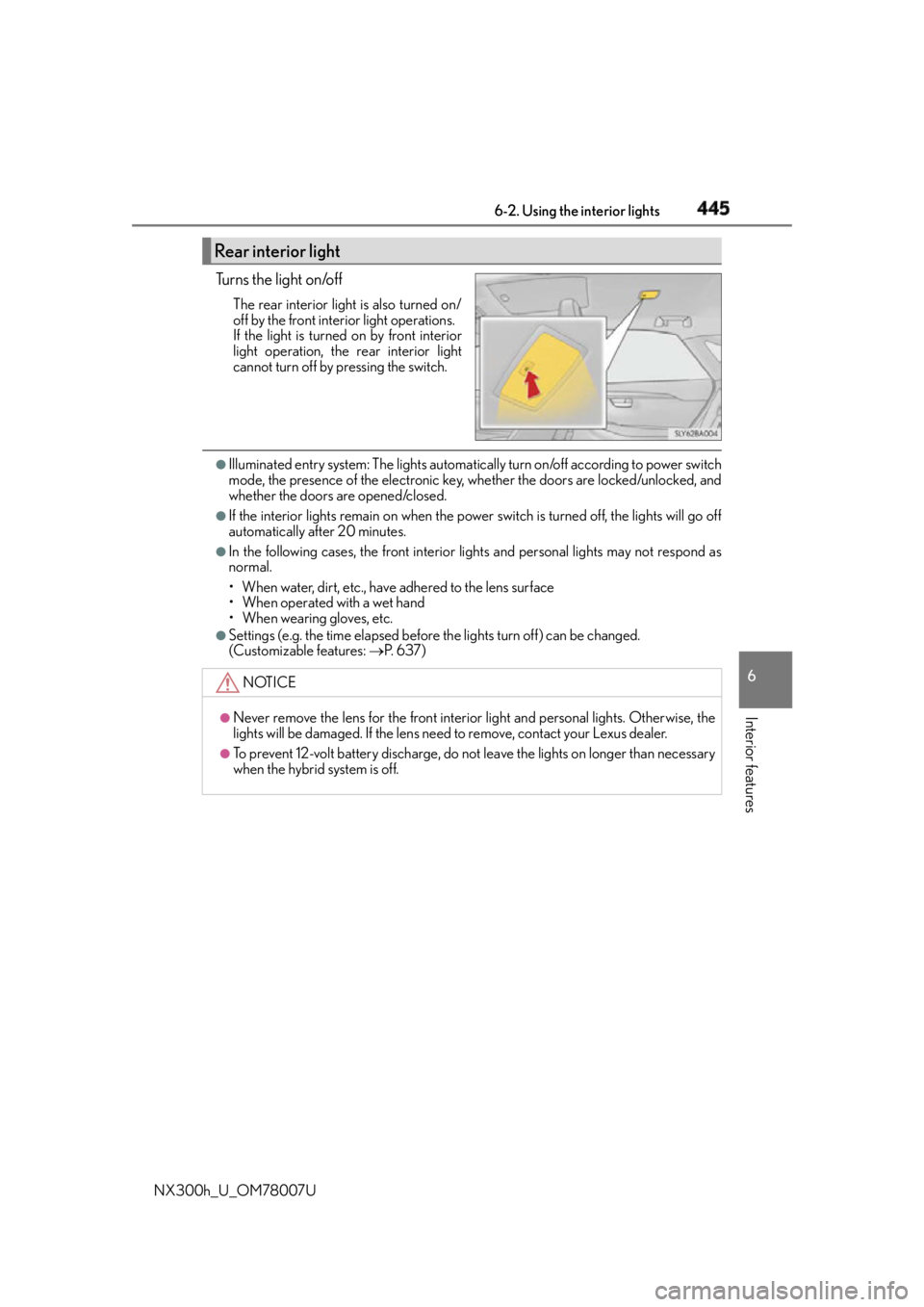
NX300h_U_OM78007U Tu r n s t h e l i g h t o n /o f f The rear interior light is also turned on/
off by the front interior light operations.
If the light is turned on by front interior
light operation, the rear interior light
cannot turn off by pressing the switch. ●
Illuminated entry system: The lights automatical ly turn on/off according to power switch
mode, the presence of the electronic key, whether the doors are locked/unlocked, and
whether the doors are opened/closed. ●
If the interior lights remain on when the power switch is turned off, the lights will go off
automatically after 20 minutes. ●
In the following cases, the front interior li ghts and personal lights may not respond as
normal.
• When water, dirt, etc., have adhered to the lens surface
• When operated with a wet hand
• When wearing gloves, etc. ●
Settings (e.g. the time elapsed before the lights turn off) can be changed.
(Customizable features: P. 6 3 7 )Rear interior light
NOTICE ●
Never remove the lens for the front interior light and personal lig hts. Otherwise, the
lights will be damaged. If the lens need to remove, contact your Lexus dealer.●
To prevent 12-volt battery discharge, do not leave the lights on lo nger than necessary
when the hybrid system is off.
Page 447 of 681
4476-3. Using the storage features
6
Interior features
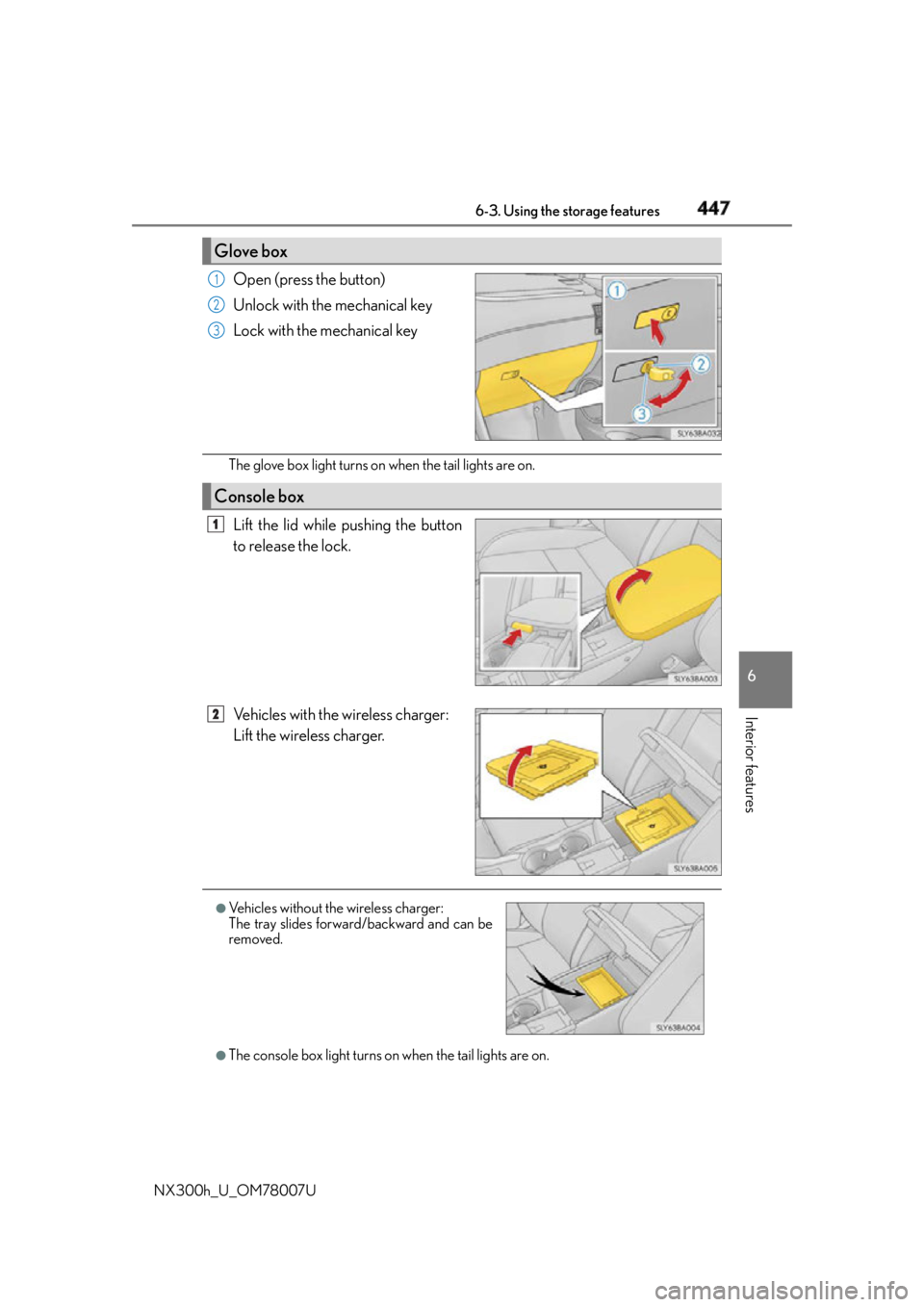
NX300h_U_OM78007U Open (press the button)
Unlock with the mechanical key
Lock with the mechanical key
The glove box light turns on when the tail lights are on.
Lift the lid while pushing the button
to release the lock.
Vehicles with the wireless charger:
Lift the wireless charger.
●
The console box light turns on when the tail lights are on.Glove box 1
2
3
Console box 1
2
●
Vehicles without the wireless charger:
The tray slides forward/backward and can be
removed.
Page 455 of 681
4556-4. Other interior features
6
Interior features
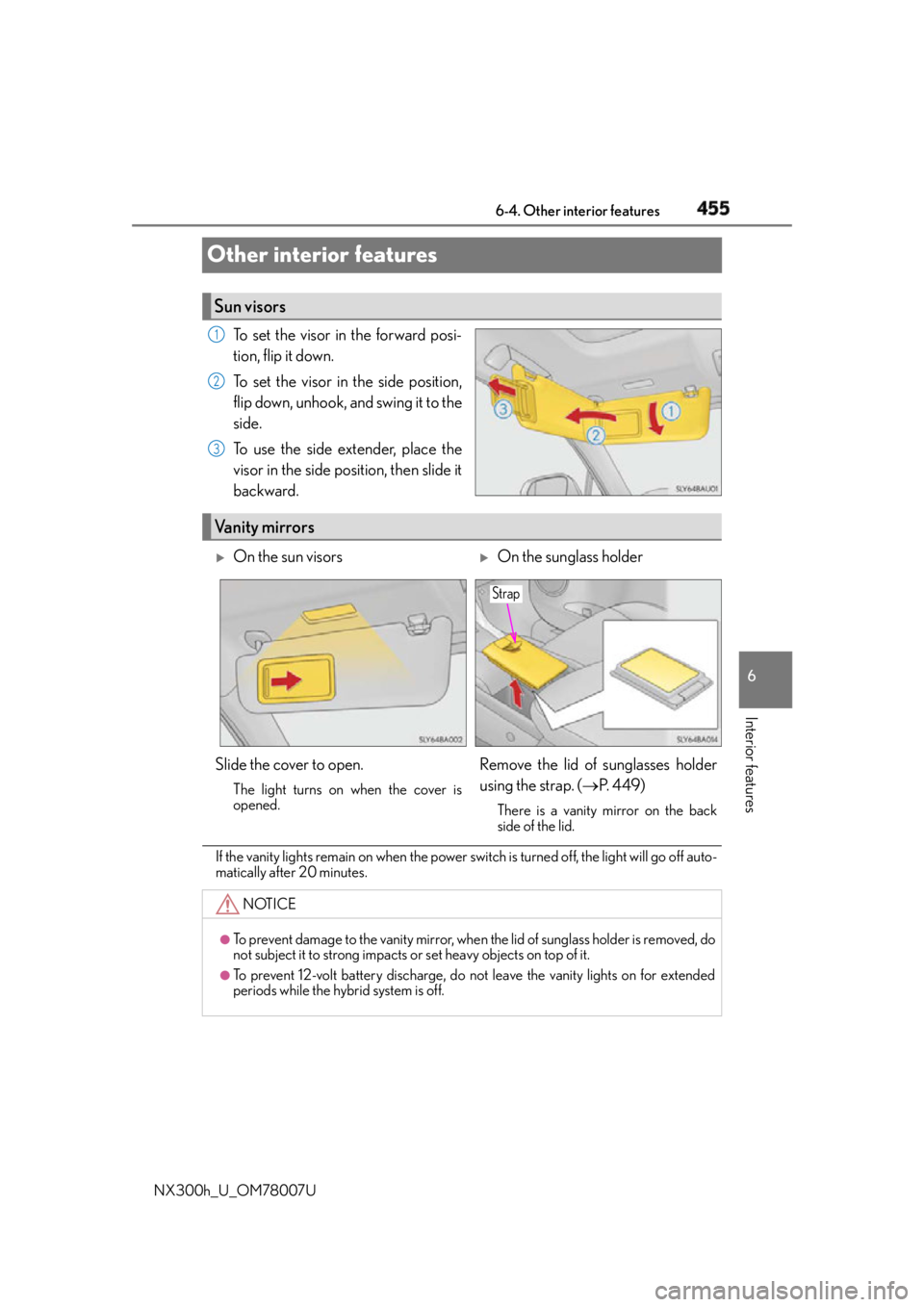
NX300h_U_OM78007UOther interior features To set the visor in the forward posi-
tion, flip it down.
To set the visor in the side position,
flip down, unhook, and swing it to the
side.
To use the side extender, place the
visor in the side position, then slide it
backward.
If the vanity lights remain on when the power swit ch is turned off, the light will go off auto-
matically after 20 minutes.Sun visors 1
2
3
Vanity mirrors
On the sun visors
On the sunglass holder
Slide the cover to open. The light turns on when the cover is
opened.
Remove the lid of sunglasses holder
using the strap. ( P. 4 4 9 )There is a vanity mirror on the back
side of the lid.
NOTICE ●
To prevent damage to the vanity mirror, when the lid of sunglass holder is removed, do
not subject it to strong impacts or set heavy objects on top of it.●
To prevent 12-volt battery discharge, do not leave the vanity lights on for extended
periods while the hybrid system is off. Strap