display LEXUS RC200T 2017 Workshop Manual
[x] Cancel search | Manufacturer: LEXUS, Model Year: 2017, Model line: RC200T, Model: LEXUS RC200T 2017Pages: 724, PDF Size: 42.04 MB
Page 155 of 724
1552. Instrument cluster
2
Instrument cluster
RC200t_RC F_EE(OM24728E)
Navigation or multimedia system screen
Press the “MENU” button on the Remote Touch, and then select “Car” on the
“Menu” screen.
If the “Trip information” screen is displayed, select “Past record”.
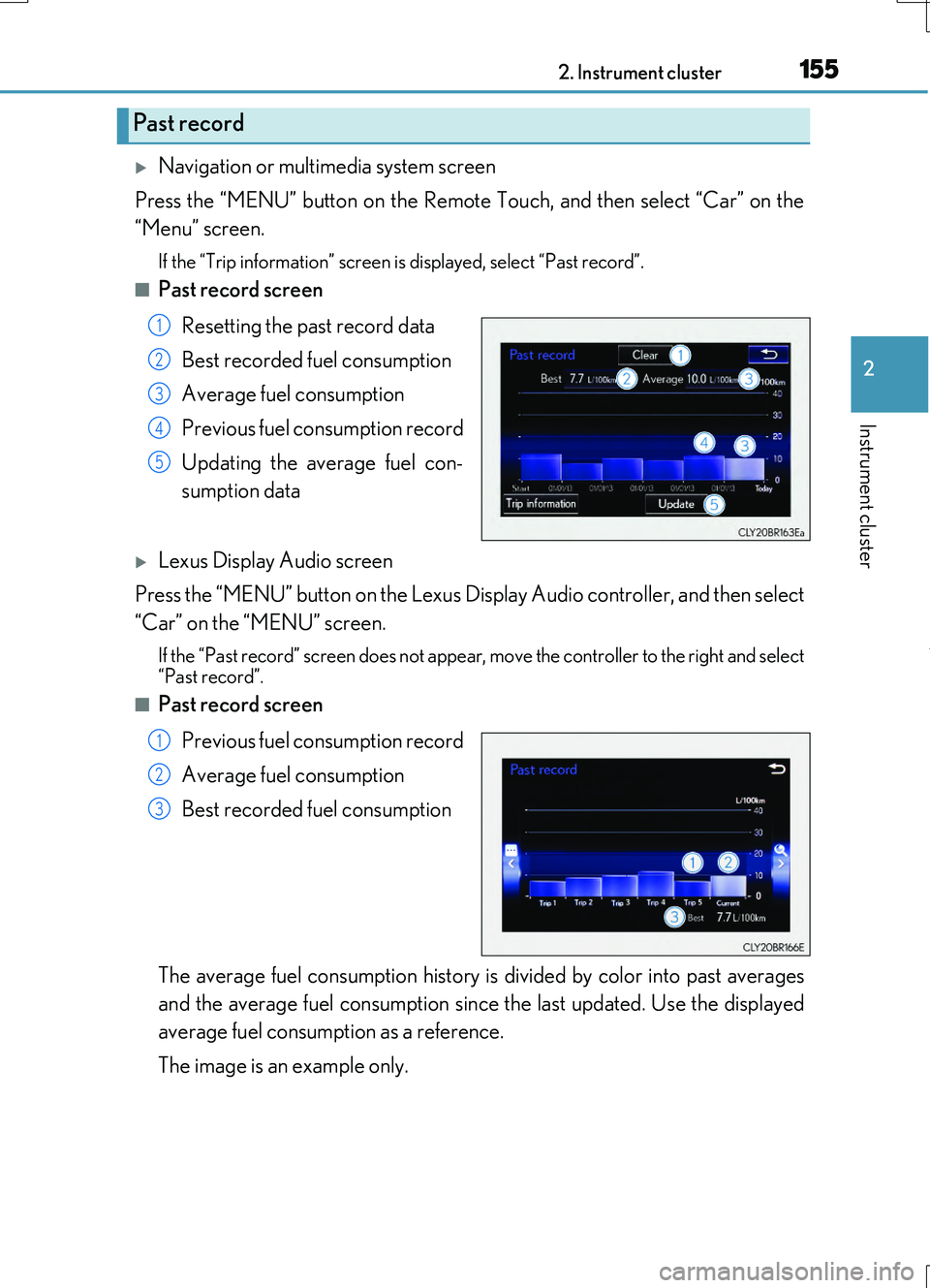
■Past record screen
Resetting the past record data
Best recorded fuel consumption
Average fuel consumption
Previous fuel consumption record
Updating the average fuel con-
sumption data
Lexus Display Audio screen
Press the “MENU” button on the Lexus Display Audio controller, and then select
“Car” on the “MENU” screen.
If the “Past record” screen does not appear , move the controller to the right and select
“Past record”.
■Past record screen
Previous fuel consumption record
Average fuel consumption
Best recorded fuel consumption
The average fuel consumption history is divided by color into past averages
and the average fuel consumption since the last updated. Use the displayed
average fuel consumption as a reference.
The image is an example only.
Past record
1
2
3
4
5
1
2
3
Page 156 of 724
1562. Instrument cluster
RC200t_RC F_EE(OM24728E)
■Updating the past record data
Navigation or multimedia system
Update the average fuel consumption by selecting “Update” to measure the current fuel consumption again.
Lexus Display Audio system
Update the average fuel consumption by moving the controller to the left and select “Update” to measure the current fuel consumption again.
■Resetting the data
Navigation or multimedia system
The fuel consumption data can be deleted by selecting “Clear”.
Lexus Display Audio system
The fuel consumption data can be deleted by moving the controller to the left and select “Clear”.
■Cruising range
Displays the estimated maximum distance that can be driven with the quantity of fuel remaining.
This distance is computed based on your average fuel consumption. As a result, the actual distance that can be driven may differ from that displayed.
Page 168 of 724

1683-2. Opening, closing and locking the doors and trunk
RC200t_RC F_EE(OM24728E)
■Side window open/close function linked to door operation
When a door is opened, its window opens slightly. When a door is closed, its window closes completely.
■Switching the door unlock function
It is possible to set which doors the entry function unlocks using the wireless remote con- trol.
Turn the engine switch off.
For vehicles with an intrusion sensor: Cancel the intrusion sensor and tilt sensor of the alarm system to prevent unintended trigge ring of the alarm while changing the set- tings. ( P. 106)
When the indicator light on the key su rface is not on, press and hold or
for approximately 5 seconds wh ile pressing and holding .
The setting changes each time an operatio n is performed, as shown below. (When changing the setting continuously, release the buttons, wait for at least 5 seconds, and
repeat step .)
For vehicles with an alarm: To prevent unin tended triggering of the alarm, unlock the doors using the wireless remote control and op en and close a door once after the set-
tings have been changed. (If a door is not opened within 30 seconds after is
pressed, the doors will be locked again and the alarm will automatically be set.)
In a case that the alarm is triggered, immediately stop the alarm. ( P. 104)
1
2
3
3
Multi-information displayUnlocking functionBeep
(Left-hand drive vehi-cles)
(Right-hand drive vehicles)
Holding the driver’s door handleunlocks only the driver’s door.
Exterior: Beeps 3 timesInterior: Pings onceHolding the passenger’s doorhandle unlocks both side doors.
Holding either door handle
unlocks both side doors.
Exterior: Beeps twice
Interior: Pings once
Page 176 of 724

1763-2. Opening, closing and locking the doors and trunk
RC200t_RC F_EE(OM24728E)
■Alarms and warning indicators
An alarm sounds and warning messages are di splayed on the multi-information display to protect against unexpected accidents or theft of the vehicle resulting from erroneous
operation. When a warning message is displayed, take appropriate measures based on the displayed message. ( P. 597)
When only an alarm sounds, circumstances and correction procedures are as follows.
■Battery-saving function
The battery-saving function will be activated in order to prevent the electronic key bat- tery and the vehicle battery from being discharged while the vehicle is not in operationfor a long time.
●In the following situations, the smart entry & start system may take some time to unlockthe doors.
• The electronic key has been left within approximately 2 m (6 ft.) of the outside of the
vehicle for 10 minutes or longer. • The smart entry & start system has no t been used for 5 days or longer.
●If the smart entry & start system has not been used for 14 days or longer, the doors can- not be unlocked at the passenger door. In this case, hold the driver’s door handle, or use the wireless remote control or mechanical key, to unlock the doors.
AlarmSituationCorrection procedure
Exterior alarm soundsonce for 5 seconds
The trunk was closed while
the electronic key was still inside the trunk and bothside doors were locked.
Retrieve the electronic keyfrom the trunk and close
the trunk lid.
An attempt was made to
lock the vehicle while a door was open.
Close both side doors andlock the doors again.
Interior alarm sounds con-
tinuously
The engine switch was turned to ACCESSORY
mode while the driver’s door was open (or thedriver’s door was opened
while the engine switch was in ACCESSORYmode).
Turn the engine switch offand close the driver’s door.
The engine switch was
turned off while the driver’s door was open.Close the driver’s door.
Page 177 of 724
1773-2. Opening, closing and locking the doors and trunk
3
Operation of each component
RC200t_RC F_EE(OM24728E)
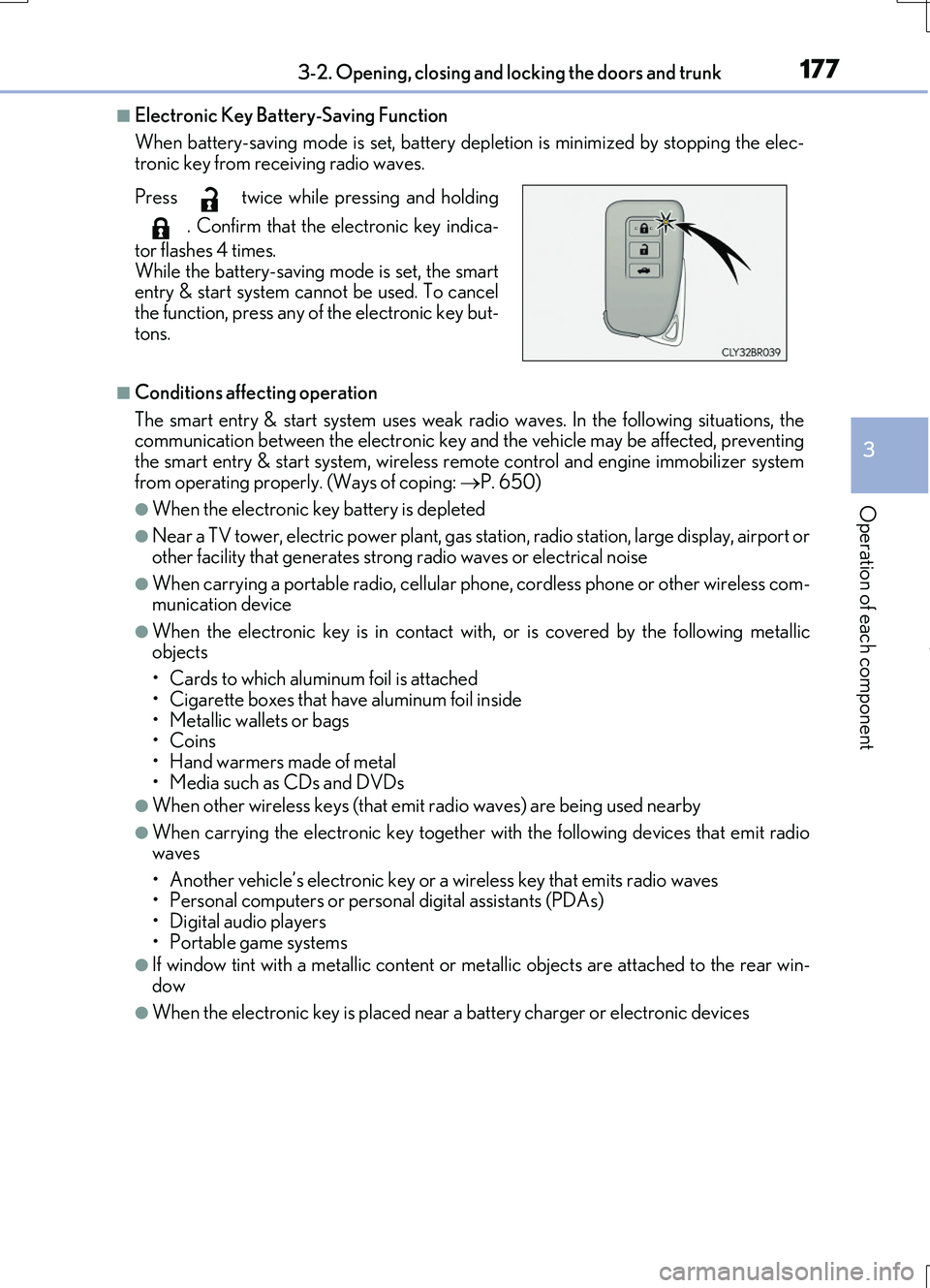
■Electronic Key Battery-Saving Function
When battery-saving mode is set, battery depl etion is minimized by stopping the elec- tronic key from receiving radio waves.
■Conditions affecting operation
The smart entry & start system uses weak ra dio waves. In the following situations, the communication between the electronic key an d the vehicle may be affected, preventing the smart entry & start system, wireless remote control and engine immobilizer system
from operating properly. (Ways of coping: P. 650)
●When the electronic key battery is depleted
●Near a TV tower, electric power plant, gas station, radio station, large display, airport or
other facility that gene rates strong radio waves or electrical noise
●When carrying a portable radio, cellular phone, cordless phone or other wireless com- munication device
●When the electronic key is in contact wi th, or is covered by the following metallic objects
• Cards to which aluminum foil is attached
• Cigarette boxes that have aluminum foil inside • Metallic wallets or bags•Coins
• Hand warmers made of metal • Media such as CDs and DVDs
●When other wireless keys (that emit radio waves) are being used nearby
●When carrying the electronic key together with the following devices that emit radiowaves
• Another vehicle’s electronic key or a wireless key that emits radio waves • Personal computers or personal digital assistants (PDAs)• Digital audio players
• Portable game systems
●If window tint with a metallic content or me tallic objects are attached to the rear win-
dow
●When the electronic key is placed near a battery charger or electronic devices
Press twice while pressing and holding
. Confirm that the electronic key indica-
tor flashes 4 times.
While the battery-saving mode is set, the smart entry & start system cannot be used. To cancelthe function, press any of the electronic key but-
tons.
Page 178 of 724

1783-2. Opening, closing and locking the doors and trunk
RC200t_RC F_EE(OM24728E)
■Note for the entry function
●Even when the electronic key is within the effective range (detection areas), the system may not operate properly in the following cases:
• The electronic key is too close to the window or outside door handle, near the ground, or in a high place when the doors are locked or unlocked.• The electronic key is near the ground or in a high place, or too close to the rear
bumper center when the trunk is opened. • The electronic key is on the instrument pa nel, rear package tray or floor, or in the door pockets or glove box when the engine is started or engine switch modes are
changed.
●Do not leave the electronic key on top of th e instrument panel or near the door pockets
when exiting the vehicle. Depending on the radio wave reception conditions, it may be detected by the antenna outside the cabin and the doors will become lockable from the outside, possibly trapping the electronic key inside the vehicle.
●As long as the electronic key is within the effective range, the doors may be locked orunlocked by anyone. However, only the doors detecting the electronic key can be usedto unlock the vehicle.
●Even if the electronic key is not inside the vehicle, it may be possible to start the engine if the electronic key is near the window.
●The doors may unlock or lock if a large amou nt of water splashes on the door handle,
such as in the rain or in a car wash, when th e electronic key is within the effective range. (The doors will automatically be locked after approximately 30 seconds if the doorsare not opened and closed.)
●If the wireless remote control is used to lock the doors when the electronic key is nearthe vehicle, there is a possibility that the d oor may not be unlocked by the entry func- tion. (Use the wireless remote control to unlock the doors.)
●Touching the door lock or unlock sensor while wearing gloves may prevent lock or unlock operation.
●If the door handle becomes wet while the electronic key is within the effective range,the door may lock and unlock repeatedly. In this case, follow the following correction procedures to wash the vehicle:
• Place the electronic key in a location 2 m (6 ft.) or more away from the vehicle. (Take care to ensure that the key is not stolen.)• Set the electronic key to battery-saving mode to disable the smart entry & start sys-
tem. ( P. 177)
●If the electronic key is inside the vehicle and a door handle becomes wet during a car
wash, a message may be shown on the mult i-information display and a buzzer will sound outside the vehicle. To turn off the alarm, lock both side doors.
●The lock sensor may not work properly if it comes into contact with ice, snow, mud, etc.
Clean the lock sensor and attempt to operate it again.
●A sudden handle operation or a handle oper ation immediately after entering the effec- tive range may prevent the doors from bein g unlocked. Touch the door unlock sensor
and check that the doors are unlocked before pulling the door handle again.
●Unlocking the vehicle may take more time if another electronic key is within the effec- tive range.
Page 229 of 724
2293-5. Opening, closing the windows and moon roof
3
Operation of each component
RC200t_RC F_EE(OM24728E)
■Door lock linked window operation
●The power windows can be opened and closed using the mechanical key.* ( P. 651)
●The power windows can be opened and closed using the wireless remote control.*(P. 164)
*: These settings must be customized at any authorized Lexus dealer or repairer, or
another duly qualified and equipped professional.
■When the battery is disconnected
The window lock switch is disabled. If nece ssary, press the window lock switch after reconnecting the battery.
■Power windows open warning buzzer
The buzzer sounds and a message is shown on the multi-information display in the instru- ment cluster when the engine switch is turned off and the driver’s door is opened with the power windows open.
■Customization
Settings (e.g. linked door lock operation) can be changed. (Customizable features: P. 685)
Page 233 of 724
2333-5. Opening, closing the windows and moon roof
3
Operation of each component
RC200t_RC F_EE(OM24728E)
■If the moon roof does not move normally
If the moon roof does not open or close no rmally or the automatic opening function does not operate, perform the follo wing initialization procedure.
Turn the engine switch to IGNITION ON mode.
Operate the moon roof.
Depending on the kind of malfunctio n perform either of the following:
If the moon roof does not open when the “OPEN” switch is pressed
Press and hold the “DOWN” switch or “C LOSE” switch until the moon roof is com- pletely closed.
The moon roof will open and close a few times before it closes completely.
Confirm that the moon roof has comple tely stopped and release the switch.
If the moon roof does not open completely automatically even though it tilts up and
opens while the “OPEN” switch is being pressed and held
Press and hold the “OPEN” switch un til the moon roof opens completely.
Press and hold the “CLOSE” switch un til the moon roof closes completely.
Press and hold the “UP” switch unt il the moon roof tilts up and stops.
Press and hold the “DOWN” switch until th e moon roof tilts down and stops at the completely closed position.
If you release the switch while the moon r oof is moving, perform the procedure again from the beginning.
If, after performing the above procedures co rrectly, the moon roof still does not open or
close normally or the automatic opening func tion does not operate, have the vehicle inspected by any authorized Lexus dealer or repairer, or another duly qualified and equipped professional.
■Moon roof open warning buzzer
The buzzer sounds and a message is shown on the multi-information display in the instru-
ment cluster when the engine switch is turned off and the driver’s door is opened with the moon roof open.
■Customization
Settings (e.g. linked door lock operation) can be changed. (Customizable features: P. 685)
1
2
3
4
3
4
5
6
Page 237 of 724
2374-1. Before driving
4
Driving
RC200t_RC F_EE(OM24728E)
■When starting off on an uphill
The hill-start assist co ntrol will activate. (P. 349)
■Driving in the rain
●Drive carefully when it is raining, because visibility will be reduced, the windows may
become fogged-up, and the road will be slippery.
●Drive carefully when it starts to rain, because the road surface will be especially slip- pery.
●Refrain from high speeds when driving on an expressway in the rain, because there maybe a layer of water between the tires and the road surface, preventing the steering andbrakes from operating properly.
■Engine speed while driving
In the following conditions, the engine speed may become high while driving. This is due to automatic up-shifting control or down-shi fting implementation to meet driving condi-
tions. It does not indicate sudden acceleration.
●The vehicle is judged to be driving uphill or downhill
●When the accelerator pedal is released
●When the brake pedal is depressed while sport mode is selected
■Restraining the engine output (brake override system)
●When the accelerator and brake pedals are depressed at the same time, the engine
output may be restrained.
●A warning message is displayed on the mult i-information display while the system is operating. ( P. 608)
■Breaking in your new Lexus
To extend the life of the vehicle, observing the following precautions is recommended:
●For the first 300 km (186 miles):
Avoid sudden stops.
●For the first 1000 km (621 miles):
• Do not drive at extremely high speeds.
• Avoid sudden acceleration. • Do not drive continuously in low gears.• Do not drive at a constant speed for extended periods.
■Drum-in-disc type parking brake system
Your vehicle has a drum-in-disc type parkin g brake system. This type of brake system needs bedding-down of the brake shoes periodically or whenever the parking brake
shoes and/or drum are replaced. Have any authorized Lexus dealer or repairer, or another duly qualified and equipped professional, perform the bedding down operation.
■Operating your vehicle in a foreign country
Comply with the relevant vehicle registration laws and confirm the availability of the cor- rect fuel. ( P. 671)
■Brake pads and discs (RC F)
The brake pads and discs are designed for use under high load conditions. Therefore, brake noise may be generated depending on the vehicle speed, braking force and vehi-
cle environment (temperature, humidity, etc.).
Page 241 of 724
2414-1. Before driving
4
Driving
RC200t_RC F_EE(OM24728E)
WARNING
Observe the following precautions. Failure to do so may result in death or serious injury.
■If a brake pad wear warning message is displayed (RC F)
Have the brake pads checked and replaced by any authorized Lexus dealer or repairer, or another duly qualified and equi pped professional as soon as possible. Rotor damage may result if the pads are not replaced when needed.
Moderate levels of the brake pad and disc wear allow enhanced braking power. As a result, the discs may wear more quickly than conventional brake discs. Therefore, when replacing the brake pads, Lexus recommends that you also have the thickness of the
discs measured. It is dangerous to drive the vehicle when th e wear limits of the brake pads and/or those of the brake discs are exceeded.
■When the vehicle is stopped
●Do not race the engine.If the vehicle is in any gear other than P or N, the vehicle may accelerate suddenly
and unexpectedly, causing an accident.
●In order to prevent accidents due to the vehicle rolling away, always keep depressing the brake pedal while the engine is running, and apply the parking brake as neces-
sary.
●If the vehicle is stopped on an incline, in order to prevent accidents caused by the vehicle rolling forward or backward, alwa ys depress the brake pedal and securely
apply the parking brake as needed.
●Avoid revving or racing the engine. Running the engine at high speed while the vehicle is stopped may cause the exhaust
system to overheat, which could result in a fire if combustible material is nearby.