driver LEXUS RC350 2015 User Guide
[x] Cancel search | Manufacturer: LEXUS, Model Year: 2015, Model line: RC350, Model: LEXUS RC350 2015Pages: 684, PDF Size: 9.31 MB
Page 84 of 684

842. Instrument cluster
RC350/RCF_U (OM24636U)
Warning lights inform the driver of malfun ctions in the indicated vehicle systems.
Warning lights
*1
(U.S.A.)
Brake system warning light
( P. 5 3 3 )
*1, 2
(if equipped)
Pre-collision system warn-
ing light
( P. 5 3 4 )
*1
(Canada)
Brake system warning light
( P. 5 3 3 )*1
Slip indicator ( P. 5 3 4 )
*1Charging system warning
light ( P. 5 3 3 )*1 Automatic headlight level-
ing system warning light
( P. 5 3 4 )
*1
(U.S.A.)
Malfunction indicator lamp
( P. 5 3 3 )Open door warning light
( P. 5 3 4 )
*1
(Canada)
Malfunction indicator lamp
( P. 5 3 3 )Low fuel level warning light
( P. 5 3 4 )
*1SRS warning light
( P. 5 3 3 )Seat belt reminder light
( P. 5 3 4 )
*1
(U.S.A.)
ABS warning light
( P. 5 3 3 )*1Master warning light
( P. 5 3 4 )
*1
(Canada)
ABS warning light
( P. 5 3 3 )*1Tire pressure warning light
( P. 5 3 5 )
*1Electric power steering sys-
tem warning light
( P. 5 3 4 )
Page 85 of 684
852. Instrument cluster
2
Instrument cluster
RC350/RCF_U (OM24636U)
*1: These lights turn on when the engine switch is turned to IGNITION ON mode toindicate that a system check is being perfor med. They will turn off after the engine is
on, or after a few seconds. There may be a malfunction in a system if a light does not
come on, or turn off. Have the vehi cle inspected by your Lexus dealer.
*2: The light flashes to indicate a malfunction.
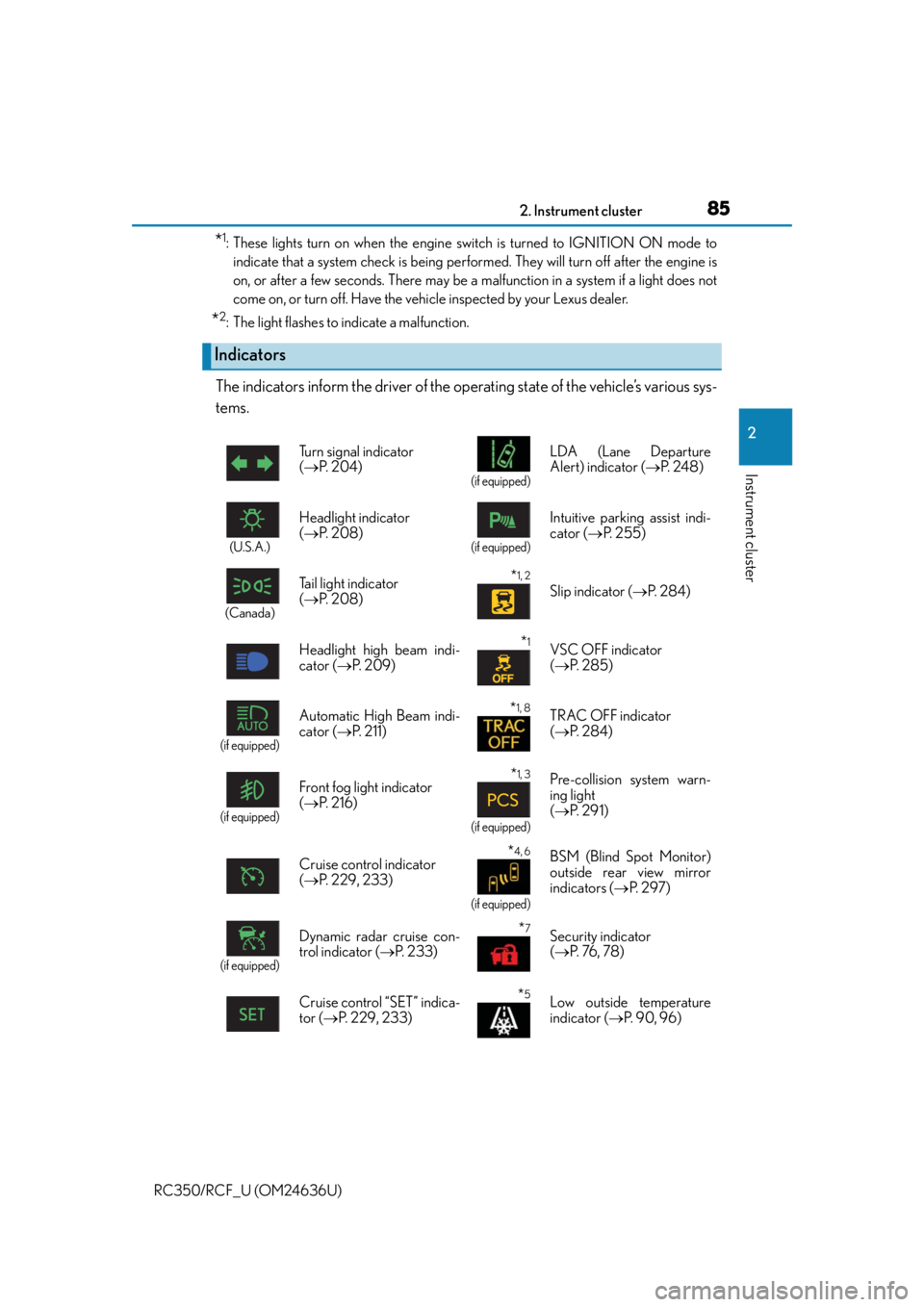
The indicators inform the driver of the operating state of the vehicle’s various sys-
tems.
Indicators
Turn signal indicator
( P. 2 0 4 )
(if equipped)
LDA (Lane Departure
Alert) indicator ( P. 2 4 8 )
(U.S.A.)
Headlight indicator
( P. 2 0 8 )
(if equipped)
Intuitive parking assist indi-
cator ( P. 2 5 5 )
(Canada)
Tail light indicator
( P. 2 0 8 ) *1, 2 Slip indicator ( P. 2 8 4 )
Headlight high beam indi-
cator ( P. 2 0 9 )
*1VSC OFF indicator
( P. 2 8 5 )
(if equipped)
Automatic High Beam indi-
cator ( P. 211)*1, 8TRAC OFF indicator
( P. 2 8 4 )
(if equipped)
Front fog light indicator
( P. 2 1 6 )*1, 3
(if equipped)
Pre-collision system warn-
ing light
( P. 2 9 1 )
Cruise control indicator
( P. 2 2 9 , 2 3 3 )
*4, 6
(if equipped)
BSM (Blind Spot Monitor)
outside rear view mirror
indicators ( P. 2 9 7 )
(if equipped)
Dynamic radar cruise con-
trol indicator ( P. 2 3 3 )*7Security indicator
( P. 76 , 7 8 )
Cruise control “SET” indica-
tor ( P. 229, 233)
*5Low outside temperature
indicator ( P. 9 0 , 9 6 )
Page 91 of 684

912. Instrument cluster
2
Instrument cluster
RC350/RCF_U (OM24636U)
Main meter moved to the right
The units used on the meters may differ depending on the target region.
Engine coolant temperature gauge
Displays the engine coolant temperature
Tachometer
Displays the engine speed in revolutions per minute
Outside temperature
Displays the outside temperature within the range of -40°F (-40°C) to 122°F
(50°C). Low outside temperature indicator comes on when the ambient tempera-
ture is 37°F (3°C) or lower.
Shift position and gear position ( P. 199)
Speedometer
Fuel gauge
Multi-information display
Presents the driver with a variety of vehicle data ( P. 1 0 3 )
Displays warning messages in case of a malfunction ( P. 5 3 9 )
Odometer and trip meter display
Odometer:
Displays the total distance the vehicle has been driven
Tr i p m e t e r :
Displays the distance the vehicle has been driven since the meter was last reset.
Trip meters “A” and “B” can be used to record and display different distances inde-
pendently.
1
2
3
4
5
6
7
8
Page 98 of 684

982. Instrument cluster
RC350/RCF_U (OM24636U)
Multi-information display
Presents the driver with a variety of vehicle data ( P. 1 1 0 )
Displays warning messages in case of a malfunction ( P. 5 3 9 )
Fuel gauge
Engine coolant temperature gauge
Displays the engine coolant temperature. If the engine coolant temperature gauge
indicator ( ) enters the red zone, a buzzer will sound and the indicator will turn red
and start flashing. Also, a warning message will be displayed.
Engine oil temperature gauge
Displays the engine oil temperature. If the engine oil temperature gauge indicator
( ) enters the red zone, the indicator will turn red and start flashing.
Outside temperature
Displays the outside temperature within the range of -40°F (-40°C) to 122°F
(50°C). Low outside temperature indicator comes on when the ambient temperature
is 37°F (3°C) or lower.
Tachometer
Displays the engine speed in revolutions per minute
Digital speedometer
Analog speedometer
Shift position and gear position
( P. 199)
Odometer and trip meter display
Odometer:
Displays the total distance the vehicle has been driven
Tr i p m e t e r :
Displays the distance the vehicle has been driven since the meter was last reset. Trip
meters “A” and “B” can be used to record and display different distances indepen-
dently.
Eco driving meter
Displays the vehicle acceleration. The more rapidly the vehicle is accelerated, the
lower the number of blue segments displayed, indicating that your driving is less eco-
friendly. This meter is designed as a guid eline to show the eco-friendliness of your
driving.
1
2
3
4
5
6
7
8
9
10
11
Page 101 of 684
1012. Instrument cluster
2
Instrument cluster
RC350/RCF_U (OM24636U)
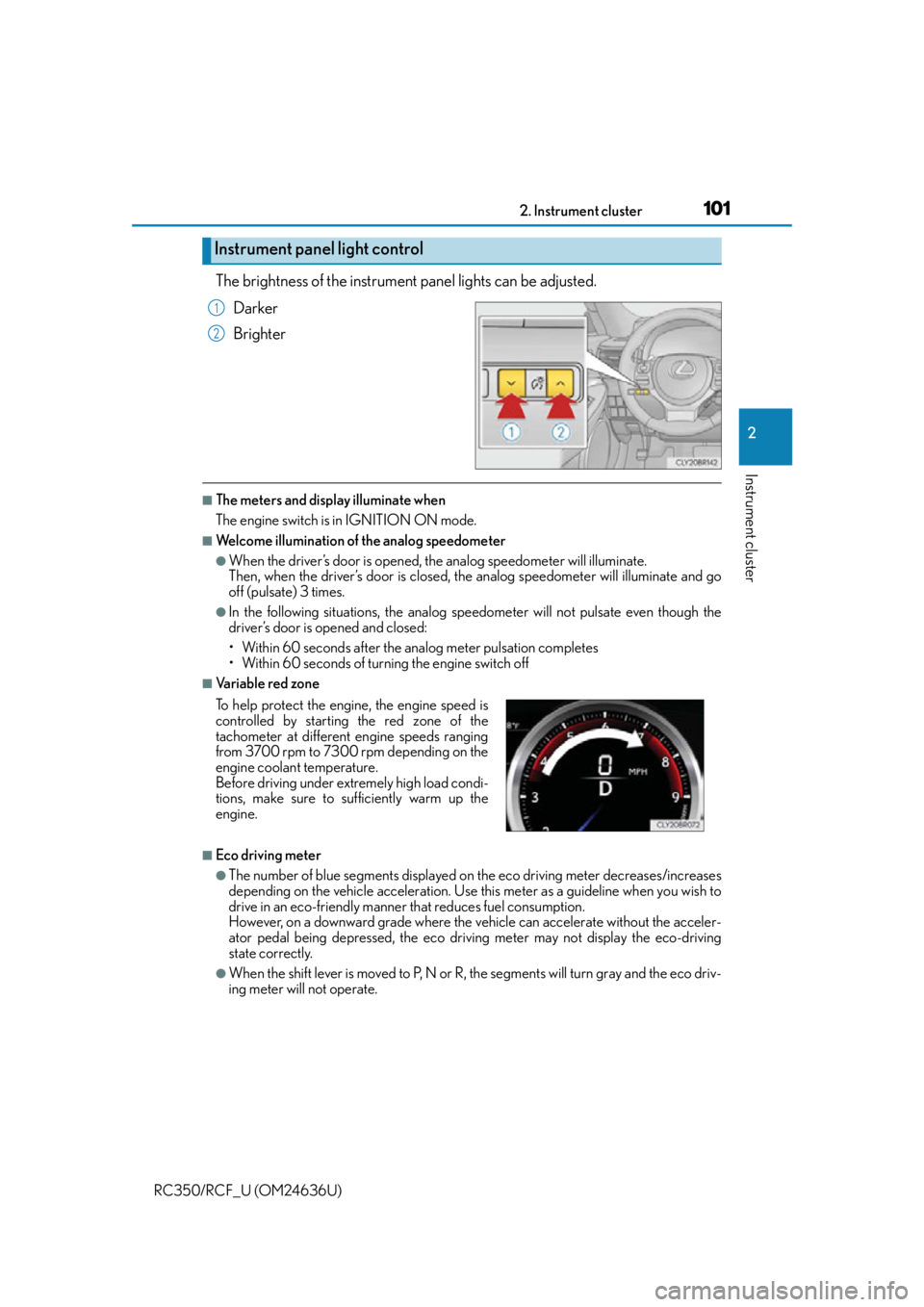
The brightness of the instrument panel lights can be adjusted.
Darker
Brighter
■The meters and display illuminate when
The engine switch is in IGNITION ON mode.
■Welcome illumination of the analog speedometer
●When the driver’s door is opened, th e analog speedometer will illuminate.
Then, when the driver’s door is closed, the analog speedometer will illuminate and go
off (pulsate) 3 times.
●In the following situations, the analog speedometer will no t pulsate even though the
driver’s door is opened and closed:
• Within 60 seconds after the analog meter pulsation completes
• Within 60 seconds of turn ing the engine switch off
■Va r i a b l e r e d z o n e
■Eco driving meter
●The number of blue segments displayed on the eco driving meter decreases/increases
depending on the vehicle acceleration. Use this meter as a guideline when you wish to
drive in an eco-friendly manner that reduces fuel consumption.
However, on a downward grade where the vehicle can accelerate without the acceler-
ator pedal being depressed, the eco driving meter may not display the eco-driving
state correctly.
●When the shift lever is moved to P, N or R, the segments will turn gray and the eco driv-
ing meter will not operate.
Instrument panel light control
1
2
To help protect the engine, the engine speed is
controlled by starting the red zone of the
tachometer at different engine speeds ranging
from 3700 rpm to 7300 rpm depending on the
engine coolant temperature.
Before driving under extremely high load condi-
tions, make sure to sufficiently warm up the
engine.
Page 109 of 684
1092. Instrument cluster
2
Instrument cluster
RC350/RCF_U (OM24636U)
■Suspension of the settings display
In the following situations, operation of the settings display will be temporarily sus-
pended.
●When a warning message appears on the multi-information display
●When the vehicle begins to move
■Tire pressure
●It may take a few minutes to display the tire inflation pressure after the engine switch is
turned to IGNITION ON mode. It may also take a few minutes to display the tire infla-
tion pressure after inflation pressure has been adjusted.
●“---” may be displayed if the tire information cannot be determined due to unfavorable
radio wave conditions.
●Tire inflation pressure changes with temperat ure. The displayed values may also be dif-
ferent from the values measured using a tire pressure gauge.
■When disconnecting and reconnecting battery terminals
The drive information data will be reset.
■Liquid crystal display
P. 9 4
WA R N I N G
■Caution for use while driving
●When operating the multi-information display while driving, pay extra attention to the
safety of the area around the vehicle.
●Do not look continuously at the multi-info rmation display while driving as you may fail
to see pedestrians, objects on the road, etc. ahead of the vehicle.
■The information display at low temperatures
Allow the interior of the vehicle to warm up before using the liquid crystal information
display. At extremely low temperatures, th e information display monitor may respond
slowly, and display changes may be delayed.
For example, there is a lag between the driver’s shifting and the new gear number
appearing on the display. This lag could cau se the driver to downshift again, causing
rapid and excessive engine braking and po ssibly an accident resulting in death or
injury.
■Cautions during setting up the display
As the engine needs to be running during sett ing up the display, ensure that the vehicle
is parked in a place with adequate ventila tion. In a closed area such as a garage,
exhaust gases including harmful carbon mo noxide (CO) may collect and enter the
vehicle. This may lead to death or a serious health hazard.
NOTICE
■While setting up the display
To prevent battery discharge, ensure that th e engine is running while setting up the dis-
play features.
Page 121 of 684
1212. Instrument cluster
2
Instrument cluster
RC350/RCF_U (OM24636U)
■Suspension of the settings display
In the following situations, operation of the settings display will be temporarily sus-
pended.
●When a warning message appears on the multi-information display
●When the vehicle begins to move
■Tire pressure
●It may take a few minutes to display the tire inflation pressure after the engine switch is
turned to IGNITION ON mode. It may also take a few minutes to display the tire infla-
tion pressure after inflation pressure has been adjusted.
●“---” may be displayed if the tire position information cannot be determined due to
unfavorable radio wave conditions.
●Tire inflation pressure changes with temperat ure. The displayed values may also be dif-
ferent from the values measured using a tire pressure gauge.
■When disconnecting and reconnecting battery terminals
The following information data will be reset:
●Drive information
●Lap timer: Measured lap times, history
●G-force: Record of the maximum G-forces
■Using the lap timer
If the engine is stopped while a lap is being timed, the lap timer will stop and the lap time
up to that point will be recorded.
■Liquid crystal display
P. 1 0 2
WA R N I N G
■Caution for use while driving
●When operating the multi-information display while driving, pay extra attention to the
safety of the area around the vehicle.
●Do not look continuously at the multi-info rmation display while driving as you may fail
to see pedestrians, objects on the road, etc. ahead of the vehicle.
■The information display at low temperatures
Allow the interior of the vehicle to warm up before using the liquid crystal information
display. At extremely low temperatures, th e information display monitor may respond
slowly, and display changes may be delayed.
For example, there is a lag between the driver’s shifting and the new gear number
appearing on the display. This lag could cau se the driver to downshift again, causing
rapid and excessive engine braking and po ssibly an accident resulting in death or
injury.
■Cautions during setting up the display
As the engine needs to be running during sett ing up the display, ensure that the vehicle
is parked in a place with adequate ventila tion. In a closed area such as a garage,
exhaust gases including harmful carbon mo noxide (CO) may collect and enter the
vehicle. This may lead to death or a serious health hazard.
Page 134 of 684

1343-1. Key information
RC350/RCF_U (OM24636U)
NOTICE
■To prevent key damage
●Do not drop the keys, subject them to strong shocks or bend them.
●Do not expose the keys to high temp eratures for long periods of time.
●Do not get the keys wet or wash them in an ultrasonic washer etc.
●Do not attach metallic or magnetic materials to the keys or place the keys close to
such materials.
●Do not disassemble the keys.
●Do not attach a sticker or anything else to the surface of the electronic key.
●Do not place the keys near objects that pr oduce magnetic fields, such as TVs, audio
systems and induction cookers, or medical electrical equipment, such as low-fre-
quency therapy equipment.
■Carrying the electronic key on your person
Carry the electronic key 3.9 in. (10 cm) or mo re away from electric appliances that are
turned on. Radio waves emitted from electric appliances within 3.9 in. (10 cm) of the
electronic key may interfere with the key, causing the key to not function properly.
■In case of a smart access system with push-button start malfunction or other key-
related problems
Take your vehicle with all the electronic keys provided with your vehicle, including the
card key, to your Lexus dealer.
■When an electronic key is lost
If the electronic key remains lost, the risk of vehicle theft increases significantly. Visit
your Lexus dealer immediately with all rema ining electronic keys and the card key that
were provided with your vehicle.
■Handling the card key (if equipped)
●Do not apply excess force when inserting th e mechanical key into the card key. Doing
so may damage the card key.
●If the battery or card key terminals get wet, the battery may corrode.
If the key is dropped into water, or if drin king water etc. is spilled on the key, immedi-
ately remove the battery cover and wipe the battery and terminals. (To remove the
battery cover, lightly grasp and pull it.) If the battery is corroded, have your Lexus
dealer replace the battery.
●Do not crush the battery cover or use a screwdriver to remove the battery cover.
Forcibly removing the battery co ver may bend or damage the key.
●If the battery cover is frequently removed, the battery cover may become loose.
●When installing the battery, make sure to check the direction of the battery.
Installing the battery in the wrong direction may cause the battery to deplete rapidly.
●The surface of the card key may be damaged, or its coating may peel off in the follow-
ing situations:
• The card key is carried together with hard objects, such as coins and keys.
• The card key is scraped with a sharp object , such as the tip of a mechanical pencil.
• The surface of the card key is wiped with thinner or benzene.
Page 135 of 684
135
3
Operation of each component
RC350/RCF_U (OM24636U)3-2. Opening, closing and locking the doors and trunk
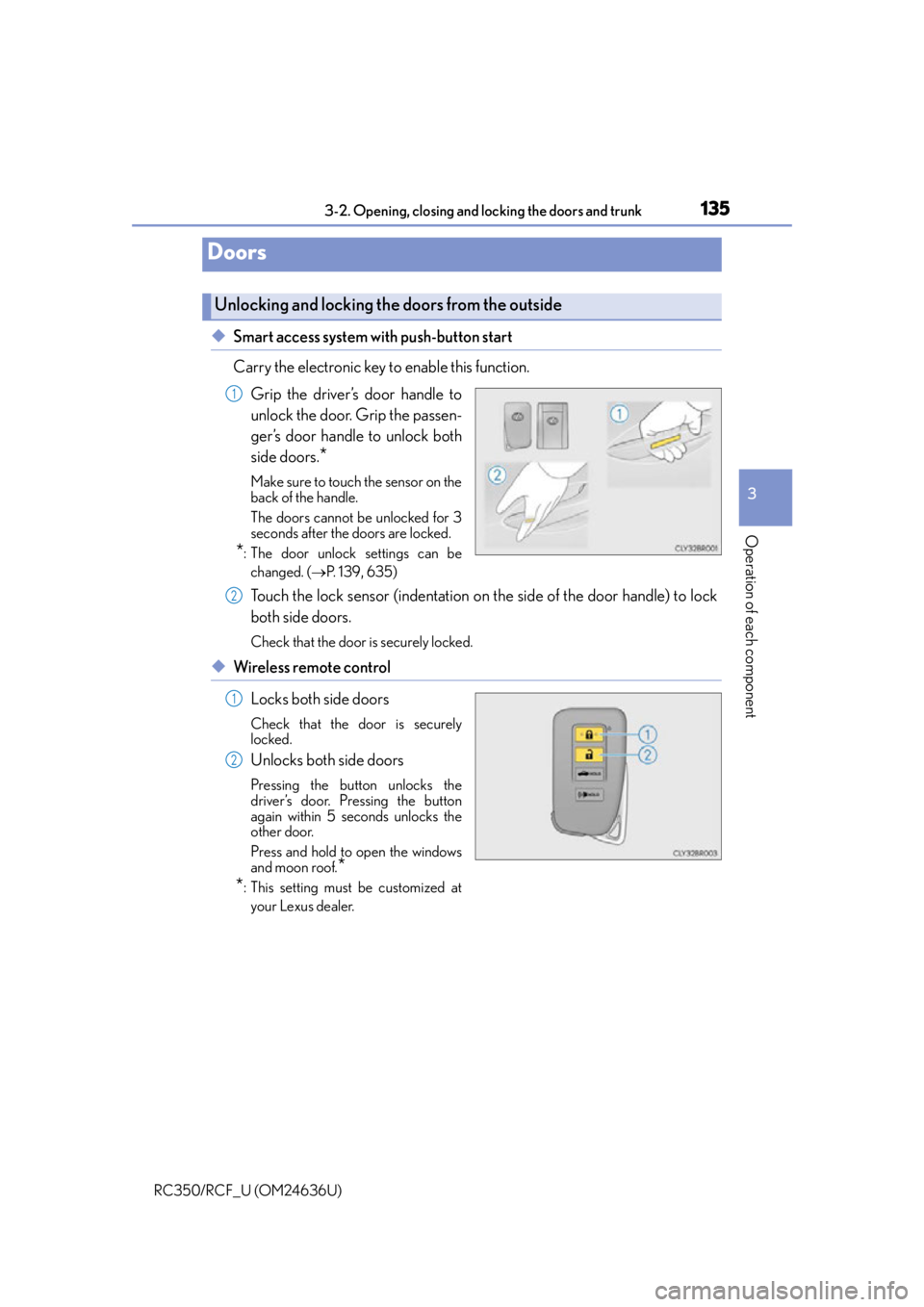
◆Smart access system with push-button start
Carry the electronic key to enable this function.
Grip the driver’s door handle to
unlock the door. Grip the passen-
ger’s door handle to unlock both
side doors.
*
Make sure to touch the sensor on the
back of the handle.
The doors cannot be unlocked for 3
seconds after the doors are locked.
*: The door unlock settings can bechanged. ( P. 1 3 9 , 6 3 5 )
Touch the lock sensor (indentation on the side of the door handle) to lock
both side doors.
Check that the door is securely locked.
◆Wireless remote control
Locks both side doors
Check that the door is securely
locked.
Unlocks both side doors
Pressing the button unlocks the
driver’s door. Pressing the button
again within 5 seconds unlocks the
other door.
Press and hold to open the windows
and moon roof.
*
*
: This setting must be customized at
your Lexus dealer.
Doors
Unlocking and locking the doors from the outside
1
2
1
2
Page 138 of 684
1383-2. Opening, closing and locking the doors and trunk
RC350/RCF_U (OM24636U)
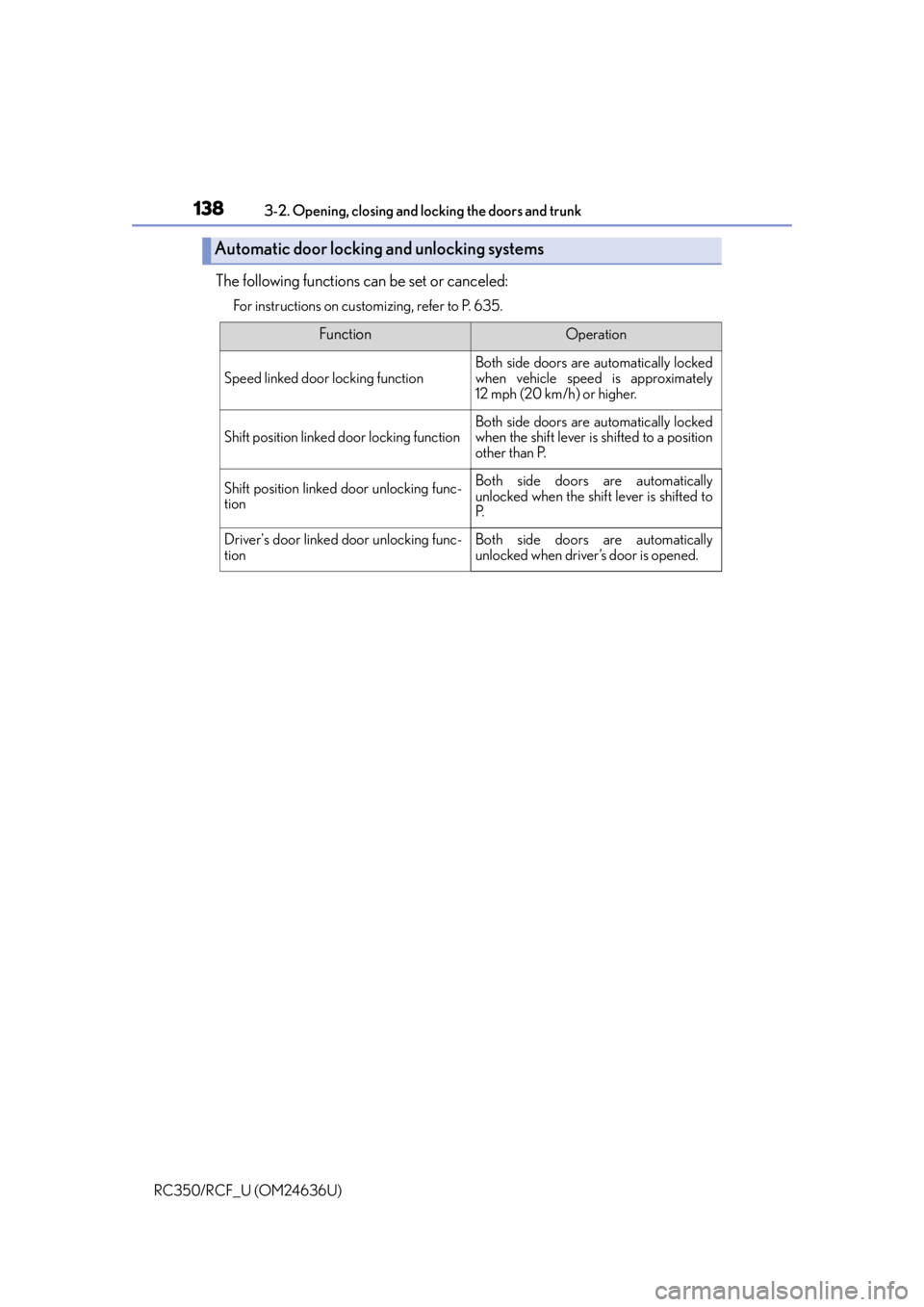
The following functions can be set or canceled:
For instructions on customizing, refer to P. 635.
Automatic door locking and unlocking systems
FunctionOperation
Speed linked door locking function
Both side doors are automatically locked
when vehicle speed is approximately
12 mph (20 km/h) or higher.
Shift position linked door locking functionBoth side doors are automatically locked
when the shift lever is shifted to a position
other than P.
Shift position linked door unlocking func-
tionBoth side doors are automatically
unlocked when the shif t lever is shifted to
P.
Driver's door linked door unlocking func-
tionBoth side doors are automatically
unlocked when driver’s door is opened.