driver LEXUS RC350 2015 Service Manual
[x] Cancel search | Manufacturer: LEXUS, Model Year: 2015, Model line: RC350, Model: LEXUS RC350 2015Pages: 684, PDF Size: 9.31 MB
Page 203 of 684

2034-2. Driving procedures
4
Driving
RC350/RCF_U (OM24636U)
■Automatic deactivation of shift range selection in the D position
Shift range selection in the D position will be deactivated in the following situations:
●When the vehicle comes to a stop
●If the accelerator pedal is depressed for more than a certain period of time
●When the shift lever is shifted to a position other than D
■To protect the automatic transmission
If the automatic transmission fluid temperatur e is high, “Transmission Fluid High Temper-
ature” will be displayed on th e multi-information display and the vehicle will go into trans-
mission protection mode automatically. Have the vehicle inspected by your Lexus dealer.
■Downshifting restriction warning buzzer
To help ensure safety and driving performa nce, downshifting operation may sometimes
be restricted. In some circumstances, downshifting may not be possible even when the
shift lever or paddle shift switch is operated. (A buzzer will sound twice.)
■Snow mode automatic deactivation
Snow mode is automatically deactivated if the engine switch is turned off after driving in
snow mode.
■When driving with cruise control or dynamic radar cruise control activated
Even when performing the following actions with the intent of enabling engine braking,
engine braking will not activate because cruise control or dynamic radar cruise control
will not be canceled.
●8-speed models: While driving in the D posi tion, downshifting to 7, 6, 5 or 4.
( P. 229, 233)
●6-speed models: While driving in the D position, downshifting to 5 or 4.
( P. 229, 233)
●When switching the driving mode to sp ort mode while driving in D position.
( P. 2 7 8 )
■If the shift lever cannot be shifted from P
P. 5 8 9
■AI-SHIFT
●The AI-SHIFT automatically selects the suitab le gear according to driver performance
and driving conditions.
The AI-SHIFT automatically operates when the sh ift lever is in D. (Shifting the shift lever
to the M position cancels the function.)
●8-speed models: G AI-SHIFT automatically se lects a suitable gear for sporty driving
according to driver’s input and driving co nditions. G AI-SHIFT operates automatically
when the shift lever is in D and sport mode is selected for the driving mode. (Selecting
normal mode with the driving mode select sw itch or shifting the shift lever to the M
position cancels this function.)
WA R N I N G
■When driving on slippery road surfaces
Be careful of downshifting and sudden accele ration, as this could result in the vehicle
skidding to the side or spinning.
Page 206 of 684
2064-2. Driving procedures
RC350/RCF_U (OM24636U)
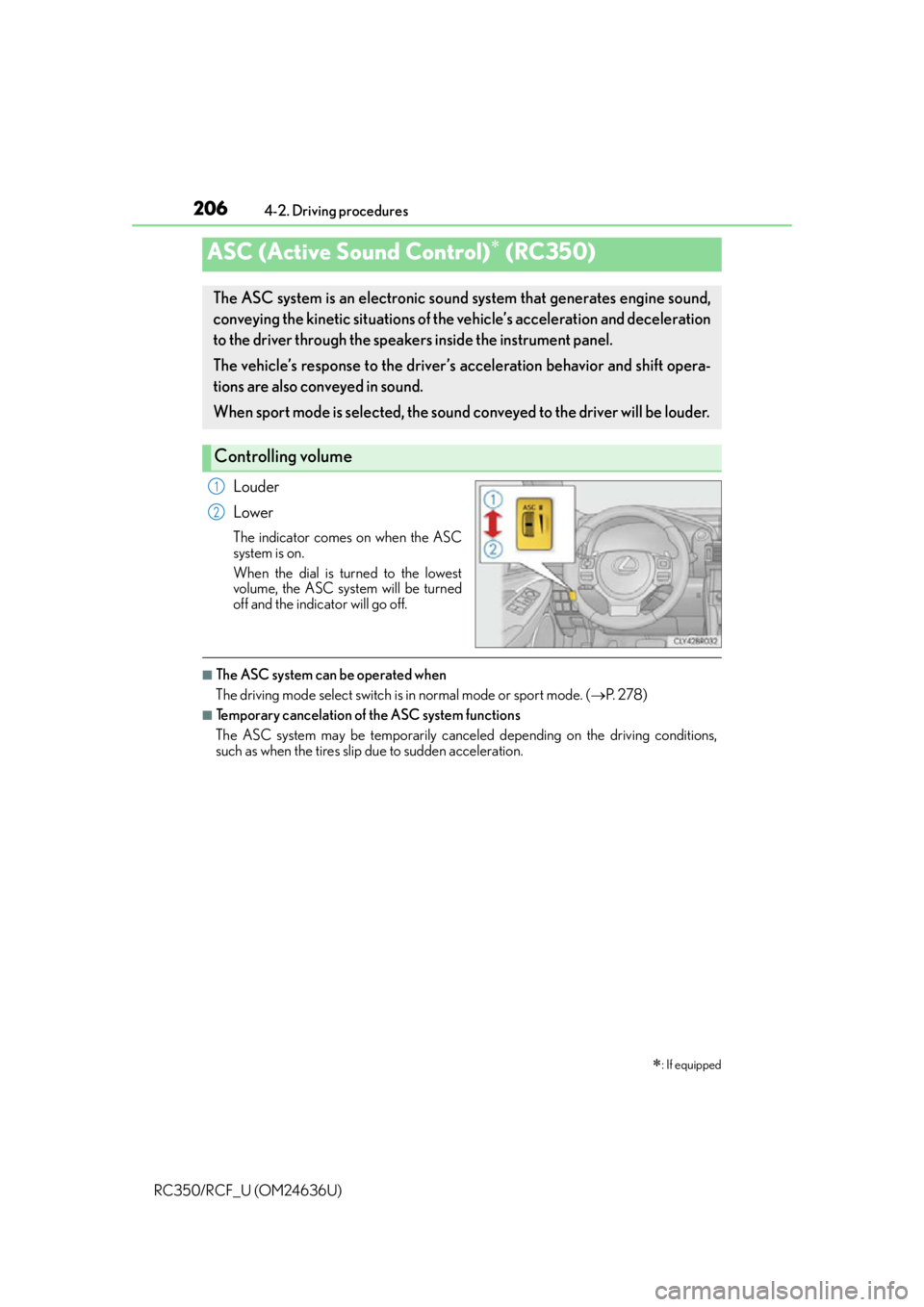
Louder
Lower
The indicator comes on when the ASC
system is on.
When the dial is turned to the lowest
volume, the ASC system will be turned
off and the indicator will go off.
■The ASC system can be operated when
The driving mode select switch is in normal mode or sport mode. (P. 2 7 8 )
■Temporary cancelation of the ASC system functions
The ASC system may be temporarily cancele d depending on the driving conditions,
such as when the tires slip due to sudden acceleration.
ASC (Active Sound Control) (RC350)
: If equipped
The ASC system is an electronic sound system that generates engine sound,
conveying the kinetic situations of the vehicle’s acceleration and deceleration
to the driver through the speake rs inside the instrument panel.
The vehicle’s response to the driver’s acceleration behavior and shift opera-
tions are also conveyed in sound.
When sport mode is selected, the sound co nveyed to the driver will be louder.
Controlling volume
1
2
Page 207 of 684
2074-2. Driving procedures
4
Driving
RC350/RCF_U (OM24636U)
■The ASC system can be operated when
The driving mode select switch is in SPORT S+ mode. (P. 2 7 8 )
ASC (Active Sound Control) (RC F)
: If equipped
The ASC system sonically emphasizes the vehicle’s response to the driver’s
operation of the accelerator pedal and shift lever or paddle shift switches. The
dynamic engine sound enabled by this system helps the driver further enjoy
the feeling of unity with the vehicle, particularly when driving in M mode.
( P. 202)
Page 209 of 684
2094-3. Operating the lights and wipers
4
Driving
RC350/RCF_U (OM24636U)
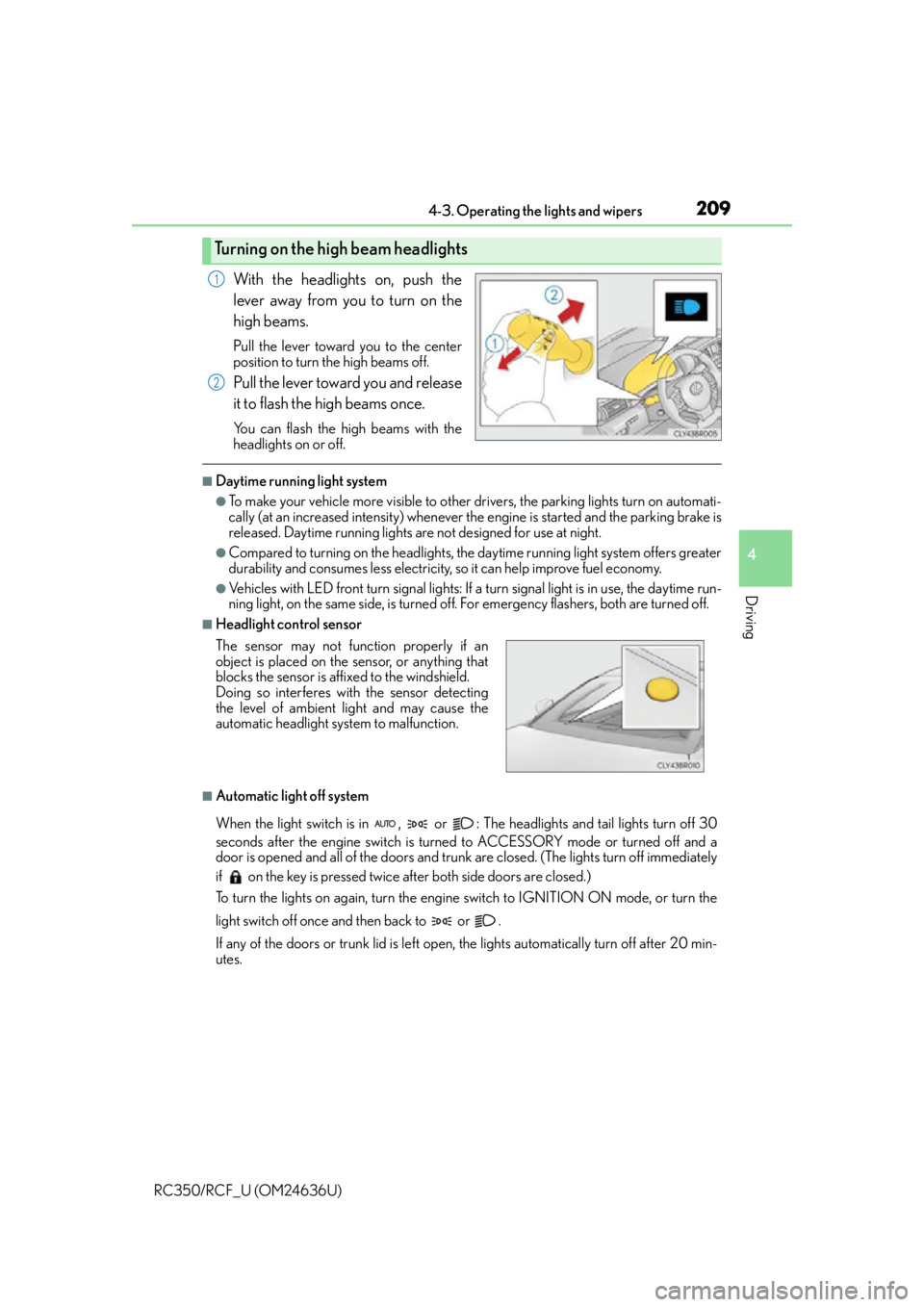
With the headlights on, push the
lever away from you to turn on the
high beams.
Pull the lever toward you to the center
position to turn the high beams off.
Pull the lever toward you and release
it to flash the high beams once.
You can flash the high beams with the
headlights on or off.
■Daytime running light system
●To make your vehicle more visible to other drivers, the parking lights turn on automati-
cally (at an increased intensity) whenever the engine is started and the parking brake is
released. Daytime running lights ar e not designed for use at night.
●Compared to turning on the headlights, the daytime running light system offers greater
durability and consumes less electricity, so it can help improve fuel economy.
●Vehicles with LED front turn signal lights: If a turn signal light is in use, the daytime run-
ning light, on the same side, is turned off. For emergency flashers, both are turned off.
■Headlight control sensor
■Automatic light off system
When the light switch is in , or : The headlights and tail lights turn off 30
seconds after the engine switch is turned to ACCESSORY mode or turned off and a
door is opened and all of the doors and trunk are closed. (The lights turn off immediately
if on the key is pressed twice after both side doors are closed.)
To turn the lights on again, turn the engine switch to IGNITION ON mode, or turn the
light switch off once and then back to or .
If any of the doors or trunk lid is left open, the lights automatically turn off after 20 min-
utes.
Turning on the high beam headlights
1
2
The sensor may not function properly if an
object is placed on the sensor, or anything that
blocks the sensor is affixed to the windshield.
Doing so interferes with the sensor detecting
the level of ambient light and may cause the
automatic headlight system to malfunction.
Page 210 of 684

2104-3. Operating the lights and wipers
RC350/RCF_U (OM24636U)
■Automatic headlight leveling system
The level of the headlights is automatically ad justed according to the number of passen-
gers and the loading condition of the vehicle to ensure that the headlights do not inter-
fere with other road users.
■Light reminder buzzer
A buzzer sounds when the engine switch is turned off or turned to ACCESSORY mode
and the driver’s door is opened while the lights are turned on.
■Operation guide display (vehicles with rain-sensing windshield wipers only)
When the headlight switch is operated to and from the “AUTO” position, the current sta-
tus is displayed on the meters for a few seconds to show that AUTO mode is activated/
deactivated. ( P. 1 0 8 , 1 1 9 )
■Customization
Settings (e.g. light sensor se nsitivity) can be changed.
(Customizable features: P. 6 3 5 )
NOTICE
■To prevent battery discharge
Do not leave the lights on longer than ne cessary when the engine is not running.
Page 213 of 684

2134-3. Operating the lights and wipers
4
Driving
RC350/RCF_U (OM24636U)
■The Automatic High Beam can be operated when
The engine switch is in IGNITION ON mode.
■Camera sensor detection information
●High beam may not be automatically tu rned off in the following situations:
• When oncoming vehicles sudd enly appear from a curve
• When the vehicle is cut in front of by another vehicle
• When oncoming or preceding vehicles are hidden from sight due to repeated
curves, road dividers or roadside trees
●High beam may be turned off if an oncoming vehicle that is using fog lights without
using the headlights is detected.
●House lights, street lights, red traffic signals, and illuminated billboards or signs may
cause the high beam to turn off.
●The following factors may affect the amount of time taken to turn high beam on or off:
• The brightness of headlights, fog lights, and tail lights of oncoming and preceding
vehicles
• The movement and direction of oncoming and preceding vehicles
• When an oncoming or preceding vehicle only has operational lights on one side
• When an oncoming or preceding vehicle is a two-wheeled vehicle
• The condition of the road (gradient, curve, condition of the road surface etc.)
• The number of passengers and amount of luggage
●High beam may be turned on or off when unexpected by the driver.
●Small vehicles, such as bicy cles, may not be detected.
●In the situations below, the system may not be able to correctly detect the surrounding
brightness levels, and may flash or expose nearby pedestrians to the high beam. There-
fore, you should consider turning the high be ams on or off manually rather than relying
on the Automatic High Beam system.
• In bad weather (rain, snow, fog, sandstorms etc.)
• The windshield is obscured by fog, mist, ice, dirt etc.
• The windshield is cracked or damaged.
• The camera sensor is deformed or dirty.
• Surrounding brightness levels are equal to those of headlights, tail lights or fog lights.
• Vehicles ahead have headlights or tail lights that are either switched off, dirty, chang-
ing color, or have improperly adjusted aim.
• When driving through an area of intermit tently changing brightness and darkness.
• When frequently and repeatedly driving ascending/descending roads, or roads with
rough, bumpy or uneven surfaces (such as stone-paved roads, gravel tracks etc.).
• When frequently and repeat edly taking curves or driving on a winding road.
• There is a highly reflective object ahead of the vehicle, such as a sign or a mirror.
• The vehicle’s headlights are damaged or dirty.
• The vehicle is listing or titling, due to a flat tire, a trailer being towed etc.
• The driver believes that the high beam may be causing problems or distress to other
drivers or pedestrians nearby.
Page 233 of 684
2334-5. Using the driving support systems
4
Driving
RC350/RCF_U (OM24636U)
Without accelerator pedal operation by the driver, in vehicle-to-vehicle distance
control mode, the vehicle automatically accelerates and decelerates in accor-
dance to the changes in speed of the preceding vehicle. In constant speed con-
trol mode, the vehicle runs at a fixed speed.
Use the dynamic radar cruise control on freeways and highways.
●Vehicle-to-vehicle distance control mode ( P. 2 3 4 )
●Constant speed control mode ( P. 2 3 9 )
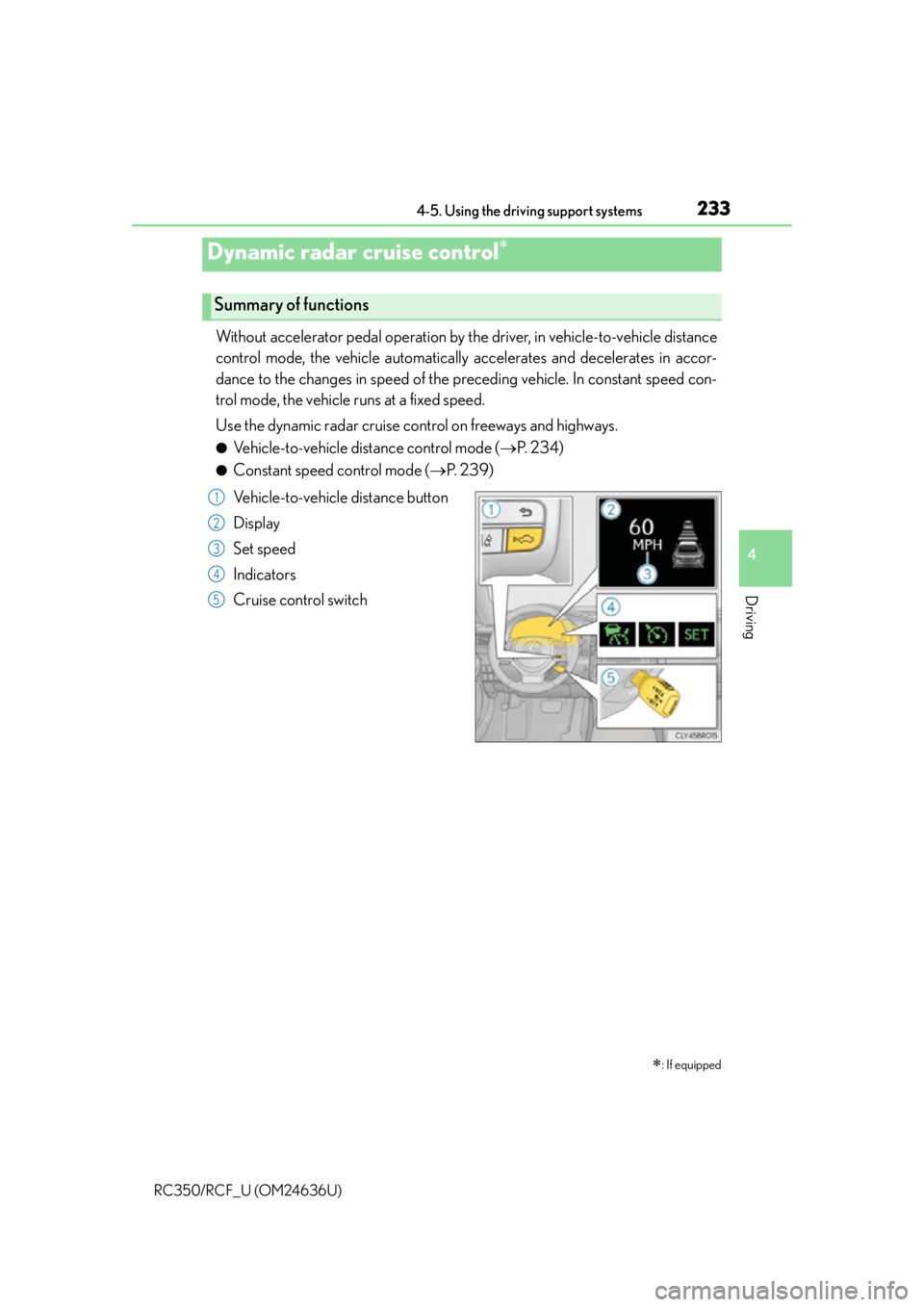
Vehicle-to-vehicle distance button
Display
Set speed
Indicators
Cruise control switch
Dynamic radar cruise control
: If equipped
Summary of functions
1
2
3
4
5
Page 234 of 684
2344-5. Using the driving support systems
RC350/RCF_U (OM24636U)
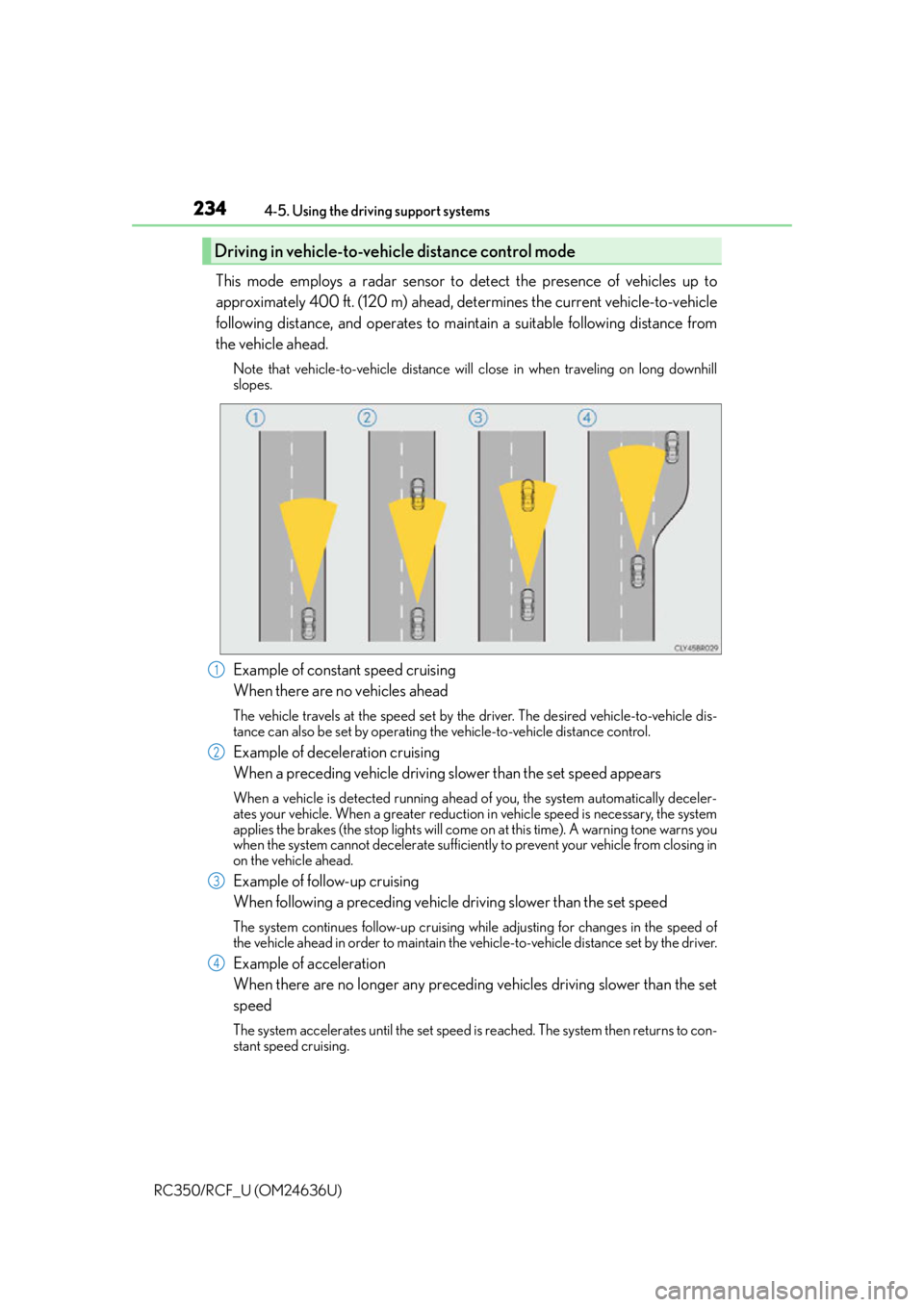
This mode employs a radar sensor to detect the presence of vehicles up to
approximately 400 ft. (120 m) ahead, determines the current vehicle-to-vehicle
following distance, and operates to main tain a suitable following distance from
the vehicle ahead.
Note that vehicle-to-vehicle distance will close in when traveling on long downhill
slopes.
Example of constant speed cruising
When there are no vehicles ahead
The vehicle travels at the speed set by the driver. The desired vehicle-to-vehicle dis-
tance can also be set by operating the vehicle-to-vehicle distance control.
Example of deceleration cruising
When a preceding vehicle driving slower than the set speed appears
When a vehicle is detected running ahead of you, the system automatically deceler-
ates your vehicle. When a greater reduction in vehicle speed is necessary, the system
applies the brakes (the stop lights will come on at this time). A warning tone warns you
when the system cannot decelera te sufficiently to prevent your vehicle from closing in
on the vehicle ahead.
Example of follow-up cruising
When following a preceding vehicle driving slower than the set speed
The system continues follow-up cruising wh ile adjusting for changes in the speed of
the vehicle ahead in order to maintain the vehicle-to-vehicle distance set by the driver.
Example of acceleration
When there are no longer any preceding vehicles driving slower than the set
speed
The system accelerates until the set speed is reached. The system then returns to con-
stant speed cruising.
Driving in vehicle-to-vehicle distance control mode
1
2
3
4
Page 238 of 684
2384-5. Using the driving support systems
RC350/RCF_U (OM24636U)
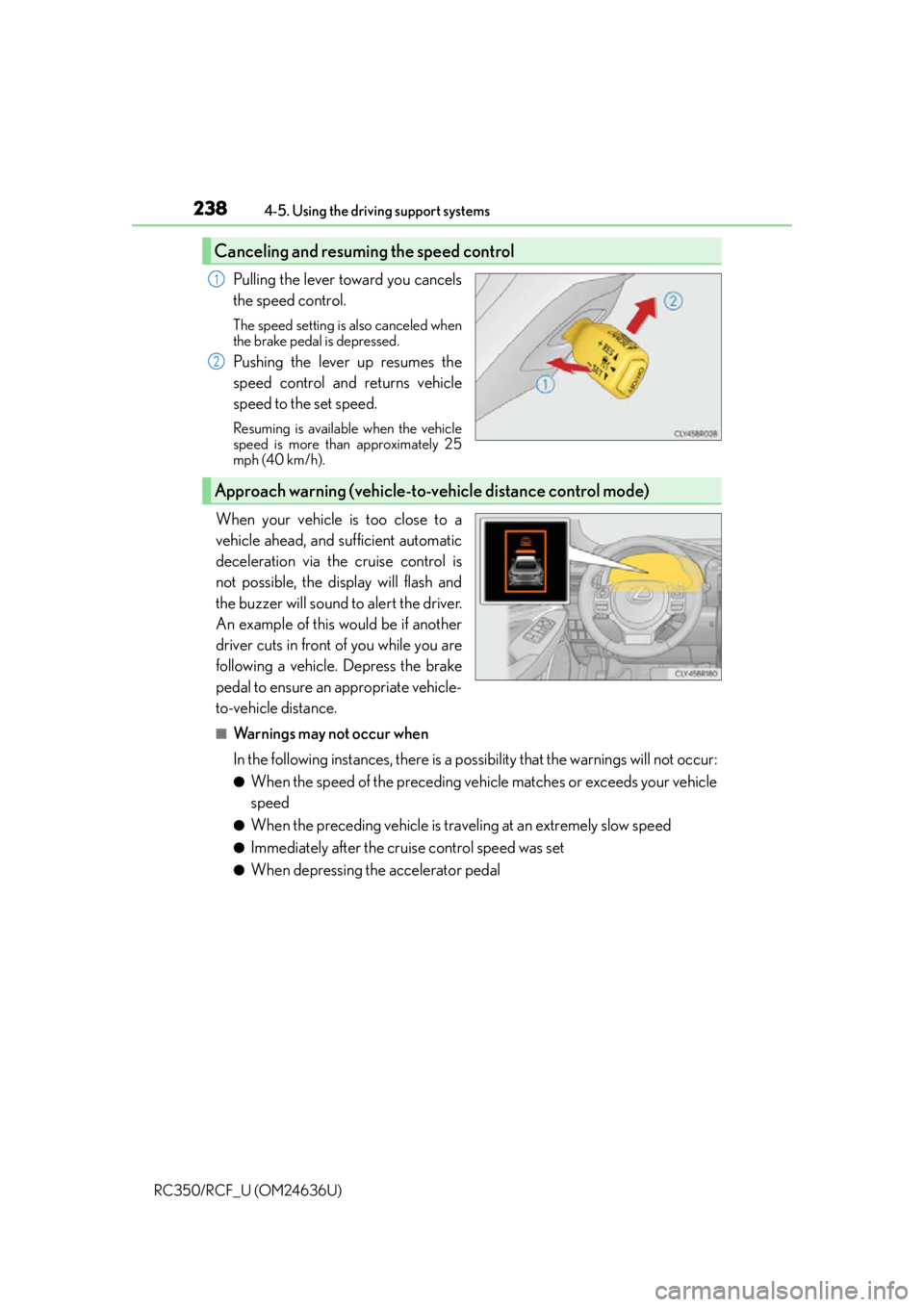
Pulling the lever toward you cancels
the speed control.
The speed setting is also canceled when
the brake pedal is depressed.
Pushing the lever up resumes the
speed control and returns vehicle
speed to the set speed.
Resuming is available when the vehicle
speed is more than approximately 25
mph (40 km/h).
When your vehicle is too close to a
vehicle ahead, and sufficient automatic
deceleration via the cruise control is
not possible, the display will flash and
the buzzer will sound to alert the driver.
An example of this would be if another
driver cuts in front of you while you are
following a vehicle. Depress the brake
pedal to ensure an appropriate vehicle-
to-vehicle distance.
■Warnings may not occur when
In the following instances, there is a po ssibility that the warnings will not occur:
●When the speed of the preceding vehicle matches or exceeds your vehicle
speed
●When the preceding vehicle is traveling at an extremely slow speed
●Immediately after the cruise control speed was set
●When depressing the accelerator pedal
Canceling and resuming the speed control
1
2
Approach warning (vehicle-to-vehicle distance control mode)
Page 240 of 684
2404-5. Using the driving support systems
RC350/RCF_U (OM24636U)
■Automatic cancelation of vehicle- to-vehicle distance control mode
Vehicle-to-vehicle distance control driving is automatically canceled in the following situ-
ations:
●Actual vehicle speed falls below approximately 25 mph (40 km/h).
●VSC is activated.
●TRAC is activated for a period of time.
●When the VSC or TRAC system is turned off by pressing the VSC OFF switch.
●The sensor cannot detect correctly because it is covered in some way.
●The windshield wipers are operating at high speed (when the wipers are in AUTO
mode or the high speed wiper operation).
●When snow mode is set.
●Pre-collision braking is activated.
If vehicle-to-vehicle distance control mode is automatically canceled for any other rea-
son, there may be a malfunction in the system. Contact your Lexus dealer.
■Automatic cancelation of constant speed control mode
Constant speed control mode is automatica lly canceled in the following situations:
●Actual vehicle speed is more than approximately 10 mph (16 km/h) below the set vehi-
cle speed.
●Actual vehicle speed falls below approximately 25 mph (40 km/h).
●VSC is activated.
●TRAC is activated for a period of time.
●When the VSC or TRAC system is turned off by pressing the VSC OFF switch.
●Pre-collision braking is activated.
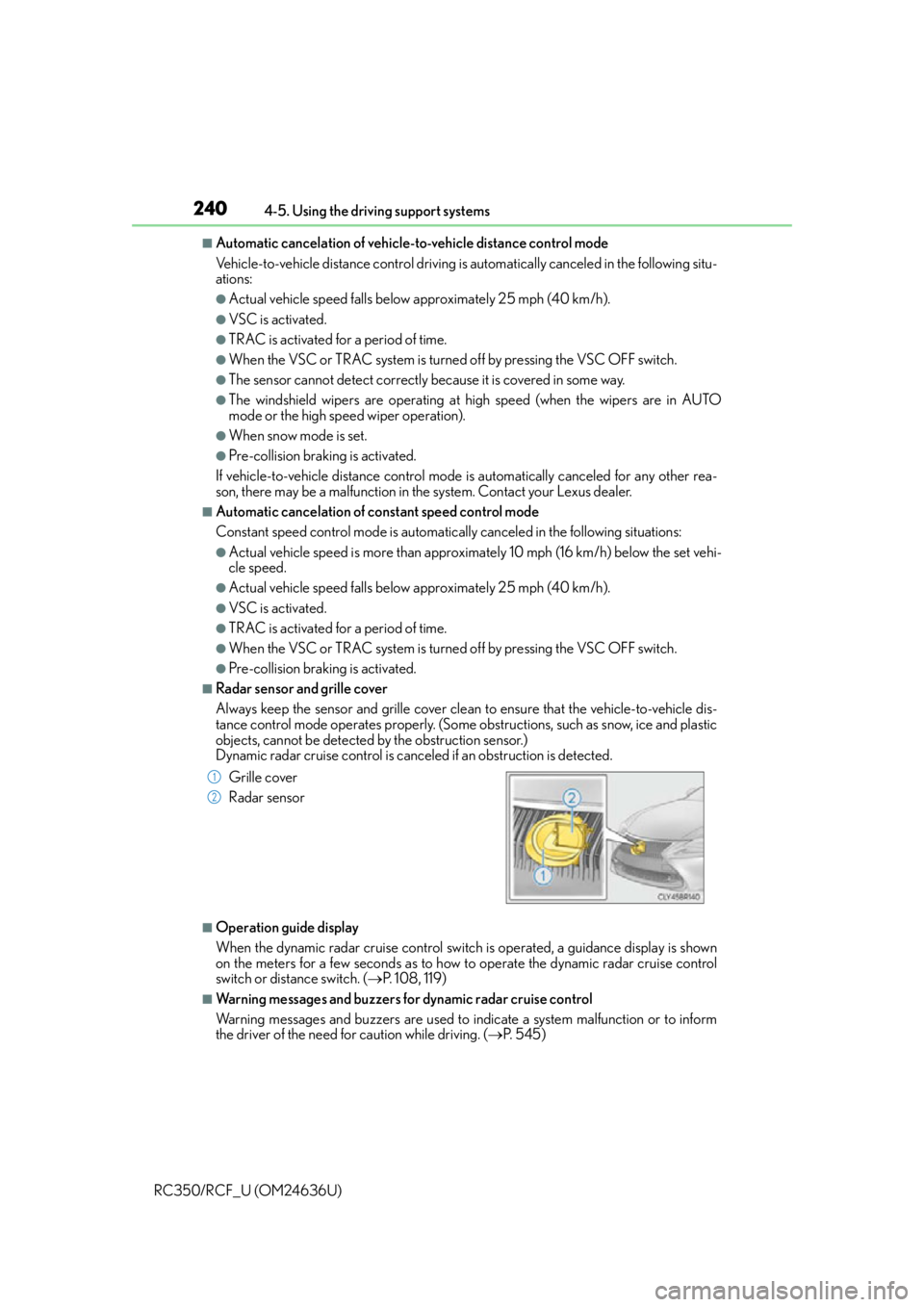
■Radar sensor and grille cover
Always keep the sensor and grille cover clean to ensure that the vehicle-to-vehicle dis-
tance control mode operates properly. (Some obstructions, such as snow, ice and plastic
objects, cannot be detected by the obstruction sensor.)
Dynamic radar cruise control is cancel ed if an obstruction is detected.
■Operation guide display
When the dynamic radar cruise control switch is operated, a guidance display is shown
on the meters for a few seconds as to how to operate the dynamic radar cruise control
switch or distance switch. ( P. 1 0 8 , 1 1 9 )
■Warning messages and buzzers for dynamic radar cruise control
Warning messages and buzzers are used to indicate a system malfunction or to inform
the driver of the need fo r caution while driving. (P. 5 4 5 )
Grille cover
Radar sensor
1
2