remote LEXUS RCF 2018 Owners Manual
[x] Cancel search | Manufacturer: LEXUS, Model Year: 2018, Model line: RCF, Model: LEXUS RCF 2018Pages: 636, PDF Size: 6.88 MB
Page 4 of 636

TABLE OF CONTENTS
4
RC350_RC300 AWD_RC3 00_RC F_U(OM24748U)4-5. Using the driving support
systems
Lexus Safety System+ .............. 245
PCS
(Pre-Collision System) ......... 250
LDA
(Lane Departure Alert
with steering control) ..............261
Dynamic radar cruise
control ......................................... 268
Intuitive parking assist..............280
BSM
(Blind Spot Monitor) ............. 290
• BSM function......................... 293
• RCTA function...................... 297
Driving mode select
switch ............................................ 301
Active rear wing ......................... 307
TVD
(Torque Vectoring
Differential) ................................ 310
Driving assist systems ................312
4-6. Driving tips
Winter driving tips ..................... 320 5-1. Using the air conditioning
system
Remote Touch ............................ 326
10.3-inch display ..........................331
Automatic air conditioning
system.......................................... 333
Heated steering wheel/
seat heaters/
seat ventilators ......................... 344
5-2. Using the interior lights
Interior lights list ......................... 347
• Interior lights.......................... 348
• Personal lights....................... 349
5-3. Using the storage features
List of storage features ............ 350
• Glove box .................................351
• Console box ............................351
• Cup holders ........................... 352
Trunk features ............................. 3535
Interior features
Page 11 of 636
11
RC350_RC300 AWD_RC3 00_RC F_U(OM24748U)The SRS airbag and seat belt pretensioner devices in your Lexus contain explosive
chemicals. If the vehicle is scrapped with th e airbags and seat belt pretensioners left as
they are, this may cause an accident such as fire. Be sure to have the systems of the SRS
airbag and seat belt pretensioner removed and disposed of by a qualified service shop or
by your Lexus dealer befo re you scrap your vehicle.
Special handling may apply, See www.dt sc.ca.gov/hazardouswaste/perchlorate.
Your vehicle has components that may contain perchlorate. These components may
include airbag, seat belt pretensioners, and wireless remote control batteries.Scrapping of your Lexus
Perchlorate Material WARNING ■
General precautions while driving
Driving under the influence: Never drive your vehicle when under the influence of
alcohol or drugs that have impaired your ability to operate your vehicle. Alcohol and
certain drugs delay reaction time, impair judgment and reduce coordination, which
could lead to an accident that could result in death or serious injury.
Defensive driving: Always driv e defensively. Anticipate mistakes that other drivers or
pedestrians might make and be ready to avoid accidents.
Driver distraction: Always give your full attention to drivin g. Anything that distracts the
driver, such as adjusting controls, talking on a cellular phone or reading can result in a
collision with resulting death or serious in jury to you, your occupants or others.■
General precaution rega rding children’s safety
Never leave children unattended in the vehicl e, and never allow child ren to have or use
the key.
Children may be able to start the vehicle or sh ift the vehicle into neutral. There is also a
danger that children may injure themselves by play ing with the windows, the moon
roof, or other features of the vehicle. In addition, heat build-up or extremely cold tem-
peratures inside the vehicle can be fatal to children.
Page 23 of 636
23Pictorial index
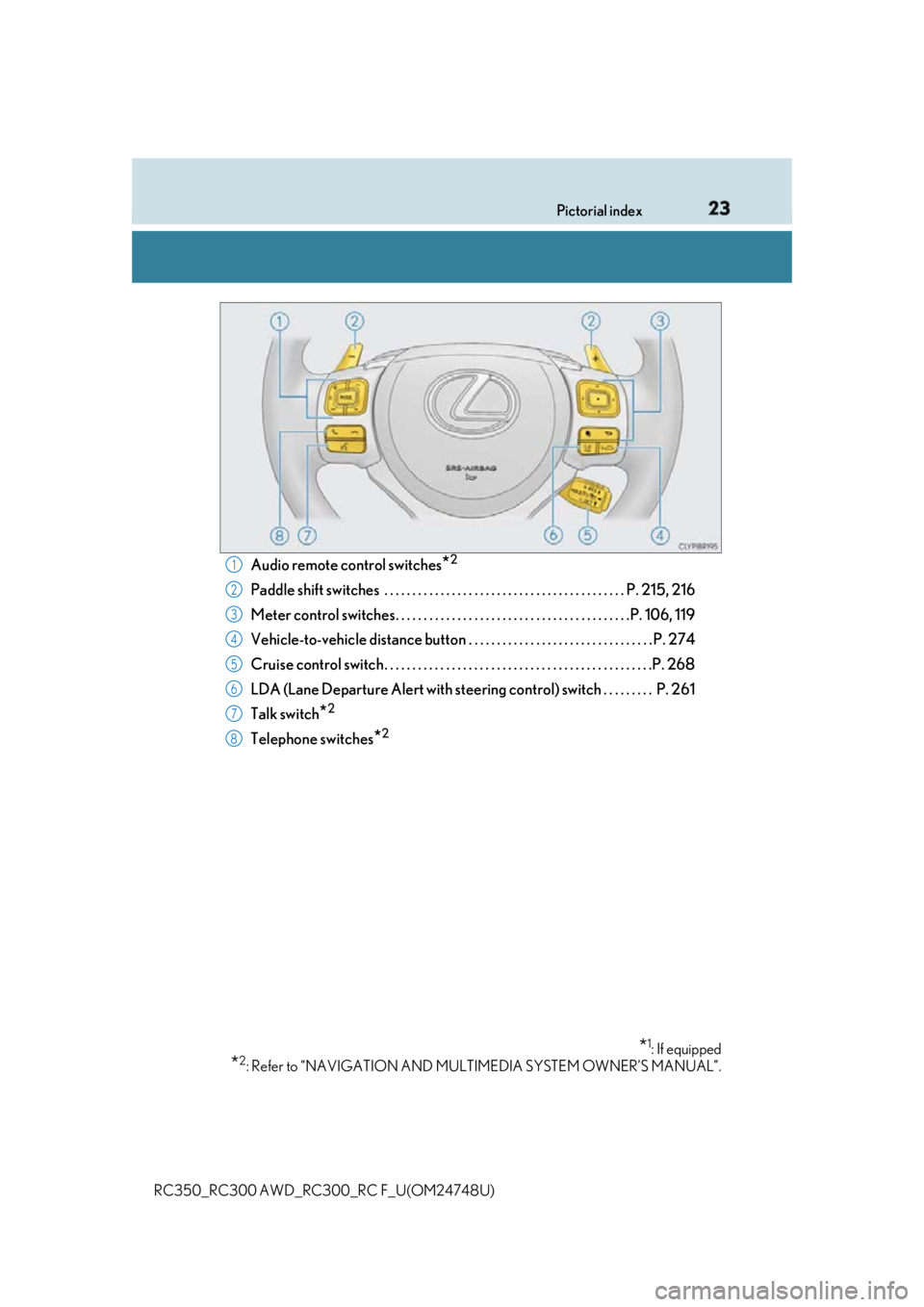
RC350_RC300 AWD_RC3 00_RC F_U(OM24748U)Audio remote control switches
* 2
Paddle shift switches . . . . . . . . . . . . . . . . . . . . . . . . . . . . . . . . . . . . . . . . . . . P. 215, 216
Meter control switches. . . . . . . . . . . . . . . . . . . . . . . . . . . . . . . . . . . . . . . . . .P. 106, 119
Vehicle-to-vehicle distance button . . . . . . . . . . . . . . . . . . . . . . . . . . . . . . . . . P. 274
Cruise control switch . . . . . . . . . . . . . . . . . . . . . . . . . . . . . . . . . . . . . . . . . . . . . . . .P. 268
LDA (Lane Departure Alert with steering co ntrol) switch . . . . . . . . . P. 261
Talk switch
* 2
Telephone switches
* 2
* 1
: If equipped
* 2
: Refer to “NAVIGATION AND MULT IMEDIA SYSTEM OWNER’S MANUAL”.1
2
3
4
5
6
7
8
Page 25 of 636

25Pictorial index
RC350_RC300 AWD_RC3 00_RC F_U(OM24748U)Seat heater switches
* 1
. . . . . . . . . . . . . . . . . . . . . . . . . . . . . . . . . . . . . . . . . . . . . P. 345
Seat ventilator switches
* 1
. . . . . . . . . . . . . . . . . . . . . . . . . . . . . . . . . . . . . . . . . . .P. 346
Heated steering wheel switch
* 1
. . . . . . . . . . . . . . . . . . . . . . . . . . . . . . . . . . . .P. 344
Driving mode select switch. . . . . . . . . . . . . . . . . . . . . . . . . . . . . . . . . . . . . . . . . . P. 301
TVD switch
* 1
. . . . . . . . . . . . . . . . . . . . . . . . . . . . . . . . . . . . . . . . . . . . . . . . . . . . . . . . P. 310
Snow mode switch . . . . . . . . . . . . . . . . . . . . . . . . . . . . . . . . . . . . . . . . . . . . . . . . . . . P. 214
VSC OFF switch . . . . . . . . . . . . . . . . . . . . . . . . . . . . . . . . . . . . . . . . . . . . . . . . . . . . . P. 314
Remote Touch
* 2
. . . . . . . . . . . . . . . . . . . . . . . . . . . . . . . . . . . . . . . . . . . . . . . . . . . .P. 326
* 1
: If equipped
* 2
: Refer to “NAVIGATION AND MULT IMEDIA SYSTEM OWNER’S MANUAL”.1
2
3
4
5
6
7
8
Page 80 of 636

80 1-2. Theft deterrent system
RC350_RC300 AWD_RC3 00_RC F_U(OM24748U)The alarm uses light and sound to give an alert when an intrusion is detected.
The alarm is triggered in the following situations when the alarm is set:●
A locked door is unlocked or opened in any way other than using the entry
function, wireless remote control or mech anical key. (The doors will lock again
automatically.) ●
The trunk is opened in any way other th an using the entry function or wireless
remote control. ●
The hood is opened.
Close the doors, trunk and hood, and
lock both side doors. The system will be
set automatically after 30 seconds. The indicator light changes from being
on to flashing when the system is set.
Do one of the following to de activate or stop the alarms:●
Unlock the doors. ●
Open the trunk using the entry func tion or wireless remote control.●
Turn the engine switch to ACCESSOR Y or IGNITION ON mode, or start
the engine. (The alarm will be deactivat ed or stopped after a few seconds.)■
System maintenance
The vehicle has a maintenance-free type alarm system. ■
Items to check before locking the vehicle
To prevent unexpected triggering of the alarm and vehicle theft, make sure of the follow-
ing: ●
Nobody is in the vehicle. ●
The windows and moon roof (if equipped) are closed before the alarm is set. ●
No valuables or other personal items are left in the vehicle.Alarm The alarm
Setting the alarm system
Deactivating or stopping the alarm
Page 136 of 636
136 2. Instrument cluster
RC350_RC300 AWD_RC3 00_RC F_U(OM24748U)Press the “MENU” button on the Remote Touch, then select “Info” on the
“Menu” screen, and then select “ECO”. If the “History” screen is displayed, select “Trip Information”.■
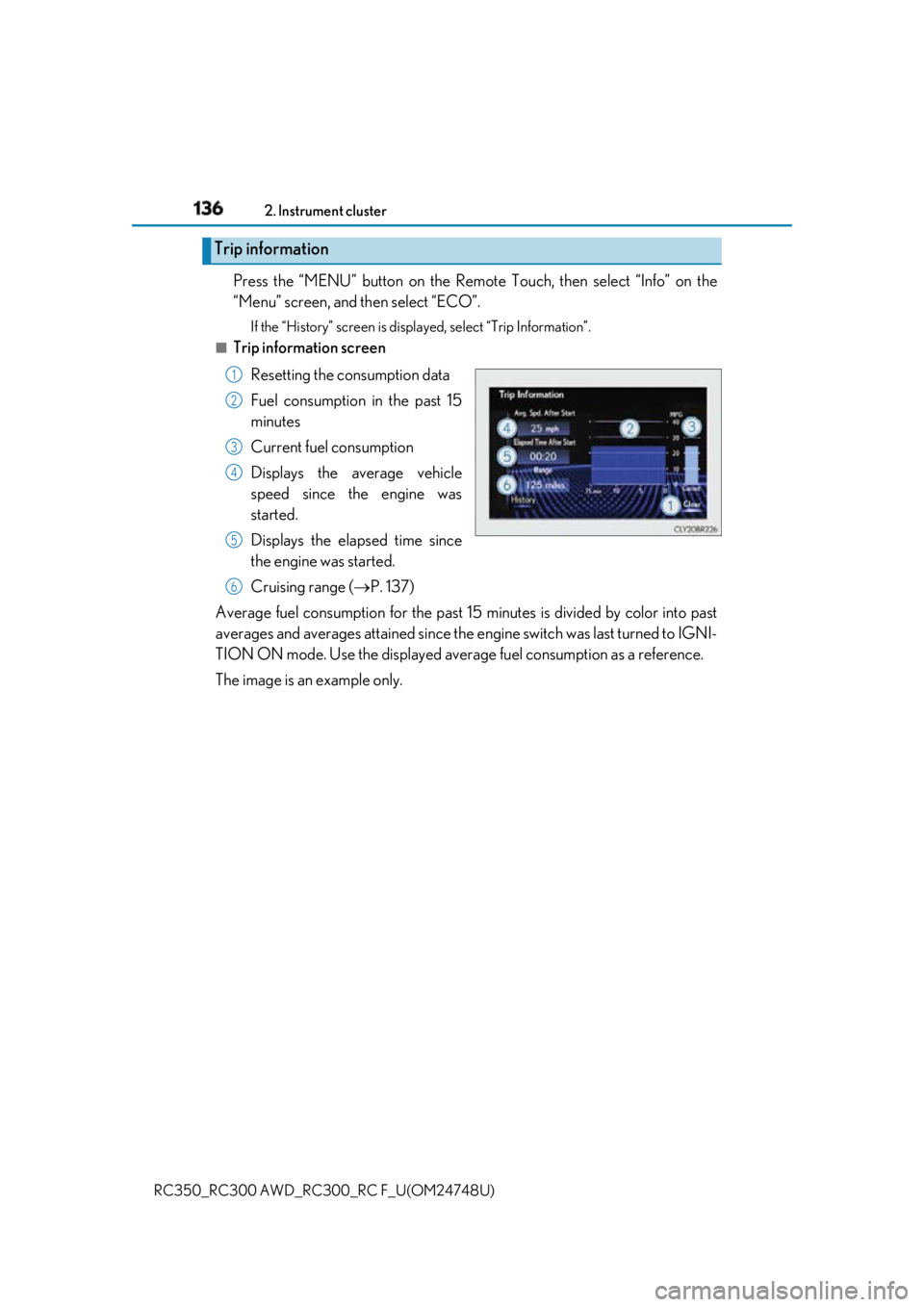
Trip information screen
Resetting the consumption data
Fuel consumption in the past 15
minutes
Current fuel consumption
Displays the average vehicle
speed since the engine was
started.
Displays the elapsed time since
the engine was started.
Cruising range ( P. 137)
Average fuel consumption for the past 15 minutes is divided by color into past
averages and averages attained since the engine switch was last turned to IGNI-
TION ON mode. Use the displayed average fuel consumption as a reference.
The image is an example only.Trip information 1
2
3
4
5
6
Page 137 of 636
1372. Instrument cluster
2
Instrument cluster
RC350_RC300 AWD_RC3 00_RC F_U(OM24748U)Press the “MENU” button on the Remote To uch, then select “Info” on the “Menu”
screen, and then select “ECO”. If the “Trip Information” screen is displayed, select “History”.■
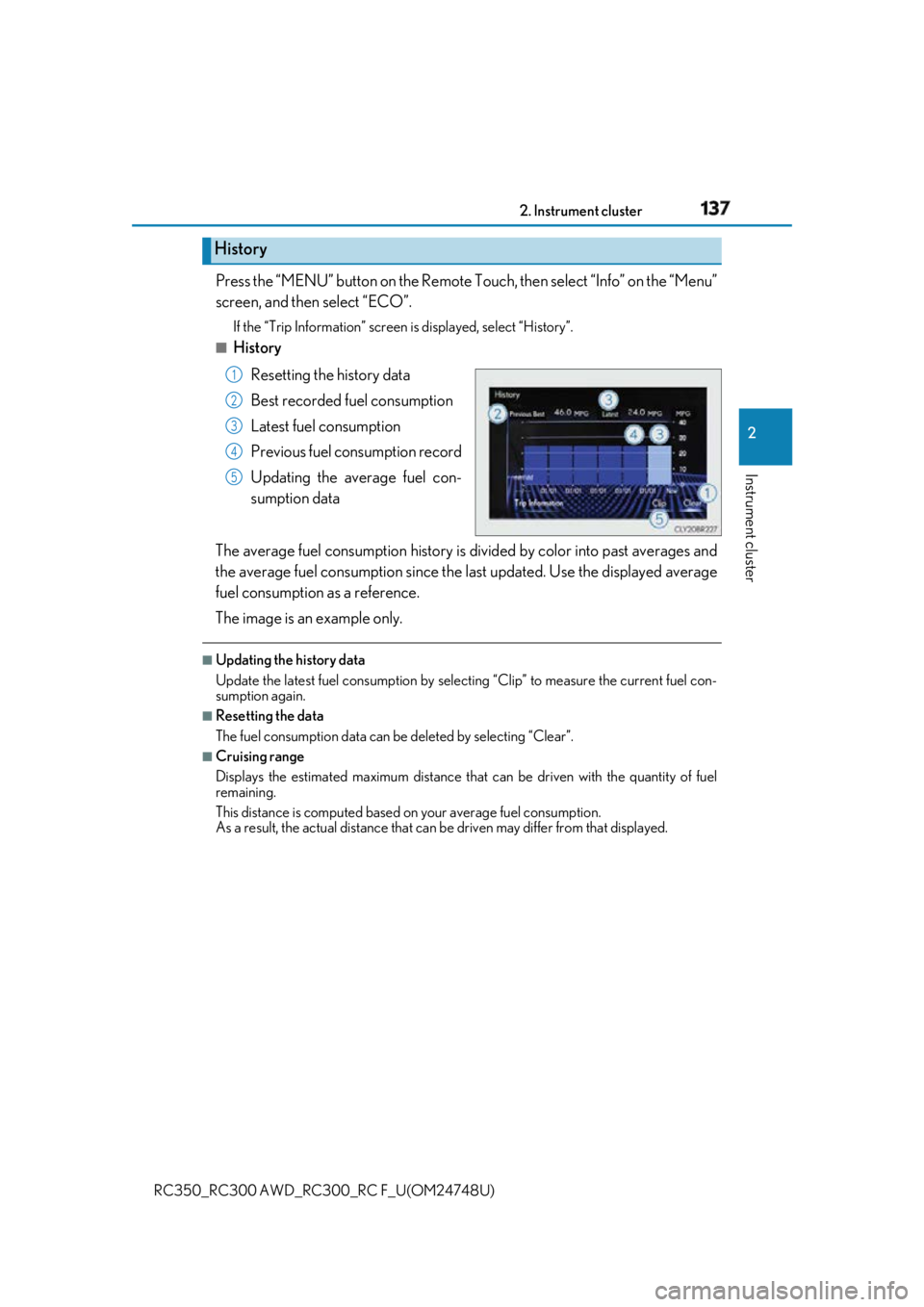
History
Resetting the history data
Best recorded fuel consumption
Latest fuel consumption
Previous fuel consumption record
Updating the average fuel con-
sumption data
The average fuel consumption history is di vided by color into past averages and
the average fuel consumption since the last updated. Use the displayed average
fuel consumption as a reference.
The image is an example only. ■
Updating the history data
Update the latest fuel consumption by sele cting “Clip” to measure the current fuel con-
sumption again. ■
Resetting the data
The fuel consumption data can be deleted by selecting “Clear”. ■
Cruising range
Displays the estimated maximum distance that can be driven with the quantity of fuel
remaining.
This distance is computed based on your average fuel consumption.
As a result, the actual distance that can be driven may differ from that displayed.History 1
2
3
4
5
Page 140 of 636
140
RC350_RC300 AWD_RC3 00_RC F_U(OM24748U)3-1. Key information
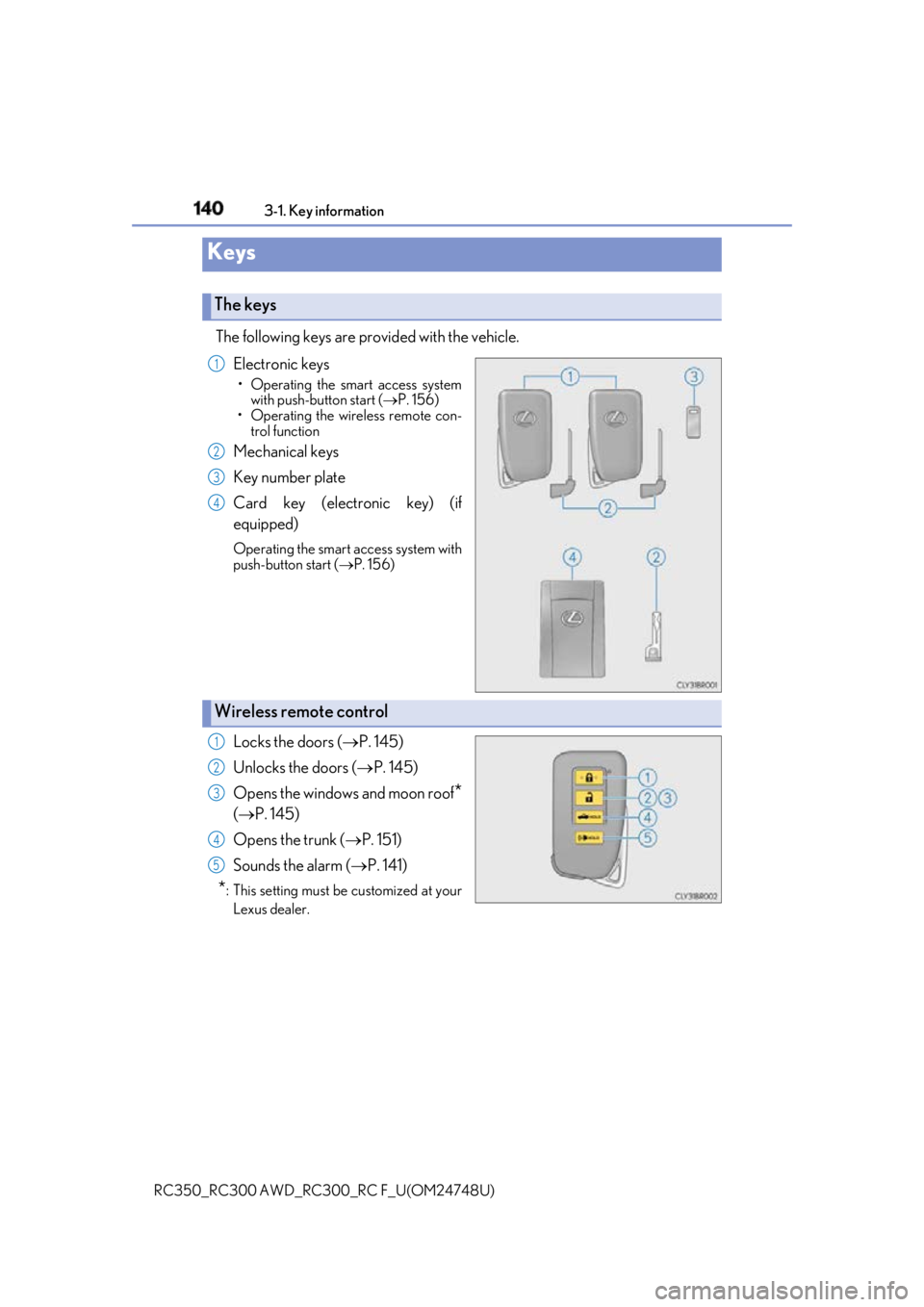
The following keys are provided with the vehicle.
Electronic keys • Operating the smart access system
with push-button start ( P. 156)
• Operating the wireless remote con-
trol function
Mechanical keys
Key number plate
Card key (electronic key) (if
equipped) Operating the smart access system with
push-button start ( P. 156)
Locks the doors ( P. 145)
Unlocks the doors ( P. 145)
Opens the windows and moon roof
*( P. 145)
Opens the trunk ( P. 151)
Sounds the alarm ( P. 141)
* : This setting must be customized at your
Lexus dealer.Keys The keys 1
2
3
4
Wireless remote control 1
2
3
4
5
Page 143 of 636

1433-1. Key information
3
Operation of each component
RC350_RC300 AWD_RC3 00_RC F_U(OM24748U)■
Electronic key battery depletion ●
The standard battery life is 1 to 2 years. (The card key battery life is about a year and a
half.) ●
If the battery becomes low, an alarm will soun d in the cabin when the engine is stopped.
( P. 485) ●
As the electronic key always receives ra dio waves, the battery will become depleted
even if the electronic key is not used. The following symptoms indi cate that the elec-
tronic key battery may be depleted. Replace the battery when necessary. ( P. 427)
• The smart access system with push-button start or the wireless remote control does
not operate.
• The detection area becomes smaller.
• The LED indicator on the key surface does not turn on. ●
To avoid serious deterioration, do not leave the electronic key within 3 ft. (1 m) of the
following electrical appliances that produce a magnetic field:
•TVs
• Personal computers
• Cellular phones, cordless phones and battery chargers
• Recharging cellular phones or cordless phones
•Table lamps
• Induction cookers ■
Replacing the battery
P. 427 ■
Confirmation of the registered key number
The number of keys already registered to the vehicle can be confirmed. Ask your Lexus
dealer for details. ■
If a wrong key is used
The key cylinder rotates freely, isol ated from the internal mechanism.
Page 145 of 636
145
3
Operation of each component
RC350_RC300 AWD_RC3 00_RC F_U(OM24748U)3-2. Opening, closing and locking the doors and trunk
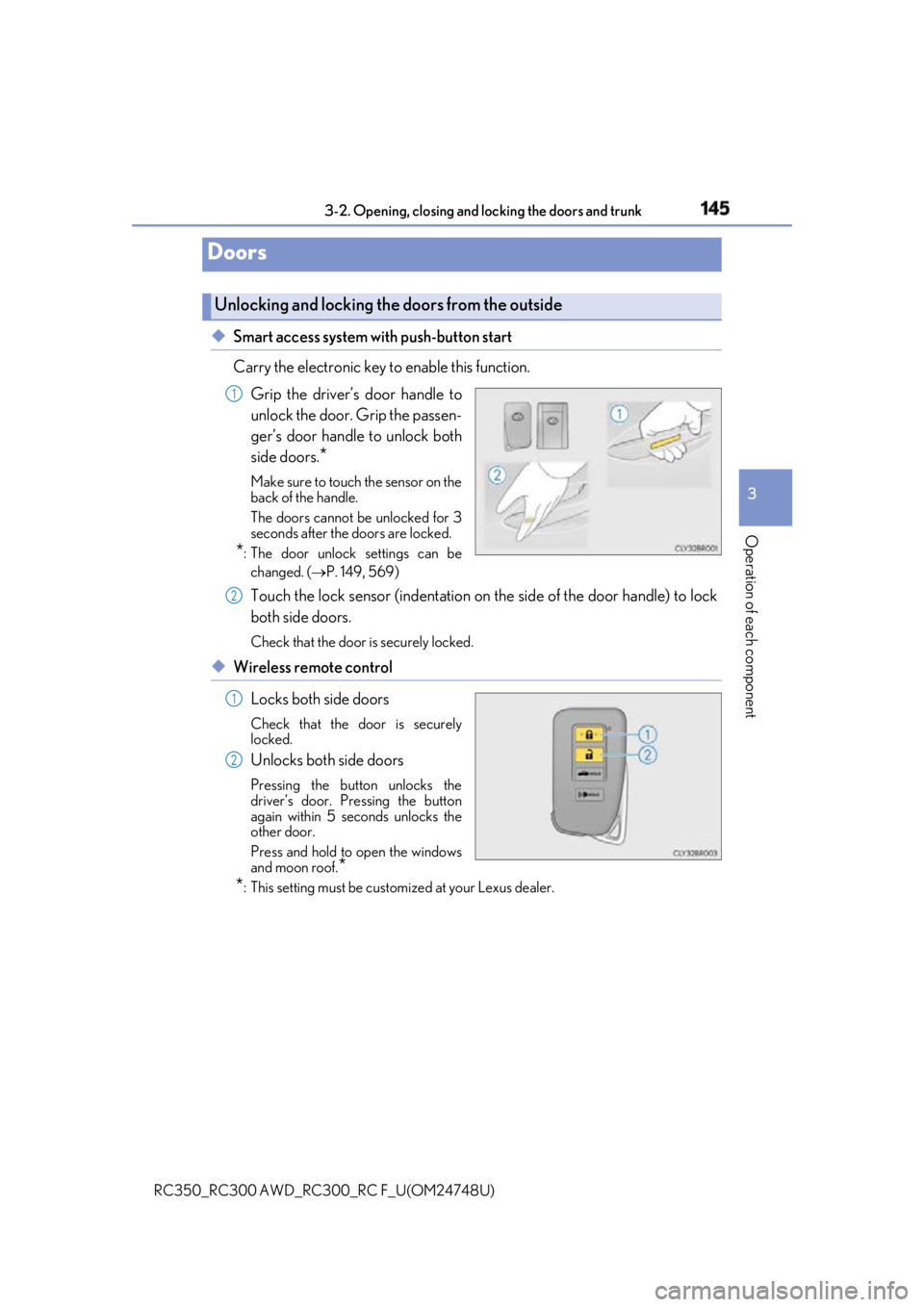
◆ Smart access system with push-button start
Carry the electronic key to enable this function.
Grip the driver’s door handle to
unlock the door. Grip the passen-
ger’s door handle to unlock both
side doors.
* Make sure to touch the sensor on the
back of the handle.
The doors cannot be unlocked for 3
seconds after the doors are locked.
* : The door unlock settings can be
changed. ( P. 149, 569)
Touch the lock sensor (indentation on the side of the door handle) to lock
both side doors. Check that the door is securely locked.
◆ Wireless remote control
Locks both side doors Check that the door is securely
locked.
Unlocks both side doors Pressing the button unlocks the
driver’s door. Pressing the button
again within 5 seconds unlocks the
other door.
Press and hold to open the windows
and moon roof.
*
* : This setting must be custom ized at your Lexus dealer.Doors Unlocking and locking the doors from the outside 1
2
1
2