engine LEXUS RX200T 2017 Owners Manual
[x] Cancel search | Manufacturer: LEXUS, Model Year: 2017, Model line: RX200T, Model: LEXUS RX200T 2017Pages: 776, PDF Size: 44.51 MB
Page 396 of 776
3964-5. Using the driving support systems
RX350/RX200t_EE_OM48F32E
■The Rear Crossing Traffic Auto Brake function will operate when
The function will operate when the ICS OFF indicator is not illuminated or flashing ( P. 383, 391) and all of the following conditions are met:
●Engine output restriction control
• The Intelligent Clearance Sonar with Rear Crossing Traffic Auto Brake is enabled. • The vehicle speed is 15 km/h (10 mph) or less.• The shift lever is in R.
• The system determines that a stronger than normal brake operation is necessary to avoid a collision with an approaching vehicle.
●Brake control
• Engine output restriction control is operating. • The system determines that an emergency brake operation is necessary to avoid a
collision with an approaching vehicle.
■The Rear Crossing Traffic Auto Brake function will stop operating when
The function will stop operating if an y of the following conditions are met:
●Engine output restriction control
• The Intelligent Clearance Sonar with Rear Crossing Traffic Auto Brake is disabled. • The collision becomes avoidable with normal brake operation.
• A vehicle is no longer approaching from the right or left at the rear of the vehicle.
●Brake control
• The Intelligent Clearance Sonar with Rear Crossing Traffic Auto Brake is disabled. • Approximately 2 seconds elapse after the vehicle is stopped by brake control.• The brake pedal is depressed after the vehicle is stopped by brake control.
• A vehicle is no longer approaching from the right or left at the rear of the vehicle.
■Detection area of the Rear Cro ssing Traffic Auto Brake function
The detection area of the Rear Crossing Tr affic Auto Brake function differs from the
detection area of the RCTA function ( P. 367).
Therefore, even if the RCTA function detects a vehicle and provides an alert, the Rear Crossing Traffic Auto Brake function may not start operating.
■If the Rear Crossing Traffic Auto Brake function has operated
If the vehicle is stopped due to operation of the Rear Crossing Traffic Auto Brake func- tion, the Rear Crossing Traffic Auto Brake fu nction will be disabled and the ICS OFF indi-
cator will illuminate.
Page 397 of 776
3974-5. Using the driving support systems
4
Driving
RX350/RX200t_EE_OM48F32E
■Re-enabling the Rear Crossing Traffic Auto Brake function
To re-enable the Rear Crossing Traffic Auto Brake function when it is disabled during
operation of the Rear Crossing Traffic Auto Brake function, either enable the system
again ( P. 383), or turn the engine switch o ff and then back to IGNITION ON mode.
Additionally, if there is no longer a vehicle ap proaching from the right or left at the rear of
the vehicle, or if the traveling direction of the vehicle changes (such as changing from
moving forward to backing up or from backing up to moving forward), the system will be
re-enabled automatically.
■Conditions under which the Rear Crossing Traffic Auto Brake function will not detect a
vehicle
The Rear Crossing Traffic Auto Brake function is not designed to detect the following
types of vehicles and/or objects.
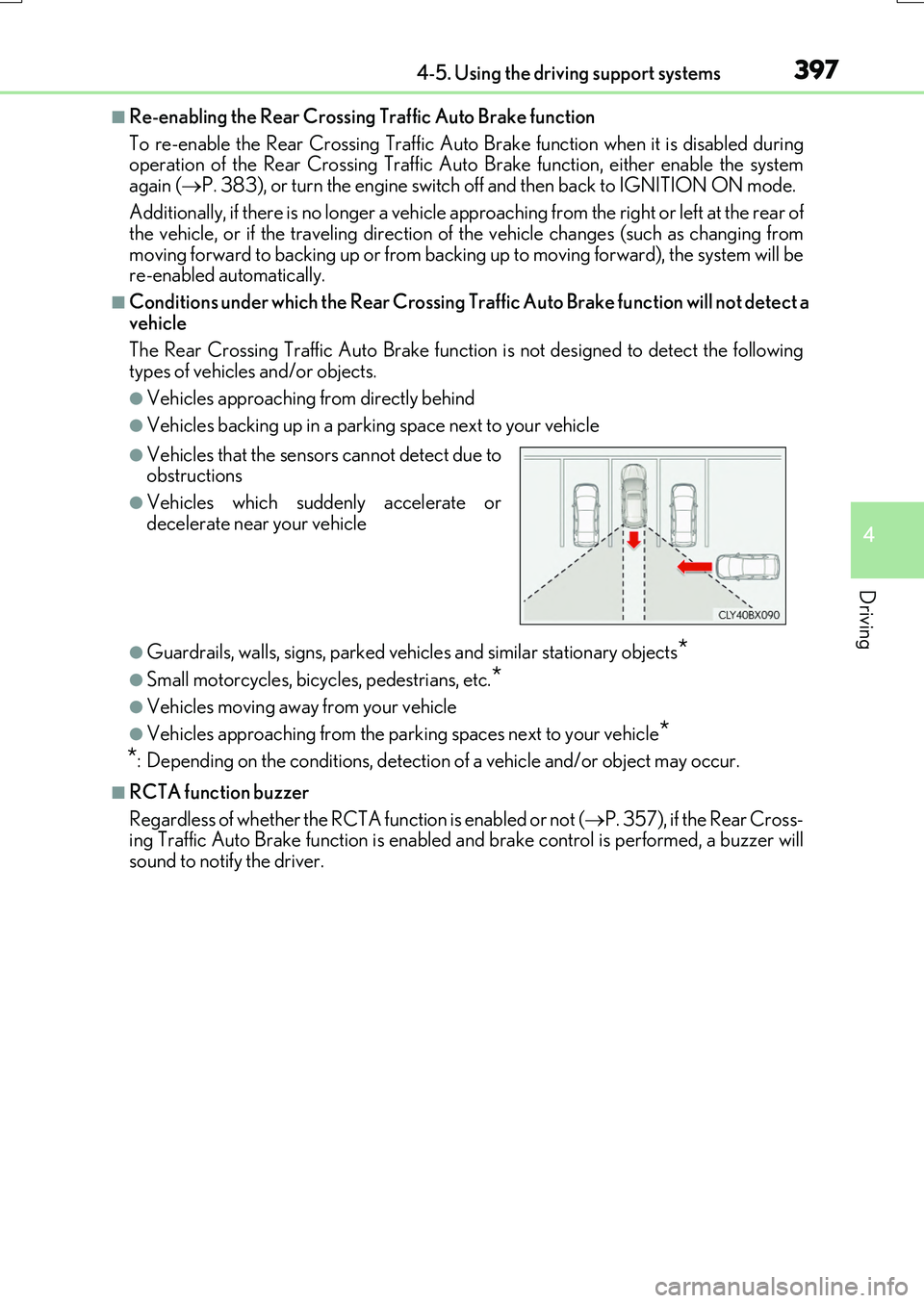
●Vehicles approaching from directly behind
●Vehicles backing up in a parking space next to your vehicle
●Guardrails, walls, signs, parked vehi cles and similar stationary objects*
●Small motorcycles, bicycles, pedestrians, etc.*
●Vehicles moving away from your vehicle
●Vehicles approaching from the parking spaces next to your vehicle*
*
: Depending on the conditions, detection of a vehicle and/or object may occur.
■RCTA function buzzer
Regardless of whether the RCTA function is enabled or not ( P. 357), if the Rear Cross-
ing Traffic Auto Brake function is enabled an d brake control is performed, a buzzer will
sound to notify the driver.
●Vehicles that the sensors cannot detect due to
obstructions
●Vehicles which suddenly accelerate or
decelerate near your vehicle
Page 401 of 776
4014-5. Using the driving support systems
4
Driving
RX350/RX200t_EE_OM48F32E
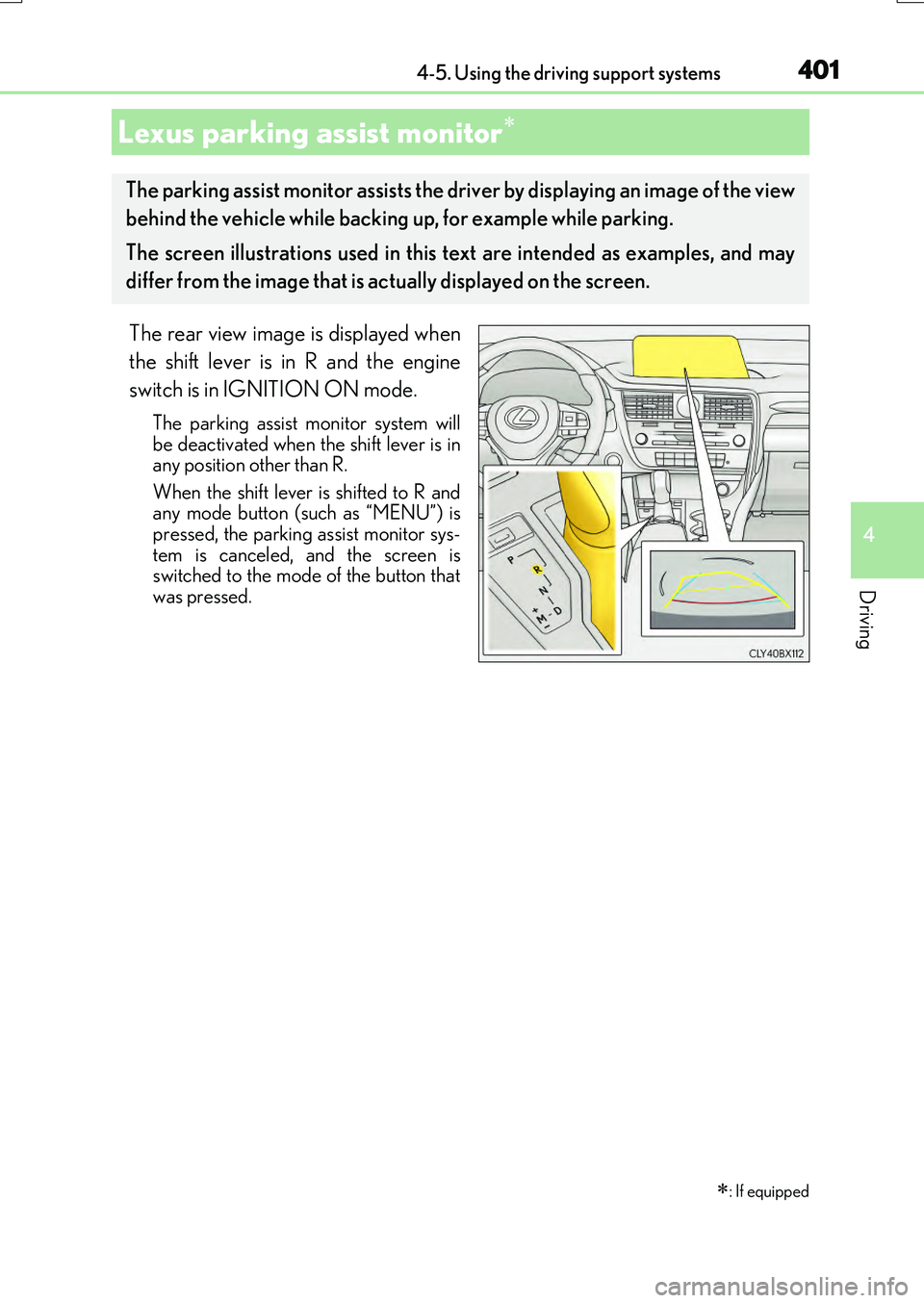
The rear view image is displayed when
the shift lever is in R and the engine
switch is in IGNITION ON mode.
The parking assist monitor system will be deactivated when the shift lever is inany position other than R.
When the shift lever is shifted to R and any mode button (such as “MENU”) ispressed, the parking assist monitor sys-
tem is canceled, and the screen is switched to the mode of the button thatwas pressed.
Lexus parking assist monitor
: If equipped
The parking assist monitor assists the driver by displaying an image of the view
behind the vehicle while backing up, for example while parking.
The screen illustrations used in this text are intended as examples, and may
differ from the image that is ac tually displayed on the screen.
Page 402 of 776
4024-5. Using the driving support systems
RX350/RX200t_EE_OM48F32E
■Screen display
The parking assist monitor screen will be displayed if the shift position is
shifted to R while the engine switch is in IGNITION ON mode.
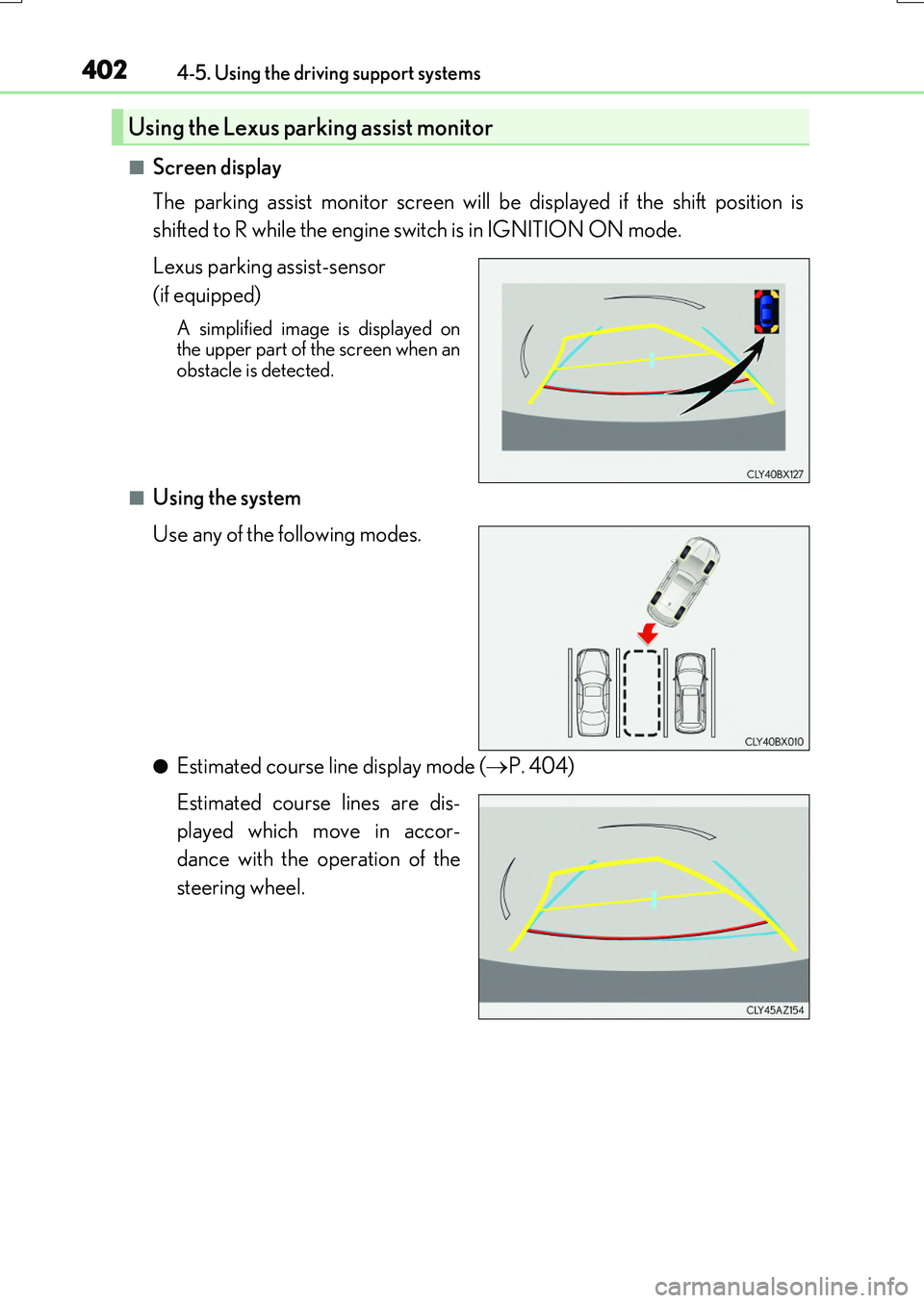
Lexus parking assist-sensor
(if equipped)
A simplified image is displayed on the upper part of the screen when anobstacle is detected.
■Using the system
Use any of the following modes.
●Estimated course line display mode ( P. 404)
Estimated course lines are dis-
played which move in accor-
dance with the operation of the
steering wheel.
Using the Lexus parking assist monitor
Page 417 of 776
4174-5. Using the driving support systems
4
Driving
RX350/RX200t_EE_OM48F32E
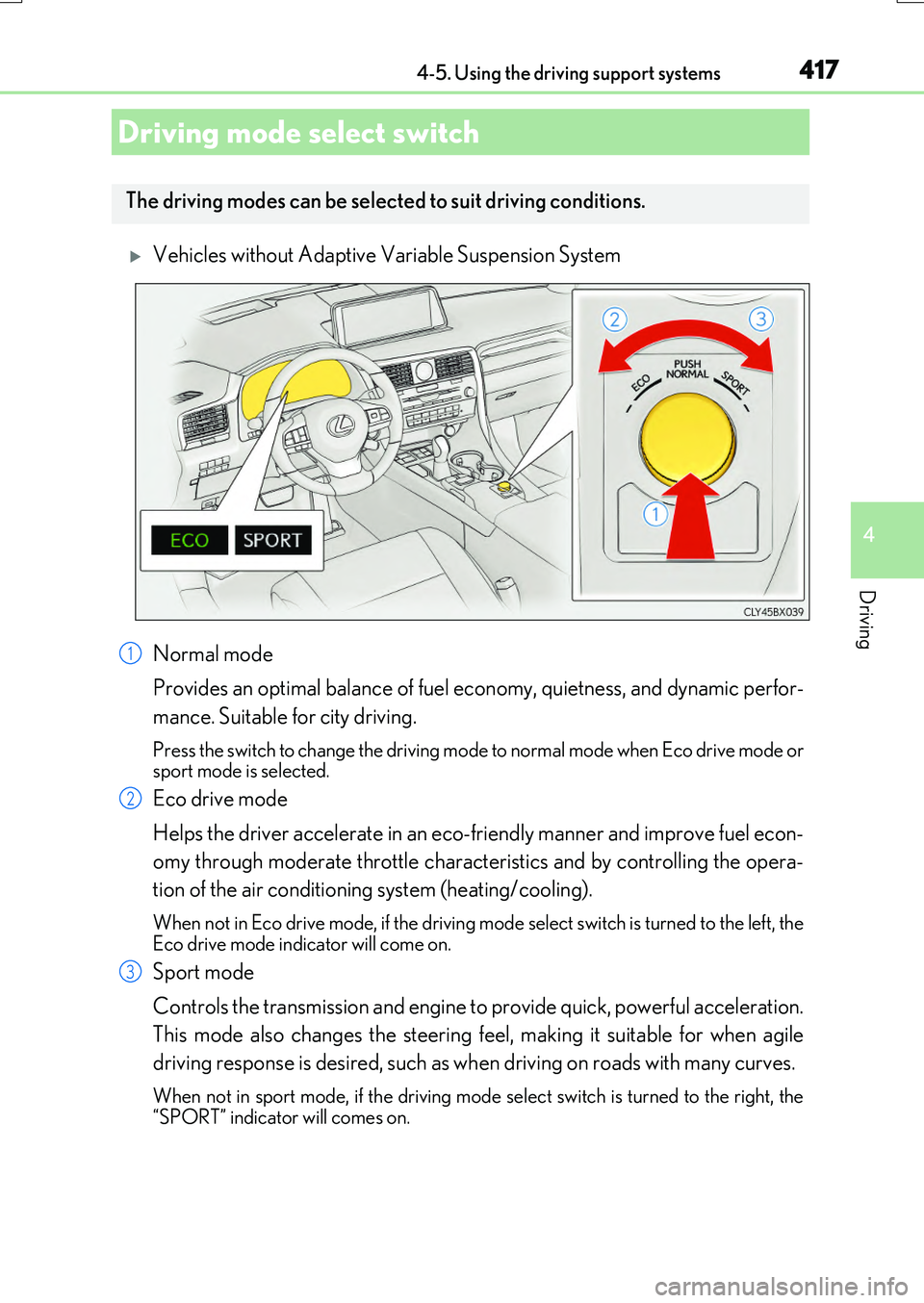
Vehicles without Adaptive Variable Suspension System
Normal mode
Provides an optimal balance of fuel ec onomy, quietness, and dynamic perfor-
mance. Suitable for city driving.
Press the switch to change the driving mode to normal mode when Eco drive mode or sport mode is selected.
Eco drive mode
Helps the driver accelerate in an eco-friendly manner and improve fuel econ-
omy through moderate throttle characteristics and by controlling the opera-
tion of the air conditioning system (heating/cooling).
When not in Eco drive mode, if the driving mode select switch is turned to the left, the
Eco drive mode indicator will come on.
Sport mode
Controls the transmission and engine to provide quick, powerful acceleration.
This mode also changes the steering feel, making it suitable for when agile
driving response is desired, such as when driving on roads with many curves.
When not in sport mode, if the driving mode se lect switch is turned to the right, the “SPORT” indicator will comes on.
Driving mode select switch
The driving modes can be selected to suit driving conditions.
1
2
3
Page 419 of 776
4194-5. Using the driving support systems
4
Driving
RX350/RX200t_EE_OM48F32E
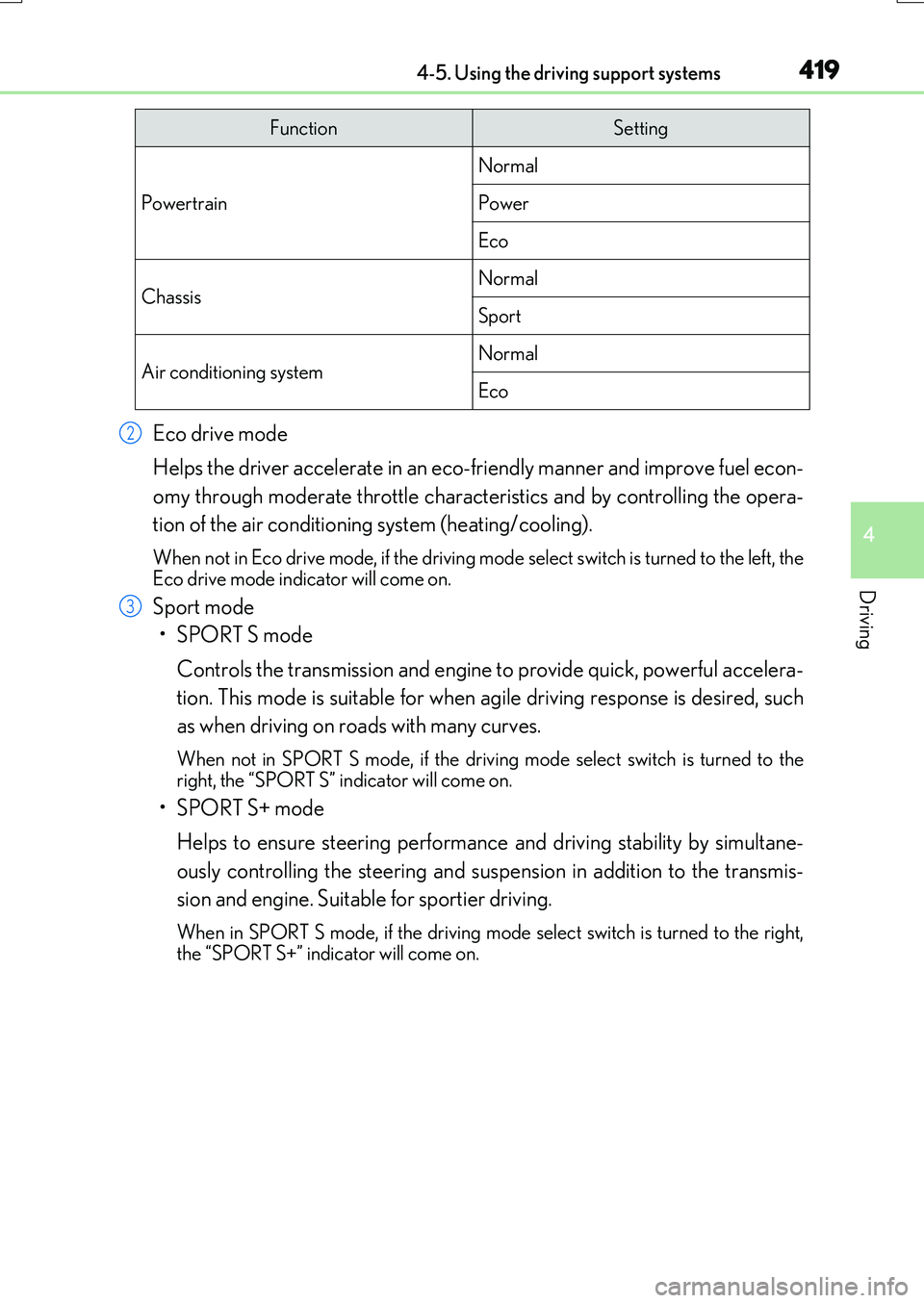
Eco drive mode
Helps the driver accelerate in an eco-friendly manner and improve fuel econ-
omy through moderate throttle characteristics and by controlling the opera-
tion of the air conditioning system (heating/cooling).
When not in Eco drive mode, if the driving mode select switch is turned to the left, the
Eco drive mode indicator will come on.
Sport mode
•SPORT S mode
Controls the transmission and engine to provide quick, powerful accelera-
tion. This mode is suitable for when agile driving response is desired, such
as when driving on roads with many curves.
When not in SPORT S mode, if the drivin g mode select switch is turned to the right, the “SPORT S” indicator will come on.
•SPORT S+ mode
Helps to ensure steering performanc e and driving stability by simultane-
ously controlling the steering and susp ension in addition to the transmis-
sion and engine. Suitable for sportier driving.
When in SPORT S mode, if th e driving mode select switch is turned to the right,
the “SPORT S+” indicator will come on.
FunctionSetting
Powertrain
Normal
Power
Eco
ChassisNormal
Sport
Air conditioning systemNormal
Eco
2
3
Page 420 of 776
4204-5. Using the driving support systems
RX350/RX200t_EE_OM48F32E
■Operation of the air conditioning system in Eco drive mode
Eco drive mode controls the heating/cooling operations and fan speed of the air condi- tioning system to enhance fuel efficiency . To improve air conditioning performance, adjust the fan speed or turn off Eco drive mode.
■Automatic deactivation of sport mode and customized mode
If the engine switch is turned off after dr iving in sport mode or customized mode, the drive mode will be changed to normal mode.
■Driving mode pop-up display (12.3-inch display only)
When the driving mode is changed, the selected driving mode will be temporarily dis- played on the side display. ( P. 533)
Page 421 of 776
4214-5. Using the driving support systems
4
Driving
RX350/RX200t_EE_OM48F32E
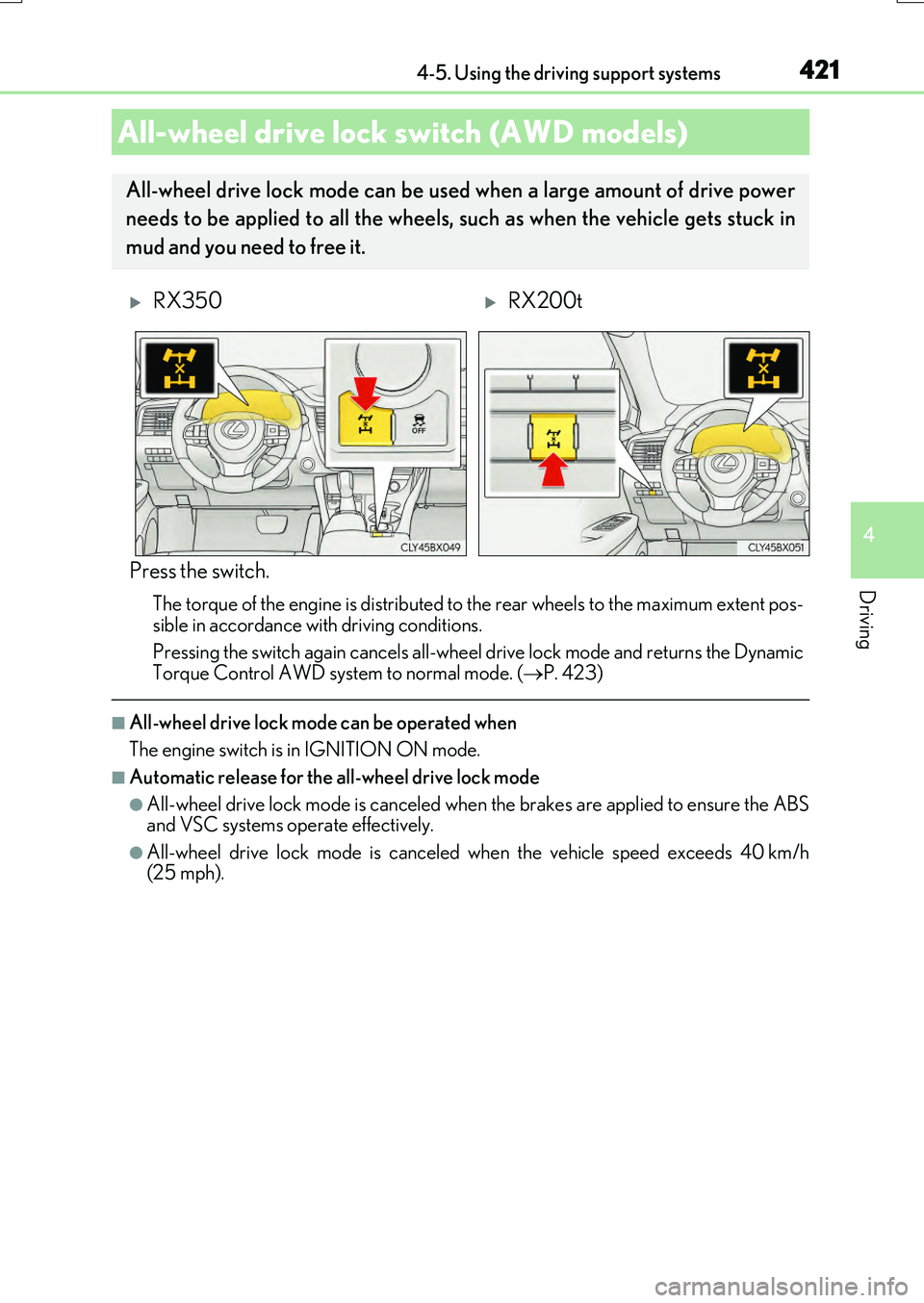
Press the switch.
The torque of the engine is distributed to the rear wheels to the maximum extent pos-
sible in accordance with driving conditions.
Pressing the switch again cancels all-wheel drive lock mode and returns the Dynamic Torque Control AWD system to normal mode. ( P. 423)
■All-wheel drive lock mode can be operated when
The engine switch is in IGNITION ON mode.
■Automatic release for the all-wheel drive lock mode
●All-wheel drive lock mode is canceled when the brakes are applied to ensure the ABS and VSC systems operate effectively.
●All-wheel drive lock mode is canceled when the vehicle speed exceeds 40 km/h(25 mph).
All-wheel drive lock switch (AWD models)
All-wheel drive lock mode can be used when a large amount of drive power
needs to be applied to all the wheels, such as when the vehicle gets stuck in
mud and you need to free it.
RX350RX200t
Page 423 of 776
4234-5. Using the driving support systems
4
Driving
RX350/RX200t_EE_OM48F32E
◆EPS (Electric Power Steering)
Employs an electric motor to reduce the amount of effort needed to turn the
steering wheel
◆Dynamic Torque Control AWD system (AWD models)
Automatically switches from front-wheel drive to all-wheel drive (AWD)
according to the driving conditions, helping to ensure reliable handling and
stability. Examples of conditions where the system will switch to AWD are
when cornering, going uphill, starting off or accelerating, and when the road
surface is slippery due to snow, rain, etc.
◆Adaptive Variable Suspension System (if equipped)
Controls the damping force of the shock absorber of each wheel according to
the road and driving conditions, helping achieve a comfortable ride, excellent
driveability and a high level of stability.
If SPORT S+ mode is selected using the driving mode select switch, the
damping force will become more suitable for sporty driving. ( P. 418)
◆VDIM (Vehicle Dynamics Integrated Management) (if equipped)
Provides integrated control of the ABS, brake assist, TRC, VSC, hill-start
assist control and EPS systems
Helps to maintain vehicle stability when swerving on slippery road surfaces by
controlling the brakes and engine output
◆Emergency brake signal
When the brakes are applie d suddenly, the stop lights automatically flash to
alert the vehicle behind.
Page 424 of 776
4244-5. Using the driving support systems
RX350/RX200t_EE_OM48F32E
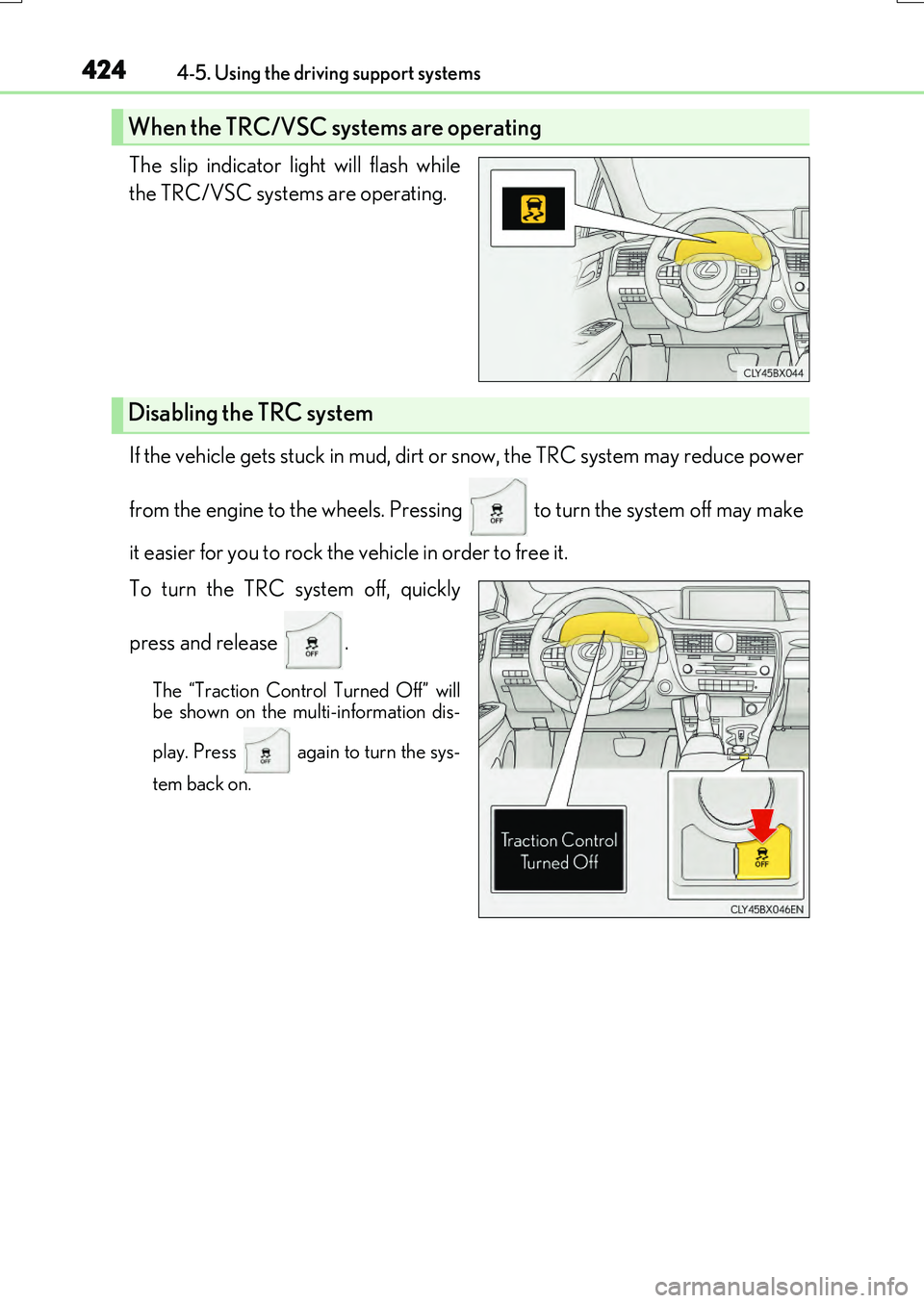
The slip indicator light will flash while
the TRC/VSC systems are operating.
If the vehicle gets stuck in mud, dirt or snow, the TRC system may reduce power
from the engine to the wheels. Pressing to turn the system off may make
it easier for you to rock the vehicle in order to free it.
To turn the TRC system off, quickly
press and release .
The “Traction Control Turned Off” will
be shown on the multi-information dis-
play. Press again to turn the sys-
tem back on.
When the TRC/VSC systems are operating
Disabling the TRC system