car LEXUS RX200T 2017 User Guide
[x] Cancel search | Manufacturer: LEXUS, Model Year: 2017, Model line: RX200T, Model: LEXUS RX200T 2017Pages: 776, PDF Size: 44.51 MB
Page 70 of 776
![LEXUS RX200T 2017 User Guide 701-2. Child safety
RX350/RX200t_EE_OM48F32E
■Child restraint system suitability table
(Installed using ISOFIX [Child restraint system conforms with ECE R44])
ISOFIX child restraint systems are d](/img/36/58026/w960_58026-69.png "LEXUS RX200T 2017 User Guide 701-2. Child safety
RX350/RX200t_EE_OM48F32E
■Child restraint system suitability table
(Installed using ISOFIX [Child restraint system conforms with ECE R44])
ISOFIX child restraint systems are d")
701-2. Child safety
RX350/RX200t_EE_OM48F32E
■Child restraint system suitability table
(Installed using ISOFIX [Child restraint system conforms with ECE R44])
ISOFIX child restraint systems are divided in different “size class”. According
to this “size class”, you will be allowed to use it in the vehicle seating position
mentioned in the table below. To know your child restraint system “size class”
and “mass group”, please refer to the child restraint system manual. If your
child restraint system has no “size class” (or if you cannot find information in
the table below), please refer to the child restraint system “vehicle list” for
compatibility information or ask the retailer of your child seat.
Size classDescription
A Full-height, forward-facing child restraint systems
B Reduced-height forward-facing child restraint systems
B1 Reduced-height forward-facing child restraint systems
C Full-size rearward-facing child restraint systems
D Reduced-size rearward-facin g child restraint systems
E Rearward-facing infant seat
F Left lateral-facing (carrycot) infant seat
G Right lateral-facing (carrycot) infant seat
Page 71 of 776
711-2. Child safety
1
For safety and security
RX350/RX200t_EE_OM48F32E
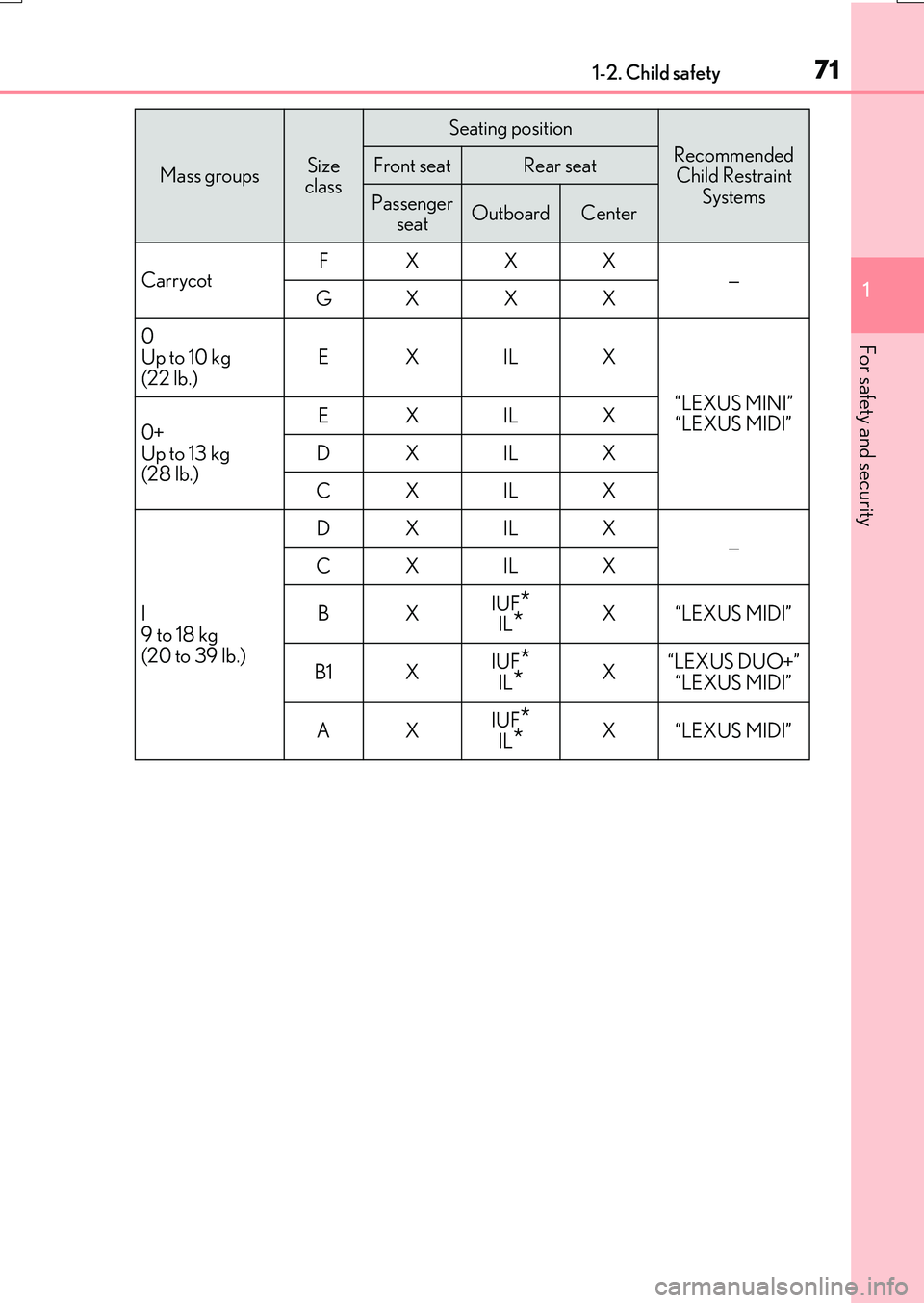
Mass groupsSize class
Seating position
Recommended Child Restraint
Systems
Front seatRear seat
Passenger seatOutboardCenter
Carrycot FXXX —GXXX
0 Up to 10 kg
(22 lb.)
EX IL X
“LEXUS MINI” “LEXUS MIDI” 0+
Up to 13 kg (28 lb.)
EX IL X
DX IL X
CX IL X
I
9 to 18 kg (20 to 39 lb.)
DX IL X —CX IL X
BX IUF*IL*X“LEXUS MIDI”
B1 X IUF*IL*X“LEXUS DUO+” “LEXUS MIDI”
AX IUF*
IL*X“LEXUS MIDI”
Page 87 of 776

871-3. Theft deterrent system
1
For safety and security
RX350/RX200t_EE_OM48F32E
●The vehicle is inside an automatic or high-pressure car wash.
●The vehicle experiences impacts, such as hail, lightning strikes, and other kinds of repeated impacts or vibrations.
■Tilt sensor detection cons iderations (if equipped)
The sensor may trigger the alarm in the following situations:
●The vehicle is transported by a ferry, trailer, train, etc.
●The vehicle is parked in a parking garage.
●The vehicle is inside a car wash that moves the vehicle.
●Any of the tires loses air pressure.
●The vehicle is jacked up.
●An earthquake occurs or the road caves in.
●Cargo is loaded onto or unloaded from the roof luggage carrier.
●The vehicle is parked in a place where extreme vibrations or noises occur, such as in a parkinggarage.
●Ice or snow is removed from the vehicle, caus-ing the vehicle to receive repeated impacts orvibrations.
Page 121 of 776
1212. Instrument cluster
2
Instrument cluster
RX350/RX200t_EE_OM48F32E
■Tire pressure
●It may take a few minutes to display the tire inflation pressure after the engine switch is turned to IGNITION ON mode. It may also take a few minutes to display the tire infla-
tion pressure after inflation pressure has been adjusted.
●“---” may be displayed if the tire position information cannot be determined due to unfavorable radio wave conditions.
●Tire inflation pressure changes with temperature. The displayed values may also be dif-ferent from the values measured using a tire pressure gauge.
■Liquid crystal display
Small spots or light spots may appear on th e display. This phenomenon is characteristic of liquid crystal displays, and there is no problem continuing to use the display.
■Customization
Some functions can be customized. ( P. 110, 740)
WARNING
■Caution for use while driving
●When operating the multi-information display while driving, pay extra attention to the safety of the area around the vehicle.
●Do not look continuously at the multi-info rmation display while driving as you may fail to see pedestrians, objects on the road, etc. ahead of the vehicle.
■The information display at low temperatures
Allow the interior of the vehicle to warm up before using the liquid crystal information display. At extremely low temperatures, th e information display monitor may respond slowly, and display changes may be delayed.
For example, there is a lag between the dr iver’s shifting and the new gear number appearing on the display. This lag could cau se the driver to downshift again, causing rapid and excessive engine braking and po ssibly an accident resulting in death or
injury.
■Cautions during setting up the display
As the engine needs to be running during setting up the display, ensure that the vehicle
is parked in a place with adequate ventilation. In a closed area such as a garage, exhaust gases including harmful carbon monoxide (CO) may collect and enter thevehicle. This may lead to death or a serious health hazard.
NOTICE
■While setting up the display
To prevent battery discharge, ensure that the engine is running while setting up the dis- play features.
Page 126 of 776
1262. Instrument cluster
RX350/RX200t_EE_OM48F32E
■Head-up display
The head-up display may seem dark or hard to see when viewed through sunglasses,
especially polarized sunglasses.
Adjust the brightness of the head-u p display or remove your sunglasses.
■When the battery is disconnected
The customize settings of the head-up display will be reset.
■Display brightness
The brightness of the head-up display can be adjusted on of the multi-information
display. Also, it is automatically adjust ed according to the ambient brightness.
■Enabling/disabling of the head-up display
If the head-up display is disabled, it will rema in disabled when the engine switch is turned
off then back to IGNITION ON mode.
■Street name display (vehicles with a navigation system)
Only street names which are included in the map data will be displayed.
WARNING
■Before using the head-up display
●Check that the position and brightness of the head-up display image does not inter-
fere with safe driving. Incorrect adjustment of the image’s position or brightness may
obstruct the driver’s view and lead to an accident, resulting in death or serious injury.
●Do not continuously look at the head-up display while driving as you may fail to see
pedestrians, objects on the road, etc. ahead of the vehicle.
■Caution for changing settings of the head-up display
As the engine needs to be running while changing the settings of the head-up display,
ensure that the vehicle is parked in a place with adequate ventilation. In a closed area
such as a garage, exhaust gases including harmful carbon monoxide (CO) may collect
and enter the vehicle. This may lead to death or a serious health hazard.
Page 129 of 776
1292. Instrument cluster
2
Instrument cluster
RX350/RX200t_EE_OM48F32E
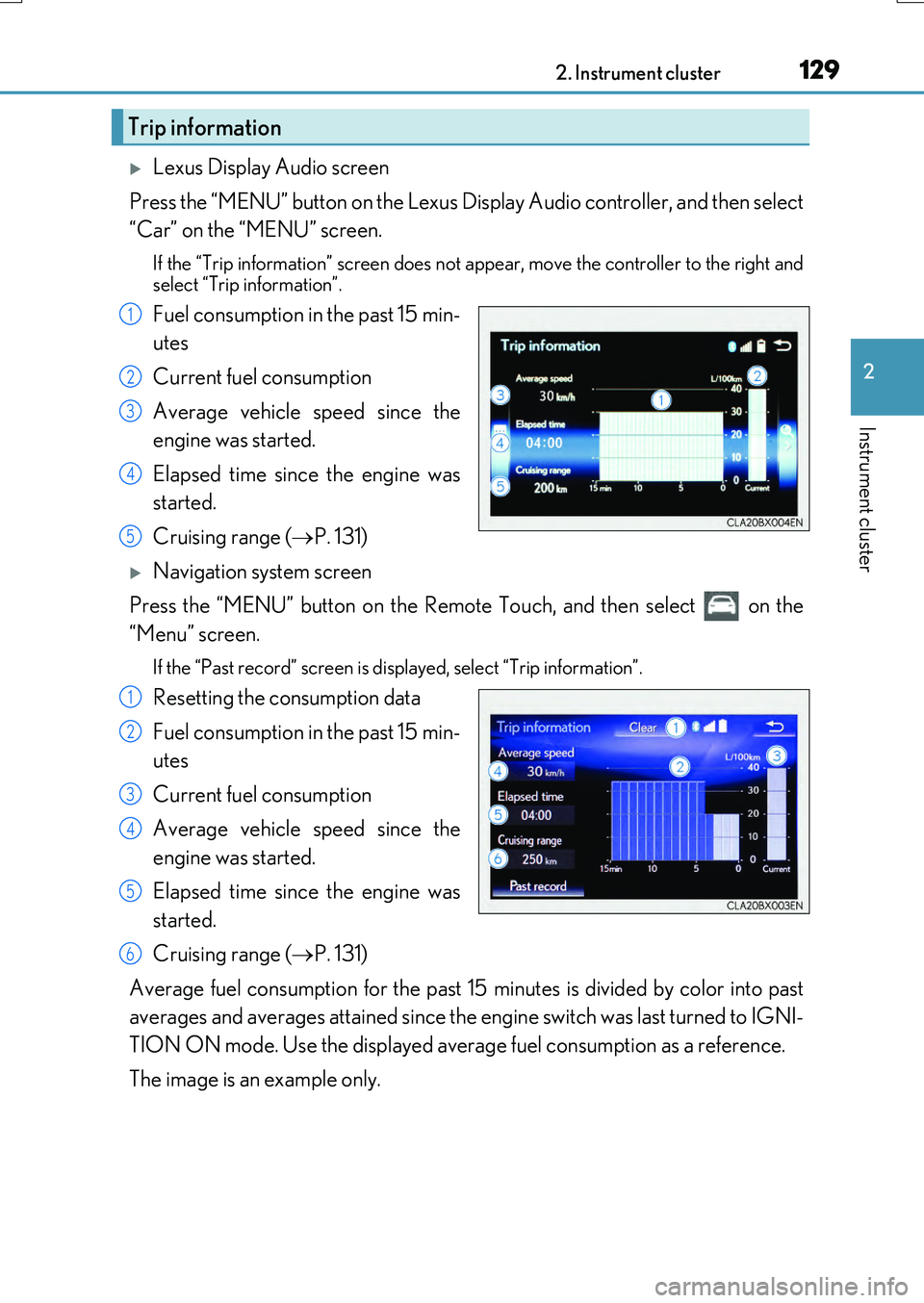
Lexus Display Audio screen
Press the “MENU” button on the Lexus Display Audio controller, and then select
“Car” on the “MENU” screen.
If the “Trip information” screen does not appear, move the controller to the right and
select “Trip information”.
Fuel consumption in the past 15 min-
utes
Current fuel consumption
Average vehicle speed since the
engine was started.
Elapsed time since the engine was
started.
Cruising range ( P. 131)
Navigation system screen
Press the “MENU” button on the Remote Touch, and then select on the
“Menu” screen.
If the “Past record” screen is displayed, select “Trip information”.
Resetting the consumption data
Fuel consumption in the past 15 min-
utes
Current fuel consumption
Average vehicle speed since the
engine was started.
Elapsed time since the engine was
started.
Cruising range ( P. 131)
Average fuel consumption for the past 15 minutes is divided by color into past
averages and averages attained since the engine switch was last turned to IGNI-
TION ON mode. Use the displayed average fuel consumption as a reference.
The image is an example only.
Trip information
1
2
3
4
5
1
2
3
4
5
6
Page 130 of 776
1302. Instrument cluster
RX350/RX200t_EE_OM48F32E
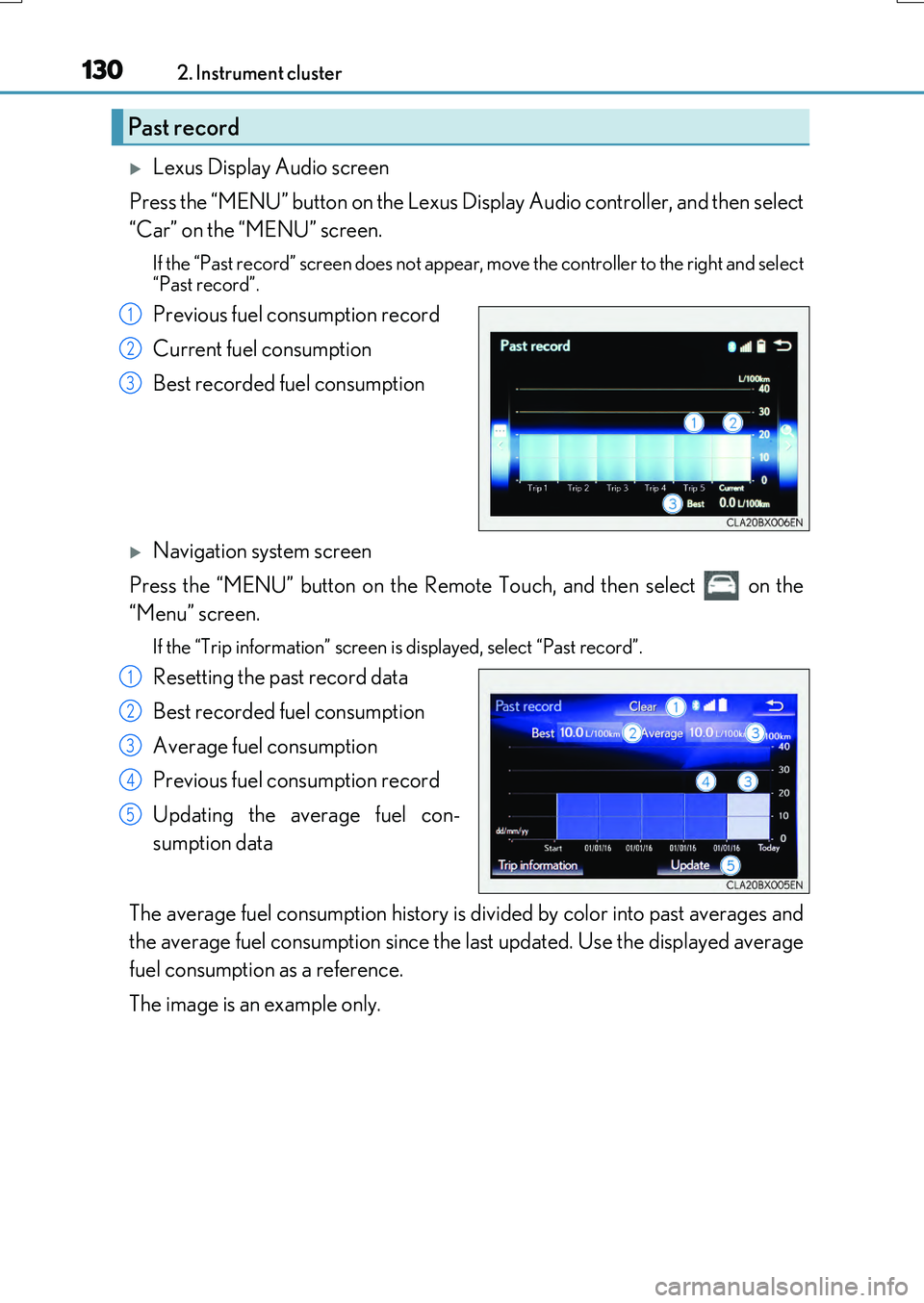
Lexus Display Audio screen
Press the “MENU” button on the Lexus Display Audio controller, and then select
“Car” on the “MENU” screen.
If the “Past record” screen does not appear , move the controller to the right and select
“Past record”.
Previous fuel consumption record
Current fuel consumption
Best recorded fuel consumption
Navigation system screen
Press the “MENU” button on the Remote Touch, and then select on the
“Menu” screen.
If the “Trip information” screen is displayed, select “Past record”.
Resetting the past record data
Best recorded fuel consumption
Average fuel consumption
Previous fuel consumption record
Updating the average fuel con-
sumption data
The average fuel consumption history is di vided by color into past averages and
the average fuel consumption since the last updated. Use the displayed average
fuel consumption as a reference.
The image is an example only.
Past record
1
2
3
1
2
3
4
5
Page 134 of 776
134
RX350/RX200t_EE_OM48F32E
3-1. Key information
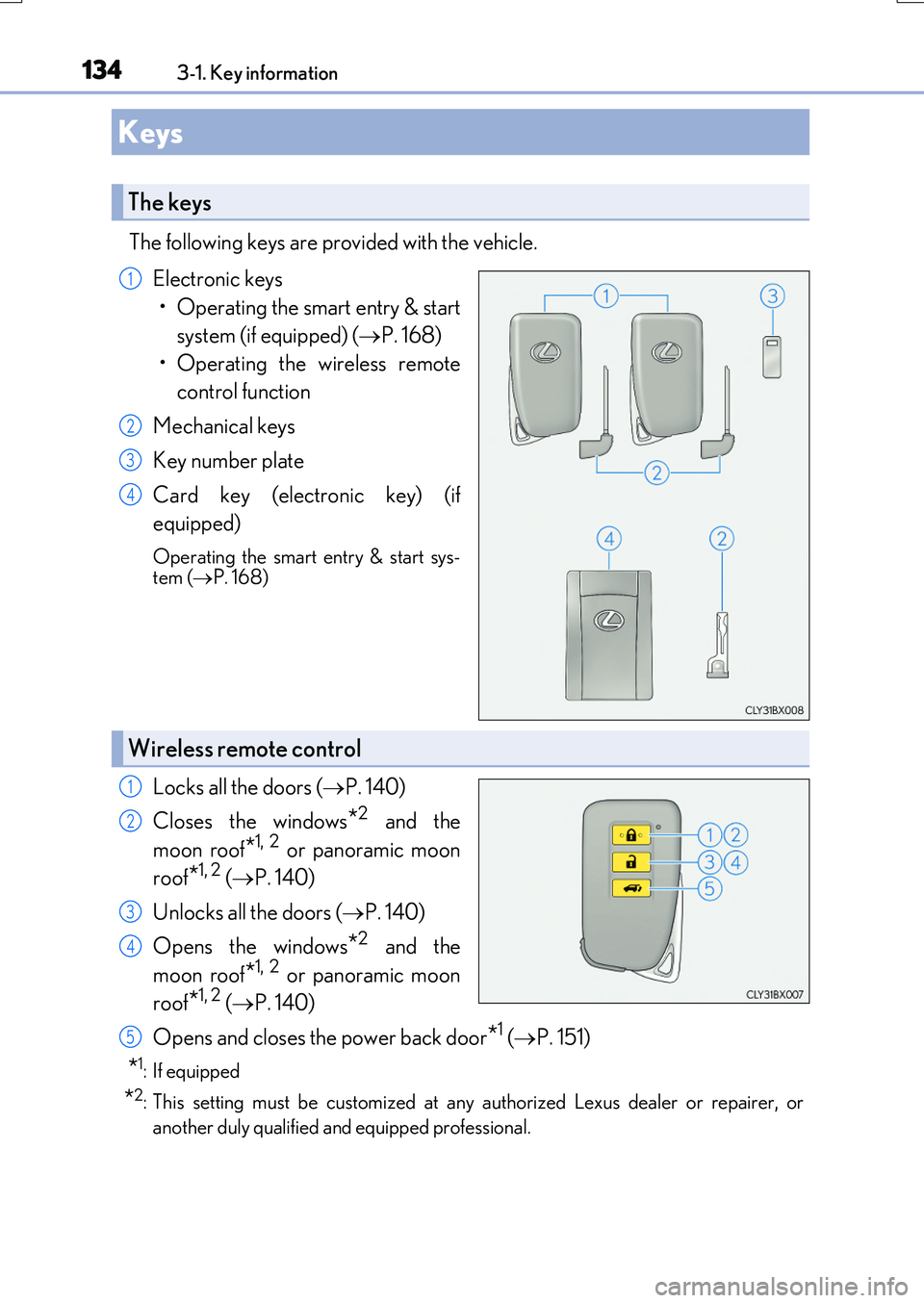
The following keys are provided with the vehicle.
Electronic keys
• Operating the smart entry & start
system (if equipped) ( P. 168)
• Operating the wireless remote
control function
Mechanical keys
Key number plate
Card key (electronic key) (if
equipped)
Operating the smart entry & start sys- tem ( P. 168)
Locks all the doors (P. 140)
Closes the windows*2 and the
moon roof*1, 2 or panoramic moon
roof*1, 2 ( P. 140)
Unlocks all the doors ( P. 140)
Opens the windows*2 and the
moon roof*1, 2 or panoramic moon
roof*1, 2 ( P. 140)
Opens and closes the power back door*1 ( P. 151)
*1: If equipped
*2: This setting must be customized at any authorized Lexus dealer or repairer, or
another duly qualified an d equipped professional.
Keys
The keys
1
2
3
4
Wireless remote control
1
2
3
4
5
Page 135 of 776
1353-1. Key information
3
Operation of each component
RX350/RX200t_EE_OM48F32E
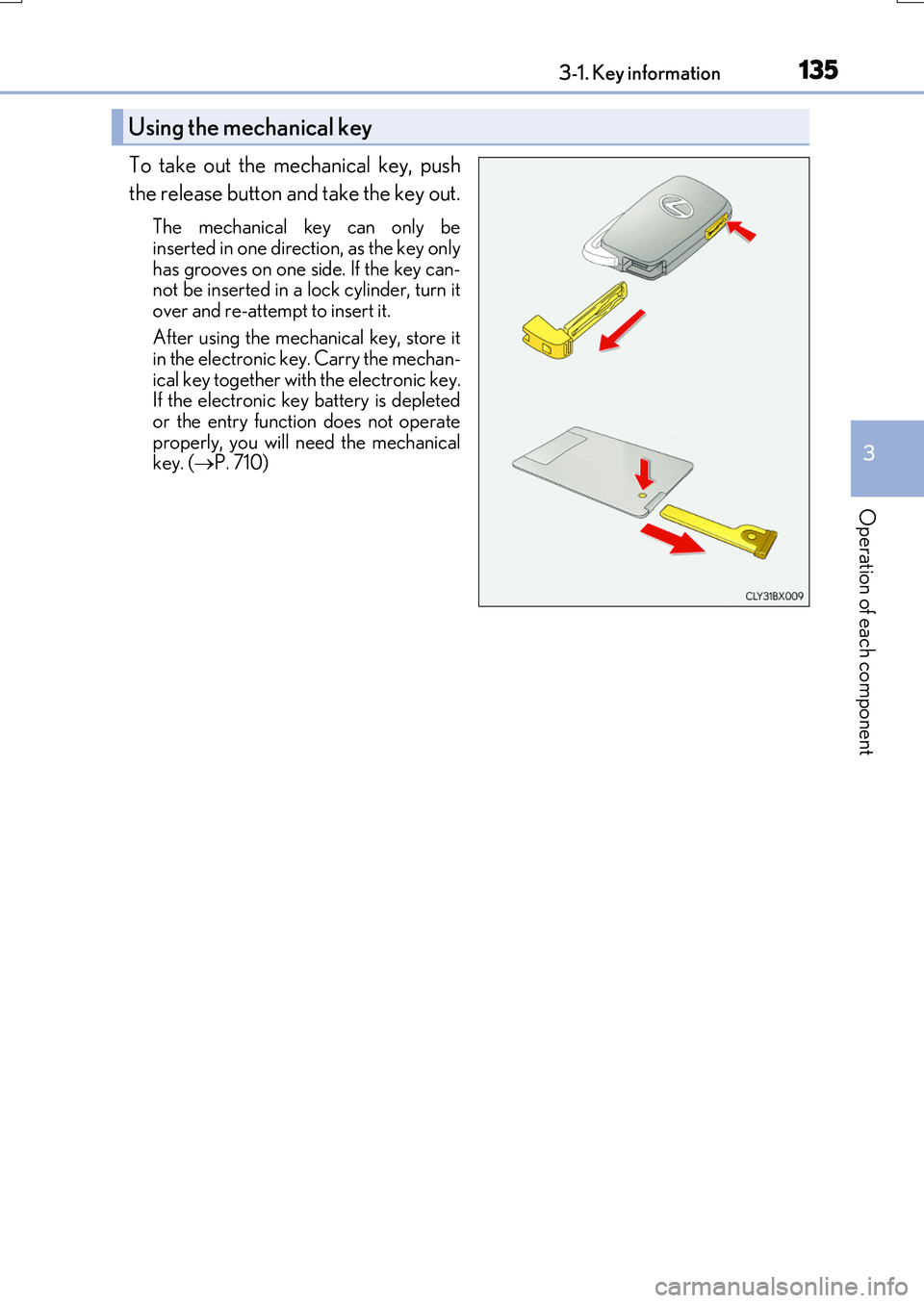
To take out the mechanical key, push
the release button and take the key out.
The mechanical key can only be
inserted in one direction, as the key only has grooves on one si de. If the key can- not be inserted in a lock cylinder, turn it
over and re-attempt to insert it.
After using the mechanical key, store it in the electronic key. Carry the mechan-
ical key together with the electronic key. If the electronic key battery is depletedor the entry function does not operate
properly, you will ne ed the mechanical key. ( P. 710)
Using the mechanical key
Page 136 of 776
1363-1. Key information
RX350/RX200t_EE_OM48F32E
■Card key (if equipped)
●The card key is not waterproof.
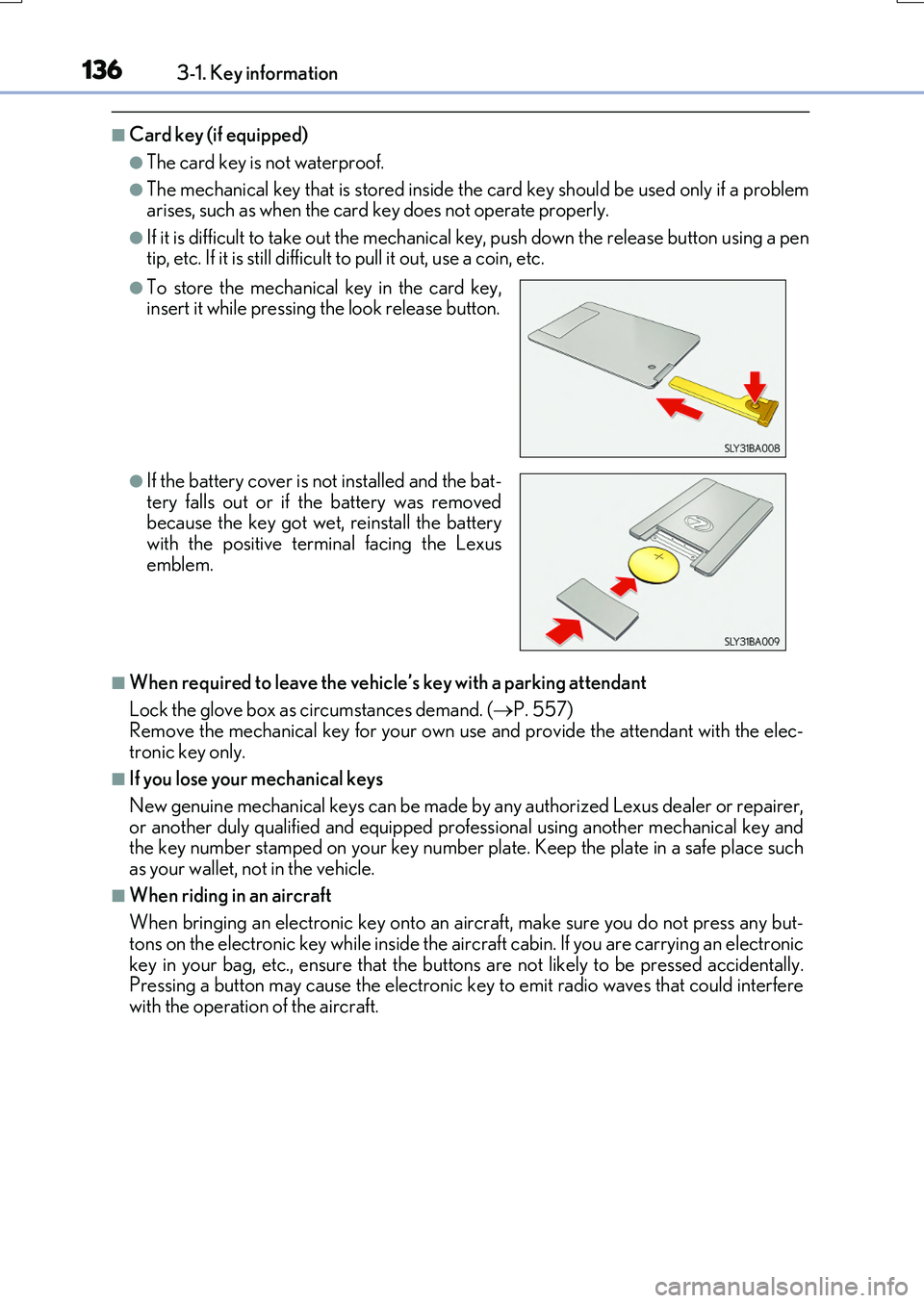
●The mechanical key that is stored inside the card key should be used only if a problem arises, such as when the card key does not operate properly.
●If it is difficult to take out the mechanical key, push down the release button using a pentip, etc. If it is still difficult to pull it out, use a coin, etc.
■When required to leave the vehicle’s key with a parking attendant
Lock the glove box as circumstances demand. ( P. 557) Remove the mechanical key for your own use and provide the attendant with the elec-
tronic key only.
■If you lose your mechanical keys
New genuine mechanical keys can be made by any authorized Lexus dealer or repairer,
or another duly qualified and equipped prof essional using another mechanical key and the key number stamped on your key number plate. Keep the plate in a safe place suchas your wallet, not in the vehicle.
■When riding in an aircraft
When bringing an electronic key onto an aircraft, make sure you do not press any but- tons on the electronic key while inside the ai rcraft cabin. If you are carrying an electronic
key in your bag, etc., ensure that the buttons are not likely to be pressed accidentally. Pressing a button may cause the electronic key to emit radio waves that could interferewith the operation of the aircraft.
●To store the mechanical key in the card key,insert it while pressing the look release button.
●If the battery cover is not installed and the bat- tery falls out or if the battery was removedbecause the key got wet, reinstall the battery
with the positive terminal facing the Lexus emblem.