car LEXUS RX200T 2017 Owner's Manual
[x] Cancel search | Manufacturer: LEXUS, Model Year: 2017, Model line: RX200T, Model: LEXUS RX200T 2017Pages: 776, PDF Size: 44.51 MB
Page 137 of 776
1373-1. Key information
3
Operation of each component
RX350/RX200t_EE_OM48F32E
■Electronic key battery depletion
●The standard battery life is 1 to 2 years. (The card key battery life is about a year and a half.)
●If the battery becomes low, an alarm will soun d in the cabin when the engine is stopped. ( P. 638)
●As the electronic key always receives radio waves, the battery will become depleted
even if the electronic key is not used. The following symptoms indicate that the elec- tronic key battery may be depleted. Replace the battery when necessary. ( P. 638)
• The smart entry & start system or the wireless remote control does not operate.
• The detection area becomes smaller. • The LED indicator on the key surface does not turn on.
●To avoid serious deterioration, do not leave the electronic key within 1 m (3 ft.) of thefollowing electrical appliances that produce a magnetic field:
•TVs
• Personal computers • Cellular phones, cordless phones and battery chargers• Recharging cellular phones or cordless phones
• Induction cookers • Table lamps
■Replacing the battery
P. 638
■Confirmation of the registered key number
The number of keys already registered to the vehicle can be confirmed. Ask any autho-
rized Lexus dealer or repairer, or another du ly qualified and equipped professional for details.
■If a wrong key is used
The key cylinder rotates freely, isolated from the internal mechanism.
Page 138 of 776

1383-1. Key information
RX350/RX200t_EE_OM48F32E
NOTICE
■To prevent key damage
●Do not drop the keys, subject them to strong shocks or bend them.
●Do not expose the keys to high temperatures for long periods of time.
●Do not get the keys wet or wash them in an ultrasonic washer, etc.
●Do not attach metallic or magnetic materials to the keys or place the keys close to such materials.
●Do not disassemble the keys.
●Do not attach a sticker or anything else to the surface of the electronic key.
●Do not place the keys near objects that produce magnetic fields, such as TVs, audio
systems and induction cookers, or medical electrical equipment, such as low-fre- quency therapy equipment.
■Carrying the electronic key on your person
Carry the electronic key 10 cm (3.9 in.) or more away from electric appliances that are turned on. Radio waves emitted from electric a ppliances within 10 cm (3.9 in.) of the electronic key may interfere with the key, causing the key to not function properly.
■In case of a smart entry & start system malfunction or other key-related problems
Take your vehicle with all the electronic keys provided with your vehicle, including the card key, to any authorized Lexus dealer or repairer, or another duly qualified and
equipped professional.
■When an electronic key is lost
If the electronic key remains lost, the risk of vehicle theft increases significantly. Visit
any authorized Lexus dealer or repairer, or another duly qualified and equipped pro- fessional immediately with all remaining el ectronic keys and the card key that were provided with your vehicle.
Page 139 of 776

1393-1. Key information
3
Operation of each component
RX350/RX200t_EE_OM48F32E
NOTICE
■Handling the card key (if equipped)
●Do not apply excess force when inserting the mechanical key into the card key. Doing so may damage the card key.
●If the battery or card key terminals get wet, the battery may corrode and the card keymay stop working.If the key is dropped into water, or if drinki ng water, etc. is spilled on the key, immedi-
ately remove the battery cover and wipe the battery and terminals. (To remove the battery cover, lightly grasp and pull it.) If the battery is corroded, have any authorized Lexus dealer or repairer, or another duly qualified and equipped professional replace
the battery.
●Do not crush the battery cover or use a screwdriver to remove the battery cover. Forcibly removing the battery co ver may bend or damage the key.
●If the battery cover is frequently removed, the battery cover may become loose.
●When installing the battery, make sure to check the direction of the battery. Installing the battery in the wrong direction may cause the battery to deplete rapidly.
●The surface of the card key may be damaged, or its coating may peel off in the follow- ing situations:
• The card key is carried together with hard objects, such as coins and keys.
• The card key is scraped with a sharp object, such as the tip of a mechanical pencil. • The surface of the card key is wiped with thinner or benzene.
Page 140 of 776
140
RX350/RX200t_EE_OM48F32E
3-2. Opening, closing and locking the doors
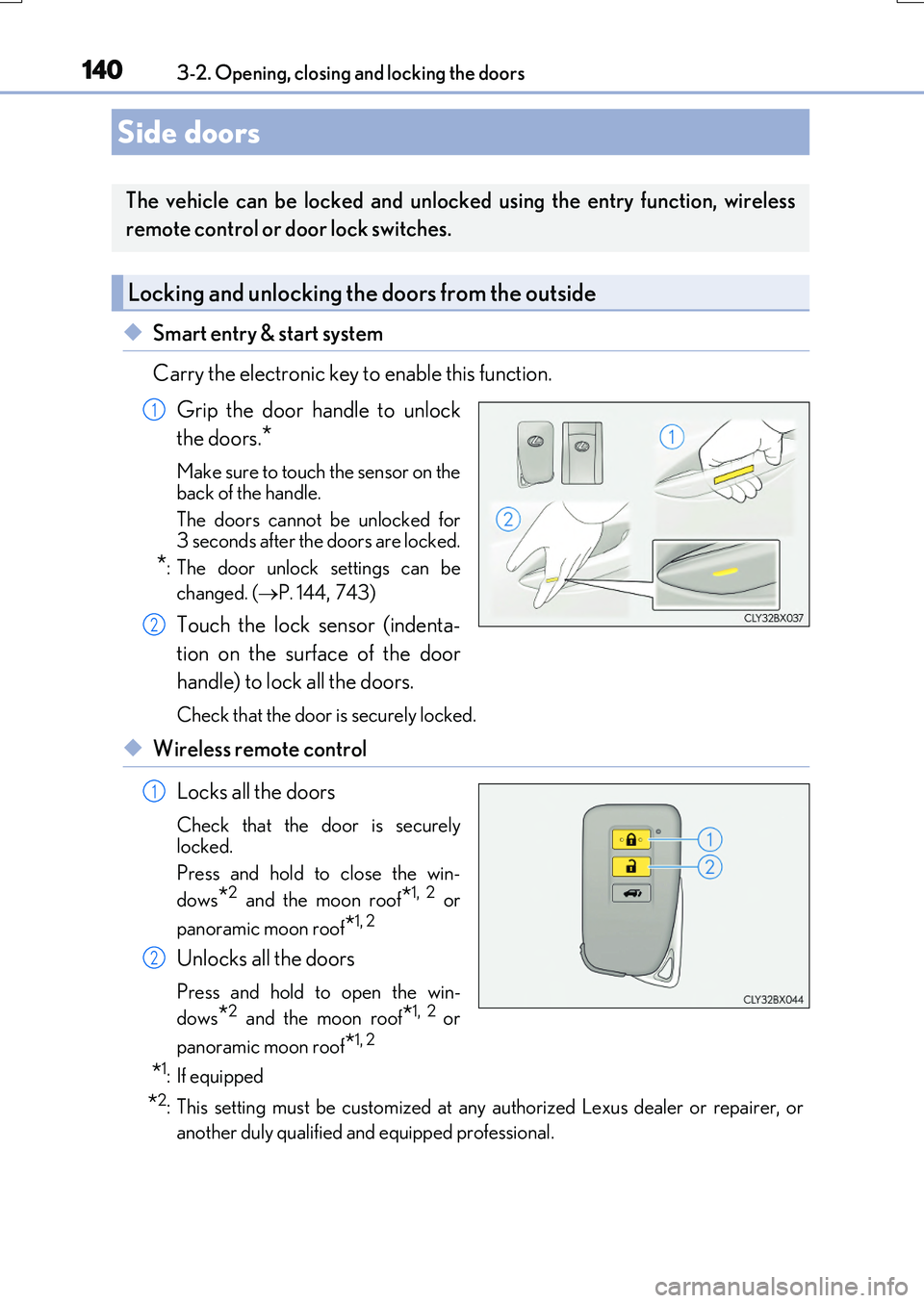
◆Smart entry & start system
Carry the electronic key to enable this function.
Grip the door handle to unlock
the doors.*
Make sure to touch the sensor on the
back of the handle.
The doors cannot be unlocked for 3 seconds after the doors are locked.
*: The door unlock settings can be
changed. ( P. 144,743)
Touch the lock sensor (indenta-
tion on the surface of the door
handle) to lock all the doors.
Check that the door is securely locked.
◆Wireless remote control
Locks all the doors
Check that the door is securely
locked.
Press and hold to close the win-
dows*2 and the moon roof*1, 2 or
panoramic moon roof*1, 2
Unlocks all the doors
Press and hold to open the win-
dows*2 and the moon roof*1, 2 or
panoramic moon roof*1, 2
*1: If equipped
*2: This setting must be customized at any authorized Lexus dealer or repairer, or
another duly qualified and equipped professional.
Side doors
The vehicle can be locked and unlocked using the entry function, wireless
remote control or door lock switches.
Locking and unlocking the doors from the outside
1
2
1
2
Page 145 of 776
1453-2. Opening, closing and locking the doors
3
Operation of each component
RX350/RX200t_EE_OM48F32E
■Conditions affecting the operation of the smart entry & start system or wireless remote control
P. 170
■Customization
Some functions can be customized. ( P. 740)
WARNING
■To prevent an accident
Observe the following precautions while driving the vehicle.
Failure to do so may result in a door open ing and an occupant falling out, resulting in death or serious injury.
●Ensure that all doors are properly closed and locked.
●Do not pull the inside handle of the doors while driving.
Be especially careful for the front doors, as the doors may be opened even if the inside lock buttons are in locked position.
●Set the rear door child-protector locks wh en children are seated in the rear seats.
■When opening or closing a door
Check the surroundings of the vehicle such as whether the vehicle is on an incline,
whether there is enough space for a door to open and whether a strong wind is blow- ing. When opening or closing the door, hold the door handle tightly to prepare for any unpredictable movement.
■When using the wireless remote control and operating the power windows or themoon roof or panoramic moon roof
Operate the power windows or the moon roof or panoramic moon roof after checking
to make sure that there is no possibility of any passenger having any of their body parts caught in the windows or the moon roof or panoramic moon roof. Also, do not allow children to operate the wireless remote contro l. It is possible for children and other
passengers to get caught in the power windows or the moon roof or panoramic moon roof.
Page 146 of 776
1463-2. Opening, closing and locking the doors
RX350/RX200t_EE_OM48F32E
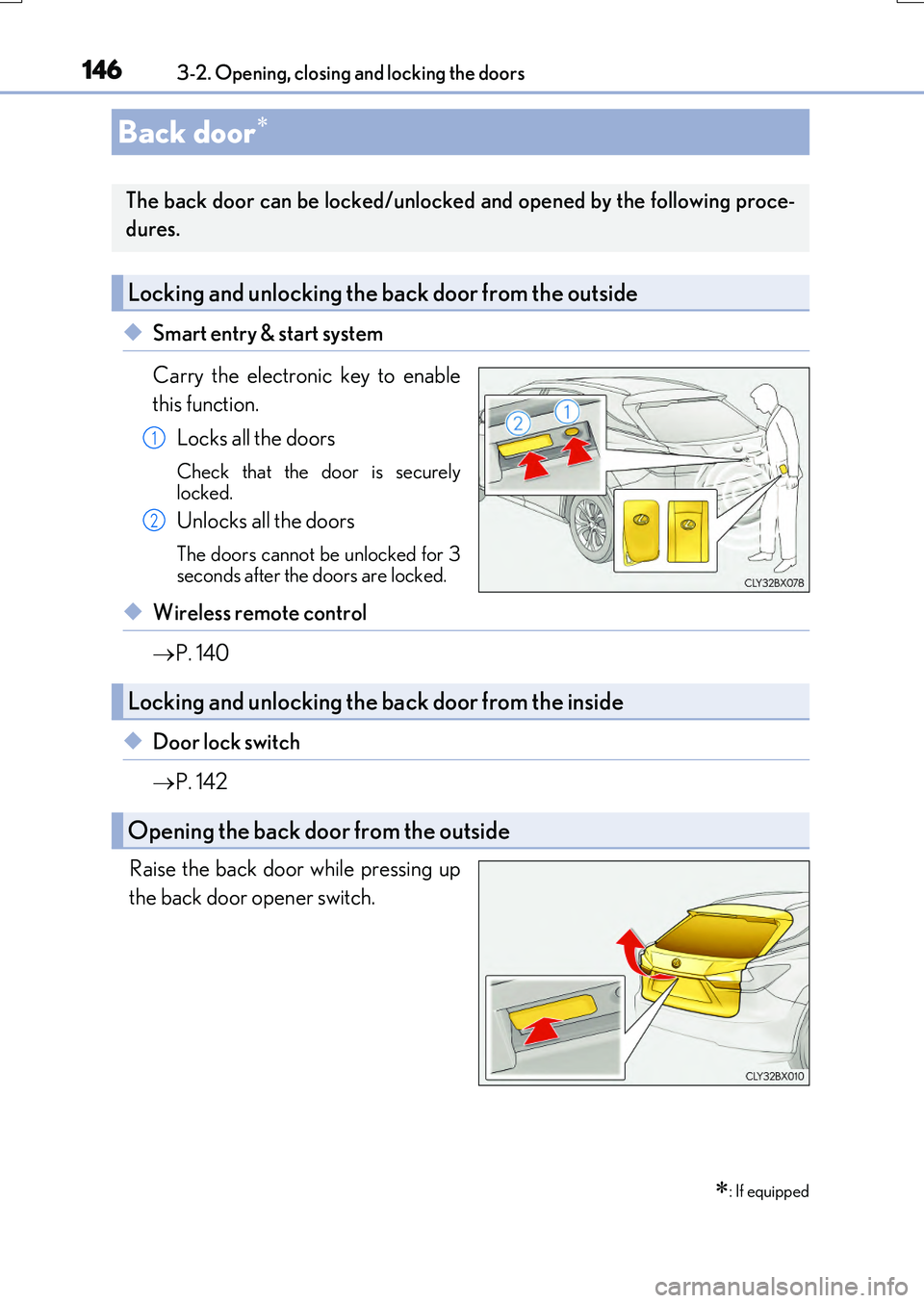
◆Smart entry & start system
Carry the electronic key to enable
this function.
Locks all the doors
Check that the door is securely
locked.
Unlocks all the doors
The doors cannot be unlocked for 3
seconds after the doors are locked.
◆Wireless remote control
P. 140
◆Door lock switch
P. 142
Raise the back door while pressing up
the back door opener switch.
Back door
: If equipped
The back door can be locked/unlocked and opened by the following proce-
dures.
Locking and unlocking the back door from the outside
1
2
Locking and unlocking the back door from the inside
Opening the back door from the outside
Page 149 of 776

1493-2. Opening, closing and locking the doors
3
Operation of each component
RX350/RX200t_EE_OM48F32E
WARNING
■Operating the back door
Observe the following precautions. Failure to do so may cause parts of the body to be caught, resulting in death or serious
injury.
●Remove any heavy loads, such as snow and ic e, from the back door before opening it. Failure to do so may cause the back door to suddenly shut again after it is opened.
●When opening or closing th e back door, thoroughly check to make sure the sur- rounding area is safe.
●If anyone is in the vicinity, make sure they are safe and let them know that the back
door is about to open or close.
●Use caution when opening or closing the b ack door in windy weather as it may move abruptly in strong wind.
●Do not pull on the back door damper stay ( P. 150) to close the back door, and do not hang on the back door damper stay. Doing so may cause hands to be caught or the back door damper stay to break,
causing an accident.
●If a bicycle carrier or similar heavy object is attached to the back door, it may sud- denly shut again after being opened, causing someone’s hands, arms, head or neck to
be caught and injured. When installing an accessory part to the back door, using a genuine Lexus part is recommended.
●The back door may suddenly shut if it is notopened fully. It is more difficult to open or
close the back door on an incline than on a level surface, so beware of the back doorunexpectedly opening or closing by itself.
Make sure that the back door is fully open and secure before using the luggage compart-ment.
●When closing the back door, take extra care
to prevent your fingers, etc., from being caught.
●When closing the back door, make sure to
press it lightly on its outer surface. If the back door handle is used to fully close the backdoor, it may result in hands or arms being
caught.
Page 151 of 776
1513-2. Opening, closing and locking the doors
3
Operation of each component
RX350/RX200t_EE_OM48F32E
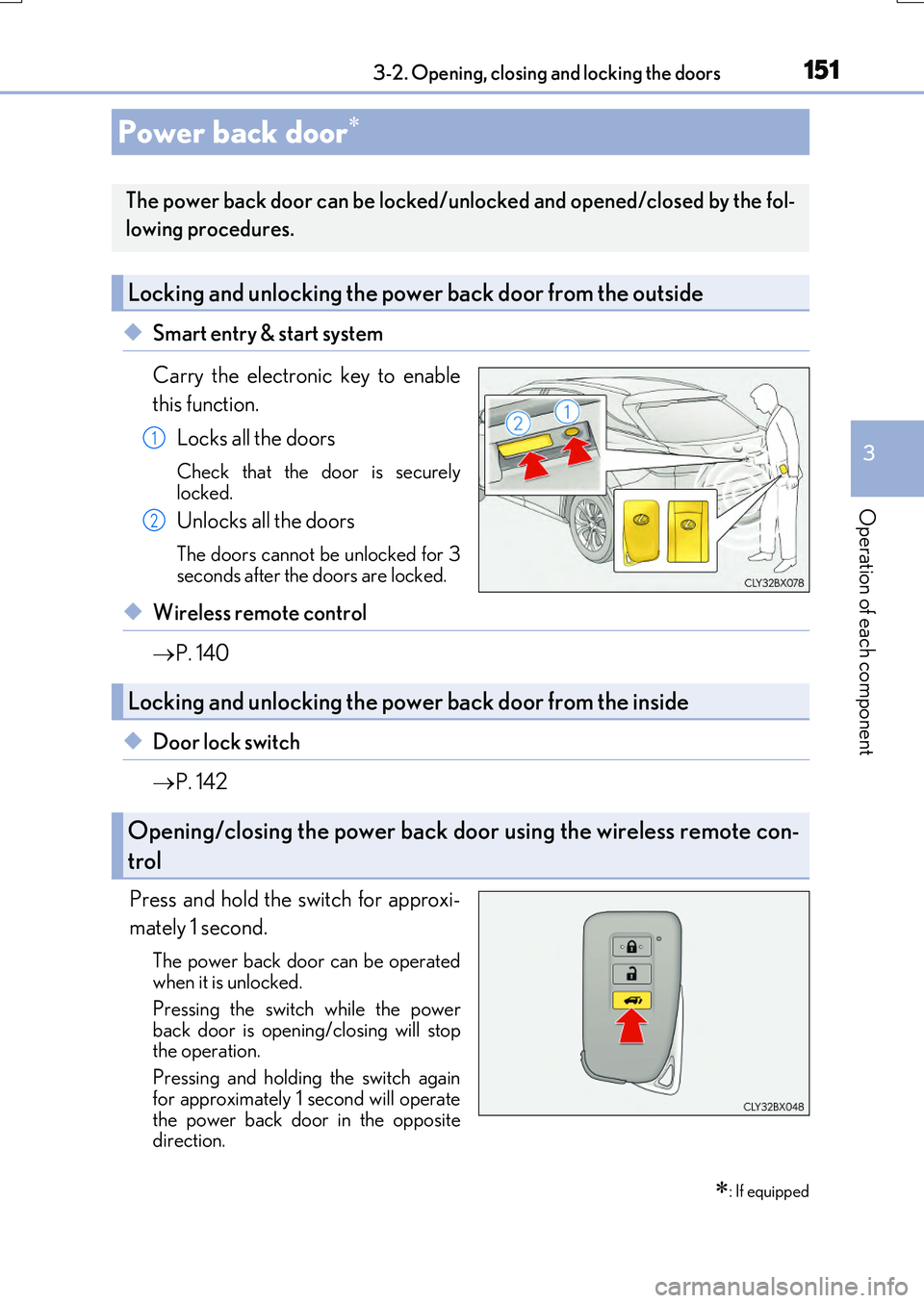
◆Smart entry & start system
Carry the electronic key to enable
this function.
Locks all the doors
Check that the door is securely
locked.
Unlocks all the doors
The doors cannot be unlocked for 3
seconds after the doors are locked.
◆Wireless remote control
P. 140
◆Door lock switch
P. 142
Press and hold the switch for approxi-
mately 1 second.
The power back door can be operated
when it is unlocked.
Pressing the switch while the power
back door is open ing/closing will stop
the operation.
Pressing and holding the switch again
for approximately 1 second will operate
the power back door in the opposite
direction.
Power back door
: If equipped
The power back door can be locked/unlocked and opened/closed by the fol-
lowing procedures.
Locking and unlocking the power back door from the outside
1
2
Locking and unlocking the power back door from the inside
Opening/closing the power back door using the wireless remote con-
trol
Page 152 of 776

1523-2. Opening, closing and locking the doors
RX350/RX200t_EE_OM48F32E
Press and hold the switch for approxi-
mately 1 second.
A buzzer will sound and the power back
door will automatically open or close. However, if the power back door islocked, it will not open.
Pressing the switch while the power back door is open ing/closing will stop the operation.
Pressing and holding the switch again for approximately 1 second will operate the power back door in the opposite
direction.
■Back door opener switch
When the power back door is
unlocked: Press the back door
opener switch.
When the power back door is
locked: While carrying an elec-
tronic key, press the back door
opener switch to unlock the power
back door and then press the back
door opener switch again.
A buzzer will sound and the power b ack door will automatically open.
Pressing the switch while the power back door is opening/closing will stop the operation.
■Wireless remote control
P. 151
Opening/closing the power back door from the inside
Opening the power back door from the outside
Page 153 of 776
1533-2. Opening, closing and locking the doors
3
Operation of each component
RX350/RX200t_EE_OM48F32E
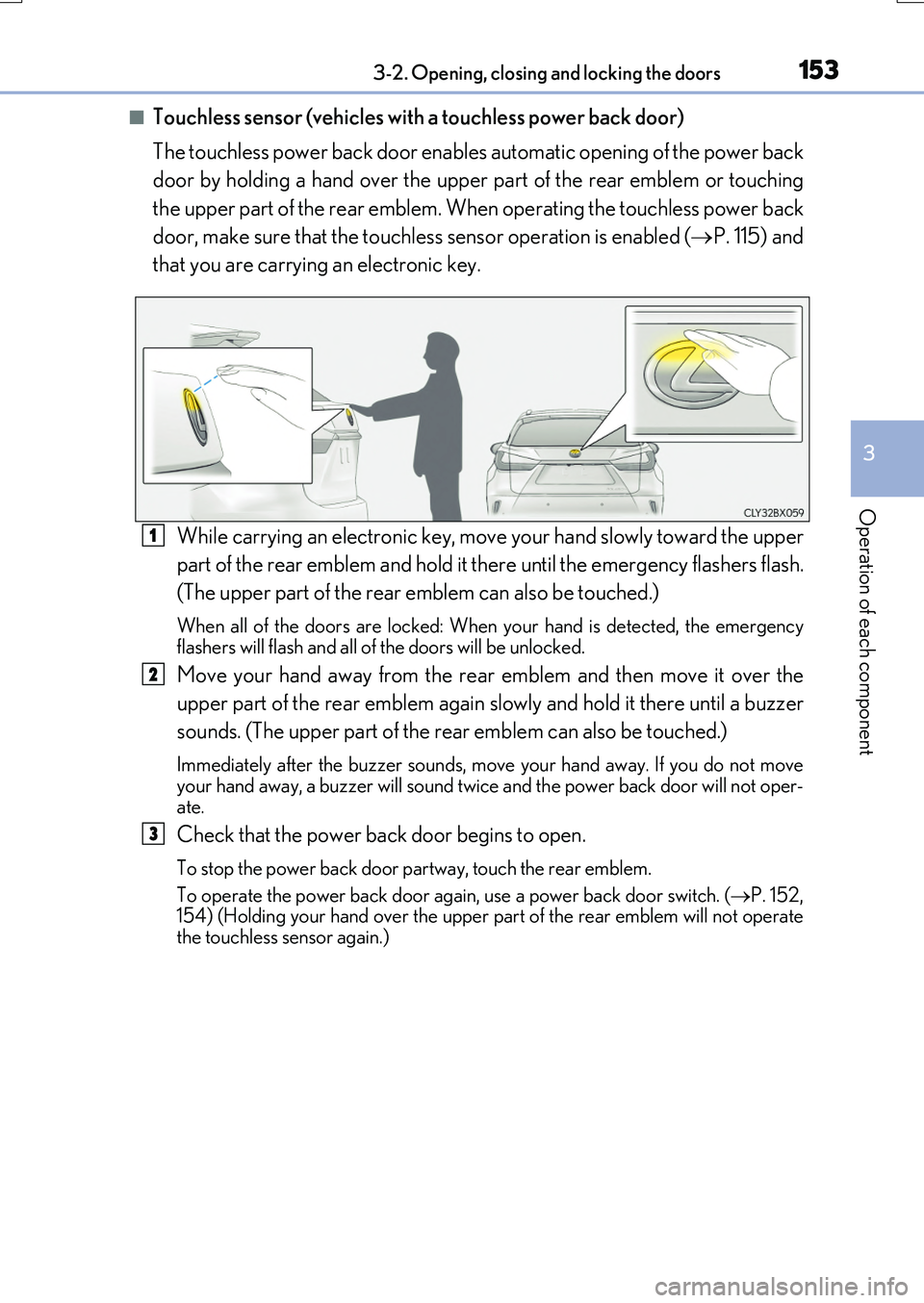
■Touchless sensor (vehicles with a touchless power back door)
The touchless power back door enable s automatic opening of the power back
door by holding a hand over the upper part of the rear emblem or touching
the upper part of the rear emblem. When operating the touchless power back
door, make sure that the touchless sensor operation is enabled ( P. 115) and
that you are carrying an electronic key.
While carrying an electronic key, move your hand slowly toward the upper
part of the rear emblem and hold it there until the emergency flashers flash.
(The upper part of the rear emblem can also be touched.)
When all of the doors are locked: When your hand is detected, the emergency flashers will flash and all of the doors will be unlocked.
Move your hand away from the rear emblem and then move it over the
upper part of the rear emblem again slowly and hold it there until a buzzer
sounds. (The upper part of the re ar emblem can also be touched.)
Immediately after the buzzer sounds, move your hand away. If you do not move your hand away, a buzzer will sound twice and the power back door will not oper-
ate.
Check that the power back door begins to open.
To stop the power back door partway, touch the rear emblem.
To operate the power back door again, use a power back door switch. ( P. 152, 154) (Holding your hand over the upper part of the rear emblem will not operate
the touchless sensor again.)
1
2
3