car LEXUS RX200T 2017 Owner's Guide
[x] Cancel search | Manufacturer: LEXUS, Model Year: 2017, Model line: RX200T, Model: LEXUS RX200T 2017Pages: 776, PDF Size: 44.51 MB
Page 160 of 776
1603-2. Opening, closing and locking the doors
RX350/RX200t_EE_OM48F32E
■Situations in which the touchless sensor may malfunction (vehicles with a touchless power back door)
In the following situations, the touchless sensor may operate unintentionally.
To prevent unintentional operation, keep the electronic key out of the operational range or disable the touchless sensor operation. ( P. 115)
●When a large amount of water is applied to the rear emblem, such as in heavy rain
●When the vehicle is being washed and water is applied to the rear emblem
●When dirt is wiped off the rear emblem
●If someone leans toward or against the rear emblem
●When a metal object is brought near the rear emblem
●When a vehicle cover is installed or removed near the rear emblem
■Situations in which the touchless sensor may not operate properly (vehicles with a
touchless power back door)
If the touchless sensor does not operate in the following situations, use the back door opener switch to open the power back door. ( P. 154)
●In the following situations, the sensitivity of the touchless sensor may be temporarily reduced and the touchless sensor may not operate:
• When a large amount of wate r is applied to the rear emblem, such as in heavy rain
• When the vehicle is being washed and water is applied to the rear emblem • For several seconds after dirt is wiped off the rear emblem • When the rear emblem is covered with mud, snow, ice, etc.
• When the vehicle has been parked for a while near objects that may move and con- tact the rear emblem, such as tall grass or trees• When an external radio wave sour ce is near the touchless sensor
●The touchless sensor may not operate in the following situations:
• When an electronic key is not being carried • When an electronic key is no t within the operational range • When an external radio wave source interferes with the communication between
the vehicle and electronic key ( P. 170) • When the power back door is not fully closed• When a hand is held pa rallel to the rear emblem*
*: The detection settings can be changed by any authorized Lexus dealer or repairer,
or another duly qualified and equipped professional. ( P. 742)
■Customization
Some functions can be customized. ( P. 110, 740)
Page 162 of 776
1623-2. Opening, closing and locking the doors
RX350/RX200t_EE_OM48F32E
WARNING
■Operating the power back door
Observe the following precautions.
Failure to do so may cause parts of the body to be caught, resulting in death or serious
injury.
●Remove any heavy loads, such as snow and ice, from the power back door before
opening it. Failure to do so may cause the power back door to suddenly shut again
after it is opened.
●When opening or closing the power back do or, thoroughly check to make sure the
surrounding area is safe.
●If anyone is in the vicinity, make sure they are safe and let them know that the power
back door is about to open or close.
●Use caution when opening or closing the power back door in windy weather as it may
move abruptly in strong wind.
●Do not pull on the back door spindle ( P. 165) to close the power back door, and
do not hang on the back door spindle.
Doing so may cause hands to be caught or the back door spindle to break, causing
an accident.
●If a bicycle carrier or similar heavy object is attached to the power back door, it may
suddenly shut again after being opened, causing someone’s hands, arms, head or
neck to be caught and injured. When installing an accessory part to the power back
door, using a genuine Lexus part is recommended.
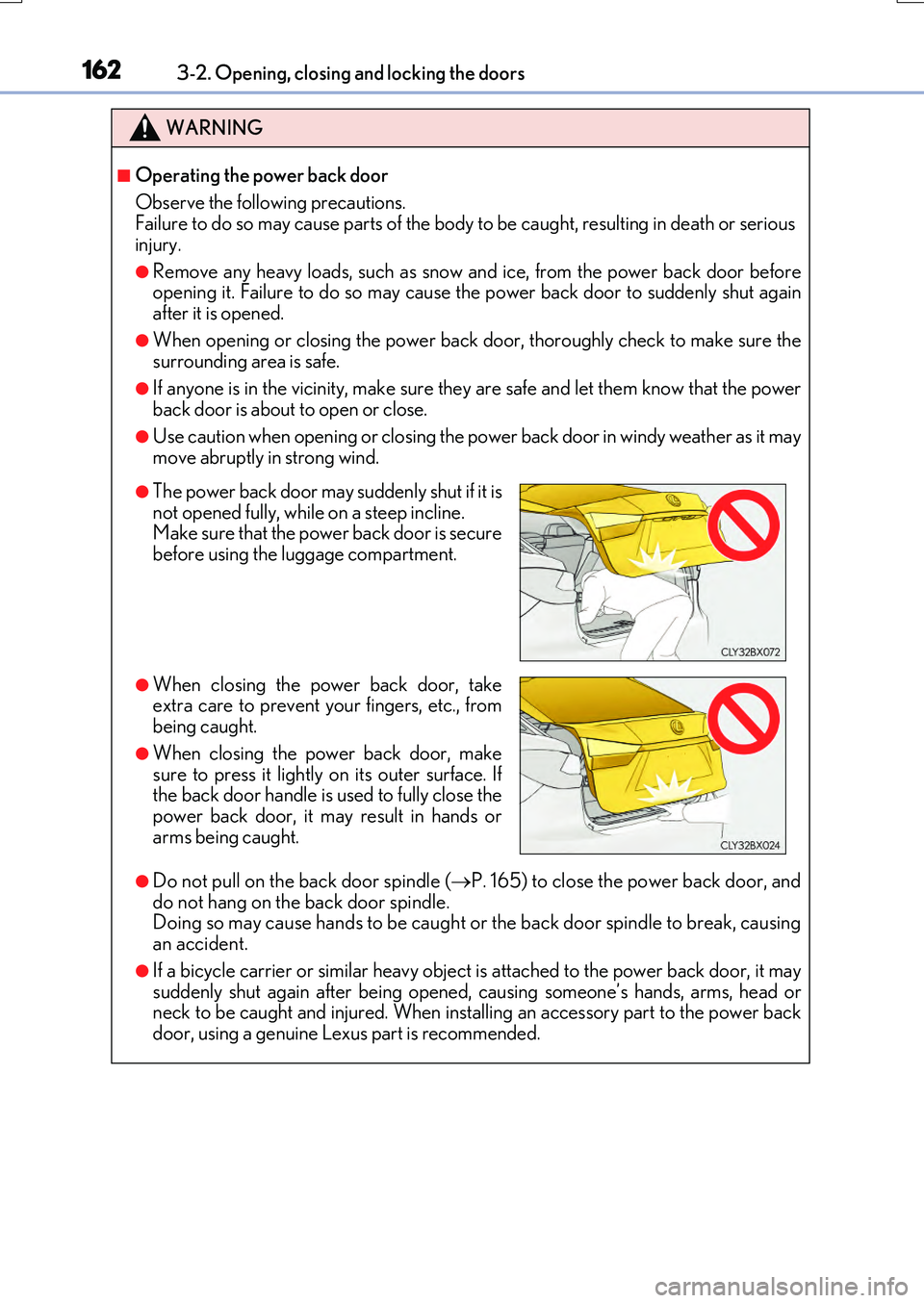
●The power back door may suddenly shut if it is
not opened fully, while on a steep incline.
Make sure that the power back door is secure
before using the luggage compartment.
●When closing the power back door, take
extra care to prevent your fingers, etc., from
being caught.
●When closing the power back door, make
sure to press it lightly on its outer surface. If
the back door handle is used to fully close the
power back door, it may result in hands or
arms being caught.
Page 163 of 776

1633-2. Opening, closing and locking the doors
3
Operation of each component
RX350/RX200t_EE_OM48F32E
WARNING
■Back door closer
●Use caution when using the back door closer as it still operates when the power back door system is disabled.
■Power back door
Observe the following precautions when operating the power back door. Failure to do so may cause death or serious injury.
●Check the safety of the surrounding area to make sure there are no obstacles or any-thing that could cause any of your belongings to get caught.
●If anyone is in the vicinity, make sure they are safe and let them know that the power
back door is about to open or close.
●If the power back door system is disabled ( P. 115) while the power back door is operating, the power back door will stop operating. The power back door must then
be operated manually. Take extra care in th is situation, as the power back door may open or close suddenly.
●If the operating conditions of the power back door (P. 156) are no longer met, a
buzzer may sound and the power back door may stop opening or closing. The power back door must then be operated manually. Take extra care on an incline in this situa-tion, as the power back door may move suddenly.
●On an incline, the power back door may suddenly shut after it opens. Make sure thepower back door is fully open and secure.
●In the following situations, the power back door may detect an abnormality and auto-
matic operation may be stopped. In this case, the power back door must then be operated manually. Take extra care in this situation, as the stopped power back door may suddenly open or close, causing an accident.
• When the power back door contacts an obstacle • When the battery voltage suddenly drops, such as when the engine switch isturned to IGNITION ON mode or the engine is started during automatic opera-
tion
●In the event that the power back door is left
slightly open, the back door closer will auto- matically close it to the fully closed position. Ittakes several seconds before the back door
closer begins to operate. Be careful not to get fingers caught or anything else in the powerback door, as this may cause bone fractures
or other serious injuries.
Page 164 of 776
1643-2. Opening, closing and locking the doors
RX350/RX200t_EE_OM48F32E
WARNING
●If a bicycle carrier or similar heavy object is attached to the power back door, the power back door may not operate, causin g a malfunction, or the power back door may suddenly shut again after being opened, causing someone’s hands, arms, head
or neck to be caught and injured. When installing an accessory part to the power back door, using a genuine Lexus part is recommended.
■Jam protection function
Observe the following precautions. Failure to do so may cause death or serious injury.
●Never use any part of your body to intent ionally activate the jam protection function.
●The jam protection function may not work if something gets caught just before the power back door fully closes. Be careful not to get fingers caught or anything else.
●The jam protection function may not work depending on the shape of the object that
is caught. Be careful not to catch fingers or anything else.
Page 165 of 776
1653-2. Opening, closing and locking the doors
3
Operation of each component
RX350/RX200t_EE_OM48F32E
NOTICE
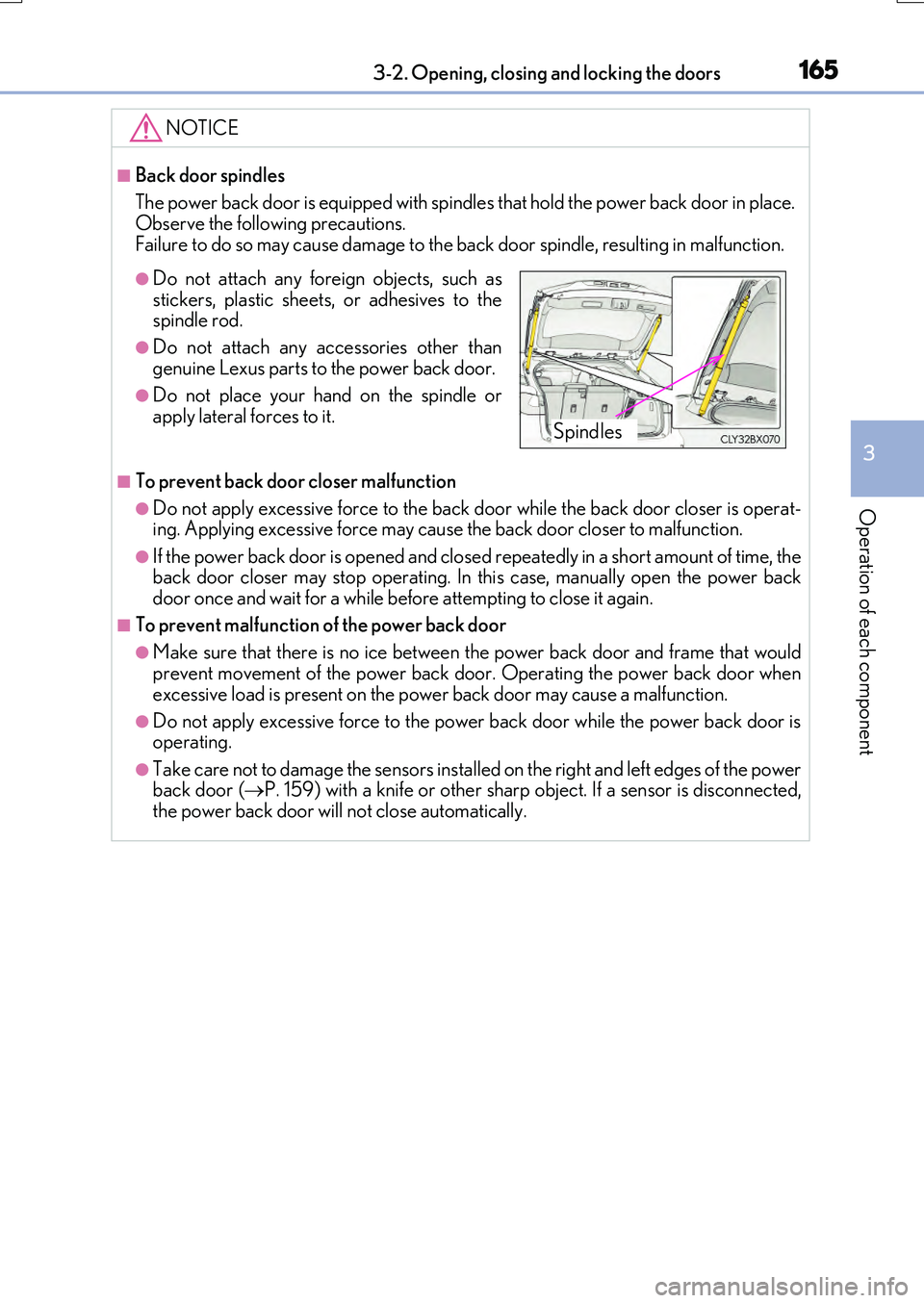
■Back door spindles
The power back door is equipped with spindl es that hold the power back door in place. Observe the following precautions.
Failure to do so may cause damage to the back door spindle, resulting in malfunction.
■To prevent back door closer malfunction
●Do not apply excessive force to the back door while the back door closer is operat- ing. Applying excessive force may cause the back door closer to malfunction.
●If the power back door is opened and closed repeatedly in a short amount of time, the back door closer may stop operating. In this case, manually open the power back door once and wait for a while before attempting to close it again.
■To prevent malfunction of the power back door
●Make sure that there is no ice between the power back door and frame that wouldprevent movement of the power back door. Operating the power back door when
excessive load is present on the power back door may cause a malfunction.
●Do not apply excessive force to the power back door while the power back door is operating.
●Take care not to damage the sensors installed on the right and left edges of the powerback door ( P. 159) with a knife or other sharp object. If a sensor is disconnected, the power back door will not close automatically.
●Do not attach any foreign objects, such as
stickers, plastic sheets, or adhesives to the spindle rod.
●Do not attach any accessories other than
genuine Lexus parts to the power back door.
●Do not place your hand on the spindle or apply lateral forces to it.Spindles
Page 166 of 776
1663-2. Opening, closing and locking the doors
RX350/RX200t_EE_OM48F32E
NOTICE
■Touchless sensor precautions (vehicles with a touchless power back door)
The touchless sensor is located behind the rear emblem. Observe the following to ensure that the touchless power back door function operates properly:
●Operate the touchless sensor while carrying an electronic key within the operationalrange.
●Keep the rear emblem clean at all times.
If the rear emblem is dirty or covered wi th snow, the touchless sensor may not oper- ate. In this situation, clean off the dirt or snow, move the vehicle from the current posi- tion and then check if the touchless sensor operates. If it does not operate, have the
vehicle inspected by any authorized Lexus dealer or repairer, or another duly quali- fied and equipped professional.
●Do not apply coatings that have a rain clea ring (hydrophilic) effect, or other coatings,
to the rear emblem.
●Do not park the vehicle near objects that may move and contact the rear emblem, such as tall grass or trees.
If the vehicle has been parked for a while near objects that may move and contact the rear emblem, such as tall grass or trees, th e touchless sensor may not operate. In this situation, move the vehicle from the current position and then check if the touchless
sensor operates. If it does not operate, have the vehicle inspected by any authorized Lexus dealer or repairer, or another du ly qualified and equipped professional.
●Do not subject the touchless sensor or its surrounding area to a strong impact.
If the touchless sensor or its surrounding ar ea has been subjected to a strong impact, the touchless sensor may not operate properly.
If the touchless sensor does not operate in the following situations, have the vehicle
inspected by any authorized Lexus dealer or repairer, or another duly qualified and equipped professional.
• The touchless sensor or its surrounding area has been subjected to a strong
impact. • The rear emblem is scratched or damaged.
●Do not disassemble the rear emblem.
●Do not attach stickers to the rear emblem.
●Do not paint the rear emblem.
●If a bicycle carrier or similar heavy object is attached to the power back door, disablethe touchless sensor. ( P. 115)
Page 168 of 776
1683-2. Opening, closing and locking the doors
RX350/RX200t_EE_OM48F32E
●Locks and unlocks the doors (P. 140)
●Locks and unlocks the back door (P. 146, 151)
●Starts and stops the engine (P. 246)
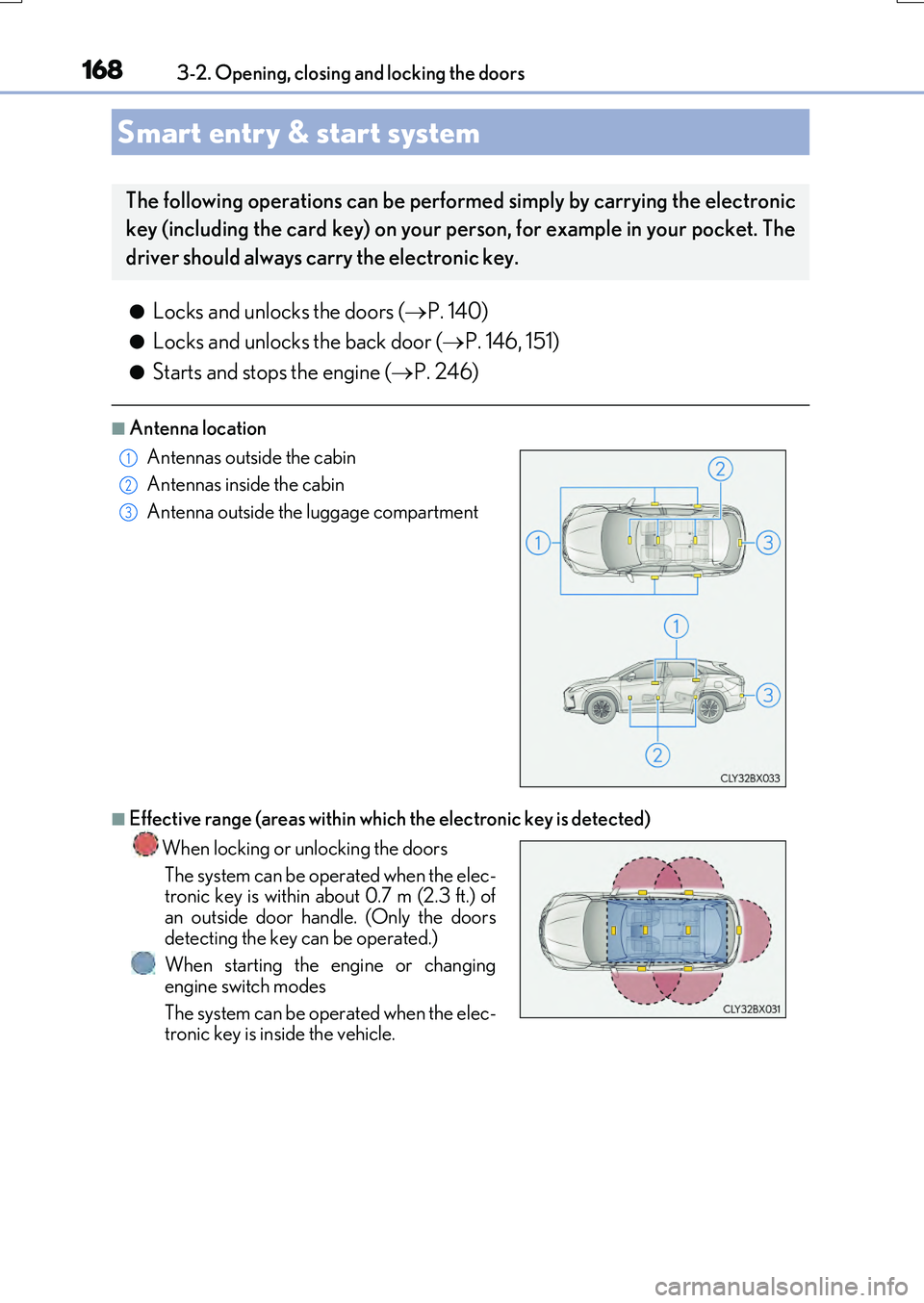
■Antenna location
■Effective range (areas within which the electronic key is detected)
Smart entry & start system
The following operations can be performed simply by carrying the electronic
key (including the card key) on your person, for example in your pocket. The
driver should always carry the electronic key.
Antennas outside the cabin
Antennas inside the cabin
Antenna outside the luggage compartment
When locking or unlocking the doors
The system can be operated when the elec- tronic key is within about 0.7 m (2.3 ft.) of
an outside door handle. (Only the doors detecting the key can be operated.)
When starting the engine or changing
engine switch modes
The system can be operated when the elec- tronic key is inside the vehicle.
1
2
3
Page 170 of 776
1703-2. Opening, closing and locking the doors
RX350/RX200t_EE_OM48F32E
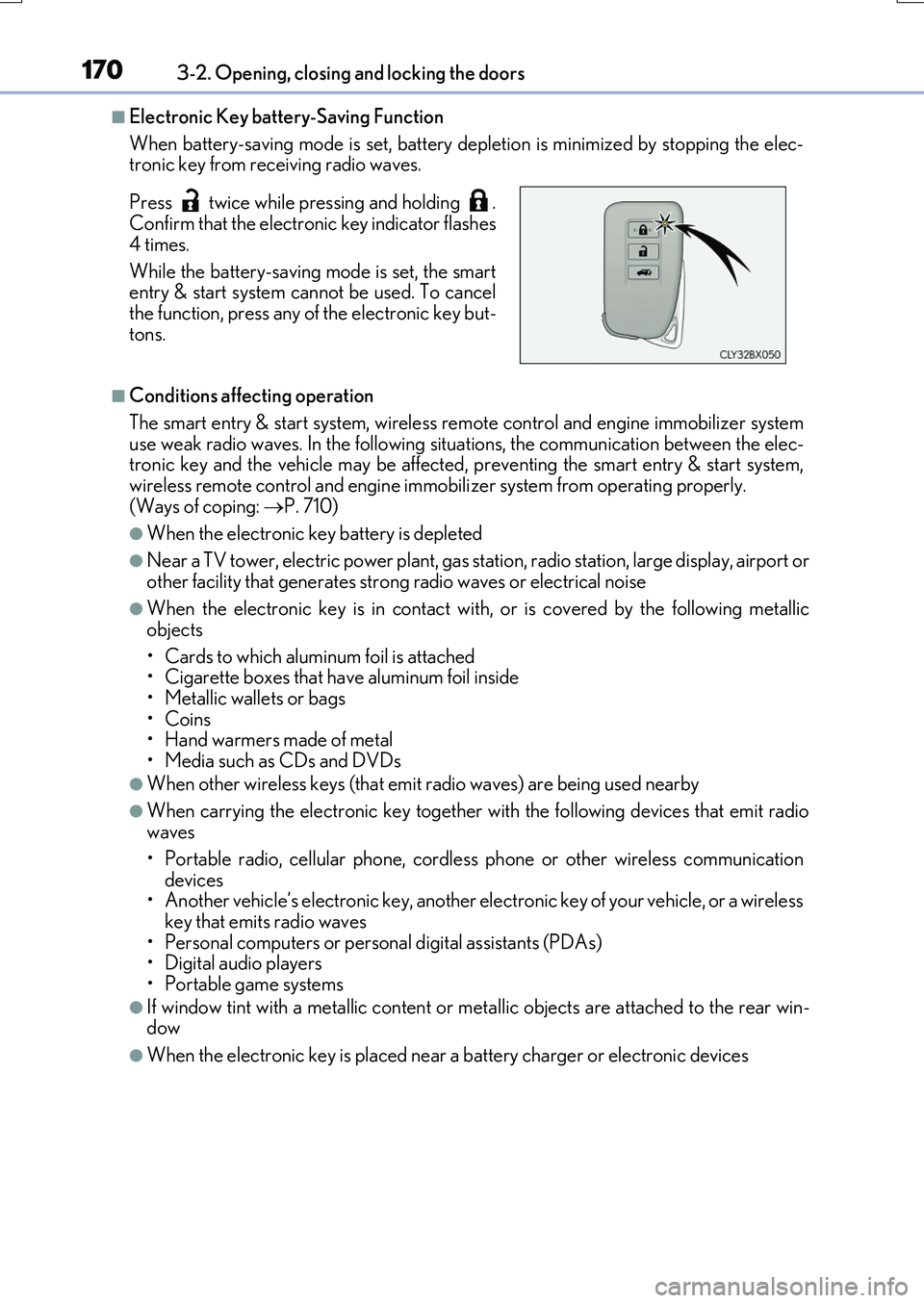
■Electronic Key battery-Saving Function
When battery-saving mode is set, battery depl etion is minimized by stopping the elec- tronic key from receiving radio waves.
■Conditions affecting operation
The smart entry & start system, wireless re mote control and engine immobilizer system use weak radio waves. In the following si tuations, the communication between the elec- tronic key and the vehicle may be affected, preventing the smart entry & start system,
wireless remote control and engine immob ilizer system from operating properly. (Ways of coping: P. 710)
●When the electronic key battery is depleted
●Near a TV tower, electric power plant, gas station, radio station, large display, airport or other facility that gene rates strong radio waves or electrical noise
●When the electronic key is in contact with, or is covered by the following metallic
objects
• Cards to which aluminum foil is attached • Cigarette boxes that have aluminum foil inside
• Metallic wallets or bags •Coins• Hand warmers made of metal
• Media such as CDs and DVDs
●When other wireless keys (that emit radio waves) are being used nearby
●When carrying the electronic key together with the following devices that emit radio waves
• Portable radio, cellular phone, cordle ss phone or other wireless communication
devices • Another vehicle’s electronic key, another electronic key of your vehicle, or a wirelesskey that emits radio waves
• Personal computers or personal digital assistants (PDAs) • Digital audio players• Portable game systems
●If window tint with a metallic content or me tallic objects are attached to the rear win- dow
●When the electronic key is placed near a battery charger or electronic devices
Press twice while pressing and holding . Confirm that the electronic key indicator flashes
4 times.
While the battery-saving mode is set, the smart entry & start system cannot be used. To cancel
the function, press any of the electronic key but- tons.
Page 171 of 776

1713-2. Opening, closing and locking the doors
3
Operation of each component
RX350/RX200t_EE_OM48F32E
■Note for the entry function
●Even when the electronic key is within the effective range (detection areas), the system may not operate properly in the following cases:
• The electronic key is too close to the window or outside door handle, near the ground, or in a high place when the doors are locked or unlocked.• The electronic key is near the ground or in a high place, or too close to the rear
bumper center when the back door is opened. • The electronic key is on the instrument panel, luggage compartment, floor, or in thedoor pockets or glove box when the engine is started or engine switch modes are
changed.
●Do not leave the electronic key on top of th e instrument panel or near the door pockets
when exiting the vehicle. Depending on the radio wave reception conditions, it may be detected by the antenna outside the cabin and the door will become lockable from theoutside, possibly trapping the electronic key inside the vehicle.
●As long as the electronic key is within the effective range, the doors may be locked orunlocked by anyone.
●Even if the electronic key is not inside the vehicle, it may be possible to start the engine
if the electronic key is near the window.
●The doors may unlock if a large amount of wa ter splashes on the door handle, such as in the rain or in a car wash when the electronic key is within the effective range. (The door
will automatically be locked after approx imately 30 seconds if the doors are not opened and closed.)
●If the wireless remote control is used to lock the doors when the electronic key is near
the vehicle, there is a possibility that the d oor may not be unlocked by the entry func- tion. (Use the wireless remote control to unlock the doors.)
●Touching the door lock sensor while wearin g gloves may delay or prevent lock opera-
tion. Remove the gloves and to uch the lock sensor again.
●If the door handle becomes wet while the electronic key is within the effective range,
the door may lock and unlock repeatedly. In that case, follow the following correction
procedures to wash the vehicle:
• Place the electronic key in a location 2 m (6 ft.) or more away from the vehicle. (Take
care to ensure that the key is not stolen.)
• Set the electronic key to battery-saving mode to disable the smart entry & start sys-
tem. ( P. 170)
●If the electronic key is inside the vehicle and a door handle becomes wet during a car wash, a message may be shown on the mult i-information display and a buzzer will
sound outside the vehicle. To turn off the alarm, lock all the doors.
●The lock sensor may not work properly if it comes into contact with ice, snow, mud, etc. Clean the lock sensor and attempt to operate it again.
●A sudden approach to the effective range or door handle may prevent the doors frombeing unlocked. In this case, return the door handle to the original position and check that the doors unlock before pulling the door handle again.
●If there is another electronic key in the de tection area, it may take slightly longer to unlock the doors after the door handle is gripped.
●Fingernails may scrape against the door duri ng operation of the door handle. Be care-
ful not to injure fingernails or damage the surface of the door.
Page 172 of 776
1723-2. Opening, closing and locking the doors
RX350/RX200t_EE_OM48F32E
■When the vehicle is not driven for extended periods
●To prevent theft of the vehicle, do not leave the electronic key within 2 m (6 ft.) of the vehicle.
●The smart entry & start system can be deactivated in advance. ( P. 740)
■To operate the system properly
Make sure to carry the electronic key when operating the system. Do not get the elec-
tronic key too close to the vehicle when op erating the system from the outside of the vehicle.
Depending on the position and holding condit ion of the electronic key, the key may not
be detected correctly and the system may not operate properly. (The alarm may go off accidentally, or the door lock prevention may not operate.)
■If the smart entry & start system does not operate properly
●Locking and unlocking the doors: Use the mechanical key. ( P. 710)
●Starting the engine: P. 712
■Customization
Some functions can be customized. ( P. 740)
■If the smart entry & start system has been deactivated in a customized setting
●Locking and unlocking the doors:
Use the wireless remote control or mechanical key. ( P. 140, 151, 710)
●Starting the engine and changing engine switch modes: P. 712
●Stopping the engine: P. 246