speed warning LEXUS RX200T 2017 Owner's Guide
[x] Cancel search | Manufacturer: LEXUS, Model Year: 2017, Model line: RX200T, Model: LEXUS RX200T 2017Pages: 776, PDF Size: 44.51 MB
Page 320 of 776
3204-5. Using the driving support systems
RX350/RX200t_EE_OM48F32E
■Operation conditions of each function
●Lane departure alert function
This function operates when all of the following conditions are met.
• LKA is turned on.
• Vehicle speed is approximately 50 km/h (32 mph) or more.
• System recognizes white (yellow) lines.
• Width of traffic lane is approximately 3 m (9.8 ft.) or more.
• Turn signal lever is not operated.
• Vehicle is driven on a straight road or around a gentle curve with a radius of more than approximately 150 m (492 ft.).
• No system malfunctions are detected. ( P. 666)
●Lane departure control function
This function operates when all of the follo wing conditions are met in addition to the
operation conditions for the la ne departure alert function.
• Setting for “Steering Assist” in of the multi-information display is set to “On”.
( P. 110)
• Vehicle is not accelerated or decelerated by a fixed amount or more.
• Steering wheel is not operated with a steering force level suitable for changing
lanes.
• ABS, VSC, TRC and PCS are not operating.
• TRC or VSC is not turned off.
• Except for Israel: Hands off steerin g wheel alert is not displayed. (P. 321)
●Vehicle sway warning
This function operates when all of the following conditions are met.
• Setting for “Sway Warning” in of the multi-information display is set to “On”.
( P. 110)
• Vehicle speed is approximately 50 km/h (32 mph) or more.
• Width of traffic lane is approximately 3 m (9.8 ft.) or more.
• No system malfunctions are detected. ( P. 666)
●Lane-keeping assist function
This function operates when all of the following conditions are met.
• LKA is turned on.
• Setting for “Lane Center” in of the mu lti-information display are set to “On”.
( P. 110)
• System recognizes white (yellow) lines.
• Dynamic radar cruise control with full-speed range is operating.
• Width of traffic lane is approximately 2.5 to 4.1 m (8.2 to 13.5 ft.).
• Turn signal lever is not operated.
• Vehicle is driven on a straight road or around a gentle curve with a radius of more
than approximately 200 m (656 ft.).
• No system malfunctions are detected. ( P. 666)
• Vehicle does not accelerate or de celerate by a fixed amount or more.
• Steering wheel is not operated with a steering force level suitable for changing
lanes.
• ABS, VSC, TRC and PCS are not operating.
• TRC or VSC is not turned off.
• Except for Israel: Hands off steering wheel alert ( P. 321) is not displayed.
• Lane departure control function is not operating.
Page 321 of 776
3214-5. Using the driving support systems
4
Driving
RX350/RX200t_EE_OM48F32E
■Temporary cancellation of functions
When operation conditions are no longer met, a function may be temporarily canceled. However, when the operation conditions are met again, operation of the function is auto-
matically restored. ( P. 320)
■Lane departure control function/lane-keeping assist function
Depending on the vehicle speed, lane departure situation, road conditions, etc., the
operation of the functions may not be reco gnized or the functions may not operate.
■Lane departure alert function
The warning buzzer may be difficult to hear due to external noise, audio playback, etc.
Also, it may be difficult to feel steering wh eel vibrations due to the road conditions, etc.
■Hands off steering wheel alert
Except for Israel: When the system determines that the driver has removed their hands
from the steering wheel while the lane departure control function or lane-keeping assist function is operating, a warning message is displayed on the multi-information display. If the driver continues to keep their hands off of the steering wheel, the buzzer sounds, a
warning message is displayed and the function is temporarily canceled. This alert also operates in the same way when the vehicle is driven with the steering wheel lightlygripped. However, depending on the road conditions, etc., the function may not cancel.
For Israel: When the system determines that the driver has removed their hands from the steering wheel while the lane departure contro l function or lane-keeping assist function is operating, a warning message is displaye d on the multi-information display and the
buzzer sounds.
■White (yellow) lines are only on one side of road
The LKA system will not operate for the side on which white (yellow) lines could not be
recognized.
Page 324 of 776
3244-5. Using the driving support systems
RX350/RX200t_EE_OM48F32E
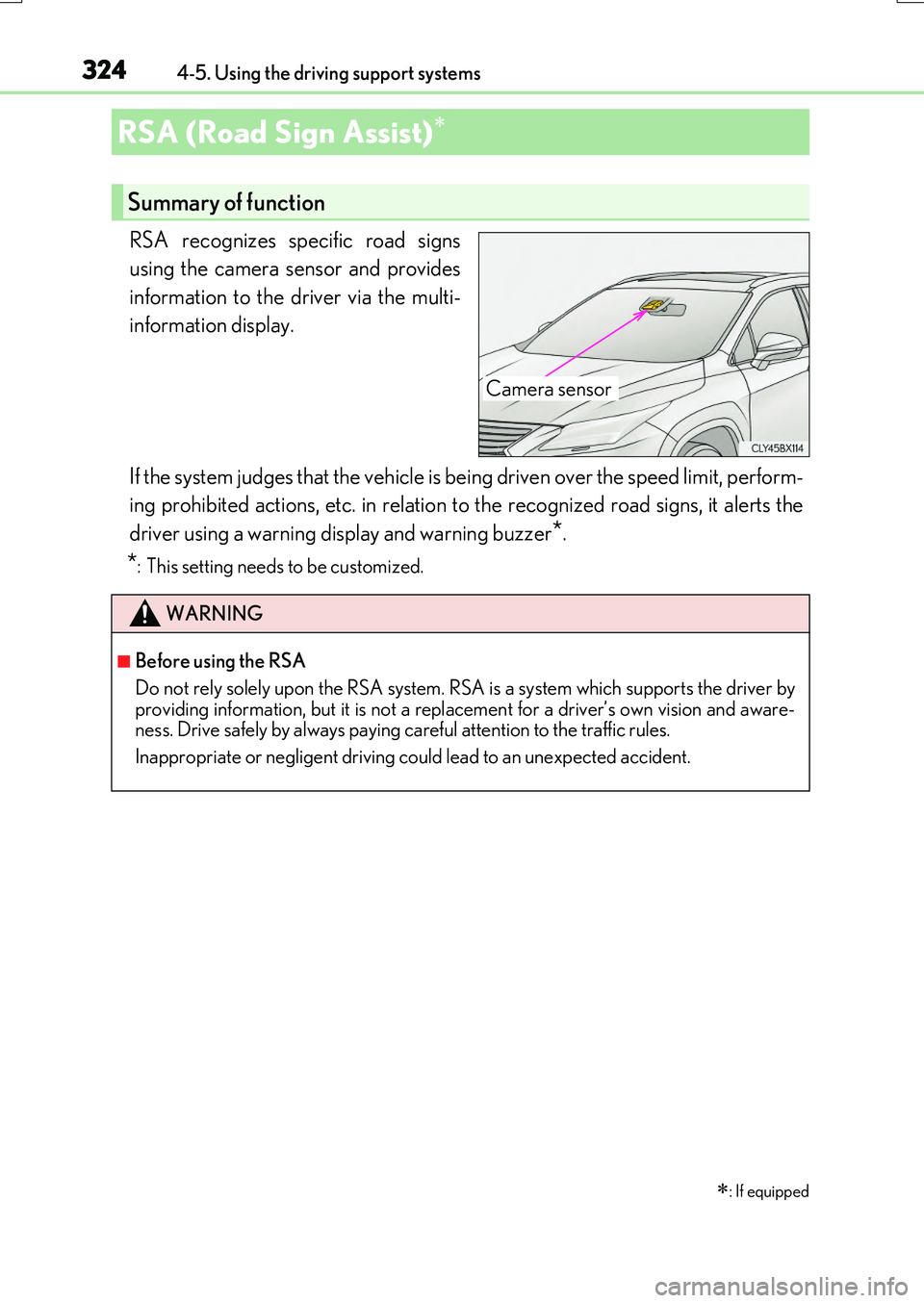
RSA recognizes specific road signs
using the camera sensor and provides
information to the driver via the multi-
information display.
If the system judges that the vehicle is being driven over the speed limit, perform-
ing prohibited actions, etc. in relation to the recognized road signs, it alerts the
driver using a warning display and warning buzzer*.
*: This setting needs to be customized.
RSA (Road Sign Assist)
: If equipped
Summary of function
Camera sensor
WARNING
■Before using the RSA
Do not rely solely upon the RSA system. RS A is a system which supports the driver by
providing information, but it is not a replacement for a driver’s own vision and aware- ness. Drive safely by always paying careful attention to the traffic rules.
Inappropriate or negligent driving could lead to an unexpected accident.
Page 327 of 776
3274-5. Using the driving support systems
4
Driving
RX350/RX200t_EE_OM48F32E
*1: If the turn signal indicator is not operated when changing lanes, the mark does not dis-
play.
*2: Vehicles with a navigation system
In the following situations, the RSA system alerts the driver using a warning dis-
play.
●When the vehicle speed exceeds the speed warning threshold applied to the
speed limit of the sign displayed on the multi-information display, the sign
color becomes inverted.
●If it is detected that your vehicle is overtaking when a no overtaking sign is dis-
played on the multi-information display, the sign flashes.
●Vehicles with a navigation system: When the RSA system recognizes a no-
entry sign and detects that the vehicle has entered a no-entry area based on
the map information of the navigation system, the no-entry sign flashes.
Depending on the situation, traffic environment (traffic direction, speed, unit)
may be detected incorrectly and a warning display may not operate properly.
■Automatic turn-off of RSA sign display
One or more signs automatically turn off in the following situations.
●A new sign is not recognized for a certain distance.
●The road changes due to a left or right turn, etc.
■Conditions in which the function may not operate or detect correctly
In the following situations, RSA does not op erate normally and may not recognize signs,
display the incorrect sign, etc. However, this does not indicate a malfunction.
●The camera sensor is misaligned due to a strong impact being applied to the sensor, etc.
●Dirt, snow, stickers, etc. are on the windshield near the camera sensor.
●In inclement weather such as heavy rain, fog, snow or sand storms
●Light from an oncoming vehicle, the sun, etc. enters the camera sensor.
●The sign is dirty, faded, tilted or bent, and if an electronic sign, the contrast is poor.
●All or part of the sign is hidden by the leaves of a tree, a pole, etc.
●The sign is only visible to the camera sensor for a short amount of time.
●The driving scene (turning, lane change, etc.) is judged incorrectly.
●Even if it is a sign not appropriate for the currently traveled lane, such a sign exists
directly after a freeway branches, or in an adjacent lane just before merging.
●Stickers are attached to the rear of the preceding vehicle.
●A sign resembling a system comp atible sign is recognized.
●The vehicle is driven in a country with a different direction of traffic.
Warning display
Page 330 of 776
3304-5. Using the driving support systems
RX350/RX200t_EE_OM48F32E
WARNING
■Before using dynamic radar cruise control with full-speed range
Driving safely is the sole resp onsibility of the driver. Do not rely solely on the system, and drive safely by always paying careful attention to your surroundings.
The dynamic radar cruise control with full- speed range provides driving assistance to reduce the driver's burden. However, there are limitations to the assistance provided.
Even when the system is functioning norma lly, the condition of the preceding vehicle as
detected by the system may differ from the condition observed by the driver. There- fore, the driver must always remain alert, as sess the danger of each situation and drive safely. Relying on this system or assuming the system ensures safety while driving can
lead to an accident, resulting in death or serious injury.
■Cautions regarding the driving assist systems
Observe the following precautions, as there are limitations to the assistance provided
by the system. Failure to do so may cause an accident resulting in death or serious injury.
●Assisting the driver to measure following distance
The dynamic radar cruise control with full-sp eed range is only intended to help the driver in determining the fo llowing distance between the driver’s own vehicle and a designated vehicle traveling ahead. It is no t a mechanism that allows careless or inat-
tentive driving, and it is not a system that can assist the driver in low-visibility condi- tions. It is still necessary for driver to pay close attention to the vehicle’s surroundings.
●Assisting the driver to judge proper following distance
The dynamic radar cruise control with full-speed range determines whether the fol- lowing distance between the driver’s own vehicle and a designated vehicle traveling ahead is within a set range. It is not capable of making any other type of judgement.
Therefore, it is absolutely necessary for the driver to remain vigilant and to determine whether or not there is a possibility of danger in any given situation.
●Assisting the driver to operate the vehicle
The dynamic radar cruise control with full-speed range has limited capability to pre- vent or avoid a collision with a vehicle trave ling ahead. Therefore, if there is ever any danger, the driver must take immediate and direct control of the vehicle and act
appropriately in order to ensure the safety of all involved.
■To avoid inadvertent dynamic radar cruise control with full-speed range activation
Switch the dynamic radar cruise control wi th full-speed range off using the “ON/OFF”
button when not in use.
Page 331 of 776
3314-5. Using the driving support systems
4
Driving
RX350/RX200t_EE_OM48F32E
WARNING
■Situations unsuitable for dynamic radar cruise control with full-speed range
Do not use dynamic radar cruise control with full-speed range in any of the following situations.
Doing so may result in inappropriate speed control and could cause an accident result- ing in death or serious injury.
●Roads where there are pedestrians, cyclers, etc.
●In heavy traffic
●On roads with sharp bends
●On winding roads
●On slippery roads, such as those covered with rain, ice or snow
●On steep downhills, or where there are sudden changes between sharp up and downgradients
Vehicle speed may exceed the set sp eed when driving down a steep hill.
●At entrances to freeways and highways
●When weather conditions are bad enough that they may prevent the sensors from
detecting correctly (fog, snow, sandstorm, heavy rain, etc.)
●When there is rain, snow, etc. on the fron t surface of the radar sensor or camera sen- sor
●In traffic conditions that require frequent repeated acceleration and deceleration
●When your vehicle is towing a trailer or during emergency towing
●When an approach warning buzzer is heard often
Page 336 of 776
3364-5. Using the driving support systems
RX350/RX200t_EE_OM48F32E
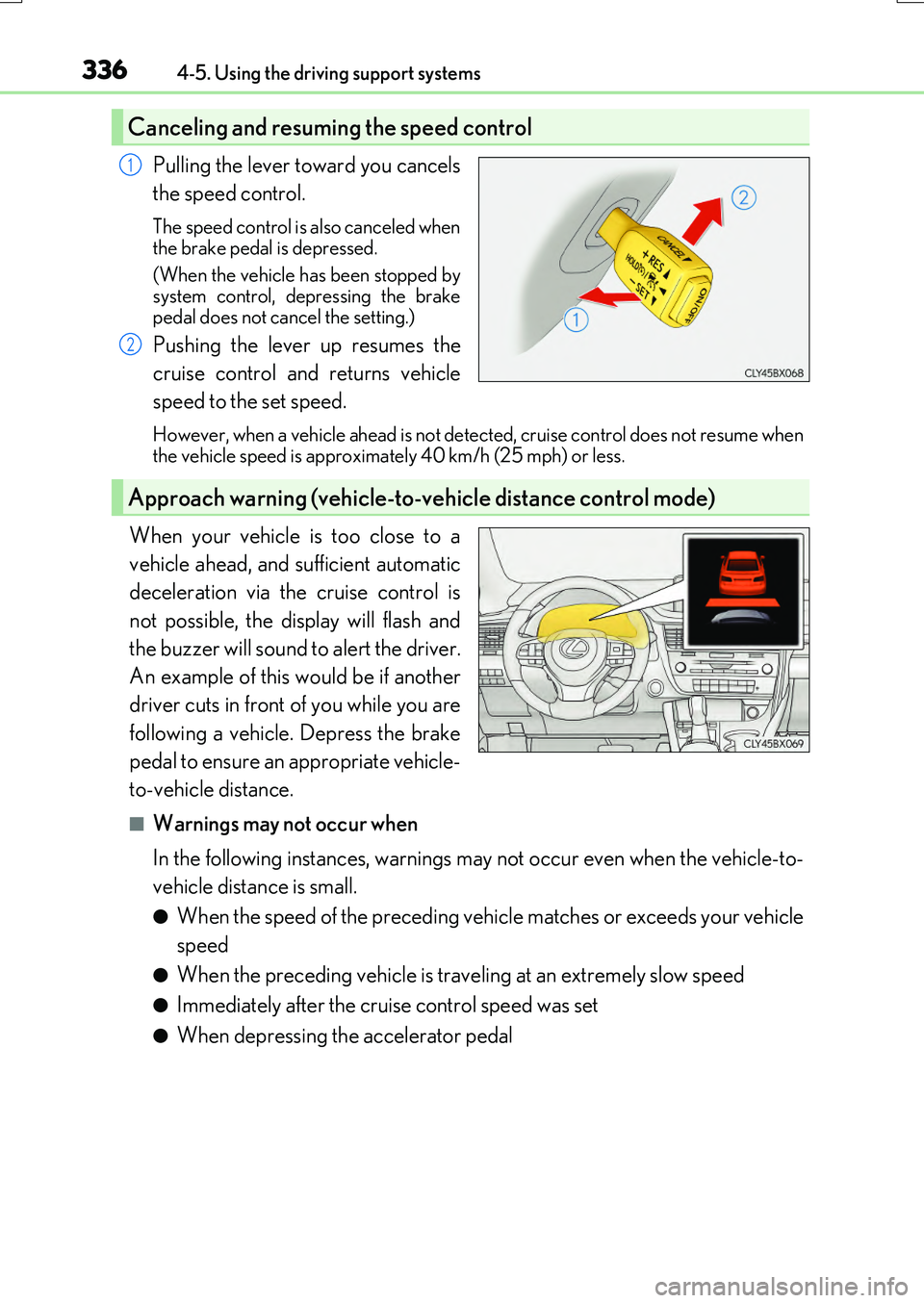
Pulling the lever toward you cancels
the speed control.
The speed control is also canceled when
the brake pedal is depressed.
(When the vehicle has been stopped by system control, depressing the brake
pedal does not cancel the setting.)
Pushing the lever up resumes the
cruise control and returns vehicle
speed to the set speed.
However, when a vehicle ahead is not detected, cruise control does not resume when the vehicle speed is approximately 40 km/h (25 mph) or less.
When your vehicle is too close to a
vehicle ahead, and sufficient automatic
deceleration via the cruise control is
not possible, the display will flash and
the buzzer will sound to alert the driver.
An example of this would be if another
driver cuts in front of you while you are
following a vehicle. Depress the brake
pedal to ensure an appropriate vehicle-
to-vehicle distance.
■Warnings may not occur when
In the following instances, warnings may not occur even when the vehicle-to-
vehicle distance is small.
●When the speed of the preceding vehicle matches or exceeds your vehicle
speed
●When the preceding vehicle is traveling at an extremely slow speed
●Immediately after the cruise control speed was set
●When depressing the accelerator pedal
Canceling and resuming the speed control
1
2
Approach warning (vehicle-to-vehicle distance control mode)
Page 339 of 776
3394-5. Using the driving support systems
4
Driving
RX350/RX200t_EE_OM48F32E
■Automatic cancelation of constant speed control mode
Constant speed control mode is automatically canceled in the following situations:
●Actual vehicle speed is more than approximately 16 km/h (10 mph) below the set vehi-
cle speed.
●Actual vehicle speed falls below approximately 40 km/h (25 mph).
●VSC is activated.
●TRC is activated for a period of time.
●When the VSC or TRC system is turned off by pressing the VSC OFF switch.
●Pre-crash braking is activated.
If constant speed control mode is automatically canceled for any other reason, there may be a malfunction in the system. Contact any authorized Lexus dealer or repairer, oranother duly qualified and equipped professional.
■Warning messages and buzzers for dynamic radar cruise control with full-speed range
Warning messages and buzzers are used to indicate a system malfunction or to inform the driver of the need for caution while driv ing. If a warning message is shown on the
multi-information display, read the message and follow the instructions.
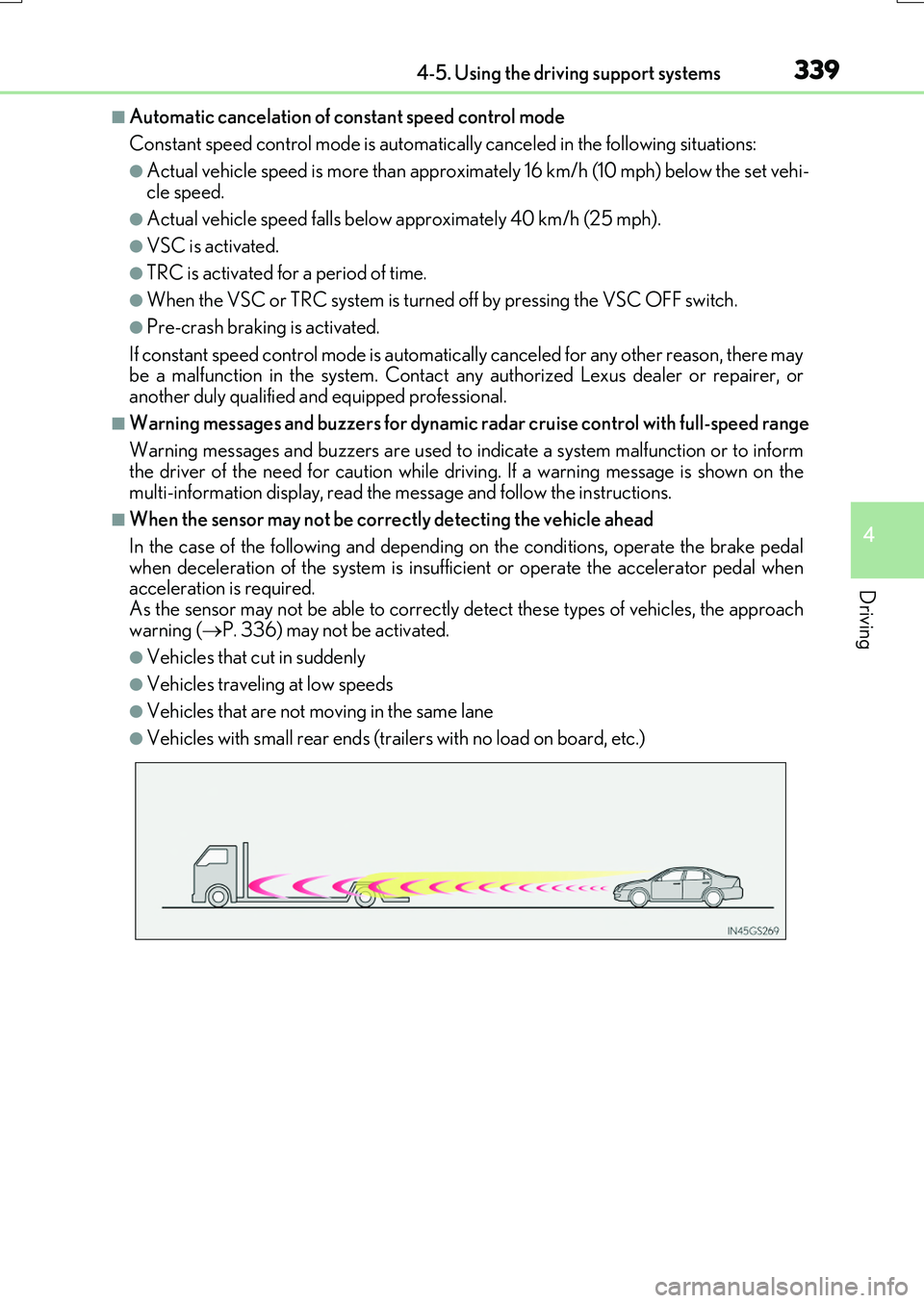
■When the sensor may not be correctly detecting the vehicle ahead
In the case of the following and depending on the conditions, operate the brake pedal
when deceleration of the system is insufficient or operate the accelerator pedal when acceleration is required.As the sensor may not be able to correctly detect these types of vehicles, the approach
warning ( P. 336) may not be activated.
●Vehicles that cut in suddenly
●Vehicles traveling at low speeds
●Vehicles that are not moving in the same lane
●Vehicles with small rear ends (trailers with no load on board, etc.)
Page 344 of 776
3444-5. Using the driving support systems
RX350/RX200t_EE_OM48F32E
WARNING
■To avoid operating the cruise control by mistake
Switch the cruise control off using the “ON/OFF” button when not in use.
■Situations unsuitable for cruise control
Do not use cruise control in any of the following situations. Doing so may result in loss of control and could cause an accident resulting in death orserious injury.
●In heavy traffic
●On roads with sharp bends
●On winding roads
●On slippery roads, such as those covered with rain, ice or snow
●On steep hills Vehicle speed may exceed the set sp eed when driving down a steep hill.
●When your vehicle is towing a trailer or during emergency towing
Page 354 of 776
3544-5. Using the driving support systems
RX350/RX200t_EE_OM48F32E
WARNING
■When the Stop & Start system is operating
●Depress the brake pedal and apply the parking brake when necessary while the engine is stopped by the Stop & Start system (while the Stop & Start indicator is on).
(Except when the brake hold system is operating or when the vehicle comes to a con- trolled stop while driving with the dynamic radar cruise control with full-speed range in vehicle-to-vehicle distan ce control mode [if equipped])
●Do not allow anyone to leave the vehicle while the engine is stopped by the Stop & Start system (while the Stop & Start indicator is on).An accident may occur due to the automatic engine start function.
●Ensure that the engine is not stopped by the Stop & Start system while the vehicle is ina poorly ventilated area. The engine may restart due to the automatic engine startfunction, causing exhaust gases to collect and enter the vehicle, possibly resulting in
death or a serious health hazard.
NOTICE
■To ensure the system operates correctly
If any of the following situations occur, the Stop & Start system may not operate cor- rectly. Have your vehicle inspected by any authorized Lexus dealer or repairer, or
another duly qualified and equipped professional.
●While the driver's seat belt is fastened, the driver's and front passenger's seat belt reminder light flashes.
●Even though the driver's seat belt is not fastened, the driver's and front passenger'sseat belt reminder light does not illuminate.
●Even though the driver's door is closed, the open door warning is displayed on the
multi-information display or the interior lig ht is illuminated when door linked illumina- tion is enabled ( P. 553).
●Even though the driver's door is open, the open door warning is not displayed on the
multi-information display or the interior light does not illuminate when door linked illumination is enabled ( P. 553).