speed warning LEXUS RX200T 2017 User Guide
[x] Cancel search | Manufacturer: LEXUS, Model Year: 2017, Model line: RX200T, Model: LEXUS RX200T 2017Pages: 776, PDF Size: 44.51 MB
Page 118 of 776
1182. Instrument cluster
RX350/RX200t_EE_OM48F32E
◆Display items
■Odometer
Displays the total distance the vehicle has been driven.
■Trip meter A/trip meter B
Displays the distance the vehicle has been driven since the meter was last
reset. Trip meters A and B can be used to record and display different dis-
tances independently.
To reset, display the desired trip meter and press and hold the “ODO/TRIP”
switch.
■ Distance until next engine oil change
Displays the distance the vehicle can be driven until an oil change is neces-
sary.
◆Pop-up display
In some situations the following will be temporarily displayed:
■ Stop & Start system operation time (current) (if equipped)
This display will be displayed when the engine is stopped due to the operation
of the Stop & Start system.
■ Distance until next engine oil change
Displays the distance until the next engine oil change. This display will be dis-
played in the following situations:
• When the engine switch is turned to IGNITION ON mode.
• When a warning message indicating that oil maintenance should be performed
soon or is required is displayed.
◆Speed warning
When set to on, the vehicle speed at which the speed warning will start oper-
ating will be displayed. If the vehicle exceeds the set speed, the speed display
will flash and a buzzer will sound.
• To display the odometer, etc. while the speed warning is set to on, press the “ODO/ TRIP” switch. (If the switch has not been operated for a certain amount of time, the
speed warning will be displayed.)
• The speed at which the speed warning w ill start operating can be changed on .
( P. 110)
Odometer/trip meter display area
Page 120 of 776
1202. Instrument cluster
RX350/RX200t_EE_OM48F32E
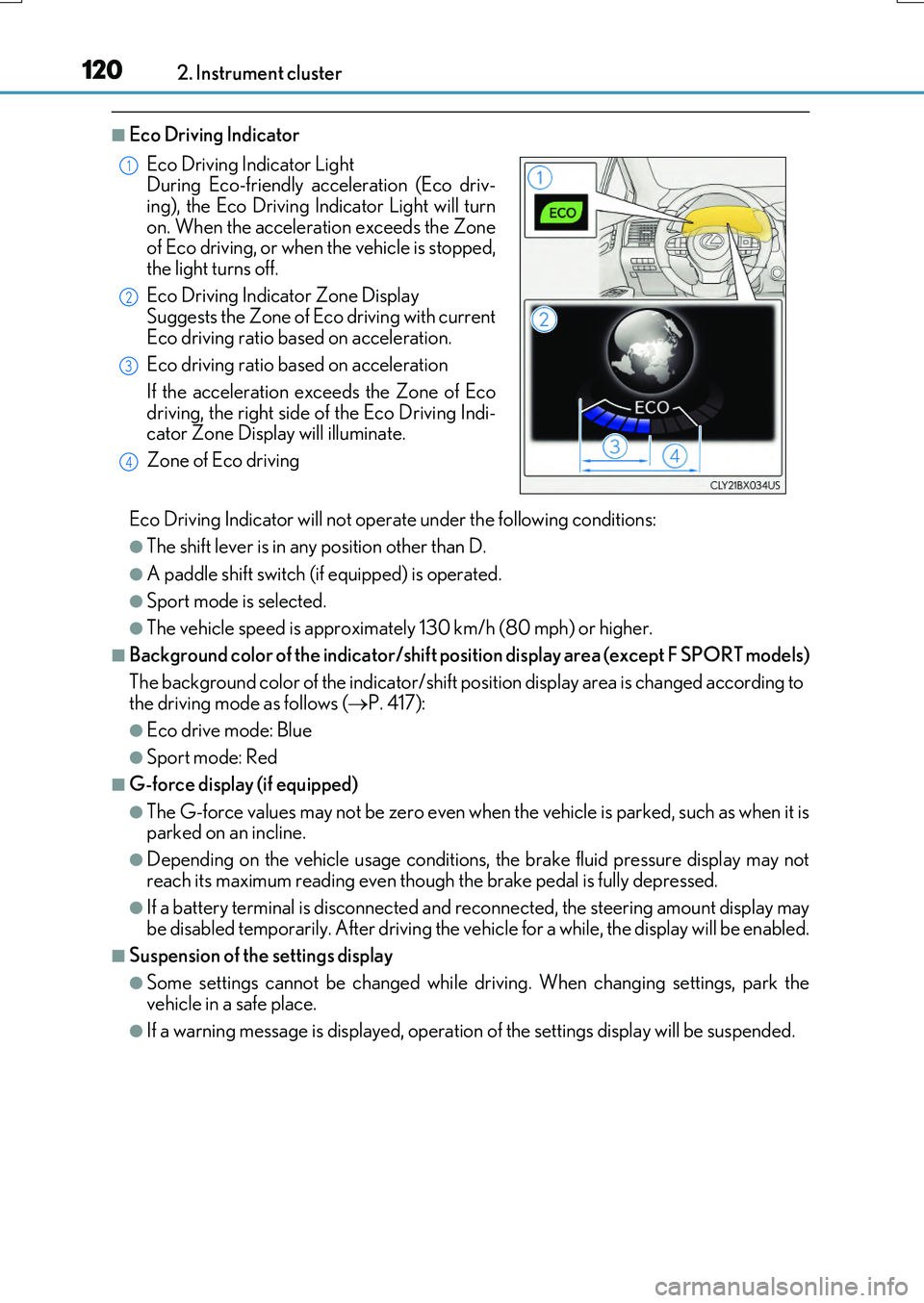
■Eco Driving Indicator
Eco Driving Indicator will not operate under the following conditions:
●The shift lever is in any position other than D.
●A paddle shift switch (if equipped) is operated.
●Sport mode is selected.
●The vehicle speed is approximately 130 km/h (80 mph) or higher.
■Background color of the indicator/shift position display area (except F SPORT models)
The background color of the indicator/shift position display area is changed according to the driving mode as follows ( P. 417):
●Eco drive mode: Blue
●Sport mode: Red
■G-force display (if equipped)
●The G-force values may not be zero even when the vehicle is parked, such as when it is parked on an incline.
●Depending on the vehicle usage conditions, the brake fluid pressure display may not
reach its maximum reading even though the brake pedal is fully depressed.
●If a battery terminal is disconnected and reconnected, the steering amount display may be disabled temporarily. After driving the ve hicle for a while, the display will be enabled.
■Suspension of the settings display
●Some settings cannot be changed while driving. When changing settings, park the vehicle in a safe place.
●If a warning message is displayed, operation of the settings display will be suspended.
Eco Driving Indicator Light During Eco-friendly acceleration (Eco driv-
ing), the Eco Driving In dicator Light will turn on. When the acceleration exceeds the Zoneof Eco driving, or when the vehicle is stopped,
the light turns off.
Eco Driving Indicator Zone Display Suggests the Zone of Eco driving with current
Eco driving ratio based on acceleration.
Eco driving ratio based on acceleration
If the acceleration exceeds the Zone of Eco
driving, the right side of the Eco Driving Indi- cator Zone Display will illuminate.
Zone of Eco driving
1
2
3
4
Page 122 of 776
1222. Instrument cluster
RX350/RX200t_EE_OM48F32E
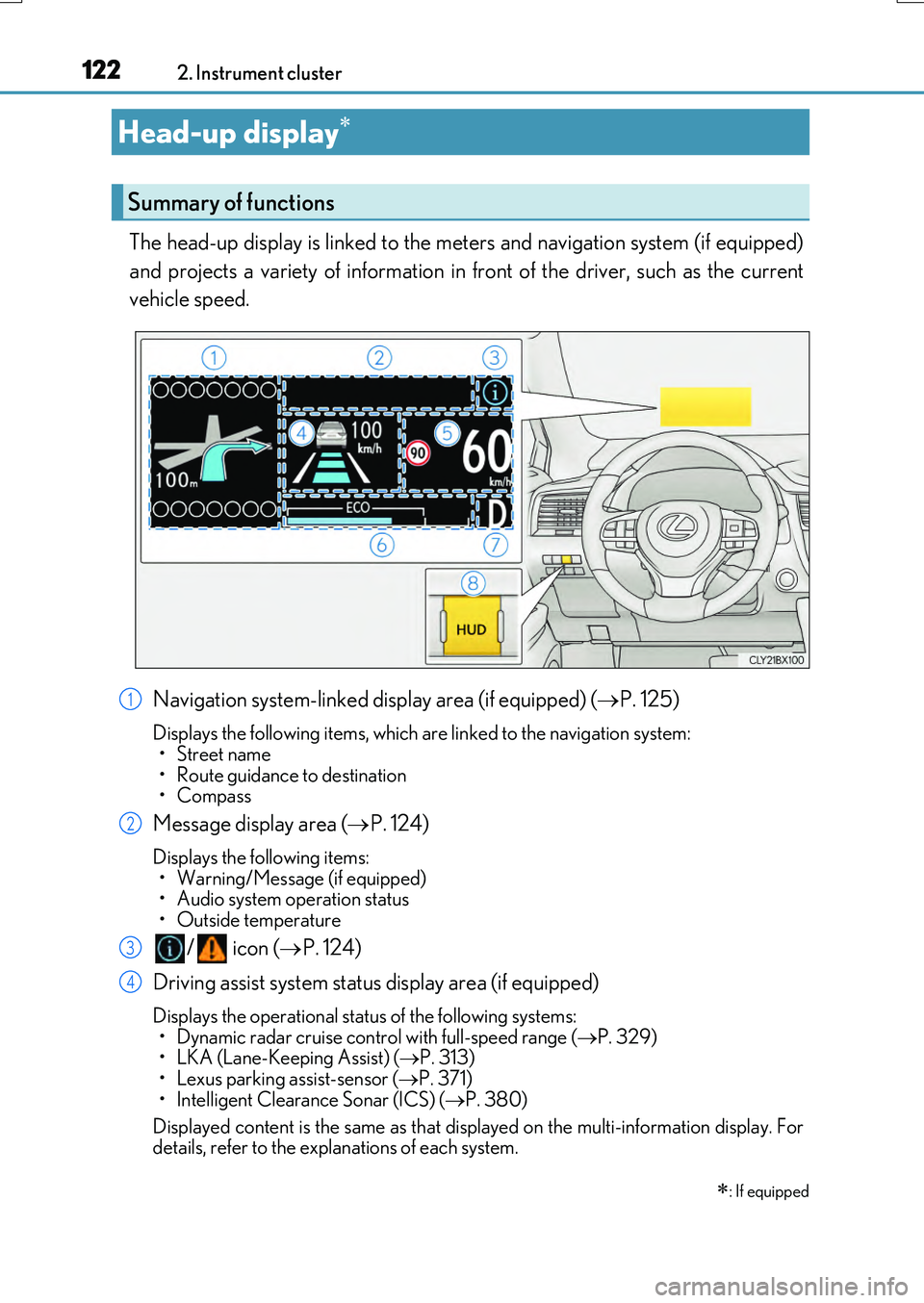
The head-up display is linked to the meters and navigation system (if equipped)
and projects a variety of information in front of the driver, such as the current
vehicle speed.
Navigation system-linked display area (if equipped) ( P. 125)
Displays the following items, which are linked to the navigation system: •Street name
• Route guidance to destination • Compass
Message display area ( P. 124)
Displays the following items: • Warning/Message (if equipped)• Audio system operation status
• Outside temperature
/ icon ( P. 124)
Driving assist system status display area (if equipped)
Displays the operational status of the following systems:
• Dynamic radar cruise cont rol with full-speed range (P. 329) • LKA (Lane-Keeping Assist) ( P. 313) • Lexus parking assist-sensor ( P. 371)
• Intelligent Clearance Sonar (ICS) ( P. 380)
Displayed content is the same as that disp layed on the multi-information display. For details, refer to the explanations of each system.
Head-up display
: If equipped
Summary of functions
1
2
3
4
Page 124 of 776
1242. Instrument cluster
RX350/RX200t_EE_OM48F32E
Displays the following multi-information display linked icons: : Master warning icon Displayed when a warning message is displayed on the multi-information
display. ( P. 673)
: Information icon Displayed when a suggestion/advice po p-up display is displayed on the
multi-information display. ( P. 119)
Displays the following items in the appropriate situation:
■Warning/Message (if equipped)
Displays the following system warning/messages:
• Pre-crash warning (Pre -crash safety system)
• Alert from the Intelligent Clearance Sonar system
• Notification message (Dynamic radar cr uise control with full-speed range)
■Audio system operation status
Displayed when the audio system is operated.
■Outside temperature
Displayed in the following situations:
• When the engine switch is turned to IGNITION ON mode
• When the low outside temperature indicator is flashing
Displayed content is the same as that disp layed on the multi-information display. For
details, refer to the explanation of the outside temperature display on the multi-infor-
mation display. ( P. 96)
/ icons
Message display area
Page 144 of 776
1443-2. Opening, closing and locking the doors
RX350/RX200t_EE_OM48F32E
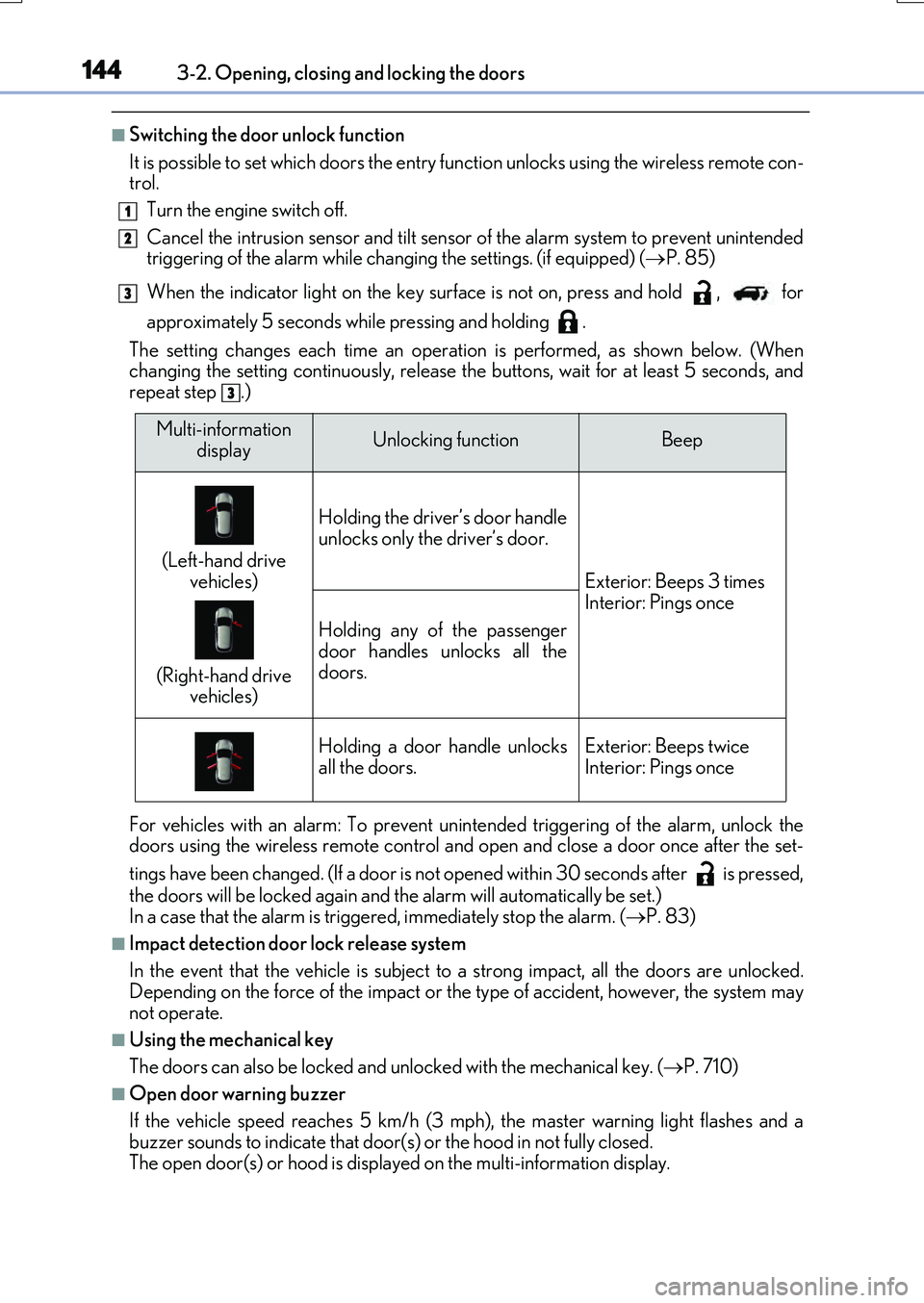
■Switching the door unlock function
It is possible to set which doors the entry function unlocks using the wireless remote con- trol.
Turn the engine switch off.
Cancel the intrusion sensor and tilt sensor of the alarm system to prevent unintended triggering of the alarm while changing the settings. (if equipped) ( P. 85)
When the indicator light on the key surface is not on, press and hold , for
approximately 5 seconds while pressing and holding .
The setting changes each time an operatio n is performed, as shown below. (When changing the setting continuously, release the buttons, wait for at least 5 seconds, andrepeat step .)
For vehicles with an alarm: To prevent unin tended triggering of the alarm, unlock the doors using the wireless remote control and op en and close a door once after the set-
tings have been changed. (If a door is not opened within 30 seconds after is pressed,
the doors will be locked again and the alarm will automatically be set.) In a case that the alarm is triggered, immediately stop the alarm. ( P. 83)
■Impact detection door lock release system
In the event that the vehicle is subject to a strong impact, all the doors are unlocked. Depending on the force of the impact or the type of accident, however, the system may
not operate.
■Using the mechanical key
The doors can also be locked and unlocked with the mechanical key. ( P. 710)
■Open door warning buzzer
If the vehicle speed reaches 5 km/h (3 mph), the master warning light flashes and a buzzer sounds to indicate that door (s) or the hood in not fully closed.
The open door(s) or hood is displa yed on the multi-information display.
1
2
3
3
Multi-information
displayUnlocking functionBeep
(Left-hand drive
vehicles)
(Right-hand drive vehicles)
Holding the driver’s door handle
unlocks only the driver’s door.
Exterior: Beeps 3 times Interior: Pings once
Holding any of the passenger
door handles unlocks all the doors.
Holding a door handle unlocksall the doors.Exterior: Beeps twiceInterior: Pings once
Page 227 of 776
2274-1. Before driving
4
Driving
RX350/RX200t_EE_OM48F32E
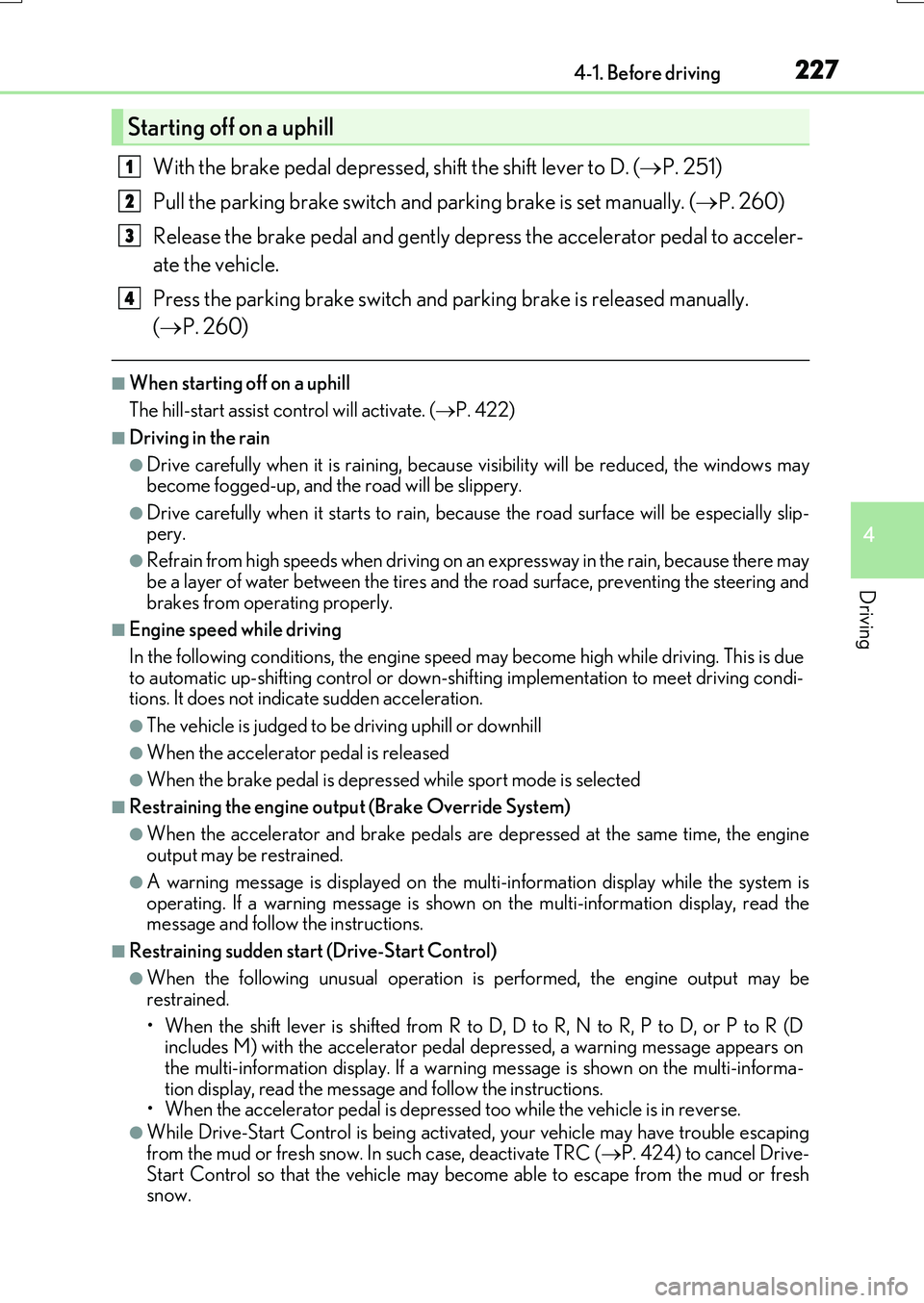
With the brake pedal depressed, shift the shift lever to D. (P. 251)
Pull the parking brake switch and parking brake is set manually. (P. 260)
Release the brake pedal and gently depr ess the accelerator pedal to acceler-
ate the vehicle.
Press the parking brake switch and pa rking brake is released manually.
( P. 260)
■When starting off on a uphill
The hill-start assist co ntrol will activate. (P. 422)
■Driving in the rain
●Drive carefully when it is raining, because visibility will be reduced, the windows may become fogged-up, and the road will be slippery.
●Drive carefully when it starts to rain, because the road surface will be especially slip- pery.
●Refrain from high speeds when driving on an expressway in the rain, because there may
be a layer of water between the tires and the road surface, preventing the steering and brakes from operating properly.
■Engine speed while driving
In the following conditions, the engine speed may become high while driving. This is due to automatic up-shifting control or down-shi fting implementation to meet driving condi- tions. It does not indicate sudden acceleration.
●The vehicle is judged to be driving uphill or downhill
●When the accelerator pedal is released
●When the brake pedal is depressed while sport mode is selected
■Restraining the engine output (Brake Override System)
●When the accelerator and brake pedals are depressed at the same time, the engine output may be restrained.
●A warning message is displayed on the mult i-information display while the system is operating. If a warning message is shown on the multi-information display, read the message and follow the instructions.
■Restraining sudden start (Drive-Start Control)
●When the following unusual operation is performed, the engine output may be
restrained.
• When the shift lever is shifted from R to D, D to R, N to R, P to D, or P to R (D includes M) with the accelerator pedal depressed, a warning message appears on
the multi-information display. If a warnin g message is shown on the multi-informa- tion display, read the messag e and follow the instructions. • When the accelerator pedal is depressed too while the vehicle is in reverse.
●While Drive-Start Control is being activated, your vehicle may have trouble escapingfrom the mud or fresh snow. In such case, deactivate TRC (P. 424) to cancel Drive-
Start Control so that the vehicle may become able to escape from the mud or fresh snow.
Starting off on a uphill
1
2
3
4
Page 229 of 776
2294-1. Before driving
4
Driving
RX350/RX200t_EE_OM48F32E
WARNING
Observe the following precautions. Failure to do so may result in death or serious injury.
■When starting the vehicle
Always keep your foot on the brake pedal while stopped with the engine running. This prevents the vehicle from creeping.
■When driving the vehicle
●Do not drive if you are unfamiliar with the location of the brake and accelerator ped-als to avoid depressing the wrong pedal.
• Accidentally depressing the accelerator pedal instead of the brake pedal will
result in sudden acceleration that may lead to an accident. • When backing up, you may twist your body around, leading to difficulty in operat- ing the pedals. Make sure to operate the pedals properly.
• Make sure to keep a correct driving posture even when moving the vehicle only slightly. This allows you to depress the brake and accelerator pedals properly.• Depress the brake pedal using your right foot. Depressing the brake pedal using
your left foot may delay response in an emergency, resulting in an accident.
●Do not drive the vehicle over or stop the vehicle near flammable materials.
The exhaust system and exhaust gases can be extremely hot. These hot parts may cause a fire if there is any flammable material nearby.
●During normal driving, do not turn off the engine. Turning the engine off while driving
will not cause loss of steering or braking control, but the power assist to these systems will be lost. This will make it more difficult to steer and brake, so you should pull over and stop the vehicle as soon as it is safe to do so.
However, in the event of an emergency, such as if it becomes impossible to stop the vehicle in the normal way: P. 657
●Use engine braking (downshift) to maintain a safe speed when driving down a steep
hill. Using the brakes continuously may caus e the brakes to overheat and lose effec- tiveness. ( P. 251)
●Do not adjust the positions of the steering wheel, the seat, or the inside or outside rear
view mirrors while driving. Doing so may result in a loss of vehicle control.
●Always check that all passengers’ arms, heads or other parts of their body are not
outside the vehicle.
●AWD models: Do not drive the vehicle off-road. This is not an AWD vehicle designed for o ff-road driving. Proceed with all due cau-
tion if it becomes unavoidable to drive off-road.
●Do not drive across a river or through other bodies of water. This may cause electric/electronic components to short circuit, damage the engine or
cause other serious damage to the vehicle.
Page 230 of 776
2304-1. Before driving
RX350/RX200t_EE_OM48F32E
WARNING
Observe the following precautions. Failure to do so may result in death or serious injury.
■When driving on slippery road surfaces
●Sudden braking, acceleration and steering may cause tire slippage and reduce your ability to control the vehicle.
●Sudden acceleration, engine braking due to shifting, or changes in engine speed
could cause the vehicle to skid.
●After driving through a puddle, lightly depress the brake pedal to make sure that the brakes are functioning properly. Wet brak e pads may prevent the brakes from func-
tioning properly. If the brakes on only one side are wet and not functioning properly, steering control may be affected.
■When shifting the shift lever
●Do not let the vehicle roll backward while the shift lever is in a driving position, or roll forward while the shift lever is in R. Doing so may cause the engine to stall or lead to poor brake and steering perfor-
mance, resulting in an accident or damage to the vehicle.
●Do not shift the shift lever to P while the vehicle is moving. Doing so can damage the transmission and may result in a loss of vehicle control.
●Do not shift the shift lever to R while the vehicle is moving forward. Doing so can damage the transmission and may result in a loss of vehicle control.
●Do not shift the shift lever to a driving position while the vehicle is moving backward.
Doing so can damage the transmission and may result in a loss of vehicle control.
●Shifting the shift lever to N while the vehicle is moving will disengage the engine. Engine braking is not available when N is selected.
●Be careful not to shift the shift lever with the accelerator pedal depressed. Shifting the shift lever to any position othe r than P or N may lead to unexpected rapid acceleration of the vehicle that may cause an accident and result in death or serious
injury.
Page 231 of 776
2314-1. Before driving
4
Driving
RX350/RX200t_EE_OM48F32E
WARNING
Observe the following precautions. Failure to do so may result in death or serious injury.
■If you hear a squealing or scraping noise (brake pad wear indicators)
Have the brake pads checked and replaced by any authorized Lexus dealer or repairer, or another duly qualified and equi pped professional as soon as possible. Rotor damage may result if the pads are not replaced when needed.
Front brakes only: Moderate levels of brake pad and disc wear allow enhanced front braking power. As a result, the discs may wear more quickly than conventional brakediscs. Therefore, when replacing the brake pads, Lexus recommends that you also
have the thickness of the discs measured.
It is dangerous to drive the vehicle when th e wear limits of the brake pads and/or those of the brake discs are exceeded.
■When the vehicle is stopped
●Do not race the engine.If the shift lever is in any position other than P or N, the vehicle may accelerate sud-
denly and unexpectedly, causing an accident.
●In order to prevent accidents due to the vehicle rolling away, always keep depressing the brake pedal while the engine is running, and apply the parking brake as neces-
sary.
●If the vehicle is stopped on an incline, in order to prevent accidents caused by the vehicle rolling forward or backward, alwa ys depress the brake pedal and securely
apply the parking brake as needed.
●Avoid revving or racing the engine. Running the engine at high speed while the vehicle is stopped may cause the exhaust
system to overheat, which could result in a fire if combustible material is nearby.
Page 236 of 776
2364-1. Before driving
RX350/RX200t_EE_OM48F32E
WARNING
■When using a roof luggage carrier (vehicles with roof rails)
Observe the following precautions:
●Place the cargo so that its weight is distributed evenly between the front and rear
axles.
●If loading long or wide cargo, never exceed the vehicle overall length or width. ( P. 726)
●Before driving, make sure the cargo is securely fastened on the roof luggage carrier.
●Loading cargo on the roof luggage carrier will make the center of gravity of the vehi- cle higher. Avoid high speeds, sudden starts, sharp turns, sudden braking or abrupt
maneuvers, otherwise it may result in loss of control or vehicle rollover due to failure to operate this vehicle correctly and result in death or serious injury.
●If driving for a long distance, on rough roads, or at high speeds, stop the vehicle now
and then during the trip to make sure the cargo remains in its place.
●Do not exceed 75 kg (165 lb.) cargo weight on the roof luggage carrier.
NOTICE
■When loading cargo (vehicles with a moon roof or panoramic moon roof)
Be careful not to scratch the surface of the moon roof or panoramic moon roof.