speed warning LEXUS RX200T 2017 Service Manual
[x] Cancel search | Manufacturer: LEXUS, Model Year: 2017, Model line: RX200T, Model: LEXUS RX200T 2017Pages: 776, PDF Size: 44.51 MB
Page 362 of 776
3624-5. Using the driving support systems
RX350/RX200t_EE_OM48F32E
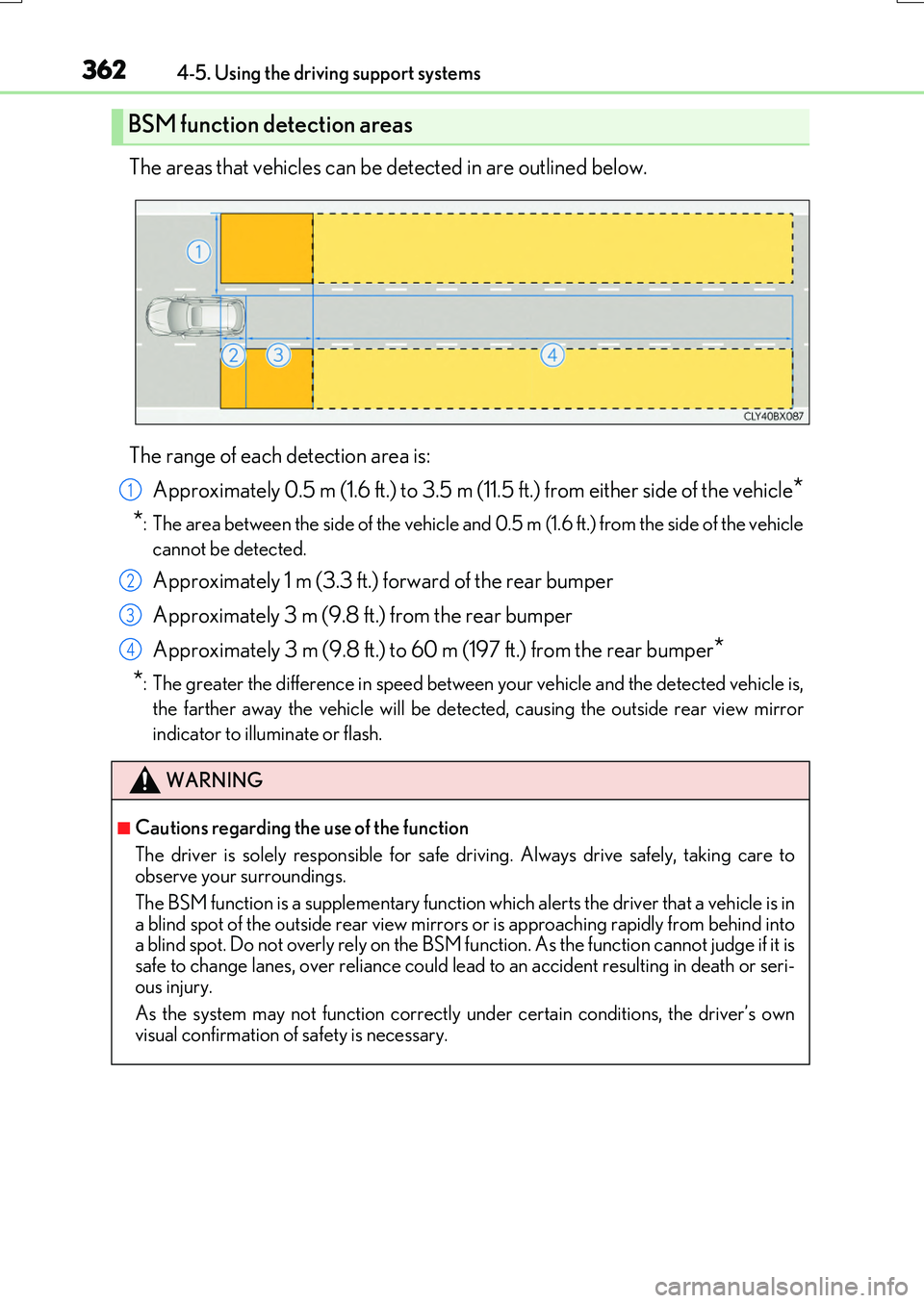
The areas that vehicles can be detected in are outlined below.
The range of each detection area is:
Approximately 0.5 m (1.6 ft.) to 3.5 m (11.5 ft.) from either side of the vehicle*
*: The area between the side of the vehicle and 0.5 m (1.6 ft.) from the side of the vehicle
cannot be detected.
Approximately 1 m (3.3 ft.) forward of the rear bumper
Approximately 3 m (9.8 ft.) from the rear bumper
Approximately 3 m (9.8 ft.) to 60 m (197 ft.) from the rear bumper*
*: The greater the difference in speed between your vehicle and the detected vehicle is,
the farther away the vehicle will be detect ed, causing the outside rear view mirror
indicator to illuminate or flash.
BSM function detection areas
WARNING
■Cautions regarding the use of the function
The driver is solely responsible for safe driving. Always drive safely, taking care to observe your surroundings.
The BSM function is a supplementary function which alerts the driver that a vehicle is in a blind spot of the outside rear view mirrors or is approaching rapidly from behind intoa blind spot. Do not overly rely on the BSM function. As the function cannot judge if it is
safe to change lanes, over reliance could lead to an accident resulting in death or seri- ous injury.
As the system may not function correctly under certain conditions, the driver’s own
visual confirmation of safety is necessary.
1
2
3
4
Page 377 of 776
3774-5. Using the driving support systems
4
Driving
RX350/RX200t_EE_OM48F32E
■The Lexus parking assist-sensor can be operated when
●Front corner sensors:
• The engine switch is in IGNITION ON mode. • The shift lever is in other than P.
• The vehicle speed is less than about 10 km/h (6 mph). (At any speed when the shift lever is in R)
●Front center sensors:
• The engine switch is in IGNITION ON mode. • The shift lever is in other than P or R.
• The vehicle speed is less than about 10 km/h (6 mph).
●Rear corner and rear center sensors:
• The engine switch is in IGNITION ON mode. • The shift lever is in R.
■Lexus parking assist-sensor display
●Vehicles with a Lexus Display Audio system : When an obstacle is detected while the Lexus parking assist monitor is in use, the warning indicator will appear in the upperpart of the screen even if the display setting has been set to off.
●Vehicles with a navigation system: If the Lexu s parking assist-sensor display is set to on, detected objects will also be displayed on the panoramic view monitor. For details, refer to “NAVIGATION SYSTEM OWNER’S MANUAL”.
■Sensor detection information
●The sensor’s detection areas are limited to the areas around the vehicle’s bumper.
●Certain vehicle conditions and the surrounding environment may affect the ability of a
sensor to correctly detect an obstacle. Particular instances where this may occur are listed below.
• There is dirt, snow or ice on the sensor . (Wiping the sensors will resolve this prob-
lem.) • The sensor is frozen. (Thawing the area will resolve this problem.) In especially cold weather, if a sensor is frozen the screen may show an abnormal
display, or obstacles may not be detected. • The sensor is covered in any way.• The vehicle is leaning considerably to one side.
• On an extremely bumpy road, on an incline, on gravel, or on grass. • The vicinity of the vehicle is noisy due to vehicle horns, motorcycle engines, airbrakes of large vehicles, or other loud noises producing ultrasonic waves.
• There is another vehicle equipped with parking assist sensors in the vicinity. • The sensor is coated with a sheet of spray or heavy rain. • The vehicle is equipped with a fender pole or wireless antenna.
• Towing eyelets are installed. • The bumper or sensor receives a strong impact.
• The vehicle is approaching a tall or curved curb. • In harsh sunlight or intense cold weather.• The area directly under the bumpers is not detected.
• If obstacles draw too close to the sensor. • A non-genuine Lexus suspension (low ered suspension etc.) is installed. • People may not be detected if they are wearing certain types of clothing.
In addition to the examples above, there are instances in which, because of their shape, signs and other objects may be judged by a sensor to be closer than they are.
Page 378 of 776
3784-5. Using the driving support systems
RX350/RX200t_EE_OM48F32E
●The shape of the obstacle may prevent a sensor from detecting it. Pay particular atten- tion to the following obstacles:
• Wires, fences, ropes, etc.
• Cotton, snow and other materials that absorb sound waves • Sharply-angled objects• Low obstacles
• Tall obstacles with upper sections projecting outwards in the direction of your vehi- cle
●The following situations may occur during use.
• Depending on the shape of the obstacle and other factors, the detection distance may shorten, or detection may be impossible.
• Obstacles may not be detected if they are too close to the sensor. • There will be a short delay between obst acle detection and display. Even at slow speeds, there is a possibility that the obstacl e will come within the sensor’s detection
areas before the display is shown and the buzzer sounds. • Thin posts or objects lower than the sens or may not be detected when approached, even if they have been detected once.
• It might be difficult to hear beeps due to the volume of audio system or air flow noise of the air conditioning system.
■If “Clean Parking Assist Sensor” is di splayed on the multi-information display
A sensor may be dirty or covered with snow or ice. In such cases, if it is removed from the sensor, the system should return to normal. Also, due to the sensor being frozen at low temperatures, a malfunction display may
appear or an obstacle may not be detected. If the sensor thaws out, the system should return to normal.
■If “Parking Assist Malfun ction” is displayed on the multi-information display
Depending on the malfunction of the sensor , the device may not be working normally. Have the vehicle inspected by any authorized Lexus dealer or repairer, or another duly
qualified and equipped professional.
■Customization
Some functions can be customized. ( P. 376,740)
WARNING
■When using the Lexus parking assist-sensor
Observe the following precautions.
Failing to do so may result in the vehicle be ing unable to be driven safely and possibly cause an accident.
●Do not use the sensor at speeds in excess of 10 km/h (6 mph).
●The sensors’ detection areas and reaction times are limited. When moving forward or reversing, check the areas surrounding the vehicle (especially the sides of the vehi-cle) for safety, and drive slowly, using the brake to control the vehicle’s speed.
●Do not install accessories within the sensors’ detection areas.
Page 391 of 776
3914-5. Using the driving support systems
4
Driving
RX350/RX200t_EE_OM48F32E
■If a battery terminal has been disconnected and reconnected
The system needs to be initialized.
To initialize the system, drive the vehicle stra ight ahead for 5 seconds or more at a speed
of approximately 35 km/h (22 mph) or more.
■If “ICS Unavailable” is displayed on the mu lti-information display and the ICS OFF indi- cator is flashing
●A sensor may be covered with ice, snow, dirt , etc. Remove the ice, snow, dirt, etc., from the sensor to return the system to normal.
Also, due to ice forming on a sensor at low temperatures, a warning message may be
displayed or the sensor may not be able to detect an object. Once the ice melts, the system will return to normal.
●If this message continues to be displayed even after cleaning the sensor, or is displayed
even though the sensor is clean, have the vehicle inspected by any authorized Lexus dealer or repairer, or another duly qualified and equipped professional.
●Initialization may not have been performed after a battery terminal was disconnected
and reconnected. Initialize the system. ( P. 391)
■If “ICS Malfunction Visit Your Dealer” is displayed on the multi-information display and the ICS OFF indicator is flashing
The system may be malfunctioning. Have the vehicle inspected by any authorized Lexus dealer or repairer, or another duly qualified and equipped professional.
Page 415 of 776
4154-5. Using the driving support systems
4
Driving
RX350/RX200t_EE_OM48F32E
WARNING
■When using the Lexus parking assist monitor system
The parking assist monitor is a supplemental device intended to assist the driver when backing up. When backing up, be sure to check visually behind and all around the vehi-
cle before proceeding.
Observe the following precautions to avoid an accident that could result in death or serious injuries.
●Never depend on the parking assist monitor entirely when backing up. The imageand the position of the guide lines displayed on the screen may differ from the actualstate.
Use caution, just as you would when backing up any vehicle.
●Be sure to back up slowly, depressing the brake pedal to control vehicle speed.
●If you seem likely to hit nearby vehicles , obstacles, people or mount the shoulder,
depress the brake pedal to stop the vehicle.
●The instructions given are only guidelines. When and how much to turn the steering wheel will vary according to traffic condi-
tions, road surface conditions, vehicle condition, etc. when parking. It is necessary to be fully aware of this before using the parking assist system.
●When parking, be sure to check that th e parking space will accommodate your vehi-
cle before maneuvering into it.
●Do not use the parking assist monitor in the following cases:
• On icy or slick road surfaces, or in snow
• When using tire chains or emergency tires • When the back door is not closed completely• On roads that are not flat or straight, such as curves or slopes.
●In low temperatures, the screen may darken or the image may become faint. Theimage could distort when the vehicle is moving, or you may become unable to see the
image on the screen. Be sure to check direct visually and with the mirrors all around the vehicle before proceeding.
●If the tire sizes are changed, the position of the guide lines displayed on the screen
may change.
●The camera uses a special lens. The distances between objects and pedestrians that appear in the image displayed on the screen will differ from the actual distances.
( P. 409)
●Estimated course line display mode: If the steering wheel is straight and the vehicle width guide lines and the estimated course lin es are not in alignment, have the vehicle
inspected by any authorized Lexus dealer or repairer, or another duly qualified and equipped professional.
Page 427 of 776
4274-5. Using the driving support systems
4
Driving
RX350/RX200t_EE_OM48F32E
WARNING
■The ABS does not operate effectively when
●The limits of tire gripping performance have been exceeded (such as excessively worn tires on a snow covered road).
●The vehicle hydroplanes while driving at high speed on wet or slick roads.
■Stopping distance when the ABS is operating may exceed that of normal conditions
The ABS is not designed to shorten the vehicle’s stopping distance. Always maintain a
safe distance from the vehicle in front of you, especially in the following situations:
●When driving on dirt, gravel or snow-covered roads
●When driving with tire chains
●When driving over bumps in the road
●When driving over roads with potholes or uneven surfaces
■TRC/VSC may not operate effectively when
Directional control and power may not be achievable while driving on slippery road surfaces, even if the TRC/VSC system is operating. Drive the vehicle carefully in conditions where stability and power may be lost.
■Hill-start assist control does not operate effectively when
●Do not overly rely on hill-start assist control. Hill-start assist control may not operate effectively on steep inclines and roads covered with ice.
●Unlike the parking brake, hill-start assist co ntrol is not intended to hold the vehicle stationary for an extended period of time. Do not attempt to use hill-start assist con-trol to hold the vehicle on an incline, as doing so may lead to an accident.
■When the VSC is activated
The slip indicator light flashes. Always drive carefully. Reckless driving may cause an accident. Exercise particular care when the indicator light flashes.
■When the TRC/VSC systems are turned off
Be especially careful and drive at a speed appropriate to the road conditions. As these are the systems to help ensure vehicle stability and driving force, do not turn the TRC/
VSC systems off unless necessary. Trailer Sway Control is part of the VSC syst em and will not operate if VSC turned off or experiences a malfunction.
■Replacing tires
Make sure that all tires are of the specified size, brand, tread pattern and total load capacity. In addition, make sure that the tire s are inflated to the recommended tire infla-
tion pressure level.
The ABS, TRC and VSC systems will not function correctly if different tires are installed on the vehicle.
Contact any authorized Lexus dealer or repairer, or another duly qualified and equipped professional for further information when replacing tires or wheels.
Page 428 of 776
4284-5. Using the driving support systems
RX350/RX200t_EE_OM48F32E
WARNING
■Handling of tires and the suspension
Using tires with any kind of problem or modif ying the suspension will affect the driving assist systems, and may cause a system to malfunction.
■Trailer Sway Control precaution
The Trailer Sway Control system is not able to reduce trailer sway in all situations. Depending on many factors such as the conditions of the vehicle, trailer, road surface,
and driving environment, the Trailer Sway Control system may not be effective. Refer to your trailer owner’s manual for informatio n on how to tow your trailer properly.
■If trailer sway occurs
Observe the following precautions. Failing to do so may cause death or serious injury.
●Firmly grip the steering wheel. Steer straight ahead.
Do not try to control trailer swaying by turning the steering wheel.
●Begin releasing the accelerator pedal immediately but very gradually to reduce speed.
Do not increase speed. Do not apply vehicle brakes.
If you make no extreme correction with the steering or brakes, your vehicle and trailer
should stabilize. ( P. 238)
Page 431 of 776
4314-6. Driving tips
4
Driving
RX350/RX200t_EE_OM48F32E
To enable the windshield wipers to be lifted when heavy snow or icy conditions
are expected, change the rest position of the windshield wipers from the
retracted position below the hood to the service position using the wiper lever.
( P. 283)
■Tire chain installation
Observe the following precautions wh en installing and removing chains:
●Install and remove tire chains in a safe location.
●Install tire chains on the front tires only. Do not install tire chains on the rear tires.
●Install tire chains on front tires as tightly as possible. Retighten chains after driving
0.5 - 1.0 km (1/4 - 1/2 mile).
●Install tire chains following the instru ctions provided with the tire chains.
Windshield wipers
WARNING
■Driving with snow tires
Observe the following precautions to reduce the risk of accidents. Failure to do so may result in a loss of vehicle control and cause death or serious injury.
●Use tires of the specified size.
●Maintain the recommended level of air pressure.
●Do not drive at speeds in excess of the speed limit or the speed limit specified for the
snow tires being used.
●Use snow tires on all, not just some wheels.
■Driving with tire chains
Observe the following precautions to reduce the risk of accidents. Failure to do so may result in the vehicle being unable to be driven safely, and may cause death or serious injury.
●Do not drive in excess of the speed limit sp ecified for the tire chains being used, or 50 km/h (30 mph), whichever is lower.
●Avoid driving on bumpy road surfaces or over potholes.
●Avoid sudden acceleration, abrupt steering, sudden braking and shifting operations that cause sudden engine braking.
●Slow down sufficiently before entering a curve to ensure that vehicle control is main-
tained.
●Do not use the LKA (Lane-Keeping Assist) system. (if equipped)
Page 433 of 776
4334-6. Driving tips
4
Driving
RX350/RX200t_EE_OM48F32E
●Specific design characteristics give it a higher center of gravity than ordinary
passenger cars. This vehicle design feature causes this type of vehicle to be
more likely to rollover. And, utility vehicles have a significantly higher rollover
rate than other types of vehicles.
●An advantage of the higher ground clearance is a better view of the road
allowing you to anticipate problems.
●It is not designed for cornering at the same speeds as ordinary passenger cars
any more than low-slung sports cars are designed to perform satisfactorily
under off-road conditions. Therefore, sharp turns at excessive speeds may
cause the vehicle to rollover.
Utility vehicle precautions
This vehicle belongs to the utility vehicle class, which has higher ground clear-
ance and narrower tread in relation to the height of its center of gravity.
Utility vehicle feature
WARNING
■Utility vehicle precautions
Always observe the following precautions to minimize the risk of death, serious injury or damage to your vehicle:
●In a rollover crash, an unbelted person is significantly more likely to die than a person
wearing a seat belt. Therefore, the driver and all passengers should always fasten their seat belts.
●Avoid sharp turns or abrupt maneuvers, if at all possible.
Failure to operate this vehicle correctly may re sult in loss of control or vehicle rollover causing death or serious injury.
●Loading cargo on the roof luggage carrier wi ll make the center of the vehicle gravity
higher. Avoid high speeds, sudden starts, sharp turns, sudden braking or abrupt maneuvers, otherwise it may result in loss of control or vehicle rollover due to failure to operate this vehicle correctly.
●Always slow down in gusty crosswinds. Because of its profile and higher center ofgravity, your vehicle is more sensitive to side winds than an ordinary passenger car.Slowing down will allow you to have better control.
●Do not drive horizontally across steep slopes . Driving straight up or straight down is preferred. Your vehicle (or any similar off- road vehicle) can tip over sideways much
more easily than forward or backward.
Page 434 of 776
4344-6. Driving tips
RX350/RX200t_EE_OM48F32E
Your vehicle is not designed to be driven off-road. However, in the event that off-
road driving cannot be avoided, please observe the following precautions to help
avoid the areas prohibited to vehicles.
●Drive your vehicle only in areas where off-road vehicles are permitted to
travel.
●Respect private property. Get owner’s permission before entering private
property.
●Do not enter areas that are closed. Honor gates, barriers and signs that
restrict travel.
●Stay on established roads. When co nditions are wet, driving techniques
should be changed or travel delayed to prevent damage to roads.
Off-road driving
WARNING
■Off-road driving precautions
Always observe the following precautions to minimize the risk of death, serious injury
or damage to your vehicle:
●Drive carefully when off the road. Do not ta ke unnecessary risks by driving in danger- ous places.
●Do not grip the steering wheel spokes when driving off-road. A bad bump could jerkthe wheel and injure your hands. Keep both hands and especially your thumbs on the outside of the rim.
●Always check your brakes for effectivene ss immediately after driving in sand, mud, water or snow.
●After driving through tall grass, mud, rock, sand, rivers, etc., check that there is no
grass, bush, paper, rags, stone, sand, etc. adhering or trapped on the underbody. Clear off any such matter from the underbody. If the vehicle is used with these materi- als trapped or adhering to the underb ody, a breakdown or fire could occur.
●When driving off-road or in rugged terrain, do not drive at excessive speeds, jump, make sharp turns, strike objects, etc. This may cause loss of control or vehicle rollover causing death or serious injury. You are also risking expensive damage to your vehi-
cle’s suspension and chassis.