tow LEXUS RX200T 2017 Owner's Guide
[x] Cancel search | Manufacturer: LEXUS, Model Year: 2017, Model line: RX200T, Model: LEXUS RX200T 2017Pages: 776, PDF Size: 44.51 MB
Page 277 of 776
2774-3. Operating the lights and wipers
4
Driving
RX350/RX200t_EE_OM48F32E
●In the following situations the system may not be able to correctly detect the surround- ing brightness level. This may cause the low beams to remain on or the high beams to flash or dazzle pedestrians or vehicles ahead. In such a case, it is necessary to manually
switch between the high and low beams.
• When driving in inclement weather (heavy rain, snow, fog, sandstorms, etc.) • When the windshield is obscured by fog, mist, ice, dirt, etc.
• When the windshield is cracked or damaged • When the camera sensor is deformed or dirty• When the temperature of the camera sensor is extremely high
• When the surrounding brightness level is equa l to that of headlights, tail lights or fog lights• When headlights or tail lights of vehicles ah ead are turned off, dirty, changing color,
or not aimed properly • When the vehicle is hit by water, snow, dust, etc. from a preceding vehicle• When driving through an area of interm ittently changing brightness and darkness
• When frequently and repeatedly driving ascending/descending roads, or roads with rough, bumpy or uneven surfaces (such as stone-paved roads, gravel roads, etc.)• When frequently and repeatedly taking curves or driving on a winding road
• When there is a highly reflective object ahead of the vehicle, such as a sign or mirror • When the back of a preceding vehicle is highly reflective, such as a container on atruck
• When the vehicle's headlights are damaged or dirty, or are not aimed properly • When the vehicle is listing or titling due to a flat tire, a trailer being towed, etc. • When the headlights are changed between the high beams and low beams repeat-
edly in an abnormal manner • When the driver believes that the high beams may be flashing or dazzling pedestri-ans or other drivers
• When the vehicle is used in an area in which vehicles travel on the opposite side of the road of the country for which the vehicle was designed, for example using a vehi-
cle designed for right-hand traffic in a left-hand traffic area, or vice versa
Page 281 of 776
2814-3. Operating the lights and wipers
4
Driving
RX350/RX200t_EE_OM48F32E
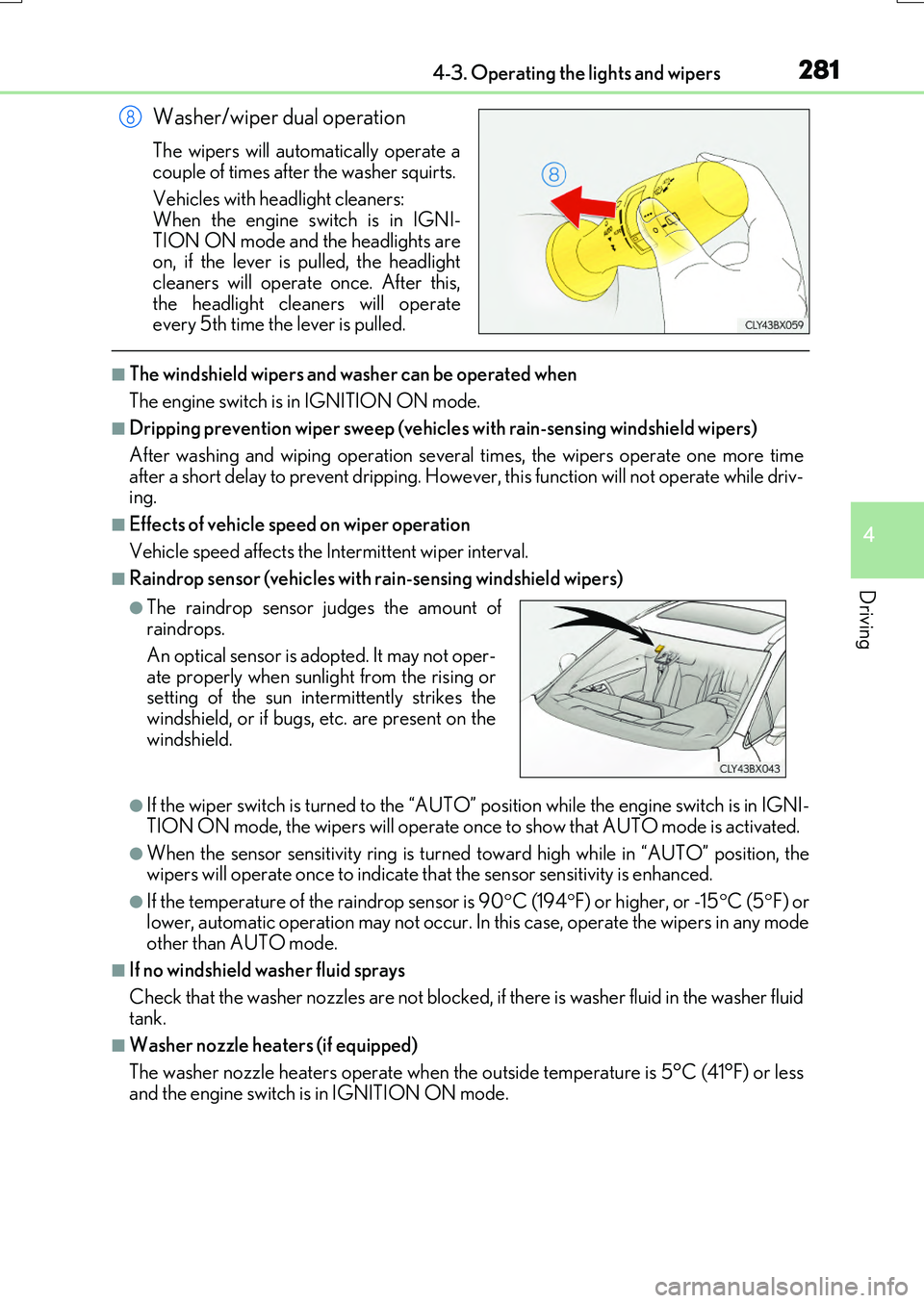
Washer/wiper dual operation
The wipers will automatically operate a
couple of times after the washer squirts.
Vehicles with headlight cleaners: When the engine switch is in IGNI-
TION ON mode and the headlights are on, if the lever is pulled, the headlightcleaners will operate once. After this,
the headlight cleaners will operate every 5th time the lever is pulled.
■The windshield wipers and washer can be operated when
The engine switch is in IGNITION ON mode.
■Dripping prevention wiper sweep (vehicles with rain-sensing windshield wipers)
After washing and wiping operation severa l times, the wipers operate one more time after a short delay to prevent dripping. However, this function will not operate while driv- ing.
■Effects of vehicle speed on wiper operation
Vehicle speed affects the Intermittent wiper interval.
■Raindrop sensor (vehicles with rain-sensing windshield wipers)
●If the wiper switch is turned to the “AUTO” position while the engine switch is in IGNI-
TION ON mode, the wipers will operate on ce to show that AUTO mode is activated.
●When the sensor sensitivity ring is turned toward high while in “AUTO” position, the wipers will operate once to indicate th at the sensor sensitivity is enhanced.
●If the temperature of the raindrop sensor is 90C (194F) or higher, or -15C (5F) or lower, automatic operation may not occur. In this case, operate the wipers in any modeother than AUTO mode.
■If no windshield washer fluid sprays
Check that the washer nozzles are not blocked, if there is washer fluid in the washer fluid tank.
■Washer nozzle heaters (if equipped)
The washer nozzle heaters operate when the outside temperature is 5°C (41°F) or less
and the engine switch is in IGNITION ON mode.
8
●The raindrop sensor judges the amount of raindrops.
An optical sensor is adopted. It may not oper- ate properly when sunlight from the rising orsetting of the sun intermittently strikes the
windshield, or if bugs, etc. are present on the windshield.
Page 303 of 776
3034-5. Using the driving support systems
4
Driving
RX350/RX200t_EE_OM48F32E
WARNING
■When to disable the pre-crash safety system
In the following situations, disable the syst em, as it may not operate properly, possibly leading to an accident resulting in death or serious injury:
●When the vehicle is being towed
●When your vehicle is towing another vehicle
●When transporting the vehicle via truck, boat, train or similar means of transportation
●When the vehicle is raised on a lift with th e engine running and the tires are allowed to rotate freely
●When inspecting the vehicle using a drum tester such as a chassis dynamometer or
speedometer tester, or when using an on vehicle wheel balancer
●When a strong impact is applied to the fron t bumper or front grille, due to an accident or other reasons
●If the vehicle cannot be driven in a stable manner, such as when the vehicle has beenin an accident or is malfunctioning
●When the vehicle is driven in a sporty manner or off-road
●When the tires are not properly inflated
●When the tires are very worn
●When tires of a size other than specified are installed
●When tire chains are installed
●When a compact spare tire or an emergency tire puncture repair kit is used
●If equipment (snow plow, etc.) that may obstruct the radar sensor or camera sensor is
temporarily installed to the vehicle
Page 309 of 776
3094-5. Using the driving support systems
4
Driving
RX350/RX200t_EE_OM48F32E
• When rapidly closing on an electric toll gate barrier, parking area barrier, or other barrier that opens and closes• When using an automatic car wash
• When the vehicle is hit by water, snow, dust, etc. from a vehicle ahead • When driving through steam or smoke
• When there are patterns or paint on the road or a wall that may be mistaken for a
vehicle or pedestrian*4
• When driving near an object that reflects radio waves, such as a large truck or guardrail
• When driving near a TV tower, broadcasting station, electric power plant, or other location where strong radio waves or electrical noise may be present
*4: Depending on the region in which the vehicle was sold, the pedestrian detection
function may not be available.
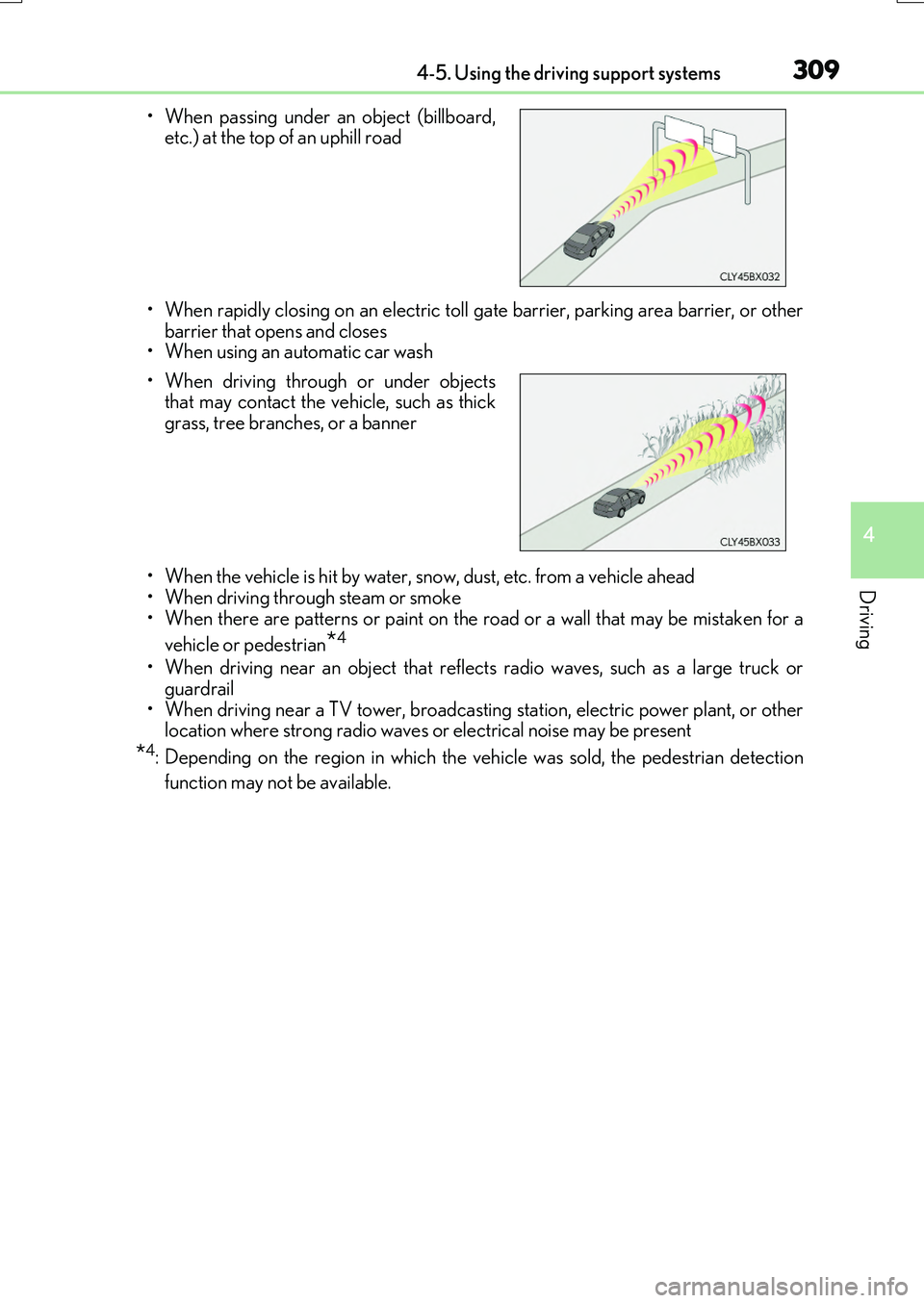
• When passing under an object (billboard, etc.) at the top of an uphill road
• When driving through or under objects that may contact the vehicle, such as thick
grass, tree branches, or a banner
Page 317 of 776
3174-5. Using the driving support systems
4
Driving
RX350/RX200t_EE_OM48F32E
WARNING
■Before using LKA system
Do not rely solely upon the LKA system. LKA is not a system which automatically drives the vehicle or reduces the amount of attention that must be paid to the area in
front of the vehicle. The driver must always assume full responsibility for driving safely by always paying careful attention to the surrounding conditions and operate the steer-ing wheel to correct the path of the vehicle. Also, make sure to take adequate breaks
when fatigued, such as from driv ing for a long period of time. Failure to perform appropriate driving operat ions and pay careful attention may lead to an accident, resulting in death or serious injury.
■To avoid operating LKA by mistake
When not using the LKA system, use the LKA switch to turn the system off.
■Situations unsuitable for LKA
Do not use the LKA system in the following situations. The system may not operate properly and le ad to an accident, resulting in death or serious injury.
●A spare tire, tire chains, etc., are equipped.
●When the tires have been excessively worn, or when the tire inflation pressure is low.
●Tires which differ by structure, manufacturer, brand or tread pattern are used.
●Objects or patterns that could be mistaken for white (yellow) lines are present on the side of the road (guardrails, cu rbs, reflective poles, etc.).
●Vehicle is driven on a snow-covered road.
●White (yellow) lines are difficult to see due to rain, snow, fog, dust, etc.
●Asphalt repair marks, white (yellow) line marks, etc., are present due to road repair.
●Vehicle is driven in a temporary lane or restricted lane due to construction work.
●Vehicle is driven on a road surface which is slippery due to rainy weather, fallen snow, freezing, etc.
●Vehicle is driven in traffic lanes other than on highways and freeways.
●Vehicle is driven in a construction zone.
●When your vehicle is towing a trailer or during emergency towing
■Preventing LKA system malfunctions and operations performed by mistake
●Do not modify the headlights or place stic kers, etc., on the surface of the lights.
●Do not modify the suspension etc. If the suspension etc. needs to be replaced, con- tact any authorized Lexus dealer or repair er, or another duly qualified and equipped
professional.
●Do not install or place anything on the hood or grille. Also, do not install a grille guard (bull bars, kangaroo bar, etc.).
●If your windshield needs repairs, contact any authorized Lexus dealer or repairer, oranother duly qualified an d equipped professional.
Page 331 of 776
3314-5. Using the driving support systems
4
Driving
RX350/RX200t_EE_OM48F32E
WARNING
■Situations unsuitable for dynamic radar cruise control with full-speed range
Do not use dynamic radar cruise control with full-speed range in any of the following situations.
Doing so may result in inappropriate speed control and could cause an accident result- ing in death or serious injury.
●Roads where there are pedestrians, cyclers, etc.
●In heavy traffic
●On roads with sharp bends
●On winding roads
●On slippery roads, such as those covered with rain, ice or snow
●On steep downhills, or where there are sudden changes between sharp up and downgradients
Vehicle speed may exceed the set sp eed when driving down a steep hill.
●At entrances to freeways and highways
●When weather conditions are bad enough that they may prevent the sensors from
detecting correctly (fog, snow, sandstorm, heavy rain, etc.)
●When there is rain, snow, etc. on the fron t surface of the radar sensor or camera sen- sor
●In traffic conditions that require frequent repeated acceleration and deceleration
●When your vehicle is towing a trailer or during emergency towing
●When an approach warning buzzer is heard often
Page 336 of 776
3364-5. Using the driving support systems
RX350/RX200t_EE_OM48F32E
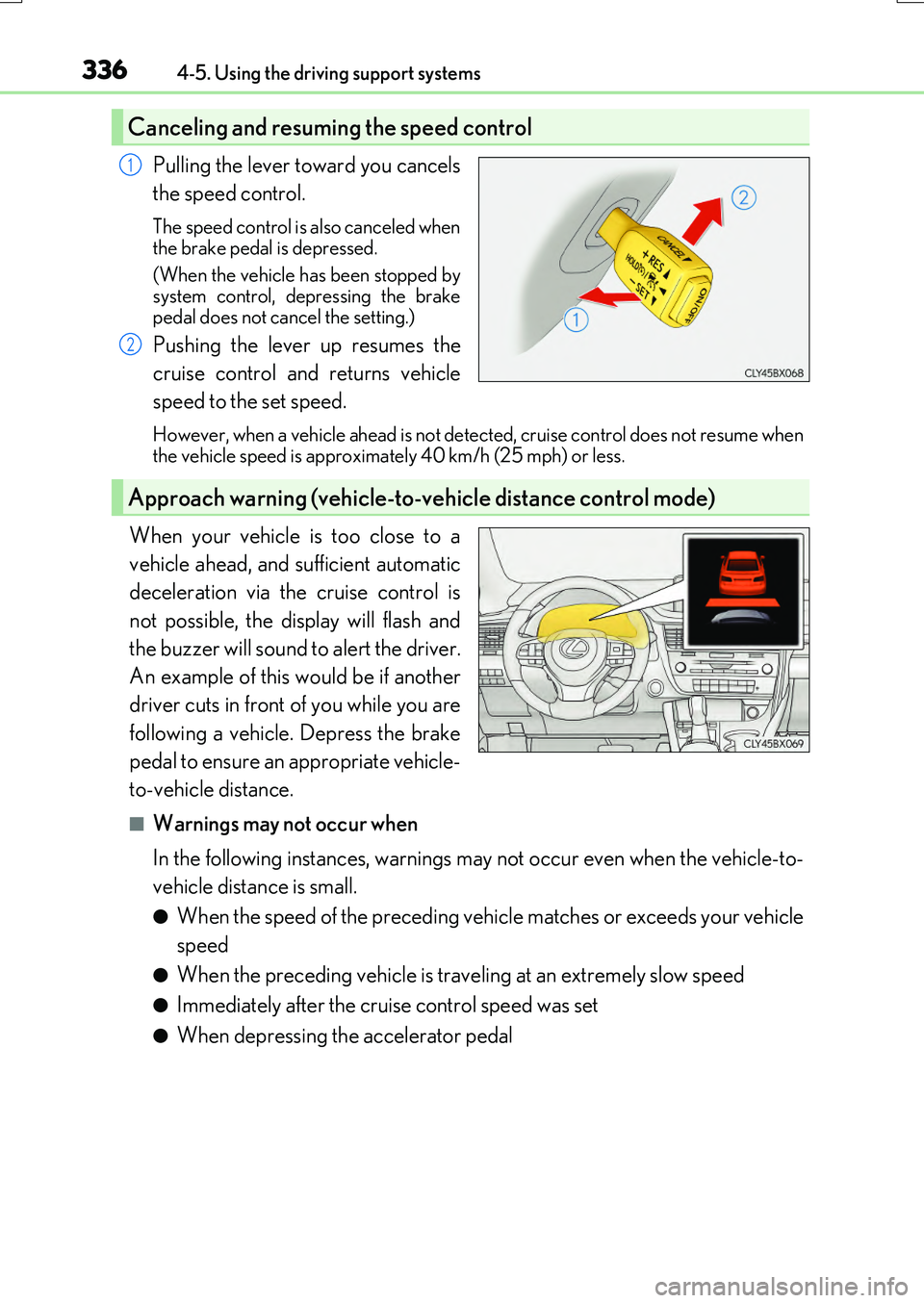
Pulling the lever toward you cancels
the speed control.
The speed control is also canceled when
the brake pedal is depressed.
(When the vehicle has been stopped by system control, depressing the brake
pedal does not cancel the setting.)
Pushing the lever up resumes the
cruise control and returns vehicle
speed to the set speed.
However, when a vehicle ahead is not detected, cruise control does not resume when the vehicle speed is approximately 40 km/h (25 mph) or less.
When your vehicle is too close to a
vehicle ahead, and sufficient automatic
deceleration via the cruise control is
not possible, the display will flash and
the buzzer will sound to alert the driver.
An example of this would be if another
driver cuts in front of you while you are
following a vehicle. Depress the brake
pedal to ensure an appropriate vehicle-
to-vehicle distance.
■Warnings may not occur when
In the following instances, warnings may not occur even when the vehicle-to-
vehicle distance is small.
●When the speed of the preceding vehicle matches or exceeds your vehicle
speed
●When the preceding vehicle is traveling at an extremely slow speed
●Immediately after the cruise control speed was set
●When depressing the accelerator pedal
Canceling and resuming the speed control
1
2
Approach warning (vehicle-to-vehicle distance control mode)
Page 342 of 776
3424-5. Using the driving support systems
RX350/RX200t_EE_OM48F32E
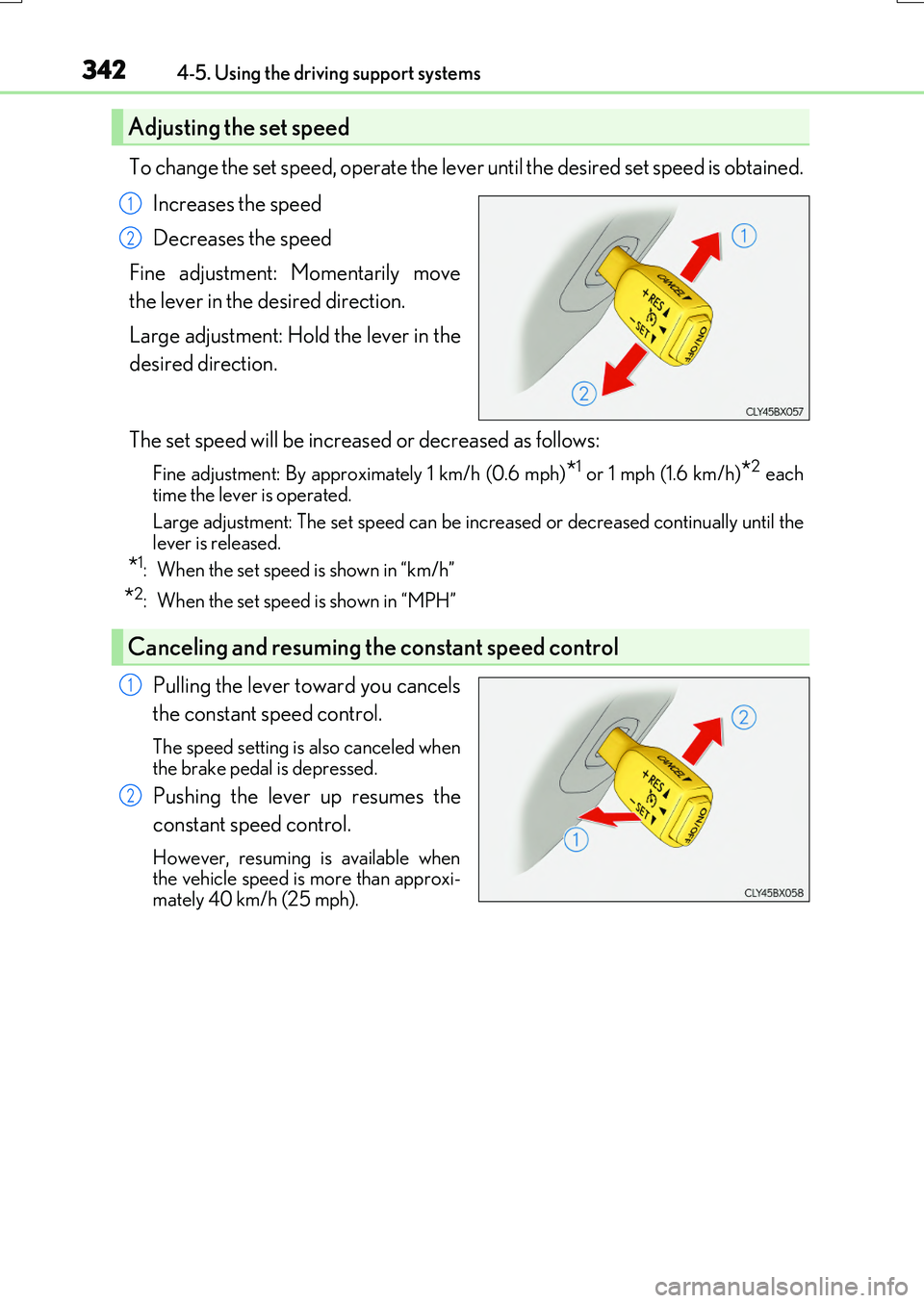
To change the set speed, operate the lever until the desired set speed is obtained.
Increases the speed
Decreases the speed
Fine adjustment: Momentarily move
the lever in the desired direction.
Large adjustment: Hold the lever in the
desired direction.
The set speed will be increased or decreased as follows:
Fine adjustment: By approximately 1 km/h (0.6 mph)*1 or 1 mph (1.6 km/h)*2 each time the lever is operated.
Large adjustment: The set speed can be incr eased or decreased continually until the
lever is released.
*1: When the set speed is shown in “km/h”
*2: When the set speed is shown in “MPH”
Pulling the lever toward you cancels
the constant speed control.
The speed setting is also canceled when
the brake pedal is depressed.
Pushing the lever up resumes the
constant speed control.
However, resuming is available when the vehicle speed is more than approxi-
mately 40 km/h (25 mph).
Adjusting the set speed
1
2
Canceling and resuming the constant speed control
1
2
Page 344 of 776
3444-5. Using the driving support systems
RX350/RX200t_EE_OM48F32E
WARNING
■To avoid operating the cruise control by mistake
Switch the cruise control off using the “ON/OFF” button when not in use.
■Situations unsuitable for cruise control
Do not use cruise control in any of the following situations. Doing so may result in loss of control and could cause an accident resulting in death orserious injury.
●In heavy traffic
●On roads with sharp bends
●On winding roads
●On slippery roads, such as those covered with rain, ice or snow
●On steep hills Vehicle speed may exceed the set sp eed when driving down a steep hill.
●When your vehicle is towing a trailer or during emergency towing
Page 356 of 776
3564-5. Using the driving support systems
RX350/RX200t_EE_OM48F32E
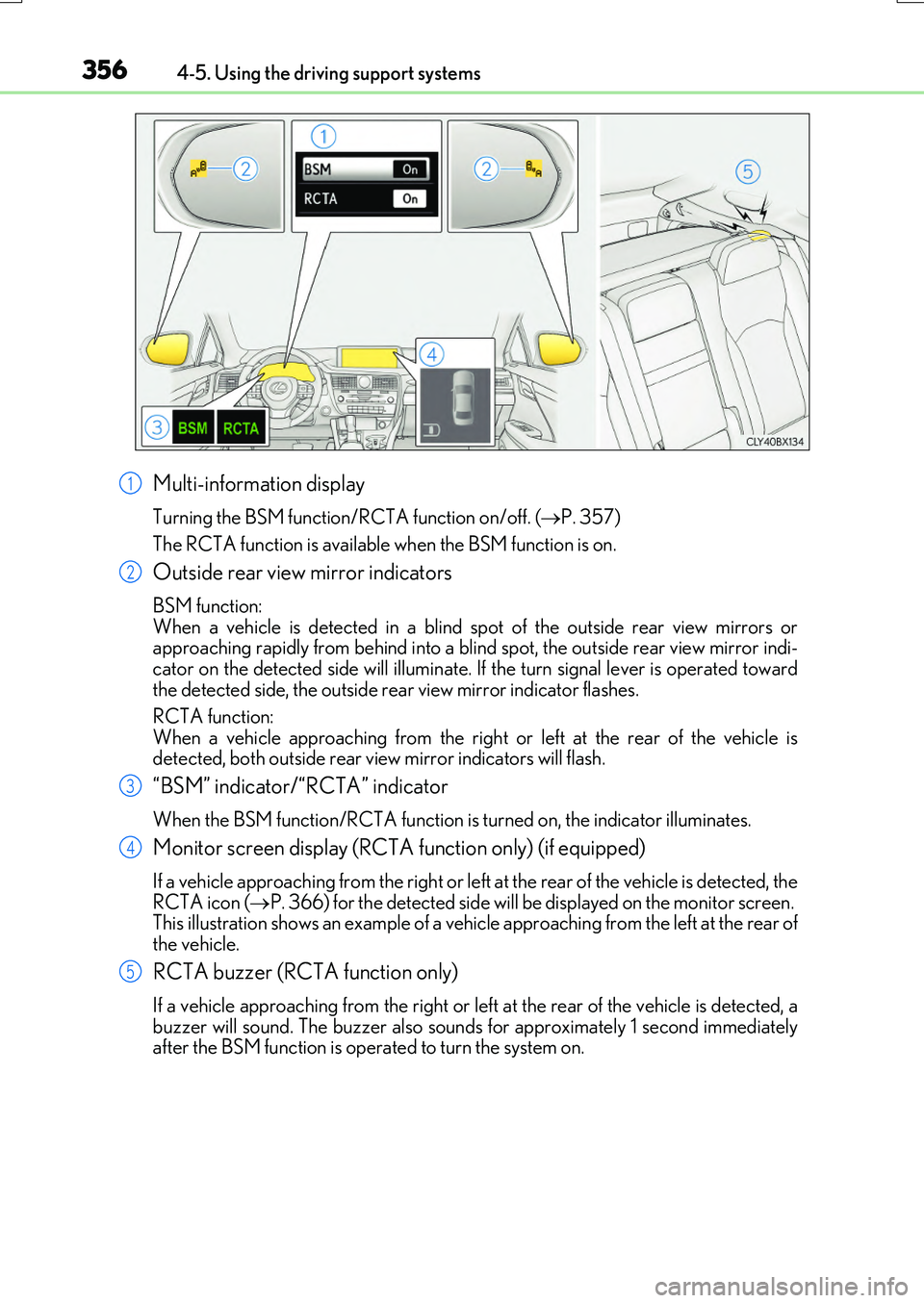
Multi-information display
Turning the BSM function/RCTA function on/off. (P. 357)
The RCTA function is available when the BSM function is on.
Outside rear view mirror indicators
BSM function: When a vehicle is detected in a blind sp ot of the outside rear view mirrors or approaching rapidly from behind into a blin d spot, the outside rear view mirror indi-
cator on the detected side will illuminate. If the turn signal lever is operated toward the detected side, the outside rear view mirror indicator flashes.
RCTA function:
When a vehicle approaching from the right or left at the rear of the vehicle is detected, both outside rear vi ew mirror indicators will flash.
“BSM” indicator/“RCTA” indicator
When the BSM function/RCTA function is turned on, the indicator illuminates.
Monitor screen display (RCTA function only) (if equipped)
If a vehicle approaching from the right or left at the rear of the vehicle is detected, the RCTA icon ( P. 366) for the detected side will be displayed on the monitor screen. This illustration shows an example of a vehicl e approaching from the left at the rear of
the vehicle.
RCTA buzzer (RCTA function only)
If a vehicle approaching from the right or left at the rear of the vehicle is detected, a buzzer will sound. The buzzer also sounds for approximately 1 second immediatelyafter the BSM function is operated to turn the system on.
1
2
3
4
5