lock LEXUS RX270 2014 User Guide
[x] Cancel search | Manufacturer: LEXUS, Model Year: 2014, Model line: RX270, Model: LEXUS RX270 2014Pages: 652, PDF Size: 48.98 MB
Page 25 of 652
1Before driving
25
RX350/270_EE
1-1. Key information
Keys .............................................. 26
1-2. Opening, closing and
locking the doors
Smart entry & start system ..... 31
Wireless remote control ........ 53
Side doors ................................... 56
Back door.................................... 60
1-3. Adjustable components
(seats, mirrors,
steering wheel)
Front seats .................................. 73
Rear seats .................................... 77
Driving position memory ........ 81
Head restraints ......................... 87
Seat belts..................................... 89
Steering wheel .......................... 94
Anti-glare inside rear
view mirror............................... 96
Outside rear view mirrors ..... 981-4. Opening and closing
the windows and
moon roof
Power windows ......................... 101
Moon roof.................................. 104
Electronic sunshade.............. 108
1-5. Refueling
Opening the fuel tank
cap ............................................. 110
1-6. Theft deterrent system
Engine immobilizer
system ....................................... 115
Double locking system ........... 121
Alarm .......................................... 122
1-7. Safety information
Correct driving posture ........ 129
SRS airbags................................ 131
Child restraint systems .......... 142
Installing child restraints ....... 152
Airbag manual on/off
system ...................................... 163
RX350_270_EE_48D77E.book 25 ページ 2014年1月24日 金曜日 午前10時4分
Page 27 of 652
27
1-1. Key information
1
Before driving
RX350/270_EE
Using the mechanical key
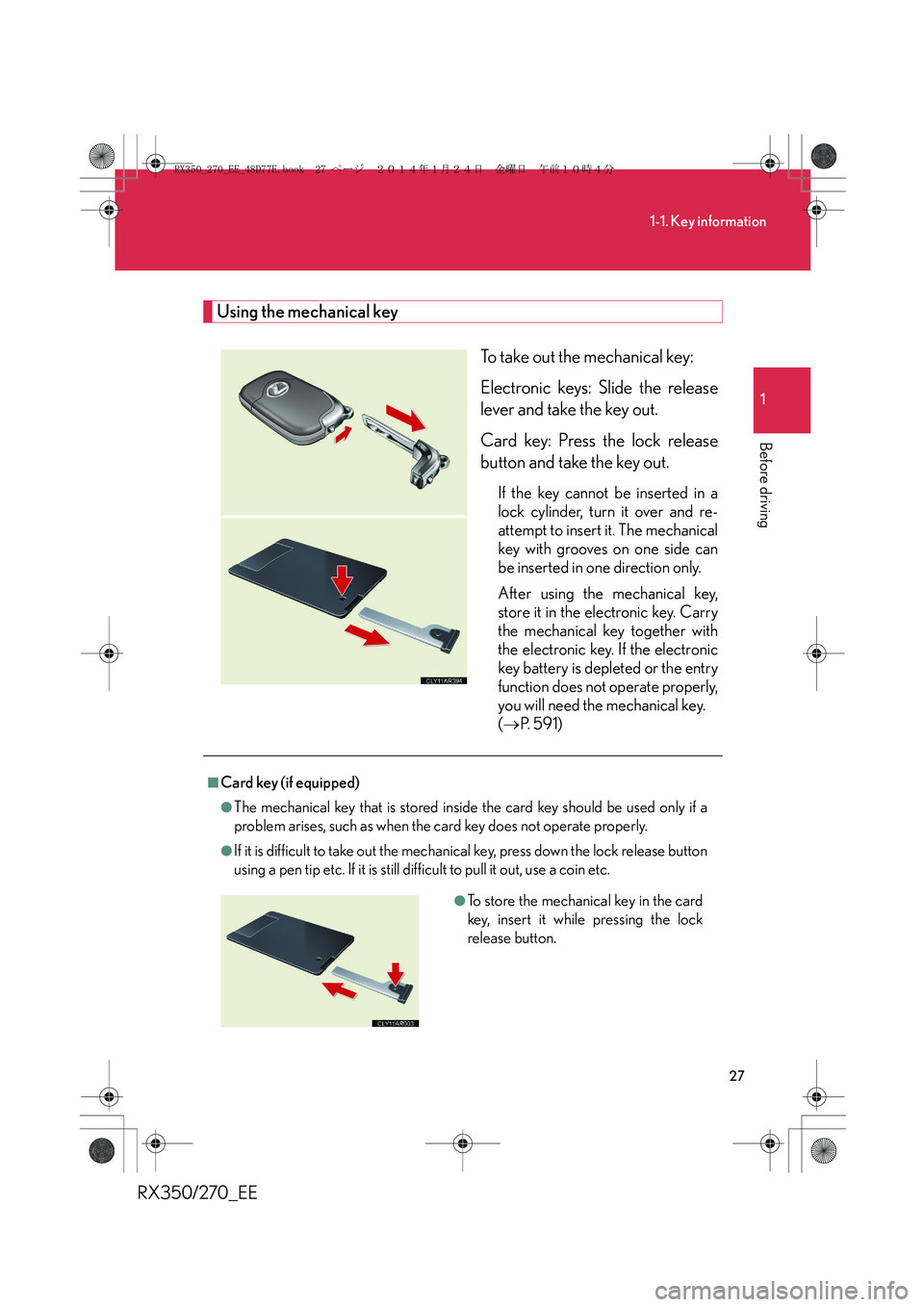
To take out the mechanical key:
Electronic keys: Slide the release
lever and take the key out.
Card key: Press the lock release
button and take the key out.
If the key cannot be inserted in a
lock cylinder, turn it over and re-
attempt to insert it. The mechanical
key with grooves on one side can
be inserted in one direction only.
After using the mechanical key,
store it in the electronic key. Carry
the mechanical key together with
the electronic key. If the electronic
key battery is depleted or the entry
function does not operate properly,
you will need the mechanical key.
(→P. 5 9 1 )
■Card key (if equipped)
●The mechanical key that is stored inside the card key should be used only if a
problem arises, such as when the card key does not operate properly.
●If it is difficult to take out the mechanical key, press down the lock release button
using a pen tip etc. If it is still difficult to pull it out, use a coin etc.
●To store the mechanical key in the card
key, insert it while pressing the lock
release button.
RX350_270_EE_48D77E.book 27 ページ 2014年1月24日 金曜日 午前10時4分
Page 28 of 652
28
1-1. Key information
RX350/270_EE
●The card key is not waterproof.
■When required to leave the vehicle’s key with a parking attendant
Lock the glove box as circumstances demand. (→P. 4 2 1 )
Remove the mechanical key for your own use and provide the attendant with the
electronic key only.
■Key number plate
Keep the plate in a safe place such as your wallet, not in the vehicle. In the event that
a mechanical key is lost, a new key can be made by any authorized Lexus dealer or
repairer, or another duly qualified and equipped professional using the key number
plate. (→P. 5 9 0 )
■When riding in an aircraft
When bringing an electronic key onto an aircraft, make sure you do not press any
buttons on the electronic key while inside the aircraft cabin. If you are carrying an
electronic key in your bag etc., ensure that the buttons are not likely to be pressed
accidentally. Pressing a button may cause the electronic key to emit radio waves
that could interfere with the operation of the aircraft.
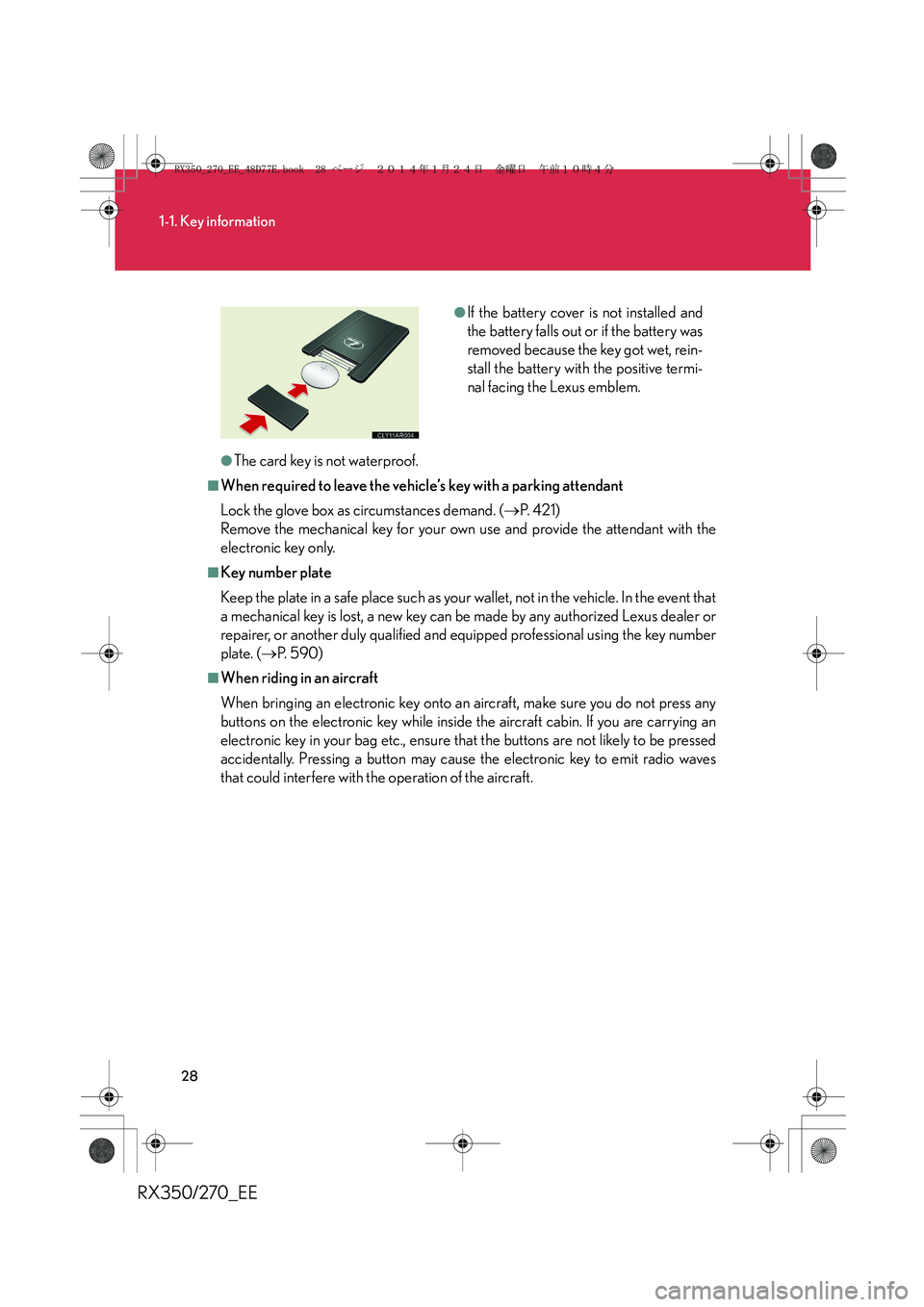
●If the battery cover is not installed and
the battery falls out or if the battery was
removed because the key got wet, rein-
stall the battery with the positive termi-
nal facing the Lexus emblem.
RX350_270_EE_48D77E.book 28 ページ 2014年1月24日 金曜日 午前10時4分
Page 31 of 652
31
1
Before driving
RX350/270_EE
1-2. Opening, closing and locking the doors
Smart entry & start system
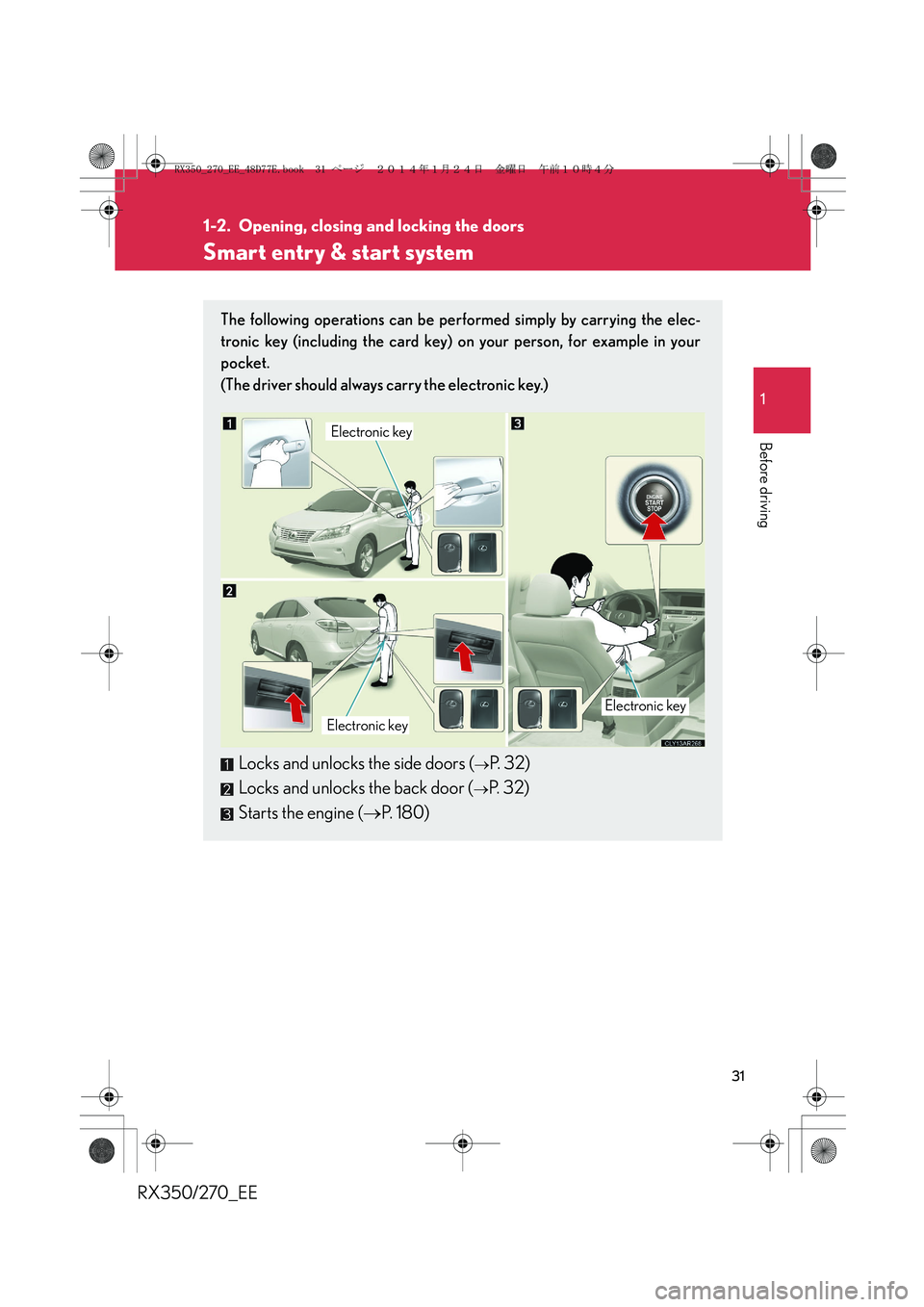
The following operations can be performed simply by carrying the elec-
tronic key (including the card key) on your person, for example in your
pocket.
(The driver should always carry the electronic key.)
Locks and unlocks the side doors (→P. 32)
Locks and unlocks the back door (
→P. 32)
Starts the engine (→P. 1 8 0 )
Electronic key
Electronic keyElectronic key
RX350_270_EE_48D77E.book 31 ページ 2014年1月24日 金曜日 午前10時4分
Page 32 of 652
32
1-2. Opening, closing and locking the doors
RX350/270_EE
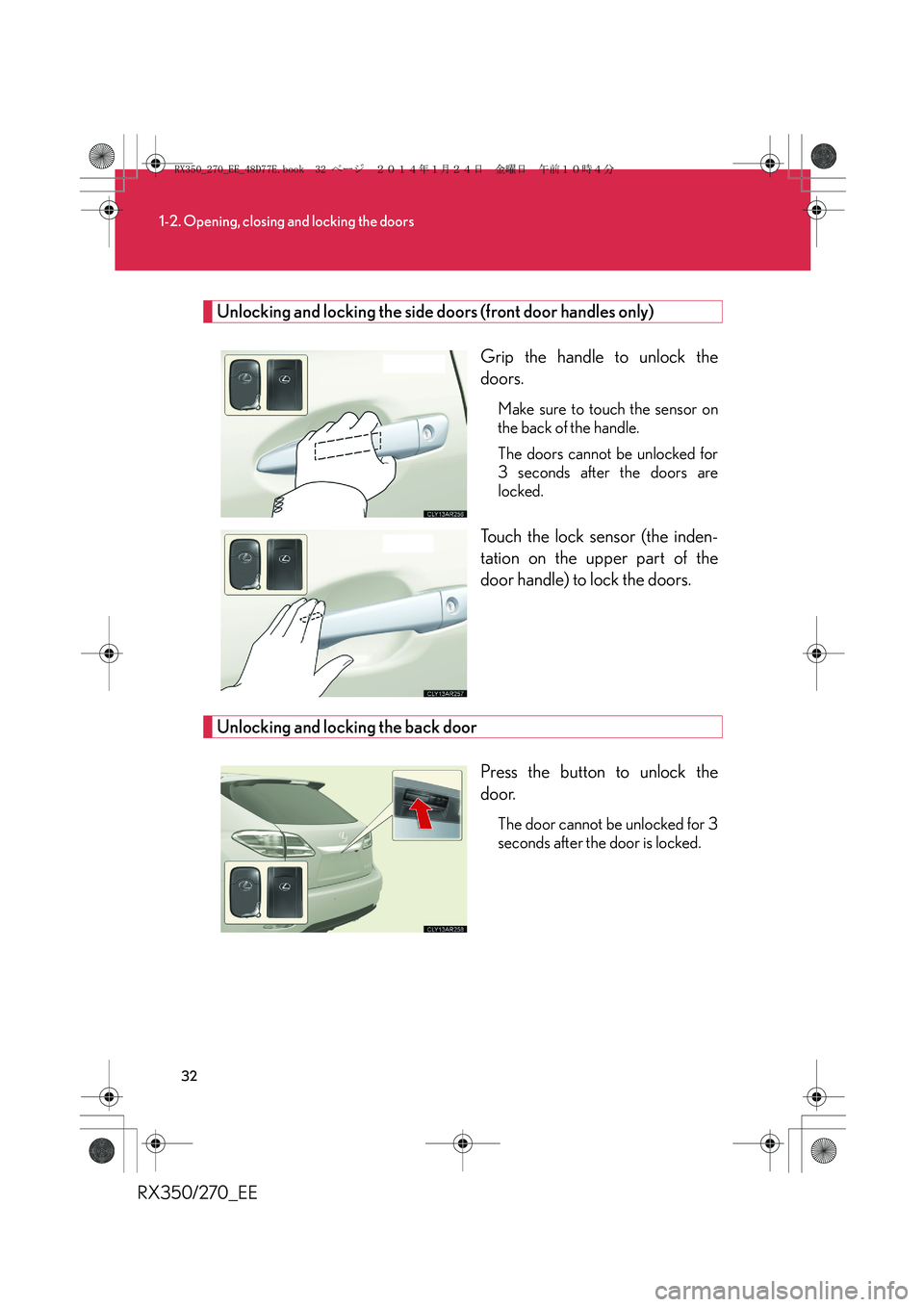
Unlocking and locking the side doors (front door handles only)
Grip the handle to unlock the
doors.
Make sure to touch the sensor on
the back of the handle.
The doors cannot be unlocked for
3 seconds after the doors are
locked.
Touch the lock sensor (the inden-
tation on the upper part of the
door handle) to lock the doors.
Unlocking and locking the back door
Press the button to unlock the
door.
The door cannot be unlocked for 3
seconds after the door is locked.
RX350_270_EE_48D77E.book 32 ページ 2014年1月24日 金曜日 午前10時4分
Page 33 of 652
33
1-2. Opening, closing and locking the doors
1
Before driving
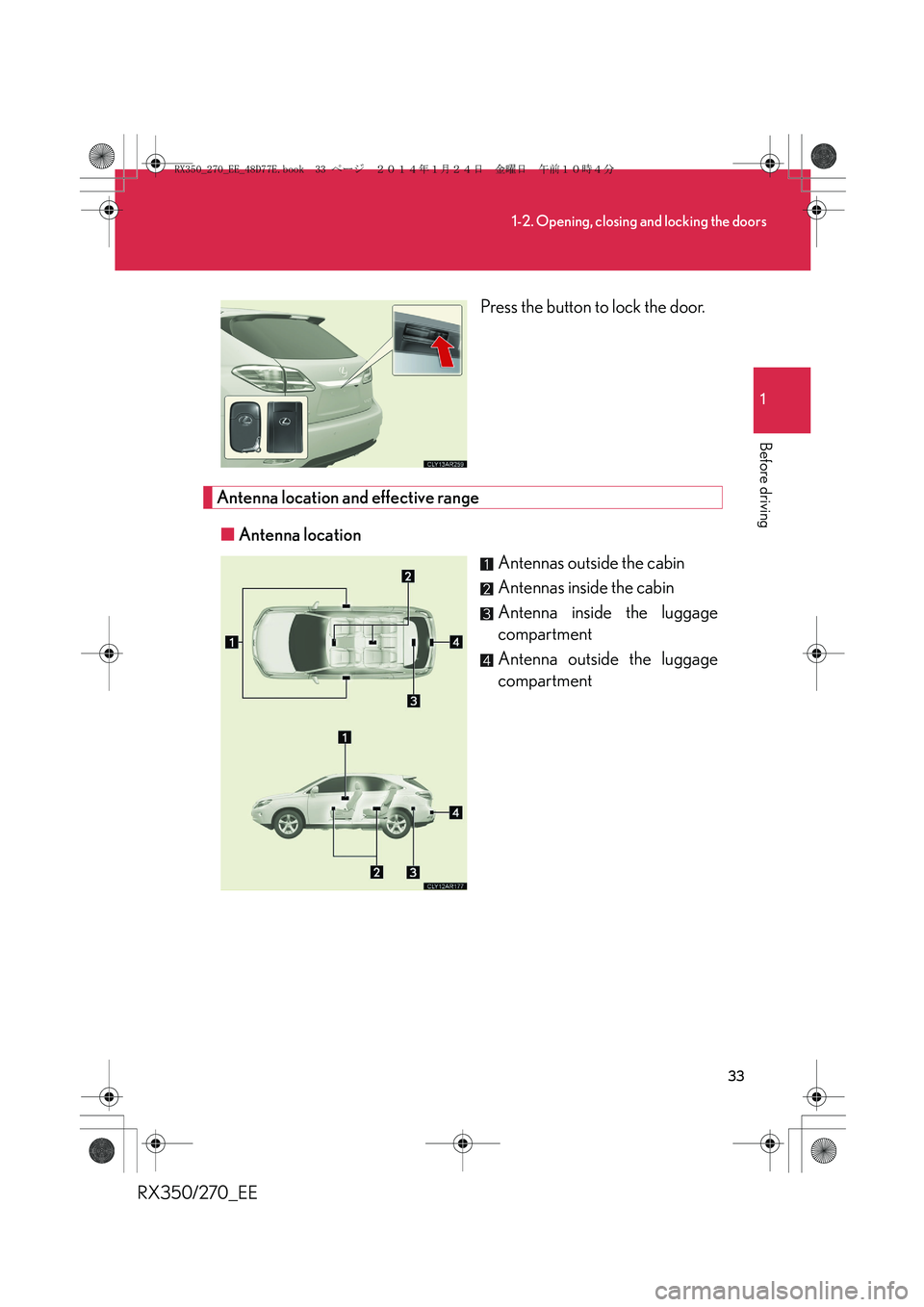
RX350/270_EEPress the button to lock the door.
Antenna location and effective range
■Antenna location
Antennas outside the cabin
Antennas inside the cabin
Antenna inside the luggage
compartment
Antenna outside the luggage
compartment
RX350_270_EE_48D77E.book 33 ページ 2014年1月24日 金曜日 午前10時4分
Page 34 of 652
34
1-2. Opening, closing and locking the doors
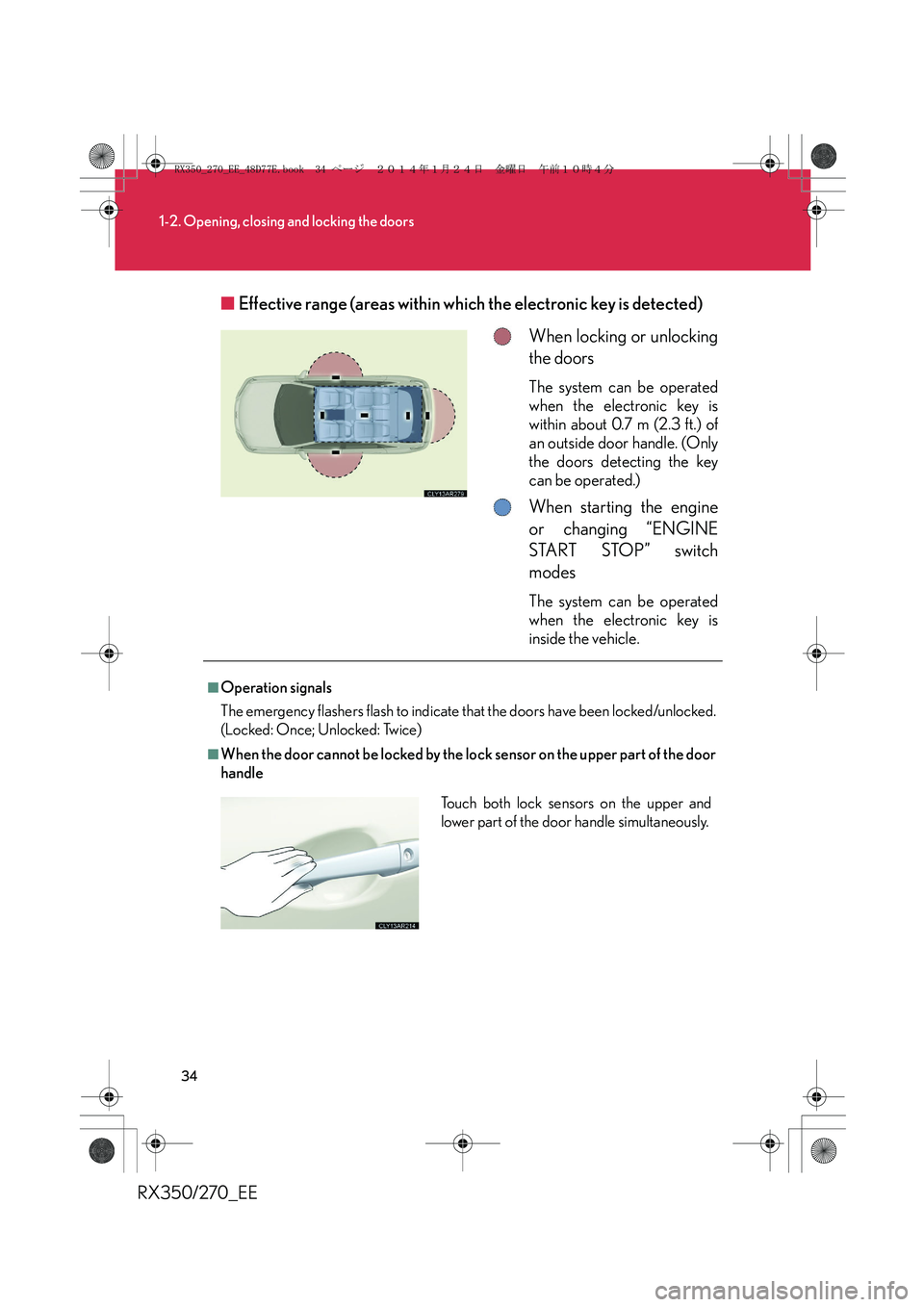
RX350/270_EE■Effective range (areas within which the electronic key is detected)
When locking or unlocking
the doors
The system can be operated
when the electronic key is
within about 0.7 m (2.3 ft.) of
an outside door handle. (Only
the doors detecting the key
can be operated.)
When starting the engine
or changing “ENGINE
START STOP” switch
modes
The system can be operated
when the electronic key is
inside the vehicle.
■Operation signals
The emergency flashers flash to indicate that the doors have been locked/unlocked.
(Locked: Once; Unlocked: Twice)
■When the door cannot be locked by the lock sensor on the upper part of the door
handle
Touch both lock sensors on the upper and
lower part of the door handle simultaneously.
RX350_270_EE_48D77E.book 34 ページ 2014年1月24日 金曜日 午前10時4分
Page 35 of 652
35
1-2. Opening, closing and locking the doors
1
Before driving
RX350/270_EE
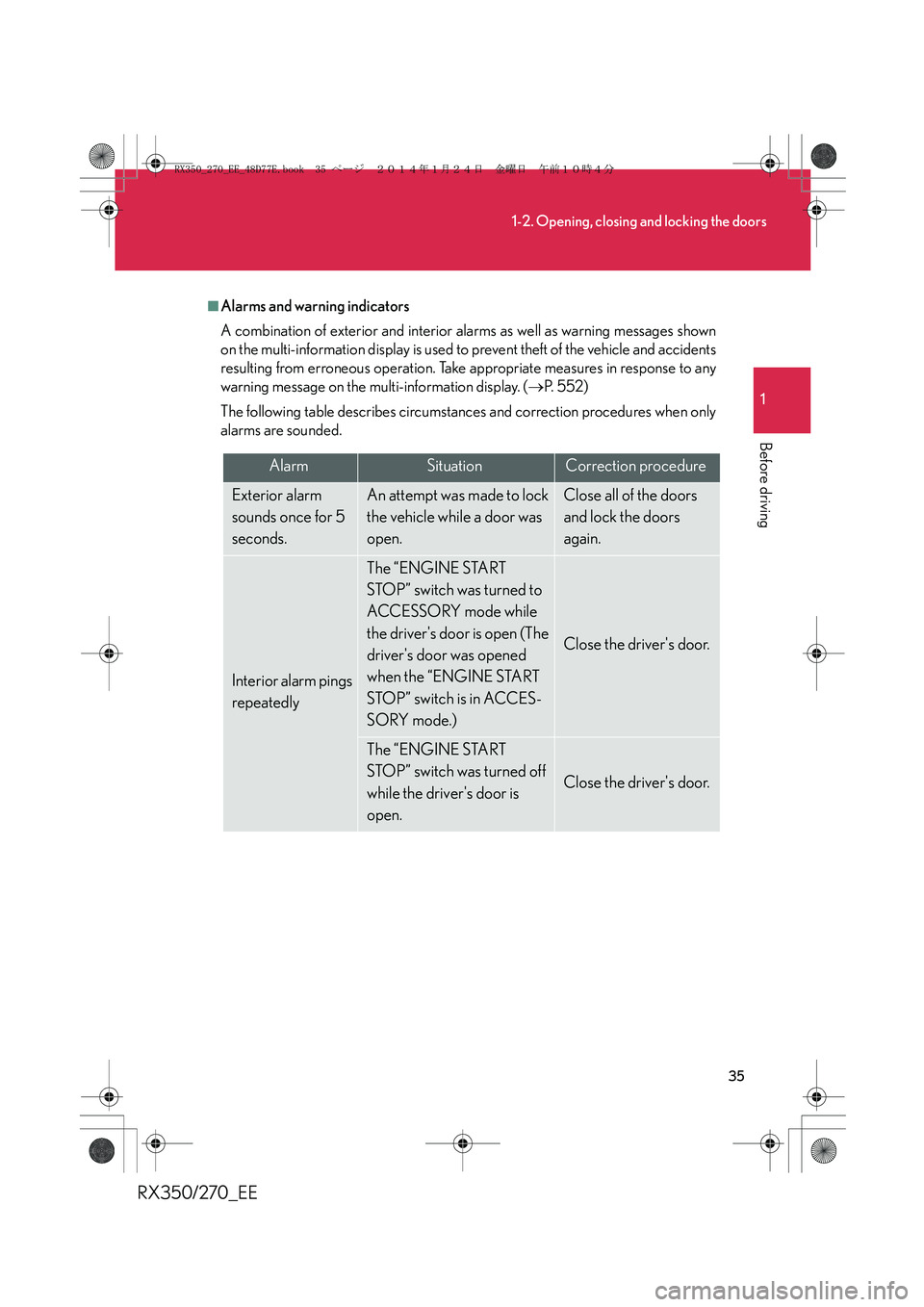
■Alarms and warning indicators
A combination of exterior and interior alarms as well as warning messages shown
on the multi-information display is used to prevent theft of the vehicle and accidents
resulting from erroneous operation. Take appropriate measures in response to any
warning message on the multi-information display. (→P. 5 5 2 )
The following table describes circumstances and correction procedures when only
alarms are sounded.
AlarmSituationCorrection procedure
Exterior alarm
sounds once for 5
seconds.An attempt was made to lock
the vehicle while a door was
open.Close all of the doors
and lock the doors
again.
Interior alarm pings
repeatedly
The “ENGINE START
STOP” switch was turned to
ACCESSORY mode while
the driver's door is open (The
driver's door was opened
when the “ENGINE START
STOP” switch is in ACCES-
SORY mode.)
Close the driver's door.
The “ENGINE START
STOP” switch was turned off
while the driver's door is
open.
Close the driver's door.
RX350_270_EE_48D77E.book 35 ページ 2014年1月24日 金曜日 午前10時4分
Page 36 of 652
36
1-2. Opening, closing and locking the doors
RX350/270_EE
■Security feature
If a door is not opened within approximately 30 seconds after the vehicle is
unlocked, the security feature automatically locks the vehicle again.
■Battery-saving function
If the vehicle is parked for a long period of time, the battery-saving function is acti-
vated in order to prevent the vehicle battery from being discharged and the elec-
tronic key battery from being depleted.
●In the following circumstances, unlocking the vehicle using the entry function
may take longer than usual:
• When the entry function has not been used for 5 days or more
• When the electronic key has been left within approximately 2 m (6 ft.) of the
vehicle for 10 minutes or more
●If the entry function has not been used for 14 days or more, the vehicle cannot
be unlocked by a door other than the driver's door. To unlock the vehicle, grip
the driver's door handle or use the wireless remote control or the mechanical
key.
The system will resume operation when:
●The vehicle is locked using the lock sensor.
●The vehicle is locked/unlocked using the wireless remote control function.
(→P. 5 3 )
●The vehicle is locked/unlocked using the mechanical key. (→P. 5 9 1 )
RX350_270_EE_48D77E.book 36 ページ 2014年1月24日 金曜日 午前10時4分
Page 37 of 652
37
1-2. Opening, closing and locking the doors
1
Before driving
RX350/270_EE
■Conditions affecting operation
The smart entry & start system uses weak radio waves. In the following situations,
the communication between the electronic key and the vehicle may be affected,
preventing the smart entry & start system, wireless remote control and immobilizer
system from operating properly.
(Ways of coping: →P. 5 9 1 )
●When the electronic key battery is depleted
●Near a TV tower, electric power plant, gas station, radio station, large display,
airport or other facility that generates strong radio waves or electrical noise
●When carrying a portable radio, cellular phone, cordless phone or other wire-
less communication device
●When the electronic key is in contact with, or is covered by the following metal-
lic objects
• Cards to which aluminum foil is attached
• Cigarette boxes that have aluminum foil inside
• Metallic wallets or bags
•Coins
• Hand warmers made of metal
• Media such as CDs and DVDs
●When multiple electronic keys are in the vicinity
●When another wireless key (that emits radio waves) is being used nearby
●When carrying the electronic key together with the following devices that emit
radio waves
• Another vehicle's electronic key or a wireless key that emits radio waves
• Personal computers or personal digital assistants (PDAs)
• Digital audio players
• Portable game systems
●If window tint with a metallic content or metallic objects are attached to the rear
window
RX350_270_EE_48D77E.book 37 ページ 2014年1月24日 金曜日 午前10時4分