stop start LEXUS RX350 2011 Workshop Manual
[x] Cancel search | Manufacturer: LEXUS, Model Year: 2011, Model line: RX350, Model: LEXUS RX350 2011Pages: 821, PDF Size: 13.27 MB
Page 283 of 821
211
2-4. Using other driving systems
2
When driving
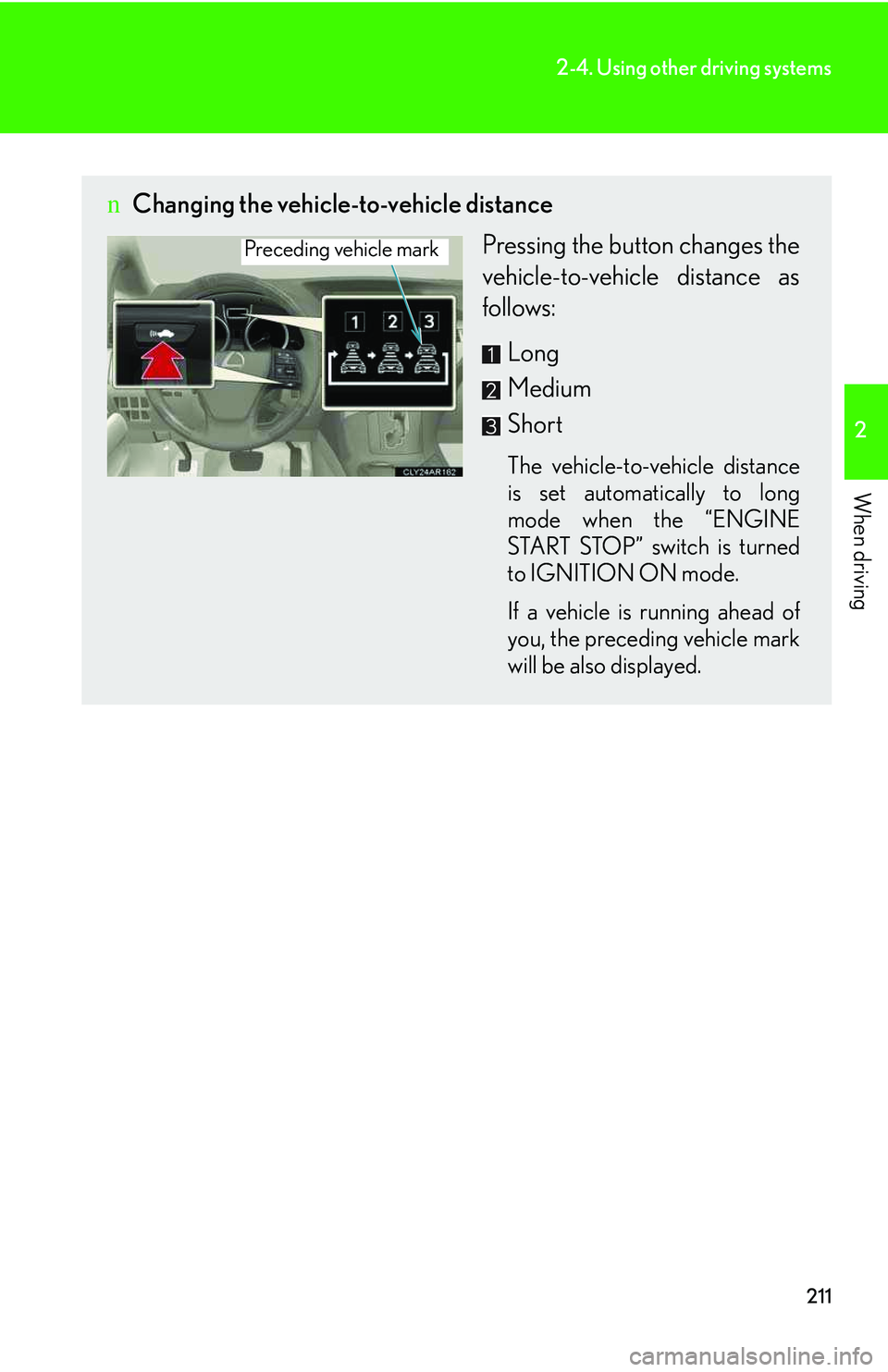
nChanging the vehicle-to-vehicle distance
Pressing the button changes the
vehicle-to-vehicle distance as
follows:
Long
Medium
Short
The vehicle-to-vehicle distance
is set automatically to long
mode when the “ENGINE
START STOP” switch is turned
to IGNITION ON mode.
If a vehicle is running ahead of
you, the preceding vehicle mark
will be also displayed.
Preceding vehicle mark
Page 300 of 821
228
2-4. Using other driving systems
nThe rear view monitor system can be operated when
The “ENGINE START STOP” switch is in IGNITION ON mode and the back door
is fully closed.
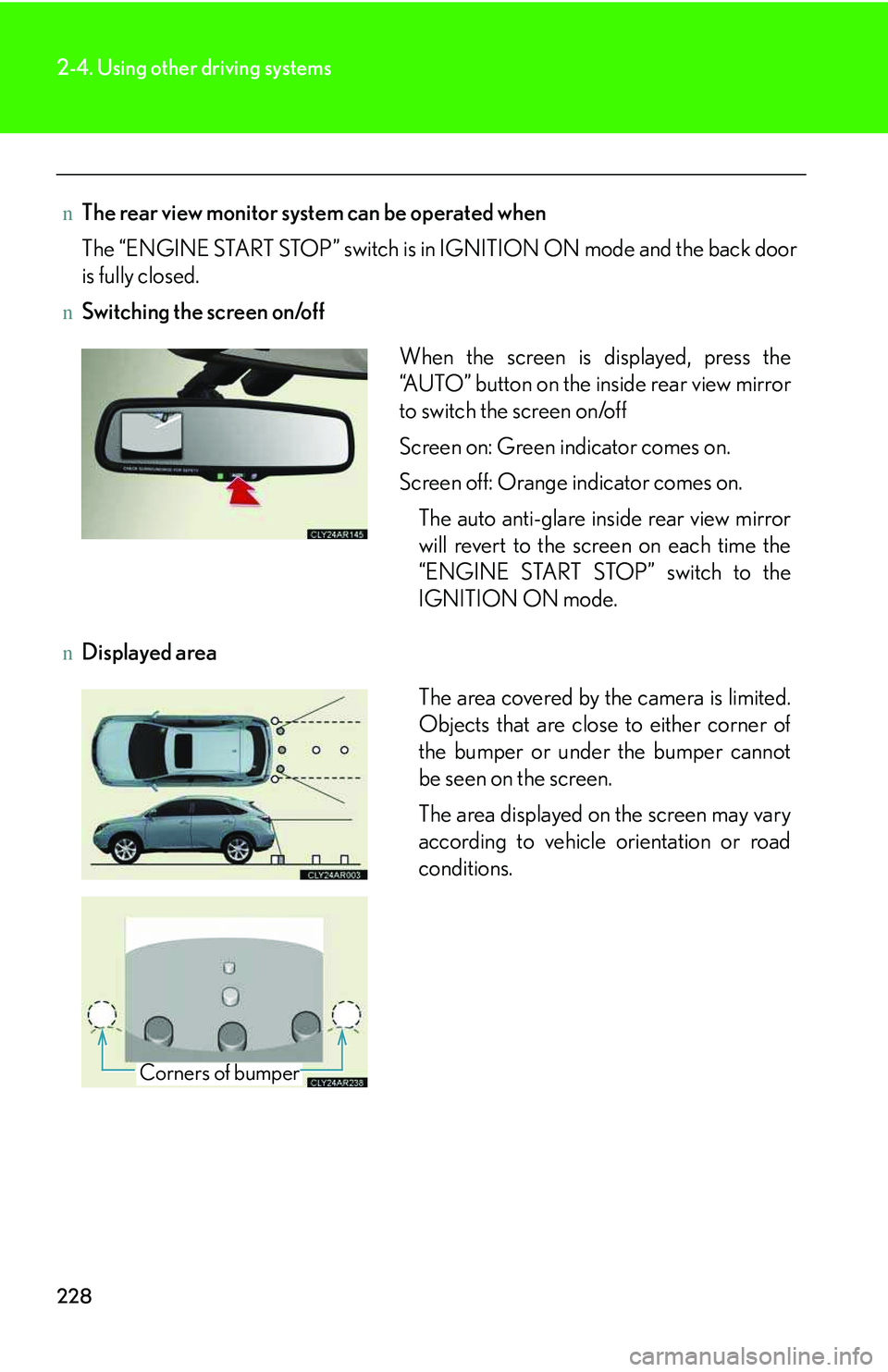
nSwitching the screen on/off
nDisplayed area
When the screen is displayed, press the
“AUTO” button on the inside rear view mirror
to switch the screen on/off
Screen on: Green indicator comes on.
Screen off: Orange indicator comes on.
The auto anti-glare inside rear view mirror
will revert to the screen on each time the
“ENGINE START STOP” switch to the
IGNITION ON mode.
The area covered by the camera is limited.
Objects that are close to either corner of
the bumper or under the bumper cannot
be seen on the screen.
The area displayed on the screen may vary
according to vehicle orientation or road
conditions.
Corners of bumper
Page 303 of 821
231
2-4. Using other driving systems
2
When driving
Driving assist systems
To help enhance driving safety and performance, the following systems
operate automatically in response to various driving situations. Be aware,
however, that these systems are supplementary and should not be relied
upon too heavily when operating the vehicle.
nABS (Anti-lock Brake System)
Helps to prevent wheel lock when the brakes are applied suddenly, or if
the brakes are applied while driving on a slippery road surface
nBrake assist
Generates an increased level of braking force after the brake pedal is
depressed, when the system detects a panic stop situation
nVSC (Vehicle Stability Control)
Helps the driver to control skidding when swerving suddenly or turning on
slippery road surfaces
nTRAC (Traction Control)
Helps to maintain drive power and prevent the drive wheels from spinning
when starting the vehicle or accelerating on slippery roads
nHill-start assist control
→P. 2 3 8
nEPS (Electric Power Steering)
Employs an electric motor to reduce the amount of effort needed to turn
the steering wheel
nActive torque control 4WD system (AWD models only)
Automatically switches from front-wheel drive to AWD (All-Wheel Drive)
according to driving conditions, helping to ensure reliable handling and
stability. Examples of conditions where the system will switch to AWD are
when cornering, going uphill, starting off or accelerating, and when the
road surface is slippery due to snow or rain etc.
Page 310 of 821
238
2-4. Using other driving systems
Hill-start assist control
nHill-start assist control can be operated when
lThe shift lever is in a position other than P.
lThe parking brake is not applied.
lThe accelerator pedal is not depressed.
nHill-start assist control
lWhile hill-start assist control is operating, the brakes remain automatically
applied after the driver releases the brake pedal. The stop lights and the high
mounted stoplight turn on.
lHill-start assist control operates for about 2 seconds after the brake pedal is
released.
lIf the slip indicator does not flash and the buzzer does not sound when the brake
pedal is further depressed, slightly reduce the pressure on the brake pedal (do
not allow the vehicle to roll backward) and then firmly depress it again. If the sys-
tem still does not operate, check if the operating conditions explained above
have been met.
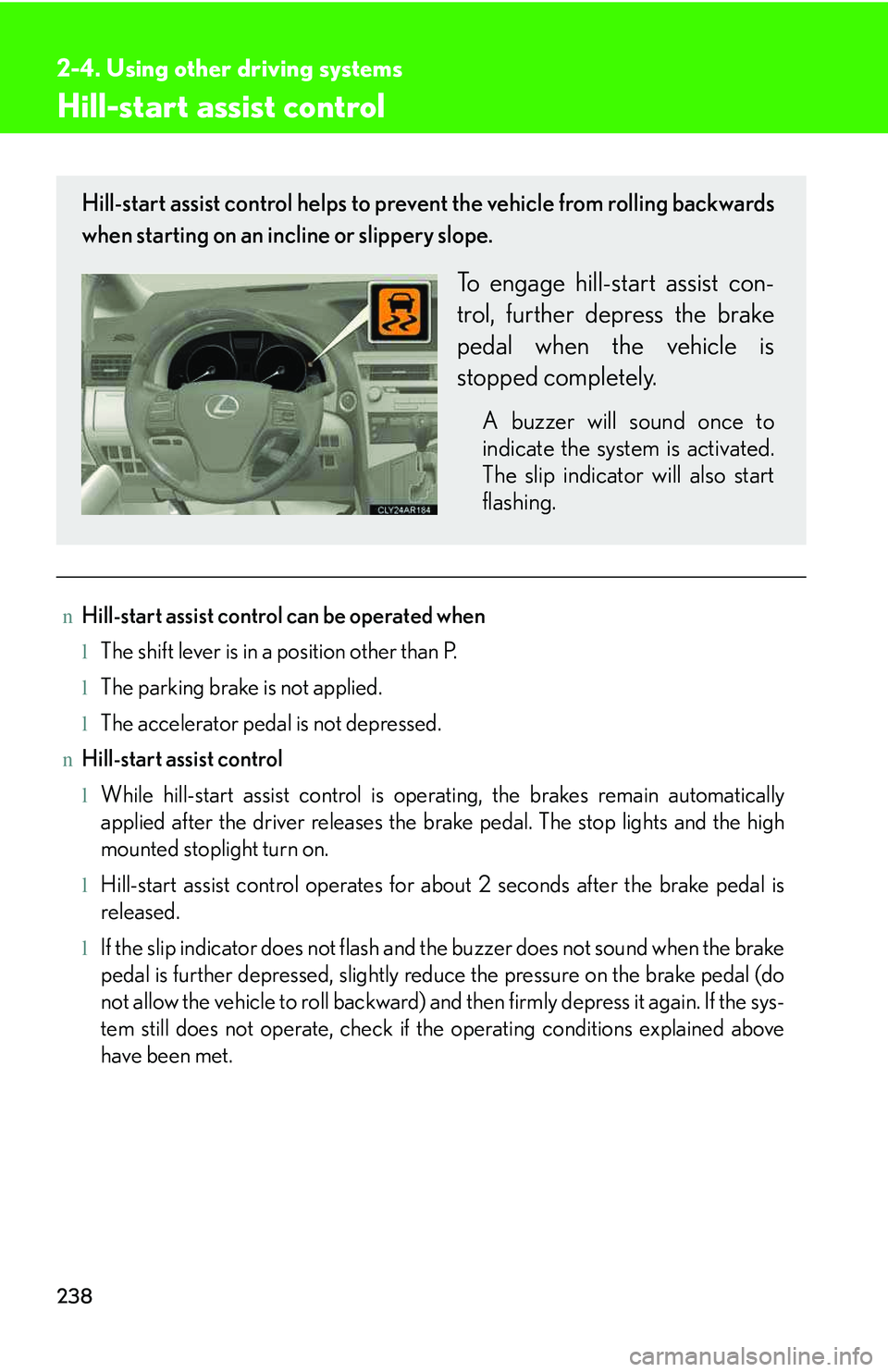
Hill-start assist control helps to prevent the vehicle from rolling backwards
when starting on an incline or slippery slope.
To engage hill-start assist con-
trol, further depress the brake
pedal when the vehicle is
stopped completely.
A buzzer will sound once to
indicate the system is activated.
The slip indicator will also start
flashing.
Page 324 of 821
252
2-5. Driving information
CAUTION
nRoof luggage carrier precautions
To use the roof rails as a roof luggage carrier, you must fit the roof rails with two or
more genuine Lexus cross rails or their equivalent.
When you load cargo on the roof luggage carrier, observe the following:
lBefore driving, make sure the cargo is securely fastened on the roof luggage car-
rier.
lLoading cargo on the roof luggage carrier will make the center of gravity of the
vehicle higher. Avoid high speeds, sudden starts, sharp turns, sudden braking or
abrupt maneuvers, otherwise the result may be a loss of control or vehicle roll-
over due to failure to operate this vehicle correctly and result in death or serious
injury.
lIf driving for a long distances, on rough roads, or at high speeds, stop the vehicle
now and then during the trip to make sure the cargo remains in its place.
lDo not exceed 165 lb. (75 kg) cargo weight on the roof luggage carrier.
lTo reduce wind noise when there is no luggage loaded on the roof luggage car-
rier, move the front cross rail to the front-most position and the rear cross rail to
the rearmost position.
NOTICE
nWhen loading cargo
Be careful not to scratch the surface of the moon roof.
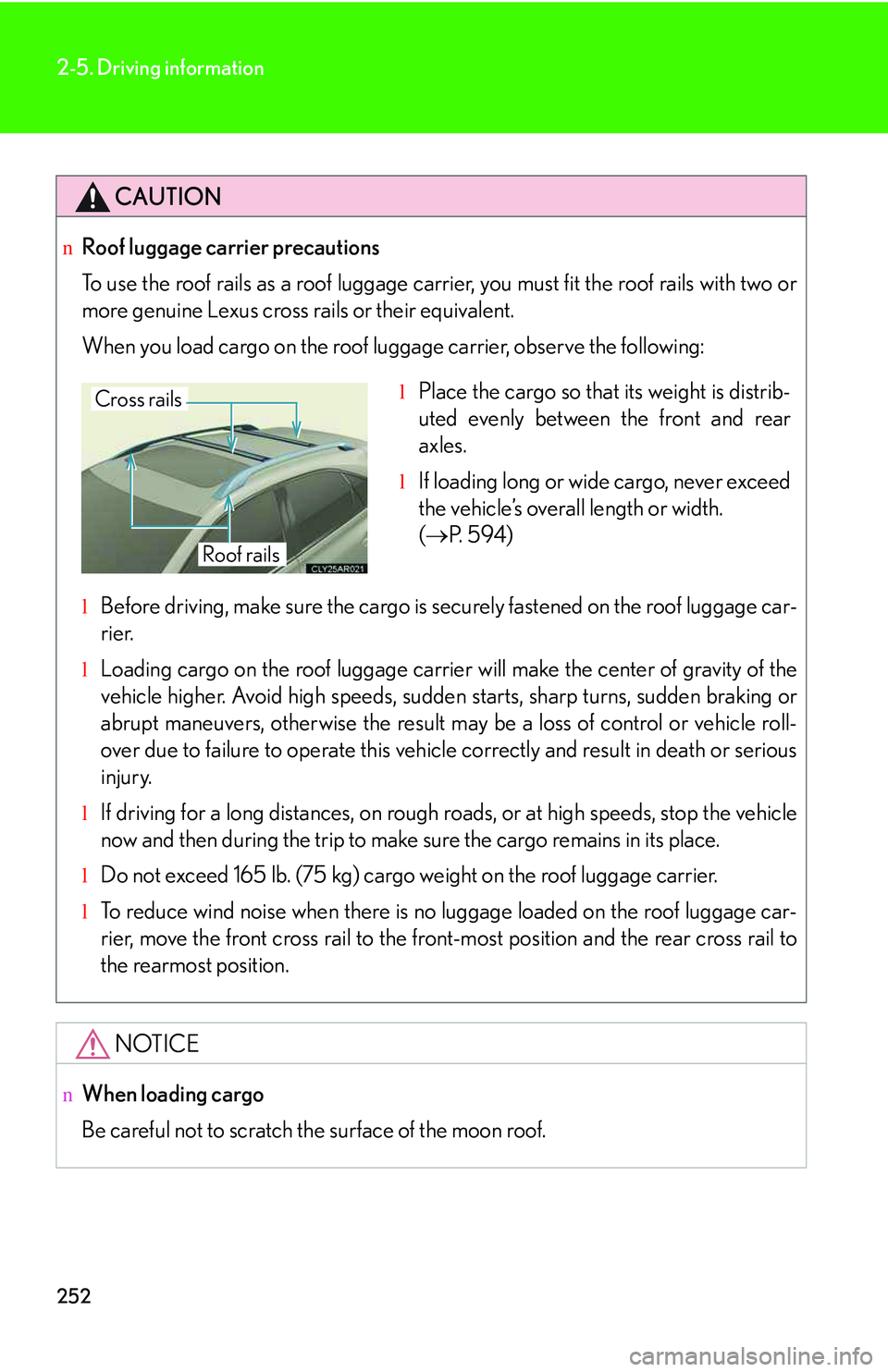
lPlace the cargo so that its weight is distrib-
uted evenly between the front and rear
axles.
lIf loading long or wide cargo, never exceed
the vehicle’s overall length or width.
(→P. 5 9 4 )
Cross rails
Roof rails
Page 336 of 821
264
2-5. Driving information
Trailer towing tips
Your vehicle will handle differently when towing a trailer. In order to avoid
accident, death or serious injury, keep the following in mind when towing:
lBefore starting out, check the trailer lights and the vehicle-trailer con-
nections. Recheck after driving a short distance.
lPractice turning, stopping and reversing with the trailer attached in an
area away from traffic until you become accustomed to the feel of the
vehicle.
lReversing with a trailer attached is difficult and requires practice. Grip
the bottom of the steering wheel and move your hand to the left to
move the trailer to the left. Move your hand to the right to move the
trailer to right. (This is generally opposite to reversing without a trailer
attached.) Avoid sharp or prolonged turning. Have someone guide
you when reversing to reduce the risk of an accident.
lAs stopping distance is increased when towing a trailer, vehicle-to-
vehicle distance should be increased. For each 10 mph (16 km/h) of
speed, allow at least one vehicle and trailer length.
lAvoid sudden braking as you may skid, resulting in jackknifing and loss
of control. This is especially true on wet or slippery surfaces.
lAvoid jerky starts or sudden acceleration.
lAvoid jerky steering and sharp turns, and slow down before making
turns.
lNote that when making a turn, the trailer wheels will be closer than the
vehicle wheels to the inside of the turn. Compensate by making a
larger than normal turning radius.
Page 338 of 821
266
2-5. Driving information
lWhen restarting after parking on a slope:
With the transmission in the P position, start the engine. Be sure
to keep the brake pedal depressed.
Shift into 3, 2, 1, or the R position (if reversing).
Release the parking brake and brake pedal, and slowly pull or
back away from the wheel blocks. Stop and apply the brakes.
Have someone retrieve the blocks.
nBefore towing
Check that the following conditions are met:
lThe vehicle's tires are properly inflated. (→P. 4 8 7 )
lTrailer tires are inflated according to the trailer manufacturer's recommendation.
lAll trailer lights work.
lAll lights work each time you connect them.
lThe trailer ball is set up at the proper height for the coupler on the trailer.
lThe vehicle remains level when a loaded or unloaded trailer is hitched. Do not
drive if the vehicle is not level, and check for improper tongue load, overloading,
worn suspension, or other possible causes.
lThe trailer cargo is securely loaded.
lThe rear view mirrors conform to all applicable federal, state/provincial or local
regulations. If they do not, install rear view mirrors appropriate for towing pur-
poses.
nBreak-in schedule
If your vehicle is new or equipped with any new power train components (such as
an engine, transmission, differential and wheel bearing), Lexus recommends that
you do not tow a trailer until it has been driven for over 500 miles (800 km).
However, avoid full throttle acceleration.
nMaintenance
lIf you tow a trailer, your vehicle will require more frequent maintenance due to
the additional load. (See “Warranty and Services Guide”, “Owner's Manual Sup-
plement” or “Scheduled Maintenance”.)
lRetighten the fixing bolts of the towing ball and bracket after approximately 600
miles (1000 km) of trailer towing.
STEP1
STEP2
STEP3
STEP4
Page 349 of 821
279
3-1. Using the air conditioning system and defogger
3
Interior features
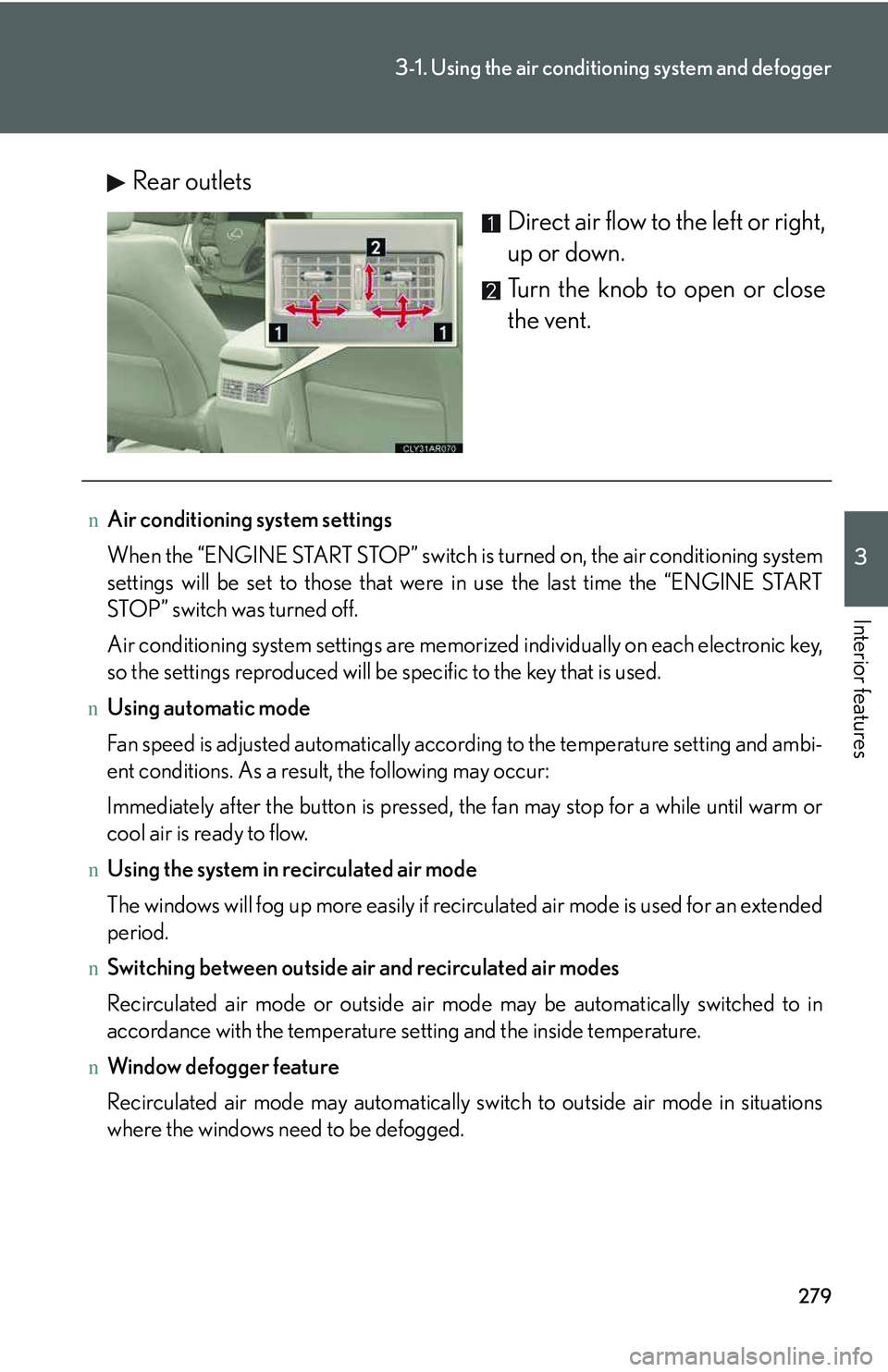
Rear outlets
Direct air flow to the left or right,
up or down.
Turn the knob to open or close
the vent.
nAir conditioning system settings
When the “ENGINE START STOP” switch is turned on, the air conditioning system
settings will be set to those that were in use the last time the “ENGINE START
STOP” switch was turned off.
Air conditioning system settings are memorized individually on each electronic key,
so the settings reproduced will be specific to the key that is used.
nUsing automatic mode
Fan speed is adjusted automatically according to the temperature setting and ambi-
ent conditions. As a result, the following may occur:
Immediately after the button is pressed, the fan may stop for a while until warm or
cool air is ready to flow.
nUsing the system in recirculated air mode
The windows will fog up more easily if recirculated air mode is used for an extended
period.
nSwitching between outside air and recirculated air modes
Recirculated air mode or outside air mode may be automatically switched to in
accordance with the temperature setting and the inside temperature.
nWindow defogger feature
Recirculated air mode may automatically switch to outside air mode in situations
where the windows need to be defogged.
Page 351 of 821
281
3-1. Using the air conditioning system and defogger
3
Interior features
Rear window defogger switch
nThe defoggers can be operated when
The “ENGINE START STOP” switch is in IGNITION ON mode.
nThe outside rear view mirror defoggers
Turning the rear window defogger on will turn the outside rear view mirror defog-
gers on.
CAUTION
nWhen the outside rear view mirror defoggers are on
Do not touch the outside surface of the rear view mirrors, as they can become very
hot and burn you.
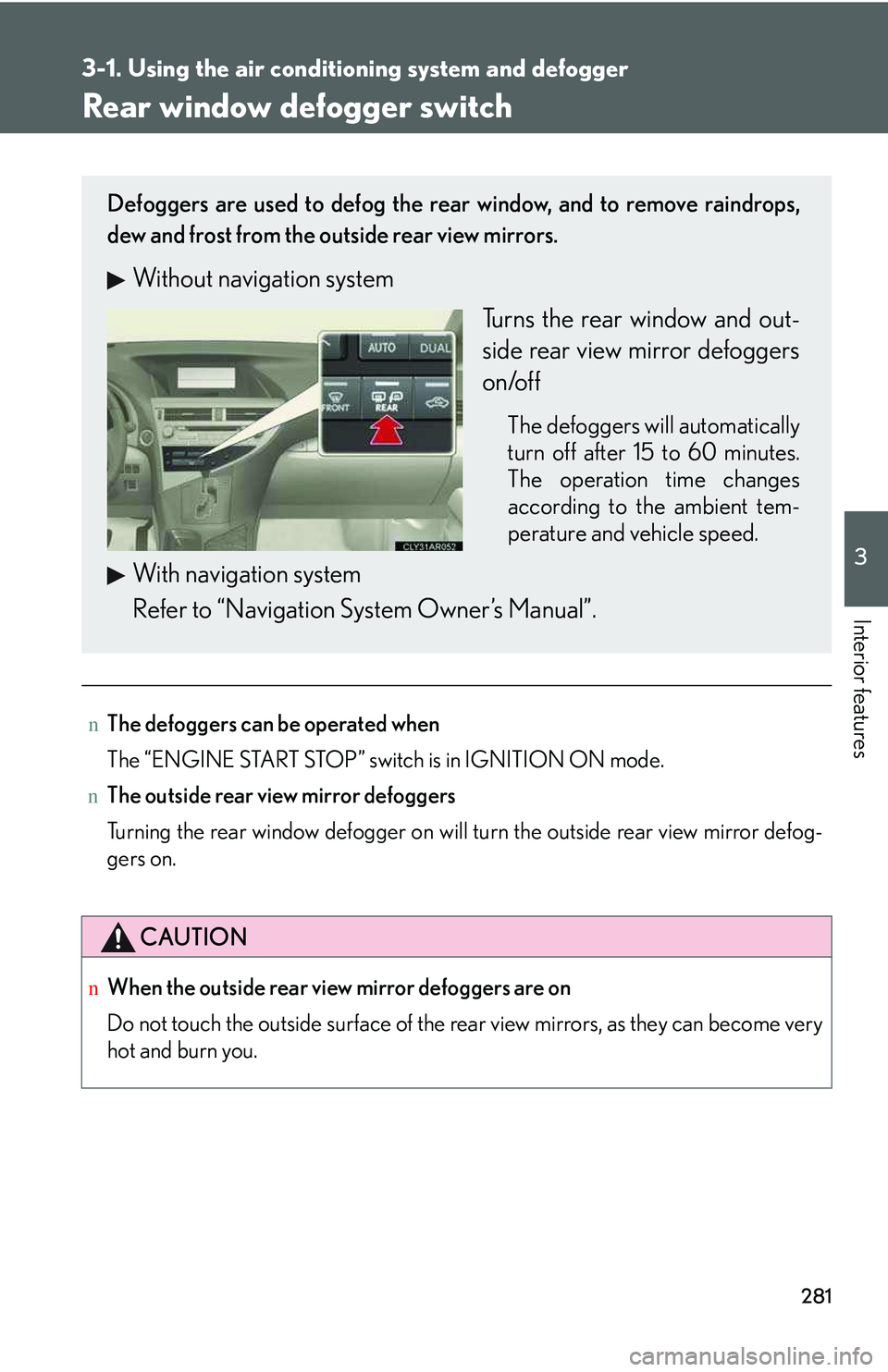
Defoggers are used to defog the rear window, and to remove raindrops,
dew and frost from the outside rear view mirrors.
Without navigation system
Turns the rear window and out-
side rear view mirror defoggers
on/off
The defoggers will automatically
turn off after 15 to 60 minutes.
The operation time changes
according to the ambient tem-
perature and vehicle speed.
With navigation system
Refer to “Navigation System Owner’s Manual”.
Page 352 of 821
282
3-1. Using the air conditioning system and defogger
Windshield wiper de-icer∗
nThe windshield wiper de-icer can be operated when
The “ENGINE START STOP” switch is in IGNITION ON mode.
CAUTION
nWhen the windshield wiper de-icer is on
Do not touch the lower part of the windshield or the side of the front pillars, as the
surfaces can become very hot and burn you.
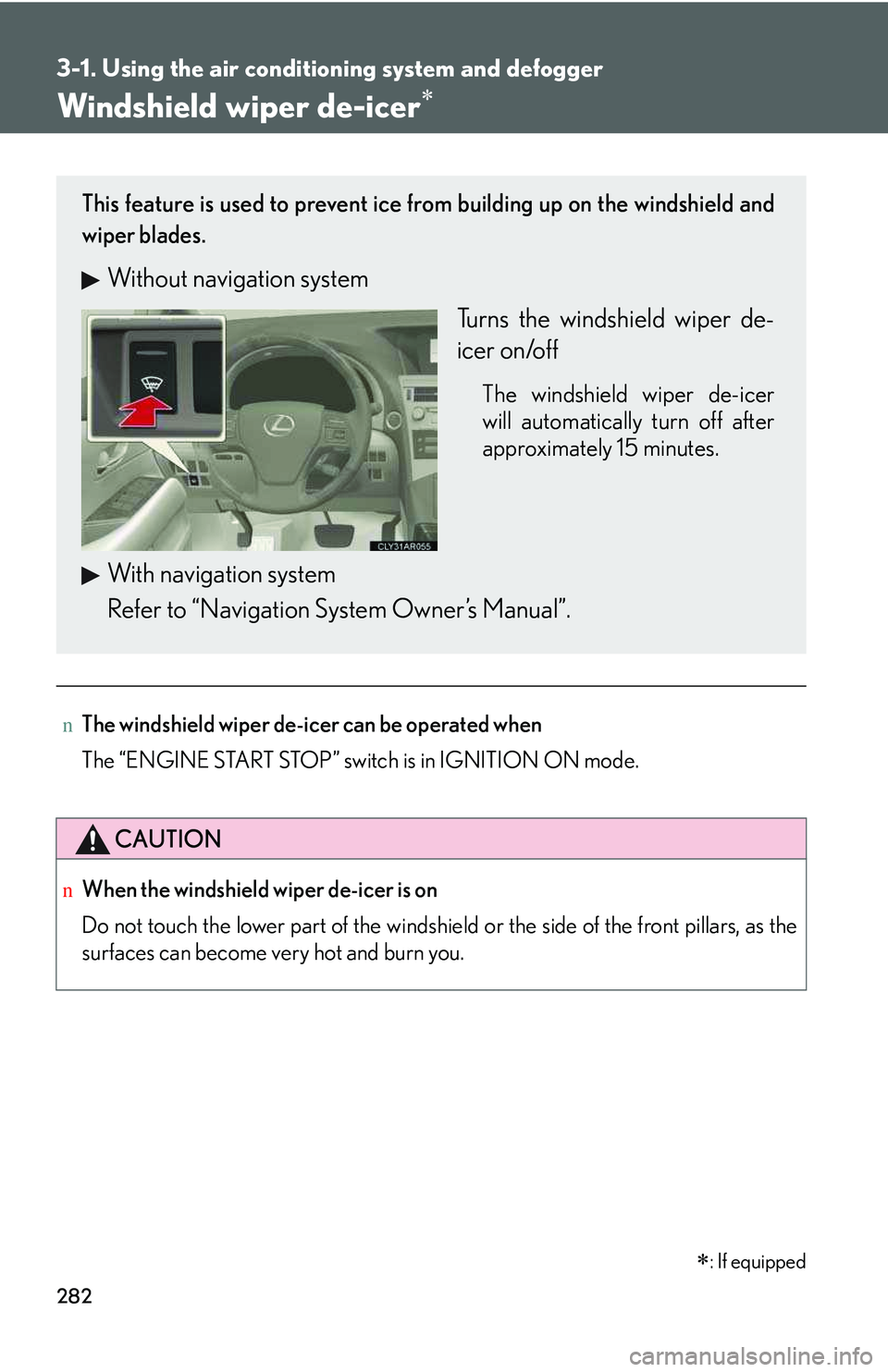
This feature is used to prevent ice from building up on the windshield and
wiper blades.
Without navigation system
Turns the windshield wiper de-
icer on/off
The windshield wiper de-icer
will automatically turn off after
approximately 15 minutes.
With navigation system
Refer to “Navigation System Owner’s Manual”.
∗: If equipped