audio LEXUS RX350 2011 Owners Manual
[x] Cancel search | Manufacturer: LEXUS, Model Year: 2011, Model line: RX350, Model: LEXUS RX350 2011Pages: 821, PDF Size: 13.27 MB
Page 1 of 821
Contents
The Quick Guide is not intended as a substitute for your
Owner’s
Manual
. We strongly encourage you to review the
Owner’s
Manual
and supplementary manuals so you will have a betterunderstanding of your vehicle’s capabilities and limitations.
1
Air Conditioning System (with navigation system)
Using the automatic mode ........................................................................................................40
Adjusting the temperature ........................................................................................................ 40
To turn off the airflow ................................................................................................................... 40
Air Conditioning System (without navigation system)
Using the automatic mode ..........................................................................................................51
Adjusting the temperature ..........................................................................................................51
To turn off the airflow .....................................................................................................................51
Audio System (with navigation system)
Audio control screen ................................................................................................................... 36
Basic operation .............................................................................................................................. 36
Radio....................................................................................................................................................37
DVD player/CD player...............................................................................................................37
Operating an iPod ........................................................................................................................ 39
Remote control (steering wheel switches) ......................................................................... 39
Audio System (without navigation system)
Basic operation .............................................................................................................................. 45
Radio................................................................................................................................................... 46
CD player ..........................................................................................................................................47
Operating an iPod ........................................................................................................................ 49
Remote control (steering wheel switches) ......................................................................... 50
Automatic High Beam........................................................................................................................22
Back Door .............................................................................................................................................. 65
Cruise Control........................................................................................................................................15
Door Locks............................................................................................................................................. 63
Dynamic Radar Cruise Control ...................................................................................................... 16
Eco Driving Indicator ........................................................................................................................... 14
Engine (Ignition) Switch ......................................................................................................................10
Fuel Tank Cap ....................................................................................................................................... 66
Hands-free System For Cellular Phone (with navigation system)
Bluetooth® phone pairing...........................................................................................................31
Phonebook transfer ..................................................................................................................... 32
Registering a speed dial ............................................................................................................. 33
Calling by name ............................................................................................................................. 34
Receiving a call............................................................................................................................... 35
Page 2 of 821
2
Hands-free System For Cellular Phone (without navigation system)
Bluetooth® phone pairing.......................................................................................................... 41
Calling by number ......................................................................................................................... 42
Calling by name.............................................................................................................................. 42
Phonebook transfer ...................................................................................................................... 43
Registering a speed dial.............................................................................................................. 44
Headlights ................................................................................................................................................ 19
Head-up Display ................................................................................................................................... 18
Intuitive Parking Assist..........................................................................................................................11
Keys .............................................................................................................................................................. 7
Lexus Enform with Safety Connect ...............................................................................................61
Moon Roof .............................................................................................................................................. 64
Multi-information Display and Switch .......................................................................................... 12
Navigation System
Register home ................................................................................................................................. 26
Destination input ⎯⎯ Search by address ........................................................................ 27
Destination input ⎯⎯ Search points of interest by name ..........................................28
Destination input ⎯⎯ Search points of interest by category ................................... 29
Destination input ⎯⎯ Search points of interest by telephone number ...............30
Portable Audio Device Ports ......................................................................................................... 58
Power Windows ................................................................................................................................... 64
Rear Window Wiper and Washer................................................................................................ 23
Remote Touch
Basic operation............................................................................................................................... 24
Start .....................................................................................................................................................25
Display ................................................................................................................................................25
Safety Connect .....................................................................................................................................59
Smart Access System with Push-button Start ............................................................................8
Theft Deterrent System ........................................................................................................................ 9
Turn Signal Lever ...................................................................................................................................17
Voice Command System
Basic operation...............................................................................................................................52
Command list ..................................................................................................................................53
Windshield Wipers and Washer ...................................................................................................20
Page 5 of 821
5
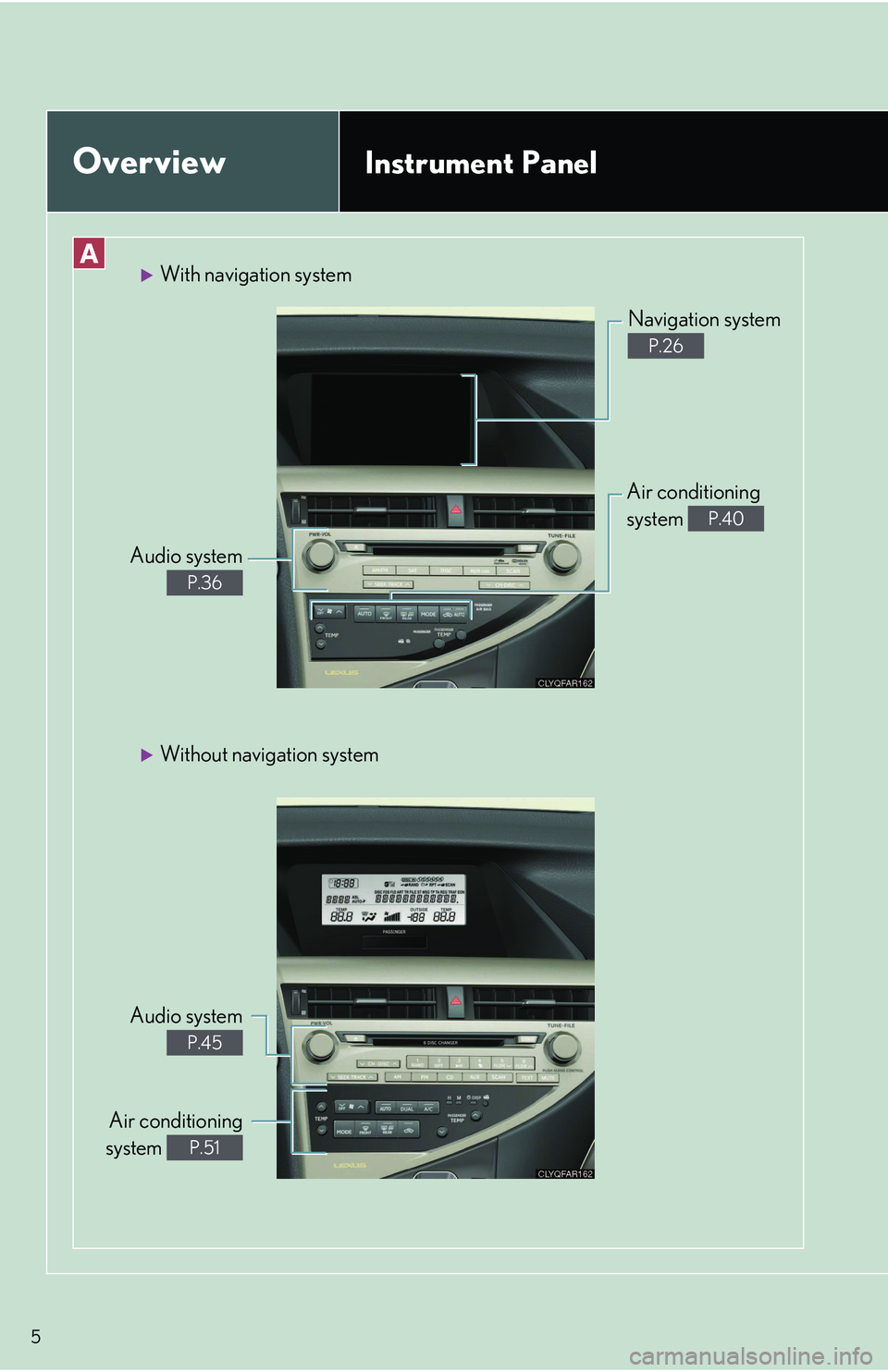
OverviewInstrument Panel
With navigation system
Audio system
P.36
Navigation system
P.26
Air conditioning
system P.40
Without navigation system
Audio system
P.45
Air conditioning
system P.51
Page 6 of 821
6
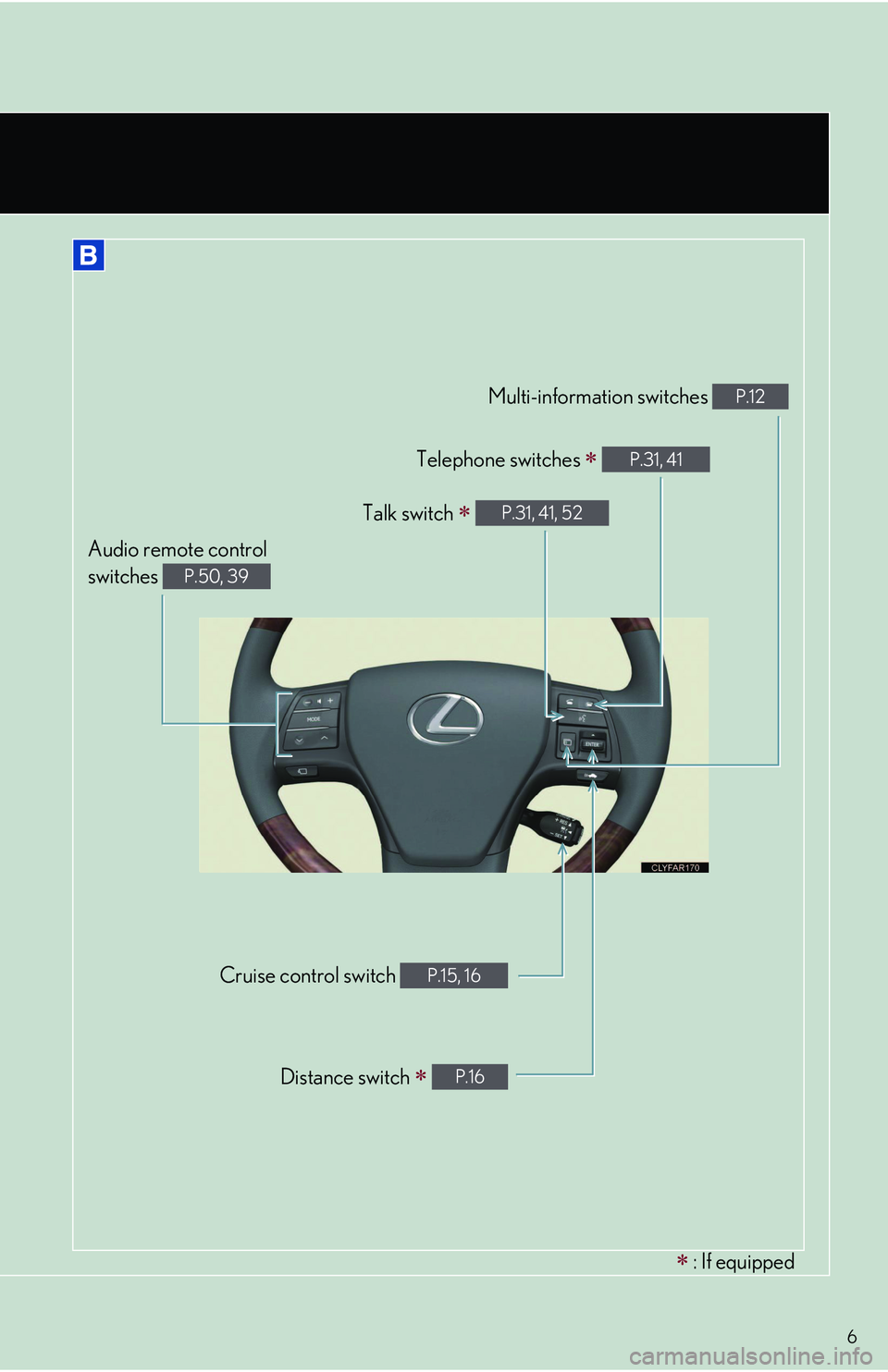
∗ : If equipped
Audio remote control
switches P.50, 39
Cruise control switch P.15, 16
Distance switch ∗ P.16
Multi-information switches P.12
Telephone switches ∗ P.31, 41
Talk switch ∗ P.31, 41, 52
Page 18 of 821
18
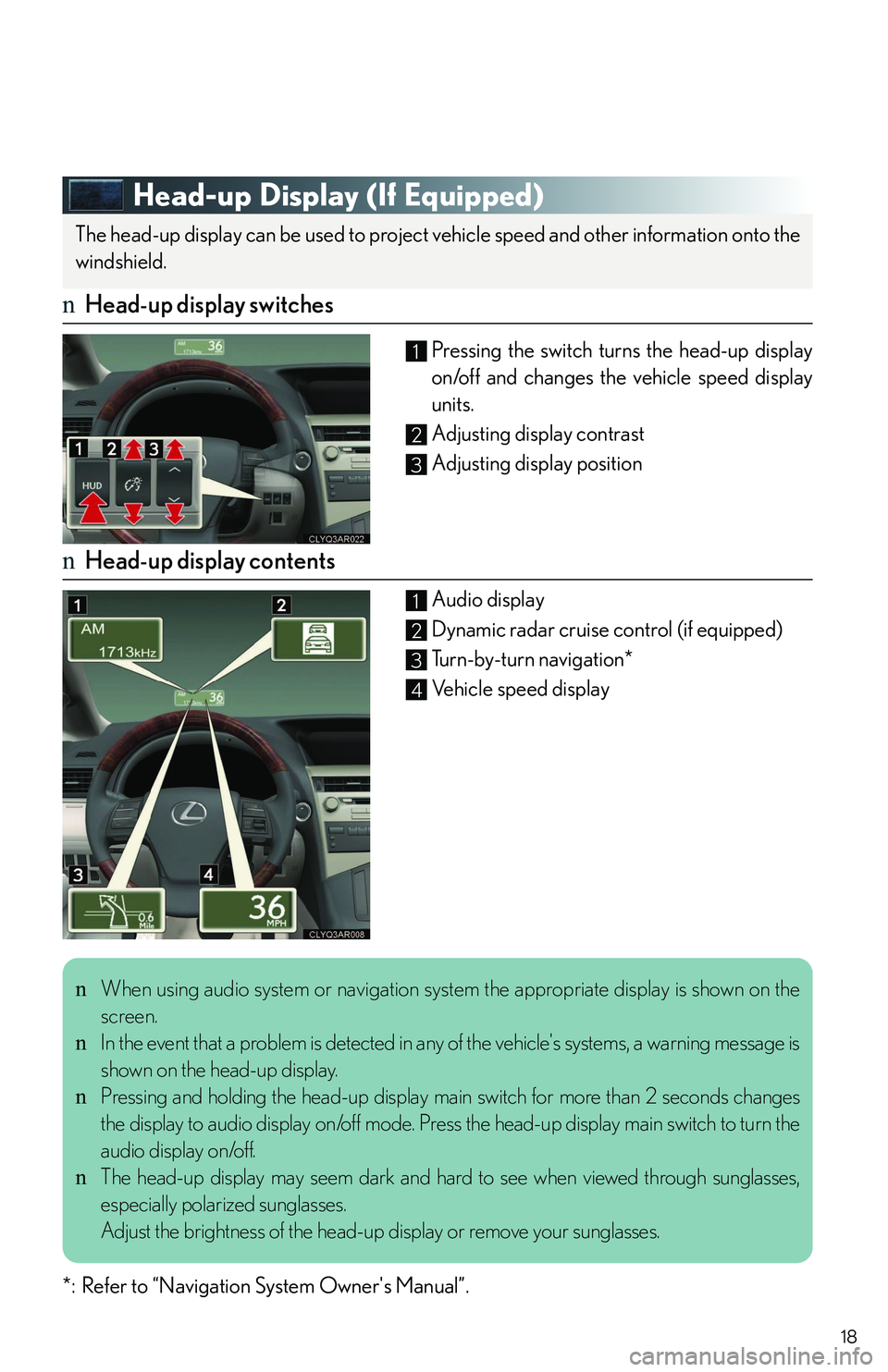
Head-up Display (If Equipped)
nHead-up display switches
Pressing the switch turns the head-up display
on/off and changes the vehicle speed display
units.
Adjusting display contrast
Adjusting display position
nHead-up display contents
Audio display
Dynamic radar cruise control (if equipped)
Turn-by-turn navigation*
Vehicle speed display
*: Refer to “Navigation System Owner's Manual”.
The head-up display can be used to project vehicle speed and other information onto the
windshield.
1
2
3
1
2
3
4
nWhen using audio system or navigation system the appropriate display is shown on the
screen.
nIn the event that a problem is detected in any of the vehicle's systems, a warning message is
shown on the head-up display.
nPressing and holding the head-up display main switch for more than 2 seconds changes
the display to audio display on/off mode. Press the head-up display main switch to turn the
audio display on/off.
nThe head-up display may seem dark and hard to see when viewed through sunglasses,
especially polarized sunglasses.
Adjust the brightness of the head-up display or remove your sunglasses.
Page 25 of 821
25
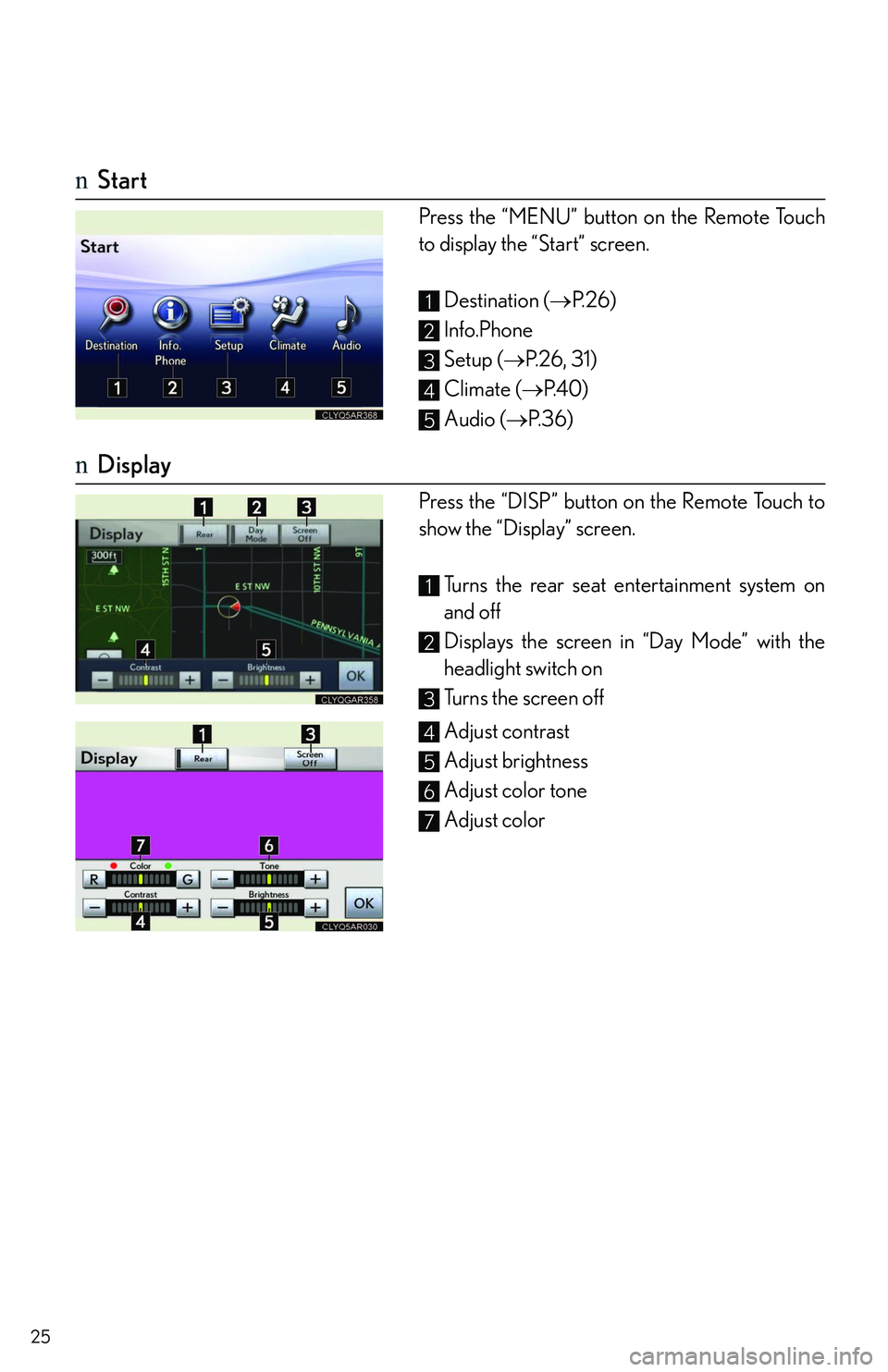
nStart
Press the “MENU” button on the Remote Touch
to display the “Start” screen.
Destination (→P. 2 6 )
Info.Phone
Setup (→P. 2 6 , 3 1 )
Climate (→P. 4 0 )
Audio (→P. 3 6 )
nDisplay
Press the “DISP” button on the Remote Touch to
show the “Display” screen.
Turns the rear seat entertainment system on
and off
Displays the screen in “Day Mode” with the
headlight switch on
Turns the screen off
Adjust contrast
Adjust brightness
Adjust color tone
Adjust color
1
2
3
4
5
1
2
3
4
5
6
7
Page 36 of 821
36
Audio System (with navigation system)
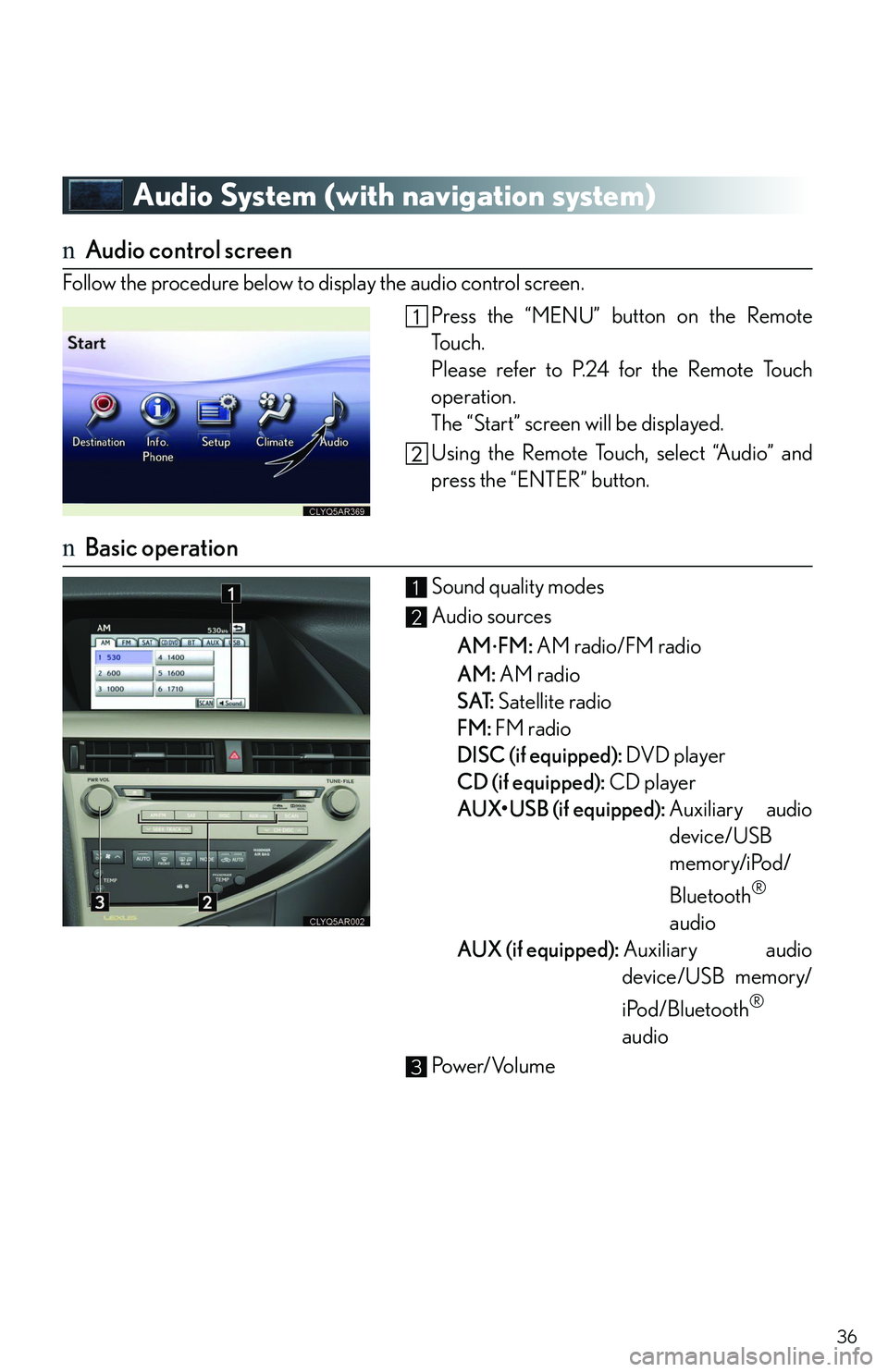
nAudio control screen
Follow the procedure below to display the audio control screen.
Press the “MENU” button on the Remote
To u c h .
Please refer to P.24 for the Remote Touch
operation.
The “Start” screen will be displayed.
Using the Remote Touch, select “Audio” and
press the “ENTER” button.
nBasic operation
Sound quality modes
Audio sources
AM⋅FM: AM radio/FM radio
AM: AM radio
SAT: Satellite radio
FM: FM radio
DISC (if equipped): DVD player
CD (if equipped): CD player
AUX
Page 37 of 821
37
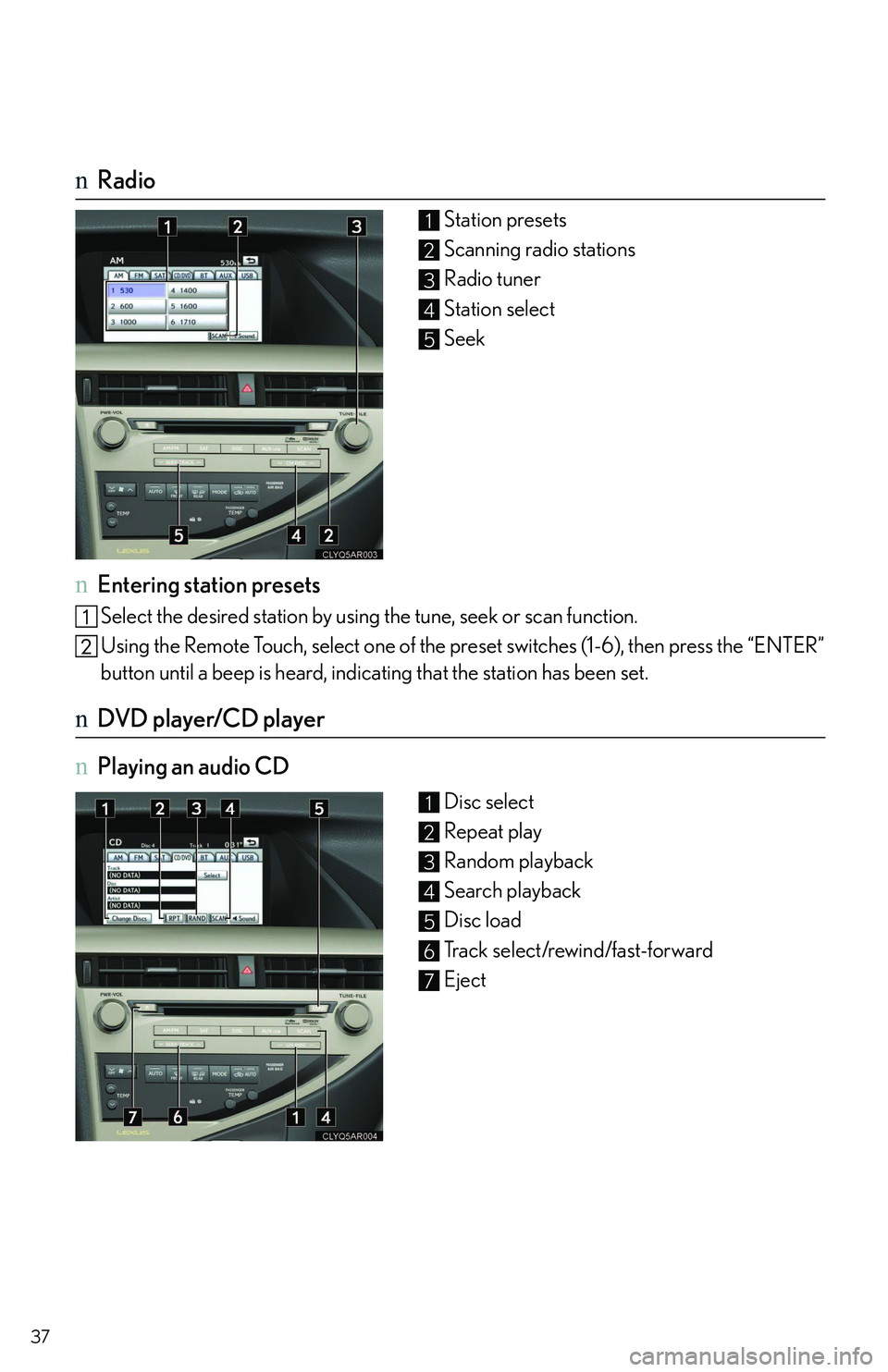
nRadio
Station presets
Scanning radio stations
Radio tuner
Station select
Seek
nEntering station presets
Select the desired station by using the tune, seek or scan function.
Using the Remote Touch, select one of the preset switches (1-6), then press the “ENTER”
button until a beep is heard, indicating that the station has been set.
nDVD player/CD player
nPlaying an audio CD
Disc select
Repeat play
Random playback
Search playback
Disc load
Track select/rewind/fast-forward
Eject
1
2
3
4
5
1
2
3
4
5
6
7
Page 39 of 821
39
nLoading a disc
Press the “LOAD” button.
When the indicator changes from flashing amber to green, insert a disc after the disc slot
door opens.
nLoading multiple discs
Press and hold the “LOAD” button until you hear a beep.
When the indicator changes from flashing amber to green, insert a disc after the disc slot
door opens.
After inserting a disc, wait until the indicator changes from flashing amber to green, then
insert the next disc after the disc slot door has opened.
Repeat and until you have inserted all discs.
To cancel the operation, press the “LOAD” button. If you do not insert a disc within 15 sec-
onds, loading will be canceled automatically.
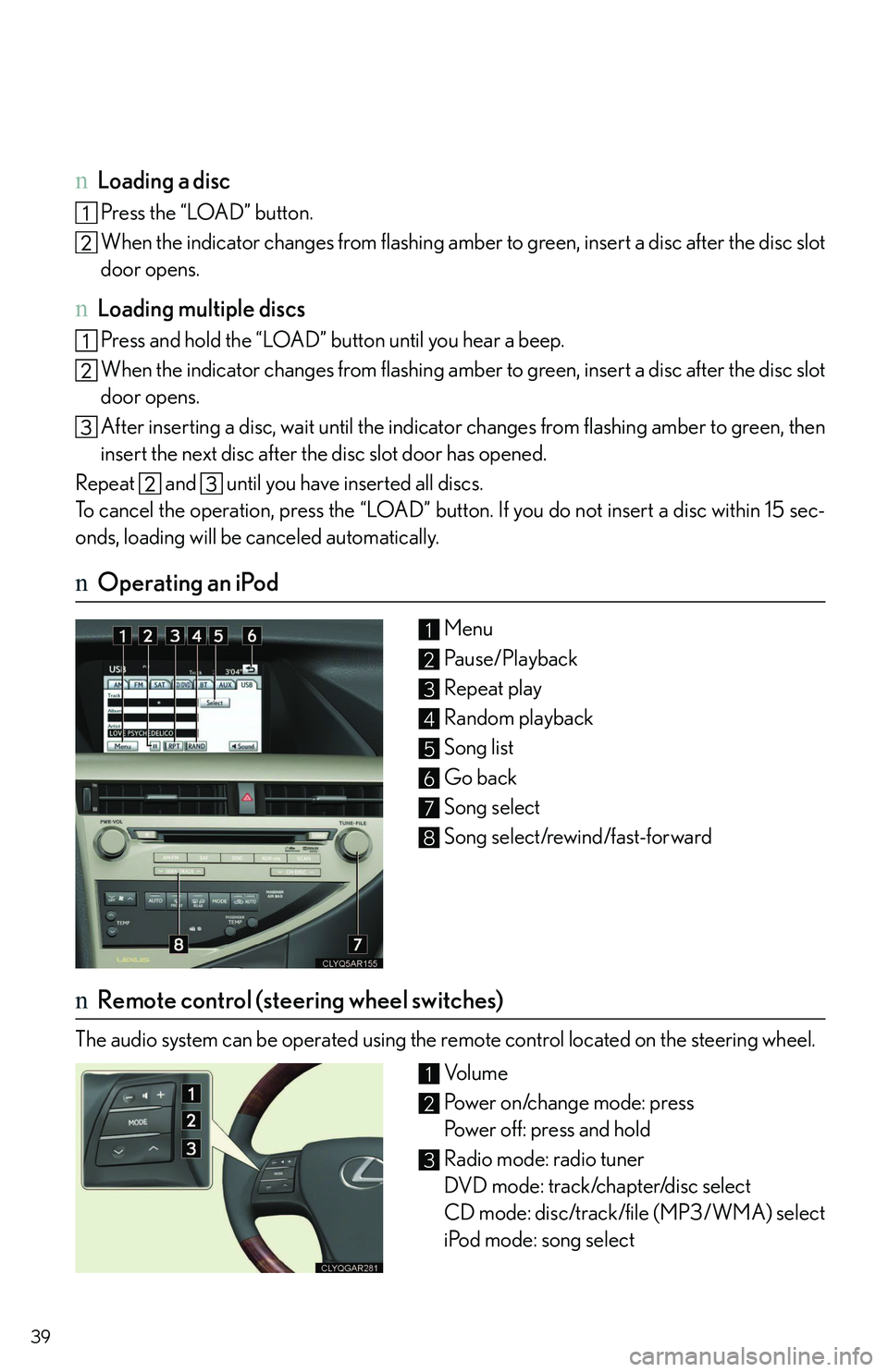
nOperating an iPod
Menu
Pau s e / P l a y b a c k
Repeat play
Random playback
Song list
Go back
Song select
Song select/rewind/fast-forward
nRemote control (steering wheel switches)
The audio system can be operated using the remote control located on the steering wheel.
Vo l u m e
Power on/change mode: press
Power off: press and hold
Radio mode: radio tuner
DVD mode: track/chapter/disc select
CD mode: disc/track/file (MP3/WMA) select
iPod mode: song select
1
2
3
4
5
6
7
8
1
2
3
Page 45 of 821
45
Audio System (without navigation system)
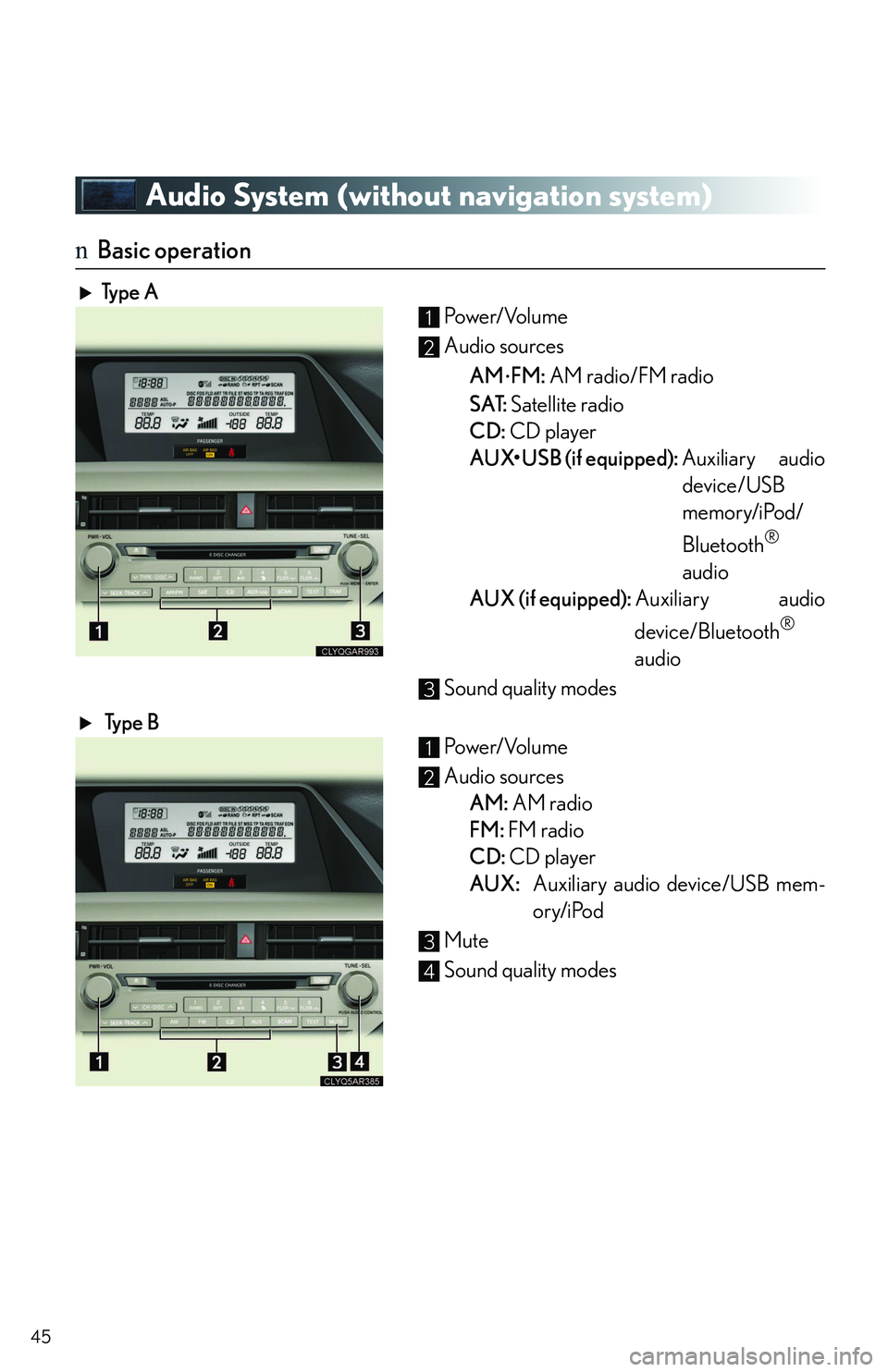
nBasic operation
Typ e A Po w e r/ Vo l u m e
Audio sources
AM⋅FM: AM radio/FM radio
SAT: Satellite radio
CD: CD player
AUX