display LEXUS RX450h 2015 User Guide
[x] Cancel search | Manufacturer: LEXUS, Model Year: 2015, Model line: RX450h, Model: LEXUS RX450h 2015Pages: 878, PDF Size: 11.62 MB
Page 36 of 878

361-1. Hybrid system
■
If a warning light comes on or a warning message is displayed, or the 12-volt bat-
tery is disconnected
The hybrid system may not start. In that ca se, try to start the system again. If the
“READY” indicator does not come on, contact your Lexus dealer.■
When refueling, the fuel filler door may take a few moments to open
As part of emission system operation, it ma y take up to 10 seconds for the fuel filler
door to automatically release after the opener switch is pressed. Before refueling is
possible, a message will be shown on the multi-information display. ( P. 119, 755)■
Electromagnetic waves ●
High voltage parts and cables on the hybrid vehicles incorporate electromag-
netic shielding, and theref ore emit approximately the same amount of electro-
magnetic waves as conventional gasoline powered vehicles or home electronic
appliances.●
Your vehicle may cause sound interference in some third party-produced radio
parts.■
Running out of fuel
When the vehicle has run out of fuel and th e hybrid system cannot be started, refuel
the vehicle with at least enough gasoline to make the low fuel level warning light
( P. 733) go off. If there is only a small amount of fuel, the hybrid system may not
be able to start. (The minimum amount of fuel to add to make the low fuel level
warning light go out is about 2.7 gal. [10.1 L, 2.2 Imp. gal.] when the vehicle is on a
level surface. This value may vary when the vehicle is on a slope.)■
Hybrid battery (traction battery)
The hybrid battery (traction battery) has a limited service life. The lifespan of the
hybrid battery (traction battery) can chan ge in accordance with driving style and
driving conditions.
Page 39 of 878
3911-1. Hybrid system
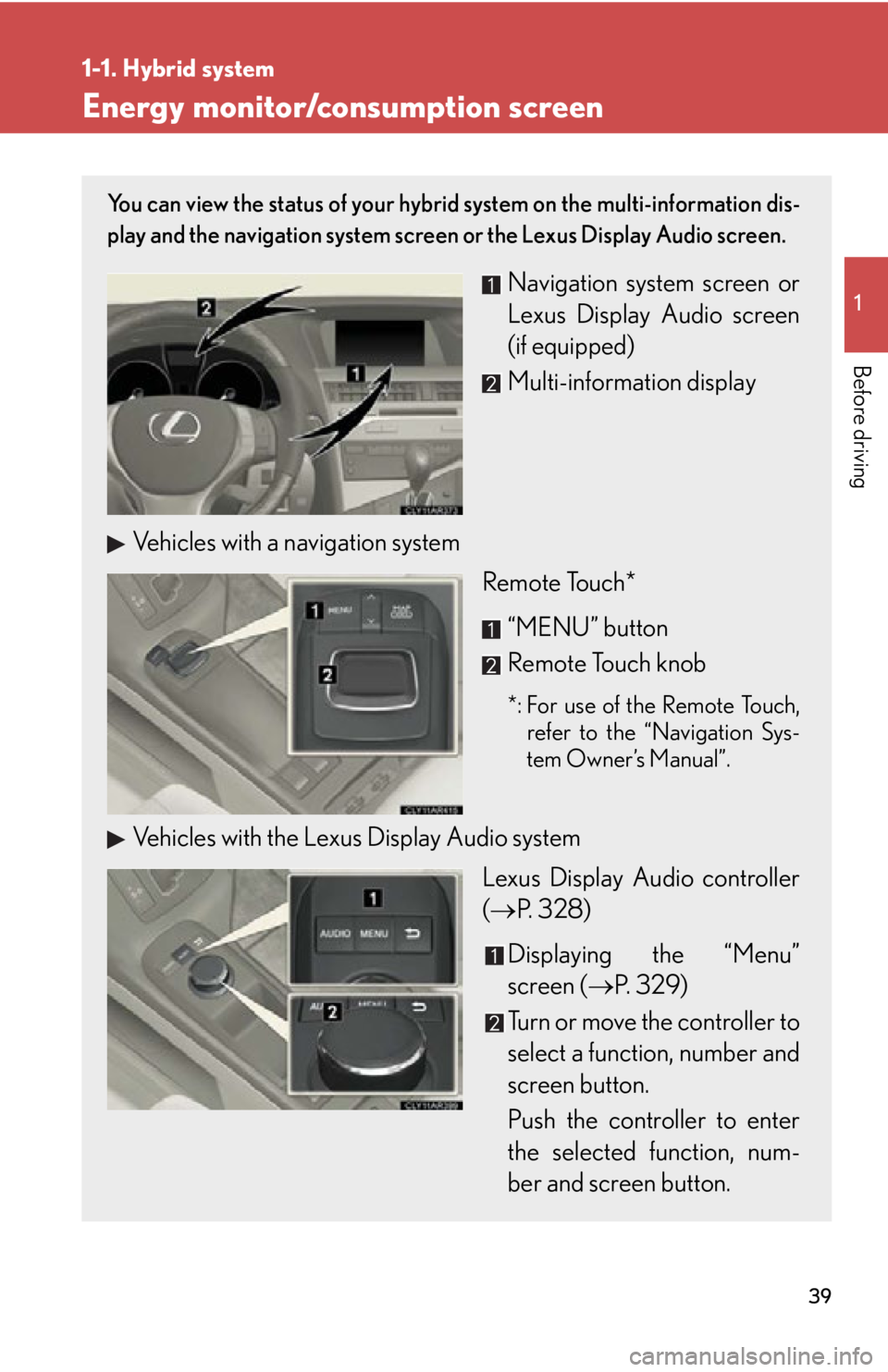
Before driving Energy monitor/consumption screen You can view the status of your hybrid system on the multi-information dis-
play and the navigation system screen or the Lexus Display Audio screen.
Navigation system screen or
Lexus Display Audio screen
(if equipped)
Multi-information display
Vehicles with a navigation system
Remote Touch*
“MENU” button
Remote Touch knob *: For use of the Remote Touch,
refer to the “Navigation Sys-
tem Owner’s Manual”.
Vehicles with the Lexus Display Audio system
Lexus Display Audio controller
( P. 328)
Displaying the “Menu”
screen ( P. 3 2 9 )
Turn or move the controller to
select a function, number and
screen button.
Push the controller to enter
the selected function, num-
ber and screen button.
Page 40 of 878
401-1. Hybrid system
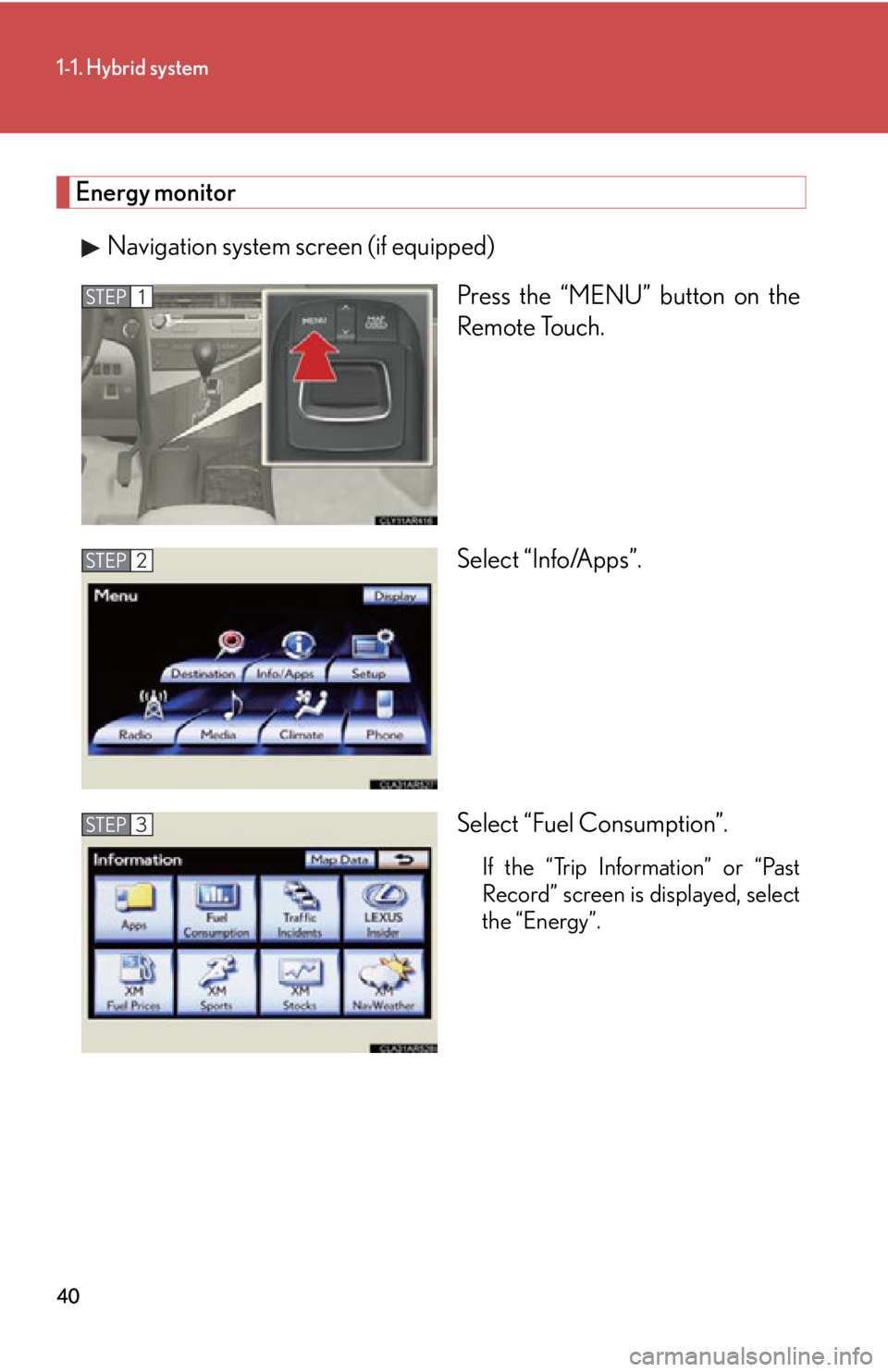
Energy monitor
Navigation system screen (if equipped)
Press the “MENU” button on the
Remote Touch.
Select “Info/Apps”.
Select “Fuel Consumption”. If the “Trip Information” or “Past
Record” screen is displayed, select
the “Energy”.STEP 1
STEP 2
STEP 3
Page 41 of 878
411-1. Hybrid system
1
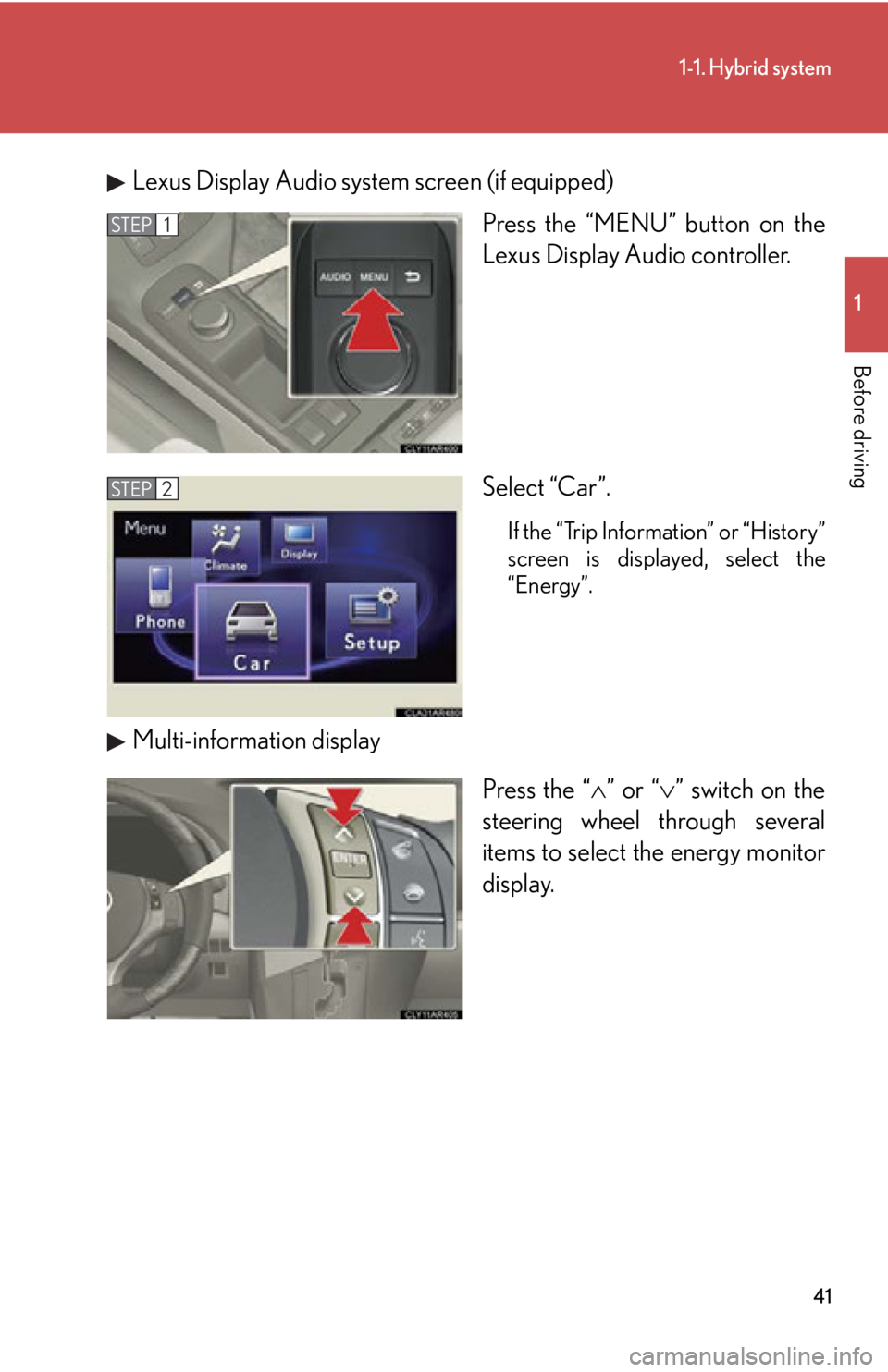
Before driving Lexus Display Audio system screen (if equipped)
Press the “MENU” button on the
Lexus Display Audio controller.
Select “Car”. If the “Trip Information” or “History”
screen is displayed, select the
“Energy”.
Multi-information display
Press the “ ” or “ ” switch on the
steering wheel through several
items to select the energy monitor
display.STEP 1
STEP 2
Page 42 of 878
421-1. Hybrid system
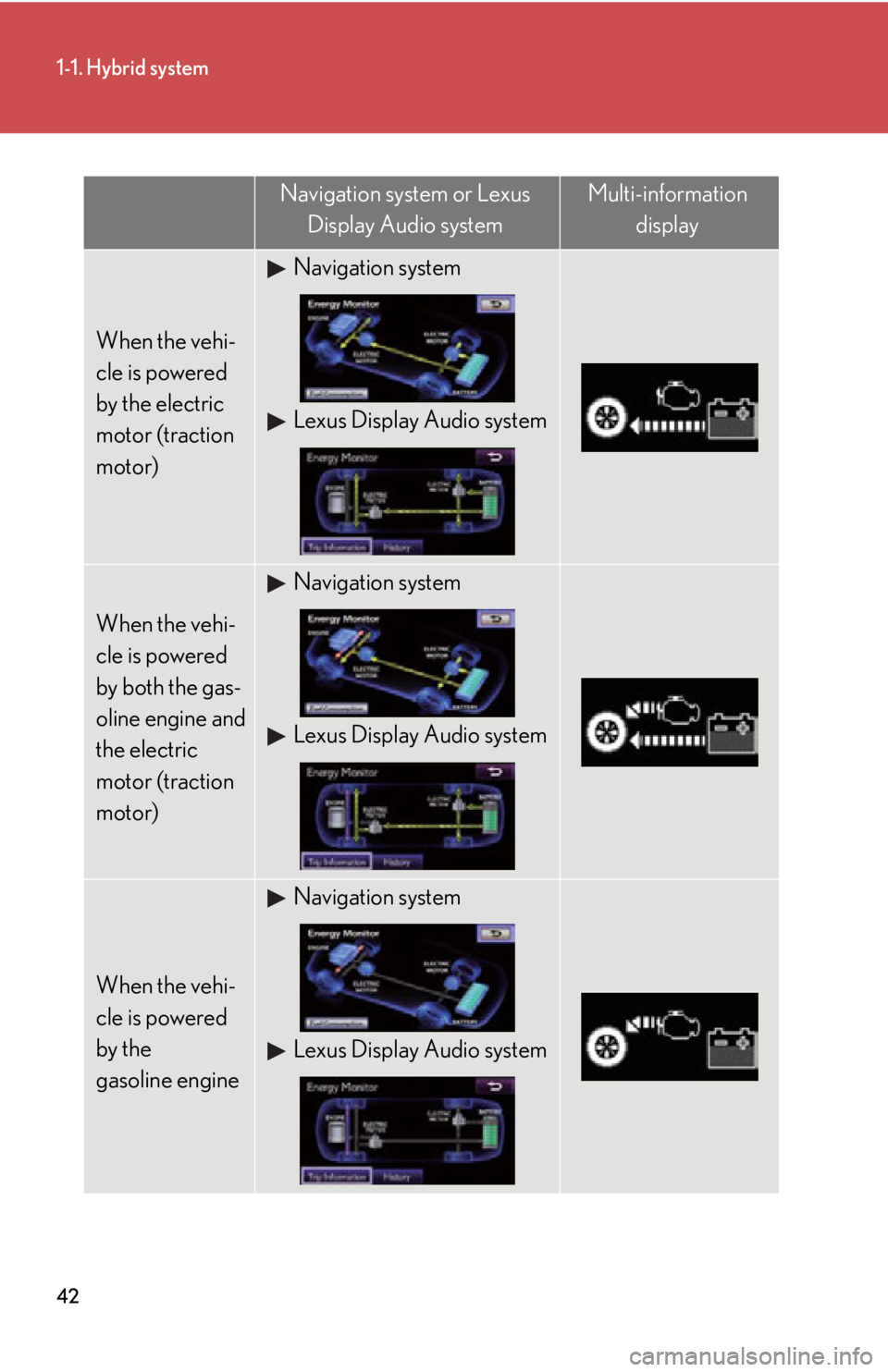
Navigation system or Lexus
Display Audio system Multi-information
display
When the vehi-
cle is powered
by the electric
motor (traction
motor) Navigation system
Lexus Display Audio system
When the vehi-
cle is powered
by both the gas-
oline engine and
the electric
motor (traction
motor) Navigation system
Lexus Display Audio system
When the vehi-
cle is powered
by the
gasoline engine Navigation system
Lexus Display Audio system
Page 43 of 878
431-1. Hybrid system
1
Before driving
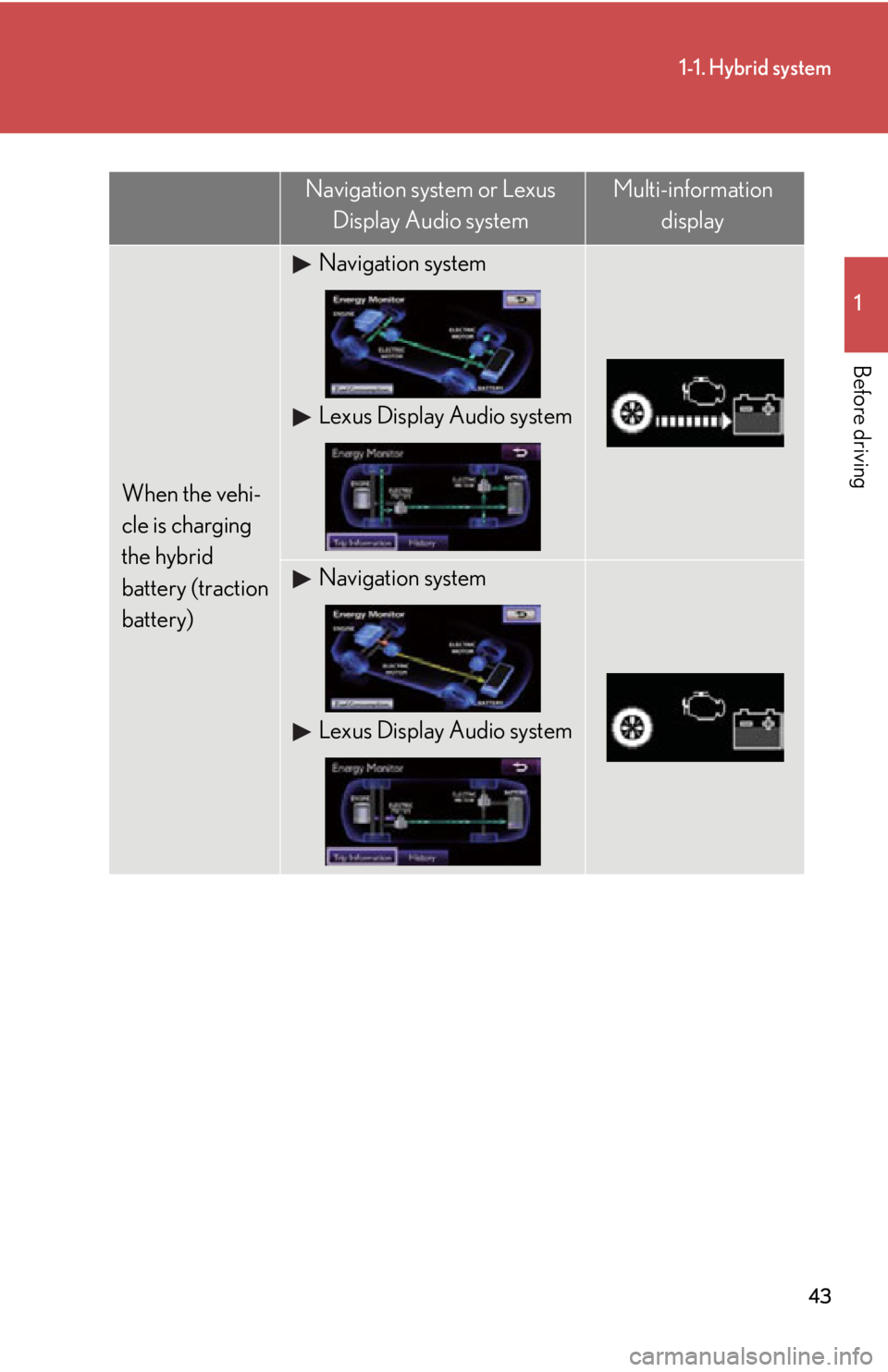
When the vehi-
cle is charging
the hybrid
battery (traction
battery) Navigation system
Lexus Display Audio system
Navigation system
Lexus Display Audio systemNavigation system or Lexus
Display Audio system Multi-information
display
Page 44 of 878
441-1. Hybrid system
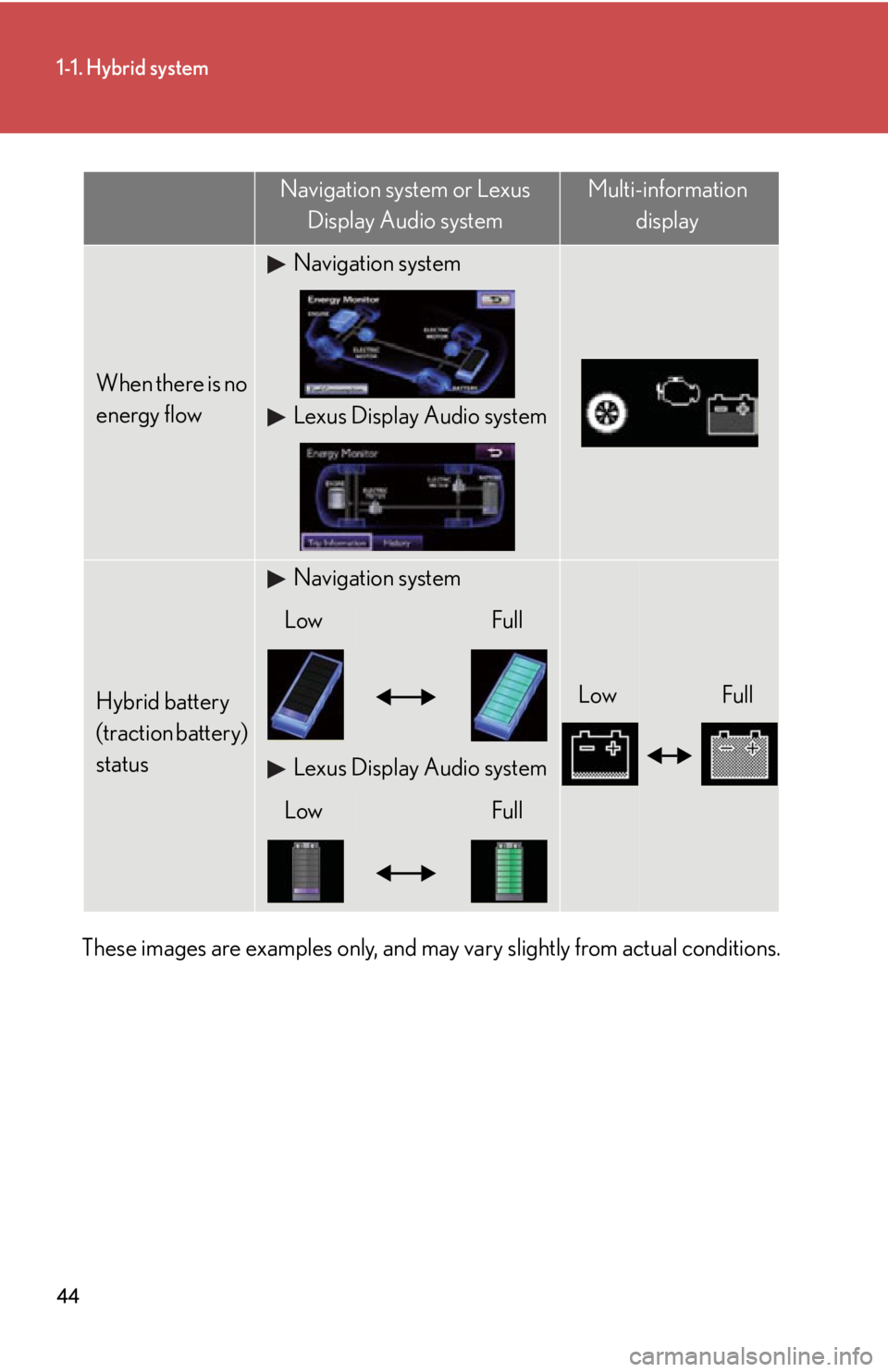
These images are examples only, and may vary slightly from actual conditions. When there is no
energy flow Navigation system
Lexus Display Audio system
Hybrid battery
(traction battery)
status Navigation system
Low FullLow Full
Lexus Display Audio system
Low FullNavigation system or Lexus
Display Audio system Multi-information
display
Page 46 of 878
461-1. Hybrid system
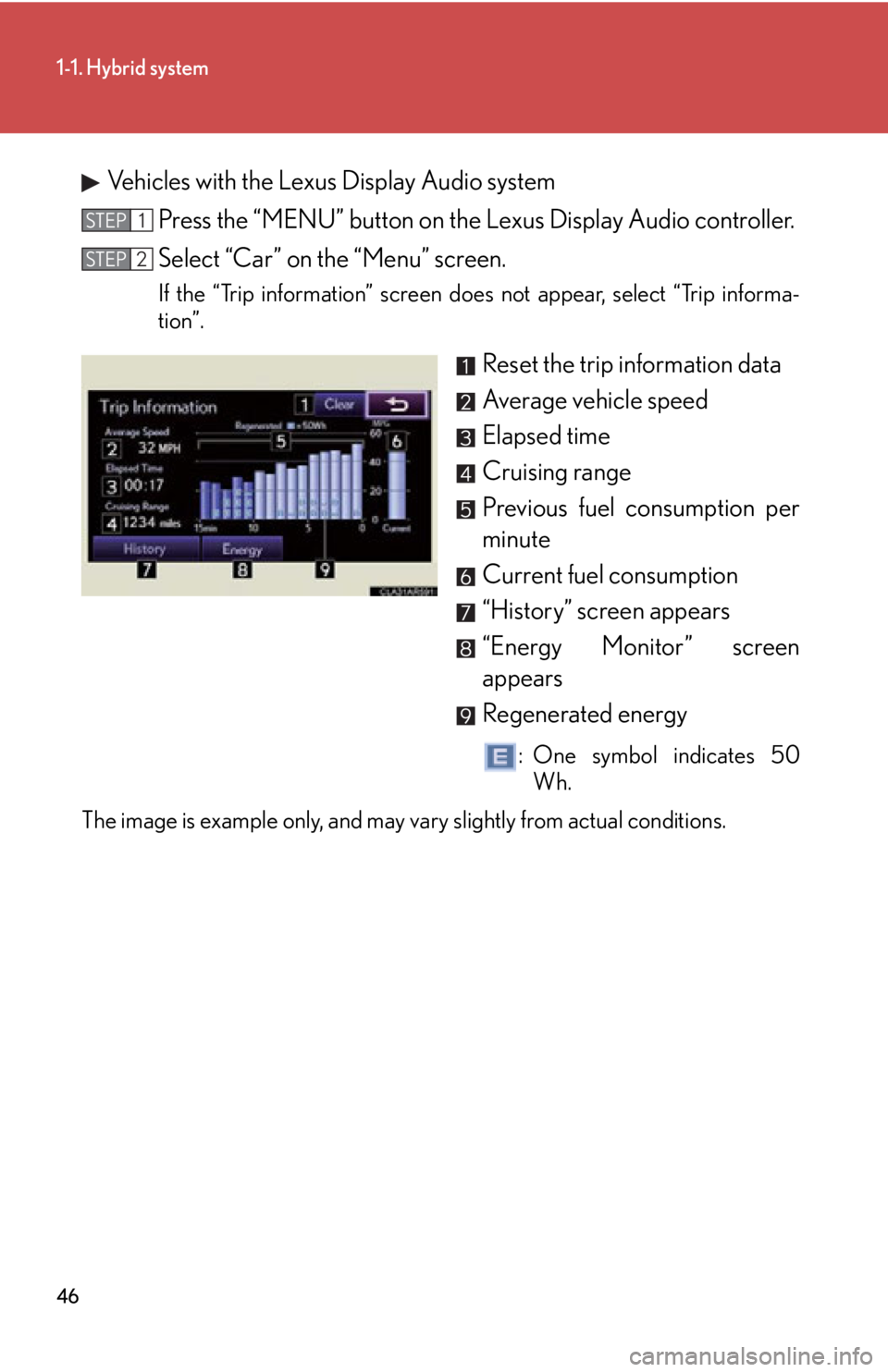
Vehicles with the Lexus Display Audio system
Press the “MENU” button on the Lexus Display Audio controller.
Select “Car” on the “Menu” screen. If the “Trip information” screen does not appear, select “Trip informa-
tion”.
Reset the trip information data
Average vehicle speed
Elapsed time
Cruising range
Previous fuel consumption per
minute
Current fuel consumption
“History” screen appears
“Energy Monitor” screen
appears
Regenerated energy : One symbol indicates 50
Wh.
The image is example only, and may vary slightly from actual conditions. STEP 1
STEP 2
Page 47 of 878
471-1. Hybrid system
1
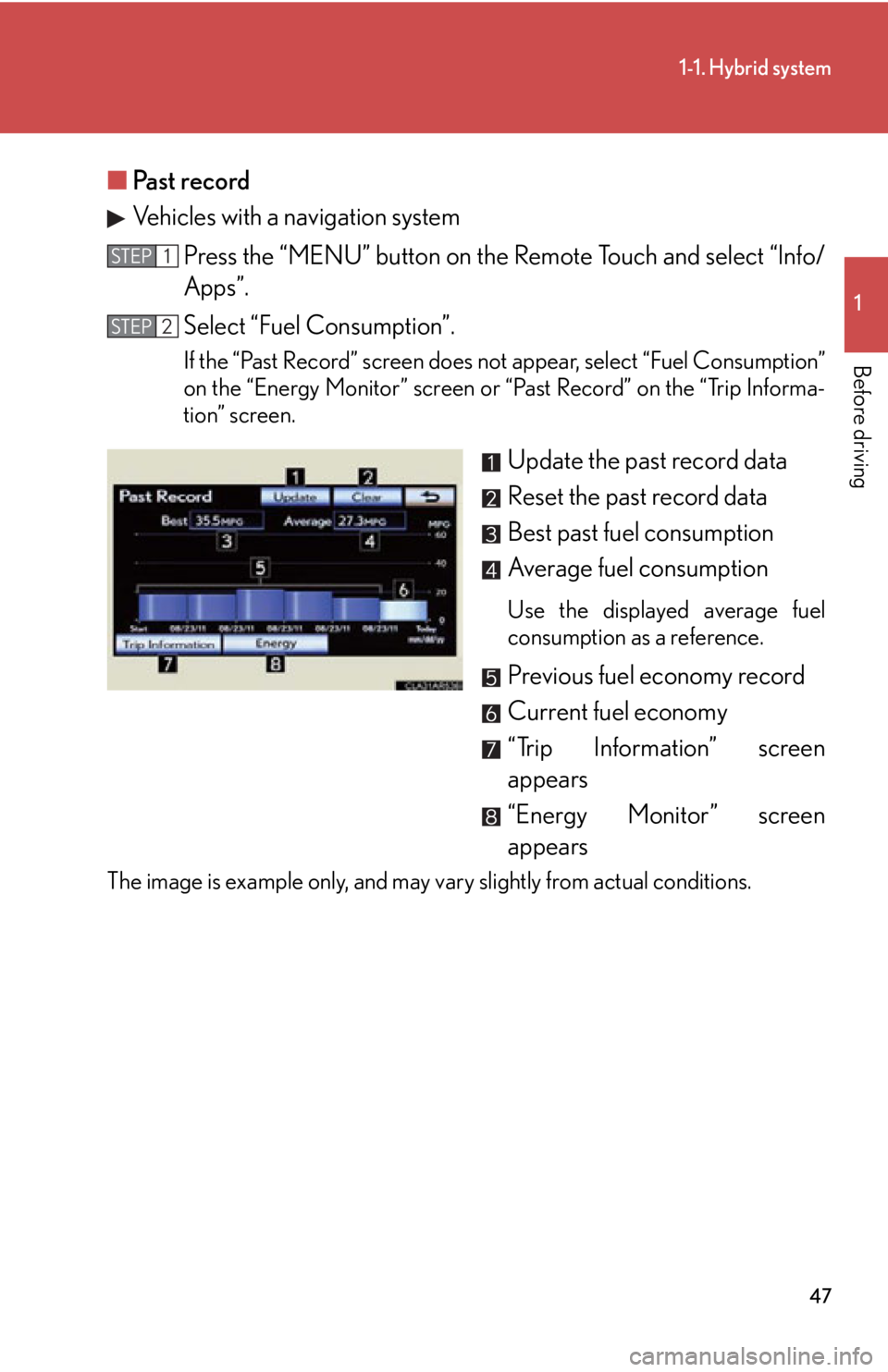
Before driving ■ Past record
Vehicles with a navigation system
Press the “MENU” button on the Remote Touch and select “Info/
Apps”.
Select “Fuel Consumption”. If the “Past Record” screen does not appear, select “Fuel Consumption”
on the “Energy Monitor” screen or “Past Record” on the “Trip Informa-
tion” screen.
Update the past record data
Reset the past record data
Best past fuel consumption
Average fuel consumption Use the displayed average fuel
consumption as a reference.
Previous fuel economy record
Current fuel economy
“Trip Information” screen
appears
“Energy Monitor” screen
appearsThe image is example only, and may vary slightly from actual conditions. STEP 1
STEP 2
Page 48 of 878
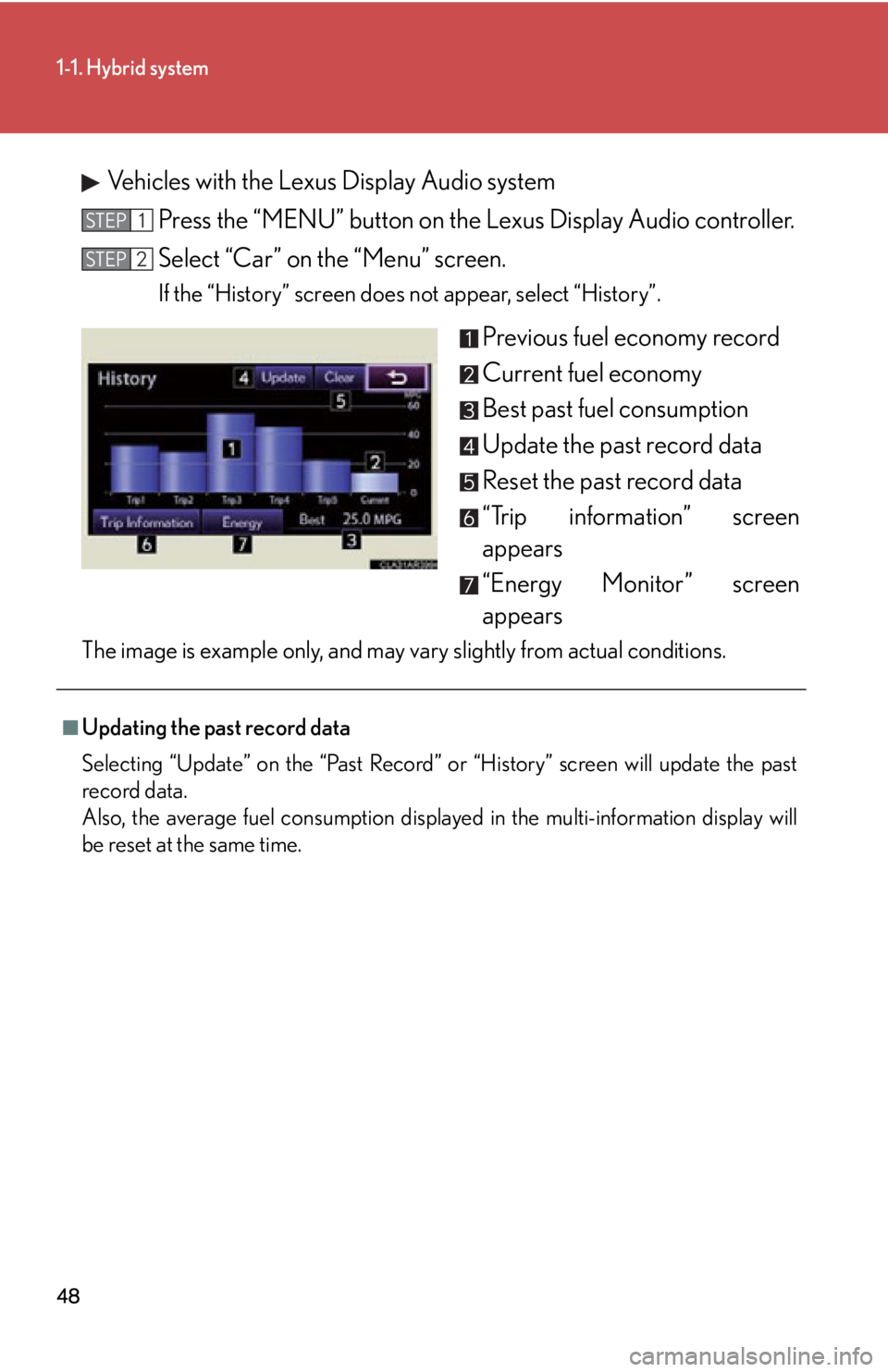
481-1. Hybrid system
Vehicles with the Lexus Display Audio system
Press the “MENU” button on the Lexus Display Audio controller.
Select “Car” on the “Menu” screen. If the “History” screen does not appear, select “History”.
Previous fuel economy record
Current fuel economy
Best past fuel consumption
Update the past record data
Reset the past record data
“Trip information” screen
appears
“Energy Monitor” screen
appearsThe image is example only, and may vary slightly from actual conditions. STEP 1
STEP 2
■
Updating the past record data
Selecting “Update” on the “Past Record” or “History” screen will update the past
record data.
Also, the average fuel consumption displayed in the multi-information display will
be reset at the same time.