display LEXUS RX450h 2015 Workshop Manual
[x] Cancel search | Manufacturer: LEXUS, Model Year: 2015, Model line: RX450h, Model: LEXUS RX450h 2015Pages: 878, PDF Size: 11.62 MB
Page 233 of 878
2332-4. Using other driving systems
2
When driving Accelerate or decelerate the
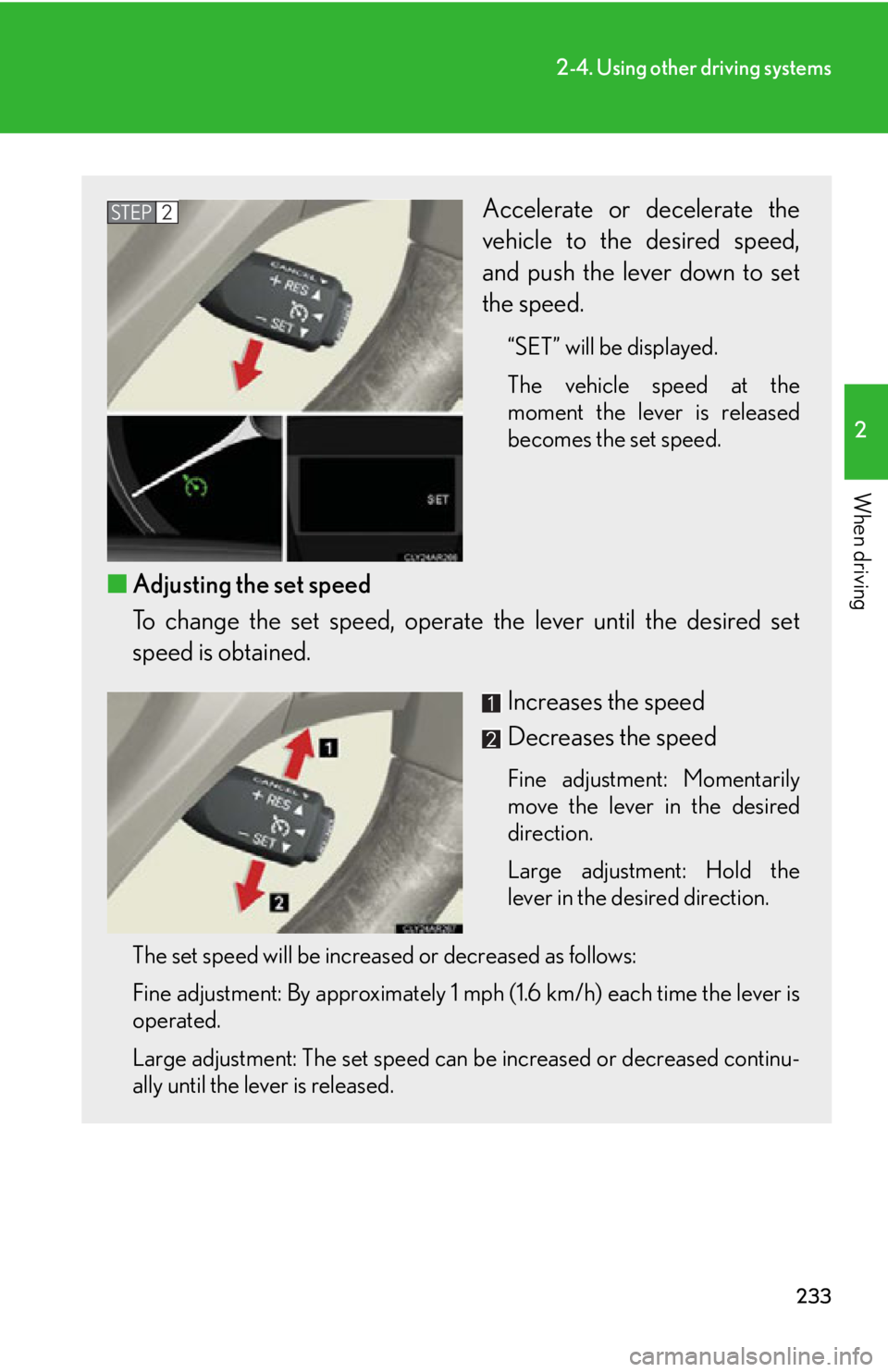
vehicle to the desired speed,
and push the lever down to set
the speed. “SET” will be displayed.
The vehicle speed at the
moment the lever is released
becomes the set speed.
■ Adjusting the set speed
To change the set speed, operate the lever until the desired set
speed is obtained.
Increases the speed
Decreases the speed Fine adjustment: Momentarily
move the lever in the desired
direction.
Large adjustment: Hold the
lever in the desired direction.
The set speed will be increased or decreased as follows:
Fine adjustment: By approximately 1 mph (1.6 km/h) each time the lever is
operated.
Large adjustment: The set speed can be increased or decreased continu-
ally until the lever is released. STEP 2
Page 235 of 878
2352-4. Using other driving systems
2
When driving ■
If a warning message is shown on the multi-information display
Press the “ON-OFF” button once to deactiv ate the system, and then press the but-
ton again to reactivate the system.
If the cruise control speed cannot be set or if the cruise control cancels immediately
after being activated, there may be a malfun ction in the cruise control system. Have
the vehicle inspected by your Lexus dealer.
CAUTION■
To avoid operating the cruise control by mistake
Switch the cruise control off using the “ON-OFF” button when not in use.■
Situations unsuitable for cruise control
Do not use cruise control in any of the following situations.
Doing so may result in loss of control and could cause an accident resulting in death
or serious injury. ●
In heavy traffic●
On roads with sharp bends●
On winding roads●
On slippery roads, such as thos e covered with rain, ice or snow●
On steep hills
Vehicle speed may exceed the set speed when driving down a steep hill.●
When your vehicle is towing a trailer or during emergency towing
Page 236 of 878
2362-4. Using other driving systems
Dynamic radar cruise control
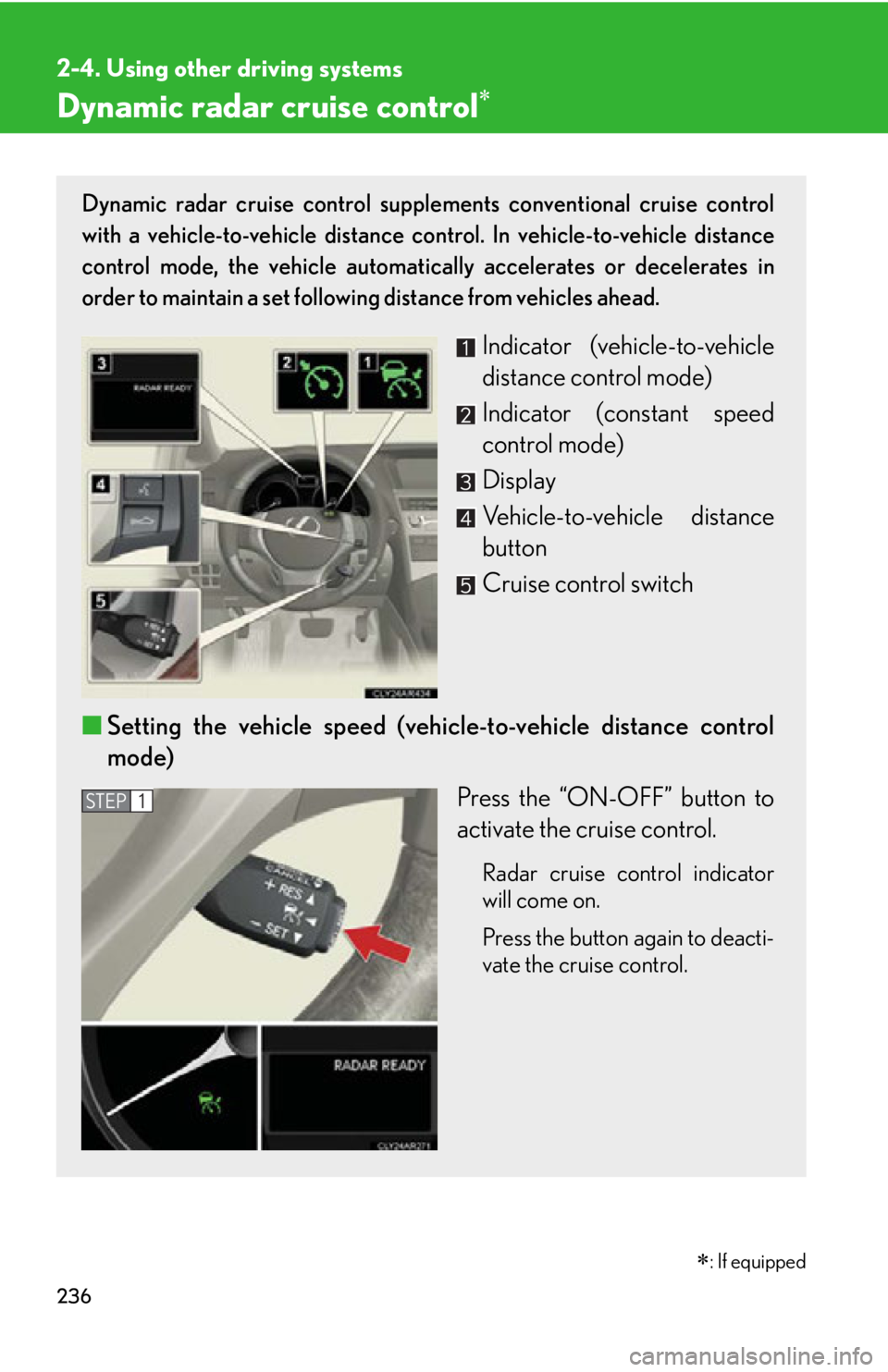
: If equippedDynamic radar cruise control supple ments conventional cruise control
with a vehicle-to-vehicle distance control. In vehicle-to-vehicle distance
control mode, the vehicle automatically accelerates or decelerates in
order to maintain a set following distance from vehicles ahead.
Indicator (vehicle-to-vehicle
distance control mode)
Indicator (constant speed
control mode)
Display
Vehicle-to-vehicle distance
button
Cruise control switch
■ Setting the vehicle speed (vehicle-to-vehicle distance control
mode)
Press the “ON-OFF” button to
activate the cruise control. Radar cruise control indicator
will come on.
Press the button again to deacti-
vate the cruise control. STEP 1
Page 237 of 878
2372-4. Using other driving systems
2
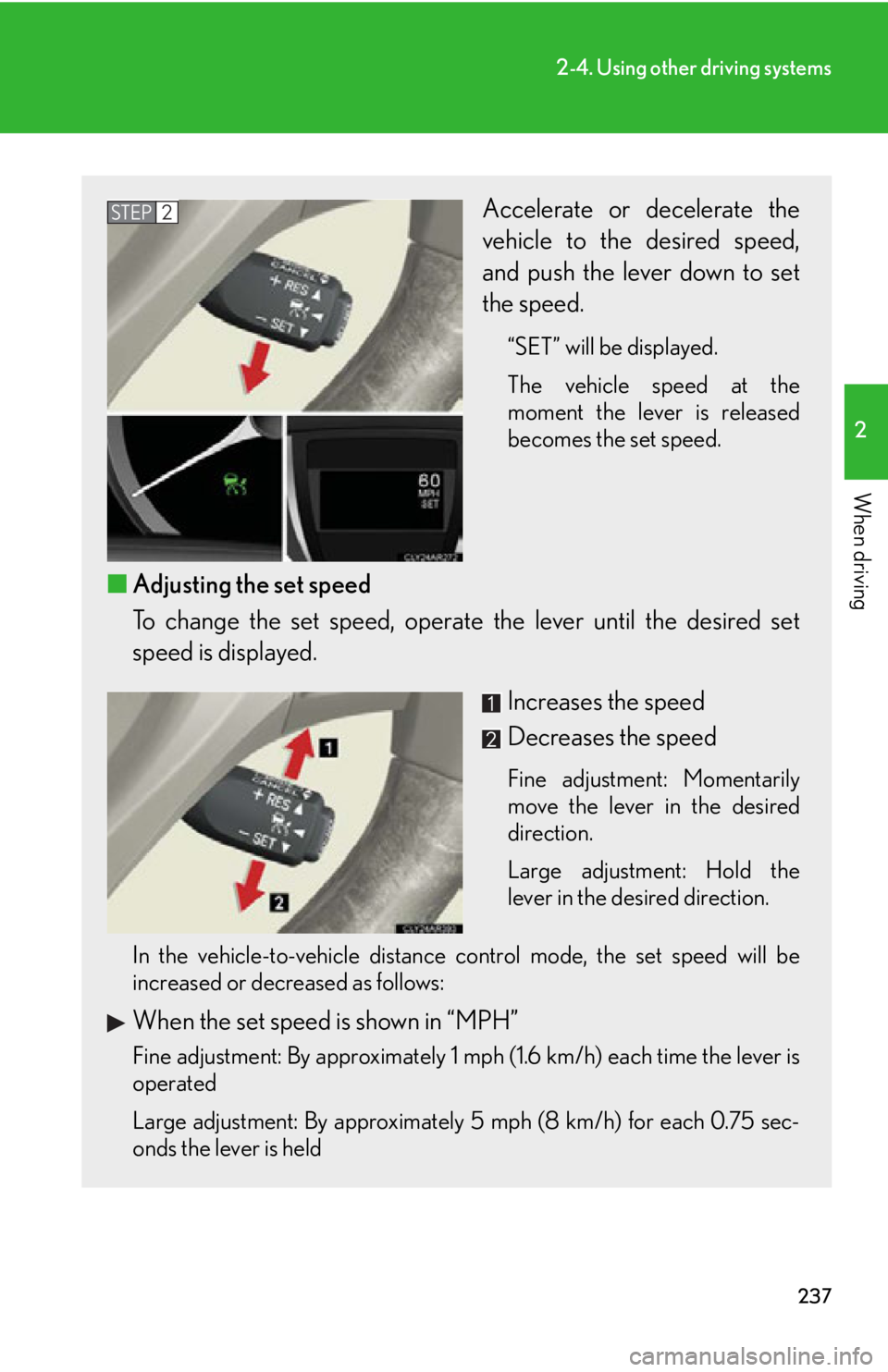
When driving Accelerate or decelerate the
vehicle to the desired speed,
and push the lever down to set
the speed. “SET” will be displayed.
The vehicle speed at the
moment the lever is released
becomes the set speed.
■ Adjusting the set speed
To change the set speed, operate the lever until the desired set
speed is displayed.
Increases the speed
Decreases the speed Fine adjustment: Momentarily
move the lever in the desired
direction.
Large adjustment: Hold the
lever in the desired direction.
In the vehicle-to-vehicle distance control mode, the set speed will be
increased or decreased as follows:
When the set speed is shown in “MPH”
Fine adjustment: By approximately 1 mph (1.6 km/h) each time the lever is
operated
Large adjustment: By approximately 5 mph (8 km/h) for each 0.75 sec-
onds the lever is held STEP 2
Page 238 of 878
2382-4. Using other driving systems
When the set speed is shown in “km/h” Fine adjustment: By approximately 0.6 mph (1 km/h) each time the lever is
operated
Large adjustment: By approximately 3.1 mph (5 km/h) for each 0.75 sec-
onds the lever is held
In the constant speed control mode ( P. 242), the set speed will be
increased or decreased as follows:
Fine adjustment: By approximately 1 mph (1.6 km/h) each time the lever is
operated
Large adjustment: The set speed can be increased or decreased continu-
ally until the lever is released.
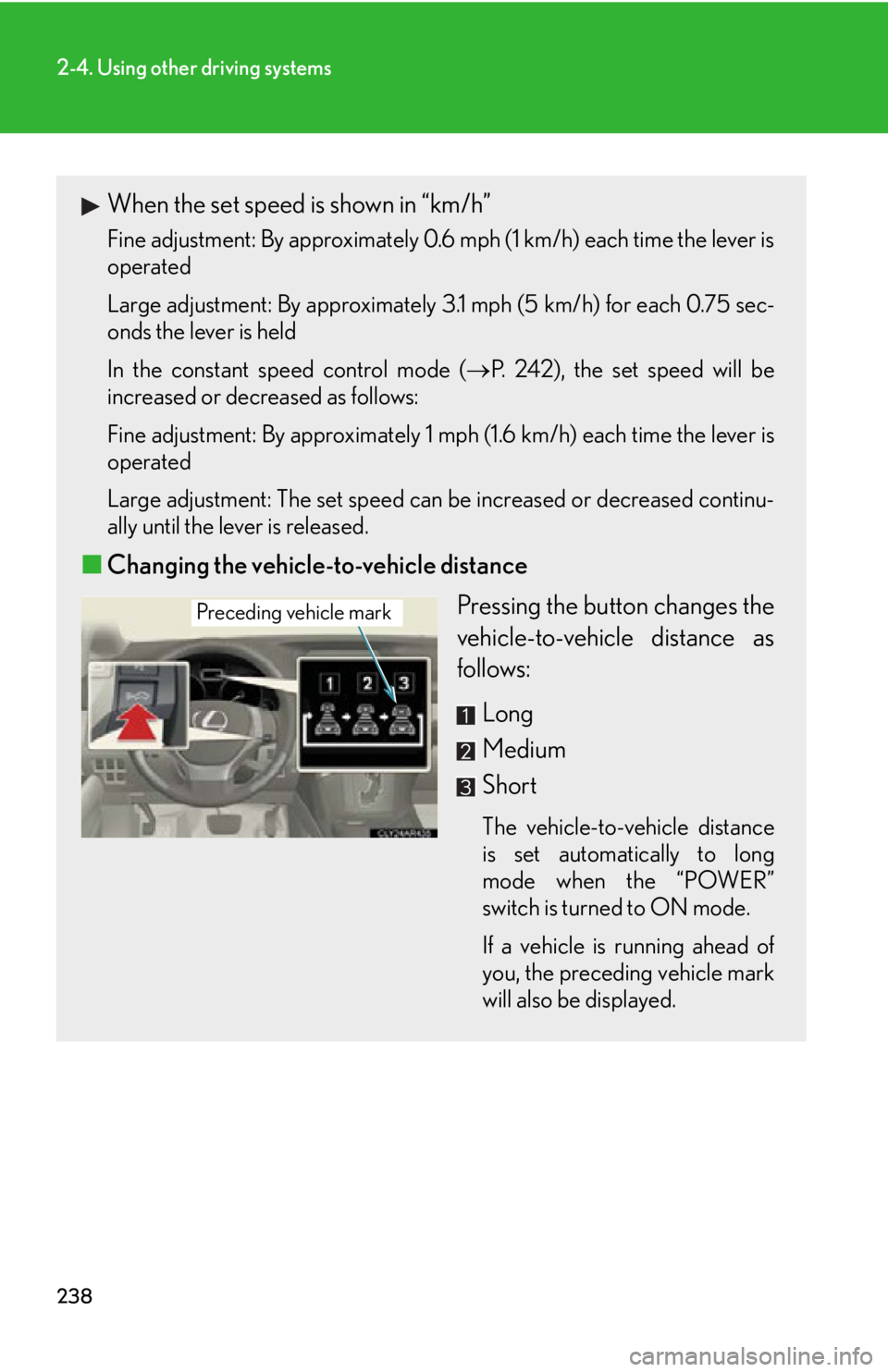
■ Changing the vehicle-to-vehicle distance
Pressing the button changes the
vehicle-to-vehicle distance as
follows:
Long
Medium
Short The vehicle-to-vehicle distance
is set automatically to long
mode when the “POWER”
switch is turned to ON mode.
If a vehicle is running ahead of
you, the preceding vehicle mark
will also be displayed.Preceding vehicle mark
Page 241 of 878
2412-4. Using other driving systems
2
When driving Example of follow-up cruising
When following a vehicle driving slower than the set speed The system continues follow-up cruising while adjusting for changes in the
speed of the vehicle ahead in order to maintain the vehicle-to-vehicle dis-
tance set by the driver.
Example of acceleration
When there are no longer any vehicl es ahead driving slower than the
set speed The system accelerates until the set speed is reached. The system then
returns to constant speed cruising.
Approach warning
When your vehicle is too close to a vehicle ahead, and sufficient auto-
matic deceleration via the cruise co ntrol is not possible, the display will
flash and the buzzer will sound to al ert the driver. An example of this
would be if another driver cuts in fron t of you while you are following a
vehicle. Apply the brakes to ensure an appropria te vehicle-to-vehicle dis-
tance.
■ Warnings may not occur when
In the following instances, there is a possibility that the warnings will not
occur:
● When the speed of the vehicle ahead matches or exceeds your
vehicle speed
● When the vehicle ahead is traveling at an extremely slow speed
● Immediately after the cruise control speed was set
● At the instant the accelerator is applied
Page 248 of 878
2482-4. Using other driving systems
Intuitive parking assist The distance to obstacles measured by the sensors is communicated via
the multi-information display, screen (vehicles with the Lexus Display
Audio system) and a buzzer when parallel parking or maneuvering into a
garage is conducted. Always check the surrounding area when using this
system.
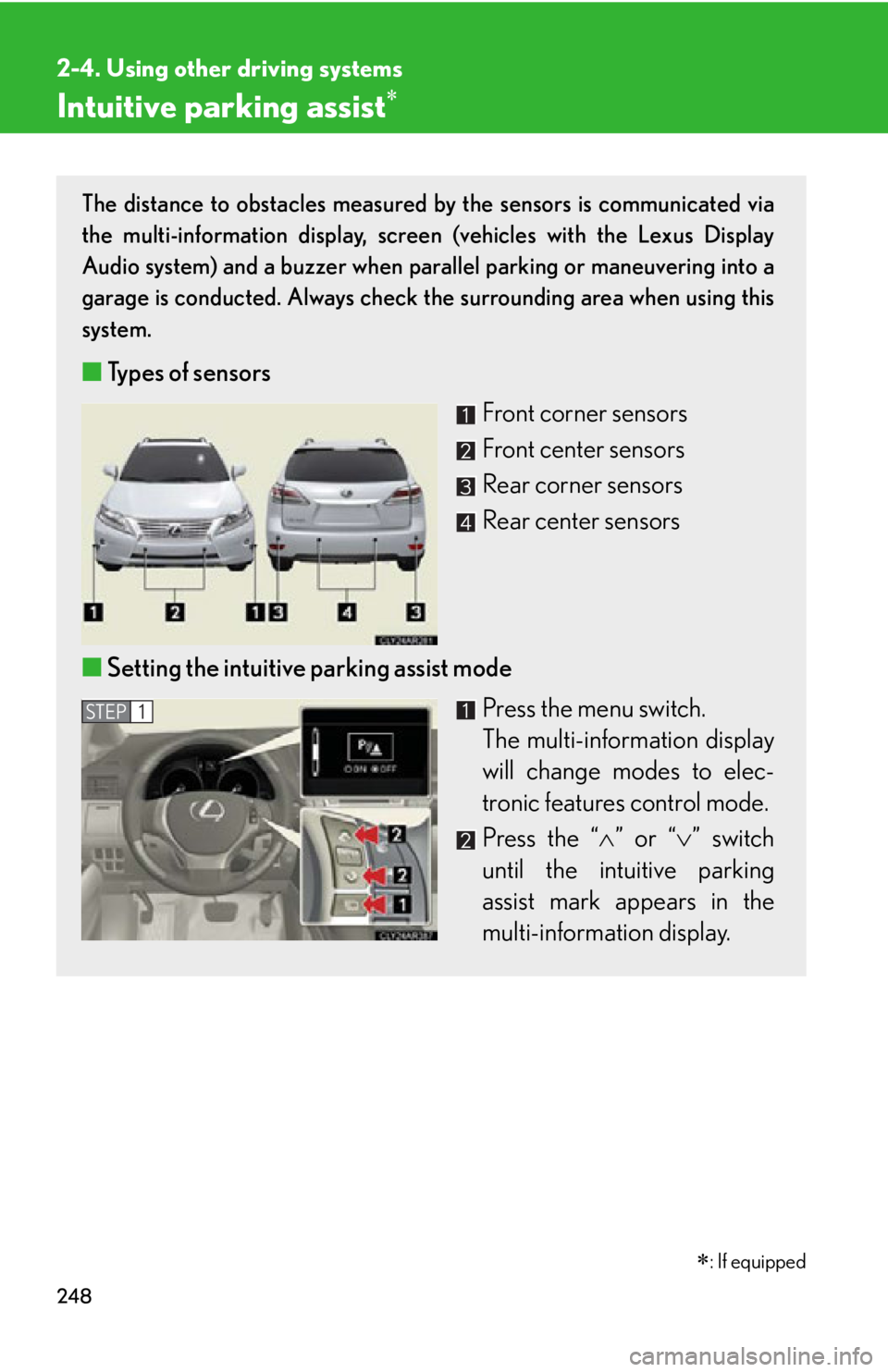
■ Types of sensors
Front corner sensors
Front center sensors
Rear corner sensors
Rear center sensors
■ Setting the intuitive parking assist mode
Press the menu switch.
The multi-information display
will change modes to elec-
tronic features control mode.
Press the “ ” or “ ” switch
until the intuitive parking
assist mark appears in the
multi-information display. STEP 1
: If equipped
Page 249 of 878
2492-4. Using other driving systems
2
When driving
Display
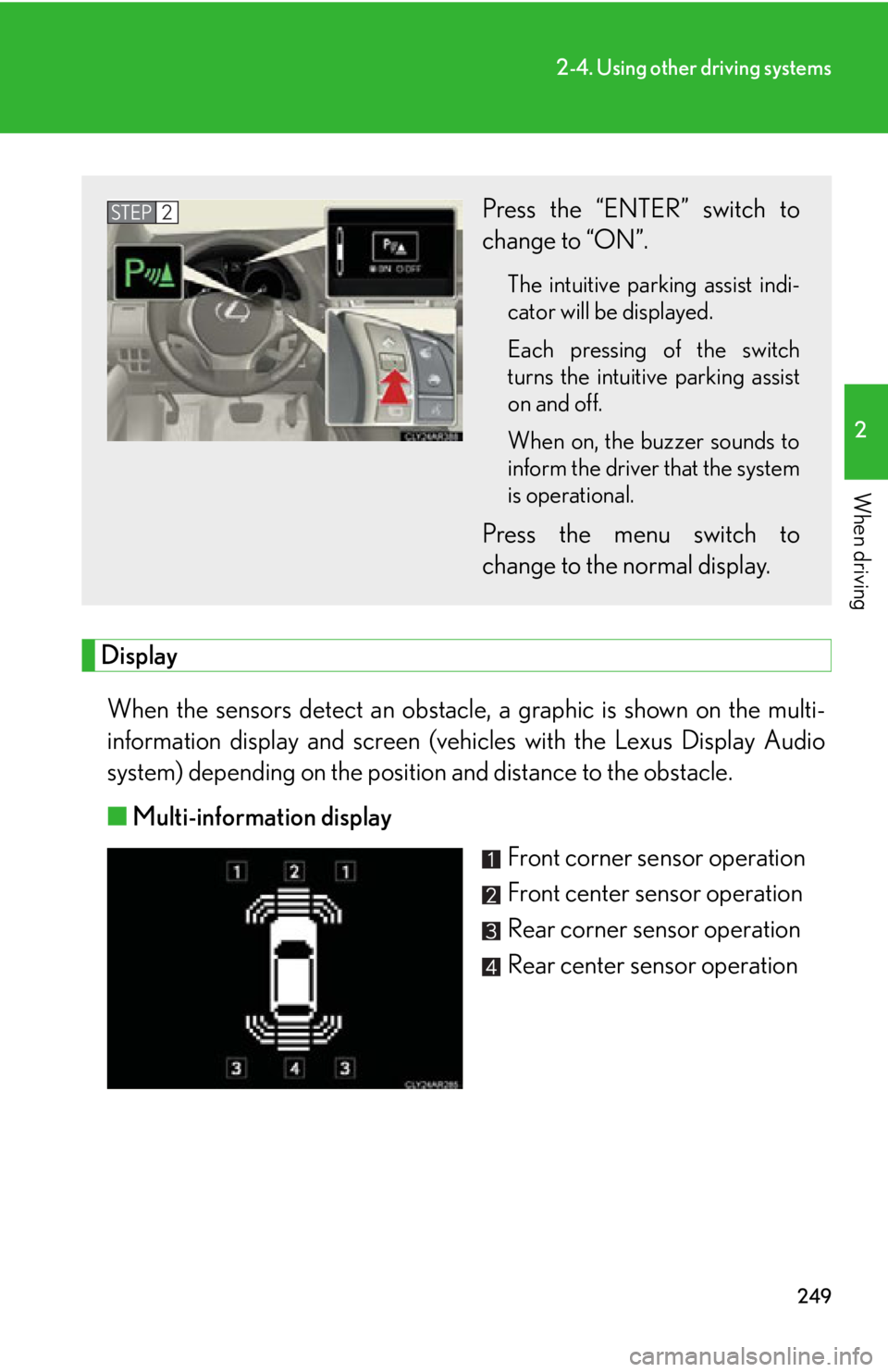
When the sensors detect an obstacle , a graphic is shown on the multi-
information display and screen (vehic les with the Lexus Display Audio
system) depending on the position and distance to the obstacle.
■ Multi-information display
Front corner sensor operation
Front center sensor operation
Rear corner sensor operation
Rear center sensor operationPress the “ENTER” switch to
change to “ON”. The intuitive parking assist indi-
cator will be displayed.
Each pressing of the switch
turns the intuitive parking assist
on and off.
When on, the buzzer sounds to
inform the driver that the system
is operational.
Press the menu switch to
change to the normal display.STEP 2
Page 250 of 878
2502-4. Using other driving systems
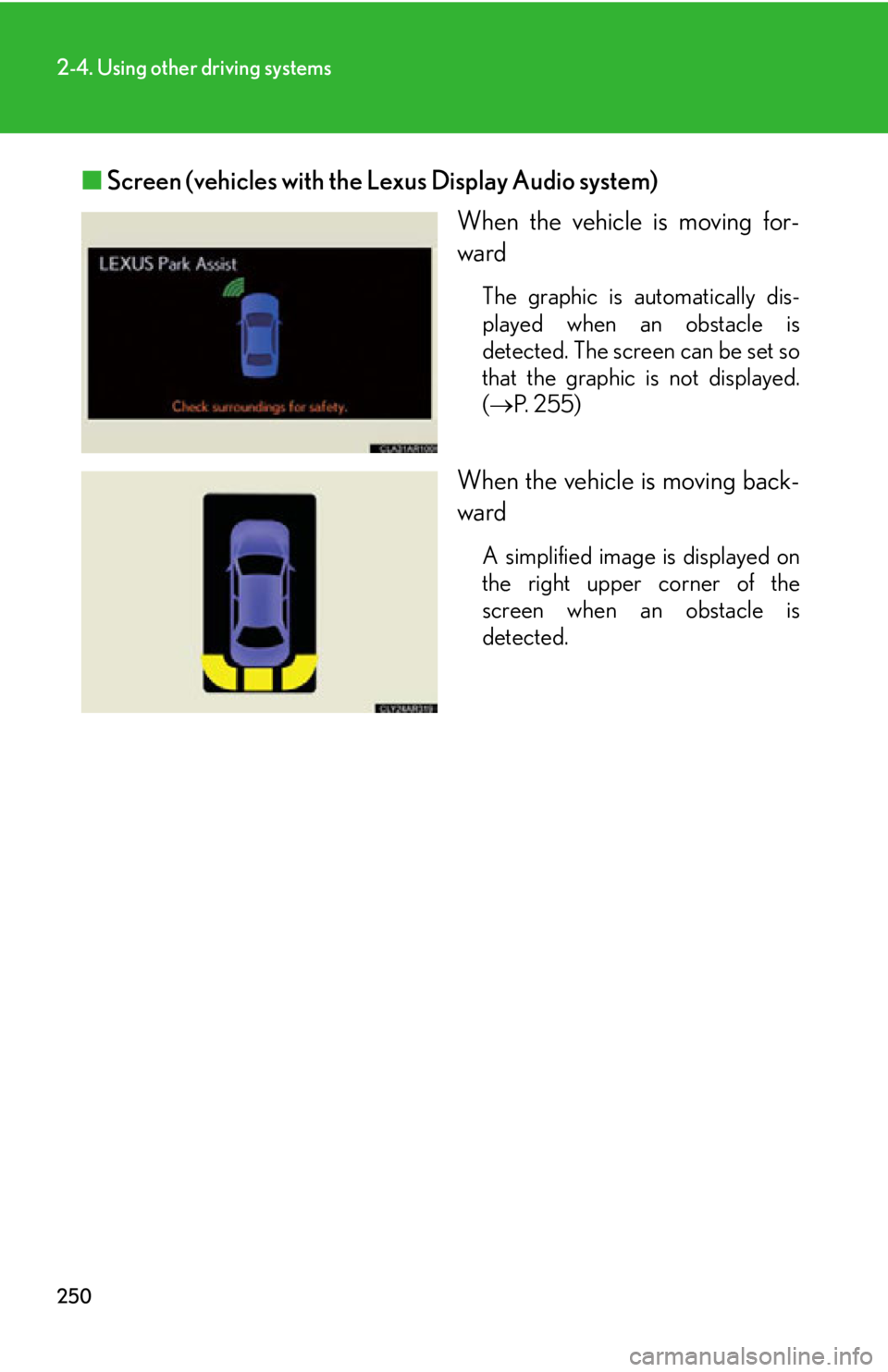
■ Screen (vehicles with the Lexus Display Audio system)
When the vehicle is moving for-
ward The graphic is automatically dis-
played when an obstacle is
detected. The screen can be set so
that the graphic is not displayed.
( P. 2 5 5 )
When the vehicle is moving back-
ward A simplified image is displayed on
the right upper corner of the
screen when an obstacle is
detected.
Page 251 of 878
2512-4. Using other driving systems
2
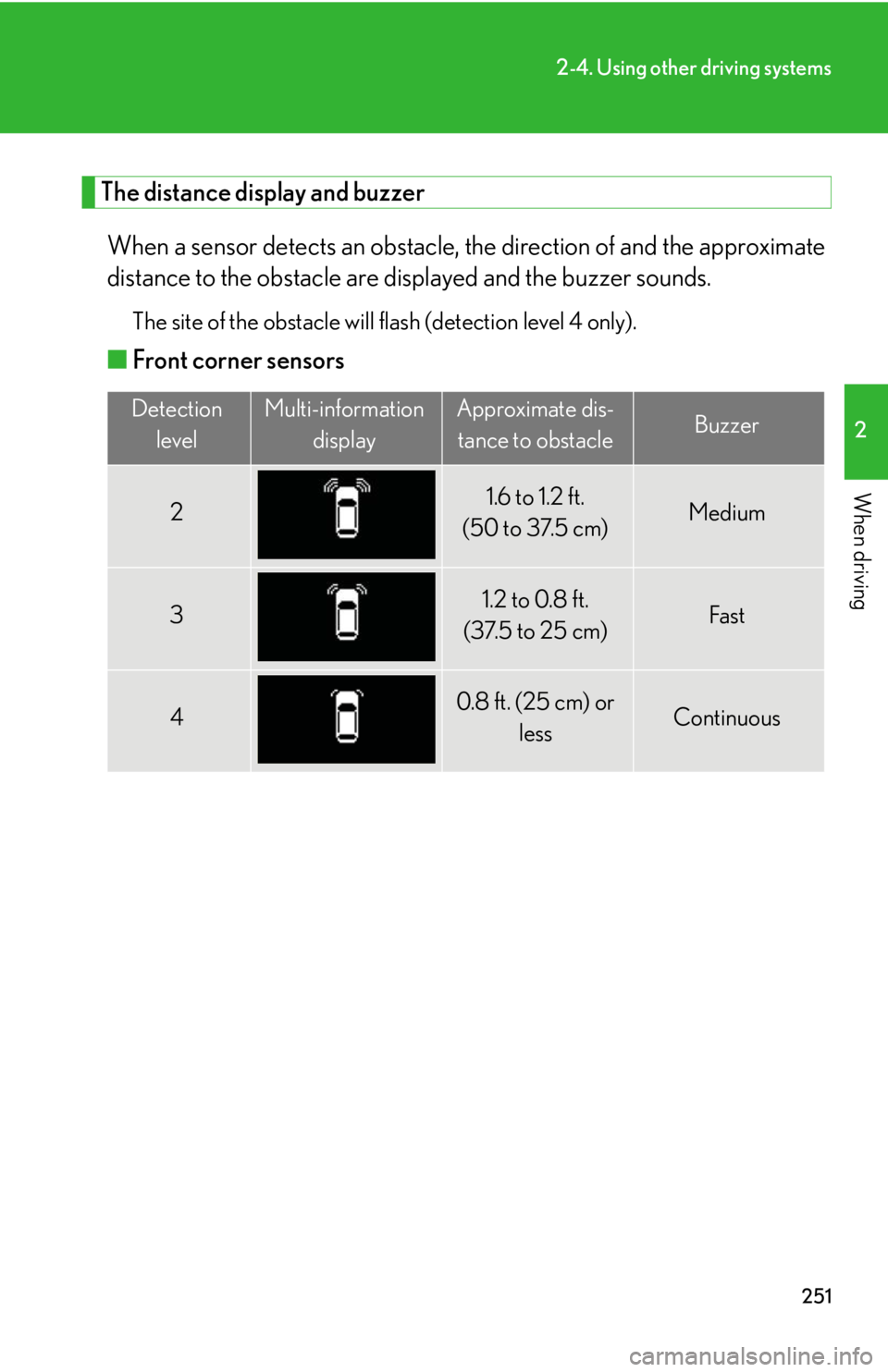
When driving The distance display and buzzer
When a sensor detects an obstacle, the direction of and the approximate
distance to the obstacle are di splayed and the buzzer sounds.The site of the obstacle will flash (detection level 4 only).
■ Front corner sensors Detection
level Multi-information
display Approximate dis-
tance to obstacle Buzzer
2 1.6 to 1.2 ft.
(50 to 37.5 cm) Medium
3 1.2 to 0.8 ft.
(37.5 to 25 cm) Fast
4 0.8 f t. (25 cm) or
less Continuous