stop LEXUS RX450H 2019 Manual Online
[x] Cancel search | Manufacturer: LEXUS, Model Year: 2019, Model line: RX450H, Model: LEXUS RX450H 2019Pages: 792, PDF Size: 13.48 MB
Page 313 of 792

3134-5. Using the driving support systems
4
Driving
RX450h_RX450hL_U
After the vehicle ahead of you starts off,
push the lever up.
Your vehicle will also resume follow-up
cruising if the accelerator pedal is
depressed after the vehicle ahead of
you starts off.Pulling the lever toward you cancels
the speed control.
The speed control is also canceled when
the brake pedal is depressed.
(When the vehicle has been stopped by
system control, depressing the brake
pedal does not cancel the setting.)
Pushing the lever up resumes the
cruise control and returns vehicle
speed to the set speed.
However, when a vehicle ahead is not detected, cruise control does not resume when
the vehicle speed is approximately 25 mph (40 km/h) or less.
Resuming follow-up cruising when the vehicle has been stopped by sys-
tem control (vehicle-to-vehicle distance control mode)
Canceling and resuming the speed control
1
2
Page 316 of 792

3164-5. Using the driving support systems
RX450h_RX450hL_U
■Dynamic radar cruise control with full-speed range can be set when
●The shift lever is in D or range 4 or higher of S has been selected.
●Range 4 or higher has been selected by using the paddle shift switch.
(vehicles with padd le shift switches)
●Vehicle speed is at or abov e approximately 30 mph (50 km/h). However, when a pre-
ceding vehicle is detected, the dynamic ra dar cruise control with full-speed range can
be set even if the vehicle speed is below approximately 30 mph (50 km/h).
■Accelerating after setting the vehicle speed
The vehicle can accelerate by operating the accelerator pedal. After accelerating, the
set speed resumes. However, during vehicle-to-vehicle distance control mode, the vehi-
cle speed may decrease below the set speed in order to maintain the distance to the pre-
ceding vehicle.
■When the vehicle stops while follow-up cruising
●Pushing the lever up while the vehicle ahead stops will resume follow-up cruising if the
vehicle ahead starts off within approximat ely 3 seconds after the switch is pressed.
●If the vehicle ahead starts off within 3 seco nds after your vehicle stops, follow-up cruis-
ing will be resumed.
■Automatic cancelation of vehicle- to-vehicle distance control mode
Vehicle-to-vehicle distance control mode is automatically canceled in the following situ-
ations.
●Actual vehicle speed falls below approximately 25 mph (40 km/h) when there are no
vehicles ahead.
●The preceding vehicle leaves the lane when yo ur vehicle is following at a vehicle speed
at or below approximately 25 mph (40 km/h ). Otherwise, the sensor cannot properly
detect the vehicle. (“Radar Cruise Contro l Not Available No Preceding Vehicles” is
displayed on the multi-information display)
●VSC is activated.
●TRAC is activated for a period of time.
●When the VSC or TRAC system is turned off.
●The sensor cannot detect correctly because it is covered in some way.
●Pre-collision braking is activated.
●The parking brake is operated.
●The vehicle is stopped by system control on a steep incline.
●The following are detected when the vehicle has been stopped by system control:
• The driver is not wearing a seat belt.
• The driver’s door is opened.
• The vehicle has been stopped for about 3 minutes
If vehicle-to-vehicle distance control mode is automatically canceled for any other rea-
son, there may be a malfunction in th e system. Contact your Lexus dealer.
Page 326 of 792

3264-5. Using the driving support systems
RX450h_RX450hL_U
■Conditions under which the BSM function may not function correctly
●The BSM function may not detect vehicles correctly in the following situations:
• When the sensor is misaligned due to a stro ng impact to the sensor or its surround-
ing area
• When mud, snow, ice, a sticke r, etc. is covering the sensor or surrounding area on
the rear bumper
• When driving on a road surf ace that is wet with standing water during bad weather,
such as heavy rain, snow, or fog
• When multiple vehicles are approaching wi th only a small gap between each vehicle
• When the distance between your vehicle and a following vehicle is short
• When there is a significant difference in speed between your vehicle and the vehicle that enters the detection area
• When the difference in speed between your vehicle and another vehicle is changing
• When a vehicle enters a detection area traveling at about the same speed as your vehicle
• As your vehicle starts from a stop, a vehicle remains in the detection area
• When driving up and down cons ecutive steep inclines, such as hills, dips on the road,
etc.
• When driving on roads with sharp bends, consecutive curves, or uneven surfaces
• When vehicle lanes are wide, or when driving on the edge of a lane, and the vehicle in an adjacent lane is far away from your vehicle
• When towing a trailer (vehicles with towing package)
• When items such as a bicycle carrier are installed on the rear of the vehicle
• When there is a significant difference in height between your vehicle and the vehicle that enters the detection area
• Immediately after the BSM function is turned on
●Instances of the BSM function unnecessarily detecting a vehicle and/or object may
increase in the following situations:
• When the sensor is misaligned due to a stro ng impact to the sensor or its surround-
ing area
• When the distance between your vehicle and a guardrail, wall, etc. that enters the detection area is short
• When driving up and down cons ecutive steep inclines, such as hills, dips on the road,
etc.
• When vehicle lanes are narrow, or when driv ing on the edge of a lane, and a vehicle
traveling in a lane other than the ad jacent lanes enters the detection area
• When driving on roads with sharp bends, consecutive curves, or uneven surfaces
• When the tires are slipping or spinning
• When the distance between your vehicle and a following vehicle is short
• When a bicycle carrier or other accessory is installed to the rear of the vehicle
• When towing a trailer (vehicles with towing package)
Page 346 of 792
3464-5. Using the driving support systems
RX450h_RX450hL_U
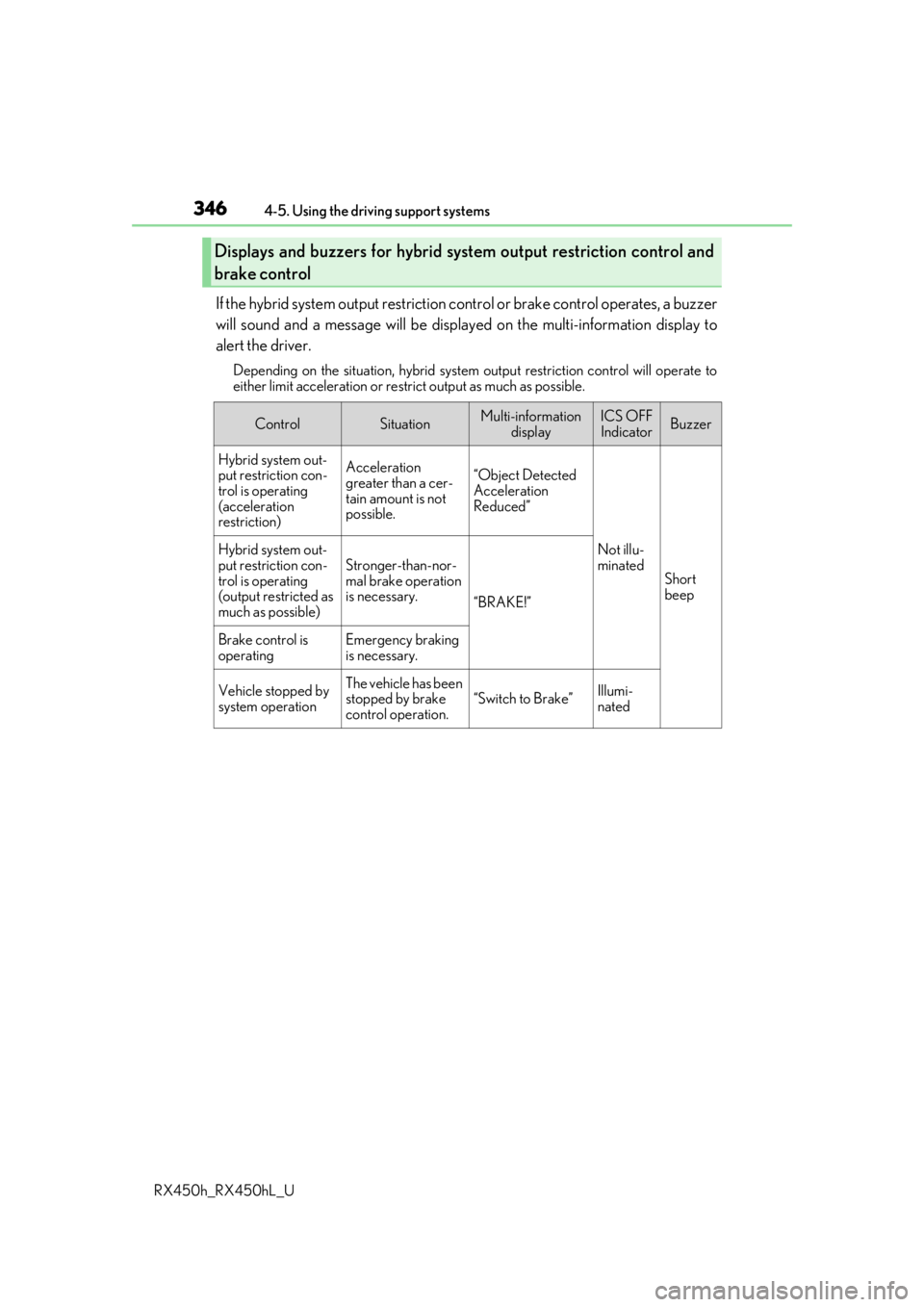
If the hybrid system output restriction control or brake control operates, a buzzer
will sound and a message will be displa yed on the multi-information display to
alert the driver.
Depending on the situation, hybrid system output restriction control will operate to
either limit acceleration or restrict output as much as possible.
Displays and buzzers for hybrid sys tem output restriction control and
brake control
ControlSituationMulti-information displayICS OFFIndicatorBuzzer
Hybrid system out-
put restriction con-
trol is operating
(acceleration
restriction)Acceleration
greater than a cer-
tain amount is not
possible.“Object Detected
Acceleration
Reduced”
Not illu-
minated
Short
beep
Hybrid system out-
put restriction con-
trol is operating
(output restricted as
much as possible)Stronger-than-nor-
mal brake operation
is necessary.
“BRAKE!”
Brake control is
operatingEmergency braking
is necessary.
Vehicle stopped by
system operationThe vehicle has been
stopped by brake
control operation.
“Switch to Brake”Illumi-
nated
Page 349 of 792
3494-5. Using the driving support systems
4
Driving
RX450h_RX450hL_U
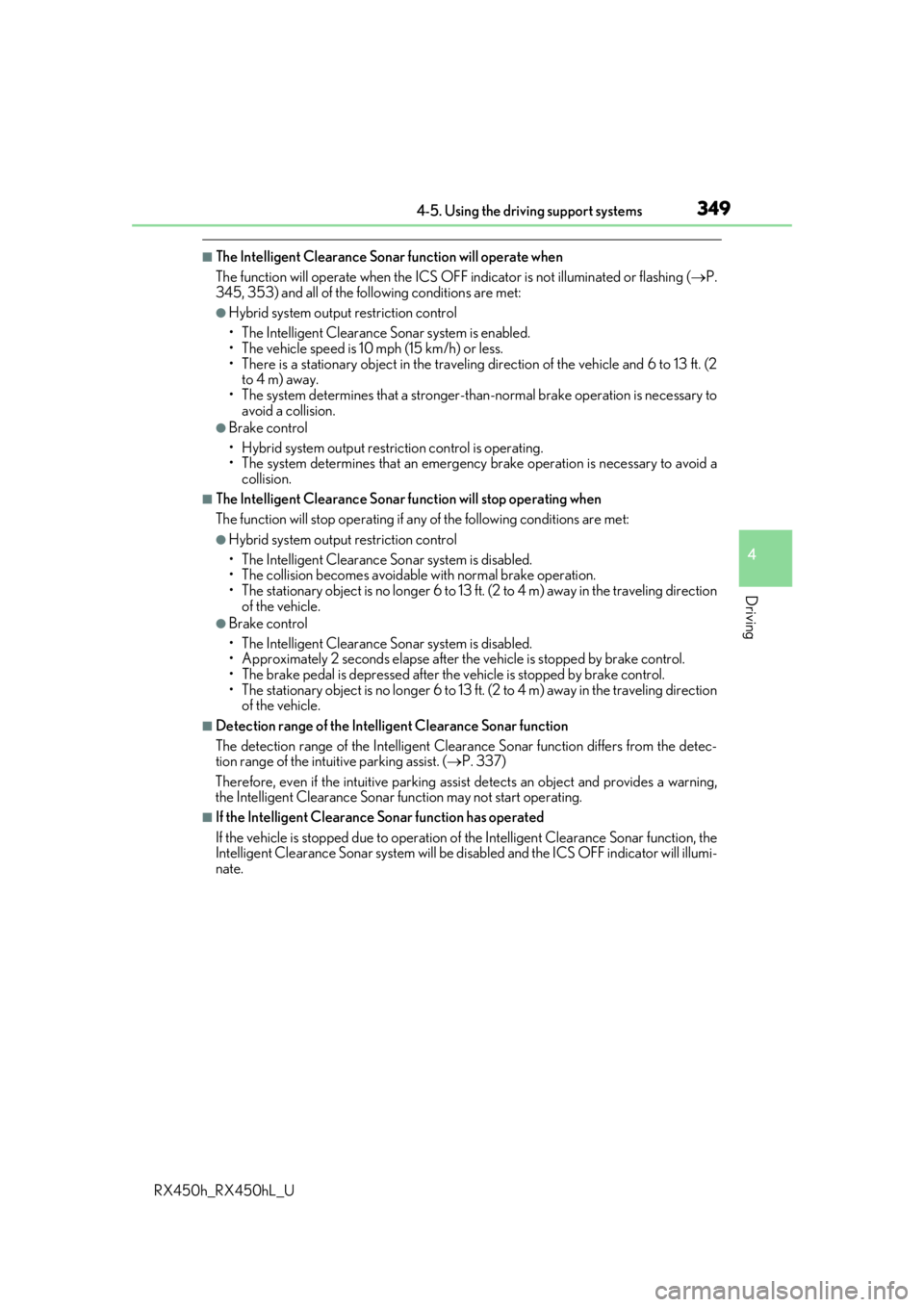
■The Intelligent Clearance Sonar function will operate when
The function will operate when the ICS OFF indicator is not illuminated or flashing (P.
345, 353) and all of the fo llowing conditions are met:
●Hybrid system output restriction control
• The Intelligent Clearance Sonar system is enabled.
• The vehicle speed is 10 mph (15 km/h) or less.
• There is a stationary object in the traveling direction of the vehicle and 6 to 13 ft. (2
to 4 m) away.
• The system determines that a stronger-t han-normal brake operation is necessary to
avoid a collision.
●Brake control
• Hybrid system output restri ction control is operating.
• The system determines that an emergenc y brake operation is necessary to avoid a
collision.
■The Intelligent Clearance Sonar fu nction will stop operating when
The function will stop operating if an y of the following conditions are met:
●Hybrid system output restriction control
• The Intelligent Clearance Sonar system is disabled.
• The collision becomes avoidable with normal brake operation.
• The stationary object is no lo nger 6 to 13 ft. (2 to 4 m) away in the traveling direction
of the vehicle.
●Brake control
• The Intelligent Clearance Son ar system is disabled.
• Approximately 2 seconds elapse after the vehicle is stopped by brake control.
• The brake pedal is depressed after the vehicle is stopped by brake control.
• The stationary object is no lo nger 6 to 13 ft. (2 to 4 m) away in the traveling direction
of the vehicle.
■Detection range of the Intellig ent Clearance Sonar function
The detection range of the Intelligent Cleara nce Sonar function differs from the detec-
tion range of the intu itive parking assist. (P. 337)
Therefore, even if the intuitive parking assist detects an object and provides a warning,
the Intelligent Clearance Sonar function may not start operating.
■If the Intelligent Clearance Sonar function has operated
If the vehicle is stopped due to operation of the Intelligent Clearance Sonar function, the
Intelligent Clearance Sonar system will be di sabled and the ICS OFF indicator will illumi-
nate.
Page 354 of 792
3544-5. Using the driving support systems
RX450h_RX450hL_U
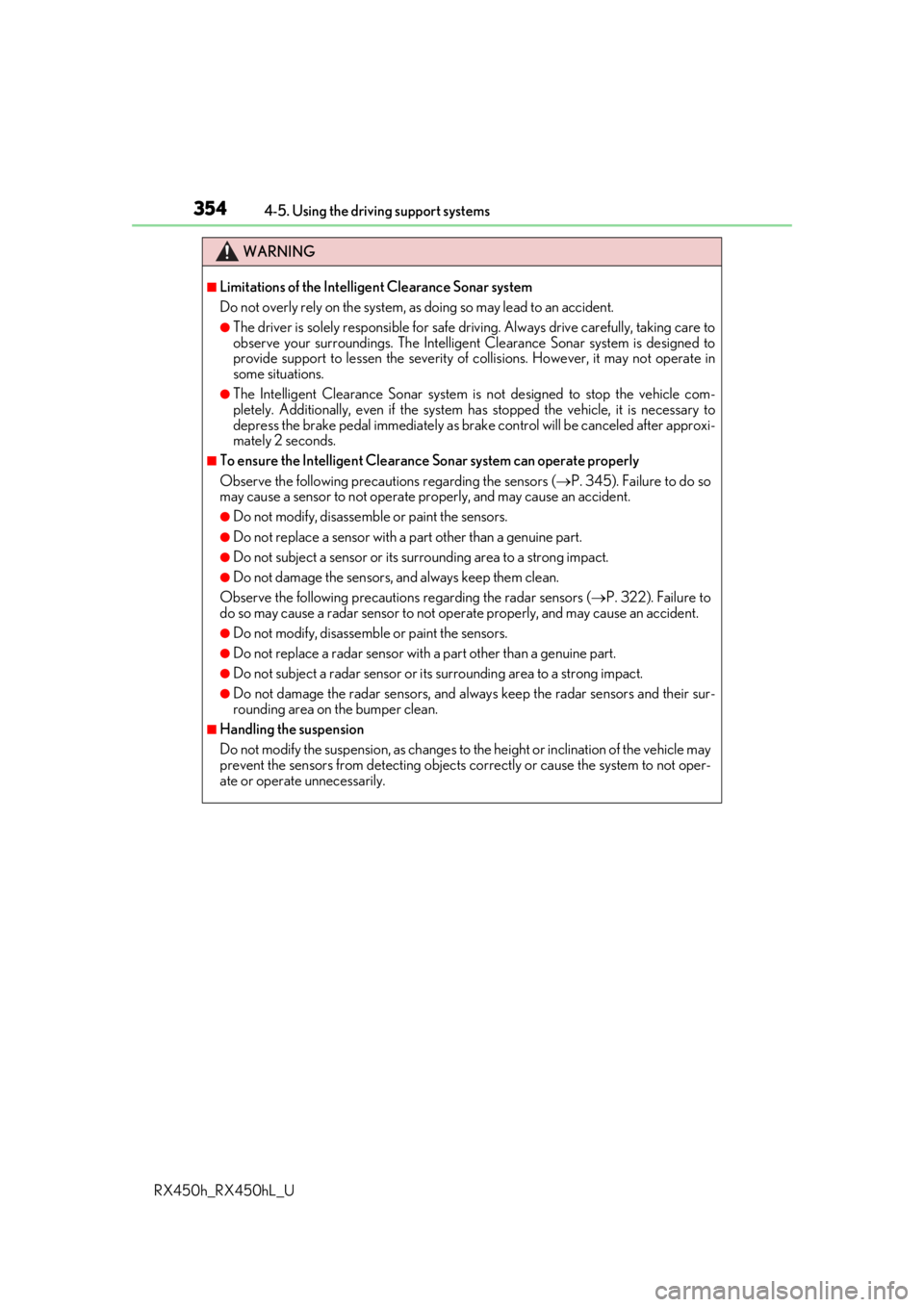
WARNING
■Limitations of the Intelligent Clearance Sonar system
Do not overly rely on the system, as doing so may lead to an accident.
●The driver is solely responsible for safe driving. Always drive carefully, taking care to
observe your surroundings. The Intelligent Clearance Sonar system is designed to
provide support to lessen the severity of collisions. However, it may not operate in
some situations.
●The Intelligent Clearance Sonar system is not designed to stop the vehicle com-
pletely. Additionally, even if the system has stopped the vehicle, it is necessary to
depress the brake pedal immediately as brak e control will be canceled after approxi-
mately 2 seconds.
■To ensure the Intelligent Clearance Sonar system can operate properly
Observe the following precauti ons regarding the sensors (P. 345). Failure to do so
may cause a sensor to not operate pr operly, and may cause an accident.
●Do not modify, disassemble or paint the sensors.
●Do not replace a sensor with a part other than a genuine part.
●Do not subject a sensor or its surrounding area to a strong impact.
●Do not damage the sensors, and always keep them clean.
Observe the following precaution s regarding the radar sensors (P. 322). Failure to
do so may cause a radar sensor to not op erate properly, and may cause an accident.
●Do not modify, disassemble or paint the sensors.
●Do not replace a radar sensor with a part other than a genuine part.
●Do not subject a radar sensor or its surrounding area to a strong impact.
●Do not damage the radar sensors, and alwa ys keep the radar sensors and their sur-
rounding area on the bumper clean.
■Handling the suspension
Do not modify the suspension, as changes to the height or inclination of the vehicle may
prevent the sensors from detecting objects co rrectly or cause the system to not oper-
ate or operate unnecessarily.
Page 358 of 792
3584-5. Using the driving support systems
RX450h_RX450hL_U
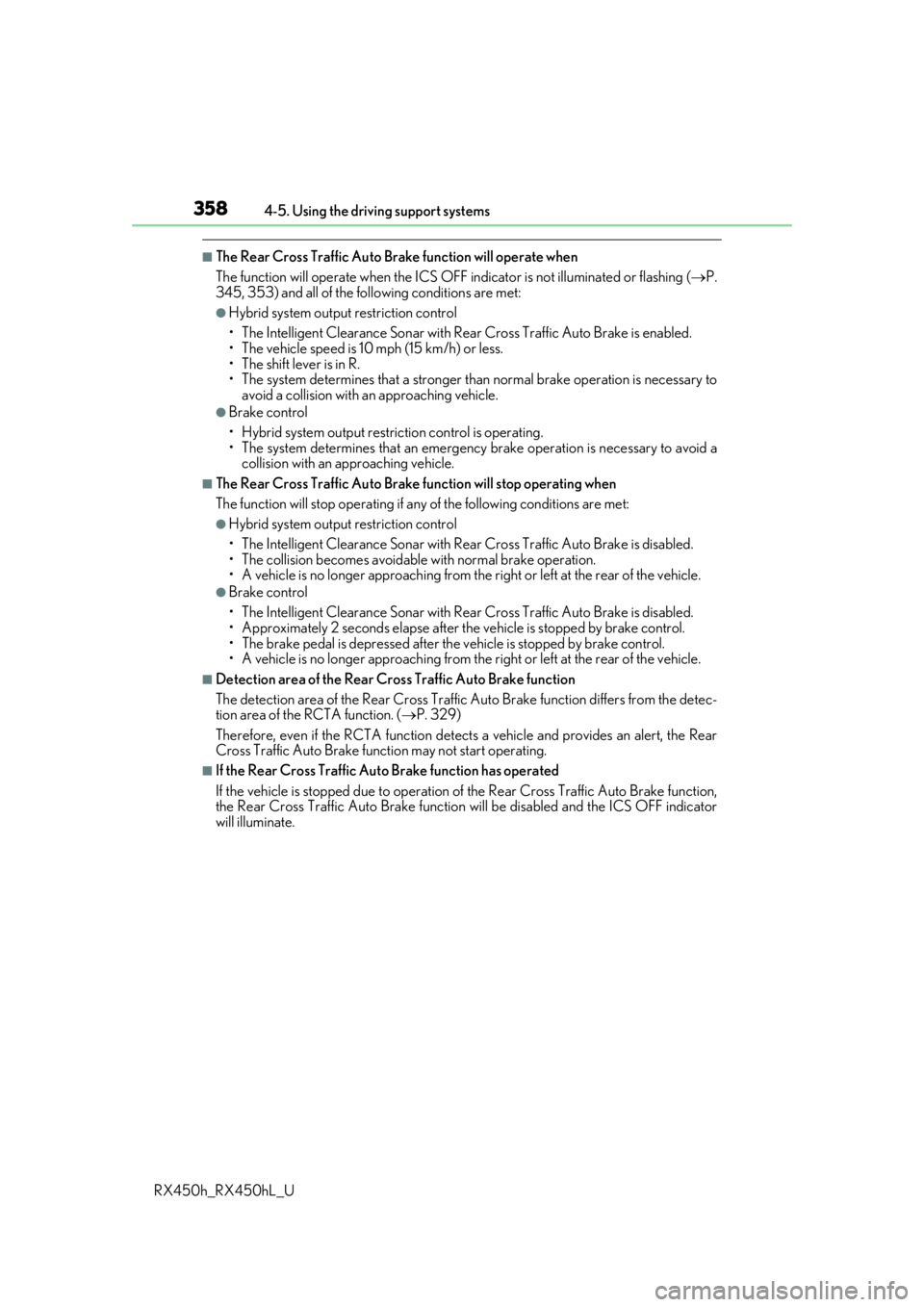
■The Rear Cross Traffic Auto Brake function will operate when
The function will operate when the ICS OFF indicator is not illuminated or flashing ( P.
345, 353) and all of the fo llowing conditions are met:
●Hybrid system output restriction control
• The Intelligent Clearance Son ar with Rear Cross Traffic Auto Brake is enabled.
• The vehicle speed is 10 mph (15 km/h) or less.
• The shift lever is in R.
• The system determines that a stronger than normal brake operation is necessary to
avoid a collision with an approaching vehicle.
●Brake control
• Hybrid system output restri ction control is operating.
• The system determines that an emergenc y brake operation is necessary to avoid a
collision with an approaching vehicle.
■The Rear Cross Traffic Auto Brake function will stop operating when
The function will stop operating if an y of the following conditions are met:
●Hybrid system output restriction control
• The Intelligent Clearance Sonar with Rear Cross Traffic Auto Brake is disabled.
• The collision becomes avoidable with normal brake operation.
• A vehicle is no longer approaching from th e right or left at the rear of the vehicle.
●Brake control
• The Intelligent Clearance Sonar with Rear Cross Traffic Auto Brake is disabled.
• Approximately 2 seconds elapse after the vehicle is stopped by brake control.
• The brake pedal is depressed after the vehicle is stopped by brake control.
• A vehicle is no longer approaching from the right or left at the rear of the vehicle.
■Detection area of the Rear Cross Traffic Auto Brake function
The detection area of the Rear Cross Traffic Auto Brake function differs from the detec-
tion area of the RCTA function. ( P. 329)
Therefore, even if the RCTA function detect s a vehicle and provides an alert, the Rear
Cross Traffic Auto Brake function may not start operating.
■If the Rear Cross Traffic Auto Brake function has operated
If the vehicle is stopped due to operation of the Rear Cross Traffic Auto Brake function,
the Rear Cross Traffic Auto Brake function will be disabled and the ICS OFF indicator
will illuminate.
Page 368 of 792
3684-5. Using the driving support systems
RX450h_RX450hL_U
Once the vehicle width guide lines and the parking space lines are parallel,
straighten the steering wheel and back up slowly until the vehicle has com-
pletely entered the parking space.
Stop the vehicle in an approp riate place, and finish parking.
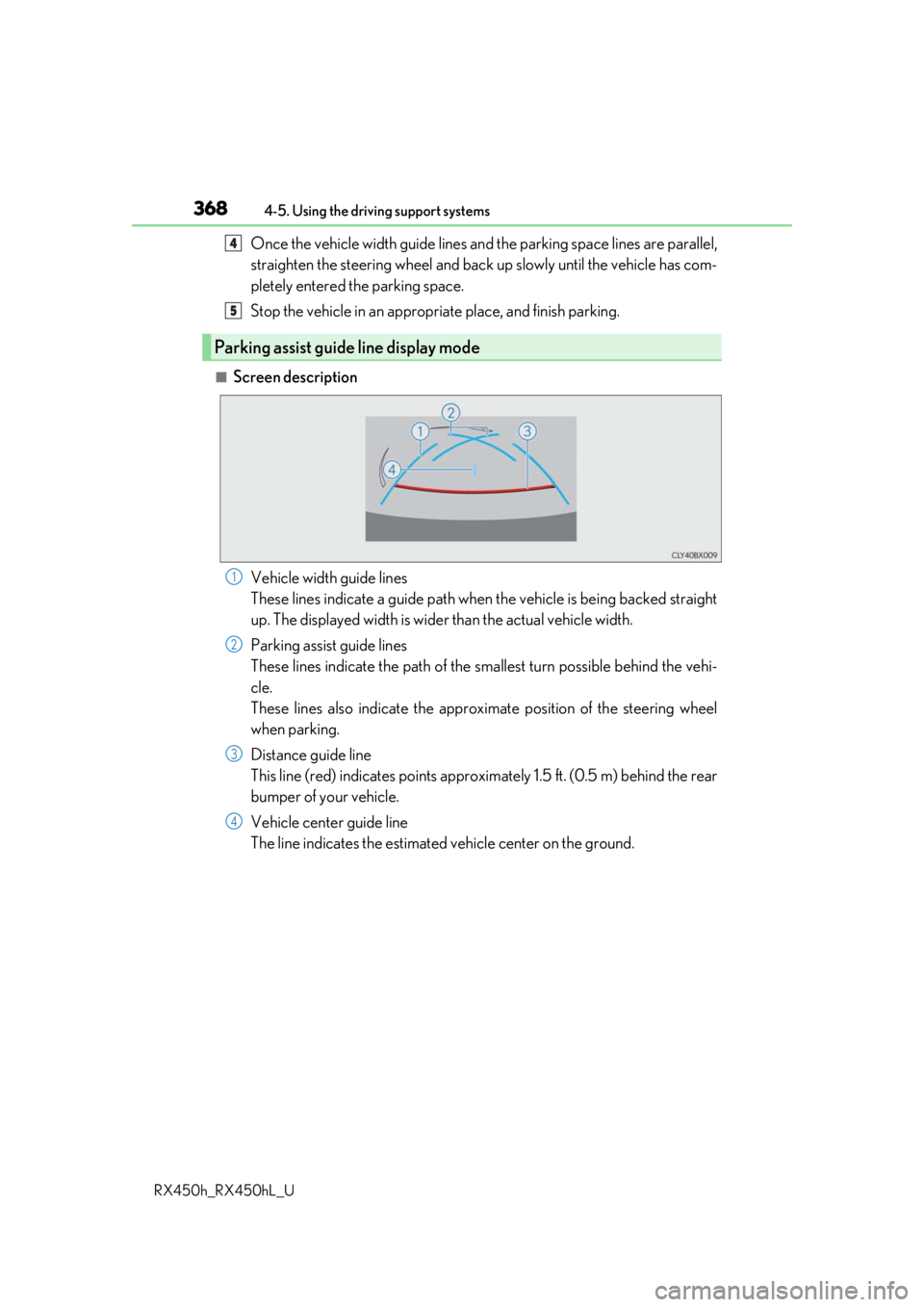
■Screen description
Vehicle width guide lines
These lines indicate a guide path when the vehicle is being backed straight
up. The displayed width is wider than the actual vehicle width.
Parking assist guide lines
These lines indicate the path of the sm allest turn possible behind the vehi-
cle.
These lines also indicate the approx imate position of the steering wheel
when parking.
Distance guide line
This line (red) indicates points approxim ately 1.5 ft. (0.5 m) behind the rear
bumper of your vehicle.
Vehicle center guide line
The line indicates the estimated vehicle center on the ground.
Parking assist guide line display mode
4
5
1
2
3
4
Page 369 of 792
3694-5. Using the driving support systems
4
Driving
RX450h_RX450hL_U
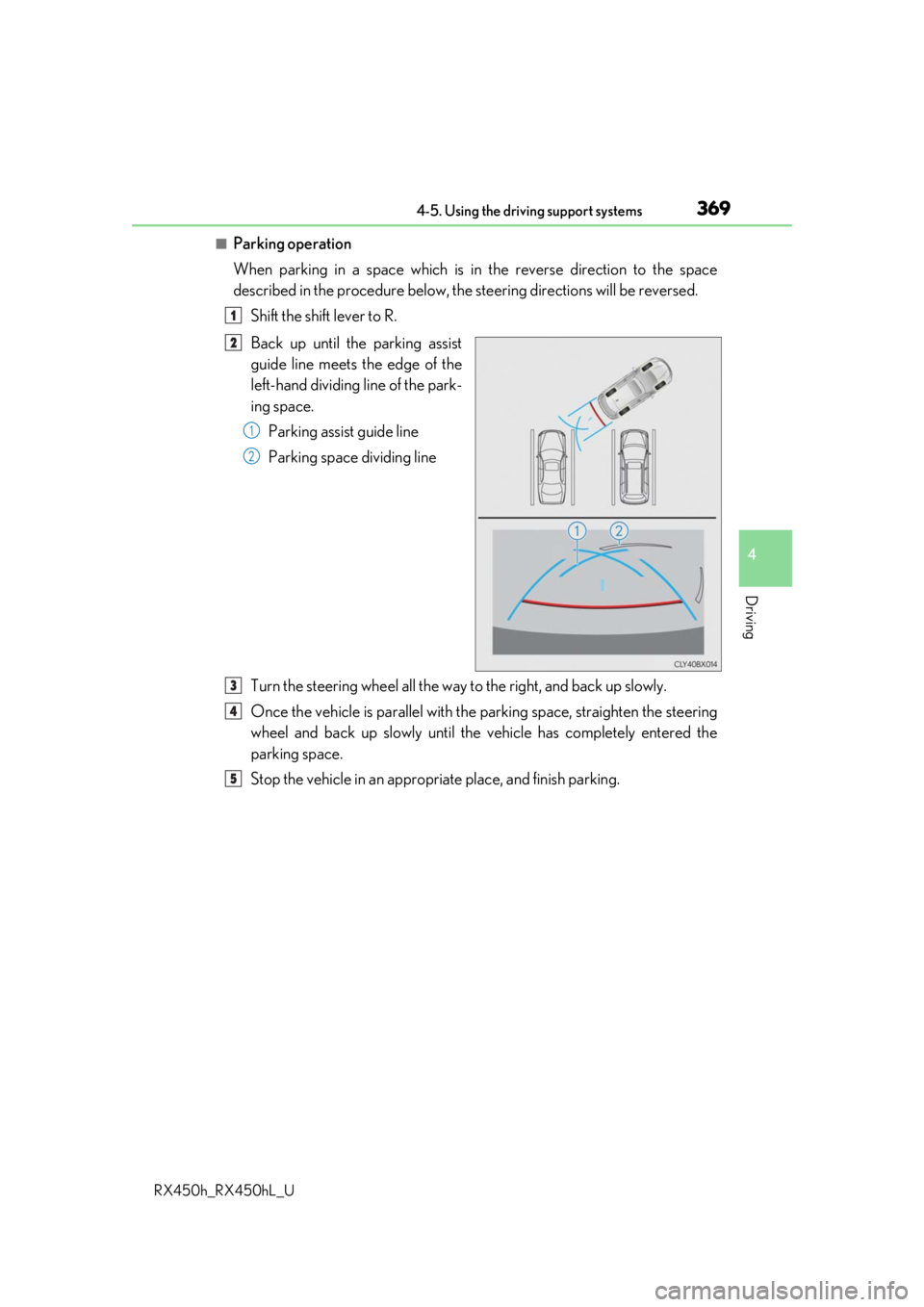
■Parking operation
When parking in a space which is in the reverse direction to the space
described in the procedure below, the steering directions will be reversed.
Shift the shift lever to R.
Back up until the parking assist
guide line meets the edge of the
left-hand dividing line of the park-
ing space. Parking assist guide line
Parking space dividing line
Turn the steering wheel all the way to the right, and back up slowly.
Once the vehicle is parallel with the parking space, straighten the steering
wheel and back up slowly until the vehicle has completely entered the
parking space.
Stop the vehicle in an approp riate place, and finish parking.
1
2
1
2
3
4
5
Page 376 of 792
3764-5. Using the driving support systems
RX450h_RX450hL_U
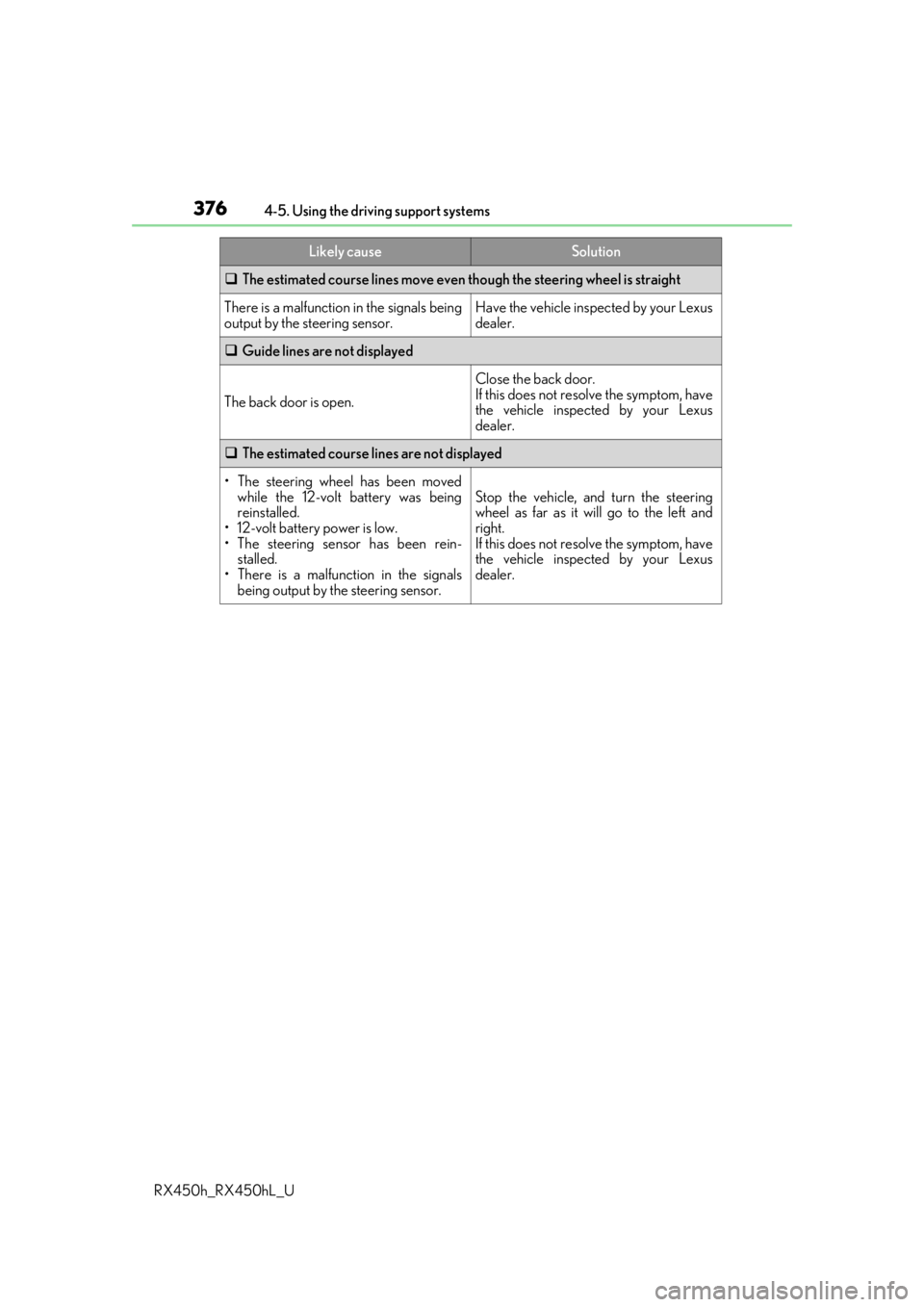
The estimated course lines move even though the steering wheel is straight
There is a malfunction in the signals being
output by the steering sensor.Have the vehicle inspected by your Lexus
dealer.
Guide lines are not displayed
The back door is open.
Close the back door.
If this does not resolve the symptom, have
the vehicle inspected by your Lexus
dealer.
The estimated course lines are not displayed
• The steering wheel has been moved
while the 12-volt battery was being
reinstalled.
• 12-volt battery power is low.
• The steering sensor has been rein-
stalled.
• There is a malfunction in the signals
being output by the steering sensor.
Stop the vehicle, and turn the steering
wheel as far as it will go to the left and
right.
If this does not resolve the symptom, have
the vehicle inspected by your Lexus
dealer.
Likely causeSolution