center LEXUS RX450H 2020 User Guide
[x] Cancel search | Manufacturer: LEXUS, Model Year: 2020, Model line: RX450H, Model: LEXUS RX450H 2020Pages: 777, PDF Size: 13.14 MB
Page 85 of 777

842. Instrument cluster
RX350/RX350L_U
●Drive mode indicators
Except F SPORT models
F SPORT models
*1: These lights turn on when the engine switch is turned to the IGNITION ON mode to indicate that a system check is being performed. They will turn off after the engine is
started, or after a few seconds. There may be a malfunction in a system if a light does
not come on, or turn off. Have the ve hicle inspected by your Lexus dealer.
*2: In order to confirm operation, the BSM ou tside rear view mirror indicators illuminate
in the following situations:
• When the BSM function is enabled on of the multi-information display, the
engine switch is turned to IGNITION ON mode.
• When the engine switch is in IGNITION ON mode, the BSM function is enabled
on of the multi-information display.
If the system is functioning correctly, the BSM outside rear view mirror indicators will
turn off after a few seconds.
If the BSM outside rear view mirror indicators do not illuminate or do not turn off,
there may be a malfunction in the system.
If this occurs, have the vehicle inspected by your Lexus dealer.
*3: This light illuminates on the outside rear view mirrors.
*4: This light flashes to indicate that the system is operating.
*5: The light comes on when the system is turned off.
*6: This light illuminates on the center panel.
*7: When the outside temperature is approximately 37 F (3 C) or lower, this indicator
will flash for approximately 10 seconds, then stay on. Eco drive mode indicator
(
P. 373) “SPORT” indicator
(
P. 373)
Eco drive mode indicator
( P. 373) “SPORT S” indicator
(
P. 373)
“SPORT S+” indicator
( P. 373) “CUSTOMIZE” indicator
(
P. 373)
Page 98 of 777
972. Instrument cluster
2
Instrument cluster
RX350/RX350L_U
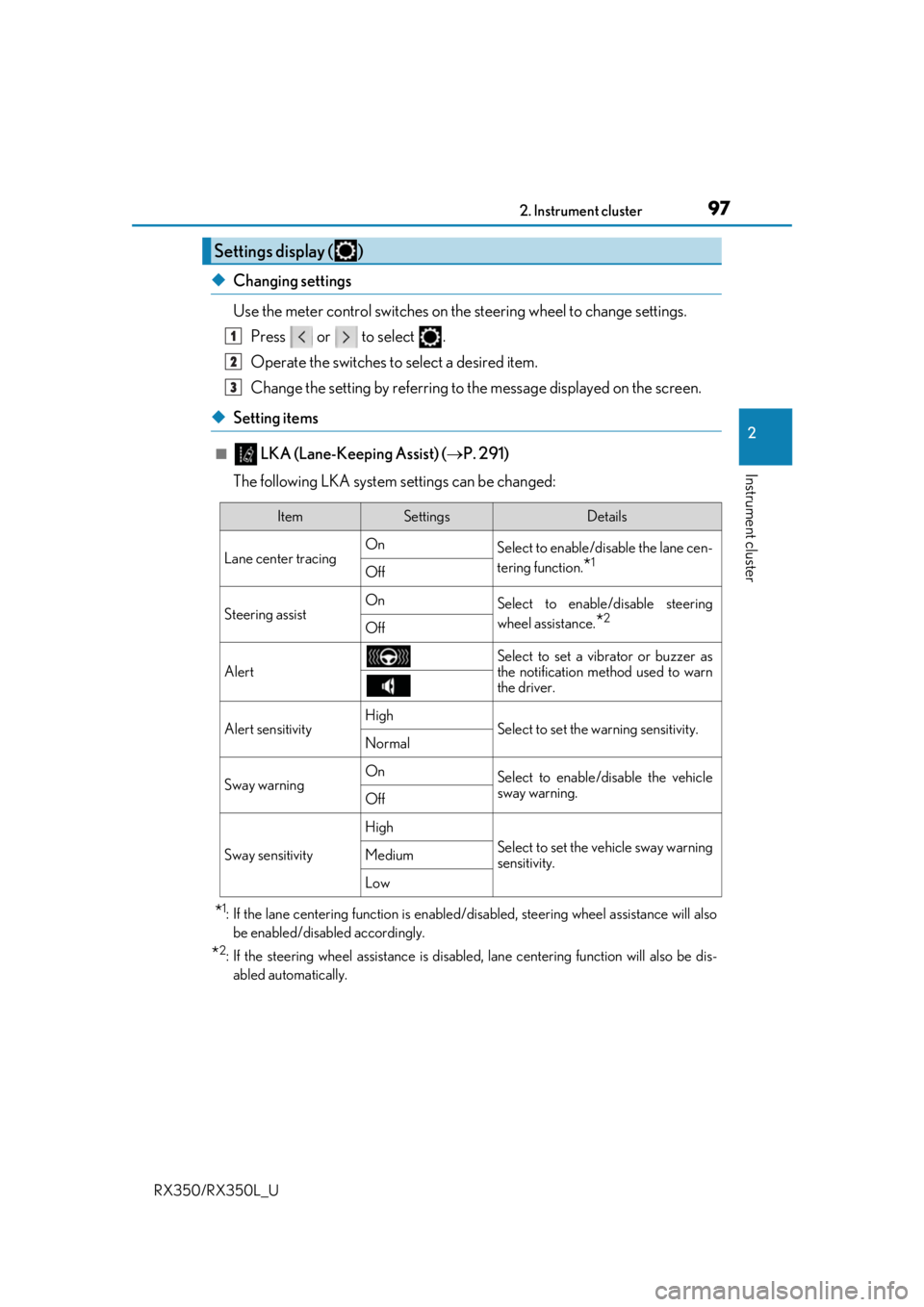
◆Changing settings
Use the meter control switches on the steering wheel to change settings.
Press or to select .
Operate the switches to select a desired item.
Change the setting by referring to the message displayed on the screen.
◆Setting items
■ LKA (Lane-Keeping Assist) ( P. 291)
The following LKA system settings can be changed:
*1: If the lane centering function is enabled/ disabled, steering wheel assistance will also
be enabled/disabled accordingly.
*2: If the steering wheel assistance is disabled, lane cent ering function will also be dis-
abled automatically.
Settings display ( )
1
2
3
ItemSettingsDetails
Lane center tracing On
Select to enable/disable the lane cen-
tering function.
*1Off
Steering assistOnSelect to enable/disable steering
wheel assistance.
*2Off
Alert
Select to set a vibrator or buzzer as
the notification method used to warn
the driver.
Alert sensitivityHighSelect to set the warning sensitivity.Normal
Sway warningOnSelect to enable/disable the vehicle
sway warning.
Off
Sway sensitivity
High
Select to set the vehicle sway warning
sensitivity.Medium
Low
Page 150 of 777

1493-2. Opening, closing and locking the doors
3
Operation of each component
RX350/RX350L_U
■Note for the entry function
●Even when the electronic key is within the effective range (detection areas), the system
may not operate properly in the following cases:
• The electronic key is too close to the window or outside door handle, near the ground, or in a high place when the doors are locked or unlocked.
• The electronic key is near the ground or in a high place, or too close to the rear
bumper center when the back door is opened.
• The electronic key is on th e instrument panel, luggage co mpartment, floor, or in the
door pockets or glove box when the engine is started or engine switch modes are
changed.
●Do not leave the electronic key on top of th e instrument panel or near the door pockets
when exiting the vehicle. Depending on the radio wave reception conditions, it may be
detected by the antenna outs ide the cabin and the door will become lockable from the
outside, possibly trapping the electronic key inside the vehicle.
●As long as the electronic key is within th e effective range, the doors may be locked or
unlocked by anyone.
●Even if the electronic key is not inside the vehicle, it may be possible to start the engine
if the electronic key is near the window.
●The doors may unlock if a large amount of wa ter splashes on the door handle, such as in
the rain or in a car wash when the electronic key is within the effective range. (The door
will automatically be locked after approx imately 60 seconds if the doors are not
opened and closed.)
●If the wireless remote control is used to lo ck the doors when the electronic key is near
the vehicle, there is a possibility that the d oor may not be unlocked by the entry func-
tion. (Use the wireless remote control to unlock the doors.)
●Touching the door lock sensor while wearin g gloves may delay or prevent lock opera-
tion. Remove the gloves and touch the lock sensor again.
●When the lock operation is performed using the lock sensor, recognition signals will be
shown up to two consecutive times. After this, no recognition signals will be given.
*
●If the door handle becomes wet while the el ectronic key is within the effective range,
the door may lock and unlock repeatedly. In that case, follow the following correction
procedures to wash the vehicle:
• Place the electronic key in a location 6 ft. (2 m) or more away from the vehicle. (Take care to ensure that the key is not stolen.)
• Set the electronic key to battery-saving mode to disable the smart access system with push-button start. ( P. 148)
●If the electronic key is inside the vehicle and a door handle becomes wet during a car
wash, a message may be shown on the mult i-information display and a buzzer will
sound outside the vehicle. To turn off the alarm, lock all the doors.
●The lock sensor may not work properly if it comes into contact with ice, snow, mud, etc.
Clean the lock sensor and attempt to operate it again.
●A sudden approach to the effective range or door handle may prevent the doors from
being unlocked. In this case, return the door handle to the original position and check
that the doors unlock before pulling the door handle again.
●If there is another electronic key in the de tection area, it may take slightly longer to
unlock the doors after the door handle is gripped.
Page 161 of 777
1603-3. Adjusting the seats
RX350/RX350L_U
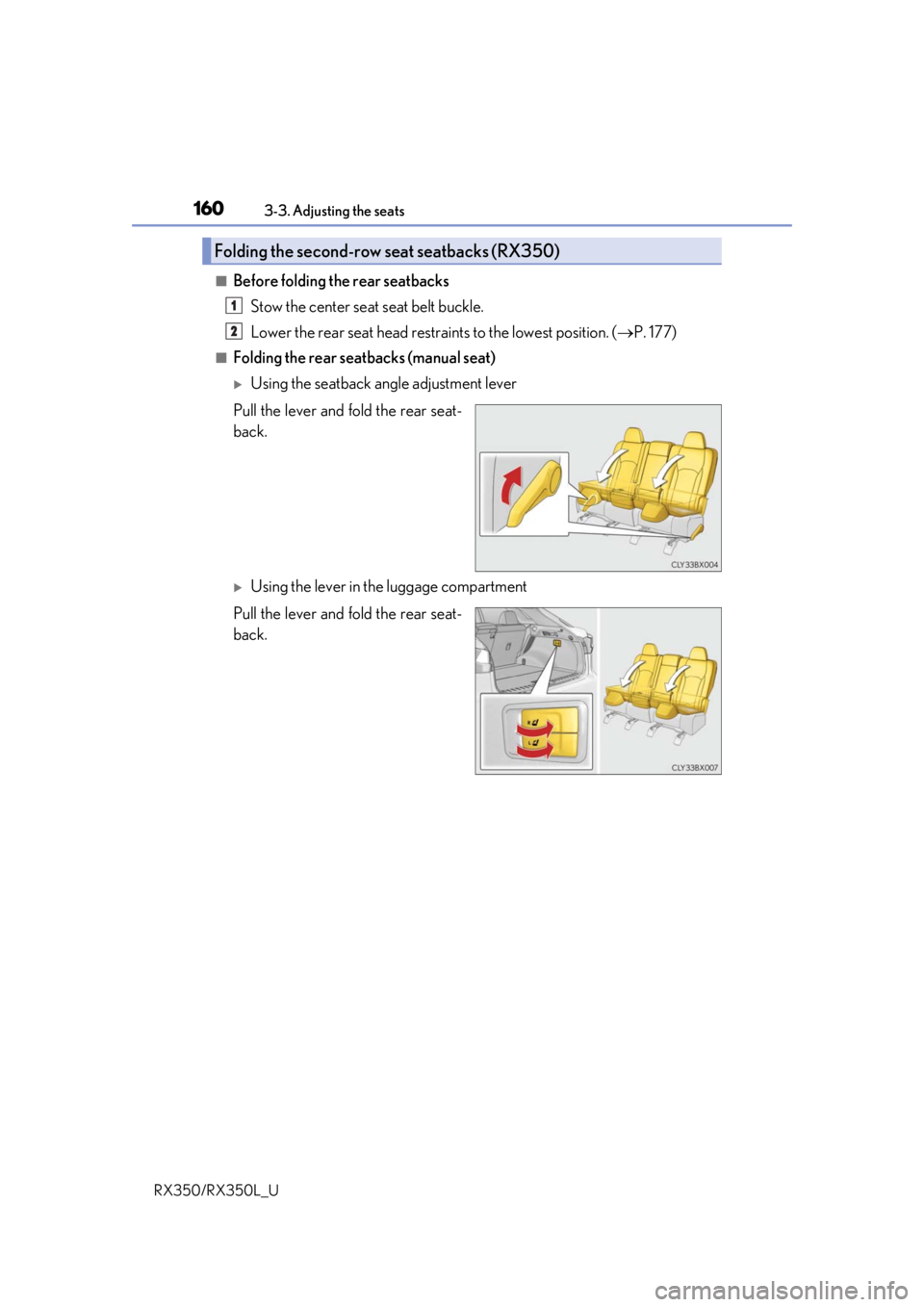
■Before folding the rear seatbacks Stow the center seat seat belt buckle.
Lower the rear seat head restra ints to the lowest position. (P. 177)
■Folding the rear seatbacks (manual seat)
Using the seatback angle adjustment lever
Pull the lever and fold the rear seat-
back.
Using the lever in the luggage compartment
Pull the lever and fold the rear seat-
back.
Folding the second-row seat seatbacks (RX350)
1
2
Page 163 of 777
1623-3. Adjusting the seats
RX350/RX350L_U
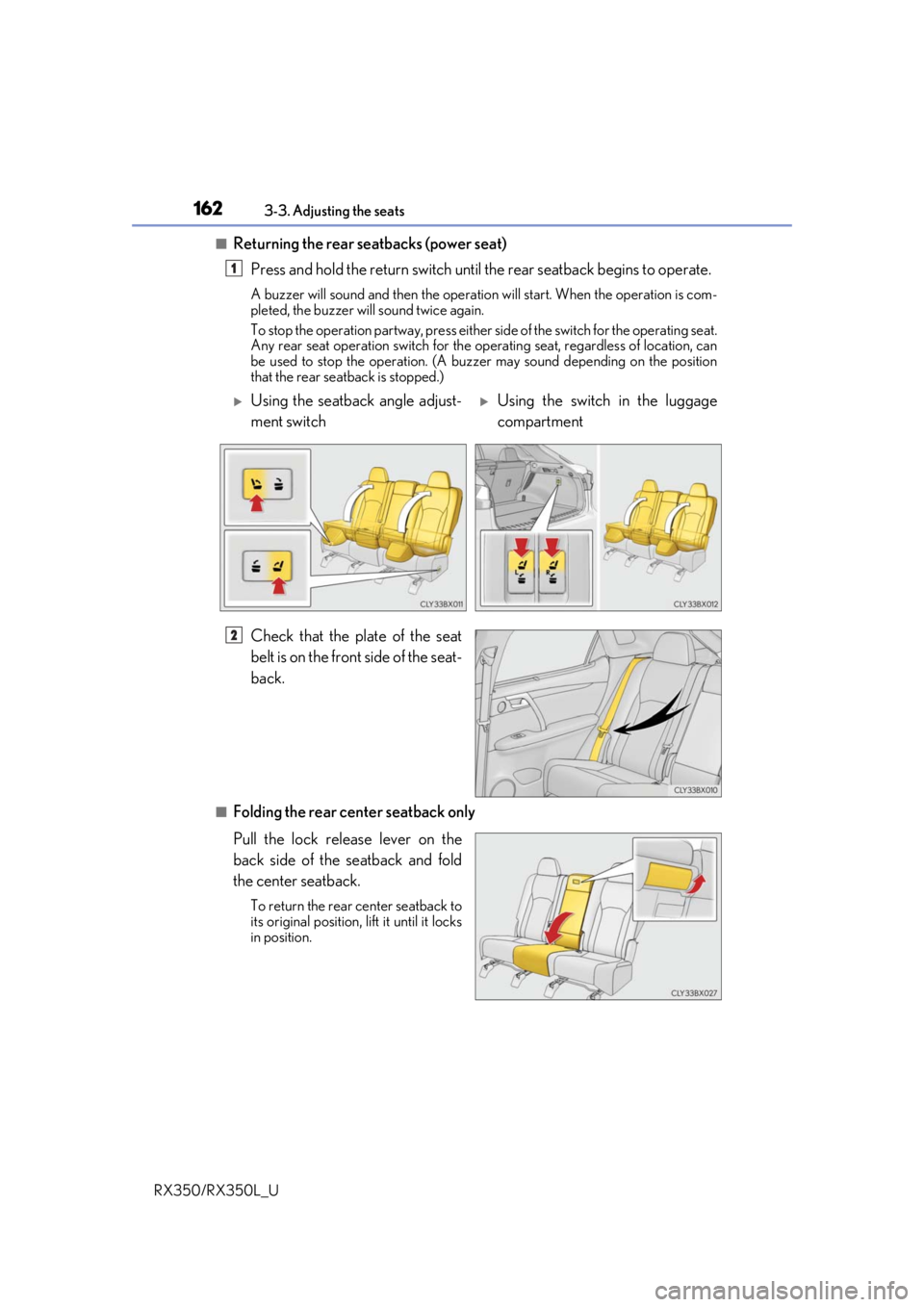
■Returning the rear seatbacks (power seat) Press and hold the return switch until the rear seatback begins to operate.
A buzzer will sound and then the operation will start. When the operation is com-
pleted, the buzzer will sound twice again.
To stop the operation partway, press either side of the switch for the operating seat.
Any rear seat operation switch for the op erating seat, regardless of location, can
be used to stop the operation. (A buzzer may sound depending on the position
that the rear seatback is stopped.)
Check that the plate of the seat
belt is on the front side of the seat-
back.
■Folding the rear center seatback only
Pull the lock release lever on the
back side of the seatback and fold
the center seatback.
To return the rear center seatback to
its original position, li ft it until it locks
in position.
1
Using the seatback angle adjust-
ment switchUsing the switch in the luggage
compartment
2
Page 164 of 777
1633-3. Adjusting the seats
3
Operation of each component
RX350/RX350L_U
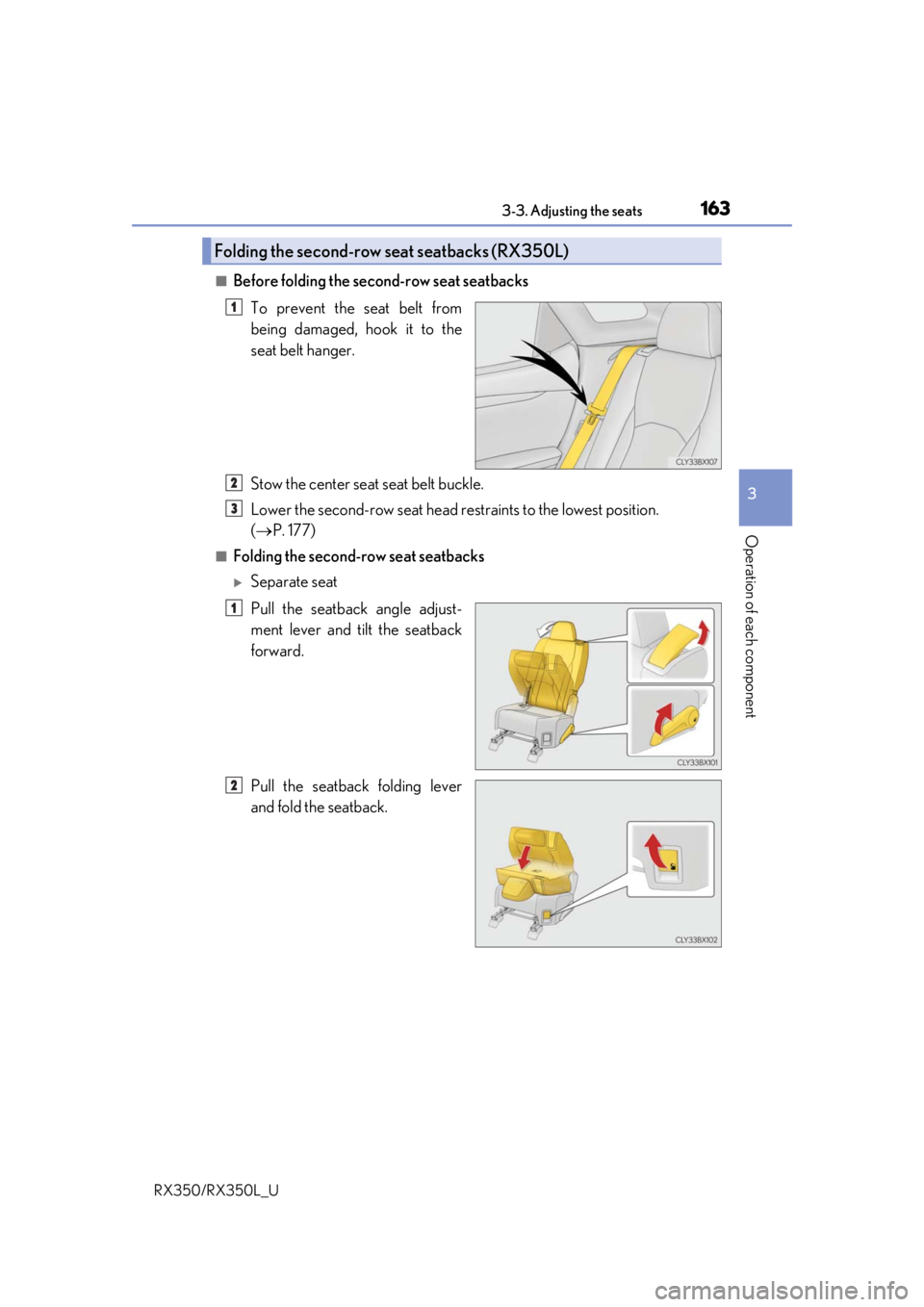
■Before folding the second-row seat seatbacksTo prevent the seat belt from
being damaged, hook it to the
seat belt hanger.
Stow the center seat seat belt buckle.
Lower the second-row seat head re straints to the lowest position.
( P. 177)
■Folding the second-row seat seatbacks
Separate seat
Pull the seatback angle adjust-
ment lever and tilt the seatback
forward.
Pull the seatback folding lever
and fold the seatback.
Folding the second-row seat seatbacks (RX350L)
1
2
3
1
2
Page 165 of 777
1643-3. Adjusting the seats
RX350/RX350L_U
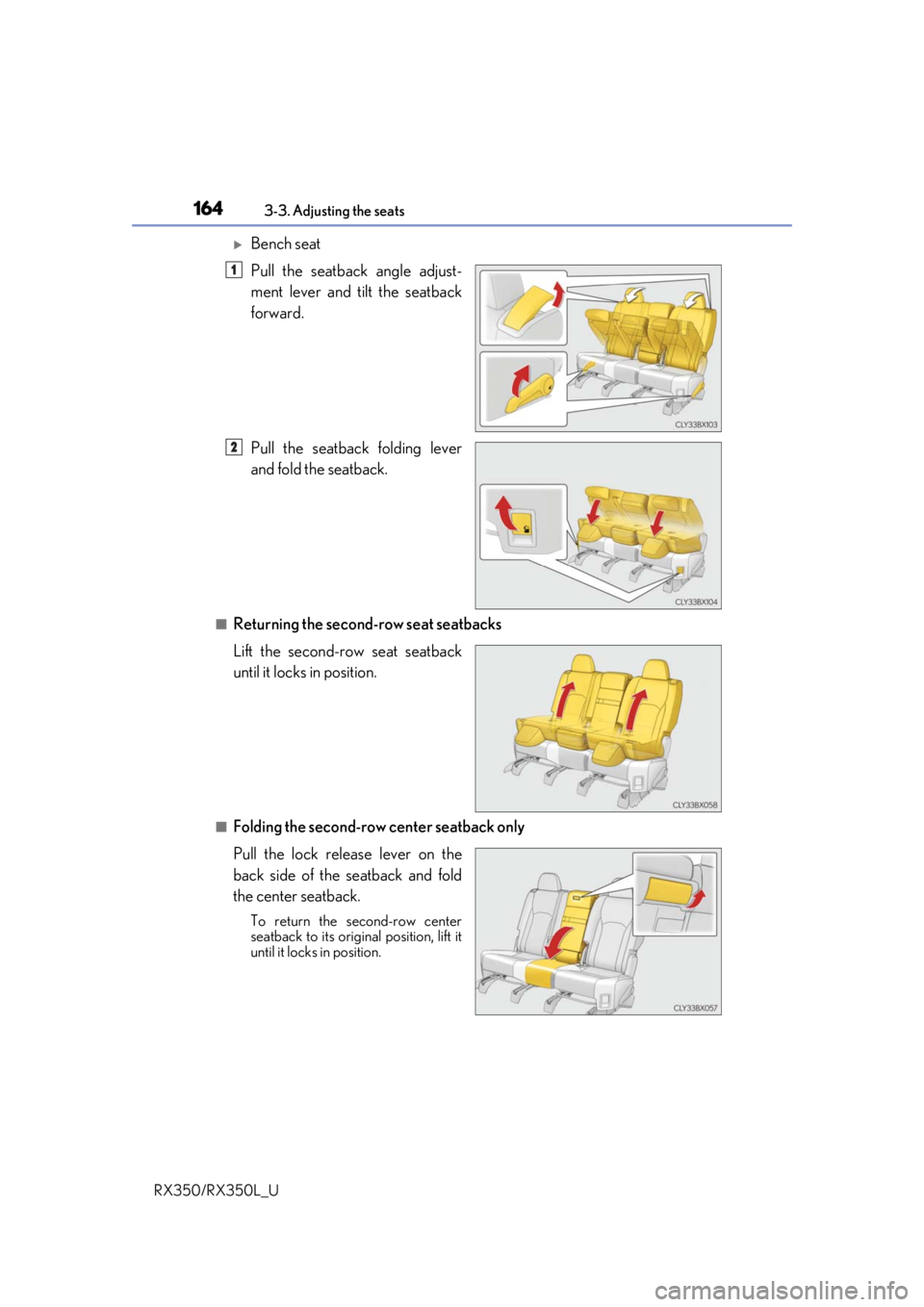
Bench seat
Pull the seatback angle adjust-
ment lever and tilt the seatback
forward.
Pull the seatback folding lever
and fold the seatback.
■Returning the second-row seat seatbacks
Lift the second-row seat seatback
until it locks in position.
■Folding the second-row center seatback only
Pull the lock release lever on the
back side of the seatback and fold
the center seatback.
To return the second-row center
seatback to its original position, lift it
until it locks in position.
1
2
Page 172 of 777
1713-3. Adjusting the seats
3
Operation of each component
RX350/RX350L_U
NOTICE
■Before folding a rear seat seatback
●Second-row seats: Make sure to stow the center seat seat belt buckle and armrest
before folding the second-row seat seatbacks. ( P. 555)
●Third-row seats: Make sure th at the third-row seats and trays are free of obstructions
before folding the seatbacks. Otherwise the seat or tray may be damaged.
■When moving the second-row seat for third-row seat access (RX350L)
Do not slide the second-row se at forward if an electronic device is connected to the
power outlet on the rear console. Otherwise, the second-row seat may contact the
electronic device, possibly resu lting in damage to the device.
■Before returning the third-row seat seatbacks to the upright position (RX350L)
If the luggage cover is installed in the luggage compartmen t, make sure to remove it
before returning the thir d-row seat seatbacks. (P. 537) Otherwise, the luggage
cover may be damaged.
Page 180 of 777
1793-3. Adjusting the seats
3
Operation of each component
RX350/RX350L_U
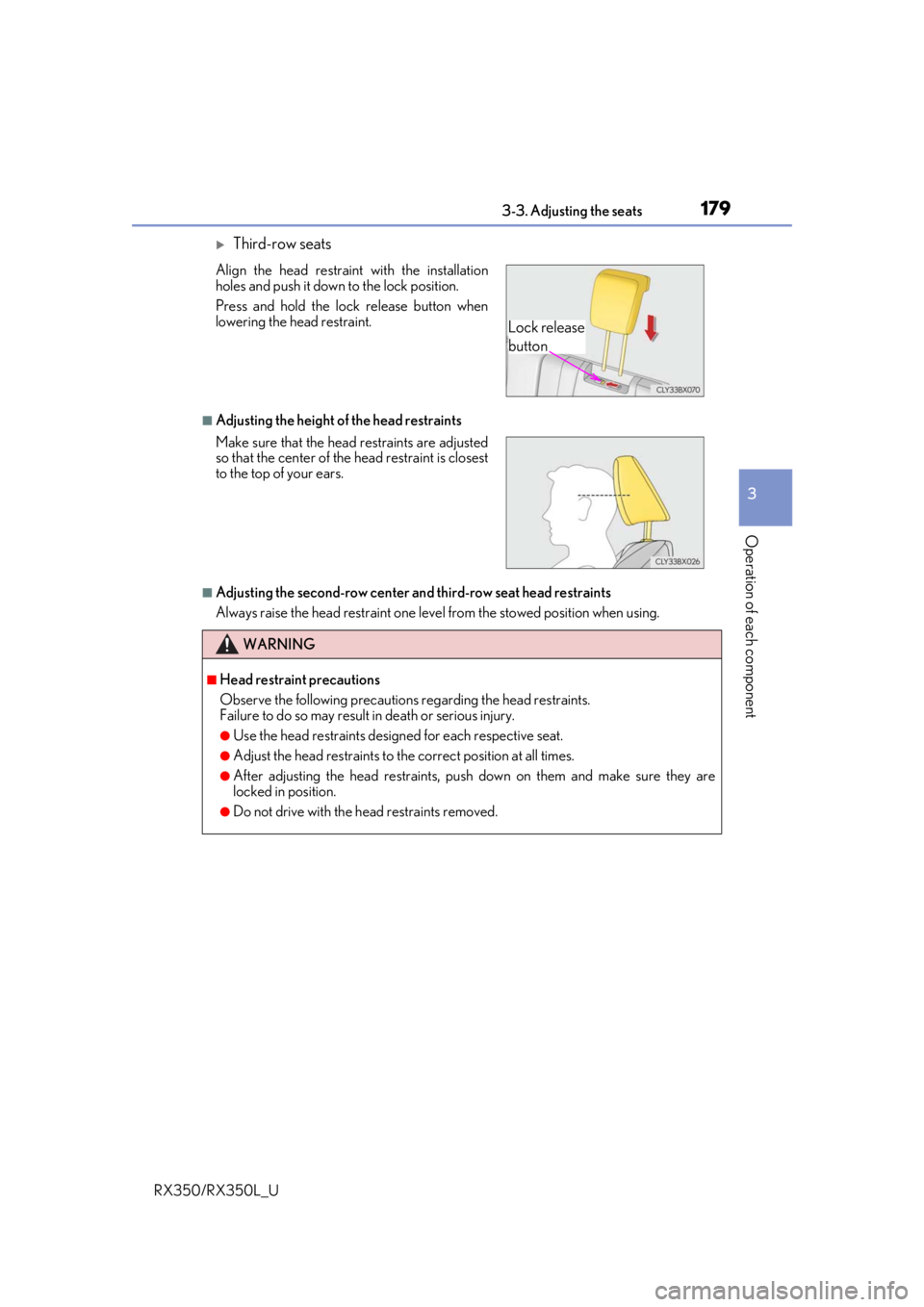
Third-row seats
■Adjusting the height of the head restraints
■Adjusting the second-row center and third-row seat head restraints
Always raise the head restraint one leve l from the stowed position when using.
Align the head restraint with the installation
holes and push it down to the lock position.
Press and hold the lock release button when
lowering the head restraint.
Make sure that the head restraints are adjusted
so that the center of the
head restraint is closest
to the top of your ears.
WARNING
■Head restraint precautions
Observe the following precautions regarding the head restraints.
Failure to do so may result in death or serious injury.
●Use the head restraints designed for each respective seat.
●Adjust the head restraints to th e correct position at all times.
●After adjusting the head restraints, push down on them and make sure they are
locked in position.
●Do not drive with the head restraints removed.
Lock release
button
Page 213 of 777
2124-1. Before driving
RX350/RX350L_U
WARNING
■Storage precautions
Observe the following precautions.
Failure to do so may prevent the pedals from being depressed properly, may block the
driver’s vision, or may result in items hittin g the driver or passengers, possibly causing
an accident.
●Stow cargo and luggage in the luggage compartment whenever possible.
●Do not stack cargo and luggage in the luggage compartment higher than the seat-
backs.
●When you fold down the rear seats, long items should not be placed directly behind
the front seats.
●Never allow anyone to ride in the luggage compartment. It is not designed for pas-
sengers. They should ride in their seats with their seat belts properly fastened.
●Do not place cargo or luggage in or on the following locations.
• At the feet of the driver
• On the front passenger or re ar seats (when stacking items)
•On the luggage cover
• On the instrument panel
•On the dashboard
●Secure all items in the occupant compartment.
■Capacity and distribution
●Do not exceed the maximum axle weight rating or the total vehicle weight rating.
●Even if the total load of occupant’s weight and the cargo load is less than the total load
capacity, do not apply the load unevenly. Improper loading may cause deterioration
of steering or braking control whic h may cause death or serious injury.
■Roof luggage carrier precautions
Observe the following precautions:
●Place the cargo so that its weight is distributed evenly between the front and rear
axles.
●If loading long or wide cargo, never exceed the vehicle overall length or width.
( P. 698)
●Before driving, make sure the cargo is secu rely fastened on the roof luggage carrier.
●Loading cargo on the roof luggage carrier will make the center of gravity of the vehi-
cle higher. Avoid high speeds, sudden star ts, sharp turns, sudden braking or abrupt
maneuvers, otherwise it may re sult in loss of control or vehicle rollover due to failure
to operate this vehicle correctly and result in death or serious injury.
●If driving for a long distance, on rough road s, or at high speeds, stop the vehicle now
and then during the trip to make sure the cargo remains in its place.
●Do not exceed 165 lb. (75 kg) cargo weight on the roof luggage carrier.
NOTICE
■When loading cargo (vehicles with a moon roof or panoramic moon roof)
Be careful not to scratch the surface of the moon roof or panoramic moon roof.