center LEXUS RX450H 2020 Owner's Manual
[x] Cancel search | Manufacturer: LEXUS, Model Year: 2020, Model line: RX450H, Model: LEXUS RX450H 2020Pages: 777, PDF Size: 13.14 MB
Page 254 of 777
2534-3. Operating the lights and wipers
4
Driving
RX350/RX350L_U
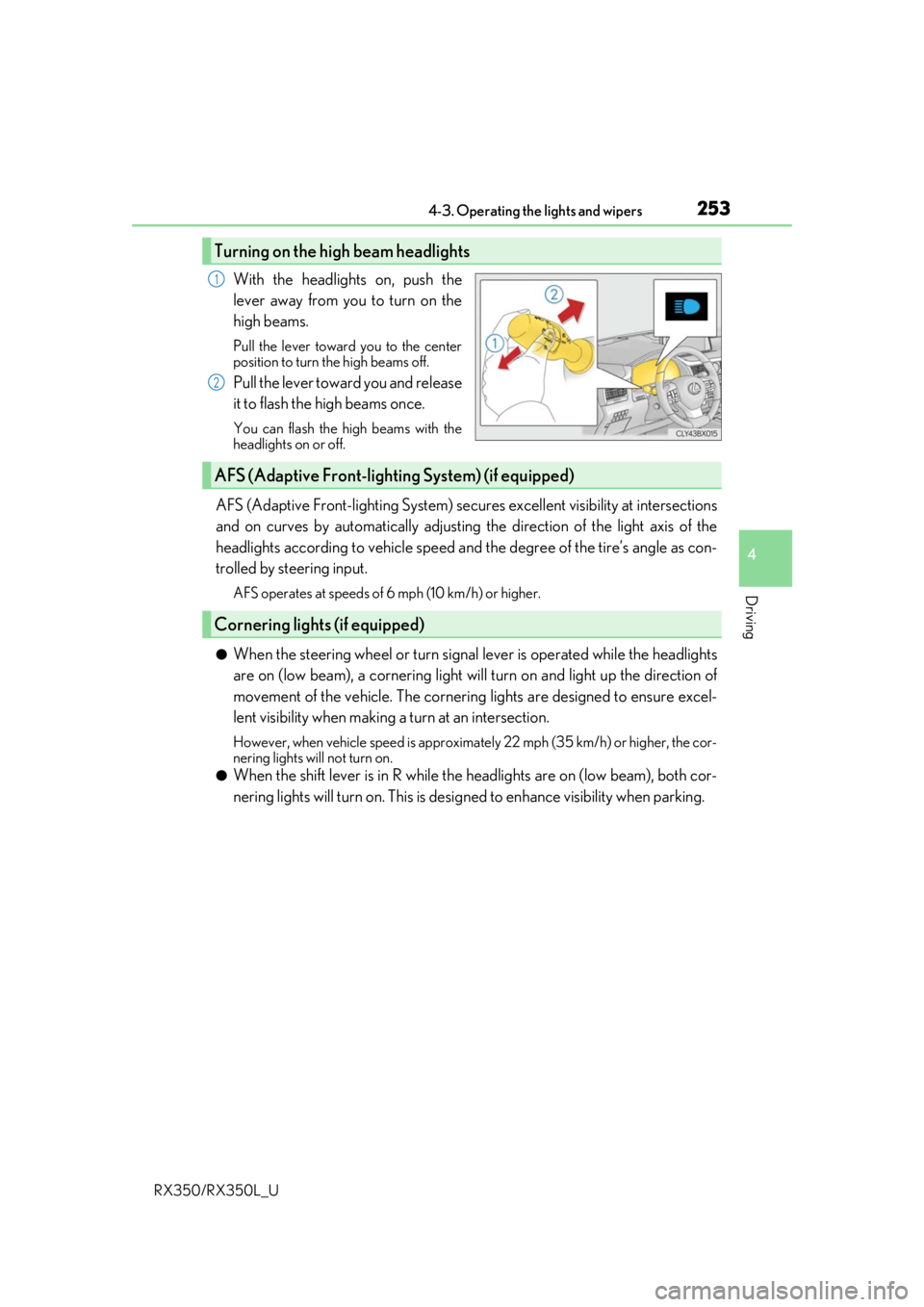
With the headlights on, push the
lever away from you to turn on the
high beams.
Pull the lever toward you to the center
position to turn the high beams off.
Pull the lever toward you and release
it to flash the high beams once.
You can flash the high beams with the
headlights on or off.
AFS (Adaptive Front-lighting System) secures excellent visibility at intersections
and on curves by automatically adjusting the direction of the light axis of the
headlights according to vehicle speed and the degree of the tire’s angle as con-
trolled by steering input.
AFS operates at speeds of 6 mph (10 km/h) or higher.
●When the steering wheel or turn signal lever is operated while the headlights
are on (low beam), a cornering light w ill turn on and light up the direction of
movement of the vehicle. The cornerin g lights are designed to ensure excel-
lent visibility when making a turn at an intersection.
However, when vehicle speed is approximately 22 mph (35 km/h) or higher, the cor-
nering lights will not turn on.
●When the shift lever is in R while the headlights are on (low beam), both cor-
nering lights will turn on. This is desi gned to enhance visibility when parking.
Turning on the high beam headlights
1
2
AFS (Adaptive Front-lighting System) (if equipped)
Cornering lights (if equipped)
Page 272 of 777
2714-4. Refueling
4
Driving
RX350/RX350L_U
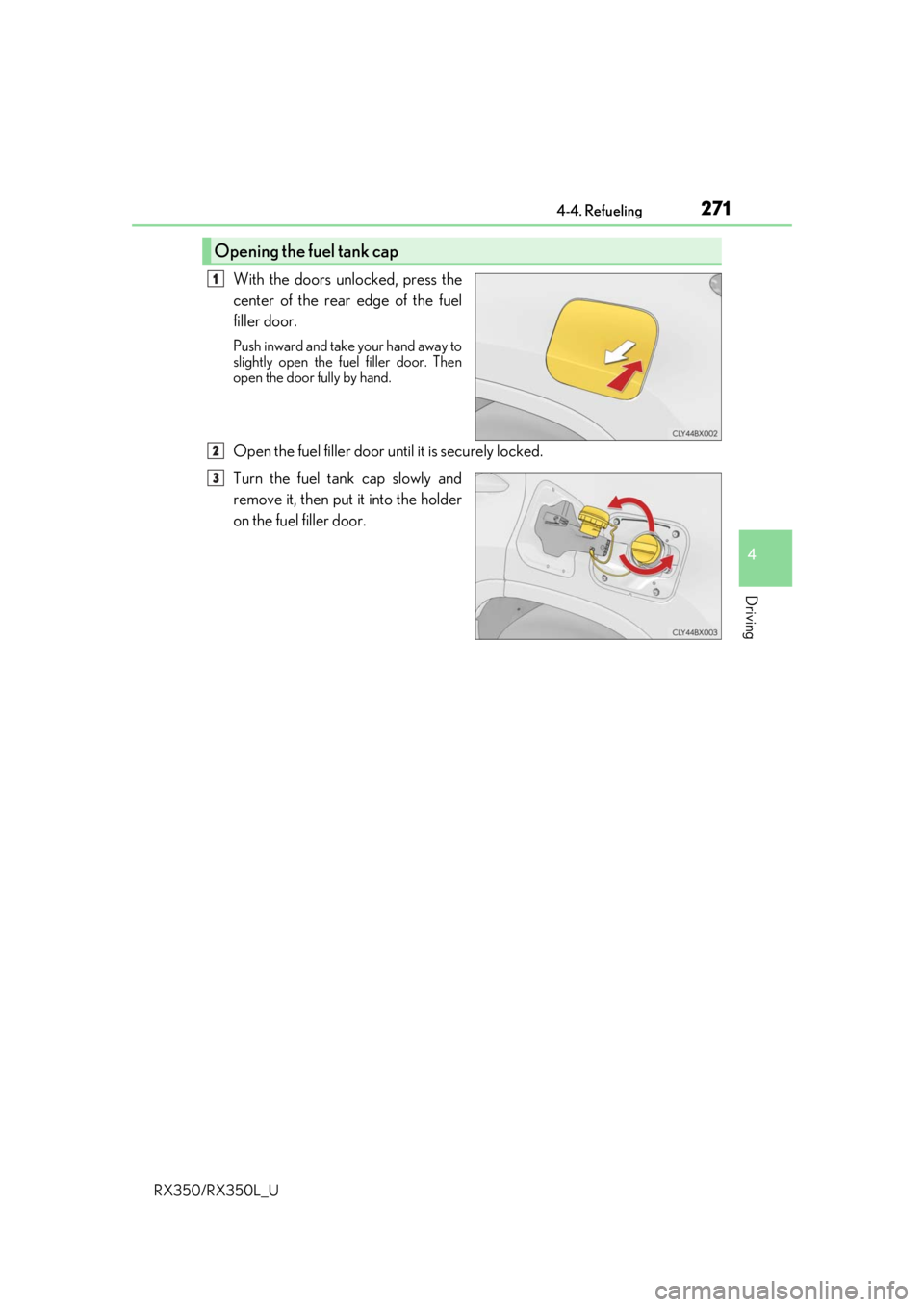
With the doors unlocked, press the
center of the rear edge of the fuel
filler door.
Push inward and take your hand away to
slightly open the fuel filler door. Then
open the door fully by hand.
Open the fuel filler door until it is securely locked.
Turn the fuel tank cap slowly and
remove it, then put it into the holder
on the fuel filler door.
Opening the fuel tank cap
1
2
3
Page 274 of 777
2734-4. Refueling
4
Driving
RX350/RX350L_U
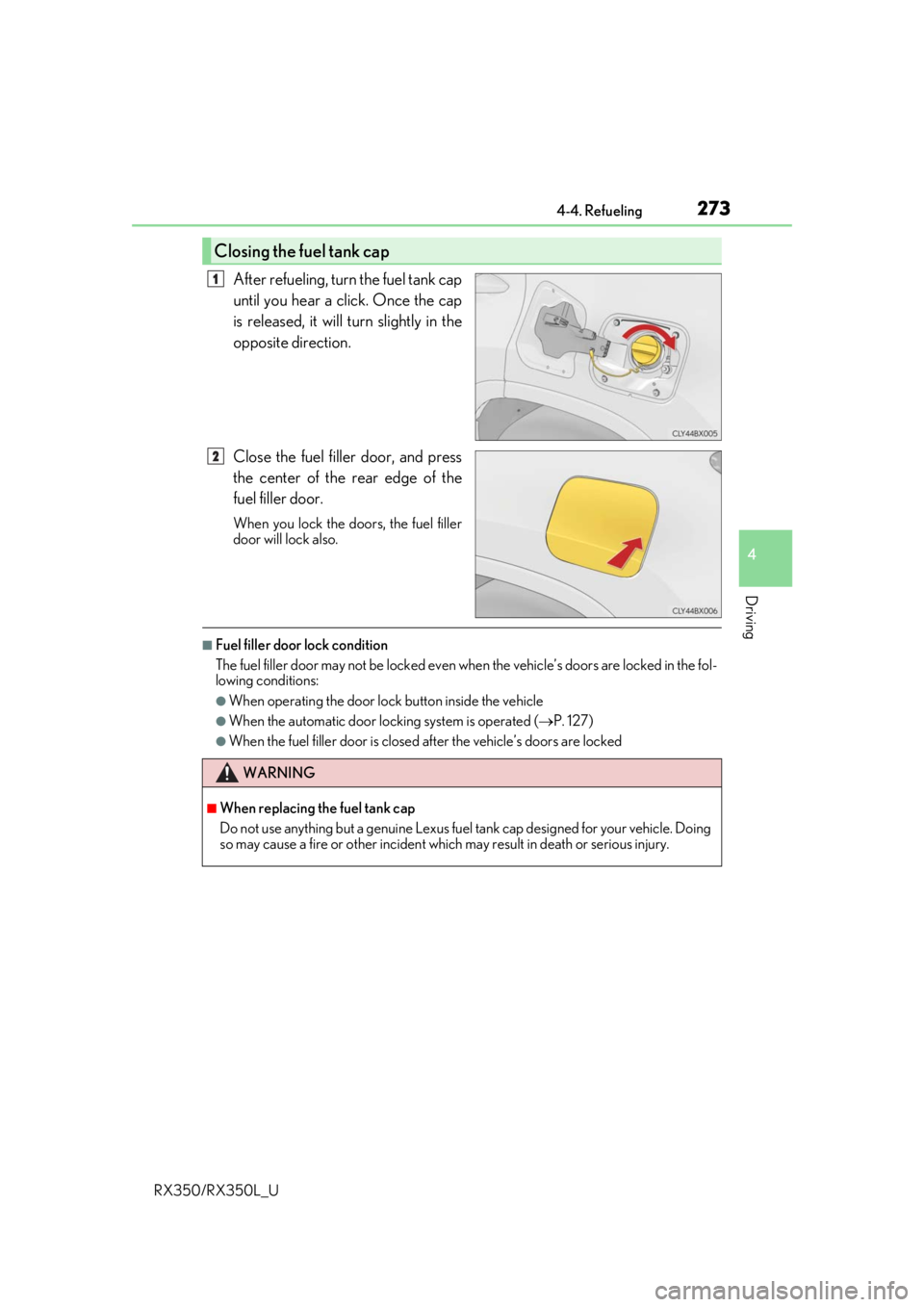
After refueling, turn the fuel tank cap
until you hear a click. Once the cap
is released, it will turn slightly in the
opposite direction.
Close the fuel filler door, and press
the center of the rear edge of the
fuel filler door.
When you lock the doors, the fuel filler
door will lock also.
■Fuel filler door lock condition
The fuel filler door may not be locked even when the vehicle’ s doors are locked in the fol-
lowing conditions:
●When operating the door lock button inside the vehicle
●When the automatic door lock ing system is operated (P. 127)
●When the fuel filler door is closed after the vehicle’s doors are locked
Closing the fuel tank cap
1
2
WARNING
■When replacing the fuel tank cap
Do not use anything but a genuine Lexus fuel tank cap designed for your vehicle. Doing
so may cause a fire or other incident whic h may result in death or serious injury.
Page 278 of 777
2774-5. Using the driving support systems
4
Driving
RX350/RX350L_U
WARNING
■To avoid malfunction of the camera sensor
Observe the following precautions.
Otherwise, the camera sensor may not operate properly, possibly leading to an acci-
dent resulting in deat h or serious injury.
●Keep the windshield clean at all times.
• If the windshield is dirty or covered with an oily film, water droplets, snow, etc.,
clear the windshield.
• If a glass coating agent is applied to the wi ndshield, it will still be necessary to use
the windshield wipers to remove water droplets, etc. from the area of the wind-
shield in front of the camera sensor.
• If the inner side of the windshield where th e camera sensor is installed is dirty, con-
tact your Lexus dealer.
●If the part of the windshield in front of the camera sensor is fogged up or covered with
condensation or ice, use the windshield defogger to remove the fog, condensation or
ice. ( P. 513)
●If water droplets cannot be properly removed from the area of the windshield in front
of the camera sensor by th e windshield wipers, replace the wiper insert or wiper
blade.
• To replace the wiper insert: P. 621
• If the wiper blades need to be re placed, contact your Lexus dealer.
●Do not attach window tinting to the windshield.
●Replace the windshield if it is damaged or cracked.
If the windshield needs to be re placed, contact your Lexus dealer.
●Do not get the camera sensor wet.
●Do not allow bright lights to shine into the camera sensor.
●Do not dirty or damage the camera sensor.
When cleaning the inside of the windshield , do not allow glass cleaner to contact the
lens. Also, do not touch the lens.
If the lens is dirty or damaged, contact your Lexus dealer.
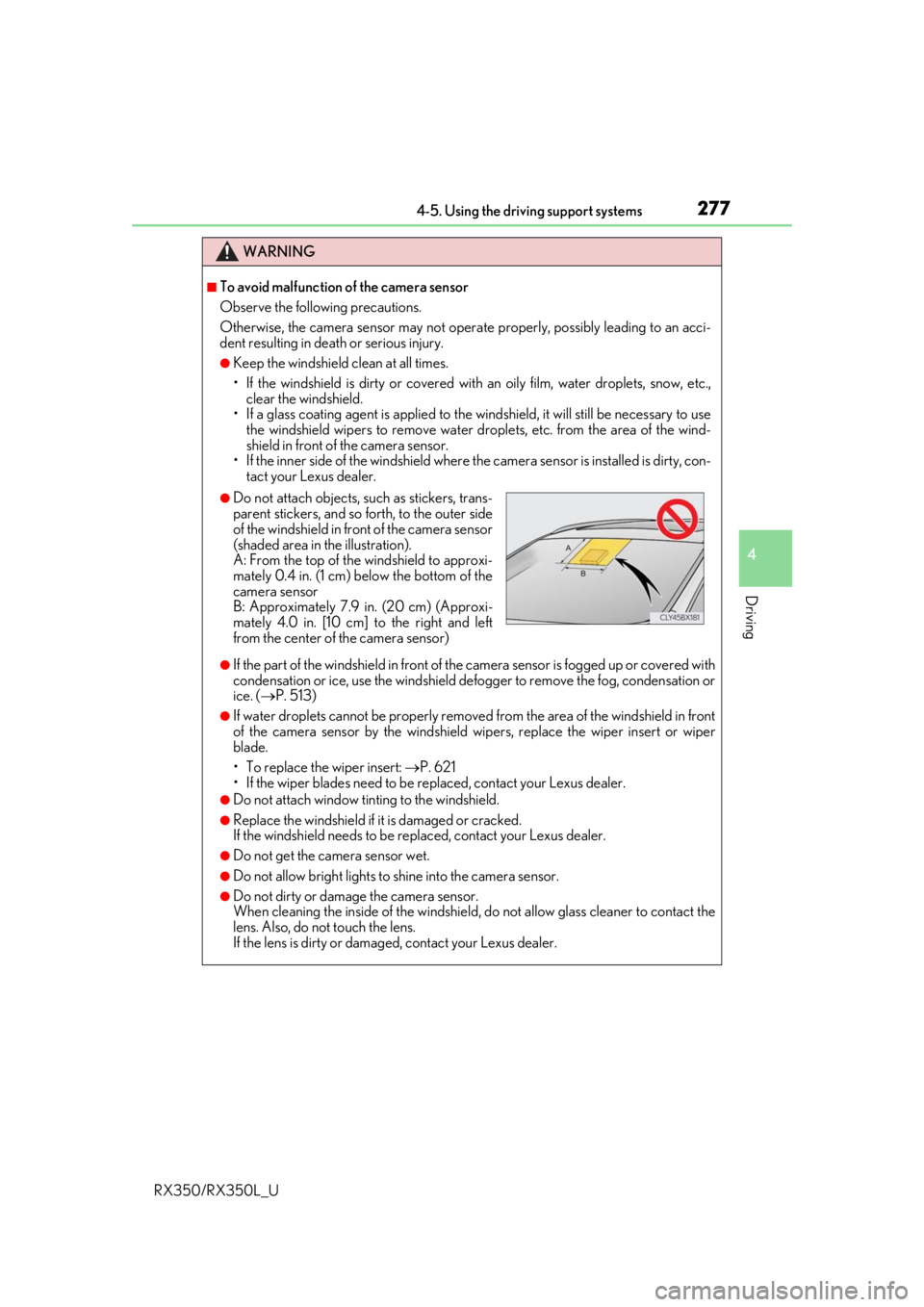
●Do not attach objects, such as stickers, trans-
parent stickers, and so forth, to the outer side
of the windshield in front of the camera sensor
(shaded area in the illustration).
A: From the top of the windshield to approxi-
mately 0.4 in. (1 cm) below the bottom of the
camera sensor
B: Approximately 7.9 in. (20 cm) (Approxi-
mately 4.0 in. [10 cm] to the right and left
from the center of the camera sensor)
Page 294 of 777
2934-5. Using the driving support systems
4
Driving
RX350/RX350L_U
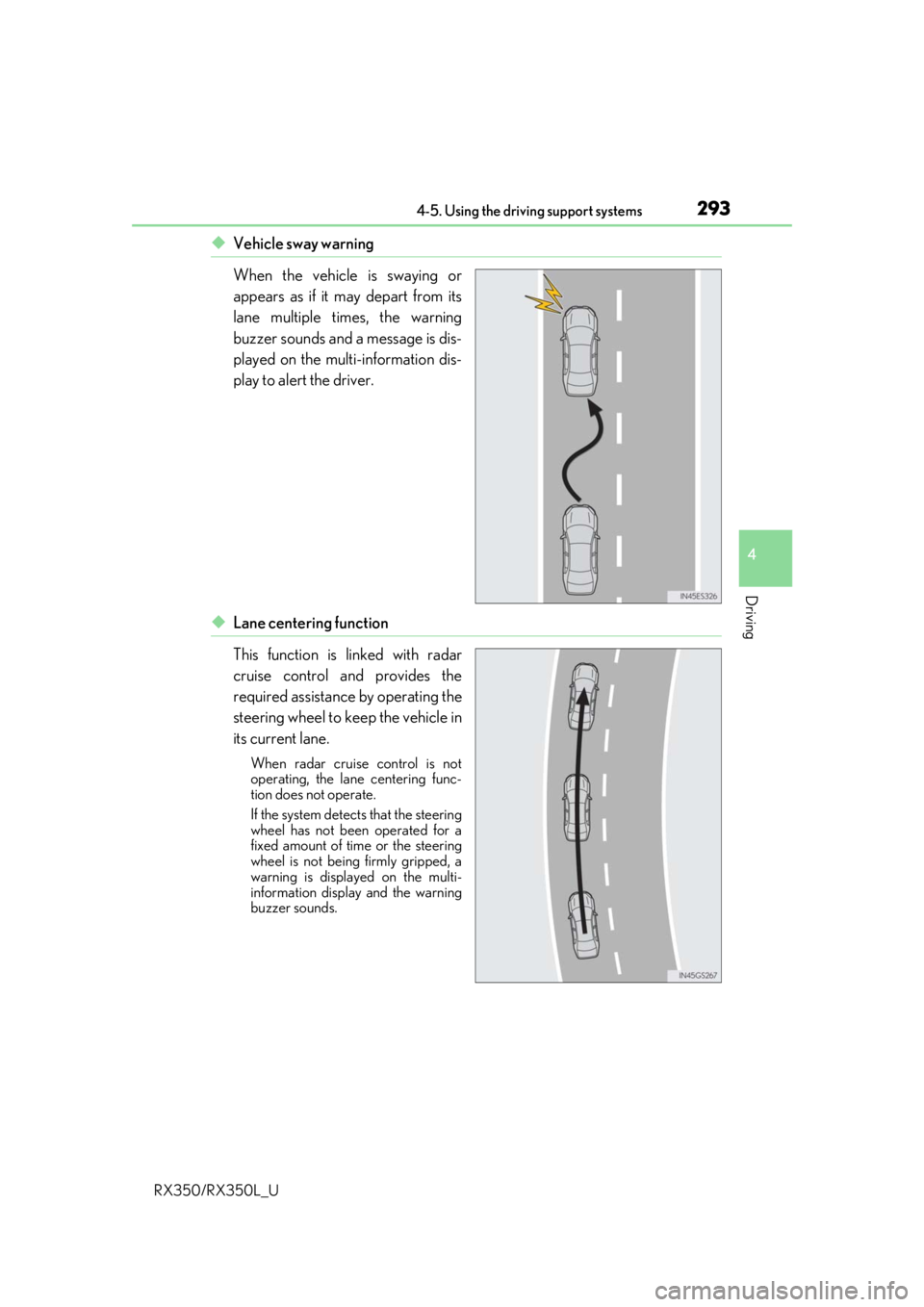
◆Vehicle sway warning
When the vehicle is swaying or
appears as if it may depart from its
lane multiple times, the warning
buzzer sounds and a message is dis-
played on the multi-information dis-
play to alert the driver.
◆Lane centering function
This function is linked with radar
cruise control and provides the
required assistance by operating the
steering wheel to keep the vehicle in
its current lane.
When radar cruise control is not
operating, the lane centering func-
tion does not operate.
If the system detects that the steering
wheel has not been operated for a
fixed amount of time or the steering
wheel is not being firmly gripped, a
warning is displayed on the multi-
information display and the warning
buzzer sounds.
Page 297 of 777
2964-5. Using the driving support systems
RX350/RX350L_U
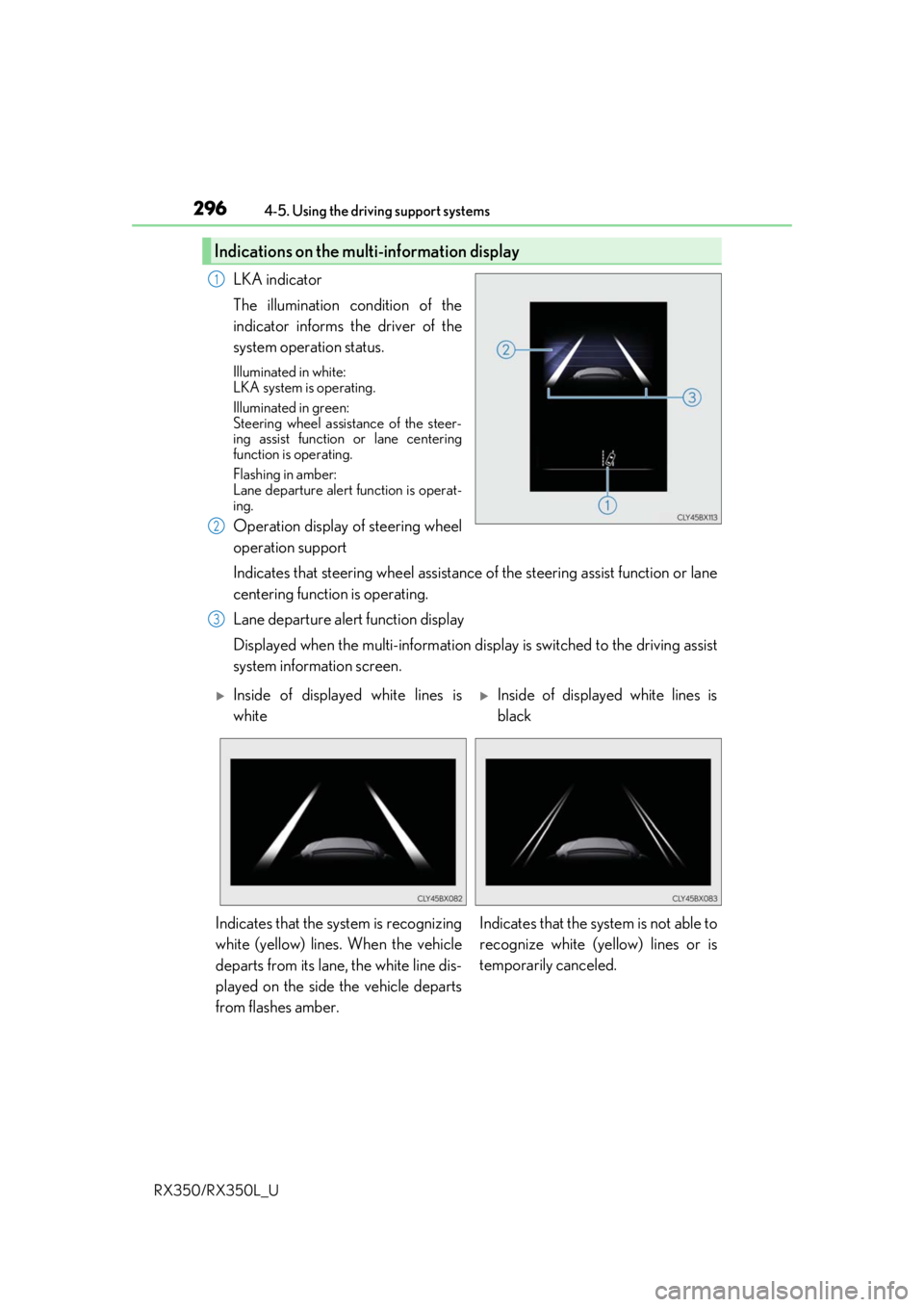
LKA indicator
The illumination condition of the
indicator informs the driver of the
system operation status.
Illuminated in white:
LKA system is operating.
Illuminated in green:
Steering wheel assistance of the steer-
ing assist function or lane centering
function is operating.
Flashing in amber:
Lane departure alert function is operat-
ing.
Operation display of steering wheel
operation support
Indicates that steering wheel assistance of the steering assist function or lane
centering function is operating.
Lane departure alert function display
Displayed when the multi-information disp lay is switched to the driving assist
system information screen.
Indications on the multi-information display
1
2
3
Inside of displayed white lines is
whiteInside of displayed white lines is
black
Indicates that the system is recognizing
white (yellow) lines. When the vehicle
departs from its lane, the white line dis-
played on the side the vehicle departs
from flashes amber. Indicates that the system is not able to
recognize white (ye
llow) lines or is
temporarily canceled.
Page 298 of 777

2974-5. Using the driving support systems
4
Driving
RX350/RX350L_U
■Operation conditions of each function
●Lane departure alert function
This function operates when all of the following conditions are met.
• LKA is turned on.
• Vehicle speed is approximatel y 32 mph (50 km/h) or more.
• System recognizes white (yellow) lines.
• Width of traffic lane is approx imately 9.8 ft. (3 m) or more.
• Turn signal lever is not operated.
• Vehicle is driven on a straight road or around a gentle curve with a radius of more
than approximately 492 ft. (150 m).
• No system malfunctions are detected. ( P. 654)
●Steering assist function
This function operates when all of the follo wing conditions are met in addition to the
operation conditions for the lane departure alert function.
• Setting for “Steering Assist” in of the multi-information display is set to “On”.
( P. 97)
• Vehicle is not accelerated or dece lerated by a fixed amount or more.
• Steering wheel is not operated with a steering force level suitable for changing
lanes.
• ABS, VSC, TRAC and PCS are not operating.
• TRAC or VSC is not turned off.
●Vehicle sway warning
This function operates when all of the following conditions are met.
• Setting for “Sway Warning” in of the multi-information display is set to “On”.
( P. 97)
• Vehicle speed is approximatel y 32 mph (50 km/h) or more.
• Width of traffic lane is approx imately 9.8 ft. (3 m) or more.
• No system malfunctions are detected. ( P. 654)
●Lane centering function
This function operates when all of the following conditions are met.
• LKA is turned on.
• Setting for “Lane Center” in of the mu lti-information display are set to “On”.
( P. 97)
• System recognizes white (yellow) lines.
• Dynamic radar cruise control with full-speed range is operating.
• Width of traffic lane is approximately 8.2 to 13.5 ft. (2.5 to 4.1 m).
• Turn signal lever is not operated.
• Vehicle is driven on a straight road or around a gentle curve with a radius of more
than approximately 656 ft. (200 m).
• No system malfunctions are detected. ( P. 654)
• Vehicle does not accele rate or decelerate by a fixed amount or more.
• Steering wheel is not operated with a steering force level suitable for changing lanes.
• ABS, VSC, TRAC and PCS are not operating.
• TRAC or VSC is not turned off.
• Steering assist function is not operating.
Page 299 of 777

2984-5. Using the driving support systems
RX350/RX350L_U
■Temporary cancellation of functions
When operation conditions are no longer met, a function may be temporarily canceled.
However, when the operation conditions are met again, operat ion of the function is auto-
matically restored. ( P. 297)
■Steering assist function/lane centering function
Depending on the vehicle speed, lane depart ure situation, road conditions, etc., the
operation of the functions may not be reco gnized or the functions may not operate.
■Lane departure alert function
The warning buzzer may be difficult to hear due to external noise, audio playback, etc.
Also, it may be difficult to f eel steering wheel vibrations due to the road conditions, etc.
■Hands off steering wheel alert
When the system determines that the driver has removed their hands from the steering
wheel while the steering assist function or lane centering function is operating, a warning
message is displayed on the multi-info rmation display and the buzzer sounds.
■White (yellow) lines are only on one side of road
The LKA system will not operate for the side on which white (yellow) lines could not be
recognized.
Page 327 of 777
3264-5. Using the driving support systems
RX350/RX350L_U
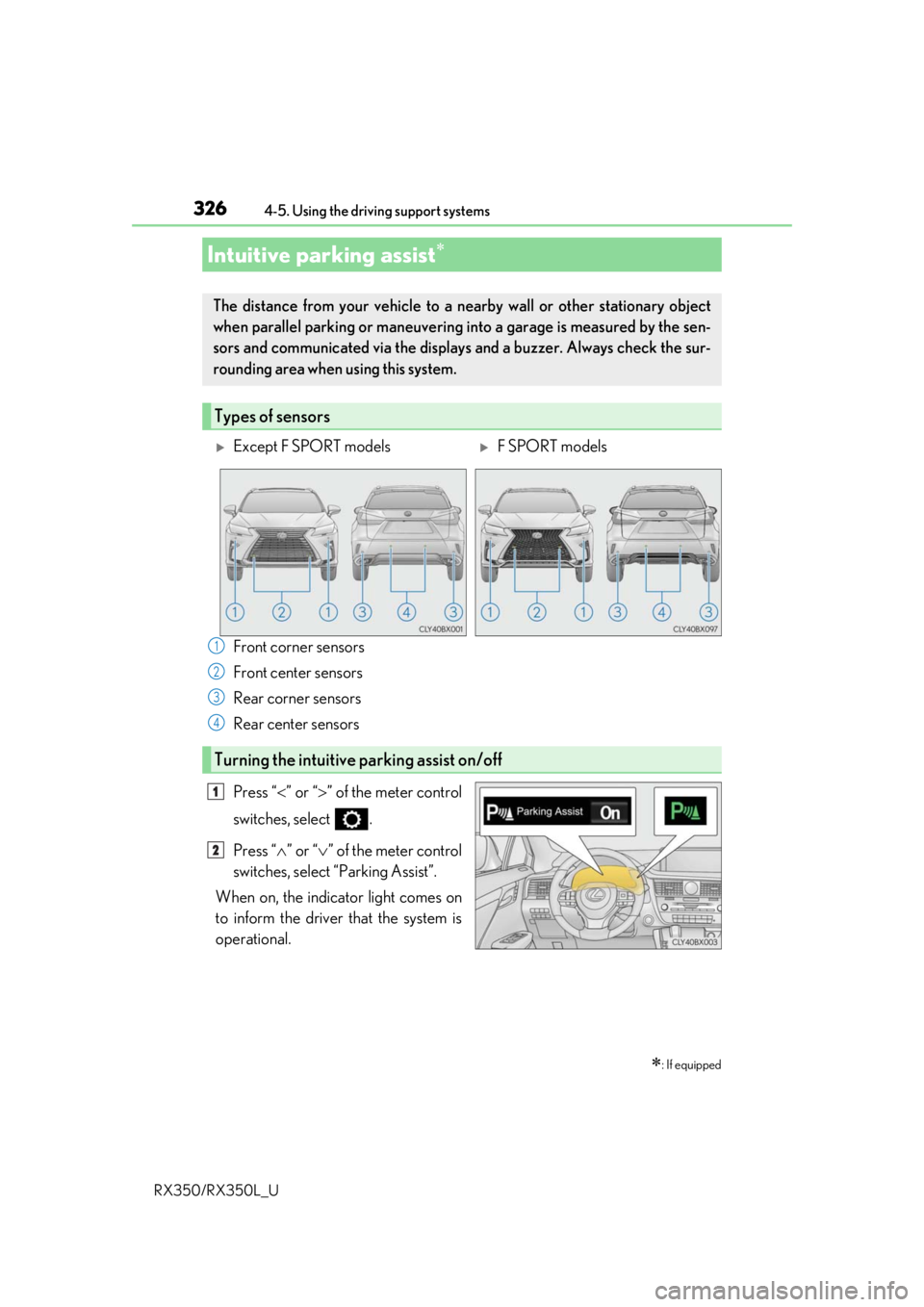
Front corner sensors
Front center sensors
Rear corner sensors
Rear center sensors
Press “ ” or “ ” of the meter control
switches, select .
Press “ ” or “ ” of the meter control
switches, select “Parking Assist”.
When on, the indicator light comes on
to inform the driver that the system is
operational.
Intuitive parking assist
: If equipped
The distance from your vehicle to a ne arby wall or other stationary object
when parallel parking or maneuvering into a garage is measured by the sen-
sors and communicated via the displays and a buzzer. Always check the sur-
rounding area when using this system.
Types of sensors
Except F SPORT modelsF SPORT models
Turning the intuitive parking assist on/off
1
2
3
4
1
2
Page 328 of 777
3274-5. Using the driving support systems
4
Driving
RX350/RX350L_U
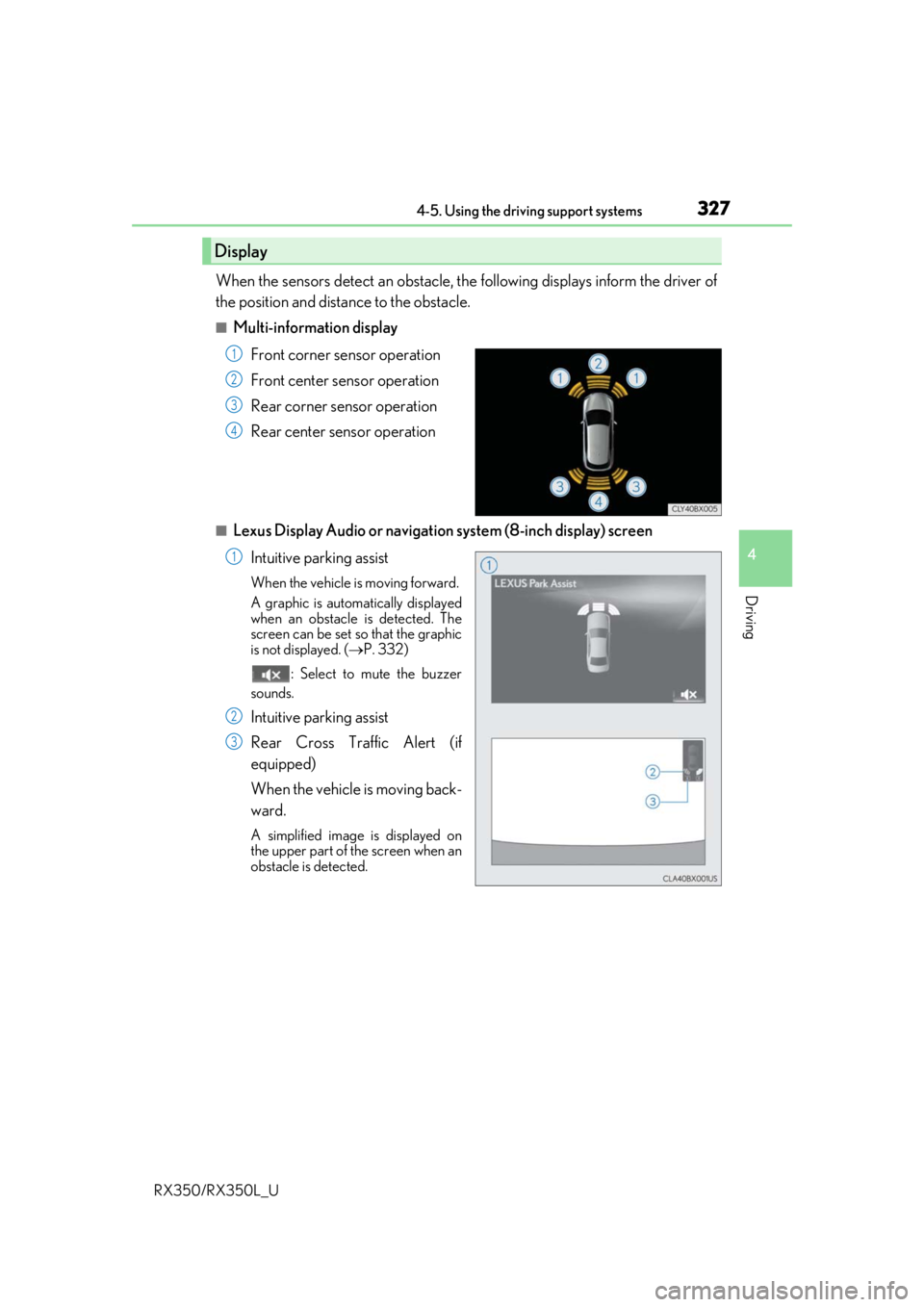
When the sensors detect an obstacle, the following displays inform the driver of
the position and distance to the obstacle.
■Multi-information display
Front corner sensor operation
Front center sensor operation
Rear corner sensor operation
Rear center sensor operation
■Lexus Display Audio or navigation system (8-inch display) screen
Intuitive parking assist
When the vehicle is moving forward.
A graphic is automatically displayed
when an obstacle is detected. The
screen can be set so that the graphic
is not displayed. ( P. 332)
: Select to mute the buzzer
sounds.
Intuitive parking assist
Rear Cross Traffic Alert (if
equipped)
When the vehicle is moving back-
ward.
A simplified image is displayed on
the upper part of the screen when an
obstacle is detected.
Display
1
2
3
4
1
2
3