center LEXUS RX450H 2020 Owner's Guide
[x] Cancel search | Manufacturer: LEXUS, Model Year: 2020, Model line: RX450H, Model: LEXUS RX450H 2020Pages: 777, PDF Size: 13.14 MB
Page 330 of 777
3294-5. Using the driving support systems
4
Driving
RX350/RX350L_U
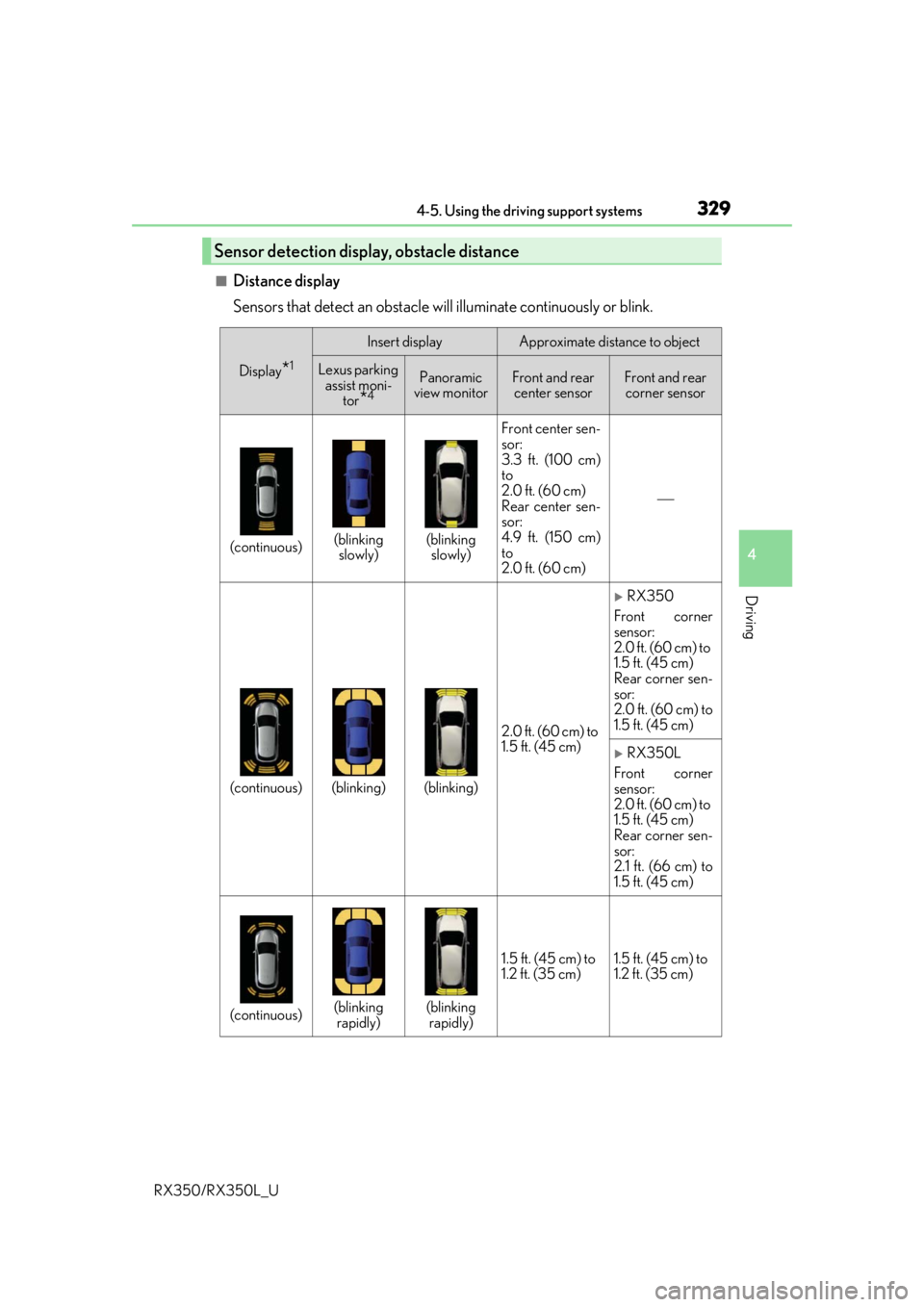
■Distance display
Sensors that detect an obstacle will illuminate continuously or blink.
Sensor detection display, obstacle distance
Display*1
Insert displayApproximate distance to object
Lexus parking assist moni- tor
*4
Panoramic
view monitorFront and rear center sensorFront and rear corner sensor
(continuous)(blinking slowly)(blinking slowly) Front center sen-
sor:
3.3 ft. (100 cm)
to
2.0 ft. (60 cm)
Rear center sen-
sor:
4.9 ft. (150 cm)
to
2.0 ft. (60 cm)
(continuous)(blinking)(blinking)
2.0 ft. (60 cm) to
1.5 ft. (45 cm)
RX350
Front corner
sensor:
2.0 ft. (60 cm) to
1.5 ft. (45 cm)
Rear corner sen-
sor:
2.0 ft. (60 cm) to
1.5 ft. (45 cm)
RX350L
Front corner
sensor:
2.0 ft. (60 cm) to
1.5 ft. (45 cm)
Rear corner sen-
sor:
2.1 ft. (66 cm) to
1.5 ft. (45 cm)
(continuous)(blinking rapidly)(blinking rapidly) 1.5 ft. (45 cm) to
1.2 ft. (35 cm)
1.5 ft. (45 cm) to
1.2 ft. (35 cm)
Page 331 of 777
3304-5. Using the driving support systems
RX350/RX350L_U
*1: The images may differ from th ose shown in the illustrations. (P. 327)
*2: Multi-information display
*3: Audio system screen
*4: Lexus Display Audio or navigation system (8-inch display) screen
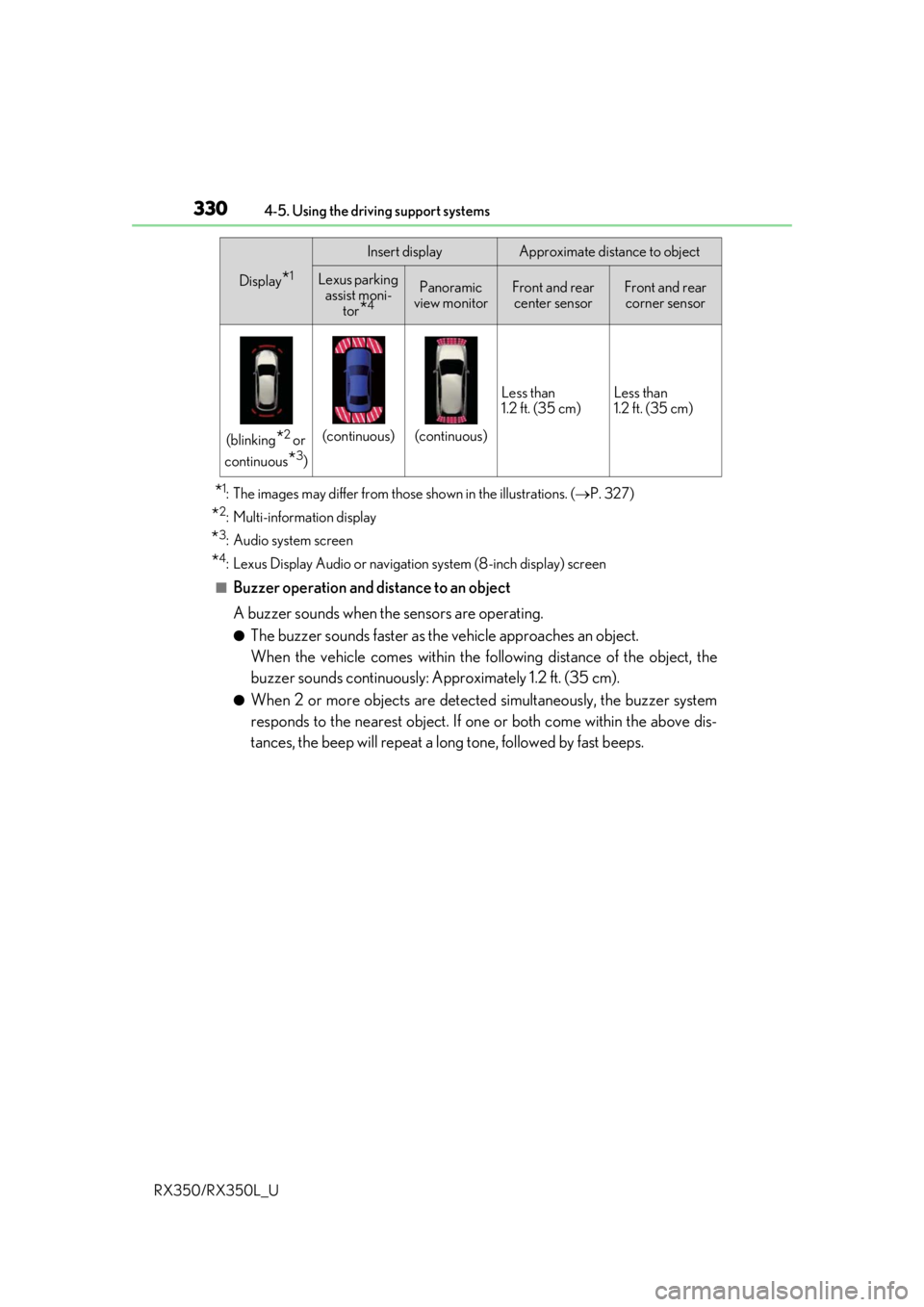
■Buzzer operation and distance to an object
A buzzer sounds when the sensors are operating.
●The buzzer sounds faster as the vehicle approaches an object.
When the vehicle comes within the following distance of the object, the
buzzer sounds continuously: Approximately 1.2 ft. (35 cm).
●When 2 or more objects are detected simultaneously, the buzzer system
responds to the nearest object. If on e or both come within the above dis-
tances, the beep will repeat a lo ng tone, followed by fast beeps.
(blinking*2 or
continuous
*3)
(continuous)(continuous) Less than
1.2 ft. (35 cm)
Less than
1.2 ft. (35 cm)
Display*1
Insert displayApproximate distance to object
Lexus parking
assist moni-
tor
*4
Panoramic
view monitorFront and rear center sensorFront and rear corner sensor
Page 333 of 777

3324-5. Using the driving support systems
RX350/RX350L_U
You can change the buzzer sounds volu me and the screen operating conditions
when the engine switch is in IGNITION ON mode.
Press the “MENU” button on the Le xus Display Audio controller/Remote
Touch, and then select on the screen.
Select “Vehicle”, and then select “LEXUS Park Assist” on the screen.
Select the desired item.
The buzzer sounds volume can be adjusted.
On or off can be selected for intuitive parking assist display.
Both the front or rear center sensors display and tone indication can be set.
Setting up intuitive parking assist
1
2
3
Lexus Display Audio screenNavigation system screen
1
2
3
Page 334 of 777

3334-5. Using the driving support systems
4
Driving
RX350/RX350L_U
■The intuitive parking assist can be operated when
●Front corner sensors:
• The engine switch is in IGNITION ON mode.
• The shift lever is in other than P.
• The vehicle speed is less than about 6 mph (10 km/h).(At any speed when the shift lever is in R)
●Front center sensors:
• The engine switch is in IGNITION ON mode.
• The shift lever is in other than P or R.
• The vehicle speed is less than about 6 mph (10 km/h).
●Rear corner and rear center sensors:
• The engine switch is in IGNITION ON mode.
• The shift lever is in R.
■Intuitive parking assist display
●Vehicles with a Lexus Display Audio system/navigation system (8-inch display): When
an object is detected while the Lexus parking assist monito r or panoramic view monitor
is in use, the warning indicator will appear in the upper part of the screen even if the dis-
play setting has been set to off.
●Vehicles with a navigation system (12.3-inch display): If the intuitive parking assist dis-
play is set to on, detected objects will also be displayed on the panoramic view monitor.
For details, refer to “NAVIGATION SYSTEM OWNER’S MANUAL”.
■Sensor detectio n information
●The sensor’s detection areas are limited to the areas around the vehicle’s bumper.
●Certain vehicle conditions and the surrounding environment may affect the ability of a
sensor to correctly detect an object. Particular instances where this may occur are
listed below.
• There is dirt, snow or ice on the sensor . (Wiping the sensors will resolve this prob-
lem.)
• The sensor is frozen. (Thawing the area will resolve this problem.)
In especially cold weather, if a sensor is frozen the screen may show an abnormal
display, or obstacles may not be detected.
• The sensor is covered in any way.
• The vehicle is leaning considerably to one side.
• When a sensor or the area around a sensor is extremely hot or cold.
• On an extremely bumpy road, on an incline, on gravel, or on grass.
• The vicinity of the vehicle is noisy due to vehicle horns, motorcycle engines, air brakes of large vehicles, or other loud noises producing ultrasonic waves.
• There is another vehicle equipped with parking assist sensors in the vicinity.
• The sensor is coated with a sheet of spray or heavy rain.
• The bumper or sensor re ceives a strong impact.
• If the vehicle is significantly tilted.
• The vehicle is approaching a tall or curved curb.
• In harsh sunlight or intense cold weather.
• The area directly under the bumpers is not detected.
• If objects draw too close to the sensor.
• People may not be detected if they are wearing certain types of clothing.
In addition to the examples above, there ar e instances in which, because of their shape,
signs and other objects may be judged by a sensor to be closer than they are.
Page 340 of 777
3394-5. Using the driving support systems
4
Driving
RX350/RX350L_U
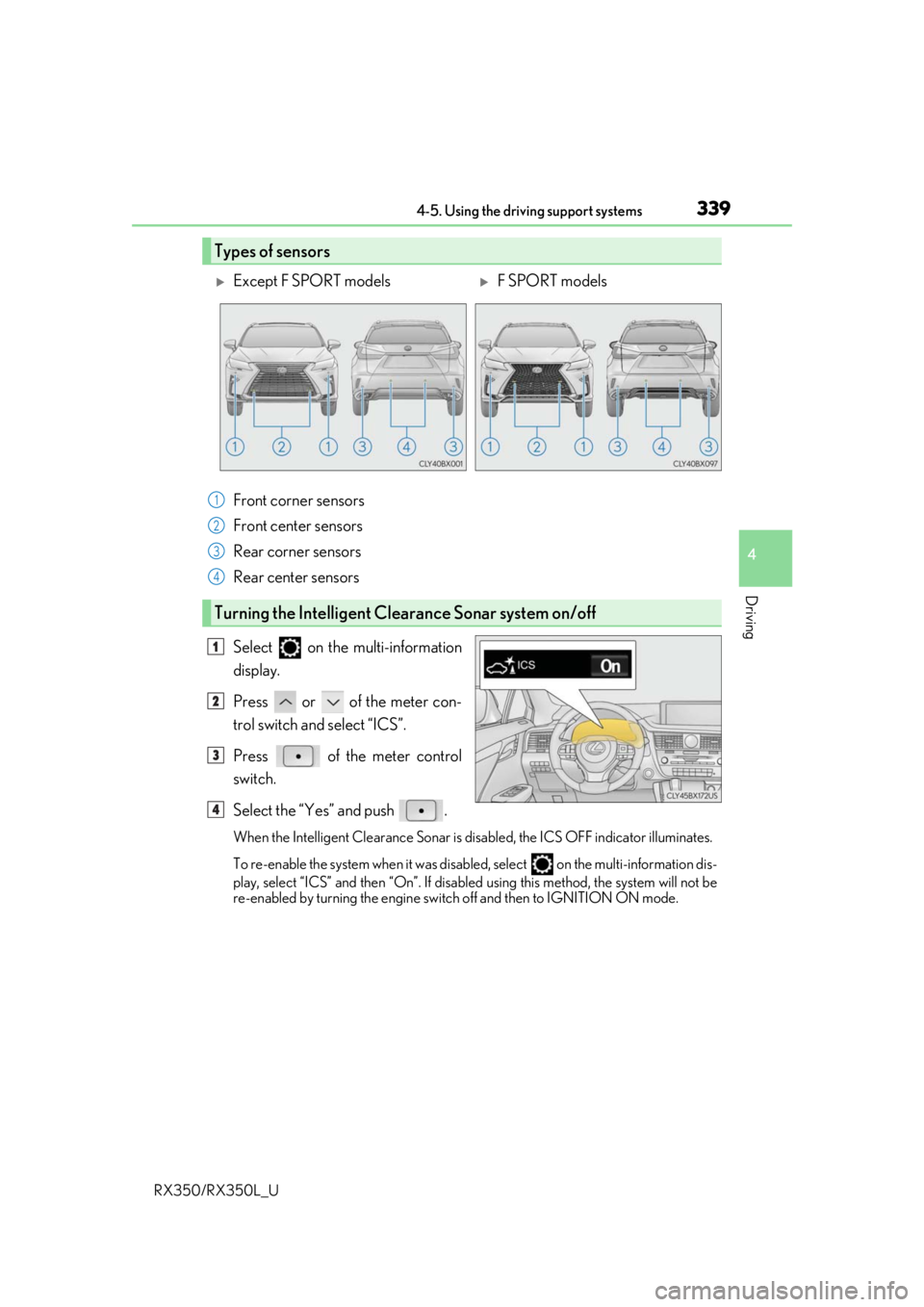
Front corner sensors
Front center sensors
Rear corner sensors
Rear center sensors
Select on the multi-information
display.
Press or of the meter con-
trol switch and select “ICS”.
Press of the meter control
switch.
Select the “Yes” and push .
When the Intelligent Clearance Sonar is disabled, the ICS OFF indicator illuminates.
To re-enable the system when it was disabled, select on the multi-information dis-
play, select “ICS” and then “On”. If disabled using this method, the system will not be
re-enabled by turning the engine switch off and then to IGNITION ON mode.
Types of sensors
Except F SPORT modelsF SPORT models
1
2
3
4
Turning the Intelligent Clearance Sonar system on/off
1
2
3
4
Page 361 of 777
3604-5. Using the driving support systems
RX350/RX350L_U
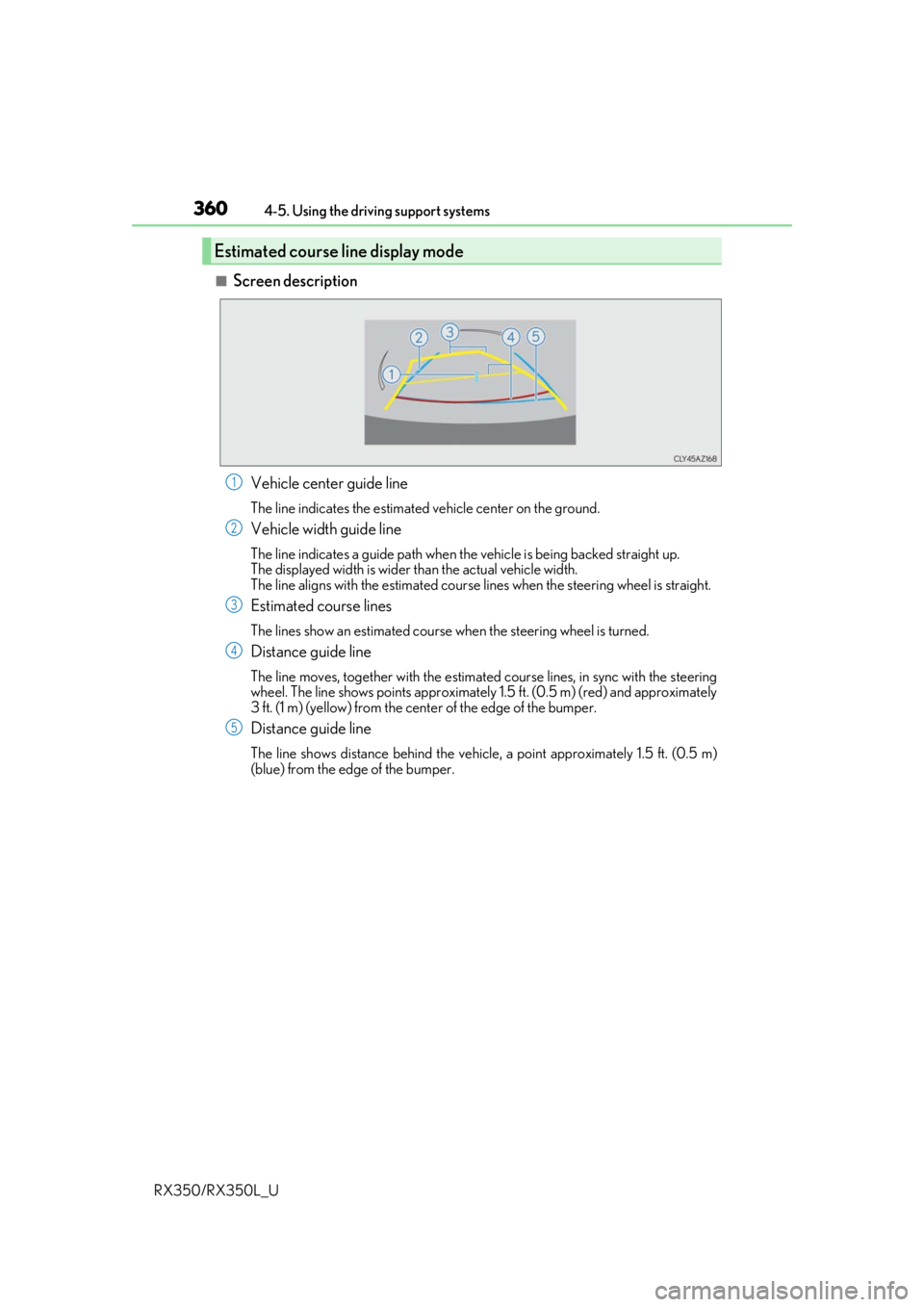
■Screen description Vehicle center guide line
The line indicates the estimated vehicle center on the ground.
Vehicle width guide line
The line indicates a guide path when the vehicle is being backed straight up.
The displayed width is wider th an the actual vehicle width.
The line aligns with the estimated course lines when the steering wheel is straight.
Estimated course lines
The lines show an estimated course when the steering wheel is turned.
Distance guide line
The line moves, together with the estimated course lines, in sync with the steering
wheel. The line shows points approximately 1.5 ft. (0.5 m) (red) and approximately
3 ft. (1 m) (yellow) from the center of the edge of the bumper.
Distance guide line
The line shows distance behind the vehicle, a point approximately 1.5 ft. (0.5 m)
(blue) from the edge of the bumper.
Estimated course line display mode
1
2
3
4
5
Page 363 of 777
3624-5. Using the driving support systems
RX350/RX350L_U
Once the vehicle width guide lines and the parking space lines are parallel,
straighten the steering wheel and back up slowly until the vehicle has com-
pletely entered the parking space.
Stop the vehicle in an approp riate place, and finish parking.
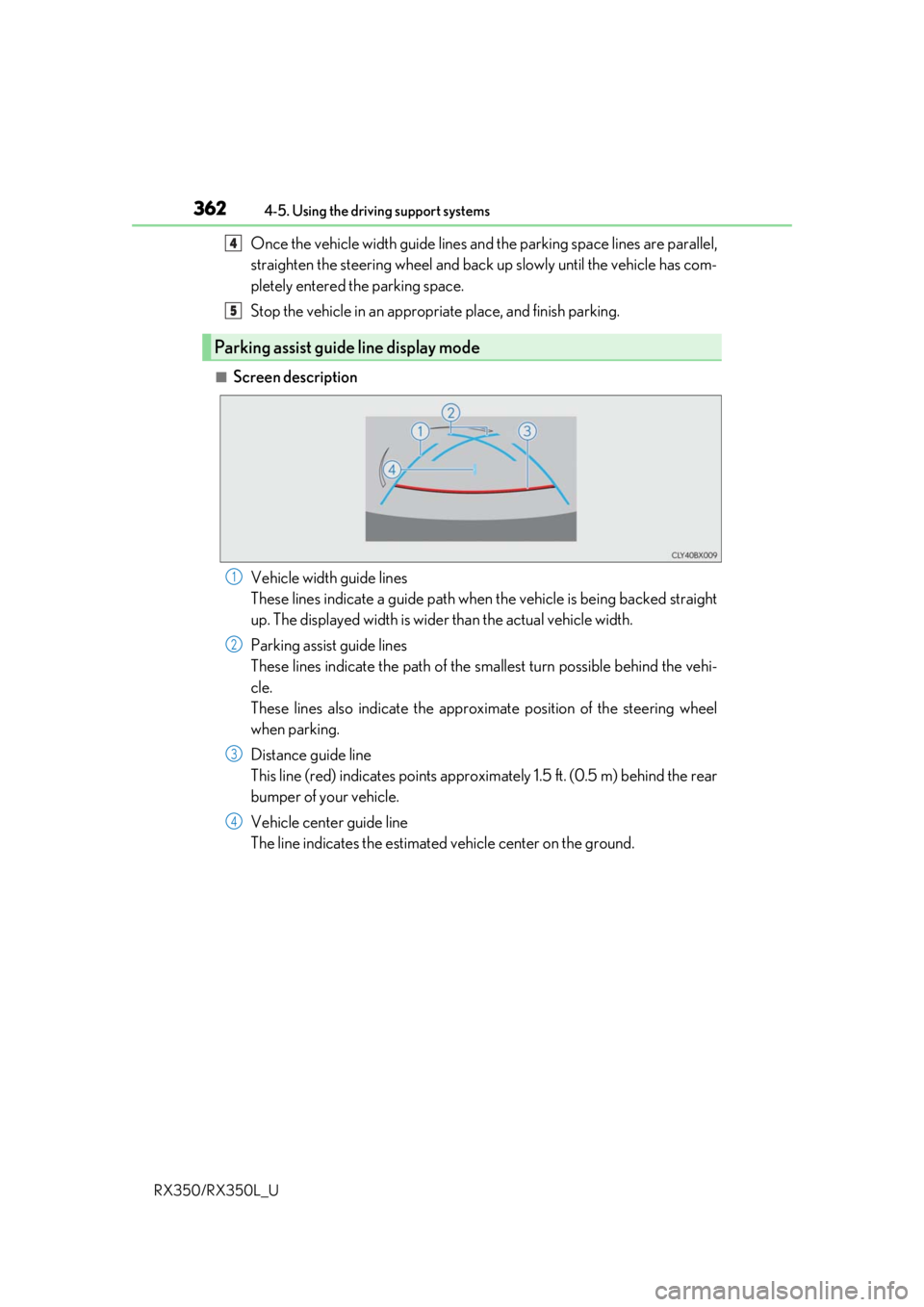
■Screen description
Vehicle width guide lines
These lines indicate a guide path when the vehicle is being backed straight
up. The displayed width is wider than the actual vehicle width.
Parking assist guide lines
These lines indicate the path of the sm allest turn possible behind the vehi-
cle.
These lines also indicate the approx imate position of the steering wheel
when parking.
Distance guide line
This line (red) indicates points approxim ately 1.5 ft. (0.5 m) behind the rear
bumper of your vehicle.
Vehicle center guide line
The line indicates the estimated vehicle center on the ground.
Parking assist guide line display mode
4
5
1
2
3
4
Page 389 of 777
3884-6. Driving tips
RX350/RX350L_U
●Specific design characteristics give it a higher center of gravity than ordinary
passenger cars. This vehicle design feature causes this type of vehicle to be
more likely to rollover. And, utility vehi cles have a significantly higher rollover
rate than other types of vehicles.
●An advantage of the higher ground cl earance is a better view of the road
allowing you to anticipate problems.
●It is not designed for cornering at the same speeds as ordinary passenger cars
any more than low-slung sports cars are designed to perform satisfactorily
under off-road conditions. Therefore, sharp turns at excessive speeds may
cause the vehicle to rollover.
Utility vehicle precautions
This vehicle belongs to the utility vehicl e class, which has higher ground clear-
ance and narrower tread in relation to the height of its center of gravity.
Utility vehicle feature
WARNING
■Utility vehicle precautions
Always observe the following precautions to minimize the risk of death, serious injury
or damage to your vehicle:
●In a rollover crash, an unbelted person is si gnificantly more likely to die than a person
wearing a seat belt. Therefore, the driver and all passengers should always fasten
their seat belts.
●Avoid sharp turns or abrupt maneuvers, if at all possible.
Failure to operate this vehicle correctly may result in loss of control or vehicle rollover
causing death or serious injury.
●Loading cargo on the roof luggage carrier will make the ce nter of the vehicle gravity
higher. Avoid high speeds, sudden starts, sharp turns, sudden braking or abrupt
maneuvers, otherwise it may re sult in loss of control or vehicle rollover due to failure
to operate this vehicle correctly.
●Always slow down in gusty crosswinds. Be cause of its profile and higher center of
gravity, your vehicle is more sensitive to side winds than an ordinary passenger car.
Slowing down will allow you to have better control.
●Do not drive horizontally across steep slopes . Driving straight up or straight down is
preferred. Your vehicle (or any similar off- road vehicle) can tip over sideways much
more easily than forward or backward.
Page 427 of 777
4265-4. Using the radio
RX350/RX350L_U
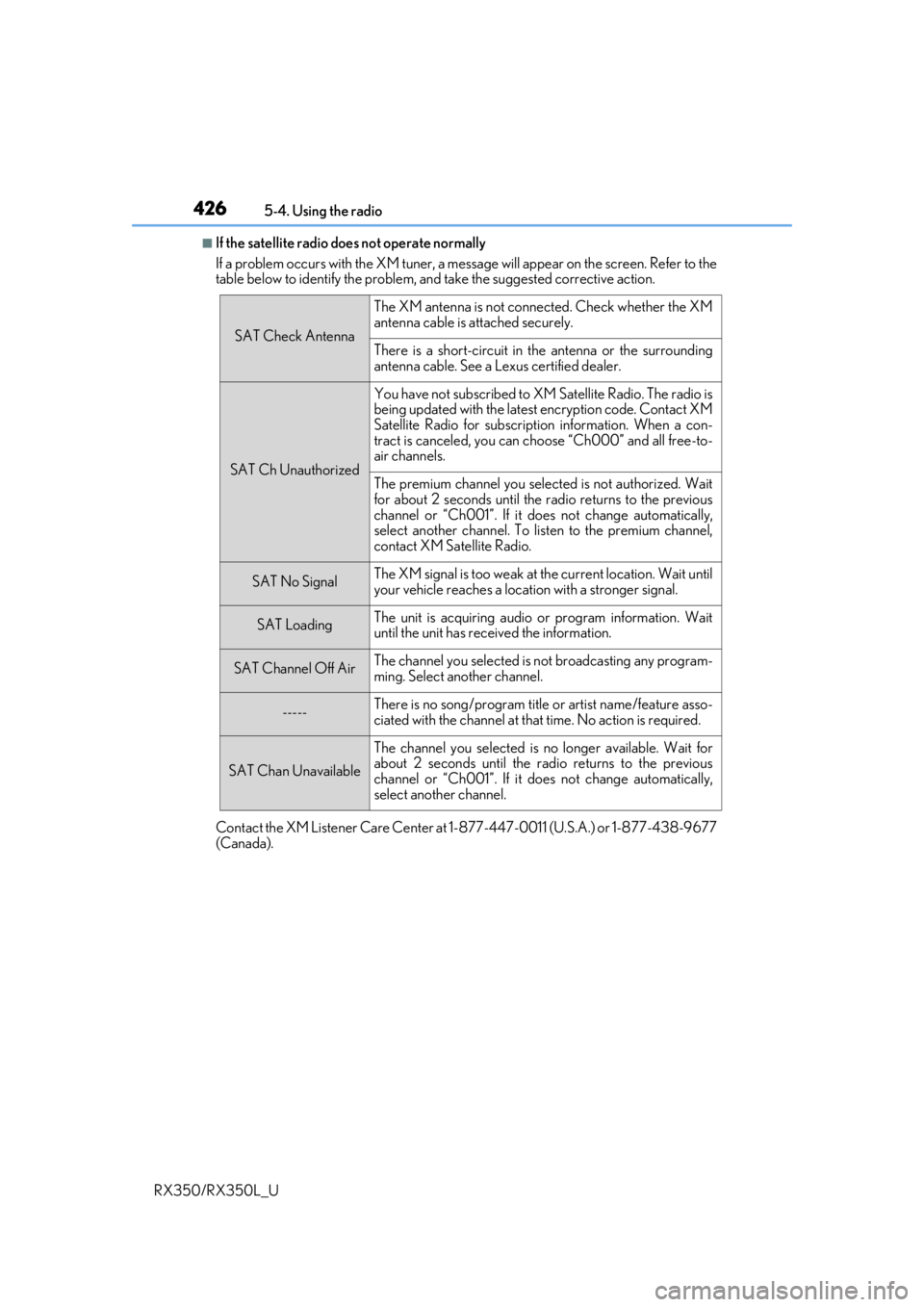
■If the satellite radio does not operate normally
If a problem occurs with the XM tuner, a message will appear on the screen. Refer to the
table below to identify the problem, an d take the suggested corrective action.
Contact the XM Listener Care Center at 1-877-447-0011 (U.S.A.) or 1-877-438-9677
(Canada).
SAT Check Antenna
The XM antenna is not connected. Check whether the XM
antenna cable is attached securely.
There is a short-circuit in the antenna or the surrounding
antenna cable. See a Lexus certified dealer.
SAT Ch Unauthorized
You have not subscribed to XM Satellite Radio. The radio is
being updated with the latest encryption code. Contact XM
Satellite Radio for subscripti on information. When a con-
tract is canceled, you can choose “Ch000” and all free-to-
air channels.
The premium channel you selected is not authorized. Wait
for about 2 seconds until the radio returns to the previous
channel or “Ch001”. If it does not change automatically,
select another channel. To listen to the premium channel,
contact XM Satellite Radio.
SAT No SignalThe XM signal is too weak at the current location. Wait until
your vehicle reaches a location with a stronger signal.
SAT LoadingThe unit is acquiring audio or program information. Wait
until the unit has rece ived the information.
SAT Channel Off AirThe channel you selected is not broadcasting any program-
ming. Select another channel.
-----There is no song/program title or artist name/feature asso-
ciated with the channel at that time. No action is required.
SAT Chan Unavailable
The channel you selected is no longer available. Wait for
about 2 seconds until the radio returns to the previous
channel or “Ch001”. If it does not change automatically,
select another channel.
Page 515 of 777
5146-2. Using the air conditioning system and defogger
RX350/RX350L_U
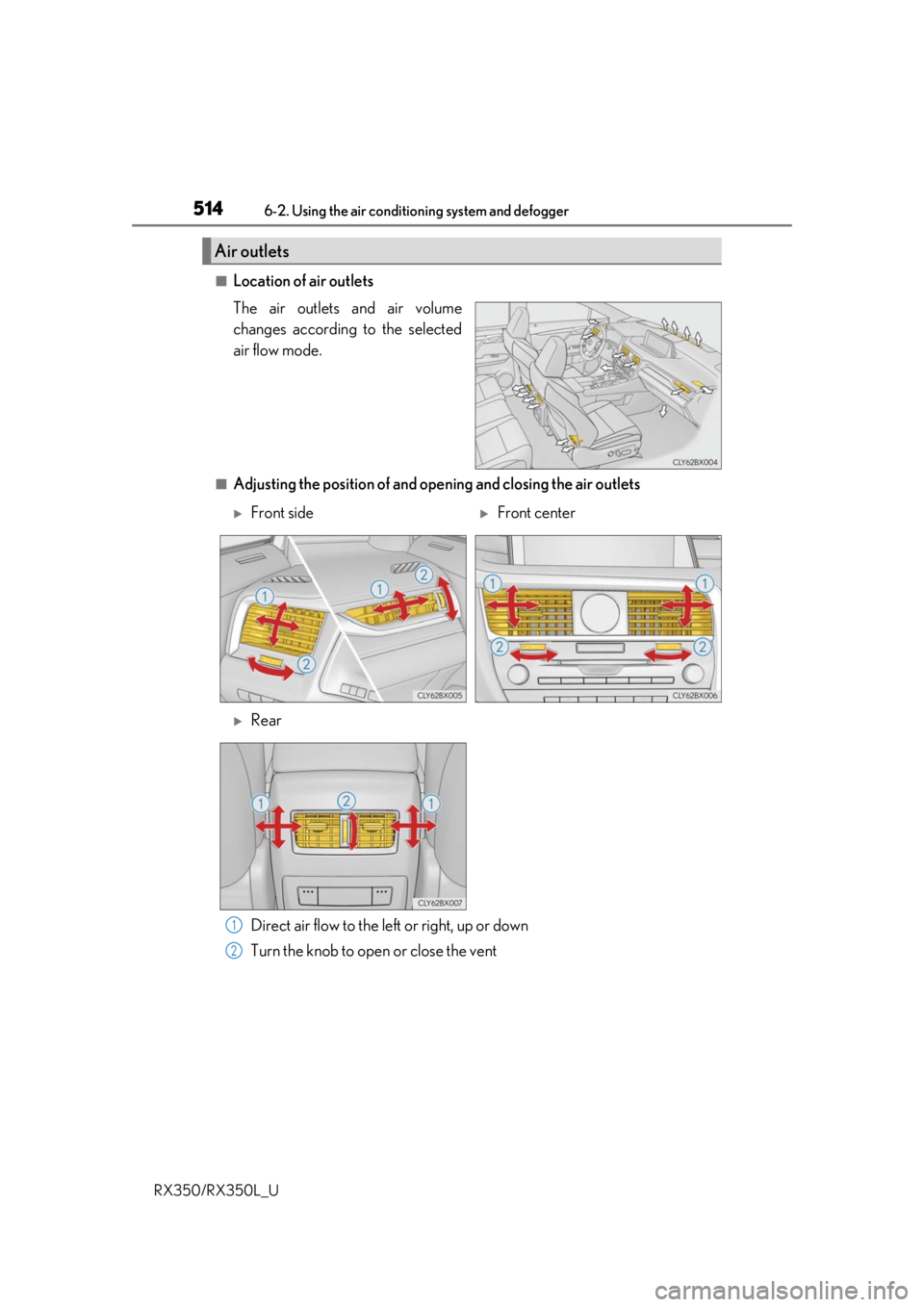
■Location of air outlets
The air outlets and air volume
changes according to the selected
air flow mode.
■Adjusting the position of and opening and closing the air outlets Direct air flow to the left or right, up or down
Turn the knob to open or close the vent
Air outlets
Front sideFront center
Rear
1
2