And disabled LINCOLN AVIATOR 2004 Owners Manual
[x] Cancel search | Manufacturer: LINCOLN, Model Year: 2004, Model line: AVIATOR, Model: LINCOLN AVIATOR 2004Pages: 336, PDF Size: 3.69 MB
Page 38 of 336
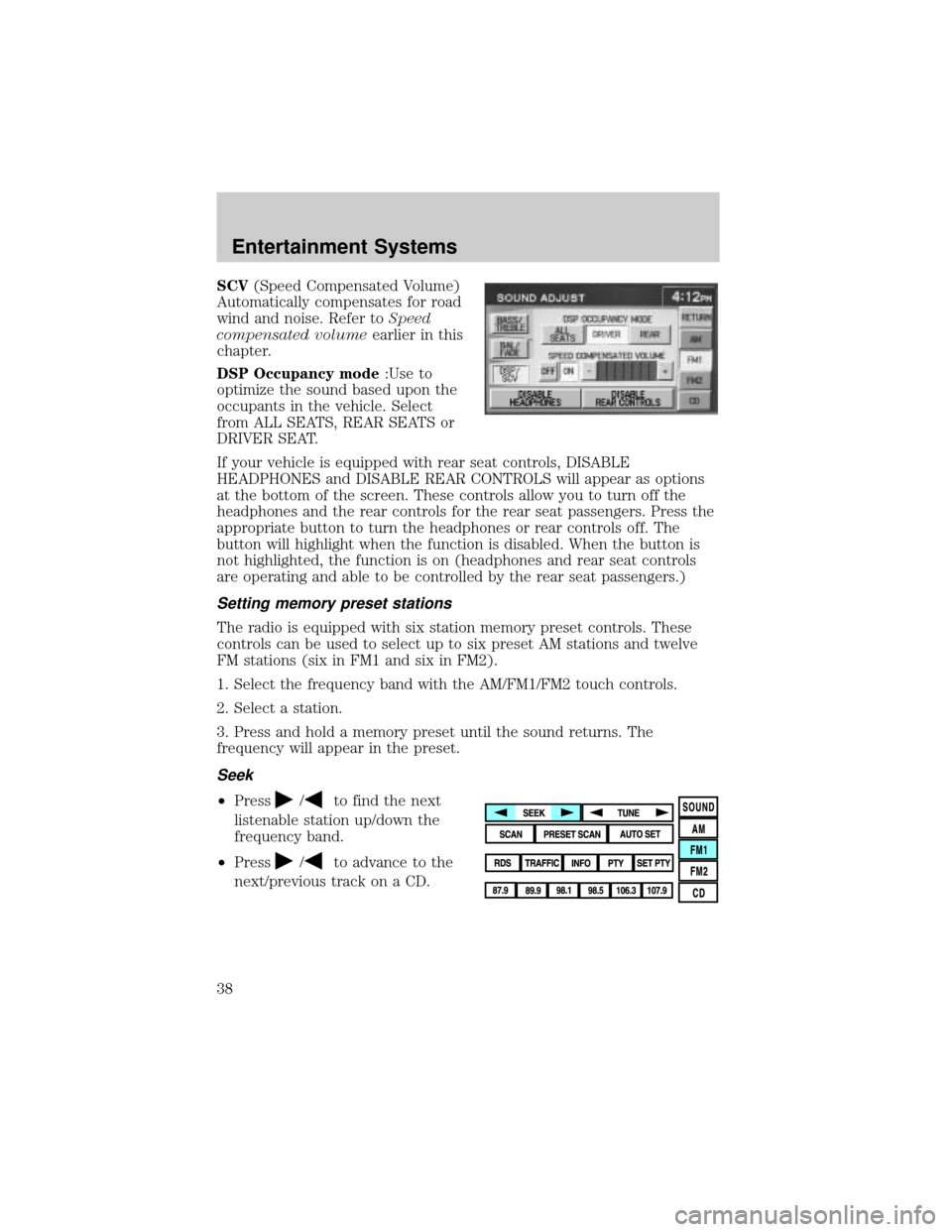
SCV(Speed Compensated Volume)
Automatically compensates for road
wind and noise. Refer toSpeed
compensated volumeearlier in this
chapter.
DSP Occupancy mode:Use to
optimize the sound based upon the
occupants in the vehicle. Select
from ALL SEATS, REAR SEATS or
DRIVER SEAT.
If your vehicle is equipped with rear seat controls, DISABLE
HEADPHONES and DISABLE REAR CONTROLS will appear as options
at the bottom of the screen. These controls allow you to turn off the
headphones and the rear controls for the rear seat passengers. Press the
appropriate button to turn the headphones or rear controls off. The
button will highlight when the function is disabled. When the button is
not highlighted, the function is on (headphones and rear seat controls
are operating and able to be controlled by the rear seat passengers.)
Setting memory preset stations
The radio is equipped with six station memory preset controls. These
controls can be used to select up to six preset AM stations and twelve
FM stations (six in FM1 and six in FM2).
1. Select the frequency band with the AM/FM1/FM2 touch controls.
2. Select a station.
3. Press and hold a memory preset until the sound returns. The
frequency will appear in the preset.
Seek
²Press/to find the next
listenable station up/down the
frequency band.
²Press
/to advance to the
next/previous track on a CD.
Entertainment Systems
38
Page 81 of 336
Floor console climate controls:
The floor console climate control system allows the rear passengers to
manually enable or disable airflow through the floor console.
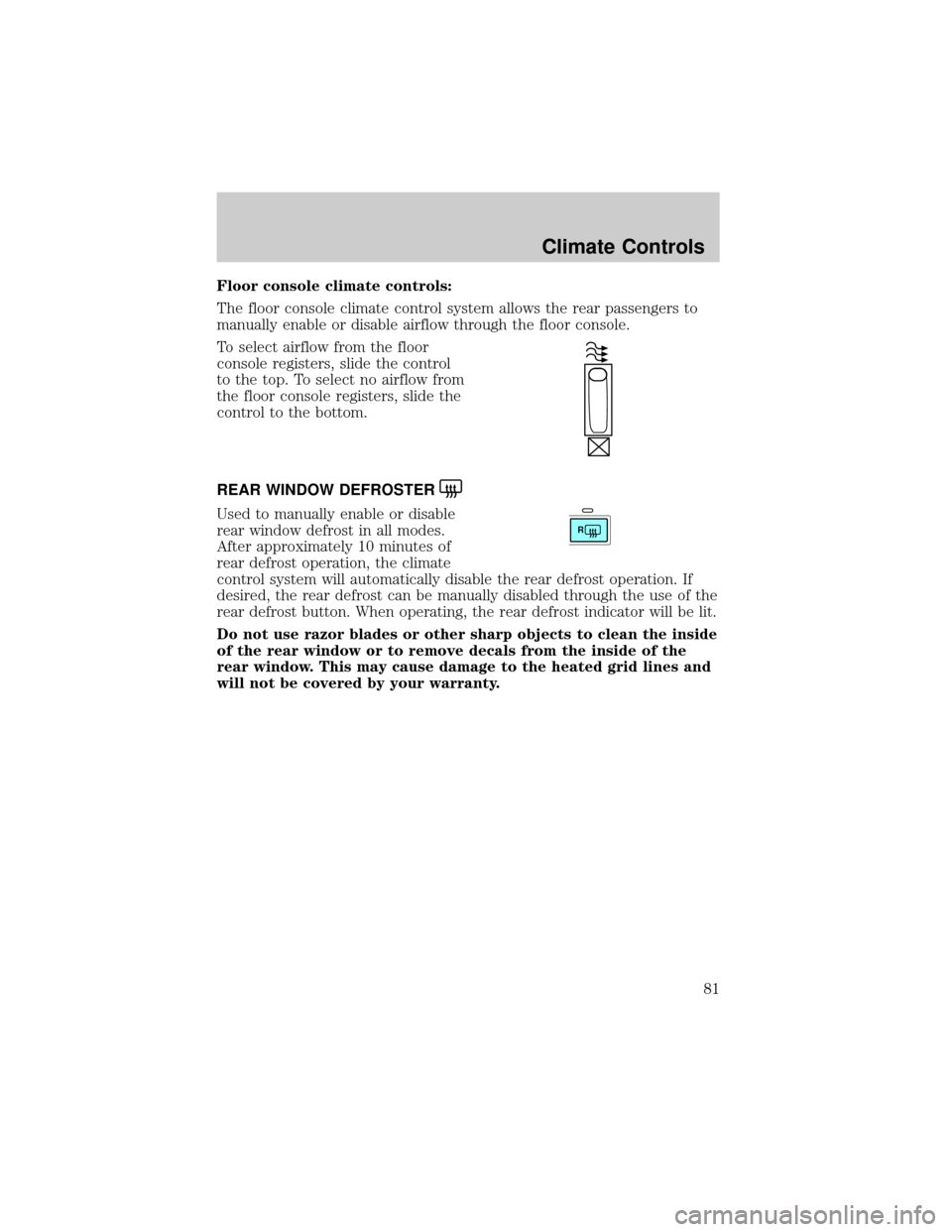
To select airflow from the floor
console registers, slide the control
to the top. To select no airflow from
the floor console registers, slide the
control to the bottom.
REAR WINDOW DEFROSTER
Used to manually enable or disable
rear window defrost in all modes.
After approximately 10 minutes of
rear defrost operation, the climate
control system will automatically disable the rear defrost operation. If
desired, the rear defrost can be manually disabled through the use of the
rear defrost button. When operating, the rear defrost indicator will be lit.
Do not use razor blades or other sharp objects to clean the inside
of the rear window or to remove decals from the inside of the
rear window. This may cause damage to the heated grid lines and
will not be covered by your warranty.R
Climate Controls
81
Page 127 of 336
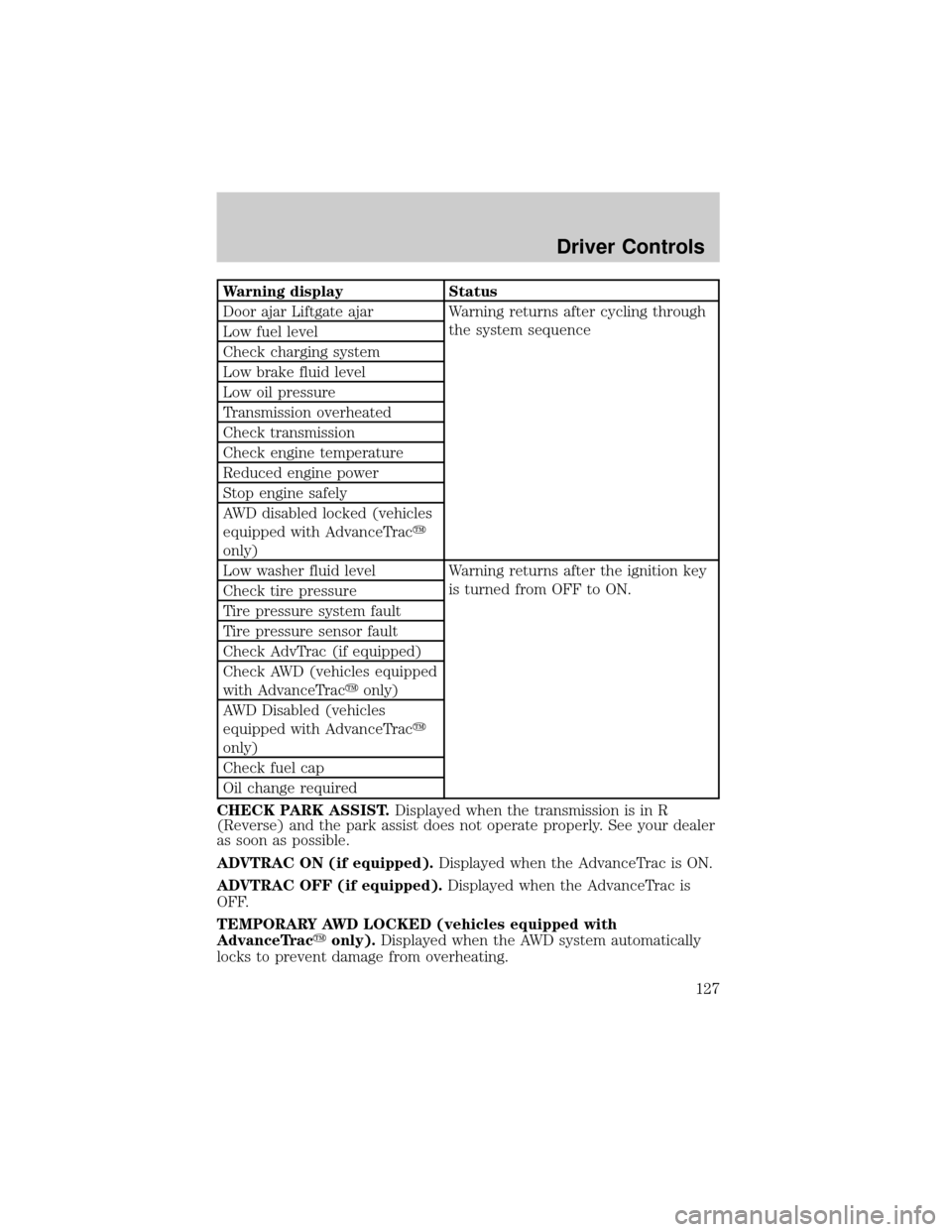
Warning display Status
Door ajar Liftgate ajar Warning returns after cycling through
the system sequence
Low fuel level
Check charging system
Low brake fluid level
Low oil pressure
Transmission overheated
Check transmission
Check engine temperature
Reduced engine power
Stop engine safely
AWD disabled locked (vehicles
equipped with AdvanceTracy
only)
Low washer fluid level Warning returns after the ignition key
is turned from OFF to ON.
Check tire pressure
Tire pressure system fault
Tire pressure sensor fault
Check AdvTrac (if equipped)
Check AWD (vehicles equipped
with AdvanceTracyonly)
AWD Disabled (vehicles
equipped with AdvanceTracy
only)
Check fuel cap
Oil change required
CHECK PARK ASSIST.Displayed when the transmission is in R
(Reverse) and the park assist does not operate properly. See your dealer
as soon as possible.
ADVTRAC ON (if equipped).Displayed when the AdvanceTrac is ON.
ADVTRAC OFF (if equipped).Displayed when the AdvanceTrac is
OFF.
TEMPORARY AWD LOCKED (vehicles equipped with
AdvanceTracyonly).Displayed when the AWD system automatically
locks to prevent damage from overheating.
Driver Controls
127
Page 128 of 336

AWD LOCK OFF and AWD AUTO ON (vehicles equipped with
AdvanceTracyonly).Displayed when the AWD system is completely
cooled down from being overheated.
DOOR AJAR LIFTGATE AJAR.Displayed when a door or liftgate is
not completely closed.
CHECK ENGINE TEMPERATURE.Displayed when the engine
coolant is overheating. Stop the vehicle as soon as safely possible, turn
off the engine and let it cool. Check the coolant and coolant level. Refer
toEngine coolantin theMaintenance and specificationschapter. If
the warning stays on or continues to come on, contact your dealer as
soon as safely possible.
REDUCED ENGINE POWER.Displayed when the engine is
overheating. Stop the vehicle as soon as safely possible, turn off the
engine. If the warning stays on or continues to come on, contact your
dealer as soon as safely possible.
STOP ENGINE SAFELY.Displayed when the engine is overheating.
Stop the vehicle as soon as safely possible, turn off the engine. If the
warning stays on or continues to come on, contact your dealer as soon as
safely possible.
AWD DISABLED LOCKED (vehicles equipped with AdvanceTracy
only).Displayed when the AWD system begins to overheat placing itself
in the autolock mode. If the warning stays on or continues to come on,
contact your dealer as soon as safely possible.
WARNING-TIRE VERY LOW.Displayed when one or more tires have
very low pressure. When this warning message is displayed, a warning
chime will sound reminding you to stop the vehicle as soon as safely
possible and check your tires for proper pressure, leaks and damage.
Refer toServicing your tiresin theMaintenance and specifications
chapter.
CHECK TIRE PRESSURE.Displayed when any of the tire pressures
are low. Refer toChecking the tire pressurein theMaintenance and
specificationschapter.
TIRE PRESSURE SYSTEM FAULT.Displayed when a tire pressure
monitoring system is malfunctioning. If the warning stays on or continues
to come on, have the system checked by your dealer.
TIRE PRESSURE SENSOR FAULT.Displayed when a tire pressure
sensor is malfunctioning. If the warning stays on or continues to come
on, have the system checked by your dealer.
LOW FUEL LEVEL.Displayed as an early reminder of a low fuel
condition.
Driver Controls
128
Page 130 of 336
AWD DISABLED (vehicles equipped with AdvanceTracyonly).
Displayed for 4 seconds then SEE OWNER'S MANUAL will display
indicating that the AWD system is not operating properly. For further
information, refer toDisabling AWDin theDrivingchapter. See your
dealer as soon as possible
CHECK AWD (vehicles equipped with AdvanceTracyonly).
Displayed when the AWD system is not operating properly. If the warning
stays on or continues to come on, contact your dealer immediately.
CHECK FUEL CAP.Displayed when the fuel filler cap is not properly
installed. Check the fuel filler cap for proper installation. Refer toFuel
filler capin theMaintenance and specificationschapter.
CHANGE OIL SOON/OIL CHANGE REQUIRED.Displayed when the
engine oil life remaining is 5 percent or less. When oil life left is between
5% and 0%, the CHANGE OIL SOON message will be displayed. When oil
life left reaches 0%, the OIL CHANGE REQUIRED message will be
displayed.
An oil change is required whenever indicated by the message center and
according to the recommended maintenance schedule. USE ONLY
RECOMMENDED ENGINE OILS.
To reset the oil monitoring system to 100% after each oil change
[approximately 8,000 km (5,000 miles) or 180 days] perform the
following:
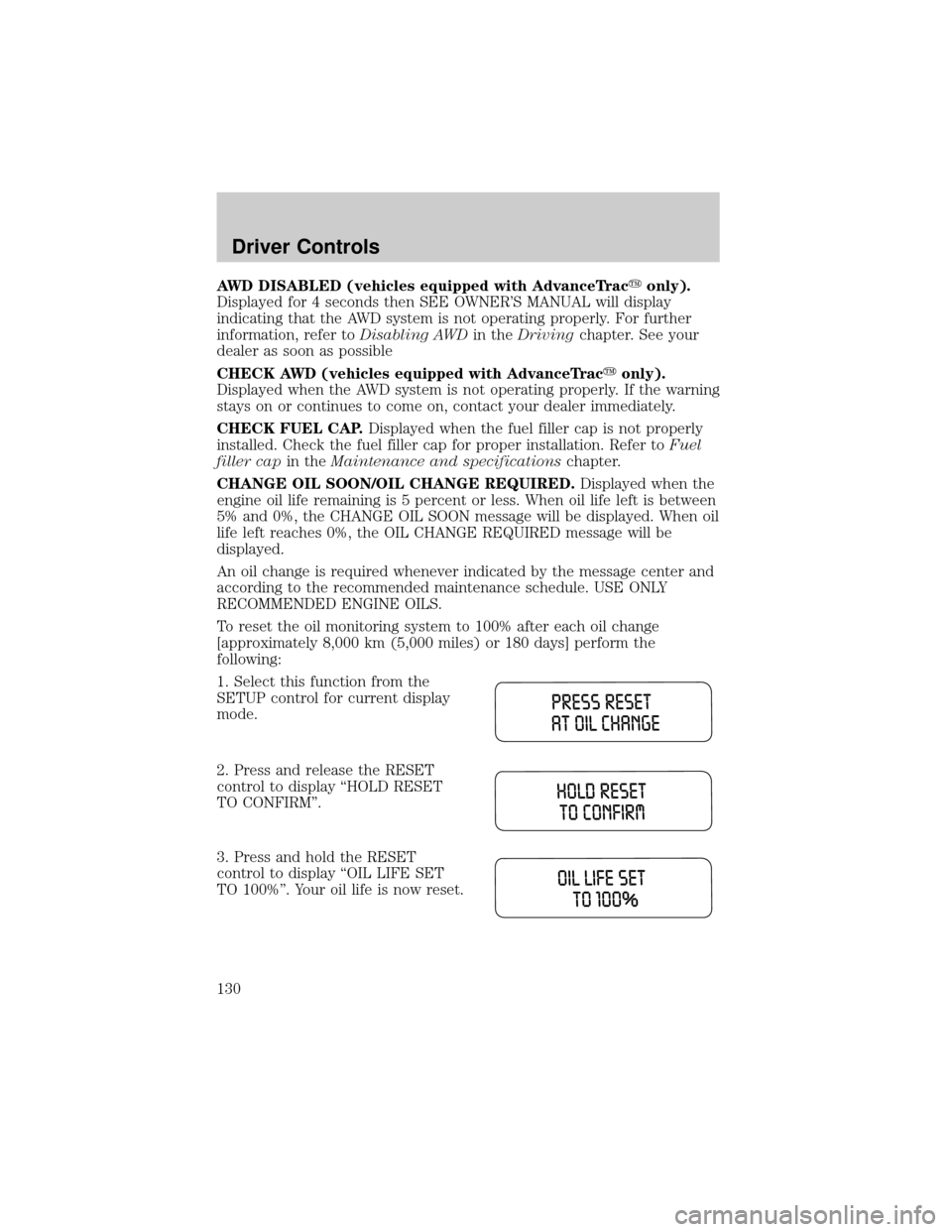
1. Select this function from the
SETUP control for current display
mode.
2. Press and release the RESET
control to display ªHOLD RESET
TO CONFIRMº.
3. Press and hold the RESET
control to display ªOIL LIFE SET
TO 100%º. Your oil life is now reset.
Driver Controls
130
Page 172 of 336
Do not sit on top of a buckled safety belt to avoid the Belt
Minder chime. Sitting on the safety belt will increase the risk of
injury in an accident. To disable (one-time) or deactivate the Belt
Minder feature please follow the directions stated below.
One time disable
Any time the safety belt is buckled and then unbuckled during an
ignition ON cycle, the BeltMinder will be disabled for that ignition cycle
only.
Deactivating/activating the BeltMinder feature
Read steps1-9thoroughly before proceeding with the
deactivation/activation programming procedure.
The BeltMinder feature can be deactivated/activated by performing the
following procedure:
Before following the procedure, make sure that:
²The parking brake is set
²The gearshift is in P (Park)
²The ignition switch is in the OFF position
²All vehicle doors are closed
²The driver's safety belt is unbuckled
²The parklamps/headlamps are in OFF position (If vehicle is equipped
with Autolamps, this will not affect the procedure.)
To reduce the risk of injury, do not deactivate/activate the Belt
Minder feature while driving the vehicle.
1. Turn the ignition switch to the RUN (or ON) position. (DO NOT
START THE ENGINE)
2. Wait until the safety belt warning light turns off. (Approximately 1±2
minutes)
²Steps 3±5 must be completed within 60 seconds or the procedure will
have to be repeated.
3. Buckle then unbuckle the safety belt three times, ending with the
safety belt unbuckled. This can be done before or during BeltMinder
warning activation.
4. Turn on the parklamps/headlamps, turn off the parklamps/headlamps.
Seating and Safety Restraints
172
Page 173 of 336
5. Buckle then unbuckle the safety belt three times, ending with the
safety belt unbuckled.
²After step 5 the safety belt warning light will be turned on for three
seconds.
6. Within seven seconds of the safety belt warning light turning off,
buckle then unbuckle the safety belt.
²This will disable BeltMinder if it is currently enabled, or enable
BeltMinder if it is currently disabled.
7. Confirmation of disabling BeltMinder is provided by flashing the safety
belt warning light four times per second for three seconds.
8. Confirmation of enabling BeltMinder is provided by flashing the safety
belt warning light four times per second for three seconds, followed by
three seconds with the safety belt warning light off, then followed by
flashing the safety belt warning light four times per second for three
seconds again.
9. After receiving confirmation, the deactivation/activation procedure is
complete.
Safety belt extension assembly
If the safety belt is too short when fully extended, there is a 20 cm (8
inch) safety belt extension assembly that can be added (part number
611C22). This assembly can be obtained from your dealer at no cost.
Use only extensions manufactured by the same supplier as the safety
belt. Manufacturer identification is located at the end of the webbing on
the label. Also, use the safety belt extension only if the safety belt is too
short for you when fully extended.
Do not use extensions to change the fit of the shoulder belt
across the torso.
Safety belt maintenance
Inspect the safety belt systems periodically to make sure they work
properly and are not damaged. Inspect the safety belts to make sure
there are no nicks, tears or cuts. Replace if necessary. All safety belt
assemblies, including retractors, buckles, front seat belt buckle
assemblies, buckle support assemblies (slide bar-if equipped), shoulder
belt height adjusters (if equipped), shoulder belt guide on seatback (if
equipped), child safety seat LATCH and tether anchors, and attaching
hardware, should be inspected after a collision. Ford Motor Company
Seating and Safety Restraints
173
Page 198 of 336
Brake Assist (if equipped)
The Brake Assist system provides full braking force during panic braking
situations. It detects a rapid application of the brake pedal and
maximizes the amount of brake booster assist, helping the driver to
achieve maximum braking pressure. Once a panic brake application is
detected, the system will remain activated as long as the brake pedal is
depressed. The system is deactivated by releasing the brake pedal.
When the system activates, the brake pedal will travel with very little
effort; this is normal.
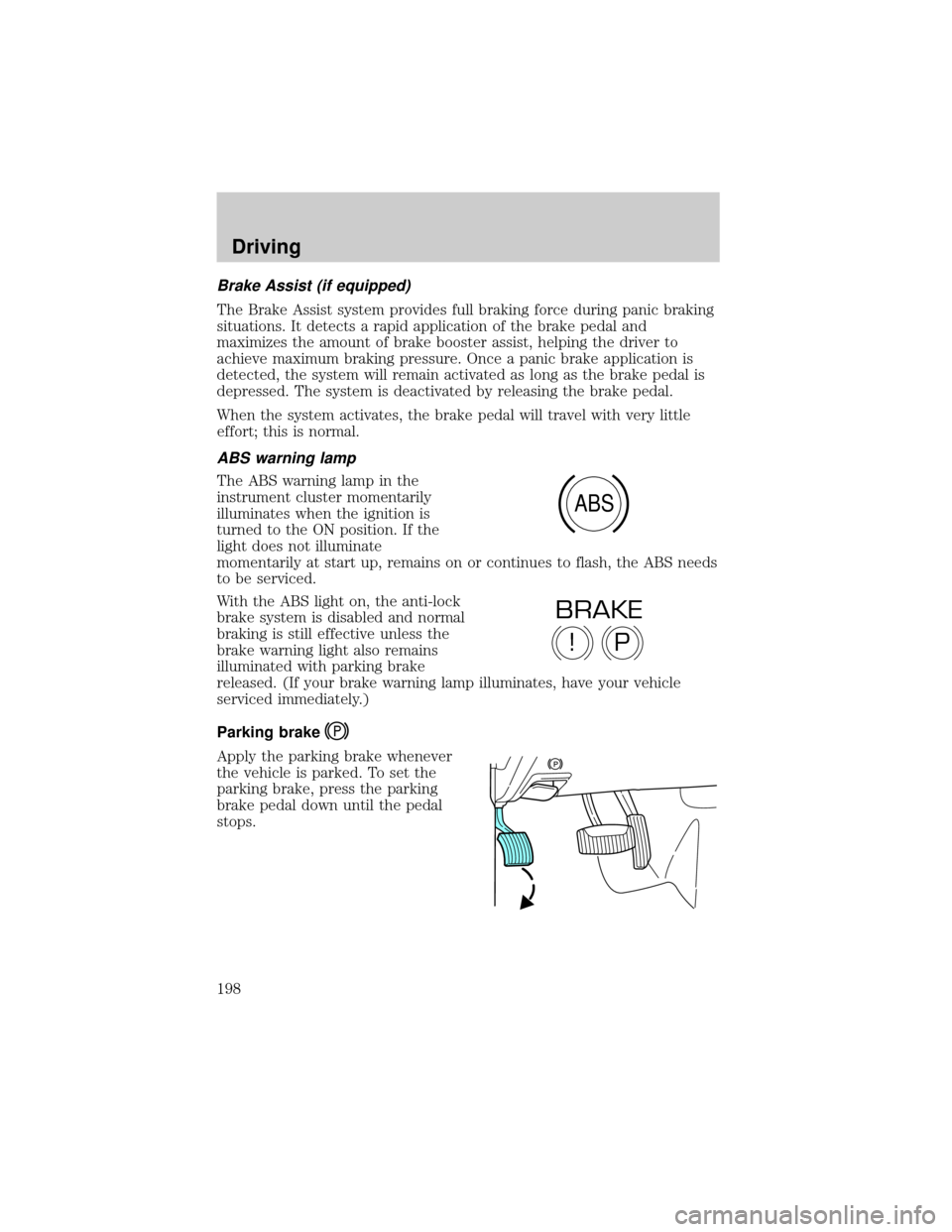
ABS warning lamp
The ABS warning lamp in the
instrument cluster momentarily
illuminates when the ignition is
turned to the ON position. If the
light does not illuminate
momentarily at start up, remains on or continues to flash, the ABS needs
to be serviced.
With the ABS light on, the anti-lock
brake system is disabled and normal
braking is still effective unless the
brake warning light also remains
illuminated with parking brake
released. (If your brake warning lamp illuminates, have your vehicle
serviced immediately.)
Parking brake
Apply the parking brake whenever
the vehicle is parked. To set the
parking brake, press the parking
brake pedal down until the pedal
stops.
ABS
P!
BRAKE
Driving
198
Page 212 of 336

Autolock operation (vehicles equipped with AdvanceTracYonly)
If the AWD system begins to overheat, the system will place itself in the
Autolock mode:
²the AWD LOCKED indicator light will illuminate in the instrument
cluster and AWD DISABLED
message center.
²AWD LOCKED will be displayed in the message center for four
seconds and a warning chime will sound. This condition may clear
without any action being taken by the driver.
²the AWD LOCKED indicator light in the instrument cluster will turn
off when the AWD system cools down.
²When the system is sufficiently cooled down, AWD AUTO RESTORED
will appear in the message center for four seconds and a warning
chime will sound.
Disabling AWD (vehicles equipped with AdvanceTracYonly)
When a problem is detected in the AWD system:
²the AWD LOCKED indicator light in the instrument cluster will flash
eight times every two minutes in the message center.
²The message center will then display AWD DISABLED for four
seconds, then SEE OWNER'S MANUAL. A warning chime will also
sound. The warning displays and chime will continue until RESET is
pressed (which will clear the message from the display).
²AWD LOCKED can still be engaged by pressing SETUP (the message
center will display AWD
RESET. The AWD LOCKED indicator light will illuminate in the
instrument cluster and the message center will display AWD
DISABLED
²To disable AWD, press RESET. The system will go back to AWD AUTO
mode momentarily, then the AWD LOCKED indicator light will flash in
the instrument cluster eight times every two minutes. The display will
then show AWD
turn off.
²If a serious problem occurs with the AWD system, the AWD LOCKED
indicator light in the instrument cluster will flash 10 times every two
minutes. The message center will also display CHECK AWD and a
warning chime will sound. You can press SETUP to check the status of
the AWD system (which will display AWD
but the AWD system will be disabled until the system is serviced.
Driving
212
Page 231 of 336

GETTING ROADSIDE ASSISTANCE
To fully assist you should you have a vehicle concern, Ford Motor
Company offers a complimentary roadside assistance program. This
program is separate from the New Vehicle Limited Warranty. The service
is available:
²24±hours, seven days a week
²for the New Vehicle Limited Warranty period of three years or 60,000
km (36,000 miles), whichever occurs first on Ford and Mercury
vehicles, and four years or 80,000 km (50,000 miles) on Lincoln
vehicles.
Roadside assistance will cover:
²changing a flat tire
²jump-starts
²lock-out assistance
²limited fuel delivery
²towing of your disabled vehicle to the nearest Ford Motor Company
dealership, or your selling dealer if within 56.3 km (35 miles) of the
nearest Ford Motor Company dealership (one tow per disablement).
Even non-warranty related tows, like accidents or getting stuck in the
mud or snow, are covered (some exclusions apply, such as impound
towing or repossession).
Canadian customers refer to your Owner Information Guide for
information on:
²coverage period
²exact fuel amounts
²towing of your disabled vehicle
²emergency travel expense reimbursement
²travel planning benefits
USING ROADSIDE ASSISTANCE
Complete the roadside assistance identification card and place it in your
wallet for quick reference. In the United States, this card is found in the
Owner Guide portfolio in the glove compartment in Ford vehicles and is
mailed to you if you own a Mercury or Lincoln. In Canada, the card is
found in the Owner Information Guide in the glove compartment.
U.S. Ford or Mercury vehicle customers who require roadside assistance,
call 1±800±241±3673; Lincoln vehicle customers call 1±800±521±4140.
Roadside Emergencies
Roadside Emergencies
231