ECO mode LINCOLN AVIATOR 2023 Owner's Manual
[x] Cancel search | Manufacturer: LINCOLN, Model Year: 2023, Model line: AVIATOR, Model: LINCOLN AVIATOR 2023Pages: 681, PDF Size: 9.33 MB
Page 172 of 681
Automatic Climate Control
Note:Adjusting the settings when your
vehicle interior is extremely hot or cold is not
necessary. Automatic mode is best
recommended to maintain set temperature.
Note:The system adjusts to heat or cool the
interior to the temperature you select as
quickly as possible.
Note:For the system to function efficiently,
the instrument panel and side air vents
should be fully open.
Note:If you select AUTO during cold outside
temperatures, the system directs air flow to
the windshield and side window air vents. In
addition, the blower motor may run at a
slower speed until the engine warms up.
Note:If you select AUTO during hot
temperatures and the inside of the vehicle
is hot, the system uses recirculated air to
maximize interior cooling. Blower motor
speed may also reduce until the air cools.
Quickly Heating the Interior
1. Press and release AUTO.2. Adjust the temperature function to the
setting you prefer.
Recommended Settings for Heating
1. Press and release AUTO.
2. Adjust the temperature function to the
setting you prefer. Use 72°F (22°C) as a
starting point, then adjust the setting as
necessary.
Quickly Cooling the Interior
1. Press and release MAX A/C.
Recommended Settings for Cooling
1. Press and release AUTO.
2. Adjust the temperature function to the
setting you prefer. Use 72°F (22°C) as a
starting point, then adjust the setting as
necessary.
Defogging the Side Windows in Cold
Weather
1. Press and release defrost or maximum
defrost.2. Adjust the temperature control to the
setting you prefer. Use 72°F (22°C) as a
starting point, then adjust the setting as
necessary.
REAR PASSENGER CLIMATE
CONTROLS - VEHICLES WITH:
QUADRUPLE ZONE AUTOMATIC
TEMPERATURE CONTROL
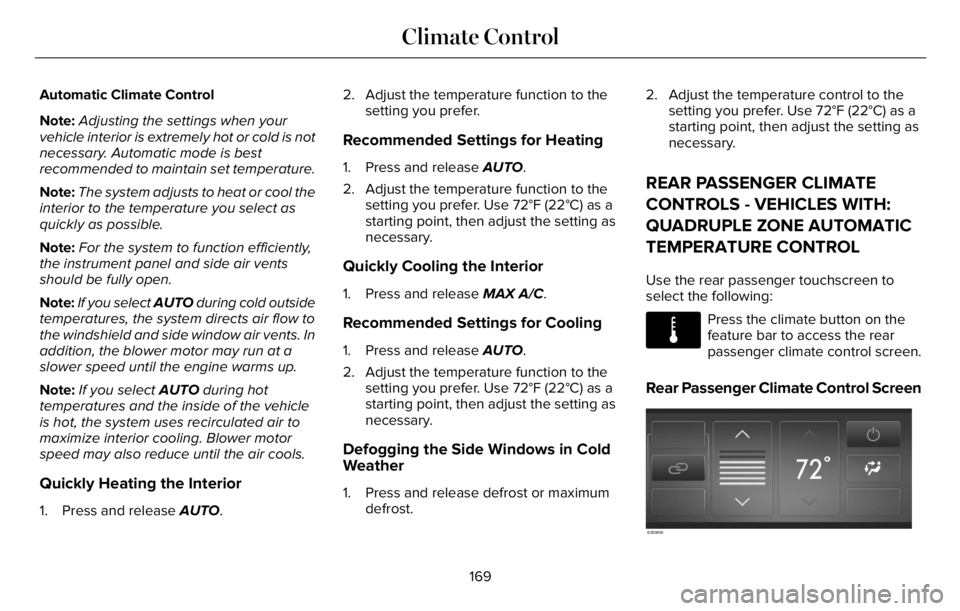
Use the rear passenger touchscreen to
select the following:
E283811
Press the climate button on the
feature bar to access the rear
passenger climate control screen.
Rear Passenger Climate Control Screen
E283809
169
Climate Control
Page 173 of 681
Selecting a Row
Press 2nd Row to control the second row
climate.
Press 3rd Row to control the third row
climate.
Linking the Rows
E282078
Press the button to simultaneously
control the climate of the second
and third row.
Setting the Rear Blower Motor Speed
Press the arrow buttons to adjust
the volume of air circulated in the
rear passenger compartment.
Setting the Rear Temperature
Press the arrow buttons to set the
temperature in the rear passenger
compartment.
Switching the Rear Climate Control On
and Off
Press the button to switch the
selected row controls on or off.
Note:When linked, touch the button to
switch both rows on or off.
Directing Air to the Overhead and Rear
Footwell Air Vents
Press the button to activate the
selection screen.
E244097Press the button to direct airflow
to the overhead air vents.
Press the button to direct airflow
to the rear footwell air vents.
Switching Rear Auto Mode On and Off
Press AUTO switch on rear automatic
operation, then set the temperature.
Rear Climate Control Lock Message
A message displays when the controls are
locked through the front and you try to
operate them.
REAR PASSENGER CLIMATE
CONTROLS - VEHICLES WITH:
TRIPLE ZONE AUTOMATIC
TEMPERATURE CONTROL
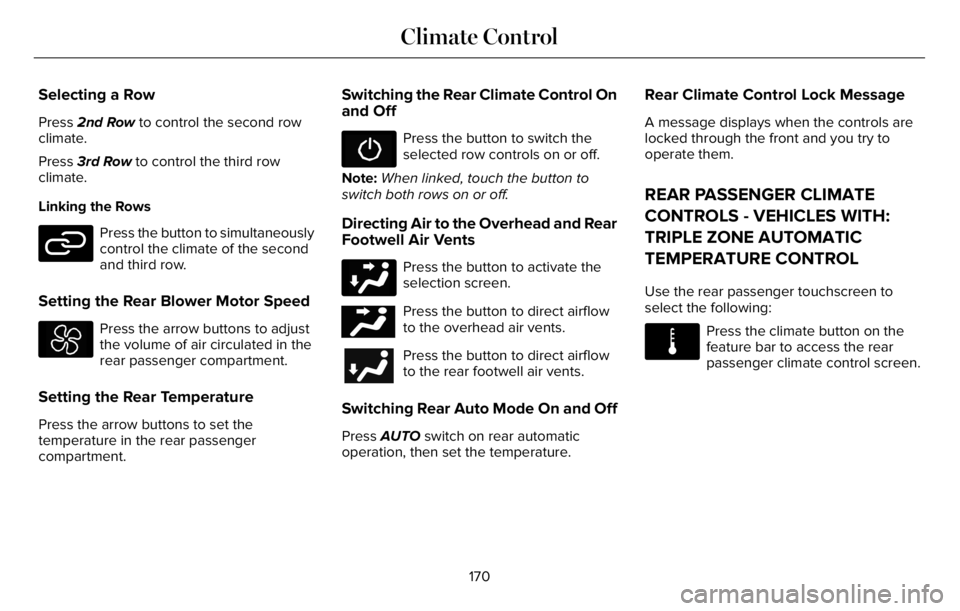
Use the rear passenger touchscreen to
select the following:
E283811
Press the climate button on the
feature bar to access the rear
passenger climate control screen.
170
Climate Control
Page 187 of 681
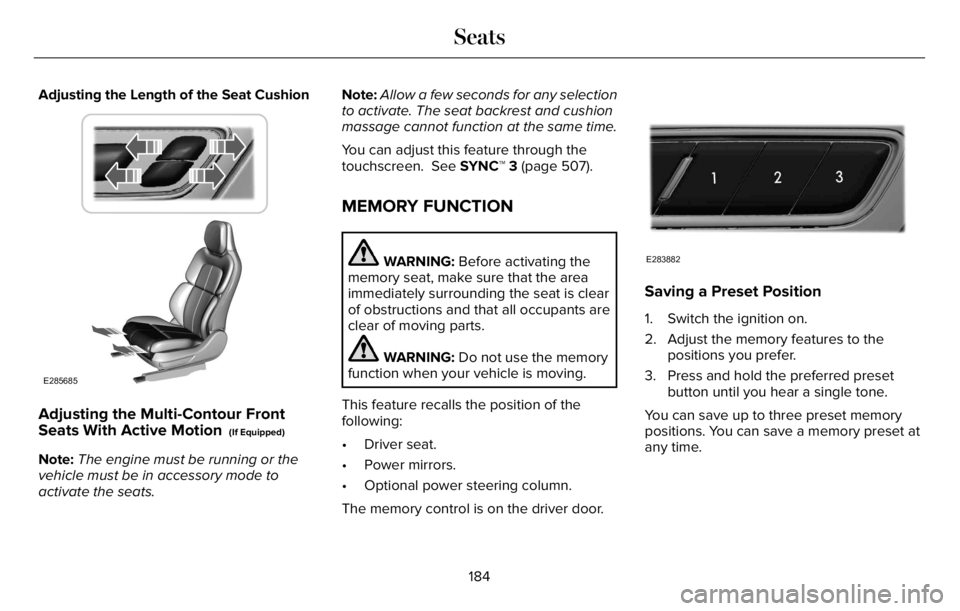
Adjusting the Length of the Seat Cushion
E285685
Adjusting the Multi-Contour Front
Seats With Active Motion (If Equipped)
Note:The engine must be running or the
vehicle must be in accessory mode to
activate the seats.Note:Allow a few seconds for any selection
to activate. The seat backrest and cushion
massage cannot function at the same time.
You can adjust this feature through the
touchscreen. See SYNC™ 3 (page 507).
MEMORY FUNCTION
WARNING: Before activating the
memory seat, make sure that the area
immediately surrounding the seat is clear
of obstructions and that all occupants are
clear of moving parts.
WARNING: Do not use the memory
function when your vehicle is moving.
This feature recalls the position of the
following:
• Driver seat.
• Power mirrors.
• Optional power steering column.
The memory control is on the driver door.
E283882
Saving a Preset Position
1. Switch the ignition on.
2. Adjust the memory features to the
positions you prefer.
3. Press and hold the preferred preset
button until you hear a single tone.
You can save up to three preset memory
positions. You can save a memory preset at
any time.
184
Seats
Page 203 of 681
12 Volt DC Power Point
WARNING: Do not plug optional
electrical accessories into the cigar lighter
socket. Incorrect use of the cigar lighter
can cause damage not covered by the
vehicle warranty, and can result in fire or
serious injury.
Note:When you switch the ignition on, you
can use the socket to power 12 volt
appliances with a maximum current rating
of 15 amps.
Note:If the power supply does not work after
you switch the ignition off, switch the ignition
on.
Note:Do not hang any accessory from the
accessory plug.
Note:Do not use the power point over the
vehicle capacity of 12 volt DC 180 watts or
a fuse may blow.
Note:Always keep the power point caps
closed when not in use.Do not insert objects other than an accessory
plug into the power point. This damages the
power point and may blow the fuse.
Run the vehicle for full capacity use of the
power point.
To prevent the battery from running out of
charge:
• Do not use the power point longer than
necessary when the vehicle is not
running.
• Do not leave devices plugged in
overnight or when you park your vehicle
for extended periods.
USB Port and Power Point Locations
USB Ports and Power Points may be in the
following locations:
• On the lower instrument panel.
• Inside the first row center console.
• Inside the second row center console.
• On the front of the center console.
• On the rear of the center console.
• In the cargo area.• On the passenger side floor panel.
• 3rd row on the quarter trim panels.
Note:Some of the USB ports may not have
data transfer capabilities.
Note:Incorrect use of the USB ports can
cause damage not covered by the vehicle
warranty.
110 Volt AC Power Point
WARNING: Do not keep electrical
devices plugged in the power point
whenever the device is not in use. Do not
use any extension cord with the 110 volt
AC power point, since it will defeat the
safety protection design. Doing so may
cause the power point to overload due to
powering multiple devices that can reach
beyond the 150 watt load limit and could
result in fire or serious injury.
Note:The power point turns off when you
switch off the ignition, when the vehicle is
not in accessory mode or when the battery
voltage drops below 11 volts.
200
Auxiliary Power Points
Page 205 of 681
WHAT IS THE WIRELESS
ACCESSORY CHARGER
The wireless accessory charger allows you
to charge one compatible Qi wireless
charging device on the charging area.
WIRELESS ACCESSORY CHARGER
PRECAUTIONS
WARNING: Wireless charging
devices can affect the operation of
implanted medical devices, including
cardiac pacemakers. If you have any
implanted medical devices, we recommend
that you consult with your physician.
Keep the charging area clean and remove
foreign objects prior to charging a device.Do not place items with a magnetic strip or
radio-frequency identification chip, for
example passports, parking tickets,
transportation passes or credit cards, near
the charging area when charging a device.
Damage could occur to the magnetic strip
or radio-frequency identification chip.
Do not place metal objects, for example
remote controls, coins and candy wrappers,
on or near the charging area when charging
a device. Metal objects may heat up and
degrade the charging performance, in
addition to causing interruptions in charging.
Charging could be interrupted, degraded, or
could stop if any of the following occur:
• The system detects a foreign object.
• The device is misaligned on the charging
area.
• The device moves on the active charging
area when the vehicle is in motion.
• The vehicle ambient temperature is too
high.
• You attempt to charge a non-Qi
compatible device on the wireless
charger.Note:During charging, the device and the
charger could heat up, this is normal. If the
battery gets hotter than usual, the device
may stop charging.
LOCATING THE WIRELESS
ACCESSORY CHARGER
E297549
The charging area is on the center
console or in the media bin below
the instrument panel.
CHARGING A WIRELESS DEVICE
Place the device on the center of the
charging surface with the charging side
down. The charging stops after your device
reaches a full charge.
You can use the charger when the vehicle
is in accessory mode, when the vehicle is
running, or when SYNC is on.
Displays on the status bar when
wireless charging is in progress.
202
Wireless Accessory Charger (If Equipped)
Page 208 of 681
GENERAL INFORMATION
WARNING: Extended idling at high
engine speeds can produce very high
temperatures in the engine and exhaust
system, creating the risk of fire or other
damage.
WARNING: Do not park, idle or drive
your vehicle on dry grass or other dry
ground cover. The emission system heats
up the engine compartment and exhaust
system, creating the risk of fire.
WARNING: Do not start the engine
in a closed garage or in other enclosed
areas. Exhaust fumes are toxic. Always
open the garage door before you start the
engine. Failure to follow this instruction
could result in personal injury or death.
WARNING: Exhaust leaks may result
in entry of harmful and potentially lethal
fumes into the passenger compartment. If
you smell exhaust fumes inside your
vehicle, have your vehicle inspected
immediately. Do not drive if you smell
exhaust fumes.
If you disconnect the battery, your vehicle
may exhibit some unusual driving
characteristics for approximately 6 mi (10 km)
after you reconnect it. This is because the
engine management system must realign
itself with the engine. You can disregard any
unusual driving characteristics during this
period.
The powertrain control system meets all
Canadian interference-causing equipment
standard requirements regulating the
impulse electrical field or radio noise.
When you start the engine, avoid pressing
the accelerator pedal before and during
operation. Only use the accelerator pedal
when you have difficulty starting the engine.
KEYLESS STARTING
Note:The system may not function if the
remote control is close to metal objects or
electronic devices, for example keys or a
cell phone.
Note:A valid remote control must be located
inside your vehicle to switch the ignition on
and start your vehicle.
Ignition Modes
E144447
The keyless starting system has three
modes:
Off: Turns the ignition off.
205
Starting and Stopping the Engine
Page 209 of 681
• Without applying the brake pedal, press
and release the button once when the
ignition is in the on mode, or when your
vehicle is running but is not moving.
On: All electrical circuits are operational and
the warning lamps and indicators illuminate.
• Without applying the brake pedal, press
and release the button once.
Start: Starts your vehicle. The engine may
not start when your vehicle starts.
• Press the brake pedal, and then press
the button for any length of time. An
indicator light on the button illuminates
when the ignition is on and when your
vehicle starts.
STARTING A GASOLINE ENGINE
When you start the engine, the idle speed
increases. This helps to warm up the
engine. If the engine idle speed does not
slow down, have your vehicle checked as
soon as possible.Note: You can crank the engine for a total
of 60 seconds without the engine starting
before the starting system temporarily
disables. The 60 seconds does not have to
be all at once. For example, if you crank the
engine three times for 20 seconds each time,
without the engine starting, you reached the
60-second time limit. A message appears
in the information display alerting you that
you exceeded the cranking time. You
cannot attempt to start the engine for at
least 15 minutes. After 15 minutes, you are
limited to a 15-second engine cranking time.
You need to wait 60 minutes before you can
crank the engine for 60 seconds again.
Before starting your vehicle, check the
following:
• Make sure all occupants have fastened
their seatbelts.
• Make sure the headlamps and electrical
accessories are off.
• Make sure the parking brake is on.
• Make sure the transmission is in park (P).
• Switch the ignition on.
Note:Do not touch the accelerator pedal.Note:You must have your intelligent access
key in your vehicle in order to shift the
transmission out of park (P).
1. Fully press the brake pedal.
2. Press the push button ignition switch.
The system does not function if:
• The passive key frequencies are jammed.
• The key battery has no charge.
If you are unable to start your vehicle, do the
following:
206
Starting and Stopping the Engine
Page 219 of 681
• The trailer is not connected.
• If you select Normal, Conserve, or
Slippery.
• You are not in 4H or 4L.
• You have not selected Manual shift
mode.
• Hill descent control is not active.
• You have not selected Tow haul, Excite,
Deep, or Slow Climb.
Note:When in Excite mode, Start/Stop can
be enabled by pressing the Auto-Start-Stop
button.
E121377
The green Auto-Start-Stop
indicator light on the instrument
cluster will illuminate to indicate
when the automatic engine stop occurs.
E146361
If the instrument cluster is
equipped with a grey
Auto-Start-Stop indicator light, it
illuminates when automatic engine stop is
not available due to one of the above noted
conditions not being met.Automatic Engine Restart
Any of the following conditions will result in
an automatic restart of the engine:
• You have removed your foot from the
brake pedal.
• You press the accelerator pedal.
• You press the accelerator and the brake
pedal at the same time.
• The driver safety belt becomes
unfastened or the driver door is ajar.
• Your vehicle is moving.
• The interior compartment does not meet
customer comfort when air conditioning
or heat is on.
• Fogging of the windows could occur and
the air conditioning is on.
• The battery is not within optimal
operating conditions.
• You have exceeded the maximum engine
off time.
• When you press the Auto-Start-Stop
button with the engine automatically
stopped.• The front defroster is turned to the Max
setting.
• When you shift into park (P), the engine
will restart.
Any of the following conditions may result in
an automatic restart of the engine:
• You have increased the blower fan speed
or changed the climate control
temperature.
• You have an electrical accessory turned
on or plugged in.
Note:You may notice that the climate seat
fan fluctuates during an automatic restart.
Disabling Auto-Start-Stop
E287975
Press the button on the instrument
panel to access the
Auto-Start-Stop feature on the
touchscreen. Use the touchscreen to
deactivate the feature.
Deactivating the feature lasts only 1 key
cycle. Use the touchscreen to restore
Auto-Start-Stop function.
216
Unique Driving Characteristics
Page 220 of 681
Note:If the Shift to park (P), Restart Engine
message appears and the amber
Auto-Start-Stop indicator light flashes in the
instrument cluster. This indicates automatic
restart is unavailable. You must restart the
vehicle manually. See Information Displays
(page 136).
If your vehicle is in an engine off
Auto-Start-Stop, shifting from drive (D) to
reverse (R) will not cause a restart if you do
not press the brake pedal. The message
Auto-Start-Stop Press Brake to Start Engine
appears. You must press the brake pedal
within 60 seconds or the system requires
you to shift into park (P) and manually restart
your vehicle.
HYBRID VEHICLE OPERATION
This hybrid vehicle combines electric and
gasoline propulsion to provide breakthrough
performance and improved efficiency.
Familiarizing yourself with these unique
characteristics provides an optimal driving
experience from your vehicle.
Starting
E293827
When you start your vehicle, a
green READY indicator light
appears in the instrument cluster
letting you know that your vehicle is ready
for driving.
The engine may not start because your
vehicle has a silent key start feature. This
fuel saving feature allows your vehicle to be
ready to drive without requiring the gas
engine to be running. The indicator remains
on when your vehicle is on, whether the
engine is running or not, to indicate your
vehicle is capable of movement using the
electric motor, gas engine or both. Typically,
the engine does not start unless the vehicle
is cold, a climate control change is requested
or you press the accelerator pedal.
Driving
The gas engine automatically starts and
stops to provide power when needed and
to save fuel when not needed. When
coasting at low speeds, coming to a stop, or
standing, the gas engine normally shuts
down and your vehicle operates in
electric-only mode.
Conditions that may cause the engine to start
up or remain running include:
• Considerable vehicle acceleration.
• Climbing a hill.
• Charge level of high voltage battery is
low.
• High or low outside temperatures in
order to provide system heating or
cooling.
• Engine not warm enough to provide
passenger requested cabin temperature.
• Towing a trailer.
217
Unique Driving Characteristics
Page 221 of 681
• Selectable drive modes: Certain
selectable drive modes may cause the
engine to run. See What Is Drive Mode
Control (page 343).
• Live in Drive: Use of the paddle shifters
while in drive (D) may cause the engine
to run. See Automatic Transmission
(page 259).
Stopping
The gas engine may shut off to conserve fuel
as you come to a stop. Restarting your
vehicle is not required. Simply step on the
accelerator when you are ready to drive.
Transmission Operation
The engine and electric motor together
propel the vehicle through the automatic
transmission. This is normal hybrid operating
and helps deliver fuel efficiency and
performance.
Battery
Your hybrid is equipped with a high voltage
battery. A cool battery maintains battery life
and provides the best possible performance.
The high voltage battery is cooled by the
vehicle's air conditioning system. When the
air conditioning system is on, you may notice
a slight increase in air temperature coming
from the climate control vents while the
battery is cooling. You may also notice cool
air flowing from the vents when the air
conditioning or blower is off.
Braking
Your hybrid is equipped with standard
hydraulic braking and regenerative braking.
Regenerative braking is performed by your
transmission and it captures brake energy
and stores it in the high voltage battery.You may also notice during extending
downhill driving that your engine continues
to run instead of shutting off. During this
engine braking, the engine stays on, but it is
not using any fuel. You may also hear a slight
whine or whistle when operating your
vehicle. This is the normal operation of the
electric motor in the hybrid system.
Driving to Optimize Fuel Economy
Note:Having your engine running is not
always an indication of inefficiency. In some
cases, it is actually more efficient than
driving in electric mode.
Your fuel economy should improve
throughout your hybrid's break-in period. As
with any vehicle, your driving habits and
accessory usage can significantly impact
your fuel economy. For best results, keep
these tips in mind:
218
Unique Driving Characteristics