warning LINCOLN AVIATOR 2023 Repair Manual
[x] Cancel search | Manufacturer: LINCOLN, Model Year: 2023, Model line: AVIATOR, Model: LINCOLN AVIATOR 2023Pages: 681, PDF Size: 9.33 MB
Page 137 of 681
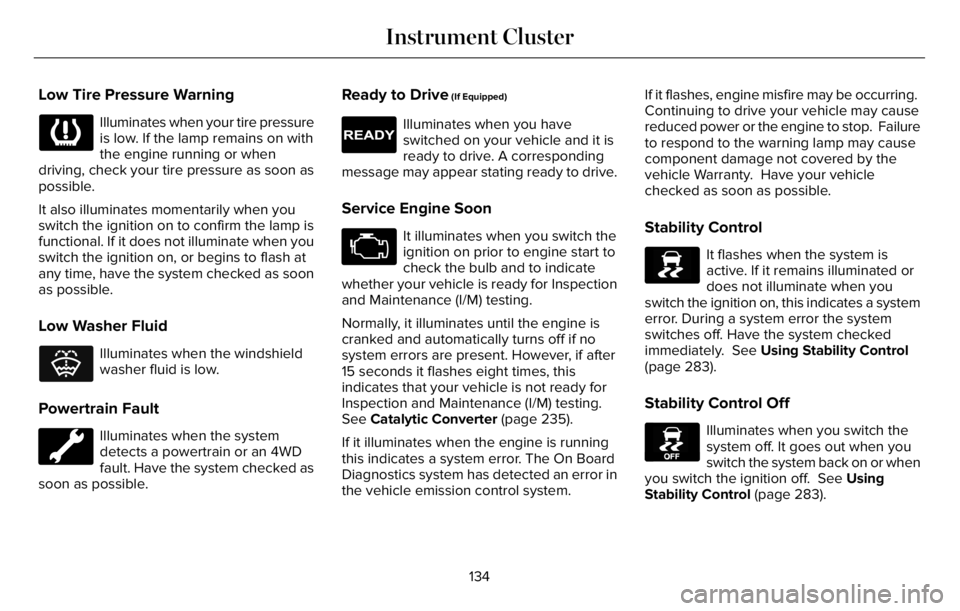
Low Tire Pressure Warning
Illuminates when your tire pressure
is low. If the lamp remains on with
the engine running or when
driving, check your tire pressure as soon as
possible.
It also illuminates momentarily when you
switch the ignition on to confirm the lamp is
functional. If it does not illuminate when you
switch the ignition on, or begins to flash at
any time, have the system checked as soon
as possible.
Low Washer Fluid
E132353
Illuminates when the windshield
washer fluid is low.
Powertrain Fault
Illuminates when the system
detects a powertrain or an 4WD
fault. Have the system checked as
soon as possible.
Ready to Drive (If Equipped)
E224090
Illuminates when you have
switched on your vehicle and it is
ready to drive. A corresponding
message may appear stating ready to drive.
Service Engine Soon
It illuminates when you switch the
ignition on prior to engine start to
check the bulb and to indicate
whether your vehicle is ready for Inspection
and Maintenance (I/M) testing.
Normally, it illuminates until the engine is
cranked and automatically turns off if no
system errors are present. However, if after
15 seconds it flashes eight times, this
indicates that your vehicle is not ready for
Inspection and Maintenance (I/M) testing.
See Catalytic Converter (page 235).
If it illuminates when the engine is running
this indicates a system error. The On Board
Diagnostics system has detected an error in
the vehicle emission control system.If it flashes, engine misfire may be occurring.
Continuing to drive your vehicle may cause
reduced power or the engine to stop. Failure
to respond to the warning lamp may cause
component damage not covered by the
vehicle Warranty. Have your vehicle
checked as soon as possible.Stability Control
E138639
It flashes when the system is
active. If it remains illuminated or
does not illuminate when you
switch the ignition on, this indicates a system
error. During a system error the system
switches off. Have the system checked
immediately. See Using Stability Control
(page 283).
Stability Control Off
E130458
Illuminates when you switch the
system off. It goes out when you
switch the system back on or when
you switch the ignition off. See Using
Stability Control (page 283).
134
Instrument Cluster
Page 138 of 681
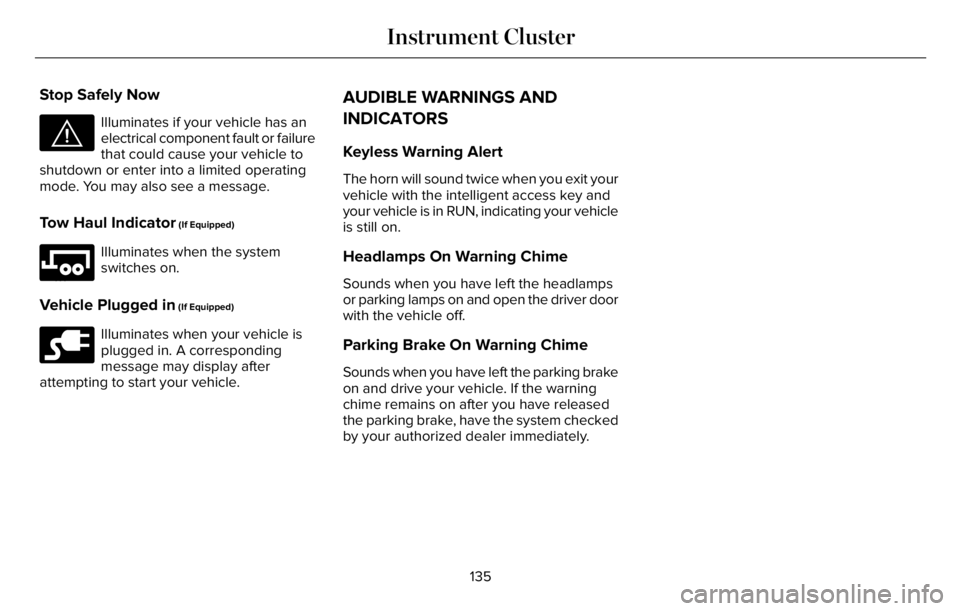
Stop Safely Now
E144693
Illuminates if your vehicle has an
electrical component fault or failure
that could cause your vehicle to
shutdown or enter into a limited operating
mode. You may also see a message.
Tow Haul Indicator (If Equipped)
E246592
Illuminates when the system
switches on.
Vehicle Plugged in (If Equipped)
E228962
Illuminates when your vehicle is
plugged in. A corresponding
message may display after
attempting to start your vehicle.
AUDIBLE WARNINGS AND
INDICATORS
Keyless Warning Alert
The horn will sound twice when you exit your
vehicle with the intelligent access key and
your vehicle is in RUN, indicating your vehicle
is still on.
Headlamps On Warning Chime
Sounds when you have left the headlamps
or parking lamps on and open the driver door
with the vehicle off.
Parking Brake On Warning Chime
Sounds when you have left the parking brake
on and drive your vehicle. If the warning
chime remains on after you have released
the parking brake, have the system checked
by your authorized dealer immediately.
135
Instrument Cluster
Page 139 of 681
GENERAL INFORMATION
WARNING: Driving while distracted
can result in loss of vehicle control, crash
and injury. We strongly recommend that
you use extreme caution when using any
device that may take your focus off the
road. Your primary responsibility is the safe
operation of your vehicle. We recommend
against the use of any hand-held device
while driving and encourage the use of
voice-operated systems when possible.
Make sure you are aware of all applicable
local laws that may affect the use of
electronic devices while driving.
You can control various systems on your
vehicle using the quick action menu on the
right-hand side of the steering wheel. The
information display provides the
corresponding information.
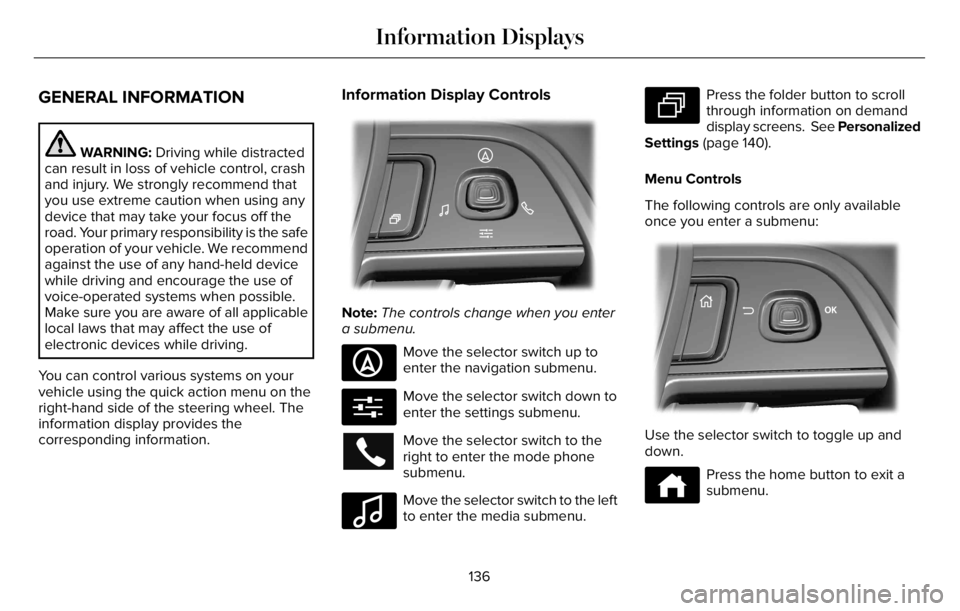
Information Display Controls
EE281281818181818111118220222222022022220220
Note:The controls change when you enter
a submenu.
E281481
Move the selector switch up to
enter the navigation submenu.
E280315
Move the selector switch down to
enter the settings submenu.
Move the selector switch to the
right to enter the mode phone
submenu.
E100027
Move the selector switch to the left
to enter the media submenu.
E281483
Press the folder button to scroll
through information on demand
display screens. See Personalized
Settings (page 140).
Menu Controls
The following controls are only available
once you enter a submenu:
EE2992992999999999999999701701701070107010701
Use the selector switch to toggle up and
down.
E272621
Press the home button to exit a
submenu.
136
Information Displays
Page 148 of 681
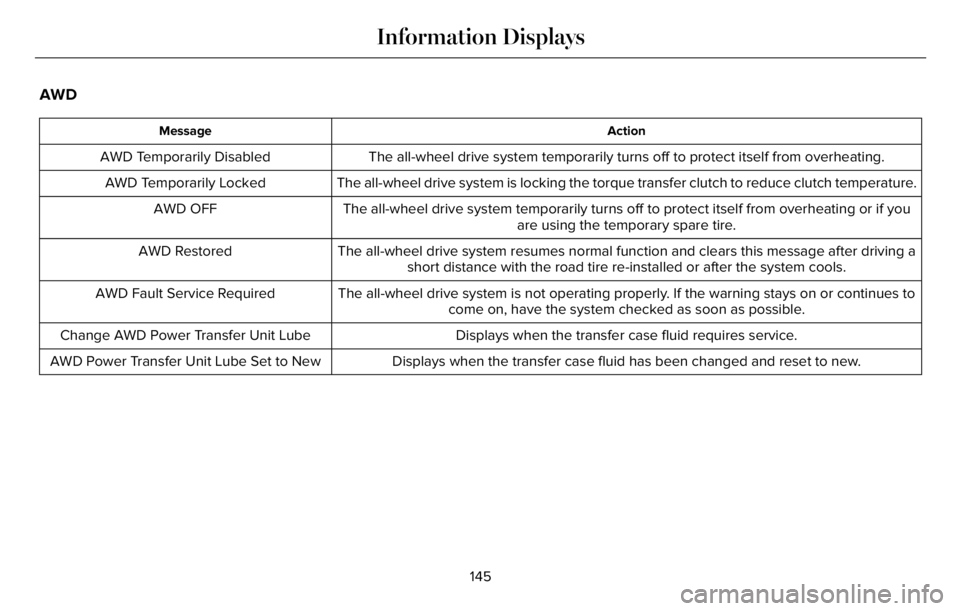
AWD
Action Message
The all-wheel drive system temporarily turns off to protect itself from overheating. AWD Temporarily Disabled
The all-wheel drive system is locking the torque transfer clutch to reduce clutch temperature. AWD Temporarily Locked
The all-wheel drive system temporarily turns off to protect itself from overheating or if you
are using the temporary spare tire. AWD OFF
The all-wheel drive system resumes normal function and clears this message after driving a
short distance with the road tire re-installed or after the system cools. AWD Restored
The all-wheel drive system is not operating properly. If the warning stays on or continues to
come on, have the system checked as soon as possible. AWD Fault Service Required
Displays when the transfer case fluid requires service. Change AWD Power Transfer Unit Lube
Displays when the transfer case fluid has been changed and reset to new. AWD Power Transfer Unit Lube Set to New
145
Information Displays
Page 149 of 681
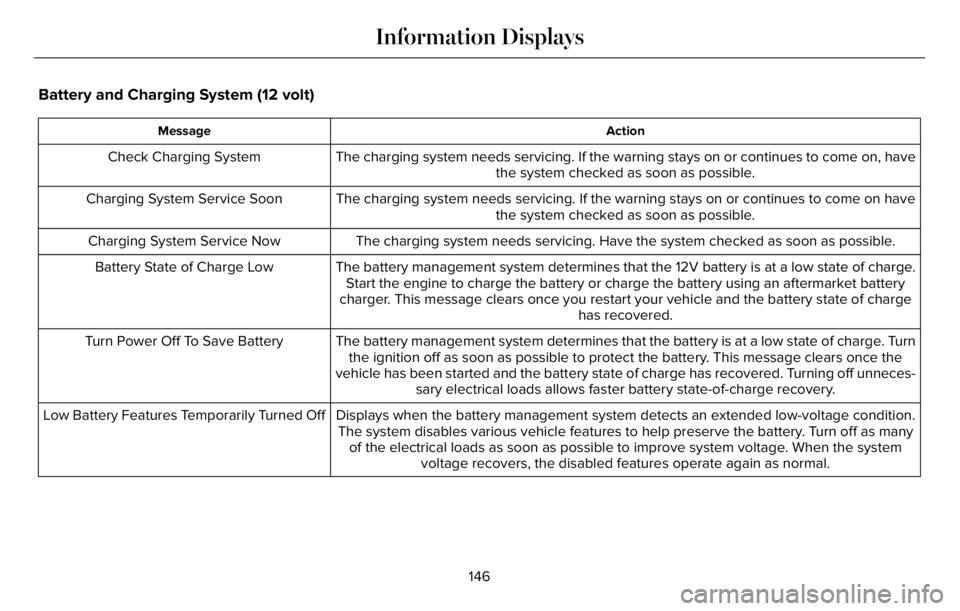
Battery and Charging System (12 volt)
Action Message
The charging system needs servicing. If the warning stays on or continues to come on, have
the system checked as soon as possible. Check Charging System
The charging system needs servicing. If the warning stays on or continues to come on have
the system checked as soon as possible. Charging System Service Soon
The charging system needs servicing. Have the system checked as soon as possible. Charging System Service Now
The battery management system determines that the 12V battery is at a low state of charge.
Start the engine to charge the battery or charge the battery using an aftermarket battery
charger. This message clears once you restart your vehicle and the battery state of charge
has recovered. Battery State of Charge Low
The battery management system determines that the battery is at a low state of charge. Turn
the ignition off as soon as possible to protect the battery. This message clears once the
vehicle has been started and the battery state of charge has recovered. Turning off unneces-
sary electrical loads allows faster battery state-of-charge recovery. Turn Power Off To Save Battery
Displays when the battery management system detects an extended low-voltage condition.
The system disables various vehicle features to help preserve the battery. Turn off as many
of the electrical loads as soon as possible to improve system voltage. When the system
voltage recovers, the disabled features operate again as normal. Low Battery Features Temporarily Turned Off
146
Information Displays
Page 153 of 681
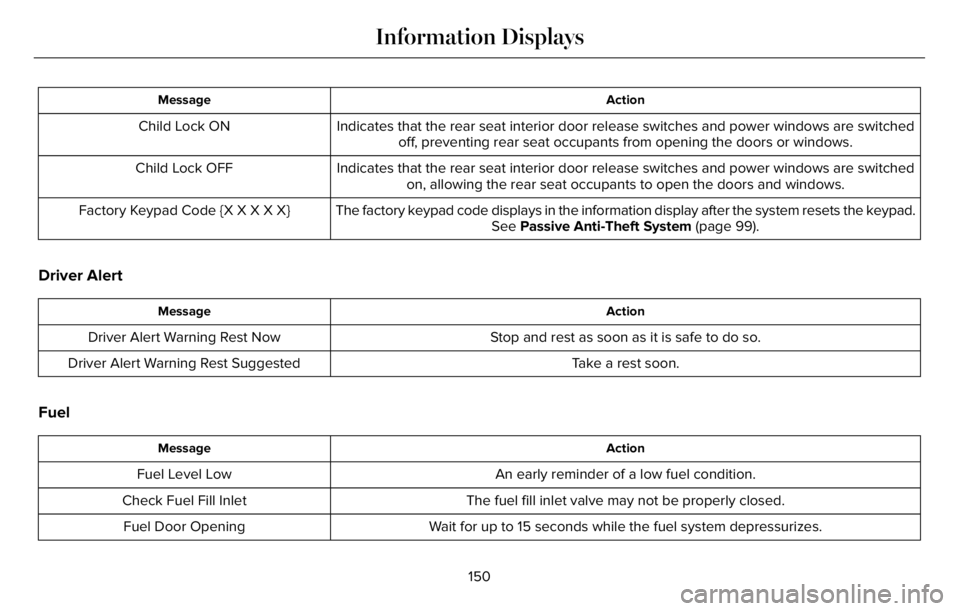
Action Message
Indicates that the rear seat interior door release switches and power windows are switched
off, preventing rear seat occupants from opening the doors or windows. Child Lock ON
Indicates that the rear seat interior door release switches and power windows are switched
on, allowing the rear seat occupants to open the doors and windows. Child Lock OFF
The factory keypad code displays in the information display after the system resets the keypad.
See Passive Anti-Theft System (page 99). Factory Keypad Code {X X X X X}
Driver Alert
Action Message
Stop and rest as soon as it is safe to do so. Driver Alert Warning Rest Now
Take a rest soon. Driver Alert Warning Rest Suggested
Fuel
Action Message
An early reminder of a low fuel condition. Fuel Level Low
The fuel fill inlet valve may not be properly closed. Check Fuel Fill Inlet
Wait for up to 15 seconds while the fuel system depressurizes. Fuel Door Opening
150
Information Displays
Page 158 of 681
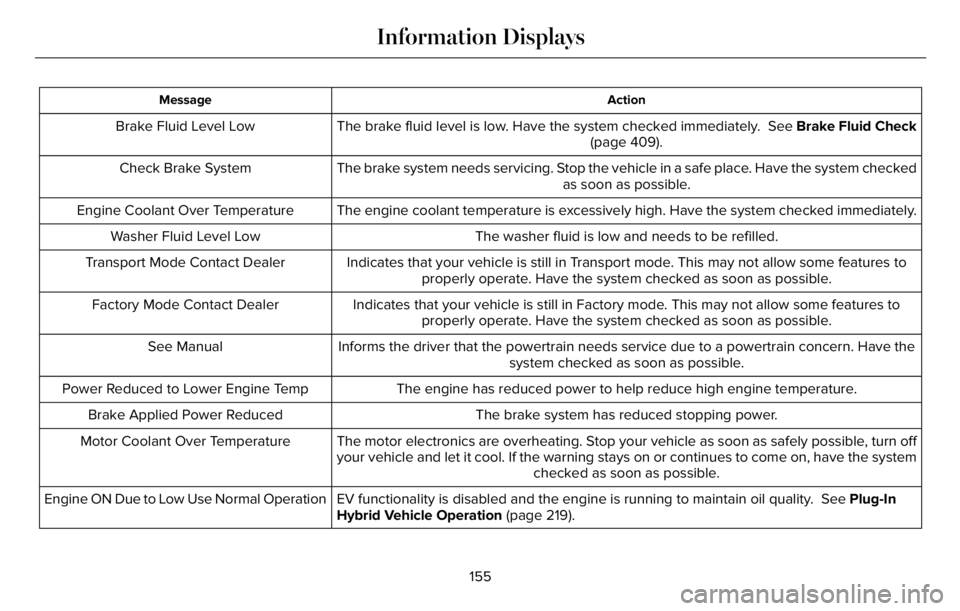
Action Message
The brake fluid level is low. Have the system checked immediately. See Brake Fluid Check
(page 409). Brake Fluid Level Low
The brake system needs servicing. Stop the vehicle in a safe place. Have the system checked
as soon as possible. Check Brake System
The engine coolant temperature is excessively high. Have the system checked immediately. Engine Coolant Over Temperature
The washer fluid is low and needs to be refilled. Washer Fluid Level Low
Indicates that your vehicle is still in Transport mode. This may not allow some features to
properly operate. Have the system checked as soon as possible. Transport Mode Contact Dealer
Indicates that your vehicle is still in Factory mode. This may not allow some features to
properly operate. Have the system checked as soon as possible. Factory Mode Contact Dealer
Informs the driver that the powertrain needs service due to a powertrain concern. Have the
system checked as soon as possible. See Manual
The engine has reduced power to help reduce high engine temperature. Power Reduced to Lower Engine Temp
The brake system has reduced stopping power. Brake Applied Power Reduced
The motor electronics are overheating. Stop your vehicle as soon as safely possible, turn off
your vehicle and let it cool. If the warning stays on or continues to come on, have the system
checked as soon as possible. Motor Coolant Over Temperature
EV functionality is disabled and the engine is running to maintain oil quality. See Plug-In
Hybrid Vehicle Operation (page 219). Engine ON Due to Low Use Normal Operation
155
Information Displays
Page 161 of 681
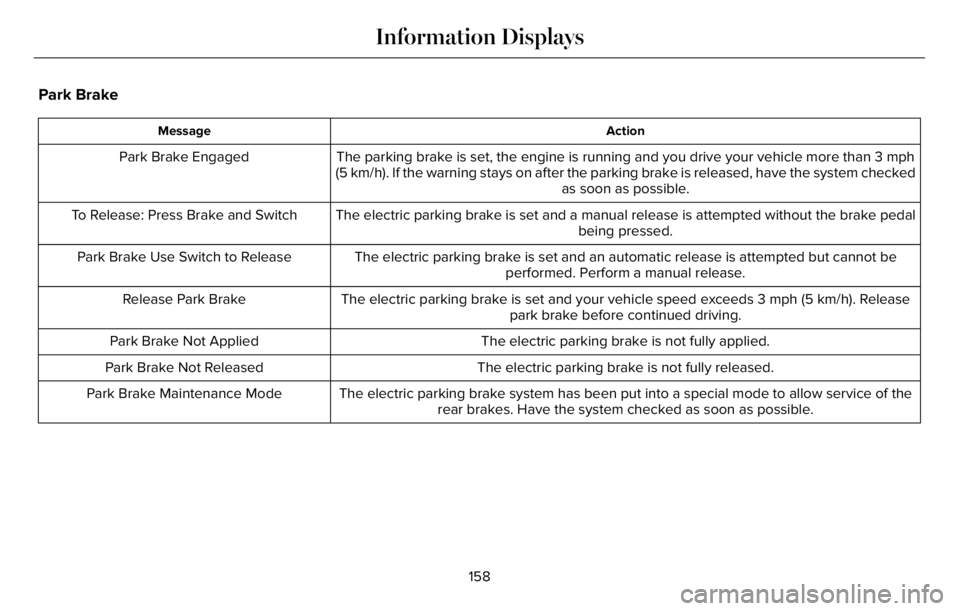
Park Brake
Action Message
The parking brake is set, the engine is running and you drive your vehicle more than 3 mph
(5 km/h). If the warning stays on after the parking brake is released, have the system checked
as soon as possible. Park Brake Engaged
The electric parking brake is set and a manual release is attempted without the brake pedal
being pressed. To Release: Press Brake and Switch
The electric parking brake is set and an automatic release is attempted but cannot be
performed. Perform a manual release. Park Brake Use Switch to Release
The electric parking brake is set and your vehicle speed exceeds 3 mph (5 km/h). Release
park brake before continued driving. Release Park Brake
The electric parking brake is not fully applied. Park Brake Not Applied
The electric parking brake is not fully released. Park Brake Not Released
The electric parking brake system has been put into a special mode to allow service of the
rear brakes. Have the system checked as soon as possible. Park Brake Maintenance Mode
158
Information Displays
Page 163 of 681
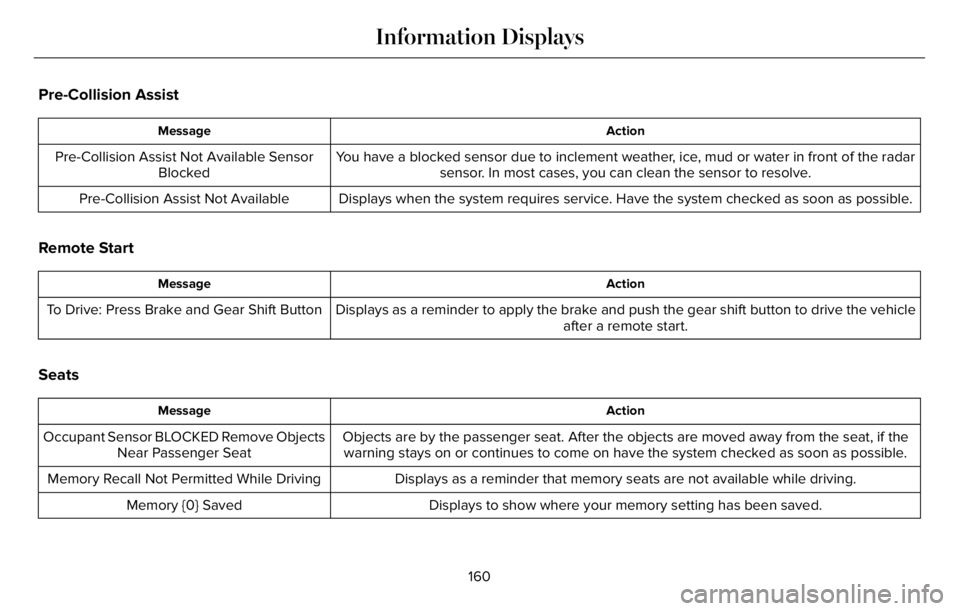
Pre-Collision Assist
Action Message
You have a blocked sensor due to inclement weather, ice, mud or water in front of the radar
sensor. In most cases, you can clean the sensor to resolve. Pre-Collision Assist Not Available Sensor
Blocked
Displays when the system requires service. Have the system checked as soon as possible. Pre-Collision Assist Not Available
Remote Start
Action Message
Displays as a reminder to apply the brake and push the gear shift button to drive the vehicle
after a remote start. To Drive: Press Brake and Gear Shift Button
Seats
Action Message
Objects are by the passenger seat. After the objects are moved away from the seat, if the
warning stays on or continues to come on have the system checked as soon as possible. Occupant Sensor BLOCKED Remove Objects
Near Passenger Seat
Displays as a reminder that memory seats are not available while driving. Memory Recall Not Permitted While Driving
Displays to show where your memory setting has been saved. Memory {0} Saved
160
Information Displays
Page 179 of 681
SITTING IN THE CORRECT
POSITION
WARNING: Sitting improperly, out of
position or with the seatback reclined too
far can take weight off the seat cushion
and affect the decision of the passenger
sensing system, resulting in serious injury
or death in the event of a crash. Always sit
upright against your seat back, with your
feet on the floor.
WARNING: Do not recline the seat
backrest too far as this can cause the
occupant to slide under the seatbelt,
resulting in personal injury in the event of
a crash.
WARNING: Do not place objects
higher than the top of the seat backrest.
Failure to follow this instruction could result
in personal injury or death in the event of
a sudden stop or crash.
E68595
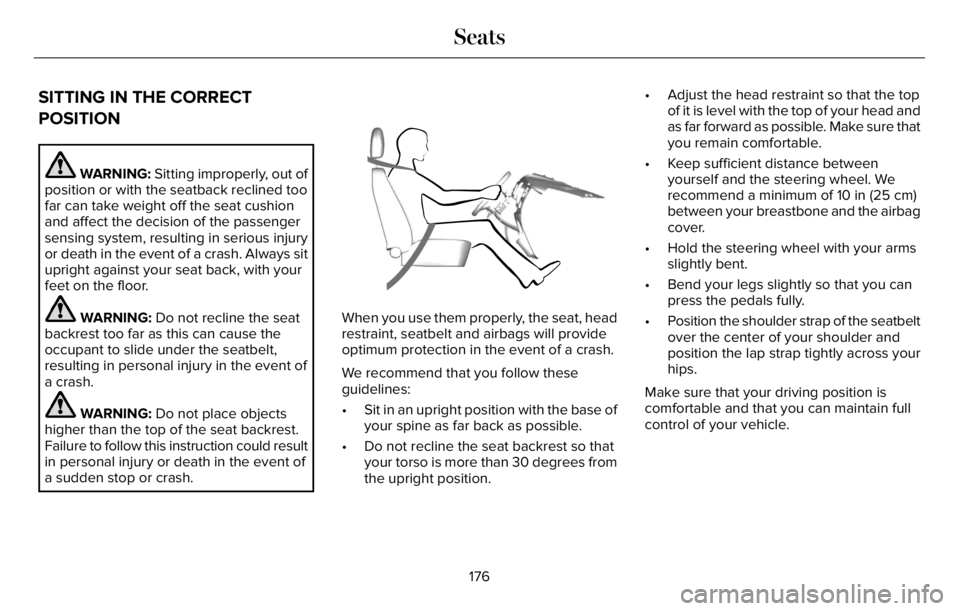
When you use them properly, the seat, head
restraint, seatbelt and airbags will provide
optimum protection in the event of a crash.
We recommend that you follow these
guidelines:
• Sit in an upright position with the base of
your spine as far back as possible.
• Do not recline the seat backrest so that
your torso is more than 30 degrees from
the upright position.• Adjust the head restraint so that the top
of it is level with the top of your head and
as far forward as possible. Make sure that
you remain comfortable.
• Keep sufficient distance between
yourself and the steering wheel. We
recommend a minimum of 10 in (25 cm)
between your breastbone and the airbag
cover.
• Hold the steering wheel with your arms
slightly bent.
• Bend your legs slightly so that you can
press the pedals fully.
• Position the shoulder strap of the seatbelt
over the center of your shoulder and
position the lap strap tightly across your
hips.
Make sure that your driving position is
comfortable and that you can maintain full
control of your vehicle.
176
Seats