service LINCOLN CONTINENTAL 2018 Repair Manual
[x] Cancel search | Manufacturer: LINCOLN, Model Year: 2018, Model line: CONTINENTAL, Model: LINCOLN CONTINENTAL 2018Pages: 615, PDF Size: 5.31 MB
Page 369 of 615
The usage of a full-size dissimilar sparewheel and tire assembly can lead toimpairment of the following:
•Handling, stability and brakingperformance.
•Comfort and noise.
•Ground clearance and parking at curbs.
•Winter weather driving capability.
•Wet weather driving capability.
•All-wheel driving capability.
When driving with the full-size dissimilarspare wheel and tire assembly additionalcaution should be given to:
•Towing a trailer.
•Driving vehicles equipped with a camperbody.
•Driving vehicles with a load on the cargorack.
Drive cautiously when using a full-sizedissimilar spare wheel and tire assembly andseek service as soon as possible.
Tire Change Procedure (If Equipped)
WARNING: The jack supplied with thisvehicle is only intended for changing wheels.Do not use the vehicle jack other than whenyou are changing a wheel in an emergency.
WARNING: The jack should be usedon level firm ground wherever possible.
WARNING: Check that the vehicle jackis not damaged or deformed and the threadis lubricated and clean.
WARNING: Never place anythingbetween the vehicle jack and the ground.
WARNING: Never place anythingbetween the vehicle jack and your vehicle.
WARNING: Use only the specifiedjacking points. If you use other positions, youmay damage the body, steering, suspension,engine, braking system or the fuel lines.
WARNING: To help prevent yourvehicle from moving when changing a wheel,shift the transmission into park (P), set theparking brake and use an appropriate blockor wheel chock to secure the wheeldiagonally opposite to the wheel beingchanged. For example, when changing thefront left wheel, place an appropriate blockor wheel chock on the right rear wheel.
WARNING: When one of the frontwheels is off the ground, the transmissionalone will not prevent the vehicle frommoving or slipping off the jack, even if thetransmission is in park (P).
WARNING: Do not get under a vehiclethat is only supported by a vehicle jack.
366
Continental (CPL) Canada/United States of America, enUSA, Edition date: 201706, Second-Printing
Wheels and Tires
Page 370 of 615
WARNING: Always use the jackprovided as original equipment with yourvehicle. If using a jack other than the oneprovided, make sure the jack capacity isadequate for the vehicle weight, includingany vehicle cargo or modifications. If you areunsure if the jack capacity is adequate,contact the authorized dealer.
Note:The jack does not requiremaintenance or additional lubrication overthe service life of your vehicle.
Note:Passengers should not remain in yourvehicle when the vehicle is being jacked.
1. Park on a level firm surface, shift thetransmission into park (P), set the parkingbrake and switch the ignition off. Activatethe hazard flashers and set up thewarning triangle.
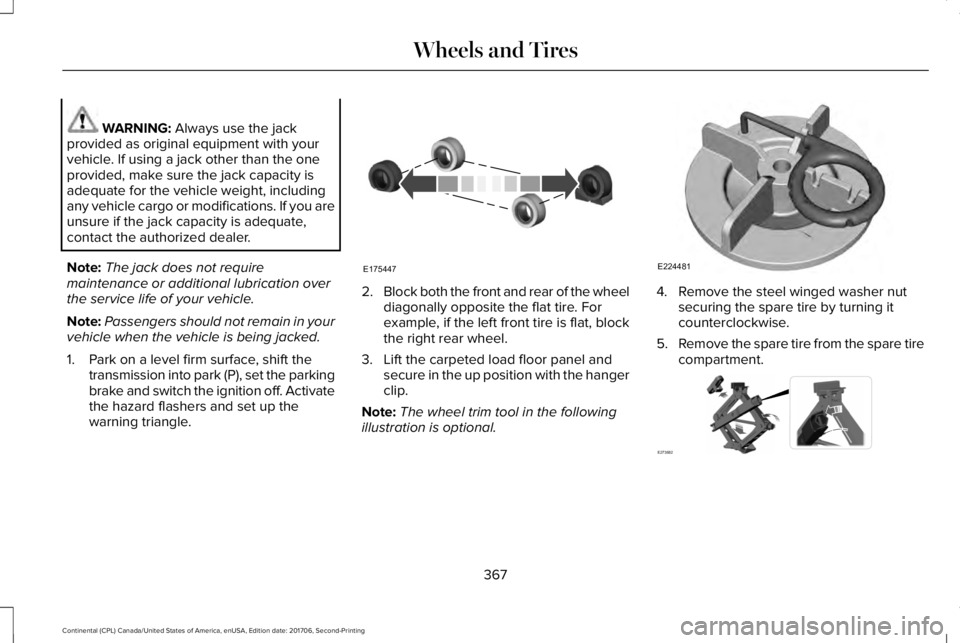
2.Block both the front and rear of the wheeldiagonally opposite the flat tire. Forexample, if the left front tire is flat, blockthe right rear wheel.
3. Lift the carpeted load floor panel andsecure in the up position with the hangerclip.
Note:The wheel trim tool in the followingillustration is optional.
4. Remove the steel winged washer nutsecuring the spare tire by turning itcounterclockwise.
5.Remove the spare tire from the spare tirecompartment.
367
Continental (CPL) Canada/United States of America, enUSA, Edition date: 201706, Second-Printing
Wheels and TiresE175447 E224481 E273682
Page 385 of 615
CAPACITIES AND SPECIFICATIONS - 2.7L
Capacities
WARNING: The air conditioning refrigerant system contains refrigerant under high pressure. Only qualified personnel should servicethe air conditioning refrigerant system. Opening the air conditioning refrigerant system can cause personal injury.
CapacityItem
6.0 qt (5.7 L)Engine oil (with oil filter).
10.9 qt (10.3 L)Engine coolant (Front Wheel Drive).
11.0 qt (10.4 L)Engine coolant (All Wheel Drive).
Between MIN/MAX on brake fluid reservoirBrake fluid.
16.0–20.8 fl oz (473–615 ml)Rear differential fluid (All Wheel Drive).
15.2 fl oz (450 ml)1Power Transfer Unit fluid (All Wheel Drive).
11.6 qt (11 L)2Automatic transmission fluid.
Fill as requiredWindshield washer fluid.
18.0 gal (68.1 L)Fuel tank.
382
Continental (CPL) Canada/United States of America, enUSA, Edition date: 201706, Second-Printing
Capacities and Specifications
Page 392 of 615
Capacities
WARNING: The air conditioning refrigerant system contains refrigerant under high pressure. Only qualified personnel should servicethe air conditioning refrigerant system. Opening the air conditioning refrigerant system can cause personal injury.
CapacityItem
6.0 qt (5.7 L)Engine oil (with oil filter).
11.6 qt (11 L)Engine coolant.
Between MIN/MAX on brake fluid reservoirBrake fluid.
16.0–20.8 fl oz (473–615 ml)Rear differential fluid (All Wheel Drive).
15.2 fl oz (450 ml)1Power Transfer Unit fluid (All Wheel Drive).
11.6 qt (11 L)2Automatic transmission fluid.
Fill as requiredWindshield washer fluid.
18.0 gal (68.1 L)Fuel tank.
20 oz (0.57 kg)A/C refrigerant.
5.24 fl oz (155 ml)A/C refrigerant compressor oil.
1 Contact an authorized dealer for fluid level checking and filling.2 Approximate dry fill capacity. Actual amount may vary during fluid changes.
389
Continental (CPL) Canada/United States of America, enUSA, Edition date: 201706, Second-Printing
Capacities and Specifications
Page 398 of 615
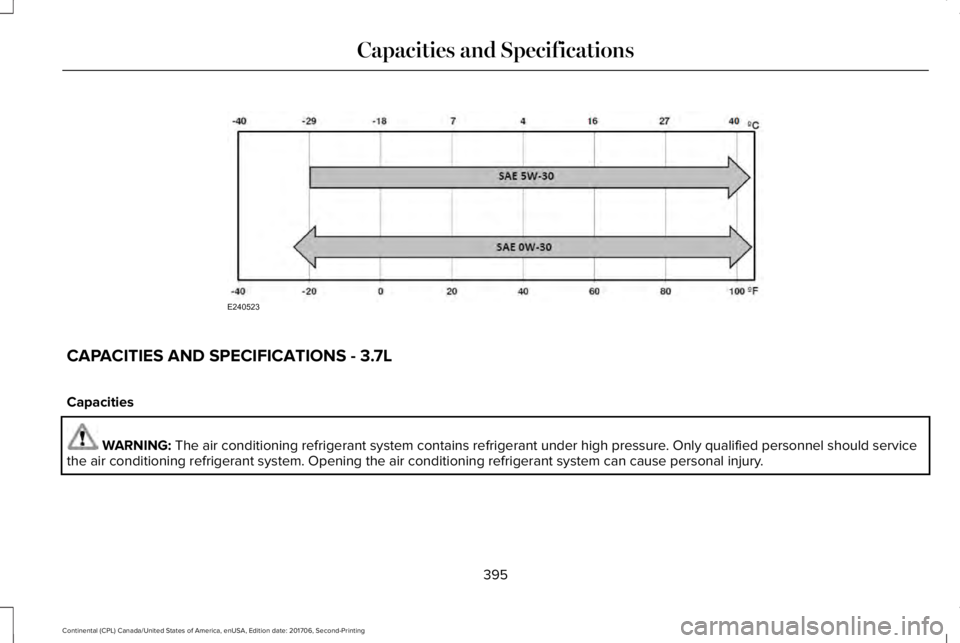
CAPACITIES AND SPECIFICATIONS - 3.7L
Capacities
WARNING: The air conditioning refrigerant system contains refrigerant under high pressure. Only qualified personnel should servicethe air conditioning refrigerant system. Opening the air conditioning refrigerant system can cause personal injury.
395
Continental (CPL) Canada/United States of America, enUSA, Edition date: 201706, Second-Printing
Capacities and SpecificationsE240523
Page 403 of 615
SpecificationName
-Lock cylinders (U.S.):Penetrating and Lock LubricantXL-1
-Lock cylinders (Canada):Penetrating FluidCXC-51-A
-Lock cylinders (Mexico):Penetrating and Lock LubricantMXL-1
If you use oil and fluids that do not meet thedefined specification and viscosity grade,this may lead to:
•Component damage which is notcovered by the vehicle warranty.
•Longer engine cranking periods.
•Increased emission levels.
•Reduced engine performance.
•Reduced fuel economy.
•Degraded brake performance.
We recommend Motorcraft® motor oil foryour vehicle. If Motorcraft® oil is notavailable, use motor oils of therecommended viscosity grade that meet APISN Plus requirements and display the APICertification Mark for gasoline engines. Donot use oil labeled with API SN servicecategory unless the label also displays theAPI certification mark.
400
Continental (CPL) Canada/United States of America, enUSA, Edition date: 201706, Second-Printing
Capacities and SpecificationsE142732
Page 413 of 615
Satellite Radio Reception Factors
Potential satellite radio reception issues
For optimal reception performance, keep the antenna clear of snow and ice build-up and keep luggage andother material as far away from the antenna as possible.Antenna obstructions
Hills, mountains, tall buildings, bridges, tunnels, freeway overpasses, parking garages, dense tree foliage andthunderstorms can interfere with your reception.Terrain
When you pass a ground-based broadcast-repeating tower, a stronger signal may overtake a weaker one andthe audio system may mute.Station overload
Your display may show ACQUIRING . . . to indicate the interference and the audio system may mute.Satellite radio signal interfer-ence
SiriusXM Satellite Radio Service
Note:SiriusXM reserves the unrestrictedright to change, rearrange, add or deleteprogramming including canceling, movingor adding particular channels, and its prices,at any time, with or without notice to you.Ford Motor Company shall not beresponsible for any such programmingchanges.
SiriusXM satellite radio is asubscription-based satellite radio service thatbroadcasts a variety of music, sports, news,weather, traffic and entertainmentprogramming. Your factory-installed SiriusXMsatellite radio system includes hardware anda limited subscription term, which begins onthe date of sale or lease of your vehicle. Seean authorized dealer for availability.
410
Continental (CPL) Canada/United States of America, enUSA, Edition date: 201706, Second-Printing
Audio SystemE208625
Page 414 of 615
For more information on extendedsubscription terms (a service fee is required),the online media player and a complete listof SiriusXM satellite radio channels, andother features, please visit www.siriusxm.com
in the United States, www.siriusxm.ca inCanada, or call SiriusXM at 1-888-539-7474.Satellite Radio Electronic SerialNumber (ESN)
You need your ESN to activate, modify ortrack your satellite radio account. When insatellite radio mode, tune to channel 0.
Troubleshooting
ActionConditionMessage
No action required. This message shoulddisappear shortly.Radio requires more than two seconds toproduce audio for the selected channel.Acquiring…
If this message does not clear shortly, or withan ignition key cycle, your receiver may havea fault. See an authorized dealer for service.
There is an internal module or system failurepresent.Satellite antenna fault
SIRIUS system failure
Tune to another channel or choose anotherpreset.The channel is no longer available.Invalid Channel
Contact SiriusXM at 1-888-539-7474 tosubscribe to the channel, or tune to anotherchannel.
Your subscription does not include thischannel.Unsubscribed Channel
The signal is blocked. When you move into anopen area, the signal should return.The signal is lost from the SiriusXM satelliteor SiriusXM tower to your vehicle antenna.No Signal
No action required. The process may take upto three minutes.Update of channel programming in progress.Updating…
411
Continental (CPL) Canada/United States of America, enUSA, Edition date: 201706, Second-Printing
Audio System
Page 415 of 615
ActionConditionMessage
Contact SiriusXM at 1-888-539-7474 to resolvesubscription issues.Your satellite service is no longer available.Questions? Call
1-888-539-7474
Use the channel guide to turn off the Lock orSkip function on that station.All the channels in the selected category areeither skipped or locked.None found
Check Channel Guide
No action required.SiriusXM has updated the channels availablefor your vehicle.Subscription Updated
USB PORT (If Equipped)
WARNING: Driving while distractedcan result in loss of vehicle control, crashand injury. We strongly recommend that youuse extreme caution when using any devicethat may take your focus off the road. Yourprimary responsibility is the safe operationof your vehicle. We recommend against the
use of any hand-held device while drivingand encourage the use of voice-operatedsystems when possible. Make sure you areaware of all applicable local laws that mayaffect the use of electronic devices whiledriving.
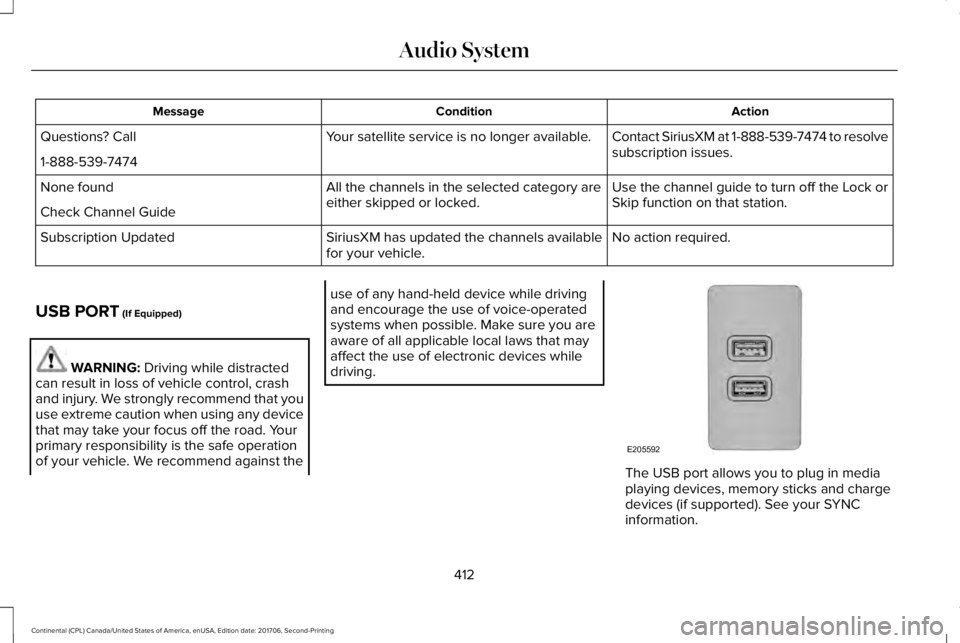
The USB port allows you to plug in mediaplaying devices, memory sticks and chargedevices (if supported). See your SYNCinformation.
412
Continental (CPL) Canada/United States of America, enUSA, Edition date: 201706, Second-Printing
Audio SystemE205592
Page 424 of 615
PHONE REJECT: Press to end a call or rejectan incoming call.
Note:On some models, SEEK NEXT may becombined with PHONE REJECT and SEEKPREVIOUS may be combined with PHONEACCEPT.
M: Touch the control repeatedly to switchbetween media sources (modes).
See Steering Wheel (page 85).
Using Your Bezel Controls
Depending on your vehicle and optionpackage, you may also have these controlson your instrument panel:
•Power: Switch the audio system on andoff.
•VOL: Control the volume of playingaudio.
•Seek and Tune: Use as you normallywould in audio modes.
•Eject: Eject a CD from the audio system.
•SOURCE or MEDIA: Press repeatedly toadvance through available media modes.
•SOUND: Press to access the Soundmenu where you can adjust sound andother audio settings.
•1-6: Press and hold to store or press toselect an AM, FM or SIRIUS memorypreset. See Audio System (page 403).
•DISP: Switch the display on or off. Youcan also touch the screen to switch thedisplay back on.
•Temperature, fan and climate controlbuttons: Control the temperature, fanspeed or settings of the climate controlsystem. See Climate Control (page 146).
911 Assist
WARNING: Unless the 911 Assistsetting is set on before a crash, the systemwill not dial for help which could delayresponse time, potentially increasing the riskof serious injury or death after a crash.
WARNING: Do not wait for 911 Assistto make an emergency call if you can do ityourself. Dial emergency servicesimmediately to avoid delayed response timewhich could increase the risk of serious injuryor death after a crash. If you do not hear 911Assist within five seconds of the crash, thesystem or phone may be damaged ornon-functional.
WARNING: Always place your phonein a secure location in your vehicle so it doesnot become a projectile or get damaged ina crash. Failure to do so may cause seriousinjury to someone or damage the phonewhich could prevent 911 Assist from workingproperly.
Note:The SYNC 911 Assist feature must beset on before the incident.
Note:The SYNC 911 Assist feature onlyoperates in the U.S., Canada or in a territoryin which 911 is the emergency number.
421
Continental (CPL) Canada/United States of America, enUSA, Edition date: 201706, Second-Printing
SYNC™ 3