reset LINCOLN CORSAIR 2021 User Guide
[x] Cancel search | Manufacturer: LINCOLN, Model Year: 2021, Model line: CORSAIR, Model: LINCOLN CORSAIR 2021Pages: 638, PDF Size: 5.7 MB
Page 83 of 638
Battery Saver
If you leave the courtesy lamps or dome
lamps on and switch the ignition off, this
feature turns them off after some time.
Accessory Mode Battery Saver for
Intelligent Access Keys
If you leave your vehicle with the ignition on,
it will turn off 30 minutes after you close all
of the doors.
Welcome Lighting
This feature lights select exterior lighting as
you approach your vehicle. You must have
an intelligent access key with you. The
feature turns off when you open a door,
liftgate, or unlock your vehicle. Welcome
lighting remains on for 25 seconds or until
you start your vehicle.
The feature is active when:
•
The feature is configured from the
touchscreen. See Welcome Lighting
(page 107).
• The ignition is off. •
All doors and the liftgate are closed.
• You lock your vehicle.
The feature is disabled when:
• Your vehicle detects the intelligent
access key is inside.
• The intelligent access key is in close
range of the vehicle for more than two
minutes.
• The anti-theft alarm triggers.
• You do not start your vehicle for more
than five days.
• The vehicle battery charge is low.
• You approach the vehicle to trigger the
welcome lighting feature 10 or more
times without switching the ignition on.
Note: When this feature is disabled, you
must switch the ignition on to reset it.
Note: This feature may not correctly operate
if the intelligent access key is stored within
8–15 ft (2.4–4.6 m)
of your vehicle while not
in use.
Note: Welcome Lighting will not function if
disabled from the touchscreen.
80
Corsair (CTF) Canada/United States of America, enUSA, Edition date: 202007, First-Printing Doors and Locks
Page 101 of 638
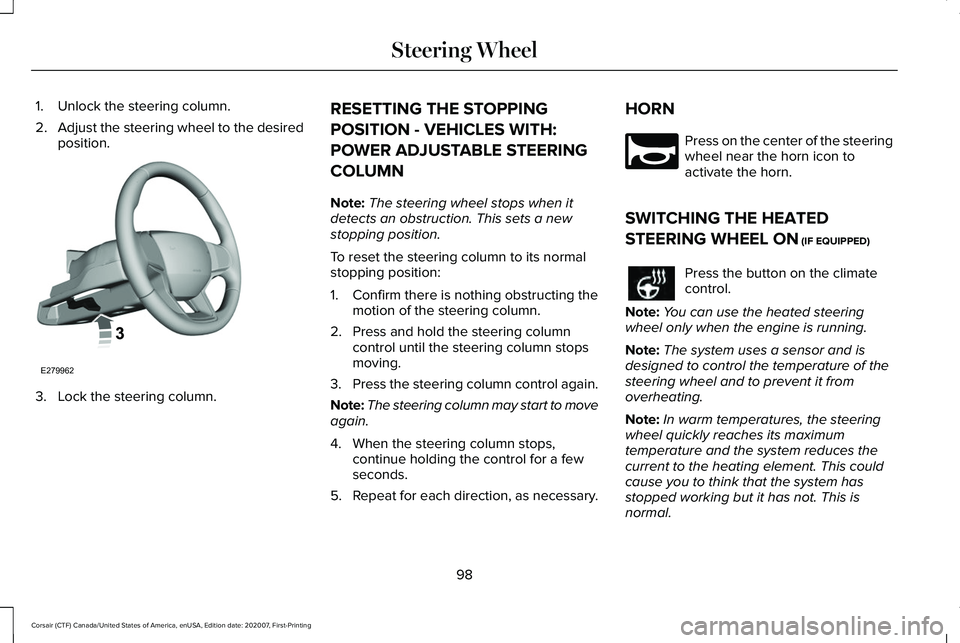
1. Unlock the steering column.
2.
Adjust the steering wheel to the desired
position. 3. Lock the steering column. RESETTING THE STOPPING
POSITION - VEHICLES WITH:
POWER ADJUSTABLE STEERING
COLUMN
Note:
The steering wheel stops when it
detects an obstruction. This sets a new
stopping position.
To reset the steering column to its normal
stopping position:
1. Confirm there is nothing obstructing the motion of the steering column.
2. Press and hold the steering column control until the steering column stops
moving.
3. Press the steering column control again.
Note: The steering column may start to move
again.
4. When the steering column stops, continue holding the control for a few
seconds.
5. Repeat for each direction, as necessary. HORN Press on the center of the steering
wheel near the horn icon to
activate the horn.
SWITCHING THE HEATED
STEERING WHEEL ON (IF EQUIPPED) Press the button on the climate
control.
Note: You can use the heated steering
wheel only when the engine is running.
Note: The system uses a sensor and is
designed to control the temperature of the
steering wheel and to prevent it from
overheating.
Note: In warm temperatures, the steering
wheel quickly reaches its maximum
temperature and the system reduces the
current to the heating element. This could
cause you to think that the system has
stopped working but it has not. This is
normal.
98
Corsair (CTF) Canada/United States of America, enUSA, Edition date: 202007, First-Printing Steering WheelE279962 E270945
Page 115 of 638
POWER WINDOWS
WARNING: Do not leave children
unattended in your vehicle and do not let
them play with the power windows. Failure
to follow this instruction could result in
personal injury. WARNING:
When closing the power
windows, verify they are free of obstruction
and make sure that children and pets are
not in the proximity of the window
openings. Press the control to open the
window. Lift the control to close
the window.
To reduce wind noise or pulsing noise when
just one window is open, slightly open the
opposite window.
One-Touch Down
Press the switch fully and release it. Press
again or lift it to stop the window. One-Touch Up
Lift the switch fully and release it. Press or
lift it again to stop the window.
Resetting One-Touch Up
Start the engine.
1.
Lift and hold the window switch until you
fully close the door window. Continue to
hold the switch for a few seconds after
you close the window.
2. Release the window switch.
3. Press and hold the window switch until you fully open the door window.
4. Release the window switch.
5. Lift and hold the window switch until you
fully close the window.
6. Test for correct window operation by carrying out the one-touch down and
one-touch up features. Rear Window Lock Press the control to lock or unlock
the rear window controls. It
illuminates when you lock the rear
window controls.
Bounce-Back
(If Equipped)
The window stops and reverses if it detects
an obstruction.
Overriding the Bounce-Back Feature WARNING:
If you override
bounce-back, the window does not reverse
if it detects an obstacle. Take care when
closing the windows to avoid personal
injury or damage to your vehicle.
Pull up the window switch and hold within a
few seconds of the window reaching the
bounce-back position. The window travels
up with no bounce-back protection. The
window stops if you release the switch
before the window fully closes.
112
Corsair (CTF) Canada/United States of America, enUSA, Edition date: 202007, First-Printing Windows and Mirrors
Page 117 of 638
To adjust your mirrors, switch your vehicle
on - with the ignition in accessory mode or
the engine running and then:
1.
Select the mirror you want to adjust. The
control light turns on.
2. Use the adjustment control to adjust the
position of the mirror.
3. Press the mirror control again. The control light turns off.
Fold-Away Exterior Mirrors
Push the mirror toward the door window
glass. Make sure that you fully engage the
mirror in its support when returning it to its
original position.
Auto-Folding Mirrors
The exterior mirrors fold in toward the glass
after you place the transmission into park (P),
turn off the vehicle, open and close the driver
side door and lock the vehicle. The exterior
mirrors unfold and return to their driving
position after you unlock the vehicle and
open and close the driver side door. You can switch this feature on and off
through the information display. See General
Information (page 131).
Note: If you switch this feature off through
the information display, the welcome lighting
also switches off.
You can fold the mirrors on demand by
pressing the power-folding mirror control
located on the door. The control lights and
the mirrors fold in toward the glass. Press
the control again to unfold the mirrors. The
control light turns off.
Note: If you use the power-folding control to
fold the mirrors on demand and the auto fold
feature is switched on, the auto-folding
feature becomes disabled. To re-enable the
auto-folding feature, press the control again
to unfold the mirrors. Loose Mirror
If your auto-folding mirrors are manually
folded or unfolded, they may not work
properly even after you re-position them.
You need to reset them if:
•
The mirrors vibrate when you drive.
• The mirrors feel loose.
• The mirrors do not stay in the folded or
unfolded position.
• One of the mirrors is not in its normal
driving position.
To reset the auto-fold feature, use the
power-folding mirror control to fold and
unfold the mirrors. You may hear a loud noise
as you reset the mirrors. This sound is
normal. Repeat this process as needed each
time the mirrors are manually folded or
unfolded.
Heated Exterior Mirrors
See
Heated Exterior Mirrors (page 168).
114
Corsair (CTF) Canada/United States of America, enUSA, Edition date: 202007, First-Printing Windows and Mirrors
Page 136 of 638
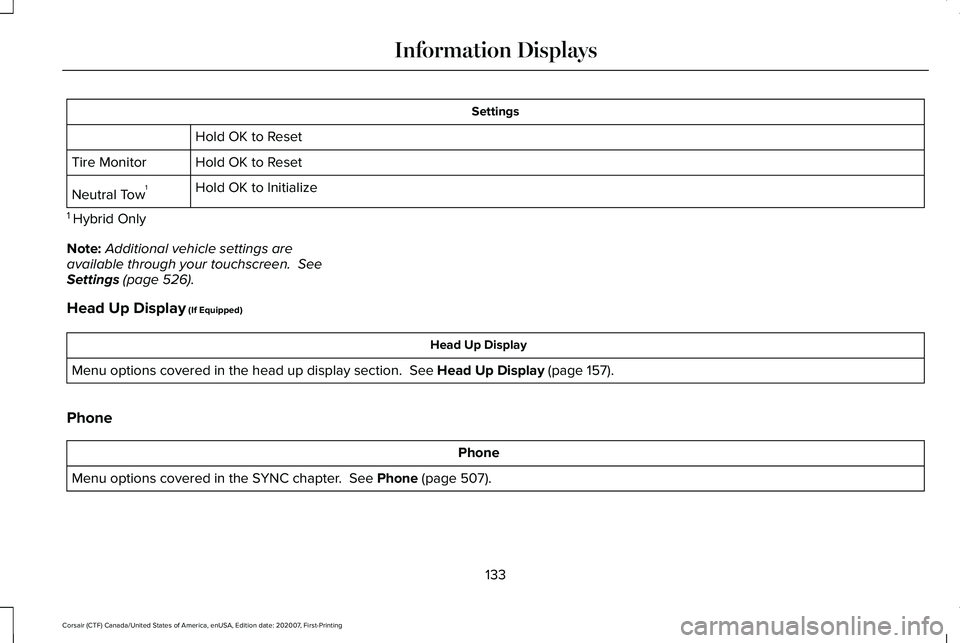
Settings
Hold OK to Reset
Hold OK to Reset
Tire Monitor
Hold OK to Initialize
Neutral Tow 1
1 Hybrid Only
Note: Additional vehicle settings are
available through your touchscreen. See
Settings (page 526).
Head Up Display
(If Equipped) Head Up Display
Menu options covered in the head up display section.
See Head Up Display (page 157).
Phone Phone
Menu options covered in the SYNC chapter.
See Phone (page 507).
133
Corsair (CTF) Canada/United States of America, enUSA, Edition date: 202007, First-Printing Information Displays
Page 139 of 638
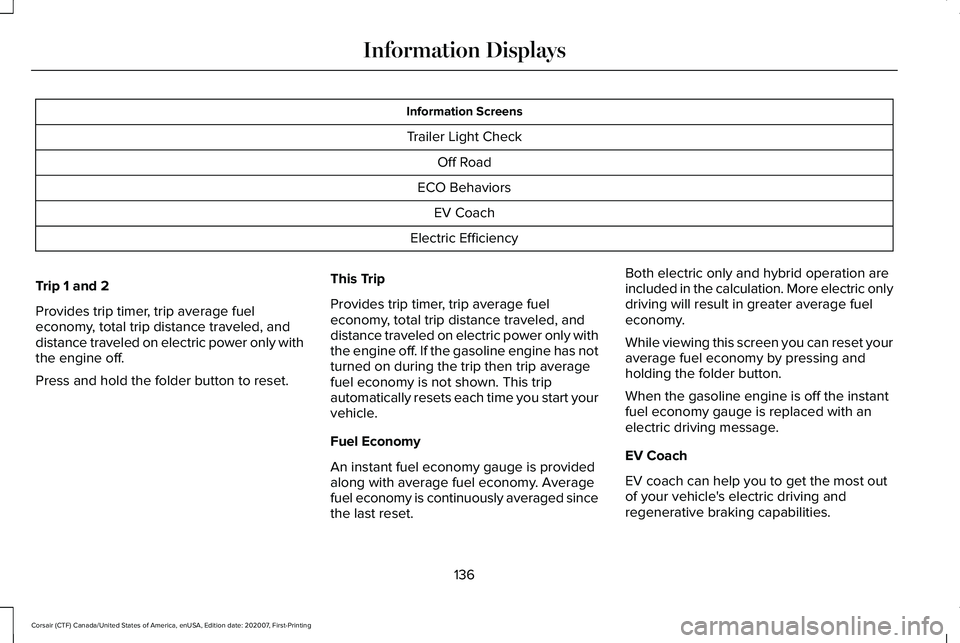
Information Screens
Trailer Light Check Off Road
ECO Behaviors EV Coach
Electric Efficiency
Trip 1 and 2
Provides trip timer, trip average fuel
economy, total trip distance traveled, and
distance traveled on electric power only with
the engine off.
Press and hold the folder button to reset. This Trip
Provides trip timer, trip average fuel
economy, total trip distance traveled, and
distance traveled on electric power only with
the engine off. If the gasoline engine has not
turned on during the trip then trip average
fuel economy is not shown. This trip
automatically resets each time you start your
vehicle.
Fuel Economy
An instant fuel economy gauge is provided
along with average fuel economy. Average
fuel economy is continuously averaged since
the last reset.Both electric only and hybrid operation are
included in the calculation. More electric only
driving will result in greater average fuel
economy.
While viewing this screen you can reset your
average fuel economy by pressing and
holding the folder button.
When the gasoline engine is off the instant
fuel economy gauge is replaced with an
electric driving message.
EV Coach
EV coach can help you to get the most out
of your vehicle's electric driving and
regenerative braking capabilities.
136
Corsair (CTF) Canada/United States of America, enUSA, Edition date: 202007, First-Printing Information Displays
Page 144 of 638

AWD
Action
Message
The all-wheel drive system temporarily turns off to protect itself from \
overheating.
AWD Temporarily Disabled
The all-wheel drive system is locking up the torque transfer clutch to h\
elp reduce clutchtemperature.
AWD Temporarily Locked
The all-wheel drive system temporarily turns off to protect itself from \
overheating or if you areusing the temporary spare tire.
AWD OFF
The all-wheel drive system will resume normal function and clear this me\
ssage after driving ashort distance with the road tire re-installed or after the system cools\
.
AWD Restored
The all-wheel drive system is not operating properly. If the warning stays on or continues tocome on, have the system checked as soon as possible.
AWD Fault Service Required
Displayed when the transfer case fluid requires service.
Change AWD Power Transfer Unit Lube
Displayed when the transfer case fluid has been changed and reset to new\
.
AWD Power Transfer Unit Lube Set to New
141
Corsair (CTF) Canada/United States of America, enUSA, Edition date: 202007, First-Printing Information Displays
Page 148 of 638
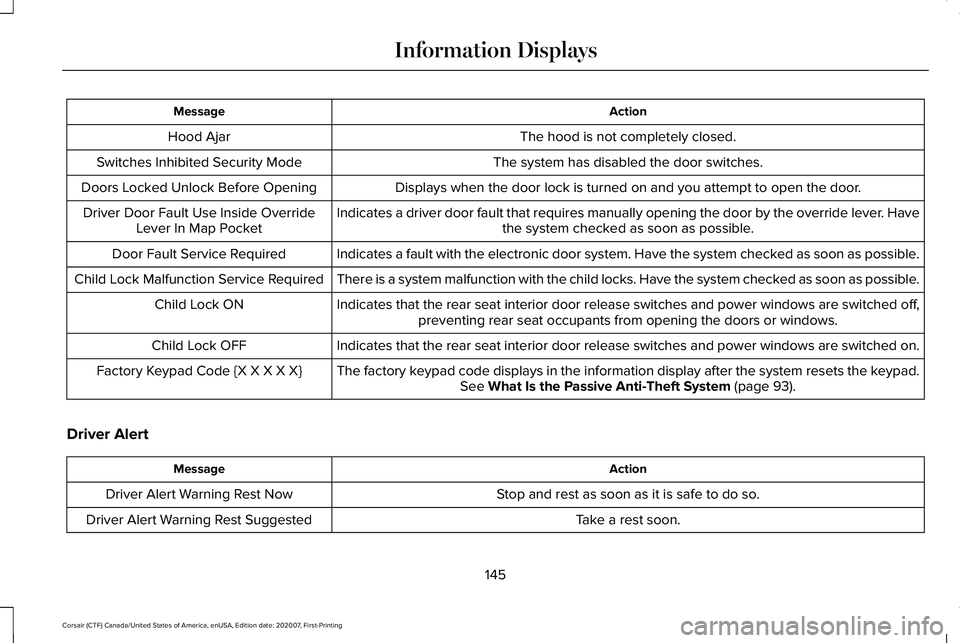
Action
Message
The hood is not completely closed.
Hood Ajar
The system has disabled the door switches.
Switches Inhibited Security Mode
Displays when the door lock is turned on and you attempt to open the doo\
r.
Doors Locked Unlock Before Opening
Indicates a driver door fault that requires manually opening the door by\
the override lever. Havethe system checked as soon as possible.
Driver Door Fault Use Inside Override
Lever In Map Pocket
Indicates a fault with the electronic door system. Have the system check\
ed as soon as possible.
Door Fault Service Required
There is a system malfunction with the child locks. Have the system chec\
ked as soon as possible.
Child Lock Malfunction Service Required
Indicates that the rear seat interior door release switches and power wi\
ndows are switched off,preventing rear seat occupants from opening the doors or windows.
Child Lock ON
Indicates that the rear seat interior door release switches and power wi\
ndows are switched on.
Child Lock OFF
The factory keypad code displays in the information display after the system resets t\
he keypad.See What Is the Passive Anti-Theft System (page 93).
Factory Keypad Code {X X X X X}
Driver Alert Action
Message
Stop and rest as soon as it is safe to do so.
Driver Alert Warning Rest Now
Take a rest soon.
Driver Alert Warning Rest Suggested
145
Corsair (CTF) Canada/United States of America, enUSA, Edition date: 202007, First-Printing Information Displays
Page 161 of 638
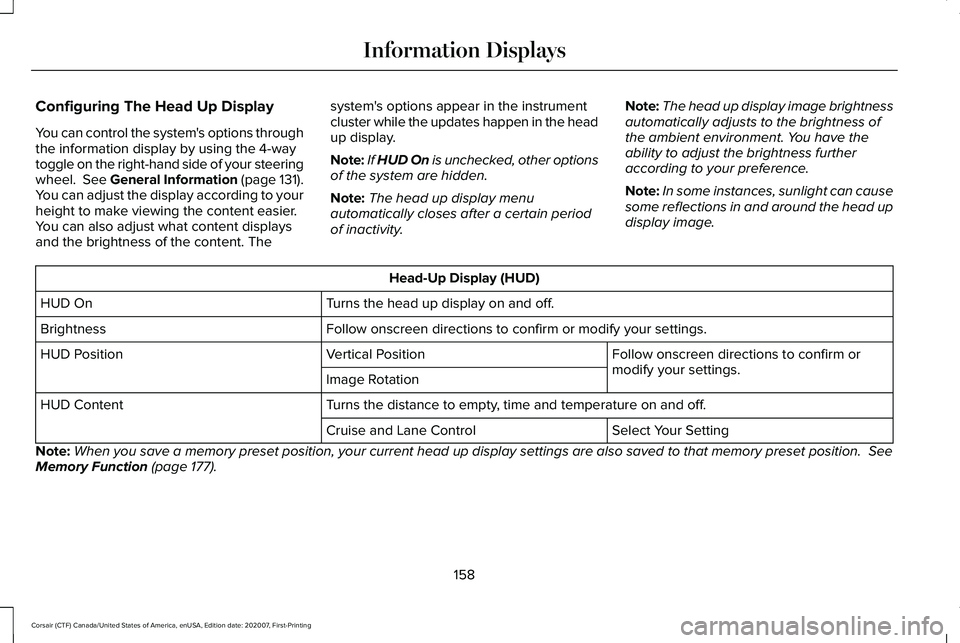
Configuring The Head Up Display
You can control the system's options through
the information display by using the 4-way
toggle on the right-hand side of your steering
wheel. See General Information (page 131).
You can adjust the display according to your
height to make viewing the content easier.
You can also adjust what content displays
and the brightness of the content. The system's options appear in the instrument
cluster while the updates happen in the head
up display.
Note:
If HUD On is unchecked, other options
of the system are hidden.
Note: The head up display menu
automatically closes after a certain period
of inactivity. Note:
The head up display image brightness
automatically adjusts to the brightness of
the ambient environment. You have the
ability to adjust the brightness further
according to your preference.
Note: In some instances, sunlight can cause
some reflections in and around the head up
display image. Head-Up Display (HUD)
Turns the head up display on and off.
HUD On
Follow onscreen directions to confirm or modify your settings.
Brightness
Follow onscreen directions to confirm or
modify your settings.
Vertical Position
HUD Position
Image Rotation
Turns the distance to empty, time and temperature on and off.
HUD Content
Select Your Setting
Cruise and Lane Control
Note: When you save a memory preset position, your current head up display set\
tings are also saved to that memory preset position.
See
Memory Function (page 177).
158
Corsair (CTF) Canada/United States of America, enUSA, Edition date: 202007, First-Printing Information Displays
Page 180 of 638
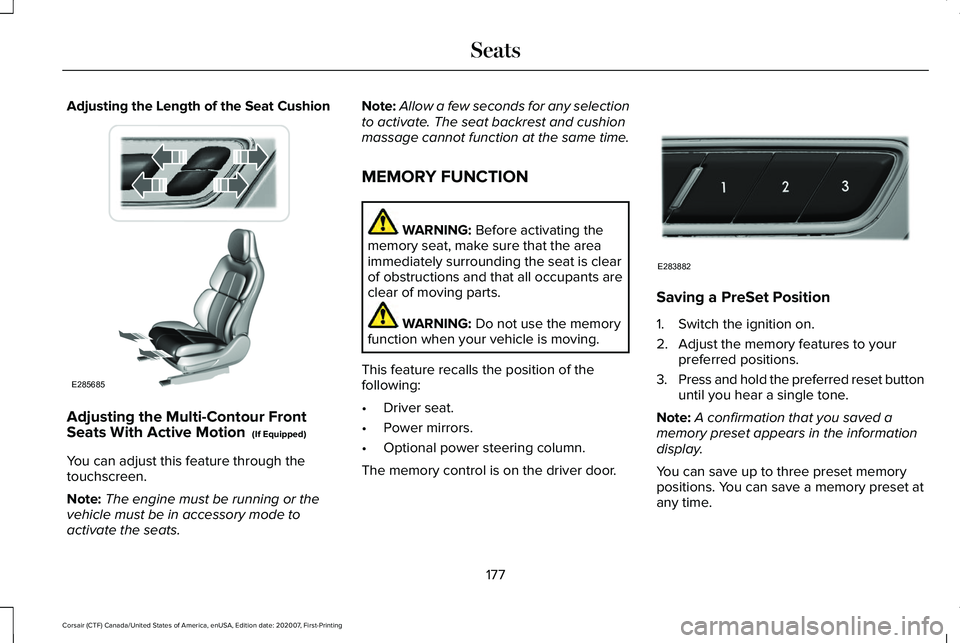
Adjusting the Length of the Seat Cushion
Adjusting the Multi-Contour Front
Seats With Active Motion (If Equipped)
You can adjust this feature through the
touchscreen.
Note: The engine must be running or the
vehicle must be in accessory mode to
activate the seats. Note:
Allow a few seconds for any selection
to activate. The seat backrest and cushion
massage cannot function at the same time.
MEMORY FUNCTION WARNING:
Before activating the
memory seat, make sure that the area
immediately surrounding the seat is clear
of obstructions and that all occupants are
clear of moving parts. WARNING:
Do not use the memory
function when your vehicle is moving.
This feature recalls the position of the
following:
• Driver seat.
• Power mirrors.
• Optional power steering column.
The memory control is on the driver door. Saving a PreSet Position
1. Switch the ignition on.
2. Adjust the memory features to your
preferred positions.
3. Press and hold the preferred reset button
until you hear a single tone.
Note: A confirmation that you saved a
memory preset appears in the information
display.
You can save up to three preset memory
positions. You can save a memory preset at
any time.
177
Corsair (CTF) Canada/United States of America, enUSA, Edition date: 202007, First-Printing SeatsE285685 E283882