ECO mode LINCOLN CORSAIR 2022 Owner's Manual
[x] Cancel search | Manufacturer: LINCOLN, Model Year: 2022, Model line: CORSAIR, Model: LINCOLN CORSAIR 2022Pages: 676, PDF Size: 7.67 MB
Page 186 of 676
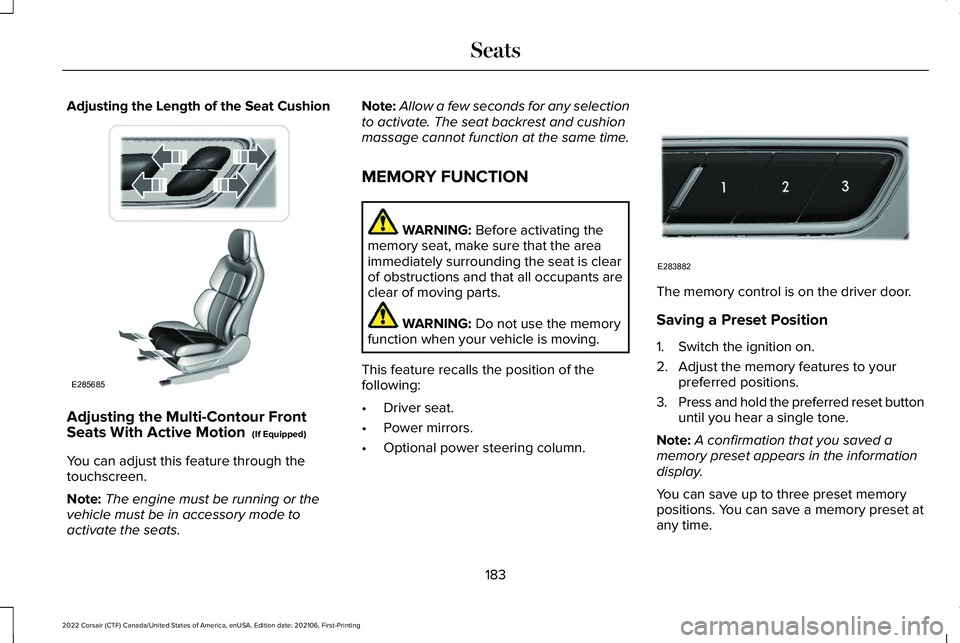
Adjusting the Length of the Seat Cushion
Adjusting the Multi-Contour Front
Seats With Active Motion (If Equipped)
You can adjust this feature through the
touchscreen.
Note: The engine must be running or the
vehicle must be in accessory mode to
activate the seats. Note:
Allow a few seconds for any selection
to activate. The seat backrest and cushion
massage cannot function at the same time.
MEMORY FUNCTION WARNING:
Before activating the
memory seat, make sure that the area
immediately surrounding the seat is clear
of obstructions and that all occupants are
clear of moving parts. WARNING:
Do not use the memory
function when your vehicle is moving.
This feature recalls the position of the
following:
• Driver seat.
• Power mirrors.
• Optional power steering column. The memory control is on the driver door.
Saving a Preset Position
1. Switch the ignition on.
2. Adjust the memory features to your
preferred positions.
3. Press and hold the preferred reset button
until you hear a single tone.
Note: A confirmation that you saved a
memory preset appears in the information
display.
You can save up to three preset memory
positions. You can save a memory preset at
any time.
183
2022 Corsair (CTF) Canada/United States of America, enUSA, Edition date: 202106, First-Printing SeatsE285685 E283882
Page 205 of 676
GENERAL INFORMATION
WARNING: Extended idling at high
engine speeds can produce very high
temperatures in the engine and exhaust
system, creating the risk of fire or other
damage. WARNING:
Do not park, idle or drive
your vehicle on dry grass or other dry
ground cover. The emission system heats
up the engine compartment and exhaust
system, creating the risk of fire. WARNING:
Do not start the engine
in a closed garage or in other enclosed
areas. Exhaust fumes can be toxic. Always
open the garage door before you start the
engine. WARNING: Exhaust leaks may result
in entry of harmful and potentially lethal
fumes into the passenger compartment. If
you smell exhaust fumes inside your
vehicle, have your vehicle inspected
immediately. Do not drive if you smell
exhaust fumes.
If you disconnect the battery, your vehicle
may exhibit some unusual driving
characteristics for approximately 5 mi (8 km)
after you reconnect it. This is because the
engine management system must realign
itself with the engine. You can disregard any
unusual driving characteristics during this
period.
The powertrain control system meets all
Canadian interference-causing equipment
standard requirements regulating the
impulse electrical field or radio noise.
When you start the engine, avoid pressing
the accelerator pedal before and during
operation. Only use the accelerator pedal
when you have difficulty starting the engine. KEYLESS STARTING
Note:
The keyless starting system may not
function if the key is close to metal objects
or electronic devices such as cellular
phones.
Note: A valid key must be located inside
your vehicle to switch the ignition on and
start the engine.
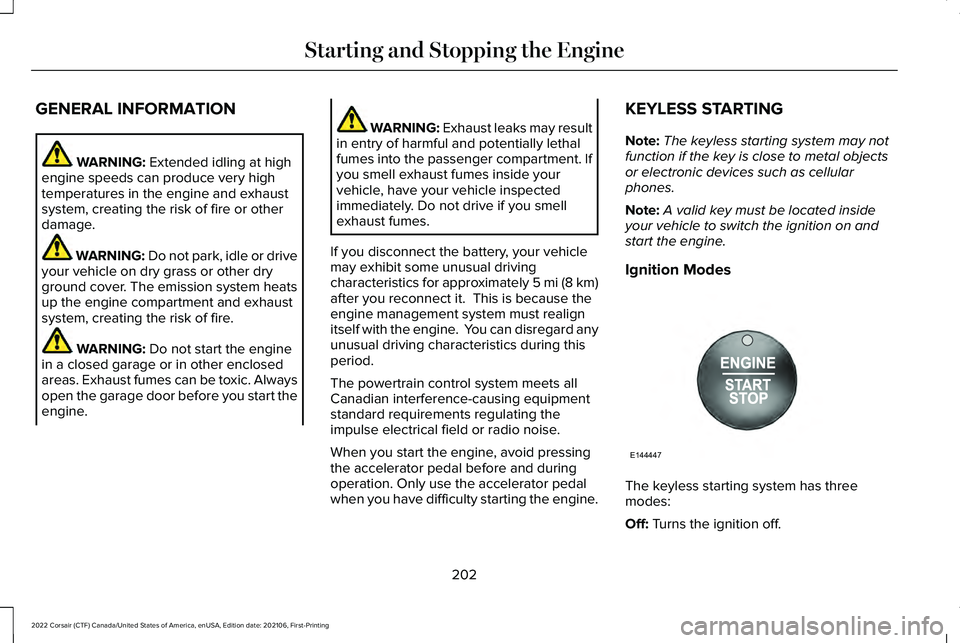
Ignition Modes The keyless starting system has three
modes:
Off:
Turns the ignition off.
202
2022 Corsair (CTF) Canada/United States of America, enUSA, Edition date: 202106, First-Printing Starting and Stopping the EngineE144447
Page 217 of 676
Battery
Your hybrid is equipped with a high voltage
battery. A cool battery maintains battery life
and provides the best possible performance.
The high voltage battery is cooled by the
vehicle's air conditioning system. When the
air conditioning system is on, you may notice
a slight increase in air temperature coming
from the climate control vents while the
battery is cooling. You may also notice cool
air flowing from the vents when the air
conditioning or blower is off.
Braking
Your hybrid is equipped with standard
hydraulic braking and regenerative braking.
Regenerative braking is performed by your
transmission and it captures brake energy
and stores it in the high voltage battery.
You may also notice during extending
downhill driving that your engine continues
to run instead of shutting off. During this
engine braking, the engine stays on, but it is
not using any fuel. You may also hear a slight
whine or whistle when operating your
vehicle. This is the normal operation of the
electric motor in the hybrid system.
Driving to Optimize Fuel Economy
Note:
Having your engine running is not
always an indication of inefficiency. In some
cases, it is actually more efficient than
driving in electric mode.
Your fuel economy should improve
throughout your hybrid's break-in period. As
with any vehicle, your driving habits and
accessory usage can significantly impact
your fuel economy. For best results, keep
these tips in mind: •
Keep the tires properly inflated and only
use the recommended size.
• Aggressive driving increases the amount
of energy required to move your vehicle.
In general, you can achieve better fuel
economy with mild to moderate
acceleration and deceleration. Moderate
braking is particularly important since it
allows you to maximize the energy
captured by the regenerative braking
system.
Additional Tips:
• Do not carry extra loads.
• Be mindful of adding external
accessories that may increase
aerodynamic drag.
• Observe posted speed limits.
• Perform all scheduled maintenance.
• There is no need to wait for your engine
to warm up. The vehicle is ready to drive
immediately after starting.
214
2022 Corsair (CTF) Canada/United States of America, enUSA, Edition date: 202106, First-Printing Unique Driving Characteristics
Page 218 of 676

PLUG-IN HYBRID VEHICLE
OPERATION - PLUG-IN HYBRID
ELECTRIC VEHICLE (PHEV)
Regularly plug in your vehicle to get optimal
electric-only range capability from the high
voltage battery. Charging your vehicle adds
electrical energy. This energy propels the
vehicle.
Estimated electric-only driving range shows
in blue next to the gasoline range on the
information display.
The system maximizes the use of
electric-only operation in normal drive mode.
System conditions could require the engine
to operate, however, the system uses the
available electric range whenever possible.
In Pure EV drive mode, your vehicle only
uses electric power unless you enable the
engine, or system conditions require the
engine to operate.
Preserve EV drive mode saves the electric
range for later use. If you select this mode
and the battery is at full or near full charge,
it uses some electric-only range to discharge
the battery. This allows the regenerative
braking system to fully operate. If the battery
charge is low when selecting Preserve EV
mode, the engine charges the high voltage
battery to a minimum level. This provides
additional electric driving range. When the
battery charges to this level, Preserve EV
saves the electric range for later use.
Other drive modes appropriately make use
of electric power to help deliver the selected
drive mode experience. It could use available
electric-only range, if needed. See What Is
Drive Mode Control (page 337). When the electric-only range reaches zero,
the powertrain system switches to hybrid
operation. This means the energy you gain
from plugging in and charging your vehicle
is now gone. Both the gasoline engine and
electric motor power your vehicle and
maximize fuel economy during hybrid
operation. Hybrid operation provides some
electric-only driving as the powertrain system
maintains the high voltage battery charge
level within functional limits.
Low Engine Use
The low engine use mode properly lubricates
the engine at sufficient temperature and
activates when you drive your vehicle with
limited engine operation. When in low engine
use mode, your vehicle runs the engine as
necessary. When low engine use mode
begins, a message appears in the information
display. If low engine use mode does not
complete before you switch your vehicle off,
it continues the next time you start your
vehicle and the message reappears.
See
Information Messages (page 142).
Pure EV mode is not available during low
engine use mode.
215
2022 Corsair (CTF) Canada/United States of America, enUSA, Edition date: 202106, First-Printing Unique Driving Characteristics
Page 251 of 676
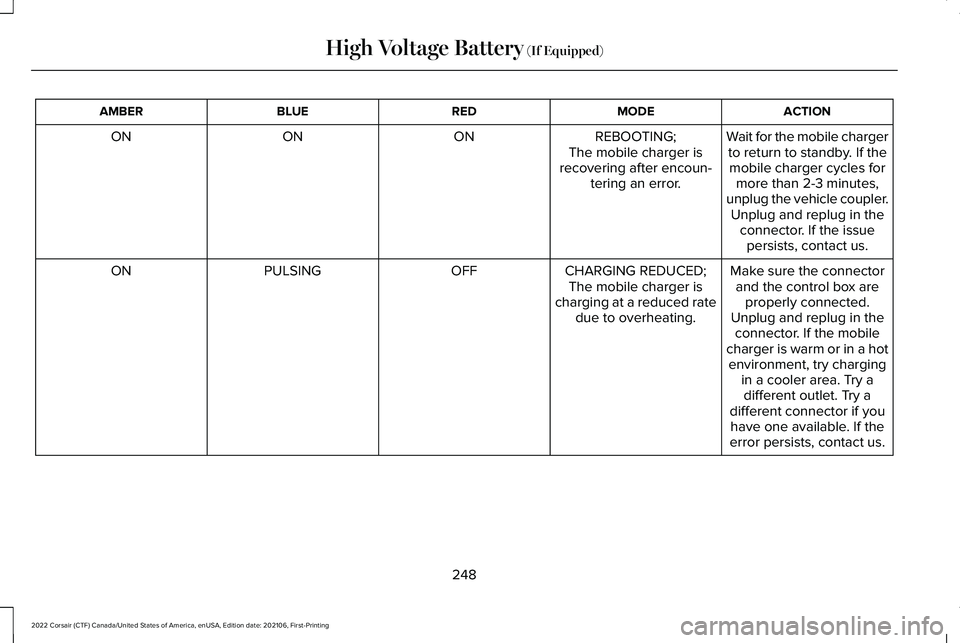
ACTION
MODE
RED
BLUE
AMBER
Wait for the mobile chargerto return to standby. If themobile charger cycles for more than 2-3 minutes,
unplug the vehicle coupler. Unplug and replug in the connector. If the issuepersists, contact us.
REBOOTING;
The mobile charger is
recovering after encoun- tering an error.
ON
ON
ON
Make sure the connectorand the control box are properly connected.
Unplug and replug in the connector. If the mobile
charger is warm or in a hot
CHARGING REDUCED;
The mobile charger is
charging at a reduced rate due to overheating.
OFF
PULSING
ON
environment, try chargingin a cooler area. Try adifferent outlet. Try a
different connector if you have one available. If the
error persists, contact us.
248
2022 Corsair (CTF) Canada/United States of America, enUSA, Edition date: 202106, First-Printing High Voltage Battery (If Equipped)
Page 253 of 676
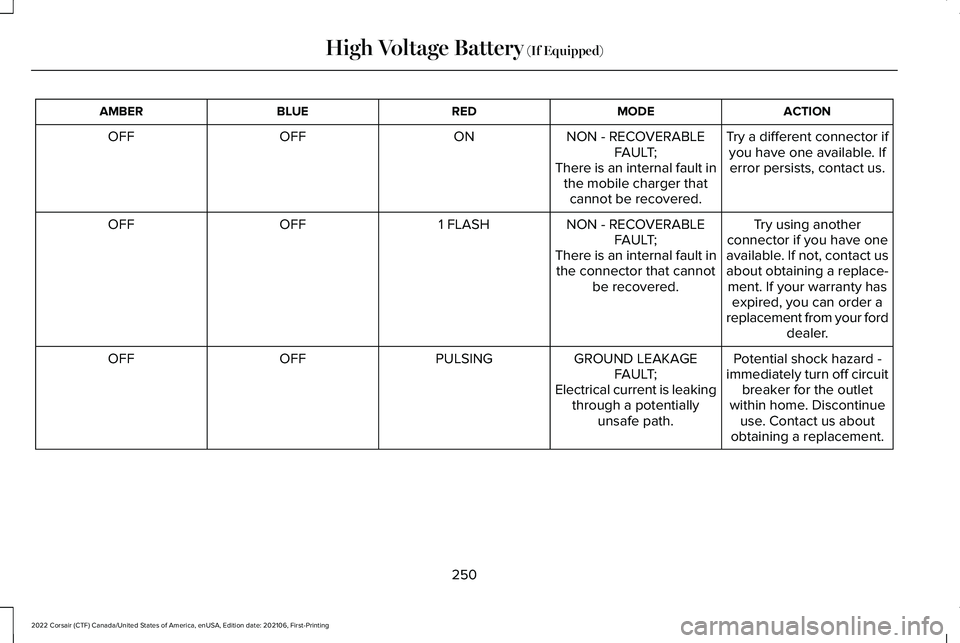
ACTION
MODE
RED
BLUE
AMBER
Try a different connector ifyou have one available. Iferror persists, contact us.
NON - RECOVERABLE
FAULT;
There is an internal fault in the mobile charger thatcannot be recovered.
ON
OFF
OFF
Try using another
connector if you have one
available. If not, contact us
about obtaining a replace- ment. If your warranty has expired, you can order a
replacement from your ford dealer.
NON - RECOVERABLE
FAULT;
There is an internal fault in the connector that cannot be recovered.
1 FLASH
OFF
OFF
Potential shock hazard -
immediately turn off circuit breaker for the outlet
within home. Discontinue use. Contact us about
obtaining a replacement.
GROUND LEAKAGE
FAULT;
Electrical current is leaking through a potentially unsafe path.
PULSING
OFF
OFF
250
2022 Corsair (CTF) Canada/United States of America, enUSA, Edition date: 202106, First-Printing High Voltage Battery (If Equipped)
Page 261 of 676
3. Press and hold the brake pedal.
4. Press the neutral (N) button.
Note:
A confirmation message appears
when your vehicle enters the mode.
5. Release the brake pedal.
Note: Your vehicle is free to roll.
6. Switch your vehicle off.
Note: Do not tow your vehicle in this mode.
Note: The neutral (N) indicator on the
transmission selector may flash in this mode.
Exiting Temporary Neutral Mode
1. Press the brake pedal.
2. Shift into park (P), or power your vehicle on and shift into drive (D), or reverse (R).
Drive (D)
Drive (D) is the normal driving position for
the best fuel economy. Transmission Not in Park (P) Audible
Warning
Sounds if you open the driver door before
shifting into park (P).
Park Selection Audible Warning
Sounds when you shift into park (P).
Manually Shifting Gears with Live in
Drive
Shifting Using Paddle Shifters
The instrument cluster displays the current
gear. The current gear flashes when your
vehicle cannot shift into the requested gear.
Your vehicle cannot shift if the requested
gear raises or lowers the engine speed
beyond the limit.
Your vehicle could shift when you fully press
the accelerator or brake pedal.
Note:
Prolonged driving with high engine
speed could cause vehicle damage not
covered by the vehicle warranty.
Note: Shifting into the requested gear could
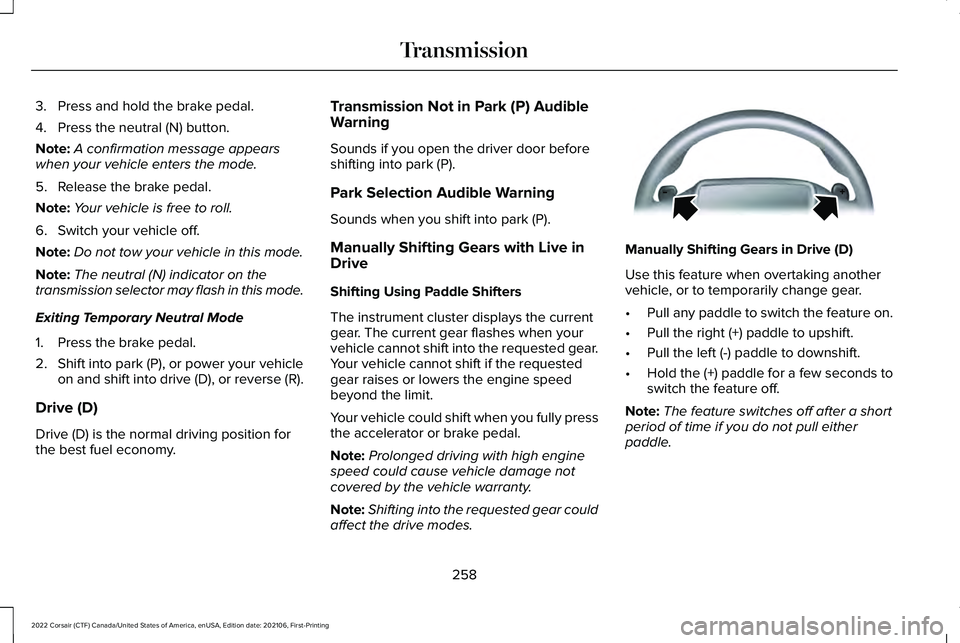
affect the drive modes. Manually Shifting Gears in Drive (D)
Use this feature when overtaking another
vehicle, or to temporarily change gear.
•
Pull any paddle to switch the feature on.
• Pull the right (+) paddle to upshift.
• Pull the left (-) paddle to downshift.
• Hold the (+) paddle for a few seconds to
switch the feature off.
Note: The feature switches off after a short
period of time if you do not pull either
paddle.
258
2022 Corsair (CTF) Canada/United States of America, enUSA, Edition date: 202106, First-Printing TransmissionE144821
Page 263 of 676
3. Using a tool or the key blade, carefully
remove the access cover.
Note: Do not pull the tether until you are in
the driver seat.
4. Switch the ignition on.
Note: Do not activate the manual park
release when you start the engine.
5. Once in the driver seat, fully press the brake pedal and hold. Do not release.
Pull the orange tether towards the driver
seat until it locks the tether in the
override position. Then leave the tether.
6. Keep the tether extended while in the override position.
7. If done correctly, a message on the instrument cluster displays Park Not
Available, Transmission Not in Park, or
Shift System Fault.
Note: Your vehicle is now out of the park (P)
position and is free to roll.
8. With your foot still fully applied on the brake pedal, disengage the parking
brake. See Electric Parking Brake (page
271). 9. Switch off the ignition.
10. Disconnect the negative battery cable
from the battery.
Note: If your vehicle detects wheel
movement before you disconnect the
battery, the electric parking brake could
apply.
Returning Your Vehicle to Normal Mode
1. Once it is safe to do so, reconnect the negative, black, battery cable to the
battery.
2. Apply the parking brake.
See Electric
Parking Brake (page 271).
Note: If your vehicle detects wheel
movement, the electric parking brake could
apply.
Note: If the vehicle battery runs out of
charge, use an external power source to
apply the parking brake.
3. Fully apply the brake pedal and hold, do
not release. Pull the orange tether
outward toward the driver seat to remove
it from the override position. 4. The cable releases and retracts back to
its original rest position.
5. Stow the manual park release cable tether back inside the instrument panel
dash hole and install the access cover
by pressing it back in position.
6. With your foot fully applied on the brake
pedal, start your vehicle. Confirm that
your vehicle is in the park (P) position and
that the instrument cluster indicates park
(P).
7. If the instrument cluster is not displaying
the park (P) position or there is a
message stating Park Not Available,
Transmission Not In Park, or Shift System
Fault, apply the parking brake before
exiting your vehicle. Contact an
authorized dealer for service.
260
2022 Corsair (CTF) Canada/United States of America, enUSA, Edition date: 202106, First-Printing Transmission
Page 266 of 676
Neutral (N)
WARNING: In neutral (N) your vehicle
is free to roll.
In neutral (N), power does not transmit to the
driven wheels, but the transmission does not
lock. You can start the engine with the
transmission in this position.
Temporary Neutral Mode
What is Temporary Neutral Mode
This mode keeps your vehicle in neutral (N)
when you switch your vehicle off. Use this
mode at an automatic car wash if you exit
your vehicle, or switch your vehicle off.
Note: Do not tow your vehicle in this mode.
Note: Automatic return to park (P) delays
when your vehicle is in this mode. Temporary Neutral Mode Limitations
Your vehicle could shift to park (P) after 30
minutes, or when the vehicle battery charge
level is low. Prolonged use of this mode can
cause the vehicle battery to run out of
charge.
Do not tow your vehicle in this mode. Failure
to follow these instructions could result in
vehicle damage not covered by the vehicle
warranty.
Entering Temporary Neutral Mode
1. Power your vehicle on.
2. Bring your vehicle to a complete stop.
3. Press and hold the brake pedal.
4. Press the neutral (N) button.
Note:
A confirmation message appears
when your vehicle enters the mode.
5. Release the brake pedal.
Note: Your vehicle is free to roll.
6. Switch your vehicle off.
Note: Do not tow your vehicle in this mode. Note:
The neutral (N) indicator on the
transmission selector may flash in this mode.
Exiting Temporary Neutral Mode
1. Press the brake pedal.
2. Shift into park (P), or power your vehicle on and shift into drive (D), or reverse (R).
Drive (D)
Drive (D) is the normal driving position for
the best fuel economy.
Transmission Not in Park (P) Audible
Warning
Sounds if you open the driver door before
shifting into park (P).
Park Selection Audible Warning
Sounds when you shift into park (P).
263
2022 Corsair (CTF) Canada/United States of America, enUSA, Edition date: 202106, First-Printing Transmission
Page 316 of 676
SWITCHING INTELLIGENT MODE
ON AND OFF
WARNING: You are responsible for
controlling your vehicle at all times. The
system is designed to be an aid and does
not relieve you of your responsibility to
drive with due care and attention. Failure
to follow this instruction could result in the
loss of control of your vehicle, personal
injury or death.
1. Press
Settings on the touchscreen.
2. Press
Driver Assistance.
3. Press
Cruise Control.
4. Press
Intelligent.
Changing the Set Speed with
Intelligent Adaptive Cruise Control
When intelligent mode is on, the system
adjusts the set speed to the speed limit
detected by the camera and the speed limit
information provided by the navigation
system. Note:
The set speed adjusts when the
system detects a different maximum speed
limit.
Note: The speed limit information provided
by the navigation map data may be
inaccurate or out of date.
See Navigation
(page 538).
Note: The system alerts you if the set speed
increases beyond the speed limit.
See
Adaptive Cruise Control Indicators (page
310).
If the system does not detect a speed limit,
the vehicle speed remains at the current set
speed.
You can override the set speed at any time.
You may need to override or cancel the
system in certain situations such as inclement
weather or if an incorrect speed is set.
Note: The system may not detect and read
speed limit signs with conditional
information, for example, when a sign is
flashing, during specific time ranges, or when
children are present. Note:
Under certain conditions, the system
may not adjust the vehicle speed until after
your vehicle passes the speed limit sign.
ADJUSTING THE SET SPEED
TOLERANCE - VEHICLES WITH:
INTELLIGENT ADAPTIVE CRUISE
CONTROL
You can set a permanent speed tolerance
that is above or below the detected speed
limit.
1. Press
Settings on the touchscreen.
2. Press
Driver Assistance.
3. Press
Cruise Control.
4. Press
Intelligent.
5. Press
Tolerance.
6. Use
+ and - to set the tolerance.
Note: You cannot set the tolerance more
than
20 mph (30 km/h) above or below the
recognized speed.
313
2022 Corsair (CTF) Canada/United States of America, enUSA, Edition date: 202106, First-Printing Adaptive Cruise Control
(If Equipped)