charging LINCOLN CORSAIR 2022 Owner's Manual
[x] Cancel search | Manufacturer: LINCOLN, Model Year: 2022, Model line: CORSAIR, Model: LINCOLN CORSAIR 2022Pages: 676, PDF Size: 7.67 MB
Page 250 of 676
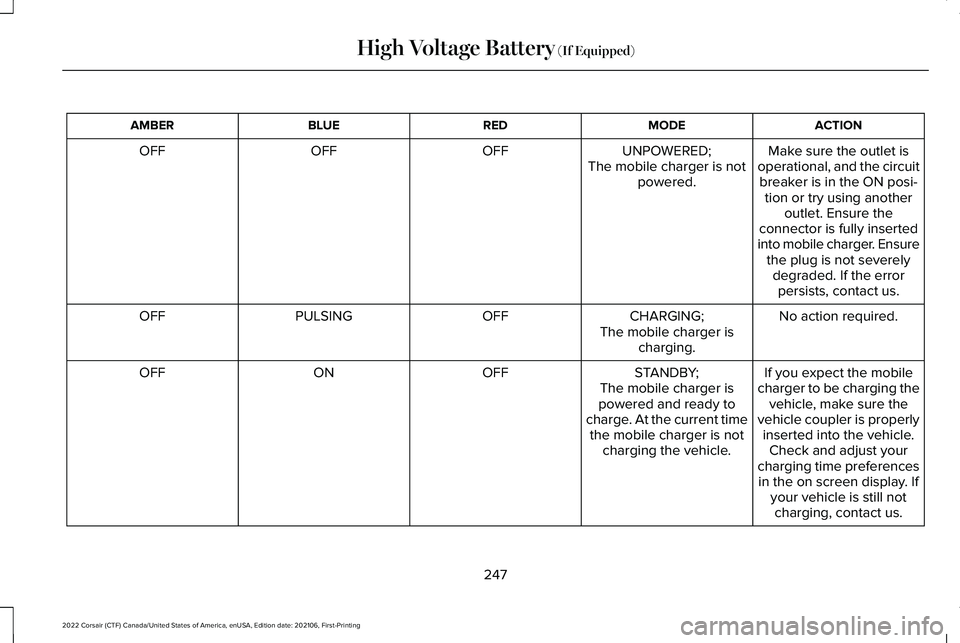
ACTION
MODE
RED
BLUE
AMBER
Make sure the outlet is
operational, and the circuit breaker is in the ON posi- tion or try using another outlet. Ensure the
connector is fully inserted
into mobile charger. Ensure the plug is not severelydegraded. If the errorpersists, contact us.
UNPOWERED;
The mobile charger is not powered.
OFF
OFF
OFF
No action required.
CHARGING;
OFF
PULSING
OFF
The mobile charger ischarging.
If you expect the mobile
charger to be charging the vehicle, make sure the
vehicle coupler is properly inserted into the vehicle. Check and adjust your
charging time preferences in the on screen display. If your vehicle is still notcharging, contact us.
STANDBY;
The mobile charger is
powered and ready to
charge. At the current time the mobile charger is not charging the vehicle.
OFF
ON
OFF
247
2022 Corsair (CTF) Canada/United States of America, enUSA, Edition date: 202106, First-Printing High Voltage Battery (If Equipped)
Page 251 of 676
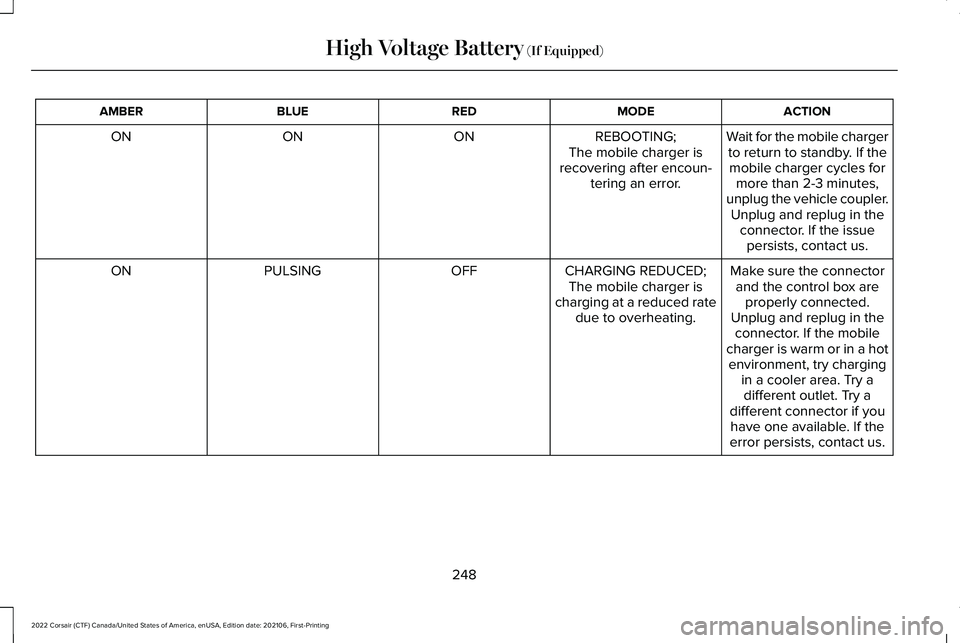
ACTION
MODE
RED
BLUE
AMBER
Wait for the mobile chargerto return to standby. If themobile charger cycles for more than 2-3 minutes,
unplug the vehicle coupler. Unplug and replug in the connector. If the issuepersists, contact us.
REBOOTING;
The mobile charger is
recovering after encoun- tering an error.
ON
ON
ON
Make sure the connectorand the control box are properly connected.
Unplug and replug in the connector. If the mobile
charger is warm or in a hot
CHARGING REDUCED;
The mobile charger is
charging at a reduced rate due to overheating.
OFF
PULSING
ON
environment, try chargingin a cooler area. Try adifferent outlet. Try a
different connector if you have one available. If the
error persists, contact us.
248
2022 Corsair (CTF) Canada/United States of America, enUSA, Edition date: 202106, First-Printing High Voltage Battery (If Equipped)
Page 252 of 676
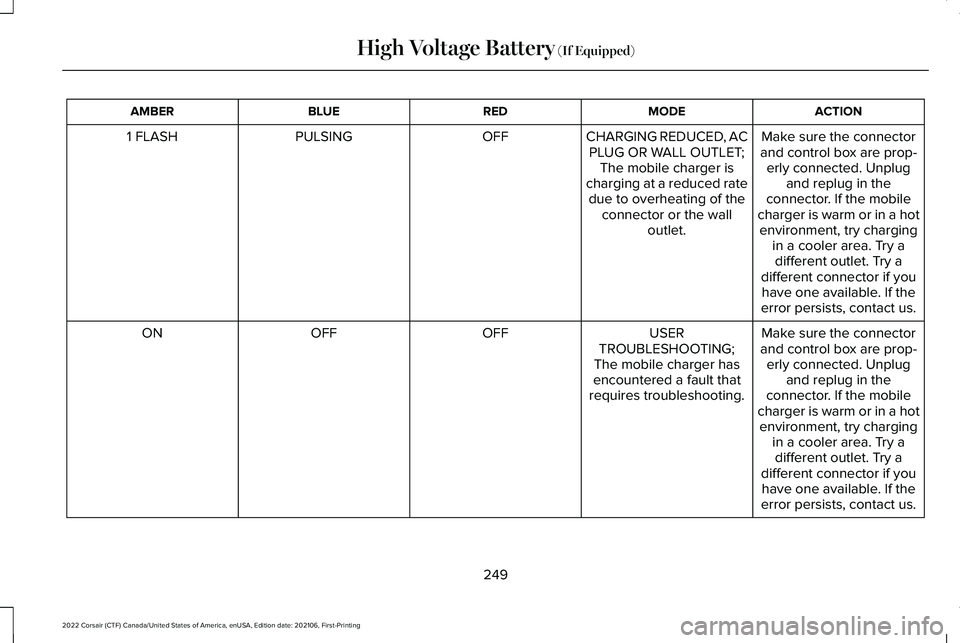
ACTION
MODE
RED
BLUE
AMBER
Make sure the connector
and control box are prop- erly connected. Unplug and replug in the
connector. If the mobile
charger is warm or in a hot
CHARGING REDUCED, AC
PLUG OR WALL OUTLET; The mobile charger is
charging at a reduced rate due to overheating of the connector or the wall outlet.
OFF
PULSING
1 FLASH
environment, try chargingin a cooler area. Try adifferent outlet. Try a
different connector if you have one available. If the
error persists, contact us.
Make sure the connector
and control box are prop- erly connected. Unplug and replug in the
connector. If the mobile
charger is warm or in a hot
USER
TROUBLESHOOTING;
The mobile charger has
encountered a fault that
requires troubleshooting.
OFF
OFF
ON
environment, try chargingin a cooler area. Try adifferent outlet. Try a
different connector if you have one available. If the
error persists, contact us.
249
2022 Corsair (CTF) Canada/United States of America, enUSA, Edition date: 202106, First-Printing High Voltage Battery (If Equipped)
Page 254 of 676
Note:
When plugging into an unfamiliar wall
outlet, let the vehicle charge for several
minutes before leaving it unattended. The
red indicator will illuminate if not charging.
The unit will turn off if breaker or
infrastructure ground fault circuit interrupter
(GFCI) is tripped. You can view vehicle
charging status remotely via the Lincoln Way
App.
Mobile Charger Auto-Restart
Auto-restart helps to make sure that your
vehicle will be charged and ready for use
when needed. A charge could be interrupted
if errors are detected. Charging resumes
once the error is no longer detected. The
red indicator illuminates during an error
condition.
The exception to the immediate auto-restart
is when the interruption is due to a charger
ground fault circuit interrupter (GFCI) event.
The charger attempts to restart 15 minutes
after a ground fault circuit interrupter (GFCI)
event. After the fourth attempt to restart, the
charger shuts down and the red indicator
stays on. If the fault persists, do not continue to try to
charge your vehicle. Contact your authorized
dealer.
CARE INSTRUCTIONS
Do not use cleaners or solvents as this could
damage your mobile charger. Do not place
stress on the charger cables. If unit
overheats, remove the mobile charger from
direct sunlight.
SAFETY FEATURES
The charger includes the following safety
features to protect against the risk of electric
shock:
•
Service Ground Check: The charger
constantly checks for the presence of a
service ground connection. If the service
ground ever fails, the charger red
indicator turns ON and shuts down power
to the vehicle.
• Thermal Event Sensor: Charger module
senses out-of-ordinary thermal events
and decreases the charging current or
shuts the unit down if required. •
Ground fault circuit interrupter (GFCI)
Protection: The charger has a ground
fault circuit interrupter (GFCI) reaction
system to protect against electric shock.
If the charger module detects an output
ground fault, it shuts down power to the
output cable and illuminates the red
indicator.
• Insulation: The charger module,
connector, cable assembly, and charge
coupler are completely insulated. There
are no exposed live parts, to protect
against electric shock.
• Unintentional Disconnection: The charge
coupler is designed to minimize
unintentional disconnection. A pilot signal
wire in the cable and charge coupler
eliminates the possibility of electric shock
when not connected to a vehicle or if an
unintended disconnect occurs during a
charge. Disconnection during charging
is safe.
251
2022 Corsair (CTF) Canada/United States of America, enUSA, Edition date: 202106, First-Printing High Voltage Battery (If Equipped)
Page 255 of 676
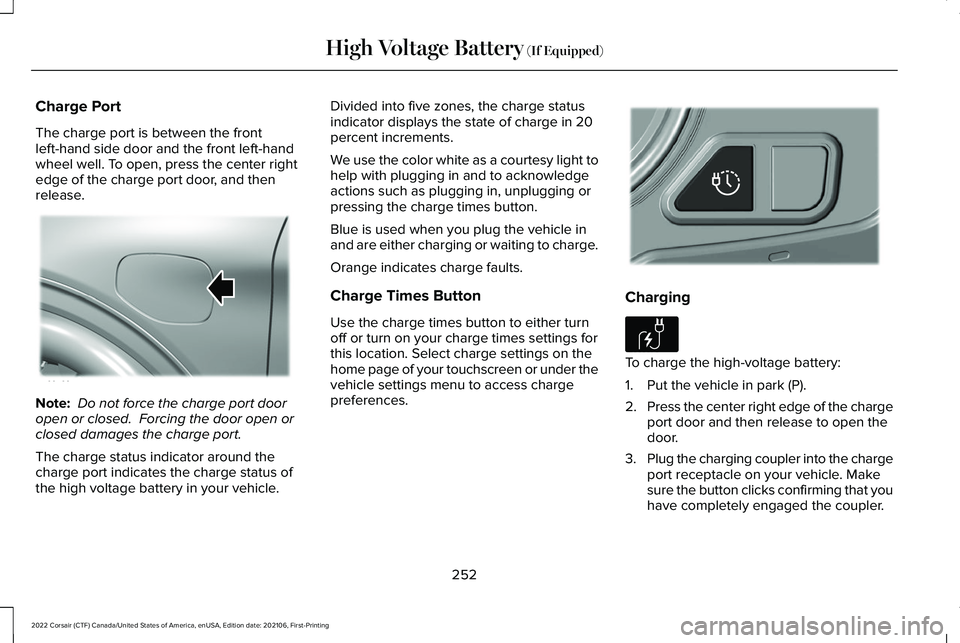
Charge Port
The charge port is between the front
left-hand side door and the front left-hand
wheel well. To open, press the center right
edge of the charge port door, and then
release.
Note:
Do not force the charge port door
open or closed. Forcing the door open or
closed damages the charge port.
The charge status indicator around the
charge port indicates the charge status of
the high voltage battery in your vehicle. Divided into five zones, the charge status
indicator displays the state of charge in 20
percent increments.
We use the color white as a courtesy light to
help with plugging in and to acknowledge
actions such as plugging in, unplugging or
pressing the charge times button.
Blue is used when you plug the vehicle in
and are either charging or waiting to charge.
Orange indicates charge faults.
Charge Times Button
Use the charge times button to either turn
off or turn on your charge times settings for
this location. Select charge settings on the
home page of your touchscreen or under the
vehicle settings menu to access charge
preferences.
Charging
To charge the high-voltage battery:
1. Put the vehicle in park (P).
2.
Press the center right edge of the charge
port door and then release to open the
door.
3. Plug the charging coupler into the charge
port receptacle on your vehicle. Make
sure the button clicks confirming that you
have completely engaged the coupler.
252
2022 Corsair (CTF) Canada/United States of America, enUSA, Edition date: 202106, First-Printing High Voltage Battery (If Equipped)E295258 E301111 E306676
Page 256 of 676
Note:
Put your vehicle in park (P) to charge,
and for the charge status indicator to
illuminate.
Note: Pump and fan noise could be present
when charging the high voltage battery. The
pump and fan noise is normal as it circulates
liquid and keeps your high voltage battery
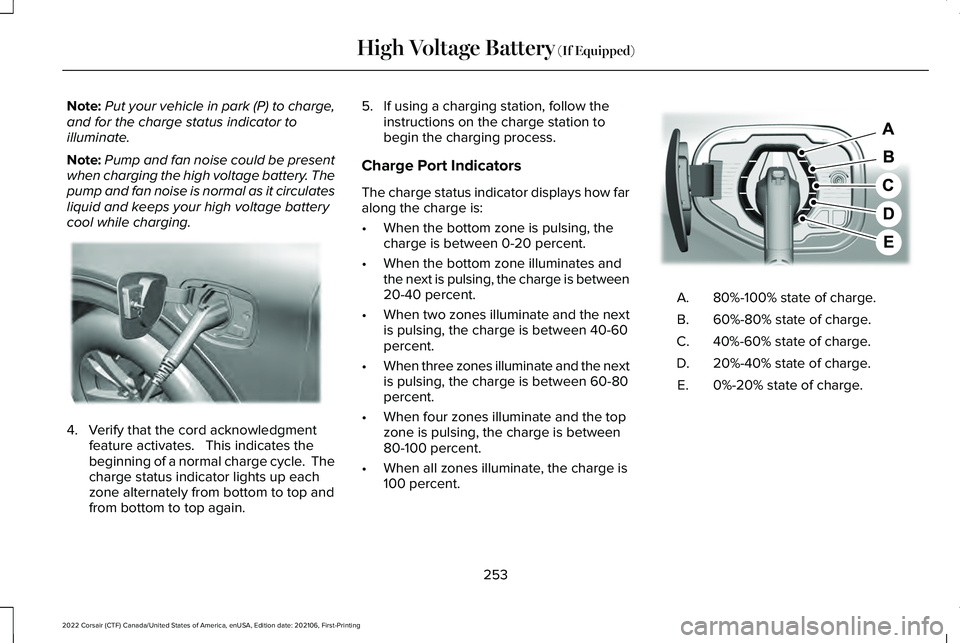
cool while charging. 4. Verify that the cord acknowledgment
feature activates. This indicates the
beginning of a normal charge cycle. The
charge status indicator lights up each
zone alternately from bottom to top and
from bottom to top again. 5. If using a charging station, follow the
instructions on the charge station to
begin the charging process.
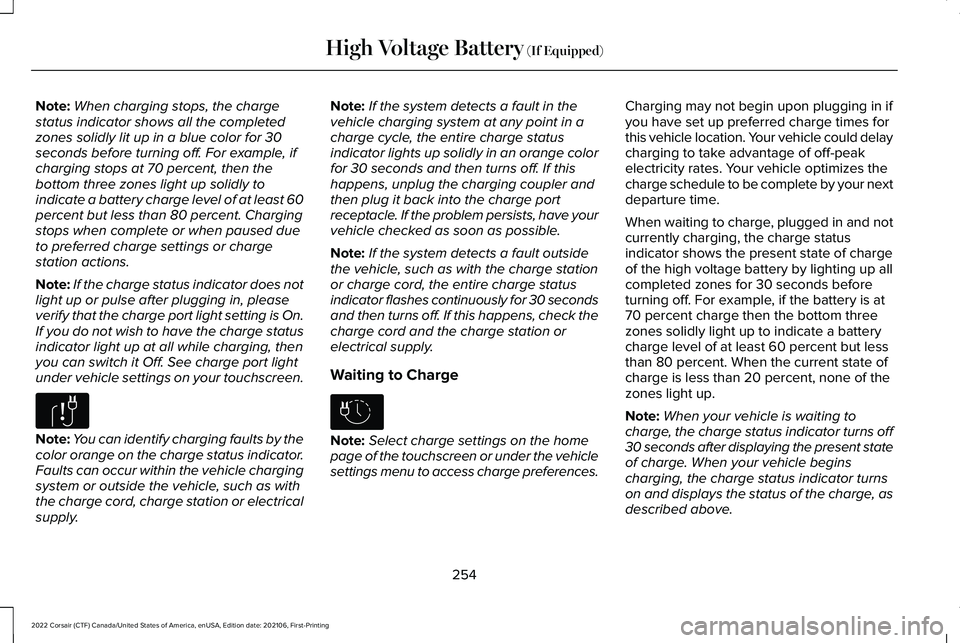
Charge Port Indicators
The charge status indicator displays how far
along the charge is:
• When the bottom zone is pulsing, the
charge is between 0-20 percent.
• When the bottom zone illuminates and
the next is pulsing, the charge is between
20-40 percent.
• When two zones illuminate and the next
is pulsing, the charge is between 40-60
percent.
• When three zones illuminate and the next
is pulsing, the charge is between 60-80
percent.
• When four zones illuminate and the top
zone is pulsing, the charge is between
80-100 percent.
• When all zones illuminate, the charge is
100 percent. 80%-100% state of charge.
A.
60%-80% state of charge.
B.
40%-60% state of charge.
C.
20%-40% state of charge.
D.
0%-20% state of charge.
E.
253
2022 Corsair (CTF) Canada/United States of America, enUSA, Edition date: 202106, First-Printing High Voltage Battery (If Equipped)E295257 E301197
Page 257 of 676
Note:
When charging stops, the charge
status indicator shows all the completed
zones solidly lit up in a blue color for 30
seconds before turning off. For example, if
charging stops at 70 percent, then the
bottom three zones light up solidly to
indicate a battery charge level of at least 60
percent but less than 80 percent. Charging
stops when complete or when paused due
to preferred charge settings or charge
station actions.
Note: If the charge status indicator does not
light up or pulse after plugging in, please
verify that the charge port light setting is On.
If you do not wish to have the charge status
indicator light up at all while charging, then
you can switch it Off. See charge port light
under vehicle settings on your touchscreen. Note:
You can identify charging faults by the
color orange on the charge status indicator.
Faults can occur within the vehicle charging
system or outside the vehicle, such as with
the charge cord, charge station or electrical
supply. Note:
If the system detects a fault in the
vehicle charging system at any point in a
charge cycle, the entire charge status
indicator lights up solidly in an orange color
for 30 seconds and then turns off. If this
happens, unplug the charging coupler and
then plug it back into the charge port
receptacle. If the problem persists, have your
vehicle checked as soon as possible.
Note: If the system detects a fault outside
the vehicle, such as with the charge station
or charge cord, the entire charge status
indicator flashes continuously for 30 seconds
and then turns off. If this happens, check the
charge cord and the charge station or
electrical supply.
Waiting to Charge Note:
Select charge settings on the home
page of the touchscreen or under the vehicle
settings menu to access charge preferences. Charging may not begin upon plugging in if
you have set up preferred charge times for
this vehicle location. Your vehicle could delay
charging to take advantage of off-peak
electricity rates. Your vehicle optimizes the
charge schedule to be complete by your next
departure time.
When waiting to charge, plugged in and not
currently charging, the charge status
indicator shows the present state of charge
of the high voltage battery by lighting up all
completed zones for 30 seconds before
turning off. For example, if the battery is at
70 percent charge then the bottom three
zones solidly light up to indicate a battery
charge level of at least 60 percent but less
than 80 percent. When the current state of
charge is less than 20 percent, none of the
zones light up.
Note:
When your vehicle is waiting to
charge, the charge status indicator turns off
30 seconds after displaying the present state
of charge. When your vehicle begins
charging, the charge status indicator turns
on and displays the status of the charge, as
described above.
254
2022 Corsair (CTF) Canada/United States of America, enUSA, Edition date: 202106, First-Printing High Voltage Battery (If Equipped)E306677 E306678
Page 258 of 676
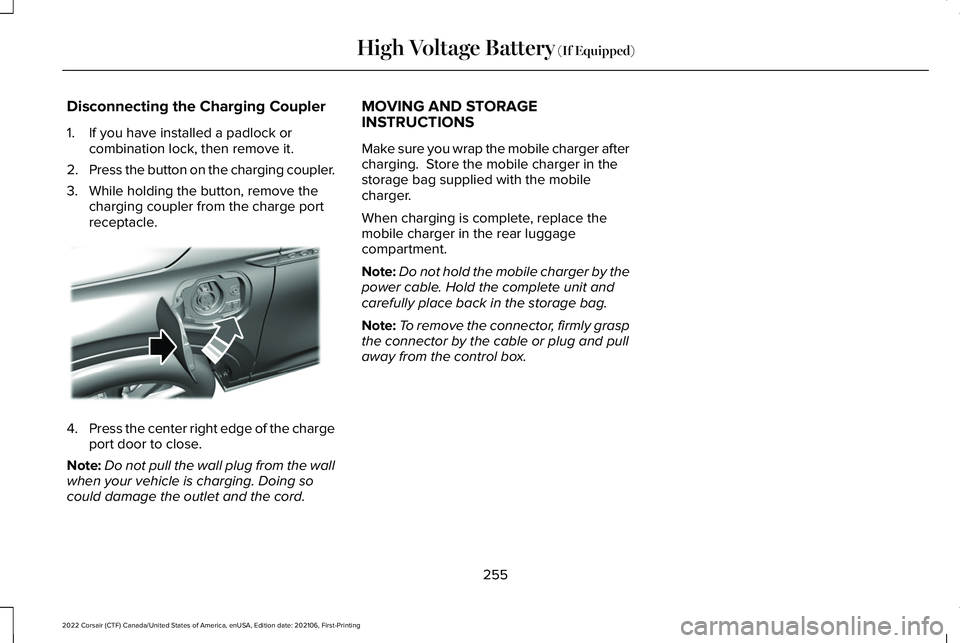
Disconnecting the Charging Coupler
1. If you have installed a padlock or
combination lock, then remove it.
2. Press the button on the charging coupler.
3. While holding the button, remove the charging coupler from the charge port
receptacle. 4.
Press the center right edge of the charge
port door to close.
Note: Do not pull the wall plug from the wall
when your vehicle is charging. Doing so
could damage the outlet and the cord. MOVING AND STORAGE
INSTRUCTIONS
Make sure you wrap the mobile charger after
charging. Store the mobile charger in the
storage bag supplied with the mobile
charger.
When charging is complete, replace the
mobile charger in the rear luggage
compartment.
Note:
Do not hold the mobile charger by the
power cable. Hold the complete unit and
carefully place back in the storage bag.
Note: To remove the connector, firmly grasp
the connector by the cable or plug and pull
away from the control box.
255
2022 Corsair (CTF) Canada/United States of America, enUSA, Edition date: 202106, First-Printing High Voltage Battery (If Equipped)E295444
Page 391 of 676
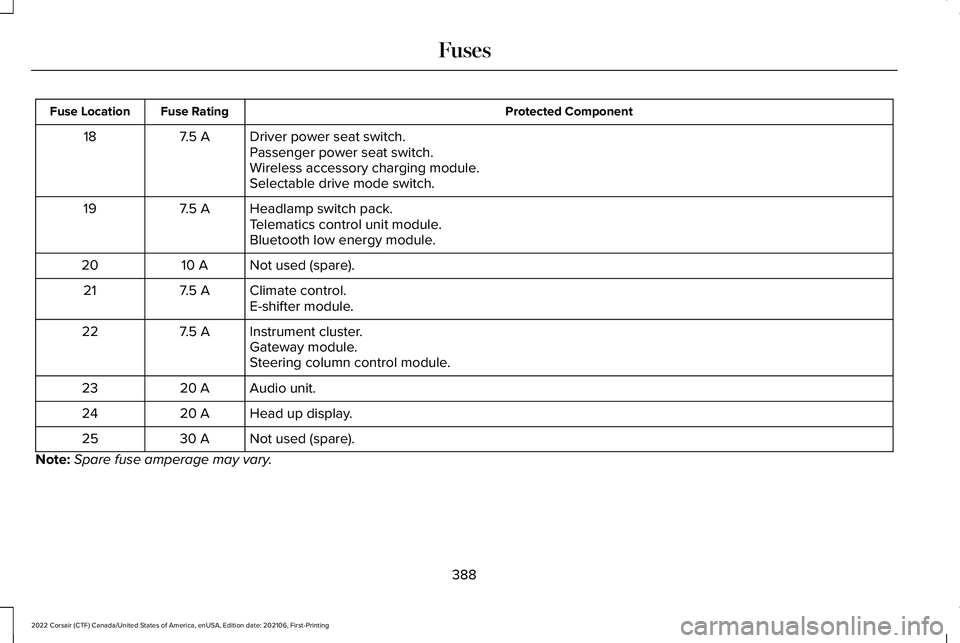
Protected Component
Fuse Rating
Fuse Location
Driver power seat switch.
7.5 A
18
Passenger power seat switch.
Wireless accessory charging module.
Selectable drive mode switch.
Headlamp switch pack.
7.5 A
19
Telematics control unit module.
Bluetooth low energy module.
Not used (spare).
10 A
20
Climate control.
7.5 A
21
E-shifter module.
Instrument cluster.
7.5 A
22
Gateway module.
Steering column control module.
Audio unit.
20 A
23
Head up display.
20 A
24
Not used (spare).
30 A
25
Note: Spare fuse amperage may vary.
388
2022 Corsair (CTF) Canada/United States of America, enUSA, Edition date: 202106, First-Printing Fuses
Page 411 of 676
Battery Management System (If Equipped)
The system monitors battery conditions and
takes actions to extend battery life. If
excessive battery drain is detected, the
system temporarily disables some electrical
systems to protect the battery.
Systems included are:
• Heated rear window.
• Heated seats.
• Climate control.
• Heated steering wheel.
• Audio unit.
• Navigation system.
A message may appear in the information
display to alert you that battery protection
actions are active. This message is only for
notification that an action is taking place, and
not intended to indicate an electrical problem
or that the battery requires replacement. After battery replacement, or in some cases
after charging the battery with an external
charger, the battery management system
requires eight hours of vehicle sleep time to
relearn the battery state of charge. During
this time, your vehicle must remain fully
locked with the ignition switched off.
Note:
Prior to relearning the battery state of
charge, the battery management system
may temporarily disable some electrical
systems.
Electrical Accessory Installation
To make sure the battery management
system works correctly, do not connect an
electrical device ground connection directly
to the battery negative post. This can cause
inaccurate measurements of the battery
condition and potential incorrect system
operation.
Note: If you add electrical accessories or
components to the vehicle, it may adversely
affect battery performance and durability.
This may also affect the performance of
other electrical systems in the vehicle. Remove and Reinstall the Battery
Install a battery approved for use by our
specifications.
See Capacities and
Specifications (page 461).
To disconnect or remove the battery, do the
following:
1. Apply the parking brake and switch the ignition off.
2. Switch all electrical equipment off, for example lights and radio.
3. Wait a minimum of two minutes before disconnecting the battery.
Note: The engine management system has
a power hold function and remains powered
for a period of time after you switch the
ignition off. This is to allow the system to
store diagnostic and adaptive tables.
Disconnecting the battery without waiting
can cause damage not covered by the
vehicle warranty.
4. Disconnect the negative battery cable terminal.
5. Disconnect the positive battery cable terminal.
408
2022 Corsair (CTF) Canada/United States of America, enUSA, Edition date: 202106, First-Printing Maintenance