ECO mode LINCOLN CORSAIR 2023 User Guide
[x] Cancel search | Manufacturer: LINCOLN, Model Year: 2023, Model line: CORSAIR, Model: LINCOLN CORSAIR 2023Pages: 690, PDF Size: 15.04 MB
Page 88 of 690
8.Confirm you are aware you arede-authorizing all authorized users andLincoln Way Connect settings.
9.Press Continue.
USING THE VALET MODE
Classic Valet Mode
Enabling Valet Mode
Make sure the remote control is in yourvehicle.
1.Press Settings on the touchscreen.
2.Press Valet Mode.
3.Enter a four digit code to lock thetouchscreen.
4.Re-enter the same four digit code tocomplete enabling valet mode.
Disabling Valet Mode
1.Press Exit Valet Mode.
2.Enter your four digit code to disable valetmode and unlock your touchscreen.
Enhanced Valet Mode
Enabling Valet Mode
Have your backup start passcode completelyset up before using valet mode. SeeProgramming Your Phone (page 83).
Note:If your vehicle detects a remotecontrol, the system defaults to classic valetmode.
1.Press Settings on the touchscreen.
2.Press Valet Mode.
Note:If the system detects a valid phone asa key, a valet passcode displays in both thetouchscreen and mobile app.
Note:If the system does not detect a validphone as a key, it prompts you to enter yourbackup start passcode on the touchscreen.Once validated, a valet passcode displayson the touchscreen.
3.Provide the valet the first five digits of thevalet passcode to enter on the keylessentry keypad to unlock your vehicle.
4.Provide the valet the eight-digit valetpasscode to enter on the touchscreen tostart and drive your vehicle.
Disabling Valet Mode
1.Press Exit Valet Mode.
Note:If the system detects an authorizedphone as a key, valet mode disables.
Note:If the system does not detect a validphone as a key, it prompts you to enter yourbackup start passcode. Once validated, valetmode disables.
USING THE BACKUP START
PASSCODE
Make sure you have phone as a key activeon at least one phone to use the previouslycreated backup start passcode. SeeProgramming Your Phone (page 83).
84
2023 Corsair (CTF) Canada/United States of America, enUSA, Edition date: 202208, DOMPhone as a Key (If Equipped)
Page 89 of 690
1.Press the brake pedal and the pushbutton ignition switch. If the system doesnot detect a valid phone as a key orremote control, a message appears onthe touchscreen and the system promptsyou for your backup start passcode.
Note:The touchscreen times out after 30seconds with no interaction.
Note:If the backup start passcode screendoes not appear, press the brake pedal andpush button ignition switch again.
2.Use the touchscreen to enter yourbackup start passcode.
3.After entering your backup startpasscode, press Enter within 30 seconds.
4.Once the system validates the backupstart passcode, a message alerts you tostart your vehicle.
5.Press the brake pedal and the pushbutton ignition switch within 20 secondsto start the vehicle.
6.If your vehicle does not start, repeatsteps 1-5.
System Lockout
The system locks after five combinedincorrect attempts of the following:
•Entering a backup start passcode.
•Resetting a current passcode.
•Entering a valet mode passcode.
Note:The system remains locked for fiveminutes. After five minutes the system allowscodes to be entered again.
PHONE AS A KEY –
TROUBLESHOOTING
PHONE AS A KEY – FREQUENTLYASKED QUESTIONS
How can I tell if my vehicle has phoneas a key?
•The touchscreen shows the phone as akey reset option.
•A control button appears on the homescreen of the Lincoln Way app if you haveregistered your vehicle through theLincoln Way app.
What happens if I cannot unlock thevehicle with phone as a key?
•Attempt to move your phone closer tothe vehicle.
•Check that the Lincoln Way app is stillrunning and that the phone as a keycontrol screen shows connected. If thephone is connected, attempt to press theremote unlock button in the Lincoln Wayapp. If the phone is not connected or theremote unlock button does not work inthe Lincoln Way app, attempt to forceclose and restart the app.
85
2023 Corsair (CTF) Canada/United States of America, enUSA, Edition date: 202208, DOMPhone as a Key (If Equipped)
Page 90 of 690
Why do I get a No Key Detectedmessage in the instrument clusterdisplay when I am using phone as akey and my phone is in the car?
•Your phone’s Bluetooth connection hasbeen disrupted or is not connected. Tryreconnecting your phone's Bluetoothconnection.
•Move the phone closer to the center ofthe vehicle near the cup holder or centerconsole.
•Verify your phone as a key is still active,enabled and has not been revoked.
What do I do if my phone is lost,damaged or the battery has depleted?
•Use the backup start passcode that youcreated. See Using the Backup StartPasscode (page 84).
How many phones can I use for phoneas a key?
•You can program and activate up to fourphones with phone as a key to yourvehicle.
How does a valet drive my car if I onlyuse my phone as a key?
•Have the valet use the temporary valetpasscode that you created. See Usingthe Valet Mode (page 84).
I uninstalled my Lincoln Way app andreinstalled it. Why am I not able to geta new phone as a key?
•Remove the phone as a key that waspreviously associated with your phone.
•Reset phone as a key from your vehicle,and then request a new phone as a key.See Programming Your Phone (page83).
Why can I not remotely start thevehicle with my phone as a key?
•Using the Lincoln Way app, verify yourphone as a key setup is complete andenabled via Bluetooth connection on atleast one phone. If Bluetooth hasconnected but phone as a key setup isnot complete, complete the setup of yourphone as a key as prompted from theLincoln Way app. See ProgrammingYour Phone (page 83).
PHONE AS A KEY VIDEOS
Lincoln Phone As A Key Video Link
Phone As A Key: Valet Mode Video Link
86
2023 Corsair (CTF) Canada/United States of America, enUSA, Edition date: 202208, DOMPhone as a Key (If Equipped)
Page 99 of 690
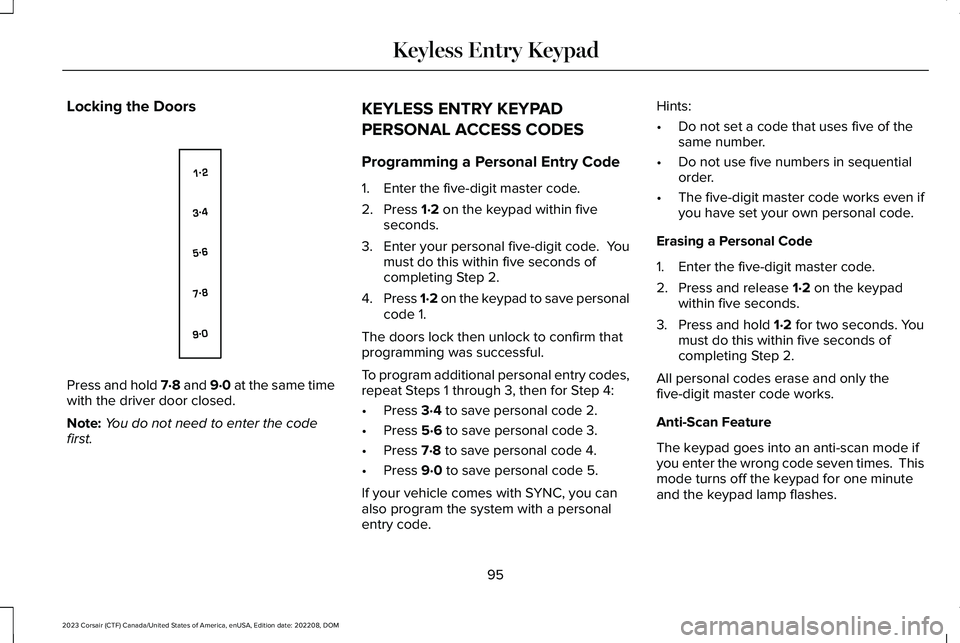
Locking the Doors
Press and hold 7·8 and 9·0 at the same timewith the driver door closed.
Note:You do not need to enter the codefirst.
KEYLESS ENTRY KEYPAD
PERSONAL ACCESS CODES
Programming a Personal Entry Code
1.Enter the five-digit master code.
2.Press 1·2 on the keypad within fiveseconds.
3.Enter your personal five-digit code. Youmust do this within five seconds ofcompleting Step 2.
4.Press 1·2 on the keypad to save personalcode 1.
The doors lock then unlock to confirm thatprogramming was successful.
To program additional personal entry codes,repeat Steps 1 through 3, then for Step 4:
•Press 3·4 to save personal code 2.
•Press 5·6 to save personal code 3.
•Press 7·8 to save personal code 4.
•Press 9·0 to save personal code 5.
If your vehicle comes with SYNC, you canalso program the system with a personalentry code.
Hints:
•Do not set a code that uses five of thesame number.
•Do not use five numbers in sequentialorder.
•The five-digit master code works even ifyou have set your own personal code.
Erasing a Personal Code
1.Enter the five-digit master code.
2.Press and release 1·2 on the keypadwithin five seconds.
3.Press and hold 1·2 for two seconds. Youmust do this within five seconds ofcompleting Step 2.
All personal codes erase and only thefive-digit master code works.
Anti-Scan Feature
The keypad goes into an anti-scan mode ifyou enter the wrong code seven times. Thismode turns off the keypad for one minuteand the keypad lamp flashes.
95
2023 Corsair (CTF) Canada/United States of America, enUSA, Edition date: 202208, DOMKeyless Entry KeypadE138637
Page 112 of 690
WHAT IS THE PERIMETER ALARM
The perimeter alarm is designed to detectunauthorized access to your vehicle.
WHAT ARE THE INTERIOR SENSORS
(If Equipped)
The interior sensors are designed to detectany movement inside your vehicle.
The interior sensors are in the overheadconsole.
Note:Do not cover the interior sensors.
WHAT ARE THE INCLINATIONSENSORS (If Equipped)
The inclination sensor is designed to detectan attempt to raise your vehicle, for exampleto remove a wheel or to tow it away.
WHAT IS THE BATTERY BACKUPALARM (If Equipped)
The battery backup alarm is an additionalalarm sounder that has its own battery. It candetect if the vehicle battery is disconnectedto overcome the alarm system.
ARMING THE ANTI-THEFT ALARMSYSTEM
The alarm is ready to arm when your vehicleis switched off.
Lock your vehicle with your remote controlto arm the alarm.
DISARMING THE ANTI-THEFT ALARMSYSTEM
Disarm the alarm by performing any of thefollowing actions:
•Unlock the doors or luggagecompartment with the remote control.
•Switch your vehicle on or start yourvehicle.
ANTI-THEFT ALARM SYSTEM
SETTINGS
WHAT ARE THE ALARM SECURITYLEVELS
You can select two levels of alarm security,all sensors and perimeter sensing.
All Sensors
All sensors is the standard setting.
In all sensors, all equipped sensors are onwhen you arm the alarm.
Note:Do not arm the alarm with all sensorsif passengers, animals or other movingobjects are inside your vehicle.
Perimeter Sensing
In perimeter sensing, the interior sensors areoff when you arm the alarm.
All the other equipped sensors activate whenyou arm the alarm in this mode.
108
2023 Corsair (CTF) Canada/United States of America, enUSA, Edition date: 202208, DOMSecurity
Page 156 of 690
USING THE INSTRUMENT
CLUSTER DISPLAY CONTROLS
WARNING: Driving while distractedcan result in loss of vehicle control, crashand injury. We strongly recommend thatyou use extreme caution when using anydevice that may take your focus off theroad. Your primary responsibility is the safeoperation of your vehicle. We recommendagainst the use of any hand-held devicewhile driving and encourage the use ofvoice-operated systems when possible.Make sure you are aware of all applicablelocal laws that may affect the use ofelectronic devices while driving.
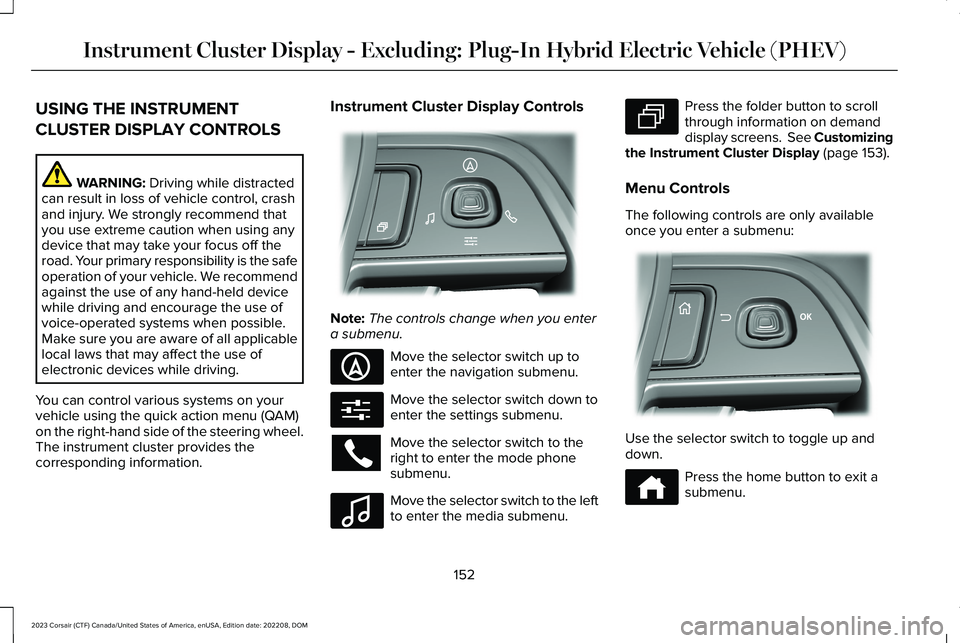
You can control various systems on yourvehicle using the quick action menu (QAM)on the right-hand side of the steering wheel.The instrument cluster provides thecorresponding information.
Instrument Cluster Display Controls
Note:The controls change when you entera submenu.
Move the selector switch up toenter the navigation submenu.
Move the selector switch down toenter the settings submenu.
Move the selector switch to theright to enter the mode phonesubmenu.
Move the selector switch to the leftto enter the media submenu.
Press the folder button to scrollthrough information on demanddisplay screens. See Customizingthe Instrument Cluster Display (page 153).
Menu Controls
The following controls are only availableonce you enter a submenu:
Use the selector switch to toggle up anddown.
Press the home button to exit asubmenu.
152
2023 Corsair (CTF) Canada/United States of America, enUSA, Edition date: 202208, DOMInstrument Cluster Display - Excluding: Plug-In Hybrid Electric Vehicle (PHEV)E281220 E281481 E280315 E100027 E281483 E299701 E272621
Page 158 of 690
USING THE INSTRUMENT
CLUSTER DISPLAY CONTROLS
WARNING: Driving while distractedcan result in loss of vehicle control, crashand injury. We strongly recommend thatyou use extreme caution when using anydevice that may take your focus off theroad. Your primary responsibility is the safeoperation of your vehicle. We recommendagainst the use of any hand-held devicewhile driving and encourage the use ofvoice-operated systems when possible.Make sure you are aware of all applicablelocal laws that may affect the use ofelectronic devices while driving.
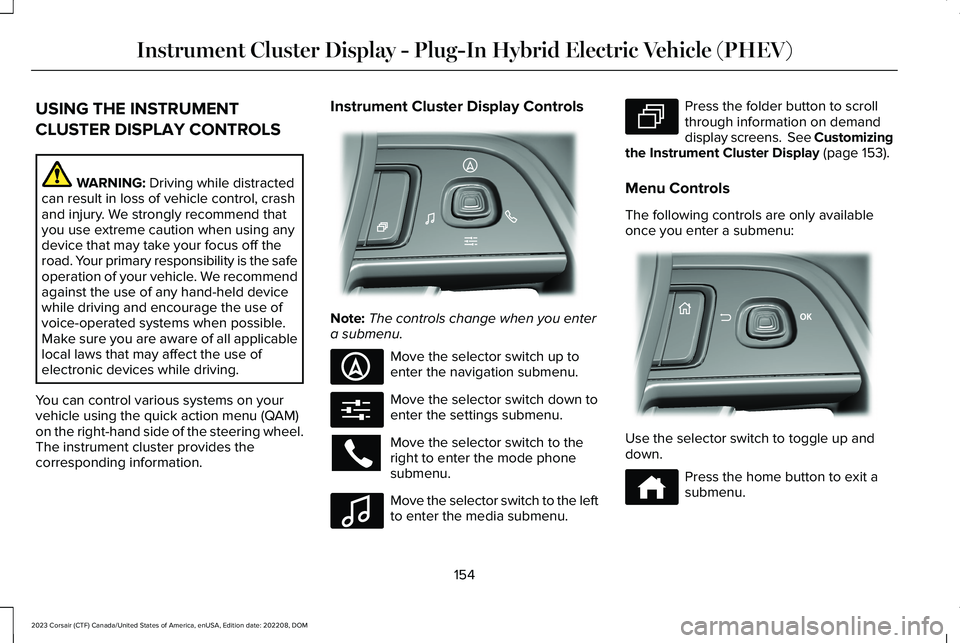
You can control various systems on yourvehicle using the quick action menu (QAM)on the right-hand side of the steering wheel.The instrument cluster provides thecorresponding information.
Instrument Cluster Display Controls
Note:The controls change when you entera submenu.
Move the selector switch up toenter the navigation submenu.
Move the selector switch down toenter the settings submenu.
Move the selector switch to theright to enter the mode phonesubmenu.
Move the selector switch to the leftto enter the media submenu.
Press the folder button to scrollthrough information on demanddisplay screens. See Customizingthe Instrument Cluster Display (page 153).
Menu Controls
The following controls are only availableonce you enter a submenu:
Use the selector switch to toggle up anddown.
Press the home button to exit asubmenu.
154
2023 Corsair (CTF) Canada/United States of America, enUSA, Edition date: 202208, DOMInstrument Cluster Display - Plug-In Hybrid Electric Vehicle (PHEV)E281220 E281481 E280315 E100027 E281483 E299701 E272621
Page 161 of 690
Your electric economy is affected by yourdriving style and route, climate control use,outside temperature and other factors. Besteconomy is achieved with mild to moderateacceleration and braking, moderate speedsand low climate control usage.
Note:Electric economy is a selectablescreen. See Customizing the InstrumentCluster Display (page 155).
BRAKE COACH
The brake coach appears after your vehiclehas come to a stop. It coaches you to brakein a manner that maximizes the amount ofenergy returned through the regenerativebraking system.
The percent displayed indicates theregenerative braking efficiency, with 100%representing the maximum amount of energyrecovered.
Note:While regenerative braking works inall drive modes, brake coach display maynot be available in all drive modes.
You can switch brake coach on or off in thesettings menu. See Instrument ClusterDisplay Main Menu (page 155).
TRIP SUMMARY
The trip summary displays upon shutting offyour vehicle. The values are cumulative sinceyou last started your vehicle.
The information shown is the same as theThis Trip screen. See Trip Data (page 159).
VEHICLE CHARGING STATUS
The vehicle charge status displays when youswitch off your vehicle and when you switchon your vehicle when plugged in. Chargingstatus includes the charge start or chargeend time as appropriate. You can modifyyour charge settings though the touchscreen.See Setting the Charging Schedule andPreferences (page 250).
157
2023 Corsair (CTF) Canada/United States of America, enUSA, Edition date: 202208, DOMInstrument Cluster Display - Plug-In Hybrid Electric Vehicle (PHEV)
Page 169 of 690
WHAT IS REMOTE START
The system allows you to remotely start yourvehicle and therefore to heat or cool theinterior to a predetermined temperature.
REMOTE START PRECAUTIONS
WARNING: Do not start the enginein a closed garage or in other enclosedareas. Exhaust fumes are toxic. Alwaysopen the garage door before you start theengine. Failure to follow this instructioncould result in personal injury or death.
REMOTE START LIMITATIONS
Remote start does not work if:
•The alarm horn is sounding.
•The hood is open.
•The transmission is not in park (P).
•Remote start is not enabled.
•The ignition is on.
Note:Do not use remote start if your fuellevel is low.
ENABLING REMOTE START
1.Press Settings on the touchscreen.
2.Press Vehicle Settings.
3.Press Remote Start Setup.
4.Switch System on or off.
Note:To use remote start, make sure thatthe modem is enabled. See Enabling andDisabling the Modem (page 514).
REMOTELY STARTING AND
STOPPING THE VEHICLE
Remotely Starting the Vehicle
Press the button on the remotecontrol.
Within three seconds, press thebutton on the remote control.
Within three seconds, press thebutton again.
Note:You can also use the Lincoln Way appto start the vehicle.
Note:The turn signals flash twice.
Note:The parking lamps turn on when thevehicle is running.
Note:The horn sounds if the system fails tostart.
Note:All other vehicle systems remain offwhen you have remotely started the vehicle.
Note:The vehicle remains secured whenyou have remotely started the vehicle. Avalid key must be inside your vehicle toswitch your vehicle on and drive yourvehicle.
Remotely Stopping the Vehicle
Within three seconds, press thebutton on the remote control.
Within three seconds, press thebutton again.
165
2023 Corsair (CTF) Canada/United States of America, enUSA, Edition date: 202208, DOMRemote StartE138623 E138625 E138625
Page 170 of 690
EXTENDING THE REMOTE START
DURATION
To extend the engine running durationduring remote start, do the following:
Press the button on the remotecontrol.
Within three seconds, press thebutton on the remote control.
Within three seconds, press thebutton again.
Note:You can extend the engine runningduration to a maximum of 30 minutes.
REMOTE START REMOTE
CONTROL INDICATORS
Remote Control Feedback
An LED on the remote control provides statusfeedback of remote start or stop commands.
StatusLED
Remote startsuccessful.Solid green.
Remote stopsuccessful.Solid red.
Request failed orstatus not received.Blinking red.
Status incomplete.Blinking green.
REMOTE START SETTINGS
Climate Control Settings
1.Press Settings on the touchscreen.
2.Press Vehicle Settings.
3.Press Remote Start Setup.
4.Press Climate Control.
5.Press Auto or Last settings.
Note:If you switch the auto mode on, thesystem attempts to heat or cool the interiorto 72°F (22°C). When you switch the vehicleon, the climate control system returns to thelast used settings.
Note:If you switch the last settings on, thesystem remembers the last used settings.
Heated Seat Settings (If Equipped)
1.Press Settings on the touchscreen.
2.Press Vehicle Settings.
3.Press Remote Start Setup.
4.Press Seats.
5.Press Auto or Off.
Note:If you switch the heated seat settingson, the heated seats turn on during coldweather.
Note:You cannot adjust the heated seatsettings when you remotely start yourvehicle.
Heated Steering Wheel Settings (If
Equipped)
1.Press Settings on the touchscreen.
166
2023 Corsair (CTF) Canada/United States of America, enUSA, Edition date: 202208, DOMRemote StartE138623 E138625