ECO mode LINCOLN CORSAIR 2023 Owner's Guide
[x] Cancel search | Manufacturer: LINCOLN, Model Year: 2023, Model line: CORSAIR, Model: LINCOLN CORSAIR 2023Pages: 690, PDF Size: 15.04 MB
Page 249 of 690
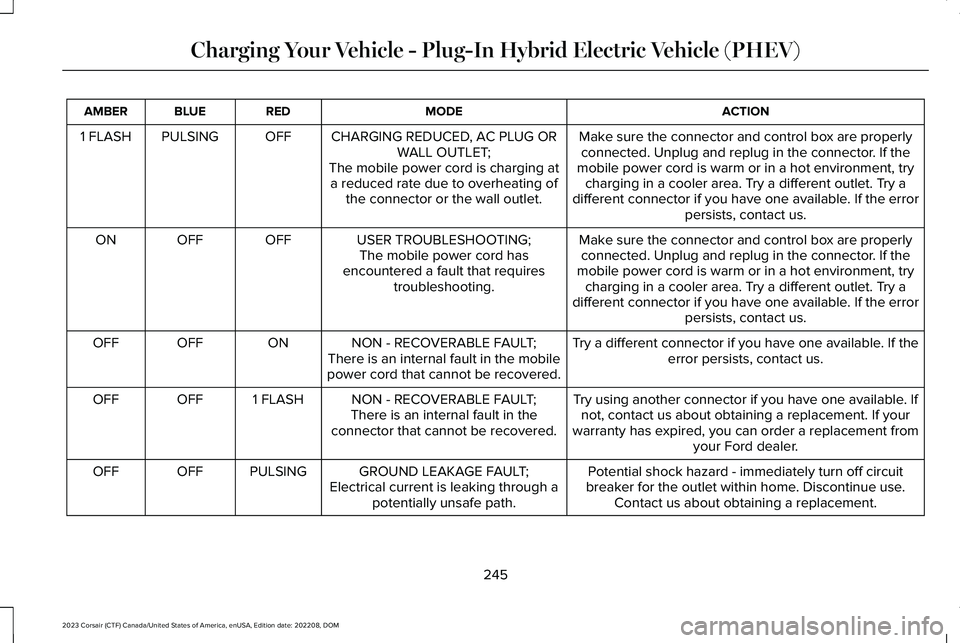
ACTIONMODEREDBLUEAMBER
Make sure the connector and control box are properlyconnected. Unplug and replug in the connector. If themobile power cord is warm or in a hot environment, trycharging in a cooler area. Try a different outlet. Try adifferent connector if you have one available. If the errorpersists, contact us.
CHARGING REDUCED, AC PLUG ORWALL OUTLET;The mobile power cord is charging ata reduced rate due to overheating ofthe connector or the wall outlet.
OFFPULSING1 FLASH
Make sure the connector and control box are properlyconnected. Unplug and replug in the connector. If themobile power cord is warm or in a hot environment, trycharging in a cooler area. Try a different outlet. Try adifferent connector if you have one available. If the errorpersists, contact us.
USER TROUBLESHOOTING;The mobile power cord hasencountered a fault that requirestroubleshooting.
OFFOFFON
Try a different connector if you have one available. If theerror persists, contact us.NON - RECOVERABLE FAULT;There is an internal fault in the mobilepower cord that cannot be recovered.
ONOFFOFF
Try using another connector if you have one available. Ifnot, contact us about obtaining a replacement. If yourwarranty has expired, you can order a replacement fromyour Ford dealer.
NON - RECOVERABLE FAULT;There is an internal fault in theconnector that cannot be recovered.
1 FLASHOFFOFF
Potential shock hazard - immediately turn off circuitbreaker for the outlet within home. Discontinue use.Contact us about obtaining a replacement.
GROUND LEAKAGE FAULT;Electrical current is leaking through apotentially unsafe path.
PULSINGOFFOFF
245
2023 Corsair (CTF) Canada/United States of America, enUSA, Edition date: 202208, DOMCharging Your Vehicle - Plug-In Hybrid Electric Vehicle (PHEV)
Page 264 of 690
Note:Drive modes could affect when thevehicle shifts into the requested gear.
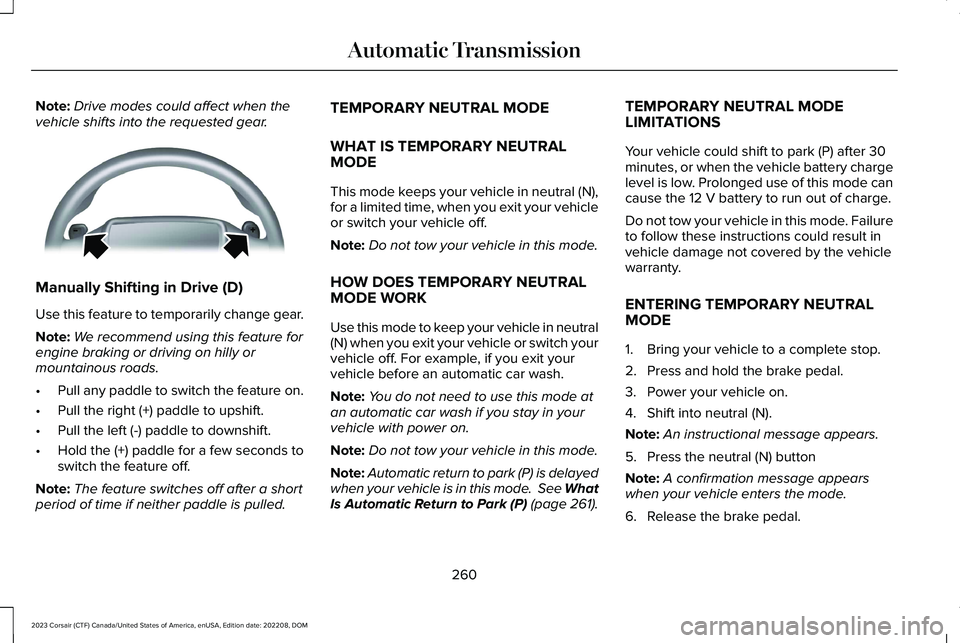
Manually Shifting in Drive (D)
Use this feature to temporarily change gear.
Note:We recommend using this feature forengine braking or driving on hilly ormountainous roads.
•Pull any paddle to switch the feature on.
•Pull the right (+) paddle to upshift.
•Pull the left (-) paddle to downshift.
•Hold the (+) paddle for a few seconds toswitch the feature off.
Note:The feature switches off after a shortperiod of time if neither paddle is pulled.
TEMPORARY NEUTRAL MODE
WHAT IS TEMPORARY NEUTRALMODE
This mode keeps your vehicle in neutral (N),for a limited time, when you exit your vehicleor switch your vehicle off.
Note:Do not tow your vehicle in this mode.
HOW DOES TEMPORARY NEUTRALMODE WORK
Use this mode to keep your vehicle in neutral(N) when you exit your vehicle or switch yourvehicle off. For example, if you exit yourvehicle before an automatic car wash.
Note:You do not need to use this mode atan automatic car wash if you stay in yourvehicle with power on.
Note:Do not tow your vehicle in this mode.
Note:Automatic return to park (P) is delayedwhen your vehicle is in this mode. See WhatIs Automatic Return to Park (P) (page 261).
TEMPORARY NEUTRAL MODELIMITATIONS
Your vehicle could shift to park (P) after 30minutes, or when the vehicle battery chargelevel is low. Prolonged use of this mode cancause the 12 V battery to run out of charge.
Do not tow your vehicle in this mode. Failureto follow these instructions could result invehicle damage not covered by the vehiclewarranty.
ENTERING TEMPORARY NEUTRALMODE
1.Bring your vehicle to a complete stop.
2.Press and hold the brake pedal.
3.Power your vehicle on.
4.Shift into neutral (N).
Note:An instructional message appears.
5.Press the neutral (N) button
Note:A confirmation message appearswhen your vehicle enters the mode.
6.Release the brake pedal.
260
2023 Corsair (CTF) Canada/United States of America, enUSA, Edition date: 202208, DOMAutomatic TransmissionE144821
Page 268 of 690
SHIFTING YOUR IMMOBILE
VEHICLE OUT OF PARK (P) -
GASOLINE
WARNING: When doing thisprocedure, you need to take thetransmission out of park (P) which meansyour vehicle can roll freely. To avoidunwanted vehicle movement, apply theparking brake prior to doing thisprocedure. Use wheel chocks ifappropriate.
Use this procedure to shift your vehicle outof park (P) if you cannot start the engine.
Note:If the battery is out of charge, use anexternal power source.
Note:Do not tow your vehicle in this mode.See Temporary Neutral Mode Limitations(page 260).
Shifting Your Vehicle Out of Park (P)
1.Apply the parking brake.
Note:If the battery is out of charge, use anexternal power source to apply the parkingbrake.
2.Power your vehicle on without your footon the brake pedal.
3.Fully press and hold the brake pedal.
4.Fully press and hold the acceleratorpedal.
5.Shift into neutral (N).
6.Press the neutral (N) button.
7.Attempt to start your vehicle.
Note:A confirmation message appearswhen your vehicle enters the mode.
Note:You must complete this procedurewithin 20 seconds. If your vehicle shifts intopark (P) attempt the procedure again.
8.Release accelerator and brake pedals.
9.Release the parking brake.
Note:Your vehicle is free to roll.
10.Switch your vehicle off.
Note:Do not tow your vehicle in this mode.
Returning Your Vehicle to NormalMode
1.Press the brake pedal.
2.Shift into park (P).
AUTOMATIC TRANSMISSION
AUDIBLE WARNINGS
Transmission Not In Park (P) AudibleWarning
Sounds if you open the driver door beforeshifting into park (P).
Park Selection Audible Warning
Sounds when you shift into park (P).
264
2023 Corsair (CTF) Canada/United States of America, enUSA, Edition date: 202208, DOMAutomatic Transmission
Page 269 of 690
AUTOMATIC TRANSMISSION –
TROUBLESHOOTING
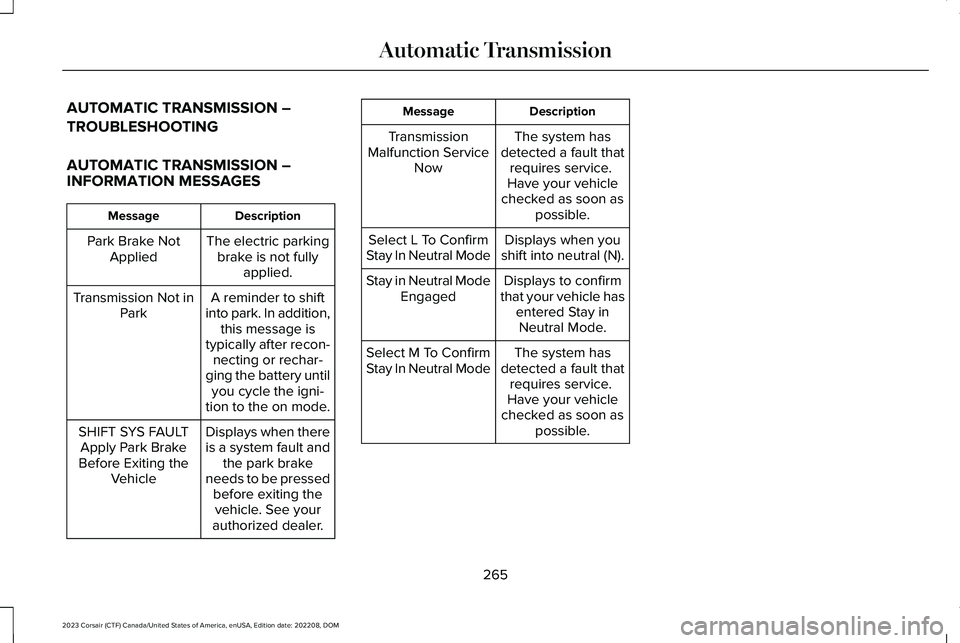
AUTOMATIC TRANSMISSION –INFORMATION MESSAGES
DescriptionMessage
The electric parkingbrake is not fullyapplied.
Park Brake NotApplied
A reminder to shiftinto park. In addition,this message istypically after recon-necting or rechar-ging the battery untilyou cycle the igni-tion to the on mode.
Transmission Not inPark
Displays when thereis a system fault andthe park brakeneeds to be pressedbefore exiting thevehicle. See yourauthorized dealer.
SHIFT SYS FAULTApply Park BrakeBefore Exiting theVehicle
DescriptionMessage
The system hasdetected a fault thatrequires service. Have your vehiclechecked as soon aspossible.
TransmissionMalfunction ServiceNow
Displays when youshift into neutral (N).Select L To ConfirmStay In Neutral Mode
Displays to confirmthat your vehicle hasentered Stay inNeutral Mode.
Stay in Neutral ModeEngaged
The system hasdetected a fault thatrequires service. Have your vehiclechecked as soon aspossible.
Select M To ConfirmStay In Neutral Mode
265
2023 Corsair (CTF) Canada/United States of America, enUSA, Edition date: 202208, DOMAutomatic Transmission
Page 290 of 690
HOW DOES TRACTION CONTROL
WORK
If your vehicle begins to slide, the systemapplies the brakes to individual wheels and,when needed, reduces power at the sametime. If the wheels spin when acceleratingon slippery or loose surfaces, the systemreduces power in order to increase traction.
SWITCHING TRACTION CONTROL
ON AND OFF
WARNING: Operating your vehiclewith the traction control disabled couldlead to an increased risk of loss of vehiclecontrol, vehicle rollover, personal injuryand death.
The traction control system turns on eachtime you switch the power on.
If your vehicle is stuck in mud or snow,switching traction control off may bebeneficial as this allows the wheels to spin.
Note:When you switch traction control off,stability control remains fully active.
TRACTION CONTROL INDICATOR
Stability and Traction Control Indicator
If the indicator does not illuminatewhen you switch the ignition on,or remains on when the engine isrunning, this indicates a malfunction. Haveyour vehicle checked by an authorizeddealer as soon as possible.
The traction control off indicatorilluminates when you switch thetraction control system off, or whenan alternative stability control mode isselected that requires the traction control offdepending on the drive mode selected.
TRACTION CONTROL –
TROUBLESHOOTING
TRACTION CONTROL – WARNINGLAMPS
System Messages
The traction control lighttemporarily illuminates on start-upand flashes when activated by adriving condition.
The traction control off light temporarilyilluminates on start-up and stays on:
•When you switch the traction controlsystem off.
•When you select an alternative stabilitycontrol mode.
•If a problem occurs in the system.
286
2023 Corsair (CTF) Canada/United States of America, enUSA, Edition date: 202208, DOMTraction ControlE138639 E130458 E138639
Page 317 of 690
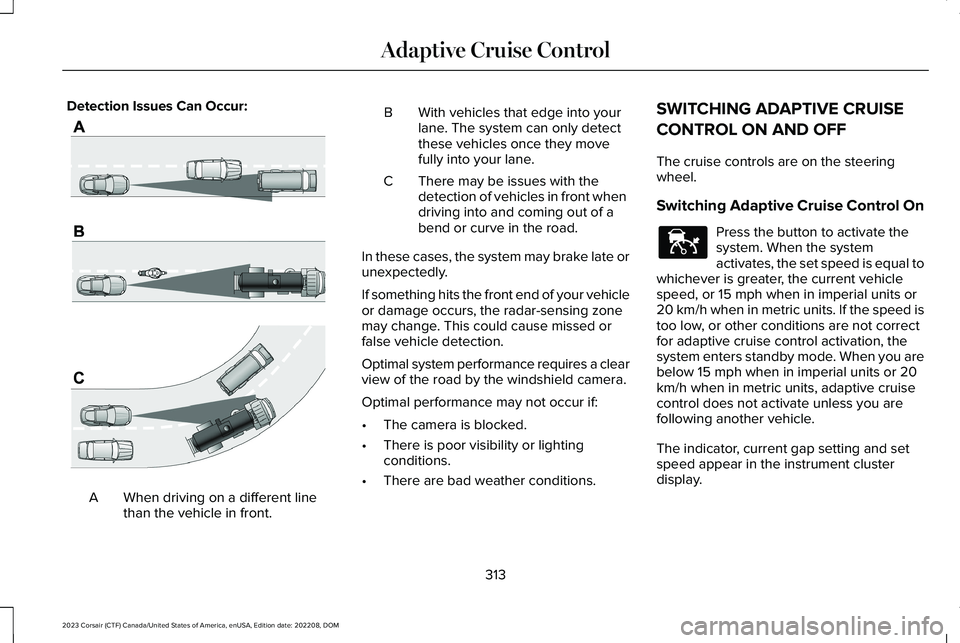
Detection Issues Can Occur:
When driving on a different linethan the vehicle in front.A
BWith vehicles that edge into yourlane. The system can only detectthese vehicles once they movefully into your lane.
There may be issues with thedetection of vehicles in front whendriving into and coming out of abend or curve in the road.
C
In these cases, the system may brake late orunexpectedly.
If something hits the front end of your vehicleor damage occurs, the radar-sensing zonemay change. This could cause missed orfalse vehicle detection.
Optimal system performance requires a clearview of the road by the windshield camera.
Optimal performance may not occur if:
•The camera is blocked.
•There is poor visibility or lightingconditions.
•There are bad weather conditions.
SWITCHING ADAPTIVE CRUISE
CONTROL ON AND OFF
The cruise controls are on the steeringwheel.
Switching Adaptive Cruise Control On
Press the button to activate thesystem. When the systemactivates, the set speed is equal towhichever is greater, the current vehiclespeed, or 15 mph when in imperial units or20 km/h when in metric units. If the speed istoo low, or other conditions are not correctfor adaptive cruise control activation, thesystem enters standby mode. When you arebelow 15 mph when in imperial units or 20km/h when in metric units, adaptive cruisecontrol does not activate unless you arefollowing another vehicle.
The indicator, current gap setting and setspeed appear in the instrument clusterdisplay.
313
2023 Corsair (CTF) Canada/United States of America, enUSA, Edition date: 202208, DOMAdaptive Cruise ControlE71621 E144529
Page 318 of 690
Switching Adaptive Cruise Control Off
Press the button when the systemis in standby mode or switch theignition off.
Note:When you switch the system off, theset speed clears.
ADAPTIVE CRUISE CONTROL
AUTOMATIC CANCELLATION
The system may cancel if:
•The tires lose traction.
•You apply the parking brake.
The system may cancel and set the parkingbrake if:
•You unbuckle the seatbelt and open thedriver door after adaptive cruise controlstops your vehicle.
•Adaptive cruise control holds yourvehicle at a stop continuously for morethan three minutes.
The system may deactivate or preventactivating when requested if:
•The vehicle has a blocked sensor.
•The brake temperature is too high.
•There is a failure in the system or arelated system.
SETTING THE ADAPTIVE CRUISE
CONTROL SPEED
Drive to the speed you prefer.
Press either button to set thecurrent speed.
Take your foot off the accelerator pedal.
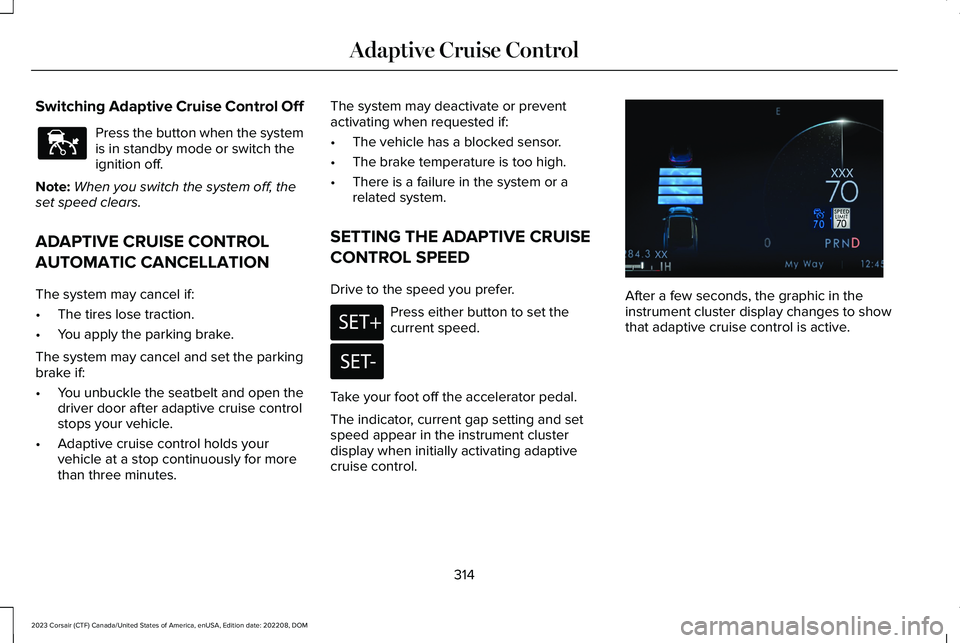
The indicator, current gap setting and setspeed appear in the instrument clusterdisplay when initially activating adaptivecruise control.
After a few seconds, the graphic in theinstrument cluster display changes to showthat adaptive cruise control is active.
314
2023 Corsair (CTF) Canada/United States of America, enUSA, Edition date: 202208, DOMAdaptive Cruise ControlE144529 E246884 E246885 E371374
Page 322 of 690
ActionMessage
Press and release the button or use the accelerator pedal to resumefollowing the lead vehicle.
Displays when on a limited access highway after following a vehicleto a complete stop. In this situation, your vehicle resumes followingthe lead vehicle without a button press or pressing the acceleratorpedal. The system can remain in auto-resume state for approximately30 seconds, after which it no longer automatically resumes.
Auto-Resume
OVERRIDING THE SET SPEED
WARNING: If you override the systemby pressing the accelerator pedal, it doesnot automatically apply the brakes tomaintain a gap from any vehicle ahead.
When you press the accelerator pedal, youoverride the set speed and gap distance.
Use the accelerator pedal to intentionallyexceed the set speed limit.
When you override the system, the indicatorremains blue, the set speed is dimmed andthe lead vehicle icon does not appear in theinstrument cluster display.
The system resumes operation when yourelease the accelerator pedal. The vehiclespeed decreases to the set speed, or a lowerspeed if following a slower vehicle.
ADAPTIVE CRUISE CONTROL
INDICATORS
Illuminates when you switchadaptive cruise control on. Thecolor of the indicator changes toindicate the system status.
White indicates the system is on but inactive.
Blue indicates that you set the speed andthe system is active.
SWITCHING FROM ADAPTIVE
CRUISE CONTROL TO CRUISE
CONTROL
WARNING: Normal cruise control willnot brake when your vehicle isapproaching slower vehicles. Always beaware of which mode you have selectedand apply the brakes when necessary.
318
2023 Corsair (CTF) Canada/United States of America, enUSA, Edition date: 202208, DOMAdaptive Cruise ControlE144529
Page 326 of 690
LANE CENTERING INDICATORS
Illuminates when you switch lanecentering on. The color of theindicator changes to indicate thesystem status.
Gray status indicates the system is on but instandby mode.
Green status indicates the system is enabledand applying steering assistance to keep thevehicle in the center of the lane.
Amber status with an audible tone, that thenchanges to gray status, indicates a systemautomatic cancellation.
PREDICTIVE SPEED ASSIST
HOW DOES PREDICTIVE SPEEDASSIST WORK
Predictive Speed Assist works with adaptivecruise control and adjusts the vehicle speedto the road geometry and to the speed limitdetected by the speed sign recognitionsystem. As the system identifies curves andhighway exits, the vehicle speed temporarilydecreases ahead of and during the changingroad geometry. When passing new speedsigns, the set speed updates. See PredictiveSpeed Assist Precautions (page 322).
There are limitations that affect the accuracyof the speed sign recognition system and itsability to determine the current speed limit.Predictive speed assist and its ability todetermine the current speed limit sharesthese limitations. See Speed SignRecognition (page 374).
Note:The adaptive cruise control gap settingoperates normally when the feature isenabled.
PREDICTIVE SPEED ASSISTPRECAUTIONS
WARNING: You are responsible forcontrolling your vehicle at all times. Thesystem is designed to be an aid and doesnot relieve you of your responsibility todrive with due care and attention. Failureto follow this instruction could result in theloss of control of your vehicle, personalinjury or death.
WARNING: Pay close attention tochanging road conditions. You may needto override the system by pressing thebrake or accelerator pedal if the adjustedspeed becomes higher or lower thannecessary.
WARNING: The system only provideslimited braking. Your vehicle may notalways decelerate quickly enough to avoida crash without driver intervention. Applythe brakes when necessary.
322
2023 Corsair (CTF) Canada/United States of America, enUSA, Edition date: 202208, DOMAdaptive Cruise ControlE297977
Page 328 of 690
Note:You can set tolerance for vehiclespeed adjustment based on speed signrecognition only.
PREDICTIVE SPEED ASSIST ALERTS
If the speed sign recognition system detectsa speed limit below the minimum adaptivecruise control set speed, a tone sounds andthe system returns to standby mode.
PREDICTIVE SPEED ASSISTINDICATORS
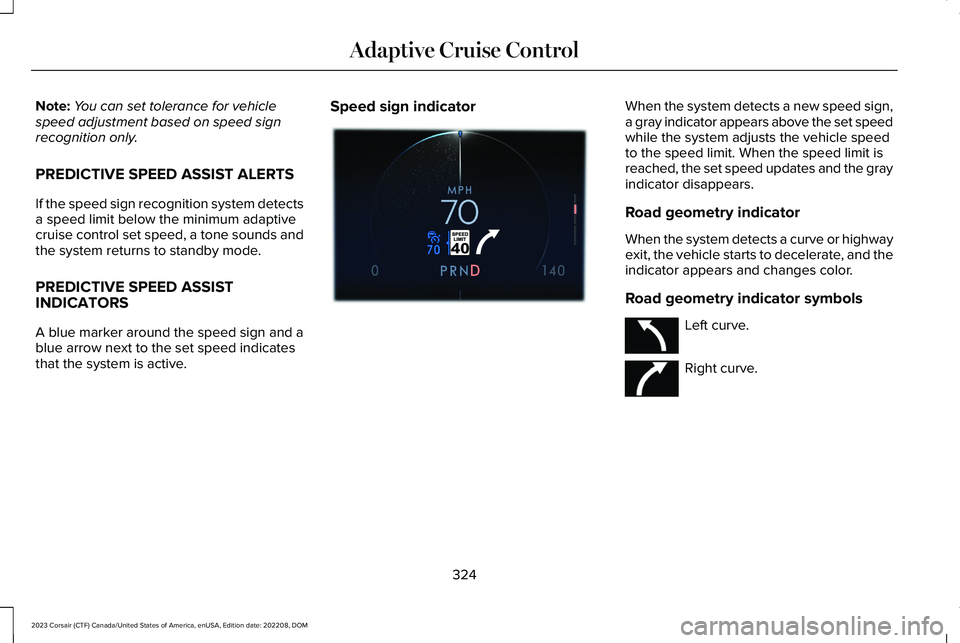
A blue marker around the speed sign and ablue arrow next to the set speed indicatesthat the system is active.
Speed sign indicatorWhen the system detects a new speed sign,a gray indicator appears above the set speedwhile the system adjusts the vehicle speedto the speed limit. When the speed limit isreached, the set speed updates and the grayindicator disappears.
Road geometry indicator
When the system detects a curve or highwayexit, the vehicle starts to decelerate, and theindicator appears and changes color.
Road geometry indicator symbols
Left curve.
Right curve.
324
2023 Corsair (CTF) Canada/United States of America, enUSA, Edition date: 202208, DOMAdaptive Cruise ControlE384806 E379737 E379738