ECO mode LINCOLN CORSAIR 2023 Service Manual
[x] Cancel search | Manufacturer: LINCOLN, Model Year: 2023, Model line: CORSAIR, Model: LINCOLN CORSAIR 2023Pages: 690, PDF Size: 15.04 MB
Page 330 of 690
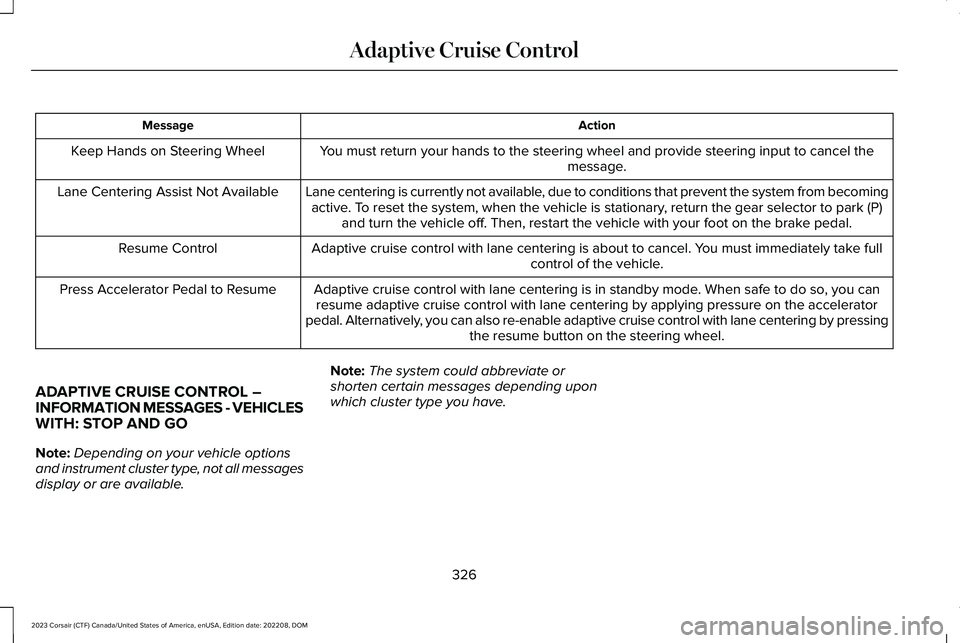
ActionMessage
You must return your hands to the steering wheel and provide steering input to cancel themessage.Keep Hands on Steering Wheel
Lane centering is currently not available, due to conditions that prevent the system from becomingactive. To reset the system, when the vehicle is stationary, return the gear selector to park (P)and turn the vehicle off. Then, restart the vehicle with your foot on the brake pedal.
Lane Centering Assist Not Available
Adaptive cruise control with lane centering is about to cancel. You must immediately take fullcontrol of the vehicle.Resume Control
Adaptive cruise control with lane centering is in standby mode. When safe to do so, you canresume adaptive cruise control with lane centering by applying pressure on the acceleratorpedal. Alternatively, you can also re-enable adaptive cruise control with lane centering by pressingthe resume button on the steering wheel.
Press Accelerator Pedal to Resume
ADAPTIVE CRUISE CONTROL –INFORMATION MESSAGES - VEHICLESWITH: STOP AND GO
Note:Depending on your vehicle optionsand instrument cluster type, not all messagesdisplay or are available.
Note:The system could abbreviate orshorten certain messages depending uponwhich cluster type you have.
326
2023 Corsair (CTF) Canada/United States of America, enUSA, Edition date: 202208, DOMAdaptive Cruise Control
Page 332 of 690
WHAT IS ACTIVEGLIDE™
ActiveGlide keeps your vehicle centered inthe lane and offers a hands-free drivingmode in certain situations when usingadaptive cruise control.
HOW DOES ACTIVEGLIDE™ WORK
ActiveGlide uses cameras to monitor yourvehicle position within a lane and appliessteering support to keep your vehiclecentered in the lane.
Using the cameras and location information,ActiveGlide allows you to remove your handsfrom the steering wheel and offers ahands-free driving mode in certain areas.
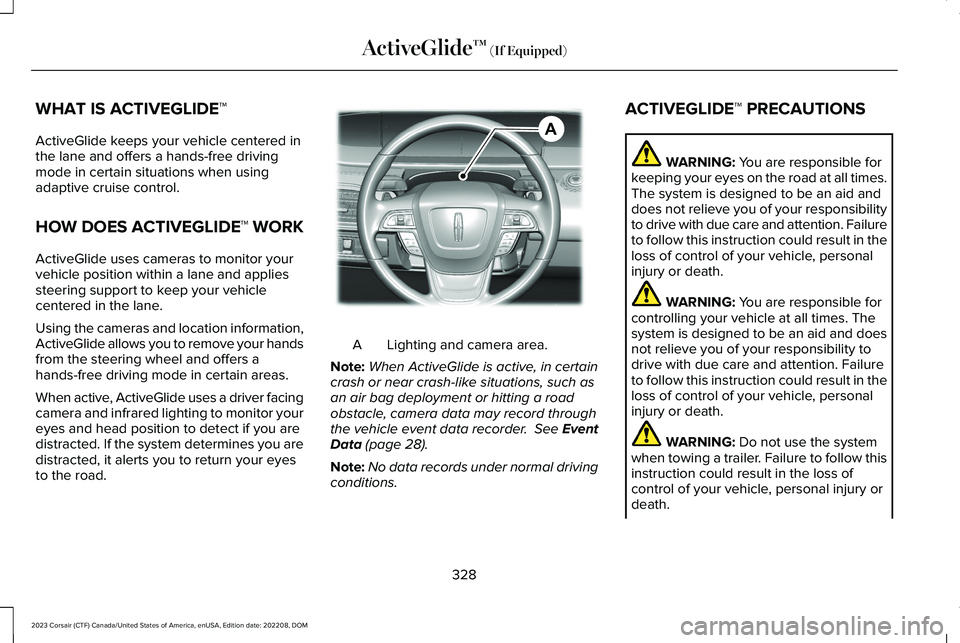
When active, ActiveGlide uses a driver facingcamera and infrared lighting to monitor youreyes and head position to detect if you aredistracted. If the system determines you aredistracted, it alerts you to return your eyesto the road.
Lighting and camera area.A
Note:When ActiveGlide is active, in certaincrash or near crash-like situations, such asan air bag deployment or hitting a roadobstacle, camera data may record throughthe vehicle event data recorder. See EventData (page 28).
Note:No data records under normal drivingconditions.
ACTIVEGLIDE™ PRECAUTIONS
WARNING: You are responsible forkeeping your eyes on the road at all times.The system is designed to be an aid anddoes not relieve you of your responsibilityto drive with due care and attention. Failureto follow this instruction could result in theloss of control of your vehicle, personalinjury or death.
WARNING: You are responsible forcontrolling your vehicle at all times. Thesystem is designed to be an aid and doesnot relieve you of your responsibility todrive with due care and attention. Failureto follow this instruction could result in theloss of control of your vehicle, personalinjury or death.
WARNING: Do not use the systemwhen towing a trailer. Failure to follow thisinstruction could result in the loss ofcontrol of your vehicle, personal injury ordeath.
328
2023 Corsair (CTF) Canada/United States of America, enUSA, Edition date: 202208, DOMActiveGlide™ (If Equipped)AE351152
Page 334 of 690
Note:The system must meet certain locationrequirements for the hands-free mode ofActiveGlide to work.
Note:The system may require softwareupdates for hands-free mode. See VehicleSoftware Updates (page 554).
ACTIVEGLIDE™ LIMITATIONS
Any of the following conditions could resultin ActiveGlide not operating correctly:
•You do not have your vehicle centeredin the lane.
•The lane is too narrow or too wide.
•The system does not detect at least onelane marking or when lanes merge orsplit.
•You have limited steering input.
•Using the system in areas underconstruction.
•If you make any aftermarket modificationsto the steering system.
•When using a spare tire.
The driver-facing camera may not operatecorrectly due to any of the following:
•If you have a pre-existing eye condition,such as an eye misalignment, or havehad eye surgery.
•You cover your facial features by a mask,hat or other items.
•The lighting conditions changesignificantly.
•You are not in the field of view of thecamera.
•You position or tilt yourself to one side.
•You are moving around extensively.
•You are wearing glasses or sunglassesthat are too dark or reflective.
Note:The system has limited steeringassistance and may not be sufficient for alldriving situations.
Note:In exceptional conditions, such asinclement weather or direct sunlight, thesystem could deviate from the center line.
Note:The information provided by thenavigation map data could be inaccurate orout of date.
ACTIVEGLIDE™ SETTINGS
Enabling ActiveGlide
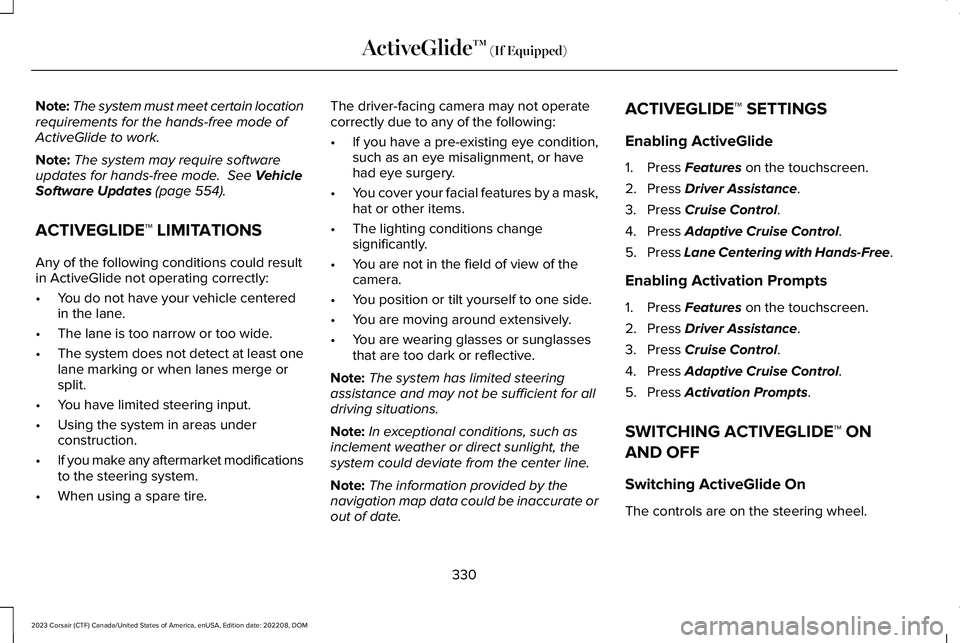
1.Press Features on the touchscreen.
2.Press Driver Assistance.
3.Press Cruise Control.
4.Press Adaptive Cruise Control.
5.Press Lane Centering with Hands-Free.
Enabling Activation Prompts
1.Press Features on the touchscreen.
2.Press Driver Assistance.
3.Press Cruise Control.
4.Press Adaptive Cruise Control.
5.Press Activation Prompts.
SWITCHING ACTIVEGLIDE™ ON
AND OFF
Switching ActiveGlide On
The controls are on the steering wheel.
330
2023 Corsair (CTF) Canada/United States of America, enUSA, Edition date: 202208, DOMActiveGlide™ (If Equipped)
Page 335 of 690
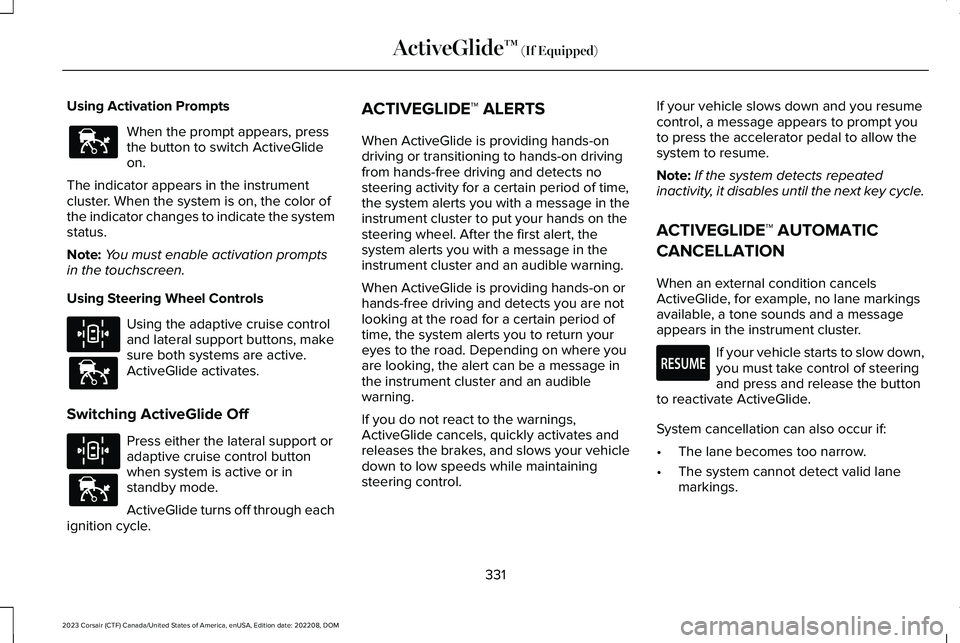
Using Activation Prompts
When the prompt appears, pressthe button to switch ActiveGlideon.
The indicator appears in the instrumentcluster. When the system is on, the color ofthe indicator changes to indicate the systemstatus.
Note:You must enable activation promptsin the touchscreen.
Using Steering Wheel Controls
Using the adaptive cruise controland lateral support buttons, makesure both systems are active.ActiveGlide activates.
Switching ActiveGlide Off
Press either the lateral support oradaptive cruise control buttonwhen system is active or instandby mode.
ActiveGlide turns off through eachignition cycle.
ACTIVEGLIDE™ ALERTS
When ActiveGlide is providing hands-ondriving or transitioning to hands-on drivingfrom hands-free driving and detects nosteering activity for a certain period of time,the system alerts you with a message in theinstrument cluster to put your hands on thesteering wheel. After the first alert, thesystem alerts you with a message in theinstrument cluster and an audible warning.
When ActiveGlide is providing hands-on orhands-free driving and detects you are notlooking at the road for a certain period oftime, the system alerts you to return youreyes to the road. Depending on where youare looking, the alert can be a message inthe instrument cluster and an audiblewarning.
If you do not react to the warnings,ActiveGlide cancels, quickly activates andreleases the brakes, and slows your vehicledown to low speeds while maintainingsteering control.
If your vehicle slows down and you resumecontrol, a message appears to prompt youto press the accelerator pedal to allow thesystem to resume.
Note:If the system detects repeatedinactivity, it disables until the next key cycle.
ACTIVEGLIDE™ AUTOMATIC
CANCELLATION
When an external condition cancelsActiveGlide, for example, no lane markingsavailable, a tone sounds and a messageappears in the instrument cluster.
If your vehicle starts to slow down,you must take control of steeringand press and release the buttonto reactivate ActiveGlide.
System cancellation can also occur if:
•The lane becomes too narrow.
•The system cannot detect valid lanemarkings.
331
2023 Corsair (CTF) Canada/United States of America, enUSA, Edition date: 202208, DOMActiveGlide™ (If Equipped)E144529 E308131 E144529 E308131 E144529 E281472
Page 336 of 690
•Lane markings cross.
•Your eyes are not on the road or yourhands are not the steering wheel.
If you have your hands on the steering wheeland your eyes are on the road when thefeature is active and a cancellation occurs,the system sounds a tone and displays acancelled graphic in the instrument cluster.
If you are not paying attention to the road oryour hands are not on the steering wheeland a cancellation occurs, the systemdisplays a message and a tone sounds untilyou resume control. If you do not resumecontrol in time, ActiveGlide quickly activatesand releases the brakes, and slows yourvehicle down to low speeds whilemaintaining steering control. If your vehicleslows down and you resume control, amessage appears to prompt you to press theaccelerator pedal to allow the system toresume.
Note:The system disables until the next keycycle if it detects repeated inactivity.
ACTIVEGLIDE™ INDICATORS
When on, the color of the indicatorchanges to indicate the status.
Gray indicates ActiveGlide is onbut inactive.
Blue indicates ActiveGlide is active.
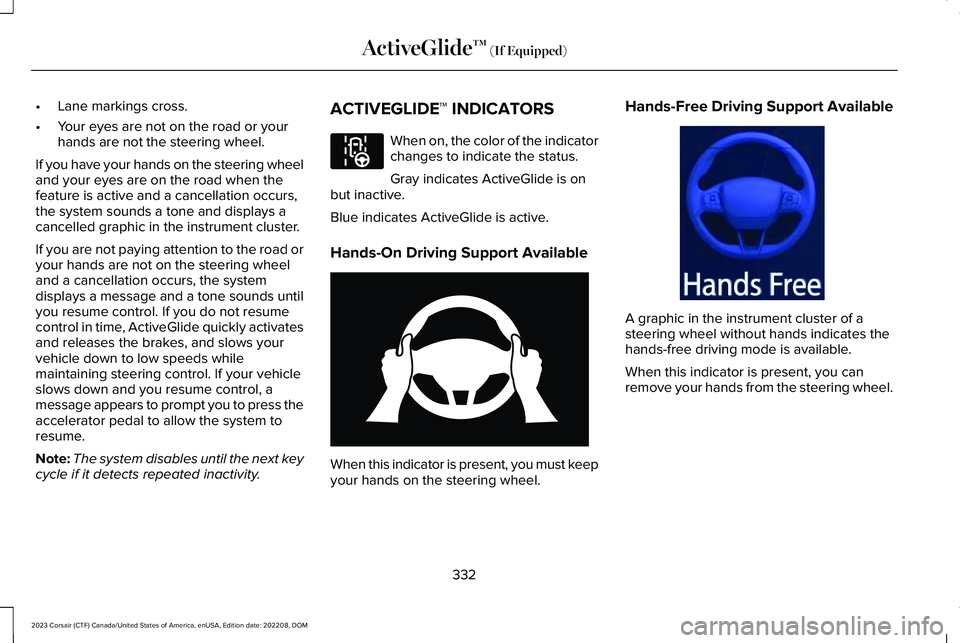
Hands-On Driving Support Available
When this indicator is present, you must keepyour hands on the steering wheel.
Hands-Free Driving Support Available
A graphic in the instrument cluster of asteering wheel without hands indicates thehands-free driving mode is available.
When this indicator is present, you canremove your hands from the steering wheel.
332
2023 Corsair (CTF) Canada/United States of America, enUSA, Edition date: 202208, DOMActiveGlide™ (If Equipped)E297977 E333236 E333232
Page 342 of 690
WHAT IS DRIVE MODE CONTROL
The system delivers a driving experiencethrough a suite of sophisticated electronicvehicle systems. These systems optimizesteering, handling and powertrain response.This provides a single location to controlmultiple systems performance settings.
Changing the drive mode automaticallychanges the functionality of the followingsystems:
•Electronically power-assisted steeringsystem adjusts steering effort and feelbased on the mode you select. See HowDoes Electric Power Steering Work(page 291).
•Electronic stability control and tractioncontrol maintains your vehicle control inadverse conditions or high performancedriving. See Stability Control (page 288).
•Electronic throttle control enhances thepowertrain response to your drivinginputs.
•Transmission controls optimize with shiftschedules tuned to each mode.
•AWD settings become optimized andtuned to each mode.
The system automatically tailors your vehicleconfiguration for each mode you select.
Note:Not all settings, or modes, may beavailable.
Note:The system has diagnostic checks thatcontinuously monitor the system for properoperation. If a mode is unavailable due to asystem fault, the mode defaults to Normal.
SELECTING A DRIVE MODE
Note:Drive mode changes may not beavailable when the ignition is off.
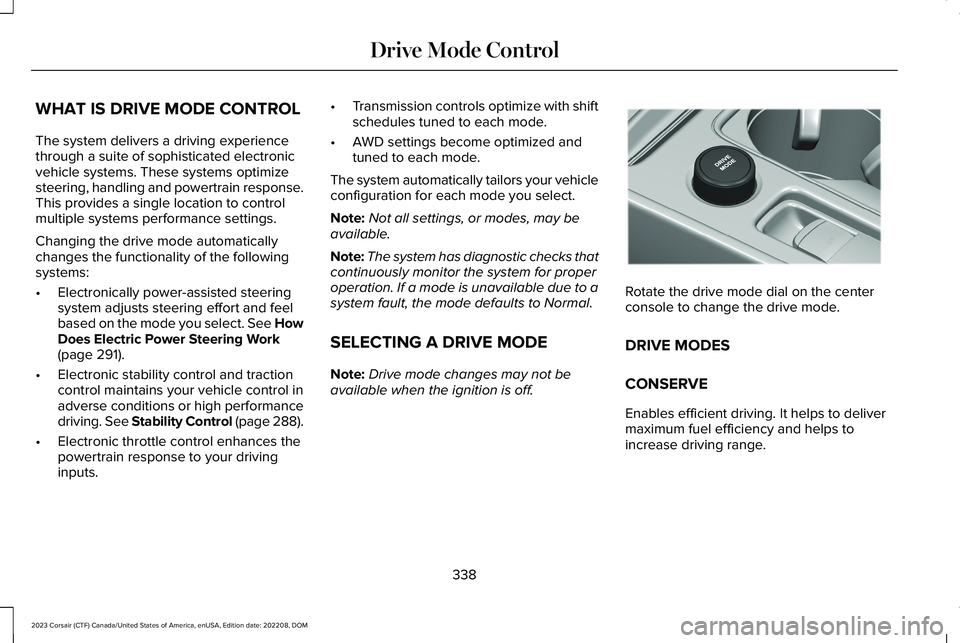
Rotate the drive mode dial on the centerconsole to change the drive mode.
DRIVE MODES
CONSERVE
Enables efficient driving. It helps to delivermaximum fuel efficiency and helps toincrease driving range.
338
2023 Corsair (CTF) Canada/United States of America, enUSA, Edition date: 202208, DOMDrive Mode ControlE307643
Page 343 of 690
EXCITE
For sporty on-road driving. This modeincreases throttle response, provides asportier exhaust sound and steering feel,along with quicker shifting. The suspensioncould stiffen, with an emphasis on handlingand control. The transmission also holdsgears longer, helping your vehicle acceleratefaster when shifting gears.
Note:Sportier exhaust sound may not beavailable depending on vehicleconfiguration.
NORMAL
For everyday driving. This mode is a perfectbalance of excitement, comfort andconvenience. This is the default mode aftereach ignition cycle.
PRESERVE EV - PLUG-IN HYBRIDELECTRIC VEHICLE (PHEV)
Your vehicle runs the engine as needed tosave electric driving range for later use inanother drive mode. For example, you firstdrive at high speeds on open roads whereengine operation is appropriate. Later, youdrive at low speeds in an urban area whereelectric only is most efficient.
If the battery charge is low when you selectthis mode, the engine begins to charge thehigh voltage battery to provide some electricrange for later.
PURE EV - PLUG-IN HYBRID ELECTRICVEHICLE (PHEV)
This mode can provide an electric onlydriving experience. Your vehicle couldaccelerate slower, and the top speed couldbe reduced. For more power, fully press theaccelerator pedal to temporarily engage theengine.
Your vehicle could enable the engine ifsystem conditions require it. An engineenabled message displays if this occurs.
The engine could enable if the climatecontrol is in a defrost mode and the outsidetemperature is cold. If the vehicle does notneed defrost, select a different climatecontrol mode to permit pure EV.
Your vehicle changes from pure EV mode tonormal mode when the vehicle electric rangeis zero.
Note:When in pure EV mode, your vehiclestays in this mode if there is all electricdriving range available and the system doesnot fault.
SLIPPERY
For less than ideal road conditions, such assnow or ice covered roads. Slippery modeinspires confidence without taking away fromdriving pleasure. Slippery mode lowersthrottle response and optimizes shifting forslippery surfaces.
Note:Using slippery mode on dry hardsurfaces could produce some vibration,driveline bind up, and potential excessivetire wear as the intent of this mode is forslippery and loose surfaces.
339
2023 Corsair (CTF) Canada/United States of America, enUSA, Edition date: 202208, DOMDrive Mode Control
Page 409 of 690
Starting the Engine
1.Start the engine of the booster vehicleand moderately rev the engine, or gentlypress the accelerator to keep the enginespeed between 2000 RPM and 3000RPM, as shown in your tachometer.
2.Start the engine of the disabled vehicle.
3.Once you start the disabled vehicle, runboth vehicle engines for an additionalthree minutes before disconnecting thejumper cables.
Removing the Jumper Cables
Remove the jumper cables in the reverseorder that they were connected.
Note:Do not switch the headlamps on whendisconnecting the cables. The peak voltagecould blow the bulbs.
POST-CRASH ALERT SYSTEM
WHAT IS THE POST-CRASH ALERTSYSTEM
The system helps draw attention to yourvehicle in the event of a serious impact.
HOW DOES THE POST-CRASH ALERTSYSTEM WORK
The system is designed to turn the hazardflashers on, turn the courtesy lamps on,intermittently sound the horn and unlock alldoors in the event of a serious impact thatdeploys an airbag or the seatbeltpretensioners.
POST-CRASH ALERT SYSTEMLIMITATIONS
Depending on applicable laws in the countryyour vehicle was built for, the horn does notsound in the event of a serious impact.
SWITCHING THE POST-CRASH ALERTSYSTEM OFF
Press the hazard flasher switch, the unlockbutton on the remote control, the panicbutton on the remote control or cycle theignition to switch the system off.
Note:The alert turns off when the vehiclebattery runs out of charge.
POST IMPACT BRAKING
HOW DOES POST IMPACT BRAKINGWORK
In the event of a moderate to severe crash,the braking system reduces the vehicle’sspeed to prevent or reduce the impact of apotential secondary crash.
POST IMPACT BRAKING LIMITATIONS
Post impact braking does not activate if anyof the following occur:
405
2023 Corsair (CTF) Canada/United States of America, enUSA, Edition date: 202208, DOMCrash and Breakdown Information
Page 411 of 690
If you need to tow your vehicle, contact aprofessional towing service or your roadsideassistance service provider.
Your manufacturer produces a towingmanual for all authorized tow truck operators.Have your tow truck operator refer to thismanual for proper hook-up and towingprocedures.
We recommend the use of a wheel lift anddollies or flatbed equipment to tow yourvehicle. Vehicle damage could occur if towedincorrectly, or by any other means.
Front-wheel and rear-wheel drive vehiclesmust have their designated drive wheels offthe ground regardless of towing direction.Use tow dollies to prevent damage to thetransmission.
All-wheel or four-wheel drive vehicles requirethat all wheels be off the ground using awheel lift and dollies or flatbed equipment.This prevents damage to the transmissionand drive system.
Note:You need to switch on the ignition tounlock the steering.
Note:Make sure you check the steeringcolumn before towing. It could lock if thebattery is dead.
FAIL-SAFE COOLING
WHAT IS FAIL-SAFE COOLING
Fail-safe cooling allows you to temporarilydrive your vehicle before any incrementalcomponent damage occurs due tooverheating.
The fail-safe distance depends on outsidetemperature, vehicle load and terrain.
HOW DOES FAIL-SAFE COOLINGWORK
If the engine reaches a presetover-temperature condition, the engineautomatically switches to alternating cylinderoperation. Each disabled cylinder acts as anair pump and cools the engine.
When this occurs, your vehicle still operates,however:
•Engine power is limited.
•The air conditioning system turns off.
Continued operation increases the enginetemperature, causing the engine tocompletely shut down. Your steering andbraking effort increases in this situation.
When the engine temperature cools, you canre-start the engine.
Note:Have your vehicle checked as soonas possible to minimize engine damage.
DRIVING WHEN FAIL-SAFE MODE ISACTIVATED
WARNING: Fail-safe mode is for useduring emergencies only. Operate yourvehicle in fail-safe mode only as long asnecessary to bring your vehicle to rest ina safe location and seek immediate repairs.When in fail-safe mode, your vehicle willhave limited power, will not be able to
407
2023 Corsair (CTF) Canada/United States of America, enUSA, Edition date: 202208, DOMCrash and Breakdown Information
Page 412 of 690
maintain high-speed operation, and maycompletely shut down without warning,potentially losing engine power, powersteering assist, and power brake assist,which may increase the possibility of acrash resulting in serious injury.
WARNING: Do not remove thecoolant reservoir cap when the engine ison or the cooling system is hot. Wait 10minutes for the cooling system to cooldown. Cover the coolant reservoir cap witha thick cloth to prevent the possibility ofscalding and slowly remove the cap.Failure to follow this instruction could resultin personal injury.
Continued operation increases the enginetemperature, causing the engine tocompletely shut down. Your steering andbraking effort increases in this situation.
When the engine temperature cools, you canre-start the engine. Have your vehiclechecked as soon as possible to minimizeengine damage.
Your vehicle has limited engine power whenin the fail-safe mode, drive your vehicle withcaution. Your vehicle does not maintainhigh-speed operation and the engine mayoperate poorly.
Remember that the engine is capable ofautomatically shutting down to preventengine damage. In this situation:
1.Pull off the road as soon as safelypossible and switch the engine off.
2.If you are a member of a roadsideassistance program, we recommend thatyou contact your roadside assistanceservice provider.
3.If this is not possible, wait for a shortperiod of time for the engine to cool.
4.Check the coolant level. If the coolantlevel is at or below the minimum mark,add prediluted coolant immediately.
5.When the engine temperature cools, youcan re-start the engine. Have your vehiclechecked as soon as possible to minimizeengine damage.
Note:Driving your vehicle without repairincreases the chance of engine damage.
FAIL-SAFE COOLING INDICATORS
If the engine begins to overheat,the coolant temperature gaugemoves toward the red zone.
A warning lamp illuminates and amessage may appear in theinstrument cluster display.
408
2023 Corsair (CTF) Canada/United States of America, enUSA, Edition date: 202208, DOMCrash and Breakdown InformationE103308 E67028