reset LINCOLN CORSAIR 2023 Owners Manual
[x] Cancel search | Manufacturer: LINCOLN, Model Year: 2023, Model line: CORSAIR, Model: LINCOLN CORSAIR 2023Pages: 690, PDF Size: 15.04 MB
Page 7 of 690
Liftgate
Liftgate Precautions......................................99
Opening the Liftgate.....................................99
Setting the Liftgate Opening Height........101
Closing the Liftgate.....................................102
Stopping the Liftgate Movement.............104
Liftgate Obstacle Detection......................104
Liftgate – Troubleshooting........................105
Security
Passive Anti-Theft System.........................107
Anti-Theft Alarm System.............................107
Anti-Theft Alarm System Settings............108
Security – Troubleshooting.......................109
Steering Wheel
Adjusting the Steering Wheel - VehiclesWith: Power Adjustable Steering Column.........................................................................111
Adjusting the Steering Wheel - VehiclesWith: Manual Adjustable SteeringColumn.........................................................111
Resetting the Stopping Position - VehiclesWith: Power Adjustable Steering Column........................................................................112
Horn..................................................................112
Switching the Heated Steering Wheel Onand Off.........................................................112
Wipers and Washers
Wipers..............................................................113
Autowipers......................................................113
Switching the Rear Window Wiper On andOff.................................................................114
Reverse Wipe.................................................114
Checking the Wiper Blades........................115
Replacing the Front Wiper Blades............115
Replacing the Rear Wiper Blades.............115
Washers...........................................................116
Wipers and Washers – Troubleshooting........................................................................117
Exterior Lighting
Exterior Lighting Control.............................118
Headlamps......................................................118
Headlamps – Troubleshooting..................119
Autolamps.......................................................119
Exterior Lamps..............................................120
Automatic High Beam Control...................121
Automatic High Beam Control –Troubleshooting.......................................124
Adaptive Front Lighting..............................125
Adaptive Front Lighting – Troubleshooting.......................................................................127
Interior Lighting
Switching All of the Interior Lamps On andOff................................................................128
Switching the Front Interior Lamps On andOff................................................................128
Switching the Rear Interior Lamps On andOff................................................................128
Interior Lamp Function................................129
Adjusting the Instrument Panel LightingBrightness..................................................129
Ambient Lighting..........................................129
Interior Lighting – Troubleshooting.........129
Windows
Opening and Closing the Windows........130
3
2023 Corsair (CTF) Canada/United States of America, enUSA, Edition date: 202208, DOMTable of Contents
Page 9 of 690
Electric Economy..........................................156
Brake Coach..................................................157
Trip Summary.................................................157
Vehicle Charging Status.............................157
Personalized Settings
Changing the Language............................158
Changing the Measurement Unit............158
Changing the Temperature Unit..............158
Changing the Tire Pressure Unit.............158
Trip Computer
Accessing the Trip Computer...................159
Resetting the Trip Computer.....................159
Configuring the Trip Computer................159
Trip Data.........................................................159
Head Up Display
What Is the Head Up Display....................160
Switching the Head Up Display On and Off.......................................................................160
Head Up Display Settings.........................160
Head Up Display Indicators......................162
Head Up Display – Troubleshooting.......164
Remote Start
What Is Remote Start...................................165
Remote Start Precautions..........................165
Remote Start Limitations............................165
Enabling Remote Start................................165
Remotely Starting and Stopping theVehicle........................................................165
Extending the Remote Start Duration.......................................................................166
Remote Start Remote Control Indicators.......................................................................166
Remote Start Settings.................................166
Climate Control
Identifying the Climate Control Unit........168
Switching Climate Control On and Off.......................................................................168
Switching Recirculated Air On and Off.......................................................................168
Switching Air Conditioning On and Off.......................................................................168
Switching Defrost On and Off...................168
Switching Maximum Defrost On and Off.......................................................................169
Switching Maximum Cooling On and Off.......................................................................169
Switching the Heated Wiper Park On andOff................................................................169
Switching the Heated Rear Window Onand Off........................................................169
Setting the Blower Motor Speed.............170
Switching the Heated Mirrors On and Off.......................................................................170
Setting the Temperature............................170
Directing the Flow of Air.............................170
Auto Mode.....................................................170
Climate Control Hints..................................172
Interior Air Quality
What Is the Cabin Air Filter........................174
Replacing the Cabin Air Filter...................174
Auto Air Refresh............................................174
Interior Air Quality – Troubleshooting........................................................................177
5
2023 Corsair (CTF) Canada/United States of America, enUSA, Edition date: 202208, DOMTable of Contents
Page 10 of 690
Front Seats
Front Seat Precautions...............................178
Sitting in the Correct Position...................178
Power Seats...................................................179
Massage Seats.............................................182
Heated Seats.................................................183
Ventilated Seats...........................................184
Rear Seats
Manual Seats.................................................185
Power Seats...................................................187
Heated Seats................................................188
Rear Occupant Alert System
What is the Rear Occupant Alert System.......................................................................189
How Does the Rear Occupant Alert SystemWork............................................................189
Rear Occupant Alert System Precautions.......................................................................190
Rear Occupant Alert System Limitations.......................................................................190
Rear Occupant Alert System Settings.......................................................................190
Rear Occupant Alert System Indicators........................................................................191
Rear Occupant Alert System AudibleWarnings.....................................................191
Memory Function
How Does the Memory Function Work.......................................................................192
Memory Function Precautions..................192
Locating the Memory Function Buttons.......................................................................192
Saving a Preset Position............................192
Recalling a Preset Position........................192
Garage Door Opener
Garage Door Opener Introduction..........194
Garage Door Opener Precautions andFrequencies..............................................194
Programming the Garage Door Opener.......................................................................195
Garage Door Opener AdditionalAssistance.................................................198
USB Ports
Locating the USB Ports..............................199
Playing Media Using the USB Port..........199
Charging a Device.......................................199
Power Outlet
What Is the Power Outlet...........................201
Power Outlet Precautions..........................201
Locating the Power Outlets.......................201
Wireless Accessory Charger
What Is the Wireless Accessory Charger......................................................................202
Wireless Accessory Charger Precautions......................................................................202
Locating the Wireless Accessory Charger......................................................................202
Charging a Wireless Device.....................202
Wireless Accessory Charger –Troubleshooting......................................203
Storage
Overhead Storage......................................204
Glove Compartment...................................204
Center Console...........................................204
6
2023 Corsair (CTF) Canada/United States of America, enUSA, Edition date: 202208, DOMTable of Contents
Page 19 of 690
Fuel Tank Capacity - Excluding: Plug-InHybrid Electric Vehicle (PHEV)............505
Fuel Tank Capacity - Plug-In Hybrid ElectricVehicle (PHEV)........................................506
Air Conditioning System Capacity andSpecification - 2.0L EcoBoost™............507
Air Conditioning System Capacity andSpecification - 2.5L, Plug-In HybridElectric Vehicle (PHEV).........................509
Washer Fluid Specification........................510
Brake Fluid Specification............................511
Vehicle Identification
Vehicle Identification Number..................513
Connected Vehicle
What Is a Connected Vehicle....................514
Connected Vehicle Requirements...........514
Connected Vehicle Limitations.................514
Connecting the Vehicle to a MobileNetwork......................................................514
Connecting the Vehicle to a Wi-Fi Network.......................................................................514
Connected Vehicle – Troubleshooting.......................................................................515
Connected Vehicle Videos........................518
Vehicle Wi-Fi Hotspot
Creating a Vehicle Wi-Fi Hotspot.............519
Changing the Vehicle Wi-Fi Hotspot Nameor Password..............................................519
Vehicle Wi-Fi Hotspot – Troubleshooting......................................................................520
Audio System
Audio System Precautions........................521
Switching the Audio Unit On and Off......521
Selecting the Audio Source......................521
Playing or Pausing the Audio Source......521
Adjusting the Volume..................................521
Switching Shuffle Mode On and Off......522
Switching Repeat Mode On and Off......522
Setting a Memory Preset..........................522
Muting the Audio........................................522
Adjusting the Sound Settings..................522
Setting the Clock and Date......................523
AM/FM Radio................................................523
Switching the Display On and Off..........524
Digital Radio.................................................524
Satellite Radio..............................................525
Audio System – Troubleshooting...........528
Audio System Videos..................................531
Center Display Overview
Center Display Precautions......................532
Center Display Limitations........................532
Status Bar......................................................532
Home Screen...............................................533
Information On Demand Screen.............533
Rebooting the Center Display.................533
Center Display Overview Videos............533
Voice Interaction
Lincoln Personal Assistant........................534
Alexa Built-In
What is Alexa Built-In.................................536
Alexa Built-In Requirements.....................536
Signing Into Your Account........................536
Using Alexa Built-In....................................536
Alexa Built-In Settings................................536
15
2023 Corsair (CTF) Canada/United States of America, enUSA, Edition date: 202208, DOMTable of Contents
Page 20 of 690
Phone
Phone Precautions.....................................538
Connecting Your Phone............................538
Phone Menu.................................................538
Making and Receiving a Phone Call......540
Sending and Receiving a Text Message......................................................................542
Switching Text Message Notification Onand Off.......................................................543
Bluetooth®
Connecting a Bluetooth® Device............544
Playing Media Using Bluetooth®.............544
Apps
App Precautions..........................................545
App Requirements......................................545
Accessing Apps...........................................545
Enabling Apps on an iOS Device............545
Enabling Apps on an Android Device......................................................................545
Switching Apple CarPlay On and Off......546
Switching Android Auto On and Off......546
Personal Profiles
How Do Personal Profiles Work..............548
Enabling or Disabling Personal Profiles......................................................................548
Creating a Personal Profile.......................549
Linking or Unlinking a Personal Profile toa Remote Control....................................549
Linking or Unlinking a Personal Profile toa Device....................................................549
Navigation
Connected Navigation................................551
Accessing Navigation.................................551
Navigation Map Updates...........................551
Adjusting the Map........................................551
Live Traffic......................................................551
Setting a Destination..................................552
Waypoints.....................................................552
Route Guidance...........................................553
Vehicle Software Updates
Vehicle Software Updates........................554
Software Update Settings.........................554
Software Update Indicators.....................555
Vehicle System Reset
Performing a System Reset......................557
Accessories
Accessories..................................................558
Lincoln Protect
What Is Lincoln Protect..............................560
Scheduled Maintenance
General Maintenance Information..........563
Normal Scheduled Maintenance............568
Special Operating Conditions ScheduledMaintenance............................................572
Customer Information
Rollover Warning.........................................576
The Better Business Bureau Auto LineProgram.....................................................576
The Mediation and Arbitration Program.......................................................................577
16
2023 Corsair (CTF) Canada/United States of America, enUSA, Edition date: 202208, DOMTable of Contents
Page 28 of 690
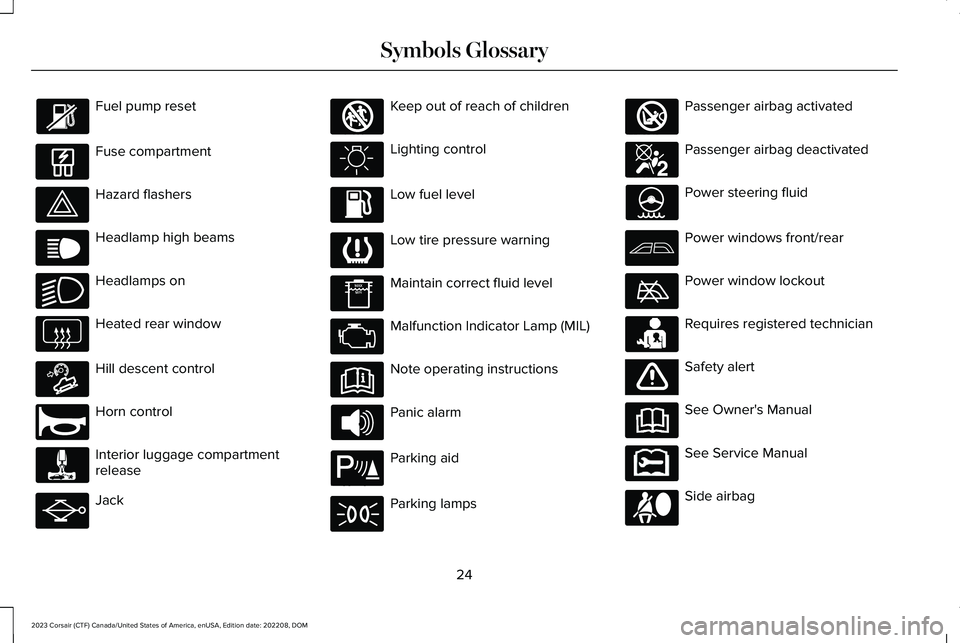
Fuel pump reset
Fuse compartment
Hazard flashers
Headlamp high beams
Headlamps on
Heated rear window
Hill descent control
Horn control
Interior luggage compartmentrelease
Jack
Keep out of reach of children
Lighting control
Low fuel level
Low tire pressure warning
Maintain correct fluid level
Malfunction Indicator Lamp (MIL)
Note operating instructions
Panic alarm
Parking aid
Parking lamps
Passenger airbag activated
Passenger airbag deactivated
Power steering fluid
Power windows front/rear
Power window lockout
Requires registered technician
Safety alert
See Owner's Manual
See Service Manual
Side airbag
24
2023 Corsair (CTF) Canada/United States of America, enUSA, Edition date: 202208, DOMSymbols Glossary E139214 E75790 E67019 E270968 E163171 E270945 E139231 E161353 E139232 E139229 E67028 E72343 E139213 E71341 E270849 E270850 E139216 E139225 E231159 E65963 E72021 E231158
Page 30 of 690
WARNING: Do not connect wirelessplug-in devices to the data link connector.Unauthorized third parties could gainaccess to vehicle data and impair theperformance of safety related systems.Only allow repair facilities that follow ourservice and repair instructions to connecttheir equipment to the data link connector.
We respect your privacy and are committedto protecting it. The information containedin this publication was correct at the time ofrelease, but as technology rapidly changes,we recommend that you visit the localLincoln website for the latest information.
Your vehicle has electronic control units thathave data recording functionality and theability to permanently or temporarily storedata. This data could include information onthe condition and status of your vehicle,vehicle maintenance requirements, eventsand malfunctions. The types of data that canbe recorded are described in this section.Some of the data recorded is stored in eventlogs or error logs.
Note:Error logs are reset following a serviceor repair.
Note:We may provide information inresponse to requests from law enforcement,other government authorities and thirdparties acting with lawful authority or througha legal process. Such information could beused by them in legal proceedings.
Data recorded includes, for example:
•Operating states of system components,for example fuel level, tire pressure andbattery charge level.
•Vehicle and component status, forexample wheel speed, deceleration,lateral acceleration and seatbelt status.
•Events or errors in essential systems, forexample headlamps and brakes.
•System responses to driving situations,for example airbag deployment andstability control.
•Environmental conditions, for exampletemperature.
Some of this data, when used in combinationwith other information, for example anaccident report, damage to a vehicle oreyewitness statements, could be associatedwith a specific person.
Services That We Provide
If you use our services, we collect and usedata, for example account information,vehicle location and driving characteristics,that could identify you. We transmit this datathrough a dedicated, protected connection.We only collect and use data to enable youruse of our services to which you havesubscribed, with your consent or wherepermitted by law. For additional information,see the terms and conditions of the servicesto which you have subscribed.
For additional information about our privacypolicy, refer to the local Lincoln website.
26
2023 Corsair (CTF) Canada/United States of America, enUSA, Edition date: 202208, DOMData Privacy
Page 32 of 690
EVENT DATA
This vehicle is equipped with an event datarecorder. The main purpose of an event datarecorder is to record, in certain crash or nearcrash-like situations, such as an airbagdeployment or hitting a road obstacle; thisdata will assist in understanding how avehicle’s systems performed. The event datarecorder is designed to record data relatedto vehicle dynamics and safety systems fora short period of time, typically 30 secondsor less.
The event data recorder in this vehicle isdesigned to record such data as:
•How various systems in your vehiclewere operating.
•Whether or not the driver and passengerseatbelts were buckled/fastened.
•How far (if at all) the driver wasdepressing the accelerator and/or thebrake pedal.
•How fast the vehicle was traveling.
•Where the driver was positioning thesteering wheel.
This data can help provide a betterunderstanding of the circumstances in whichcrashes and injuries occur.
Note:Event data recorder data is recordedby your vehicle only if a non-trivial crashsituation occurs; no data is recorded by theevent data recorder under normal drivingconditions and no personal data orinformation (for example name, gender, age,and crash location) is recorded. However,parties, such as law enforcement, couldcombine the event data recorder data withthe type of personally identifying dataroutinely acquired during a crashinvestigation.
To read data recorded by an event datarecorder, special equipment is required, andaccess to the vehicle or the event datarecorder is needed. In addition to the vehiclemanufacturer, other parties, such as lawenforcement, that have such specialequipment, can read the information if theyhave access to the vehicle or the event datarecorder.
SETTINGS DATA
Your vehicle has electronic control units thathave the ability to store data based on yourpersonalized settings. The data is storedlocally in the vehicle or on devices that youconnect to it, for example, a USB drive ordigital music player. You can delete some ofthis data and also choose whether to shareit through the services to which yousubscribe.
Comfort and Convenience Data
Data recorded includes, for example:
•Seat and steering wheel position.
•Climate control settings.
•Radio presets.
Entertainment Data
Data recorded includes, for example:
•Music, videos or album art.
•Contacts and corresponding addressbook entries.
•Navigation destinations.
28
2023 Corsair (CTF) Canada/United States of America, enUSA, Edition date: 202208, DOMData Privacy
Page 34 of 690
The cell phone profile, media device indexand diagnostic log remain in your vehicleunless you delete them and are generallyaccessible only in your vehicle when youconnect your cell phone or media device. Ifyou no longer plan to use the system or yourvehicle, we recommend you use the masterreset function to erase the storedinformation. See Performing a SystemReset (page 557).
System data cannot be accessed withoutspecial equipment and access to yourvehicle's module.
For additional information about our privacypolicy, refer to the local Lincoln website.
Note:To find out if your vehicle hasconnectivity technology, visitwww.ConnectedLincoln.com.
EMERGENCY CALL SYSTEM DATA
When the emergency call system is active,it may disclose to emergency services thatyour vehicle has been in a crash involvingthe deployment of an airbag or activation ofthe fuel pump shut-off. Certain versions orupdates to the emergency call system mayalso be capable of electronically or verballydisclosing to emergency services operatorsyour vehicle location or other details aboutyour vehicle or crash to assist emergencyservices operators to provide the mostappropriate emergency services. If you donot want to disclose this information, do notactivate the emergency call system.
Note:You cannot deactivate emergency callsystems that are required by law.
30
2023 Corsair (CTF) Canada/United States of America, enUSA, Edition date: 202208, DOMData Privacy
Page 87 of 690
WHAT IS PHONE AS A KEY
Phone as a Key allows you to use your phonein place of a passive key.
You can use your phone for the followingfunctions:
•Remote locking and unlocking.
•Passive entry and exit.
•Passive start and drive the vehicle.
•Remote start.
•Memory function recall.
PHONE AS A KEY LIMITATIONS
Limitations can vary based on the make andmodel of your phone, phone location andphysical obstructions.
The following items could impact Phone asa Key performance or prevent functionalityin some cases:
•The typical operating range for Phone asa Key is 131 ft (40 m).
•Your Bluetooth® connection is notenabled, is disrupted, or out of range.
•Your Phone as a Key is not active orenabled on at least one phone.
•Your vehicle battery has depleted.
•Your phone battery has depleted.
•Interference from other devices usingradio frequencies or physicalobstructions.
•Your phone is too close to metal objectsor other electronic devices.
Note:Do not leave a duplicate coded keyin the vehicle. Always take your keys andphone and lock all doors when leaving thevehicle.
PROGRAMMING YOUR PHONE
To program your smartphone as phone as akey:
1.Visit your device's app store to downloadthe Lincoln Way app.
2.Create a new account or sign in to anexisting account on the Lincoln Way app.
3.Add the vehicle identification number toyour account and follow the prompts inthe Lincoln Way app to complete theSync Connect Authorization process.
4.After the authorization is complete, youcan set up phone as a key following theprompts in the Lincoln Way app.
5.After phone as a key is set up, you canset up the backup start passcode byfollowing the prompts on yourtouchscreen.
Note:Keep your new backup start passcodewith you in case of an emergency.
Resetting Phone as a Key
1.Press Settings on the touchscreen.
2.Press General.
3.Press Reset.
4.Press the app connect reset option.
5.Press Phone as a Key Reset.
6.Confirm you would like to continue witherasing all phone as a key, keys andbackup start passcodes.
7.Press Continue.
83
2023 Corsair (CTF) Canada/United States of America, enUSA, Edition date: 202208, DOMPhone as a Key (If Equipped)