ECU LINCOLN CORSAIR 2023 Owner's Guide
[x] Cancel search | Manufacturer: LINCOLN, Model Year: 2023, Model line: CORSAIR, Model: LINCOLN CORSAIR 2023Pages: 690, PDF Size: 15.04 MB
Page 440 of 690
1.Loosen the clamp. See MaintenanceVideos (page 450).
2.Disconnect the connector.
3.Release the two clips securing the airboxcover to the housing.
4.Lift up on the airbox cover.
5.Remove the air filter element from thehousing.
6.Wipe any dirt or debris from the housing.
Note:Do not allow dirt or debris to enter theair filter housing and make sure you have agood seal.
7.Install the new air filter element.
Note:Be careful not to crimp the air filterelement edges between the housing andcover. This can cause filter damage andallow unfiltered air to enter the engine if notproperly seated.
8.Install the airbox cover back into thehousing. Make sure that all four coverfingers are seated in their correspondinghousing windows. Press down with yourright hand on the flexible tube, whilepulling back on the housing bracket withyour left hand.
9.Reverse Steps 3, 2 and 1. Make sure theclamp joint is fully seated.
CHANGING THE ENGINE AIR FILTER -PLUG-IN HYBRID ELECTRIC VEHICLE(PHEV)
WARNING: To reduce the risk ofvehicle damage and personal burn injuries,do not start your engine with the aircleaner removed and do not remove itwhile the engine is running.
When changing the air filter element, useonly parts that meet or exceed ourspecifications.
Change the air filter element at the properinterval. See Maintenance (page 426).
Note:If you do not use the correct air filterelement, your vehicle warranty could bevoid.
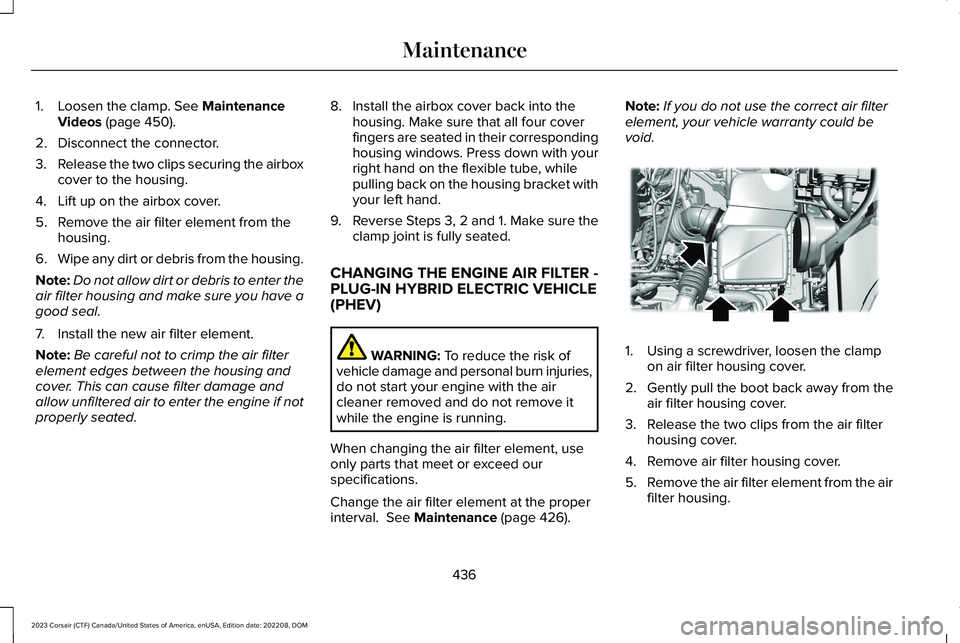
1.Using a screwdriver, loosen the clampon air filter housing cover.
2.Gently pull the boot back away from theair filter housing cover.
3.Release the two clips from the air filterhousing cover.
4.Remove air filter housing cover.
5.Remove the air filter element from the airfilter housing.
436
2023 Corsair (CTF) Canada/United States of America, enUSA, Edition date: 202208, DOMMaintenanceE299071
Page 441 of 690
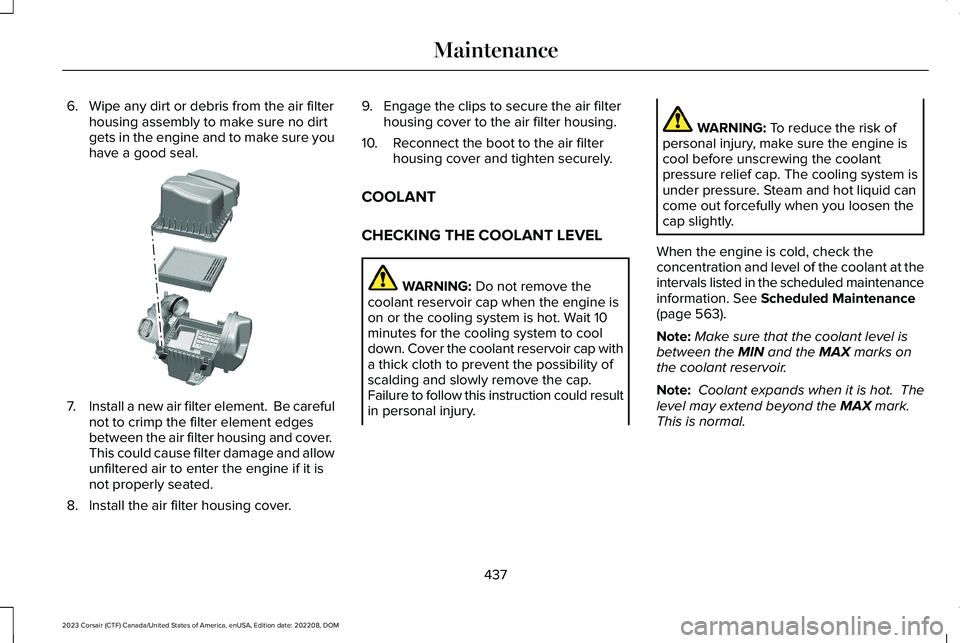
6.Wipe any dirt or debris from the air filterhousing assembly to make sure no dirtgets in the engine and to make sure youhave a good seal.
7.Install a new air filter element. Be carefulnot to crimp the filter element edgesbetween the air filter housing and cover. This could cause filter damage and allowunfiltered air to enter the engine if it isnot properly seated.
8.Install the air filter housing cover.
9.Engage the clips to secure the air filterhousing cover to the air filter housing.
10.Reconnect the boot to the air filterhousing cover and tighten securely.
COOLANT
CHECKING THE COOLANT LEVEL
WARNING: Do not remove thecoolant reservoir cap when the engine ison or the cooling system is hot. Wait 10minutes for the cooling system to cooldown. Cover the coolant reservoir cap witha thick cloth to prevent the possibility ofscalding and slowly remove the cap.Failure to follow this instruction could resultin personal injury.
WARNING: To reduce the risk ofpersonal injury, make sure the engine iscool before unscrewing the coolantpressure relief cap. The cooling system isunder pressure. Steam and hot liquid cancome out forcefully when you loosen thecap slightly.
When the engine is cold, check theconcentration and level of the coolant at theintervals listed in the scheduled maintenanceinformation. See Scheduled Maintenance(page 563).
Note:Make sure that the coolant level isbetween the MIN and the MAX marks onthe coolant reservoir.
Note: Coolant expands when it is hot. Thelevel may extend beyond the MAX mark. This is normal.
437
2023 Corsair (CTF) Canada/United States of America, enUSA, Edition date: 202208, DOMMaintenanceE299074
Page 448 of 690
Note:If you add electrical accessories orcomponents to the vehicle, it could adverselyaffect battery performance and durability.This could also affect the performance ofother electrical systems in the vehicle.
CHANGING THE 12V BATTERY
The battery is in the engine compartment.See Maintenance (page 426).
Your vehicle has a maintenance-free battery. It does not require additional water duringservice.
If the vehicle battery has a cover, make sureyou correctly install it after cleaning orreplacing the battery.
For longer, trouble-free operation, keep thetop of the battery clean and dry and thebattery cables tightly fastened to the batteryterminals. If any corrosion is present on thebattery or terminals, remove the cables fromthe terminals and clean with a wire brush. You can neutralize the acid with a solutionof baking soda and water.
We recommend that you disconnect thenegative battery cable terminal from thebattery if you plan to store your vehicle foran extended period.
Note:If you only disconnect the negativebattery cable terminal, make sure it isisolated or placed away from the batteryterminal to avoid unintended connection orarcing.
If you disconnect or replace the battery andyour vehicle has an automatic transmission,it must relearn its adaptive strategy. Becauseof this, the transmission may shift firmly whenfirst driven. This is normal operation whilethe transmission fully updates its operationto optimum shift feel.
Removing the Battery
1.Apply the parking brake and switch theignition off.
2.Switch all electrical equipment off, forexample lights and radio.
3.Wait a minimum of two minutes beforedisconnecting the battery.
Note:The engine management system hasa power hold function and remains poweredfor a period of time after you switch theignition off. This is to allow diagnostic andadaptive tables to be stored. Disconnectingthe battery without waiting can causedamage not covered by the vehicleWarranty.
4.Disconnect and isolate the negativebattery cable terminal.
5.Disconnect and isolate the positivebattery cable terminal.
6.Remove the battery securing clamp.
7.Remove the battery.
If you disconnect or replace the vehiclebattery, you must reset the followingfeatures:
•Window bounce-back. See WindowBounce-Back (page 131).
•Clock Settings.
•Pre-set radio stations.
444
2023 Corsair (CTF) Canada/United States of America, enUSA, Edition date: 202208, DOMMaintenance
Page 449 of 690
Replacing the Battery
Note:Before reconnecting the battery, makesure the ignition remains switched off.
You must replace the battery with one ofexactly the same specification.
To install, reverse the removal procedure.
Note:Make sure that you correctly installthe battery terminal covers, battery coverand battery cable terminals.
CHANGING THE 12V BATTERY - PLUG-IN HYBRID ELECTRIC VEHICLE (PHEV)
The battery is in the luggage compartment.
Your vehicle has a maintenance-free battery.It does not require additional water duringservice.
If the vehicle battery has a cover, make sureyou correctly install it after cleaning orreplacing the battery.
For longer, trouble-free operation, keep thetop of the battery clean and dry and thebattery cables tightly fastened to the batteryterminals. If any corrosion is present on thebattery or terminals, remove the cables fromthe terminals and clean with a wire brush.You can neutralize the acid with a solutionof baking soda and water.
Note:If you only disconnect the negativebattery cable terminal, make sure it isisolated or placed away from the batteryterminal to avoid unintended connection orarcing.
If you disconnect or replace the battery andyour vehicle has an automatic transmission,it must relearn its adaptive strategy. Becauseof this, the transmission may shift firmly whenfirst driven. This is normal operation whilethe transmission fully updates its operationto optimum shift feel.
Removing the Battery
1.Apply the parking brake and switch theignition off.
2.Switch all electrical equipment off, forexample lights and radio.
3.Wait a minimum of two minutes beforedisconnecting the battery.
Note:The engine management system hasa power hold function and remains poweredfor a period of time after you switch theignition off. This is to allow diagnostic andadaptive tables to be stored. Disconnectingthe battery without waiting can causedamage not covered by the vehicleWarranty.
4.Remove the battery securing clamp.
5.Disconnect and isolate the negativebattery cable terminal.
6.Disconnect and isolate the positivebattery cable terminal.
7.Remove the battery.
If you disconnect or replace the vehiclebattery, you must reset the followingfeatures:
•Window bounce-back. See What IsWindow Bounce-Back (page 131).
•Clock Settings.
•Pre-set radio stations.
445
2023 Corsair (CTF) Canada/United States of America, enUSA, Edition date: 202208, DOMMaintenance
Page 474 of 690
The tires on your vehicle could haveall-weather treads to provide traction in rainand snow. In some climates you will need touse snow tires and chains on your vehicle inemergency situations or if required by law.
Note:The suspension insulation andbumpers will help prevent vehicle damage.Do not remove these components from yourvehicle when using snow tires and chains.
Note:Driving too fast for road conditionscreates the possibility of loss of vehiclecontrol. Driving at very high speeds forextended periods of time may result indamage to vehicle components.
Follow these guidelines when using snowtires and chains:
•The snow chains or cables must bemounted in pairs on the front tires only.
•Chains may damage aluminum wheels.
•Use ultra low profile cables, 10 mm orless in dimension as measured on thesidewall of your tire, only with 225/60R18all season tires.
•Do not use snow chains or cables with225/55R19, or 245/45R20.
•Not all S-class snow chains or cablesmeet these restrictions. Chains of thissize restriction will include a tensioningdevice.
•Purchase chains or cables from amanufacturer that clearly labels body totire dimension restrictions.
•When driving with snow chains do notexceed 30 mph (50 km/h) or themaximum speed recommended by thechain manufacturer, whichever is less.
•Install cables securely, verifying that thecables do not touch any wiring or brakelines.
•Drive cautiously. If you hear the cablesrub or bang against the vehicle, stop andretighten them. If this does not work,remove the cables to prevent vehicledamage.
•Remove the tire chains when they are nolonger needed. Do not use tire chains ondry roads.
If you have any questions regarding snowchains or cables, please contact yourauthorized dealer.
470
2023 Corsair (CTF) Canada/United States of America, enUSA, Edition date: 202208, DOMWheel and Tire Information
Page 481 of 690
What to do when a tire is punctured
A tire puncture within the tire's tread areacan be repaired in two stages with the kit.
•In the first stage, the tire is reinflated witha sealing compound and air. After the tirehas been inflated, drive the vehicle ashort distance approximately 4 mi (6 km)to distribute the sealant in the tire.
•In the second stage, check the tirepressure and adjust, if necessary, to thevehicle's specified tire inflation pressure.
First Stage: Reinflating the Tire withsealing compound and air
WARNING: Do not stand directly overthe kit while inflating the tire. If you noticeany unusual bulges or deformations in thetire's sidewall during inflation, stop and callroadside assistance.
WARNING: If the tire does not inflateto the recommended tire pressure within15 minutes, stop and call roadsideassistance.
Park the vehicle in a safe, level and securearea, away from moving traffic.
Turn the hazard lights on. Apply the parkingbrake and power off the vehicle. Inspect theflat tire for visible damage.
If a puncture is located in the tire sidewall,stop and call roadside assistance.
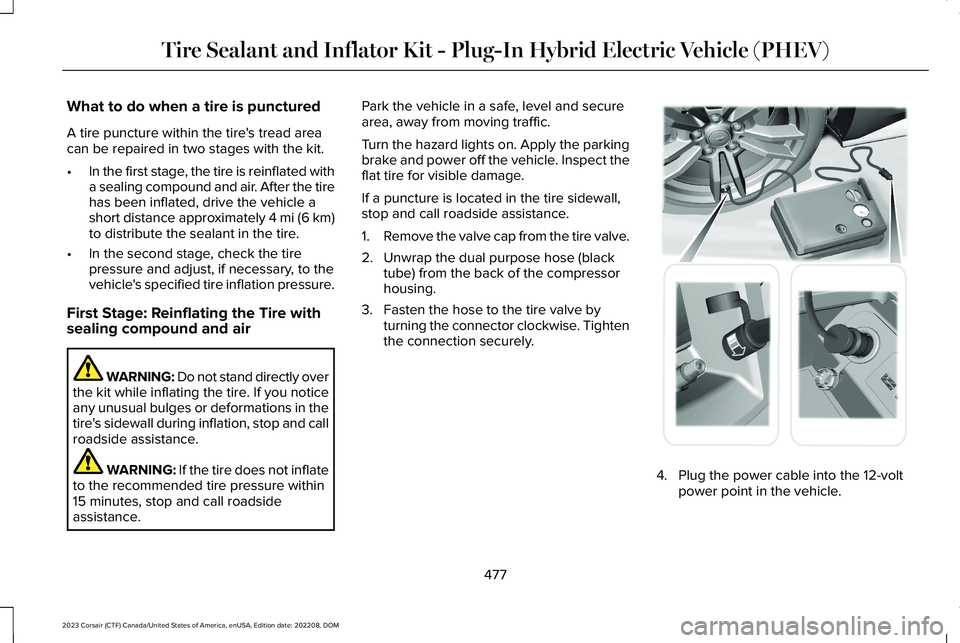
1.Remove the valve cap from the tire valve.
2.Unwrap the dual purpose hose (blacktube) from the back of the compressorhousing.
3.Fasten the hose to the tire valve byturning the connector clockwise. Tightenthe connection securely.
4.Plug the power cable into the 12-voltpower point in the vehicle.
477
2023 Corsair (CTF) Canada/United States of America, enUSA, Edition date: 202208, DOMTire Sealant and Inflator Kit - Plug-In Hybrid Electric Vehicle (PHEV) E175979
Page 491 of 690
CHANGING A FLAT TIRE
WARNING: Failure to follow theseguidelines could result in an increased riskof loss of vehicle control, injury or death.
WARNING: Do not attempt to changea tire on the side of the vehicle close tomoving traffic. Pull far enough off the roadto not obstruct the flow of traffic and avoidthe danger of being hit when operating thejack or changing the wheel.
WARNING: Switch the ignition offand apply the parking brake. If your vehiclehas a manual transmission, shift into firstor reverse gear. If your vehicle has anautomatic transmission, shift into park (P).
WARNING: Make sure that yourvehicle is on firm and level ground with thefront wheels pointing straight ahead andset up a warning triangle if available.
WARNING: To help prevent yourvehicle from moving when changing awheel, use an appropriate block or wheelchock to secure the wheel diagonallyopposite to the wheel being changed. Forexample, when changing the front leftwheel, place an appropriate block or wheelchock on the right rear wheel.
WARNING: Do not switch off stabilitycontrol or select sport mode, when usinga temporary spare wheel or after repairinga tire using the temporary mobility kit.
Make sure all passengers are out of yourvehicle.
If the spare wheel is the same type and sizeas the your vehicle road wheels, you can fitthe spare wheel and continue to drive in thenormal manner. We recommend that youhave the damaged road wheel and tirerepaired or replaced as soon as possible.
If the spare wheel is not the same type andsize as your vehicle road wheels, it has alabel showing the maximum driving speedlimit.
Note:Your vehicle may exhibit somedifferent driving characteristics if you fit thespare wheel.
Note: The ground clearance of your vehiclemay be reduced when the spare wheel isfitted. Take care when parking next to acurb.
Note:: If the spare wheel is fitted to yourvehicle, do not drive through an automaticcar wash.
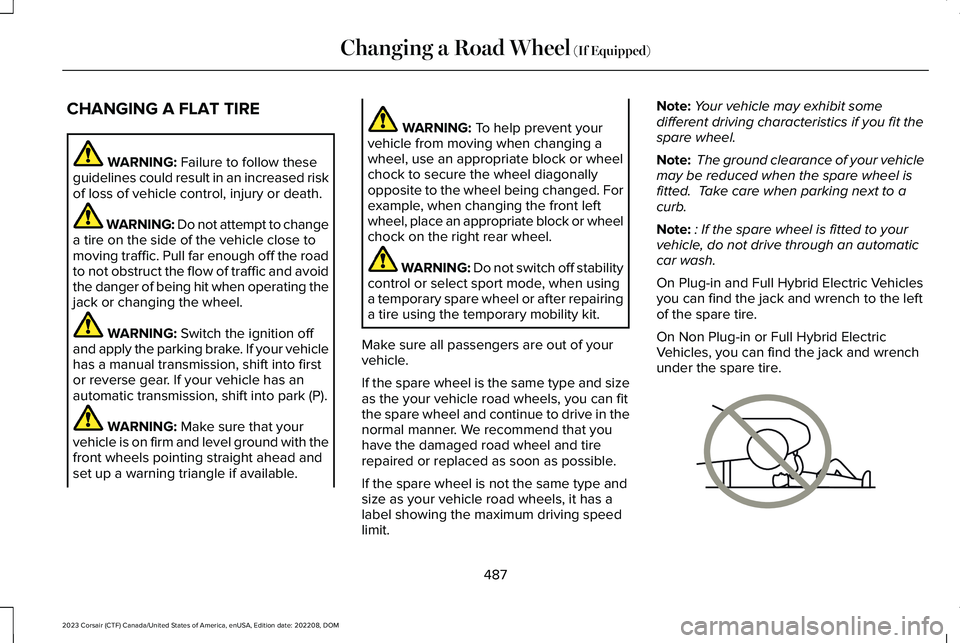
On Plug-in and Full Hybrid Electric Vehiclesyou can find the jack and wrench to the leftof the spare tire.
On Non Plug-in or Full Hybrid ElectricVehicles, you can find the jack and wrenchunder the spare tire.
487
2023 Corsair (CTF) Canada/United States of America, enUSA, Edition date: 202208, DOMChanging a Road Wheel (If Equipped)E166722
Page 492 of 690
WARNING: No person should placeany portion of their body under a vehiclethat is supported by a jack.
Note:The jack does not requiremaintenance or additional lubrication overthe service life of your vehicle with normalusage.
1.Park on a level surface, set the parkingbrake and activate the hazard flashers.
2.Place the transmission in park (P) andturn the engine off.
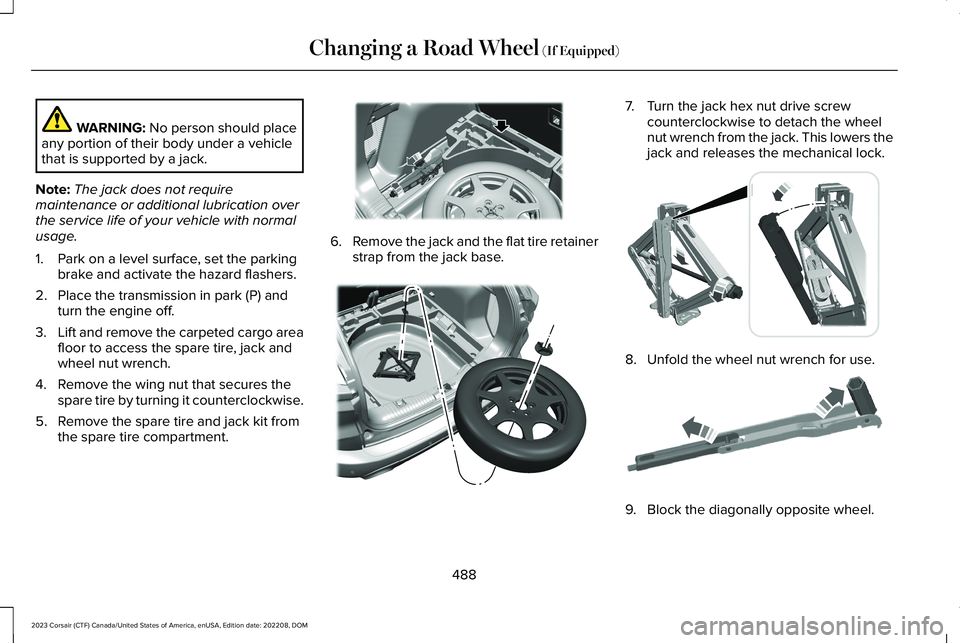
3.Lift and remove the carpeted cargo areafloor to access the spare tire, jack andwheel nut wrench.
4.Remove the wing nut that secures thespare tire by turning it counterclockwise.
5.Remove the spare tire and jack kit fromthe spare tire compartment.
6.Remove the jack and the flat tire retainerstrap from the jack base.
7.Turn the jack hex nut drive screwcounterclockwise to detach the wheelnut wrench from the jack. This lowers thejack and releases the mechanical lock.
8.Unfold the wheel nut wrench for use.
9.Block the diagonally opposite wheel.
488
2023 Corsair (CTF) Canada/United States of America, enUSA, Edition date: 202208, DOMChanging a Road Wheel (If Equipped)E294118 E305308 E294117 E181744
Page 494 of 690
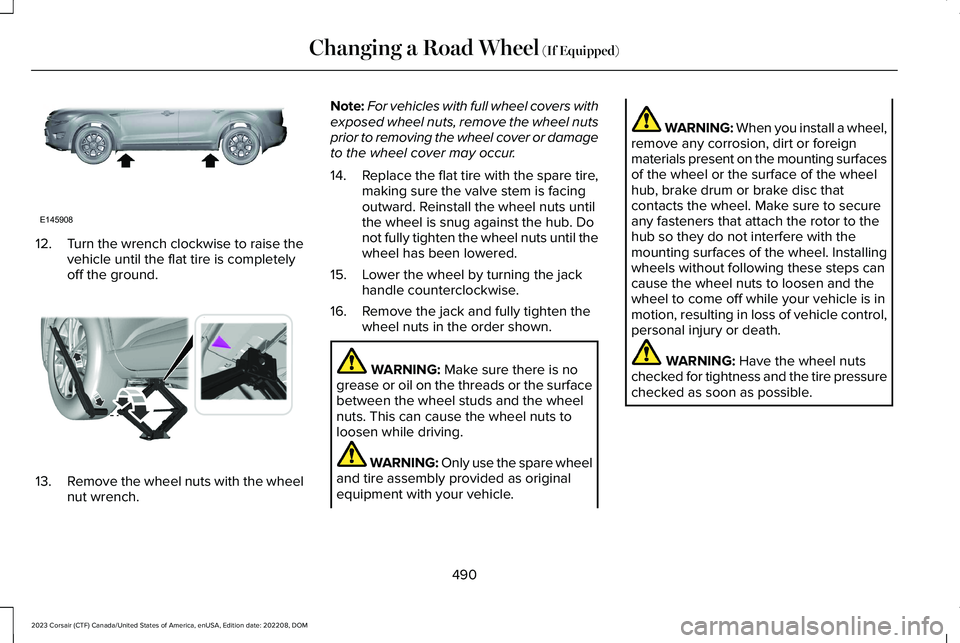
12.Turn the wrench clockwise to raise thevehicle until the flat tire is completelyoff the ground.
13.Remove the wheel nuts with the wheelnut wrench.
Note:For vehicles with full wheel covers withexposed wheel nuts, remove the wheel nutsprior to removing the wheel cover or damageto the wheel cover may occur.
14.Replace the flat tire with the spare tire,making sure the valve stem is facingoutward. Reinstall the wheel nuts untilthe wheel is snug against the hub. Donot fully tighten the wheel nuts until thewheel has been lowered.
15.Lower the wheel by turning the jackhandle counterclockwise.
16.Remove the jack and fully tighten thewheel nuts in the order shown.
WARNING: Make sure there is nogrease or oil on the threads or the surfacebetween the wheel studs and the wheelnuts. This can cause the wheel nuts toloosen while driving.
WARNING: Only use the spare wheeland tire assembly provided as originalequipment with your vehicle.
WARNING: When you install a wheel,remove any corrosion, dirt or foreignmaterials present on the mounting surfacesof the wheel or the surface of the wheelhub, brake drum or brake disc thatcontacts the wheel. Make sure to secureany fasteners that attach the rotor to thehub so they do not interfere with themounting surfaces of the wheel. Installingwheels without following these steps cancause the wheel nuts to loosen and thewheel to come off while your vehicle is inmotion, resulting in loss of vehicle control,personal injury or death.
WARNING: Have the wheel nutschecked for tightness and the tire pressurechecked as soon as possible.
490
2023 Corsair (CTF) Canada/United States of America, enUSA, Edition date: 202208, DOMChanging a Road Wheel (If Equipped)E145908 E338668
Page 495 of 690
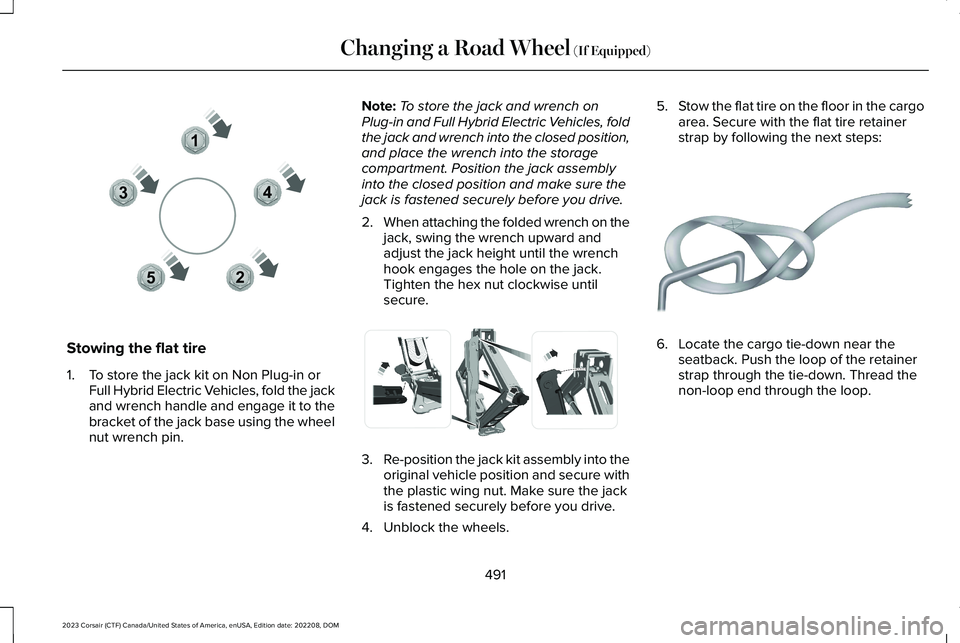
Stowing the flat tire
1.To store the jack kit on Non Plug-in orFull Hybrid Electric Vehicles, fold the jackand wrench handle and engage it to thebracket of the jack base using the wheelnut wrench pin.
Note:To store the jack and wrench onPlug-in and Full Hybrid Electric Vehicles, foldthe jack and wrench into the closed position,and place the wrench into the storagecompartment. Position the jack assemblyinto the closed position and make sure thejack is fastened securely before you drive.
2.When attaching the folded wrench on thejack, swing the wrench upward andadjust the jack height until the wrenchhook engages the hole on the jack.Tighten the hex nut clockwise untilsecure.
3.Re-position the jack kit assembly into theoriginal vehicle position and secure withthe plastic wing nut. Make sure the jackis fastened securely before you drive.
4.Unblock the wheels.
5.Stow the flat tire on the floor in the cargoarea. Secure with the flat tire retainerstrap by following the next steps:
6.Locate the cargo tie-down near theseatback. Push the loop of the retainerstrap through the tie-down. Thread thenon-loop end through the loop.
491
2023 Corsair (CTF) Canada/United States of America, enUSA, Edition date: 202208, DOMChanging a Road Wheel (If Equipped)12345E306781 E294121 E142906