audio LINCOLN CORSAIR 2023 Owners Manual
[x] Cancel search | Manufacturer: LINCOLN, Model Year: 2023, Model line: CORSAIR, Model: LINCOLN CORSAIR 2023Pages: 690, PDF Size: 15.04 MB
Page 19 of 690
Fuel Tank Capacity - Excluding: Plug-InHybrid Electric Vehicle (PHEV)............505
Fuel Tank Capacity - Plug-In Hybrid ElectricVehicle (PHEV)........................................506
Air Conditioning System Capacity andSpecification - 2.0L EcoBoost™............507
Air Conditioning System Capacity andSpecification - 2.5L, Plug-In HybridElectric Vehicle (PHEV).........................509
Washer Fluid Specification........................510
Brake Fluid Specification............................511
Vehicle Identification
Vehicle Identification Number..................513
Connected Vehicle
What Is a Connected Vehicle....................514
Connected Vehicle Requirements...........514
Connected Vehicle Limitations.................514
Connecting the Vehicle to a MobileNetwork......................................................514
Connecting the Vehicle to a Wi-Fi Network.......................................................................514
Connected Vehicle – Troubleshooting.......................................................................515
Connected Vehicle Videos........................518
Vehicle Wi-Fi Hotspot
Creating a Vehicle Wi-Fi Hotspot.............519
Changing the Vehicle Wi-Fi Hotspot Nameor Password..............................................519
Vehicle Wi-Fi Hotspot – Troubleshooting......................................................................520
Audio System
Audio System Precautions........................521
Switching the Audio Unit On and Off......521
Selecting the Audio Source......................521
Playing or Pausing the Audio Source......521
Adjusting the Volume..................................521
Switching Shuffle Mode On and Off......522
Switching Repeat Mode On and Off......522
Setting a Memory Preset..........................522
Muting the Audio........................................522
Adjusting the Sound Settings..................522
Setting the Clock and Date......................523
AM/FM Radio................................................523
Switching the Display On and Off..........524
Digital Radio.................................................524
Satellite Radio..............................................525
Audio System – Troubleshooting...........528
Audio System Videos..................................531
Center Display Overview
Center Display Precautions......................532
Center Display Limitations........................532
Status Bar......................................................532
Home Screen...............................................533
Information On Demand Screen.............533
Rebooting the Center Display.................533
Center Display Overview Videos............533
Voice Interaction
Lincoln Personal Assistant........................534
Alexa Built-In
What is Alexa Built-In.................................536
Alexa Built-In Requirements.....................536
Signing Into Your Account........................536
Using Alexa Built-In....................................536
Alexa Built-In Settings................................536
15
2023 Corsair (CTF) Canada/United States of America, enUSA, Edition date: 202208, DOMTable of Contents
Page 64 of 690
Pregnant women should always wear theirseatbelt. Position the lap belt portion of acombination lap and shoulder belt low acrossthe hips below the belly and worn as tightas comfort allows. Position the shoulder beltto cross the middle of the shoulder and thecenter of the chest.
ADJUSTING THE SEATBELT
HEIGHT
WARNING: Position the seatbeltheight adjuster so that the seatbelt restsacross the middle of your shoulder. Failureto adjust the seatbelt correctly couldreduce its effectiveness and increase therisk of injury in a crash.
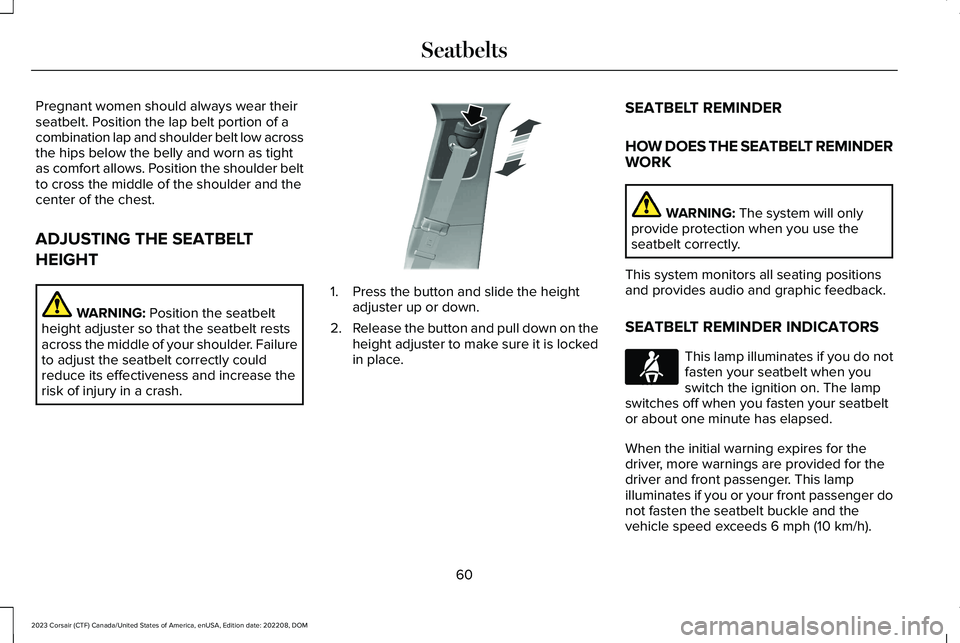
1.Press the button and slide the heightadjuster up or down.
2.Release the button and pull down on theheight adjuster to make sure it is lockedin place.
SEATBELT REMINDER
HOW DOES THE SEATBELT REMINDERWORK
WARNING: The system will onlyprovide protection when you use theseatbelt correctly.
This system monitors all seating positionsand provides audio and graphic feedback.
SEATBELT REMINDER INDICATORS
This lamp illuminates if you do notfasten your seatbelt when youswitch the ignition on. The lampswitches off when you fasten your seatbeltor about one minute has elapsed.
When the initial warning expires for thedriver, more warnings are provided for thedriver and front passenger. This lampilluminates if you or your front passenger donot fasten the seatbelt buckle and thevehicle speed exceeds 6 mph (10 km/h).
60
2023 Corsair (CTF) Canada/United States of America, enUSA, Edition date: 202208, DOMSeatbeltsE200161 E71880
Page 157 of 690
Move the selector switch to the leftto exit a submenu.
Move the selector switch to theright to choose and confirmsettings or messages.
Status Indicator
This icon shows the features on oroff status. A check in the boxindicates the feature is on, andunchecked indicates the feature is off.
Note:Some menu items are regional specificor optional and may appear slightly differentor not at all.
INSTRUMENT CLUSTER DISPLAY
MAIN MENU
Depending on your vehicle options, somemenu items can appear different or not atall.
Note:For your safety, some features arespeed-dependent and could be unavailablewhen your vehicle is above a certain speed.
Menu Item
Settings
Audio
Phone
Navigation
CUSTOMIZING THE INSTRUMENT
CLUSTER DISPLAY
You can customize the gauge displaysthrough the following:
ActionMenu Item
Press the OK button.Display
153
2023 Corsair (CTF) Canada/United States of America, enUSA, Edition date: 202208, DOMInstrument Cluster Display - Excluding: Plug-In Hybrid Electric Vehicle (PHEV)E281480 E265041 E204495
Page 159 of 690
Move the selector switch to the leftto exit a submenu.
Move the selector switch to theright to choose and confirmsettings or messages.
Status Indicator
This icon shows the features on oroff status. A check in the boxindicates the feature is on, andunchecked indicates the feature is off.
Note:Some menu items are regional specificor optional and may appear slightly differentor not at all.
INSTRUMENT CLUSTER DISPLAY
MAIN MENU
Depending on your vehicle options, somemenu items can appear different or not atall.
Note:For your safety, some features arespeed-dependent and could be unavailablewhen your vehicle is above a certain speed.
Menu Item
Settings
Audio
Phone
Navigation
CUSTOMIZING THE INSTRUMENT
CLUSTER DISPLAY
You can customize the gauge displaysthrough the following:
ActionMenu Item
Press the OK button.Display
155
2023 Corsair (CTF) Canada/United States of America, enUSA, Edition date: 202208, DOMInstrument Cluster Display - Plug-In Hybrid Electric Vehicle (PHEV)E281480 E265041 E204495
Page 203 of 690
LOCATING THE USB PORTS
Data Transfer USB Ports
The USB ports could be in the followinglocations:
•On the lower instrument panel.
•Inside the center console.
Note: These USB ports can also chargedevices.
Note: Not all USB ports in your vehicle havedata transfer capabilities.
Note: We recommend using only USB-IFcertified cables and adapters. Non-certifiedcables and adapters may not work.
Charge Only USB Ports
The USB ports could be in the followinglocations:
•On the lower instrument panel.
•On the upper instrument panel.
•Inside the media bin.
•Inside the center console.
•On the rear of the center console.
•In the cargo area.
PLAYING MEDIA USING THE USB
PORT
WARNING: Driving while distractedcan result in loss of vehicle control, crashand injury. We strongly recommend thatyou use extreme caution when using anydevice that may take your focus off theroad. Your primary responsibility is the safeoperation of your vehicle. We recommendagainst the use of any hand-held devicewhile driving and encourage the use ofvoice-operated systems when possible.Make sure you are aware of all applicablelocal laws that may affect the use ofelectronic devices while driving.
Connect your device to a data transfer USBport.
Press the audio button on thefeature bar.
Select Sources.
Select the USB option.
Press to play a track. Press againto pause the track.
Press to skip to the next track.
Press and hold to fast forwardthrough the track.
Press once to return to thebeginning of a track. Repeatedlypress to return to previous tracks.
Press and hold to fast rewind.
CHARGING A DEVICE
Connect your device to the USB port.
199
2023 Corsair (CTF) Canada/United States of America, enUSA, Edition date: 202208, DOMUSB PortsE250655 E263583 E100027
Page 299 of 690
REAR PARKING AID AUDIBLEWARNINGS
A warning tone sounds when your vehicleapproaches an object. As your vehiclemoves closer to an object, the rate of thetone increases. The warning tonecontinuously sounds when an object is 12 in(30 cm) or less from the rear bumper.
If your vehicle remains stationary for a fewseconds, the audible warning turns off. If yourvehicle moves backward the tone soundsagain.
Note:When the parking aid system soundsa tone, the audio system could reduce theset volume.
FRONT PARKING AID
WHAT IS THE FRONT PARKING AID
Front parking sensors detect objects in frontof your vehicle.
FRONT PARKING AID LIMITATIONS
The front parking aid sensors are activewhen your vehicle is in any position otherthan park (P) and the vehicle speed is lessthan 5 mph (8 km/h).
The sensor coverage area is up to 28 in(70 cm) from the bumper.
If your vehicle is in reverse (R), the frontparking aid detects objects when yourvehicle is moving at a low speed or an objectis moving toward your vehicle and providesan audible warning, for example anothervehicle at a low speed. If your vehicleremains stationary for a few seconds, theaudible warning turns off. Visual indicationis always active in reverse (R).
If your vehicle is in any forward gear, thefront parking aid provides audible warningsand visual indication when your vehicle ismoving at a speed of 5 mph (8 km/h) orbelow and the system detects an objectwithin the detection zone. If your vehicleremains stationary for a few seconds, thevisual indication and audible warning turnsoff.
If your vehicle is in neutral (N), the front andrear sensors provide visual indication onlywhen your vehicle is moving below a speedof 5 mph (8 km/h) and obstacles are detectedinside the detection areas. Once your vehiclestops, the visual indication and audiblewarning stops after a few seconds.
LOCATING THE FRONT PARKING AIDSENSORS
The front parking aid sensors are in the frontbumper.
295
2023 Corsair (CTF) Canada/United States of America, enUSA, Edition date: 202208, DOMParking AidsE187330
Page 428 of 690
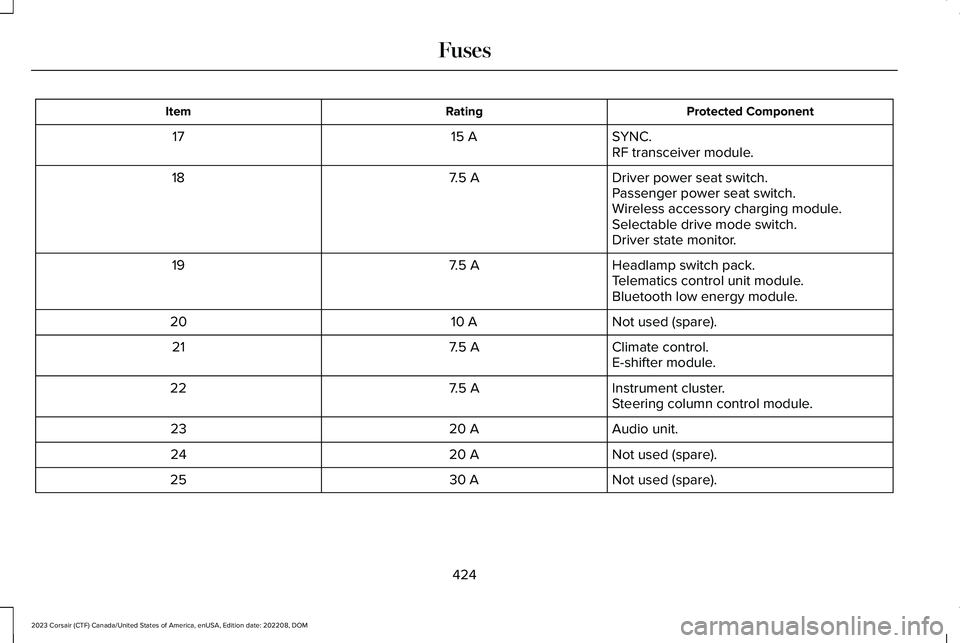
Protected ComponentRatingItem
SYNC.15 A17RF transceiver module.
Driver power seat switch.7.5 A18Passenger power seat switch.Wireless accessory charging module.Selectable drive mode switch.Driver state monitor.
Headlamp switch pack.7.5 A19Telematics control unit module.Bluetooth low energy module.
Not used (spare).10 A20
Climate control.7.5 A21E-shifter module.
Instrument cluster.7.5 A22Steering column control module.
Audio unit.20 A23
Not used (spare).20 A24
Not used (spare).30 A25
424
2023 Corsair (CTF) Canada/United States of America, enUSA, Edition date: 202208, DOMFuses
Page 447 of 690
WARNING: This vehicle may havemore than one battery. Removing thebattery cables from only one battery doesnot disconnect your vehicle electricalsystem. Make sure you disconnect thebattery cables from all batteries whendisconnecting power. Failure to do so maycause serious personal injury or propertydamage.
WARNING: For vehicles withAuto-Start-Stop the battery requirement isdifferent. You must replace the battery withone of exactly the same specification.
WHAT IS THE BATTERYMANAGEMENT SYSTEM
The battery management system monitorsbattery conditions and takes actions toextend battery life.
HOW DOES THE BATTERYMANAGEMENT SYSTEM WORK
If excessive battery drain is detected, thesystem temporarily disables some electricalsystems to protect the battery.
Systems included are:
•Heated rear window.
•Heated seats.
•Climate control.
•Heated steering wheel.
•Audio unit.
•Navigation system.
A message could appear in the informationdisplay to alert you that battery protectionactions are active. This message is only fornotification that an action is taking place, andnot intended to indicate an electrical problemor that the battery requires replacement.
BATTERY MANAGEMENT SYSTEMLIMITATIONS
After battery replacement, or in some casesafter charging the battery with an externalcharger, the battery management systemrequires eight hours of vehicle sleep time torelearn the battery state of charge. Duringthis time, your vehicle must remain fullylocked with the ignition switched off.
Note:Prior to relearning the battery state ofcharge, the battery management systemcould temporarily disable some electricalsystems.
Electrical Accessory Installation
To make sure the battery managementsystem works correctly, do not connect anelectrical device ground connection directlyto the battery negative post. This can causeinaccurate measurements of the batterycondition and potential incorrect systemoperation.
443
2023 Corsair (CTF) Canada/United States of America, enUSA, Edition date: 202208, DOMMaintenance
Page 525 of 690
AUDIO SYSTEM PRECAUTIONS
WARNING: Driving while distractedcan result in loss of vehicle control, crashand injury. We strongly recommend thatyou use extreme caution when using anydevice that may take your focus off theroad. Your primary responsibility is the safeoperation of your vehicle. We recommendagainst the use of any hand-held devicewhile driving and encourage the use ofvoice-operated systems when possible.Make sure you are aware of all applicablelocal laws that may affect the use ofelectronic devices while driving.
Listening to loud audio for long periods oftime could damage your hearing.
SWITCHING THE AUDIO UNIT ON
AND OFF
Press the button on the volumecontrol.
SELECTING THE AUDIO SOURCE
Audio Unit
Press the button to open the mediasource menu.
You can press this multiple times to changeto the audio source or scroll through themedia sources.
Touchscreen
Press Sources on the touchscreen to openthe media source menu.
PLAYING OR PAUSING THE AUDIO
SOURCE
Touchscreen
Press to pause playback. Pressagain to resume playback.
Note:Not all sources can be paused.
ADJUSTING THE VOLUME
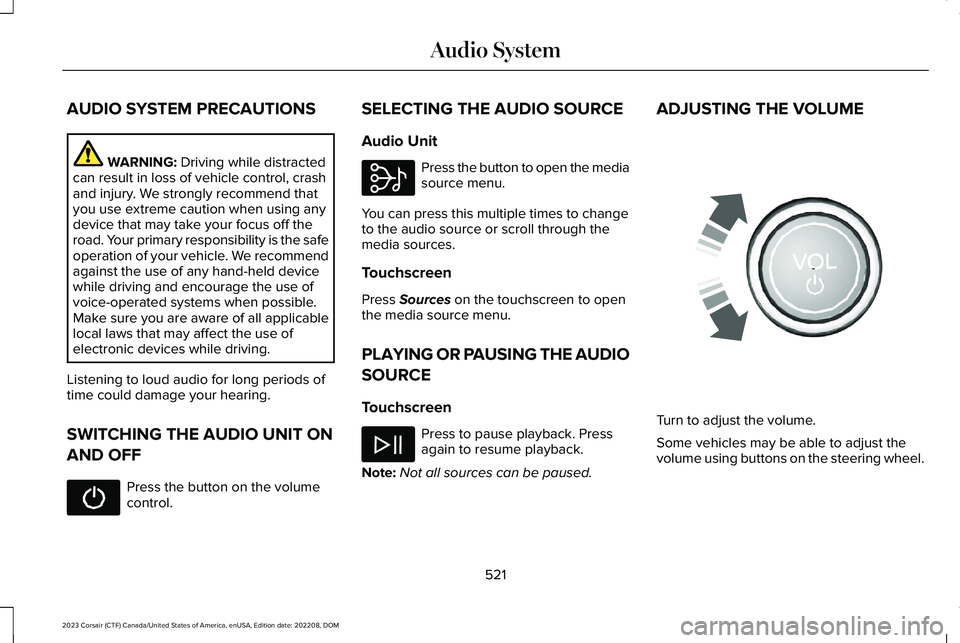
Turn to adjust the volume.
Some vehicles may be able to adjust thevolume using buttons on the steering wheel.
521
2023 Corsair (CTF) Canada/United States of America, enUSA, Edition date: 202208, DOMAudio System E308143 E248939
Page 526 of 690
SWITCHING SHUFFLE MODE ON
AND OFF
Press the button on thetouchscreen to switch shufflemode on or off.
Note:Not all sources have shuffle mode.
SWITCHING REPEAT MODE ON
AND OFF
Press the button on thetouchscreen to switch repeat modeon or off.
Note:Not all sources have repeat mode.
SETTING A MEMORY PRESET
1.Select a station or channel.
2.Press and hold a memory preset buttonon the touchscreen.
Note:The audio mutes briefly while thesystem saves the preset and returns once itis stored.
Note:You can save presets from multiplesources to the memory preset bar.
MUTING THE AUDIO
Press the button on the steeringwheel to mute the audio.
Press to mute the signal. Pressagain to restore the signal.
ADJUSTING THE SOUND
SETTINGS
Balance and Fade (If Equipped)
1.Press Settings on the touchscreen.
2.Press Sound Settings.
3.Press Balance / Fade.
4.Press the arrows to adjust the settings.
Tone Settings
1.Press Settings on the touchscreen.
2.Press Sound Settings.
3.Press Tone Settings.
4.Press the arrows or slider bar to adjustthe settings.
Speed Compensated Volume
1.Press Settings on the touchscreen.
2.Press Sound Settings.
3.Press Speed Compensated Volume.
4.Press a setting.
Occupancy Mode (If Equipped)
1.Press Settings on the touchscreen.
2.Press Sound Settings.
3.Press Occupancy Mode.
4.Press a setting.
Sound Mode (If Equipped)
1.Press Settings on the touchscreen.
2.Press Sound Settings.
3.Press Sound Mode.
4.Press a setting.
522
2023 Corsair (CTF) Canada/United States of America, enUSA, Edition date: 202208, DOMAudio System