light LINCOLN MARK VIII 1997 Owner's Manual
[x] Cancel search | Manufacturer: LINCOLN, Model Year: 1997, Model line: MARK VIII, Model: LINCOLN MARK VIII 1997Pages: 315, PDF Size: 2.18 MB
Page 86 of 315

81
3. Rotate the headlamp control counterclockwise
from the OFF position.
NOTE:The Message Center will display the
amount of time that has been set for the autolamp
to turn off the headlamps after turning the key to
off.
4. The autolamp will automatically turn the lamps
on and off for you.
Do not put any articles on top of the photocell that
is located in the top right corner of the instrument
panel. This photocell controls the autolamp. If you
cover it, the photocell reacts as if it is nighttime,
and the lamps turn on.
To turn the autolamp off, rotate the headlamp
control clockwise to the OFF position.
To turn the autolamp off, rotate the headlamp
control clockwise to the OFF position. The message
center will display ªAUTOLAMP OFFº message.
q
The further you rotate the headlamp switch
counterclockwise, the longer the lamps will stay
on after you leave your vehicle. Similarly, if you
rotate the control only slightly, the headlamps
stay on for only a short time after you turn
your vehicle off.
Turning On Interior Lights/Instrument
Panel IlluminationWith the light control in the parking lamps or the
headlamps position, you can brighten or dim the
lights in the instrument panel. To do this, use the
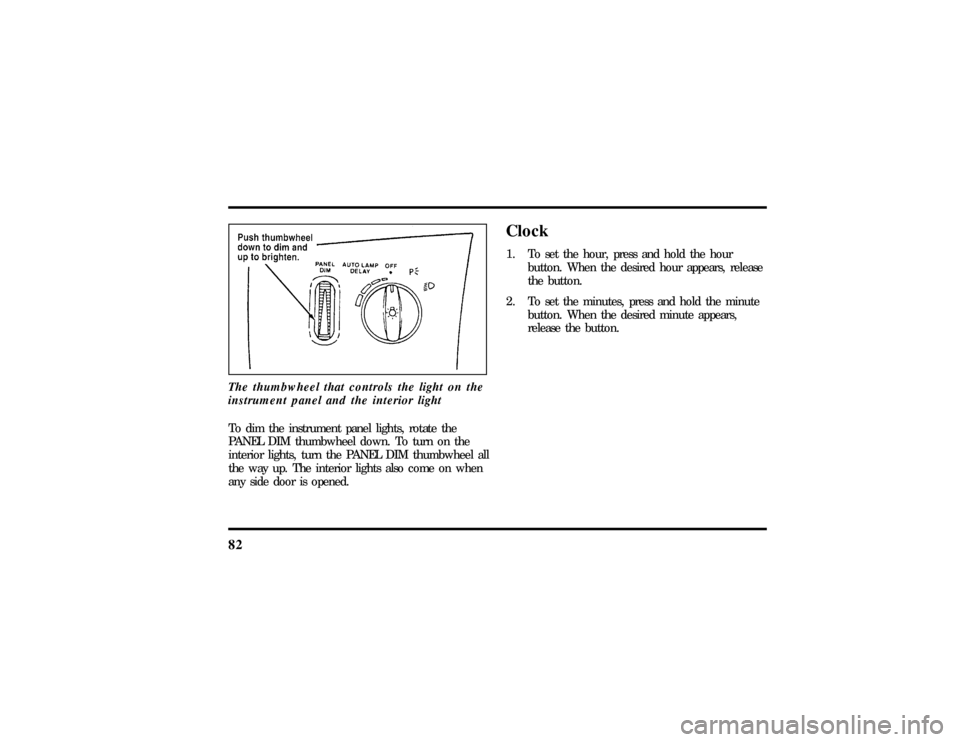
thumbwheel to the left of the steering wheel. This
wheel also turns on the interior lights with the light
control on or off.
File:05fncf8.ex
Update:Thu Jun 27 10:02:20 1996
Page 87 of 315
82The thumbwheel that controls the light on the
instrument panel and the interior lightTo dim the instrument panel lights, rotate the
PANEL DIM thumbwheel down. To turn on the
interior lights, turn the PANEL DIM thumbwheel all
the way up. The interior lights also come on when
any side door is opened.
Clock1. To set the hour, press and hold the hour
button. When the desired hour appears, release
the button.
2. To set the minutes, press and hold the minute
button. When the desired minute appears,
release the button.
File:05fncf8.ex
Update:Thu Jun 27 10:02:20 1996
Page 89 of 315

84
ON allow syo uto tes tyou rvehicle' swarnin glights
WARNING
Alway sse tth eparkin gbrak efull yand
Page 91 of 315

86For lane changes, move the lever far enough to
signal but not to latch. The lever will return to the
off position when you release it.
When the turn signal is used when the headlamps
are on, the cornering lamps will automatically light
on either the right or left side depending on the
direction of the turn.High BeamsTo turn on the high beams, turn the headlamp
control switch to the headlamp ON position (or
activate the autolamp feature) and pull the turn
signal lever toward you until it latches. When the
high beams are ON, the high beam indicator light
on the instrument cluster comes on.
To turn off the high beams, push the lever away
from you until it latches. The high beam indicator
light turns off.NOTE:When the headlamps are on low beam, the
outer two headlamps are on. When the headlamps
are on high beam, the two outer headlamps will
turn off and the inner headlamps turn on.
Flashing the LightsTo flash the headlamps, pull the lever toward you
for a moment and then release it. The headlamps
will flash whether the headlamp knob is in the on
or off position.Windshield Wipers and WasherThe wiper system is controlled by the windshield
wiper control module. The windshield wiper will
operate with the ignition switch in the ACC or ON
position or in the delayed accessory mode. The
wiper system functions are as follows:
INTERMITTENTÐ Wipers run at low speed at
intervals set by rotating the barrel of the wiper
switch. The interval can be adjusted between one
to twenty seconds.
File:05fncf8.ex
Update:Thu Jun 27 10:02:20 1996
Page 100 of 315

95
To Set a Higher Set Speedq
Press and hold SET ACCEL. Release the switch
when the desired vehicle speed is reached. OR
q
Press and release SET ACCEL. Each press will
increase the set speed by 1 mph (1.6 km/h).
OR
q
Accelerate with your accelerator pedal, then
press SET ACCEL.
You may accelerate with the accelerator pedal at
any time during speed control usage. Releasing the
accelerator pedal will return your vehicle speed to
the previously programmed set speed.
To Set a Lower Set Speedq
Press and hold COAST. Release the switch
when the desired vehicle speed is reached. OR
q
Press and release COAST. Each press will
decrease the set speed by 1 mph (1.6 km/h).
OR
q
Depress the brake pedal. When the desired
vehicle speed is reached, press SET ACCEL.
To Disengage Speed Controlq
Depress the brake pedal.
Disengaging the speed control will not erase the
previously programmed set speed.
To Return to a Set Speedq
Press RESUME. For RESUME to operate, the
vehicle speed must be faster than 30 mph
(48 km/h).
Indicator Lightq
Lights when either the SET ACCEL or RESUME
switches are pressed and remains lighted until it
is either disengaged or turned off.
File:05fncf8.ex
Update:Thu Jun 27 10:02:20 1996
Page 105 of 315
100short delay. The delay starts when glare goes away.
The delay prevents excessive changing of the
mirrors as traffic moves behind and around the
vehicle, or on rolling hills and curves.
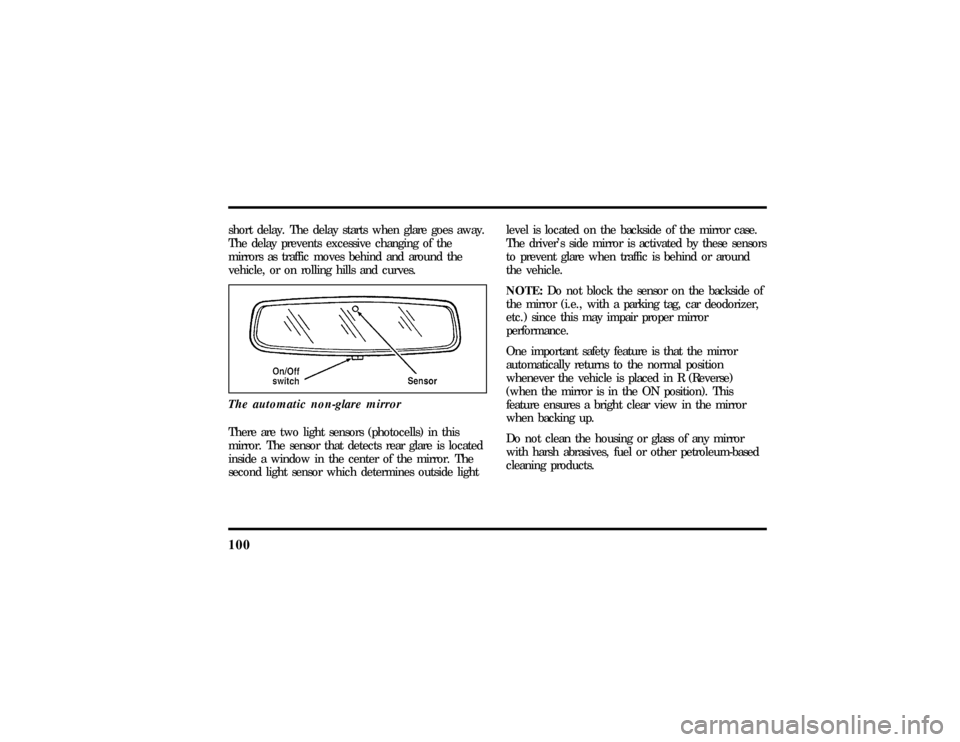
The automatic non-glare mirrorThere are two light sensors (photocells) in this
mirror. The sensor that detects rear glare is located
inside a window in the center of the mirror. The
second light sensor which determines outside lightlevel is located on the backside of the mirror case.
The driver's side mirror is activated by these sensors
to prevent glare when traffic is behind or around
the vehicle.
NOTE:Do not block the sensor on the backside of
the mirror (i.e., with a parking tag, car deodorizer,
etc.) since this may impair proper mirror
performance.
One important safety feature is that the mirror
automatically returns to the normal position
whenever the vehicle is placed in R (Reverse)
(when the mirror is in the ON position). This
feature ensures a bright clear view in the mirror
when backing up.
Do not clean the housing or glass of any mirror
with harsh abrasives, fuel or other petroleum-based
cleaning products.
File:05fncf8.ex
Update:Thu Jun 27 10:02:20 1996
Page 107 of 315

102Do not use this HomeLink Transmitter with any
garage door opener that lacks safety ªstopº and
ªreverseº features as required by federal safety
standards, (this includes any garage door opener
model manufactured before April 1, 1982). A garage
door opener which cannot ªdetectº an object in the
path of a closing door and then automatically ªstopº
and ªreverseº the door, does not meet current
federal safety standards. Using a garage door opener
without these features increases risk of serious
injury or death. For more information on this
matter, call toll-free:1-800-355-3515.ProgrammingIf after repeated attempts you do not successfully
program the HomeLink Universal Transmitter to
learn the signal of the hand-held transmitter, call
toll-free for customer assistance: 1-800-355-3515.1. If you have previously programmed your
HomeLink Transmitter, proceed to step 2.
Otherwise, hold down the two outside buttons
on the HomeLink Transmitter until the red
light begins to flash. Release both buttons.
2. Decide which one of the three channels you
want to program.
3. Hold the end of your hand-held transmitter
against the front surface of the HomeLink
Transmitter so that you can still see the red
light.
File:05fncf8.ex
Update:Thu Jun 27 10:02:20 1996
Page 108 of 315
103
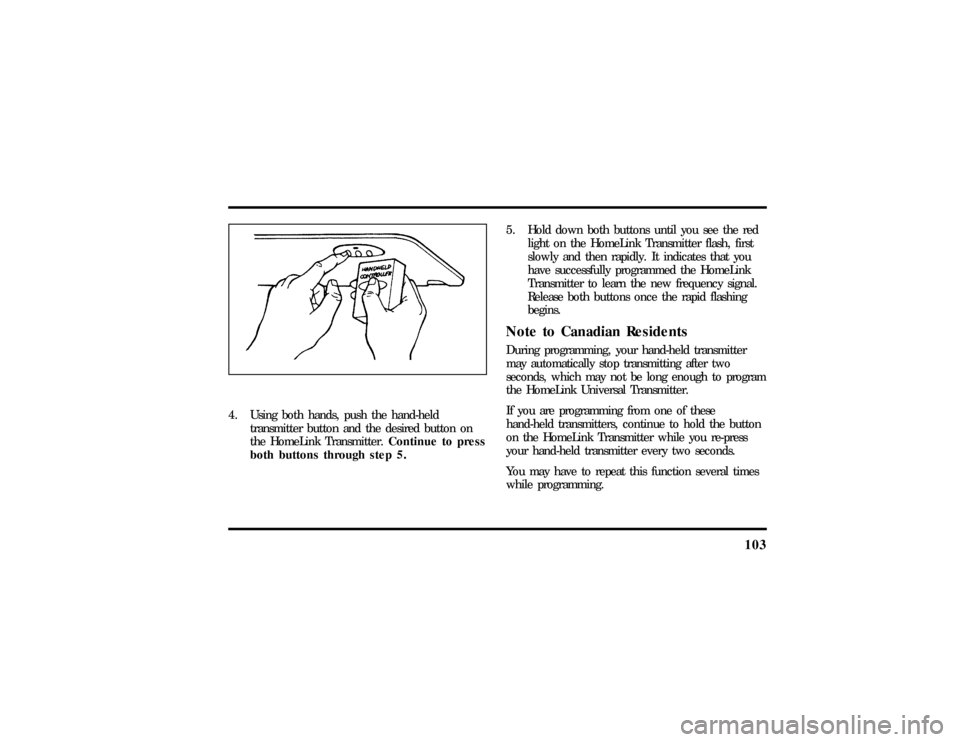
4. Using both hands, push the hand-held
transmitter button and the desired button on
the HomeLink Transmitter.Continue to press
both buttons through step 5.5. Hold down both buttons until you see the red
light on the HomeLink Transmitter flash, first
slowly and then rapidly. It indicates that you
have successfully programmed the HomeLink
Transmitter to learn the new frequency signal.
Release both buttons once the rapid flashing
begins.
Note to Canadian ResidentsDuring programming, your hand-held transmitter
may automatically stop transmitting after two
seconds, which may not be long enough to program
the HomeLink Universal Transmitter.
If you are programming from one of these
hand-held transmitters, continue to hold the button
on the HomeLink Transmitter while you re-press
your hand-held transmitter every two seconds.
You may have to repeat this function several times
while programming.
File:05fncf8.ex
Update:Thu Jun 27 10:02:20 1996
Page 109 of 315

104Operating the HomeLinkHUniversal
TransmitterOnce it is programmed, the HomeLink Universal
Transmitter can be used in place of your hand-held
transmitter(s). To operate, simply press the
appropriate button on the HomeLink Transmitter.
The red light comes on while the signal is being
transmitted.
NOTE:If your hand-held transmitter appears to
program the HomeLink Transmitter, but does not
open your garage door, and if your garage door
opener was manufactured after 1995, your garage
door opener may have a ªcode protectedº or
ªrolling codeº feature.
A ªrolling codeº type of system will change the
ªcodeº of your garage door opener every time you
open or close your garage door.
To determine if you have one of these systems,
depress the button on the HomeLink Transmitter
that you programmed. If the red light on theHomeLink Transmitter flashes rapidly for 1-2
seconds, then remains on, your garage door opener
has a rolling code system.
Training a Garage Door Opener
Equipped with ªRolling CodesºTo train your ªrolling codeº garage door opener to
operate from your HomeLink Transmitter, follow
these steps:
1. Program your hand-held transmitter to the
HomeLink Transmitter by following the
procedures outlined in the ªProgrammingº
section of these instructions. (If you already
completed this programming, proceed to the
next instruction.)
2. Train your garage door opener receiver to
recognize your HomeLink Transmitter. (Your
garage door opener receiver will learn to
recognize the HomeLink Transmitter by
following the same procedures used to train the
hand-held transmitter.)
File:05fncf8.ex
Update:Thu Jun 27 10:02:20 1996
Page 110 of 315

105
q
Remove the cover panel from your garage door
opener receiver. (The receiver should be located
by the garage door opener motor.)
q
Locate the training button on the garage door
opener receiver. The exact location and color of
the button may vary by garage door opener
brand. If you have difficulty locating the training
button, reference your garage door opener
manual, or call1-800-355-3515.
q
Press the training button on the garage door
opener receiver for 1-2 seconds.
q
Return to the HomeLink Transmitter in the
vehicle, and depress the programmed HomeLink
button for the duration of the rapid flash of the
HomeLink's red light, (1-2 seconds). Release the
button, and re-press the button to confirm that
the HomeLink Transmitter has been trained to
the receiver.
q
Your garage door opener should now recognize
your HomeLink Transmitter. You may use either
your HomeLink Transmitter or your original
hand-held transmitter to open your garage door.
If after following these suggestions you still have
difficulties in programming your HomeLink
Transmitter, call toll-free for customer assistance:
1-800-355-3515.
Erasing ChannelsTo erase all three programmed channels, hold down
the two outside buttons until the red light begins to
flash. Then release both buttons. Individual channels
cannot be erased, but can be reprogrammed using
the procedures for programming the HomeLink
Transmitter, (steps 2 through 5).
NOTE:Be sure to retain your original transmitter
for future programming procedures (i.e., new
vehicle purchase).
File:05fncf8.ex
Update:Thu Jun 27 10:02:20 1996