ignition LINCOLN MKC 2018 Workshop Manual
[x] Cancel search | Manufacturer: LINCOLN, Model Year: 2018, Model line: MKC, Model: LINCOLN MKC 2018Pages: 571, PDF Size: 4.39 MB
Page 186 of 571
To resume operation, switch the ignition offand allow the system to cool down for aminimum of 15 minutes. After the system hascooled down, you will see a brief messagedisplay in the information display. SeeInformation Messages (page 114).
When driving at slow speeds in deep sandunder high outside temperatures, use a lowgear when possible. Low gear operation willmaximize the engine and transmissioncooling capability.
Tips when driving over sand:
•Keep all four wheels on the most solidarea of the trail.
•Shift to a lower gear.
•Apply the accelerator slowly.
•Drive steadily through the terrain.
•Avoid excessive wheel spin.
•Avoid reducing the tire pressures.
Mud and Water
Mud
Avoid sudden changes in vehicle speed ordirection when you are driving in mud. Evenall-wheel drive vehicles can lose traction inmud. If your vehicle does slide, steer in thedirection of the slide until you regain controlof your vehicle.
After driving through mud, clean off excessmud stuck to rotating driveshafts and tires.Excess mud stuck on tires and rotatingdriveshafts can cause an imbalance thatcould damage drive components.
Water
Drive slowly through high water. Traction orbrake capability may be limited.
When driving through water, determine thedepth and avoid water higher than thebottom of the wheel rims. If the ignitionsystem gets wet, your vehicle may stall.
Once through water, always try the brakes.Wet brakes will not stop your vehicle asquickly as dry brakes. Apply light pressureto the brake pedal while slowly moving thevehicle to dry the brakes.
Note:Driving through deep water maydamage the transmission. If the front or rearaxle is submerged in water, have the powertransfer unit (PTU) or rear axle serviced byan authorized dealer.
Driving on Hilly or Sloping Terrain
Although natural obstacles may make itnecessary to travel diagonally up or down ahill or steep incline, always try to drivestraight up or straight down the slopingterrain.
Note:To maintain traction and avoidpossibly rolling your vehicle, avoid turningon steep slopes or hills. When you drive ona hill, determine beforehand the route youwill use. Do not drive over a hill without firstseeing what is on the other side. Do not drivein reverse over a hill without the aid of anobserver.
183
MKC (TME) Canada/United States of America, JJ7J 19A321 AA enUSA, Edition date: 201707, Second Printing
All-Wheel Drive (If Equipped)
Page 189 of 571
GENERAL INFORMATION
Note: Occasional brake noise is normal. Ifa metal-to-metal, continuous grinding orcontinuous squeal sound is present, thebrake linings may be worn-out and anauthorized dealer should check them. If thevehicle has continuous vibration or shudderin the steering wheel while braking, anauthorized dealer should check your vehicle.
Note:Brake dust may accumulate on thewheels, even under normal drivingconditions. Some dust is inevitable as thebrakes wear and does not contribute tobrake noise. See Cleaning the Wheels(page 312).
See Warning Lamps andIndicators (page 104).
Wet brakes result in reduced brakingefficiency. Gently press the brake pedal afew times when driving from a car wash orstanding water to dry the brakes.
Brake Over Accelerator
In the event the accelerator pedal becomesstuck or entrapped, apply steady and firmpressure to the brake pedal to slow thevehicle and reduce engine power. If youexperience this condition, apply the brakesand bring your vehicle to a safe stop. Switchthe engine off, move the transmission to park(P) and apply the parking brake. Inspect theaccelerator pedal and the area around it forany items or debris that may be obstructingits movement.If none are found and thecondition persists, have your vehicle towedto the nearest authorized dealer.
Emergency Brake Assist
Emergency brake assist detects when youbrake heavily by measuring the rate at whichyou press the brake pedal. It providesmaximum braking efficiency as long as youpress the pedal. Emergency brake assistcan reduce stopping distances in criticalsituations.
Anti-lock Brake System
This system helps you maintain steeringcontrol during emergency stops by keepingthe brakes from locking.
This lamp momentarily illuminateswhen you switch the ignition on. Ifthe light does not illuminate duringstart up, remains on or flashes, the anti-lockbraking system may be disabled. Have thesystem checked by an authorized dealer. Ifthe anti-lock brake system is disabled,normal braking is still effective.
If the brake warning lampilluminates with the parking brakereleased, have your brake systemserviced immediately.
It also illuminates momentarily when youswitch the ignition on to confirm the lamp isfunctional. If it does not illuminate when youswitch the ignition on, or begins to flash atany time, have the system checked by anauthorized dealer.
186
MKC (TME) Canada/United States of America, JJ7J 19A321 AA enUSA, Edition date: 201707, Second Printing
BrakesE138644 E138644
Page 190 of 571
HINTS ON DRIVING WITH ANTI-
LOCK BRAKES
The anti-lock braking system does noteliminate the risks when:
•You drive too closely to the vehicle infront of you.
•Your vehicle is hydroplaning.
•You take corners too fast.
•The road surface is poor.
Note: If the system activates, the brakepedal may pulse and may travel further. Maintain pressure on the brake pedal. Youmay also hear a noise from the system. Thisis normal.
ELECTRIC PARKING BRAKE
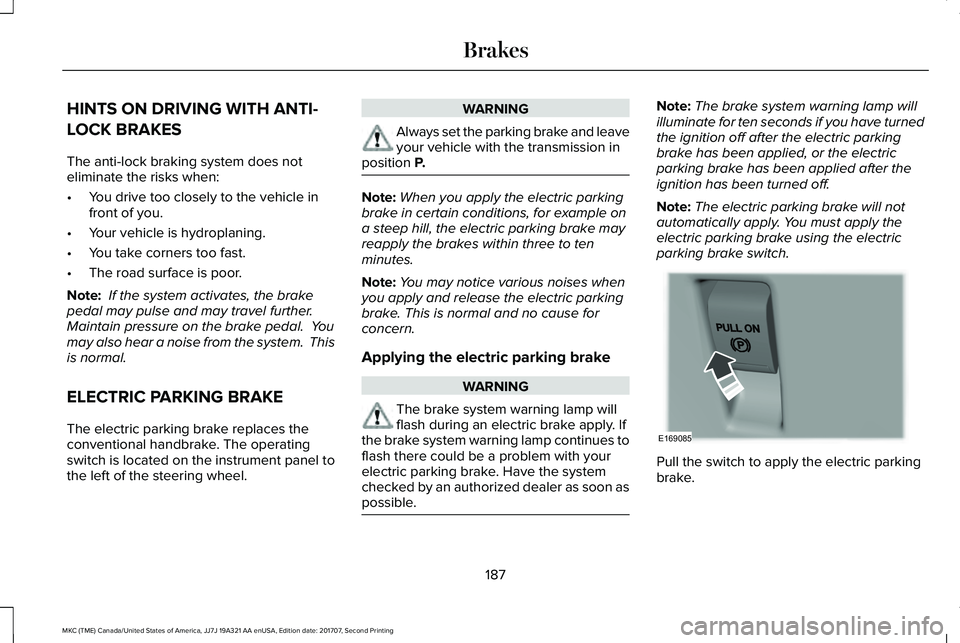
The electric parking brake replaces theconventional handbrake. The operatingswitch is located on the instrument panel tothe left of the steering wheel.
WARNING
Always set the parking brake and leaveyour vehicle with the transmission inposition P.
Note:When you apply the electric parkingbrake in certain conditions, for example ona steep hill, the electric parking brake mayreapply the brakes within three to tenminutes.
Note:You may notice various noises whenyou apply and release the electric parkingbrake. This is normal and no cause forconcern.
Applying the electric parking brake
WARNING
The brake system warning lamp willflash during an electric brake apply. Ifthe brake system warning lamp continues toflash there could be a problem with yourelectric parking brake. Have the systemchecked by an authorized dealer as soon aspossible.
Note:The brake system warning lamp willilluminate for ten seconds if you have turnedthe ignition off after the electric parkingbrake has been applied, or the electricparking brake has been applied after theignition has been turned off.
Note:The electric parking brake will notautomatically apply. You must apply theelectric parking brake using the electricparking brake switch.
Pull the switch to apply the electric parkingbrake.
187
MKC (TME) Canada/United States of America, JJ7J 19A321 AA enUSA, Edition date: 201707, Second Printing
BrakesE169085
Page 191 of 571
The brake system warning lamp will flash forapproximately 2 seconds then illuminate toconfirm that the electric parking brake hasbeen applied. See Instrument Cluster (page103).
Applying the electric parking brake
when the vehicle is moving
WARNINGS
Applying the electric parking brakewhile moving will result in use of theanti-lock braking system. Do not use theelectric parking brake system when thevehicle is moving unless the normal brakesystem is unable to stop the vehicle.
With the exception of emergencyconditions (for example, the brakepedal does not work or is blocked), do notapply the electric parking brake while thevehicle is moving. On bends, or poor roadsurfaces or weather conditions, emergencybraking can cause the vehicle to skid out ofcontrol or off the road.
If you apply the electric parking brake whenyour vehicle is moving, the brake systemwarning lamp will illuminate and a warningchime will sound. See Instrument Cluster(page 103).
If your vehicle speed is above 4 mph (6km/h), the braking force is applied as longas the switch is applied. Release or press theswitch or press the accelerator pedal to stopthe braking force.
Releasing the electric parking brake
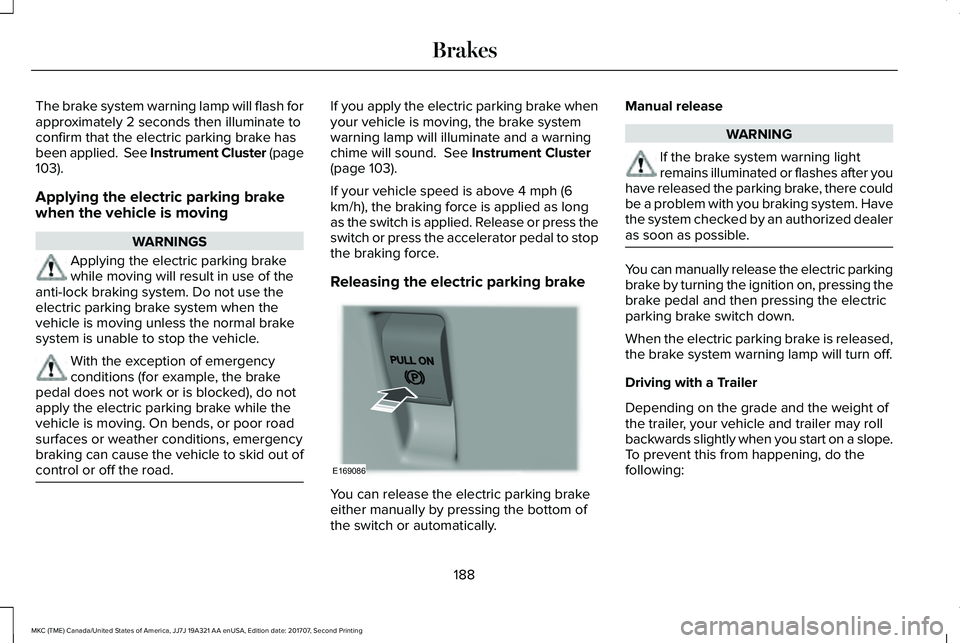
You can release the electric parking brakeeither manually by pressing the bottom ofthe switch or automatically.
Manual release
WARNING
If the brake system warning lightremains illuminated or flashes after youhave released the parking brake, there couldbe a problem with you braking system. Havethe system checked by an authorized dealeras soon as possible.
You can manually release the electric parkingbrake by turning the ignition on, pressing thebrake pedal and then pressing the electricparking brake switch down.
When the electric parking brake is released,the brake system warning lamp will turn off.
Driving with a Trailer
Depending on the grade and the weight ofthe trailer, your vehicle and trailer may rollbackwards slightly when you start on a slope.To prevent this from happening, do thefollowing:
188
MKC (TME) Canada/United States of America, JJ7J 19A321 AA enUSA, Edition date: 201707, Second Printing
BrakesE169086
Page 193 of 571
When the system is active, your vehicle willremain stationary on the slope for two tothree seconds after you release the brakepedal. This allows you time to move yourfoot from the brake to the accelerator pedal. The brakes release automatically when theengine has sufficient torque to prevent yourvehicle from rolling down the grade. This isan advantage when pulling away on a slope,for example from a car park ramp, trafficlights or when reversing uphill into a parkingspace.
The system will activate automatically on anyslope that will cause significant vehiclerollback. For vehicles with a manualtransmission, you can switch this feature offusing the information display. SeeInformation Displays (page 109). The systemwill remain on or off depending on how itwas last set.
Note:There is no warning lamp to indicatethe system is either on or off.
Note:If your vehicle is equipped with AutoHold, Hill Start Assist will not be availablewhile Auto Hold is active.
Using Hill Start Assist
1. Bring your vehicle to a completestandstill. Keep the brake pedal pressedand select an uphill gear (for example,drive (D) or first (1) when facing uphill orreverse (R) when facing downhill).
2. If the sensors detect that your vehicle ison a slope, the system will activateautomatically.
3. When you remove your foot from thebrake pedal, your vehicle will remain onthe slope without rolling away for abouttwo or three seconds. This hold time willautomatically be extended if you are inthe process of driving off.
4. Drive off in the normal manner. Thebrakes will release automatically.
Switching the System On and Off
You can switch this feature on or off if yourvehicle is equipped with a manualtransmission and an information display. SeeGeneral Information (page 109). The systemremembers the last setting when you startyour vehicle.
If your vehicle is not equipped with a manualtransmission and an information display, youcannot turn the system on or off. When youswitch the ignition on, the systemautomatically turns on.
AUTO HOLD
WARNINGS
The system does not replace theparking brake. When you leave yourvehicle, always apply the parking brake.
You must remain in your vehicle whenthe system turns on. At all times, youare responsible for controlling your vehicle,supervising the system and intervening, ifrequired. Failure to take care may result inthe loss of control of your vehicle, seriouspersonal injury or death.
The system will turn off if a malfunctionis apparent. Failure to take care mayresult in the loss of control of your vehicle,serious personal injury or death.
190
MKC (TME) Canada/United States of America, JJ7J 19A321 AA enUSA, Edition date: 201707, Second Printing
Brakes
Page 195 of 571
Note:Auto Hold is last remembered afterignition. Auto Hold also suppresses while inReverse (R).
When Auto Hold is off, your vehicle behavesthe same as a vehicle without Auto Hold.
There is an Auto Hold indicator lamp in theinstrument cluster that has two modes, activeand unavailable:
The Auto Hold (ACTIVE) indicatorlight illuminates in the informationdisplay when the system holdsyour vehicle stationary. When in active mode,press the brake pedal and the Auto Holdbutton to switch Auto Hold off.
The Auto Hold (UNAVAILABLE)indicator light illuminates in theinformation display when thesystem is on but unavailable to hold yourvehicle (for example, during Active ParkAssist, Stay in Neutral Mode, or when youdo not fasten your seatbelt or close thedoor).
Note:Make sure you switch off Auto Holdor use the Stay in Neutral mode before youenter a car wash. See AutomaticTransmission (page 175).
Using Auto Hold
1. Bring your vehicle to a stop by pressingthe brake pedal. After coming to a stop,the green Auto Hold (ACTIVE) indicatorlamp illuminates in the informationdisplay.
2.Release the brake pedal. The Auto Hold(ACTIVE) indicator light remainsilluminated in the information display andAuto Hold will hold your vehicle at a stop.
3. When you press the accelerator pedal,Auto Hold releases the brakes and youwill be able to drive off. Once you driveoff, the green Auto Hold (ACTIVE)indicator no longer illuminates in theinformation display.
Note:The Stop/Start system (if equipped)may stop the engine when you press thebrake pedal. If this occurs, it will restart onceyou press the accelerator pedal. Auto Holdstill holds your vehicle at a standstill with theengine off.
192
MKC (TME) Canada/United States of America, JJ7J 19A321 AA enUSA, Edition date: 201707, Second Printing
BrakesE197933 E197934
Page 196 of 571
PRINCIPLE OF OPERATION
The traction control system helps avoid drivewheel spin and loss of traction.
If your vehicle begins to slide, the systemapplies the brakes to individual wheels and,when needed, reduces engine power at thesame time. If the wheels spin whenaccelerating on slippery or loose surfaces,the system reduces engine power in orderto increase traction.
USING TRACTION CONTROL
WARNING
The stability and traction control lightilluminates steadily if the systemdetects a failure. Make sure you did notmanually disable the traction control systemusing the information display controls or theswitch. If the stability control and tractioncontrol light is still illuminating steadily, havethe system serviced by an authorized dealerimmediately. Operating your vehicle with thetraction control disabled could lead to anincreased risk of loss of vehicle control,vehicle rollover, personal injury and death.
The system automatically turns on each timeyou switch the ignition on.
If your vehicle is stuck in mud or snow,switching traction control off may bebeneficial as this allows the wheels to spin.
Note:When you switch traction control off,stability control remains fully active.
Switching the System Off
When you switch the system off or on, amessage appears in the information displayshowing system status.
You can switch the system off by either usingthe information display controls or the switch.
Using the Information Display Controls
You can switch this feature off or on in theinformation display. See General Information(page 109).
Using a Switch (If Equipped)
Use the traction control switch on theinstrument panel to switch the system off oron.
System Indicator Lights and Messages
The stability and traction controllight:
193
MKC (TME) Canada/United States of America, JJ7J 19A321 AA enUSA, Edition date: 201707, Second Printing
Traction ControlE138639
Page 198 of 571
PRINCIPLE OF OPERATION
WARNINGS
Vehicle modifications involving brakingsystem, aftermarket roof racks,suspension, steering system, tireconstruction and wheel and tire size maychange the handling characteristics of yourvehicle and may adversely affect theperformance of the electronic stability controlsystem. In addition, installing any stereoloudspeakers may interfere with andadversely affect the electronic stabilitycontrol system. Install any aftermarket stereoloudspeaker as far as possible from the frontcenter console, the tunnel, and the frontseats in order to minimize the risk ofinterfering with the electronic stability controlsensors. Reducing the effectiveness of theelectronic stability control system could leadto an increased risk of loss of vehicle control,vehicle rollover, personal injury and death.
WARNINGS
Remember that even advancedtechnology cannot defy the laws ofphysics. It’s always possible to lose controlof a vehicle due to inappropriate driver inputfor the conditions. Aggressive driving on anyroad condition can cause you to lose controlof your vehicle increasing the risk of personalinjury or property damage. Activation of theelectronic stability control system is anindication that at least some of the tires haveexceeded their ability to grip the road; thiscould reduce the operator’s ability to controlthe vehicle potentially resulting in a loss ofvehicle control, vehicle rollover, personalinjury and death. If your electronic stabilitycontrol system activates, SLOW DOWN.
The system automatically turns on each timeyou switch the ignition on.
If a fault occurs in either the stability controlor the traction control system, you mayexperience the following conditions:
•The stability and traction control lightilluminates steadily.
•The stability control and traction controlsystems do not enhance your vehicle'sability to maintain traction of the wheels.
If a driving condition activates either thestability control or the traction control systemyou may experience the following conditions:
•The stability and traction control lightflashes.
•Your vehicle slows down.
•Reduced engine power.
•A vibration in the brake pedal.
•The brake pedal is stiffer than usual.
•If the driving condition is severe and yourfoot is not on the brake, the brake pedalmay move as the system applies higherbrake force.
The stability control system has severalfeatures built into it to help you maintaincontrol of your vehicle:
195
MKC (TME) Canada/United States of America, JJ7J 19A321 AA enUSA, Edition date: 201707, Second Printing
Stability Control
Page 199 of 571
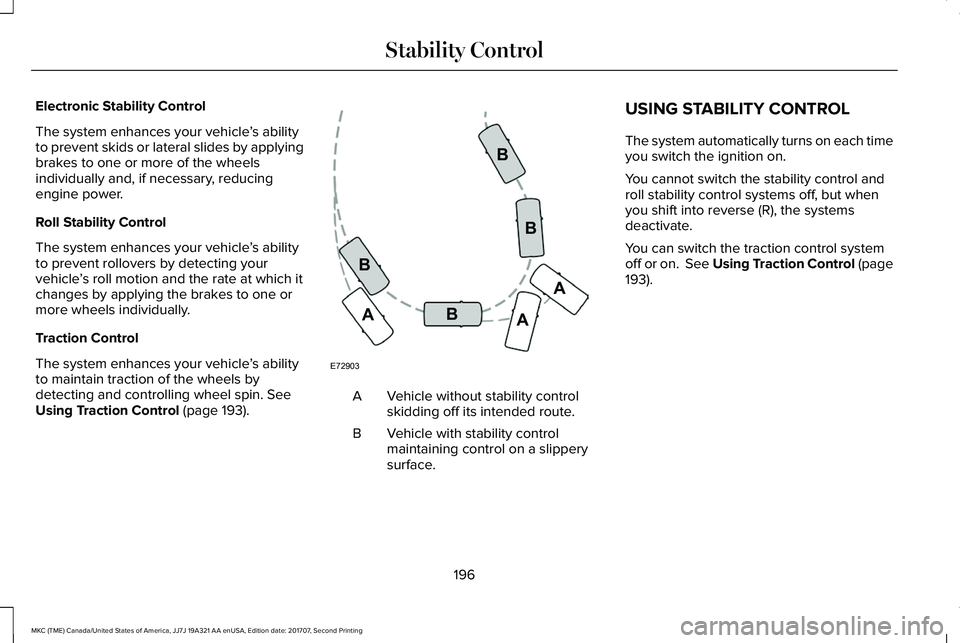
Electronic Stability Control
The system enhances your vehicle’s abilityto prevent skids or lateral slides by applyingbrakes to one or more of the wheelsindividually and, if necessary, reducingengine power.
Roll Stability Control
The system enhances your vehicle’s abilityto prevent rollovers by detecting yourvehicle’s roll motion and the rate at which itchanges by applying the brakes to one ormore wheels individually.
Traction Control
The system enhances your vehicle’s abilityto maintain traction of the wheels bydetecting and controlling wheel spin. SeeUsing Traction Control (page 193).Vehicle without stability controlskidding off its intended route.A
Vehicle with stability controlmaintaining control on a slipperysurface.
B
USING STABILITY CONTROL
The system automatically turns on each timeyou switch the ignition on.
You cannot switch the stability control androll stability control systems off, but whenyou shift into reverse (R), the systemsdeactivate.
You can switch the traction control systemoff or on. See Using Traction Control (page193).
196
MKC (TME) Canada/United States of America, JJ7J 19A321 AA enUSA, Edition date: 201707, Second Printing
Stability ControlE72903A
AA
B
BB
B
Page 200 of 571
PRINCIPLE OF OPERATION
WARNINGS
To help avoid personal injury, alwaysuse caution when in reverse (R) andwhen using the sensing system.
The system may not detect objectswith surfaces that absorb reflection.Always drive with due care and attention.Failure to take care may result in a crash.
Traffic control systems, inclementweather, air brakes, external motorsand fans may affect the correct operation ofthe sensing system.This may cause reducedperformance or false alerts.
The system may not detect small ormoving objects, particularly those closeto the ground.
Note:If your vehicle is equipped withMyKey™, the sensing system cannot beturned off when a MyKey™ is present. SeePrinciple of Operation (page 59).
Note:Keep the sensors, located on thebumper or fascia, free from snow, ice andlarge accumulations of dirt. If the sensorsare covered, the system’s accuracy can beaffected. Do not clean the sensors with sharpobjects.
Note:If your vehicle sustains damage to thebumper or fascia, leaving it misaligned orbent, the sensing zone may be alteredcausing inaccurate measurement ofobstacles or false alerts.
Note:Certain add-on devices installedaround the bumper or fascia may createfalse alerts. For example, large trailerhitches, bike or surfboard racks, license platebrackets, bumper covers or any other devicethat may block the normal detection zoneof the system. Remove the add-on device toprevent false alerts.
Note:When a trailer is connected to yourvehicle, the rear parking aid may detect thetrailer and therefore provide an alert. Disablethe rear parking aid when a trailer isconnected to prevent the alert.
The sensing system warns the driver ofobstacles within a certain range of yourvehicle. The system turns on automaticallywhenever you switch the ignition on.
The system can be switched off through theinformation display menu or from the pop-upmessage that appears once you shift thetransmission into reverse (R). See GeneralInformation (page 109).
If a fault is present in the system, a warningmessage appears in the information display.See Information Messages (page 114).
REAR PARKING AID
The rear sensors are only active when thetransmission is in reverse (R). As your vehiclemoves closer to the obstacle, the rate of theaudible warning increases. When theobstacle is less than 12 in (30 cm) away, thewarning sounds continuously. If the systemdetects a stationary or receding objectfarther than 12 in (30 cm) from the corners ofthe bumper, the tone sounds for only threeseconds. Once the system detects an objectapproaching, the warning sounds again.
197
MKC (TME) Canada/United States of America, JJ7J 19A321 AA enUSA, Edition date: 201707, Second Printing
Parking Aids