service LINCOLN MKS 2015 Workshop Manual
[x] Cancel search | Manufacturer: LINCOLN, Model Year: 2015, Model line: MKS, Model: LINCOLN MKS 2015Pages: 424, PDF Size: 3.96 MB
Page 287 of 424
If you have a dissimilar spare wheel and tire,
then it is intended for temporary use only.
This means that if you need to use it, you
should replace it as soon as possible with a
road wheel and tire assembly that is the
same size and type as the road tires and
wheels that were originally provided by Ford.
If the dissimilar spare tire or wheel is
damaged, it should be replaced rather than
repaired.
A dissimilar spare wheel and tire assembly
is defined as a spare wheel and tire assembly
that is different in brand, size or appearance
from the road tires and wheels and can be
one of three types:
1.
T-type mini-spare: This spare tire begins
with the letter T for tire size and may have
Temporary Use Only molded in the sidewall.
2. Full-size dissimilar spare with label on
wheel:
This spare tire has a label on the
wheel that states: THIS WHEEL AND TIRE
ASSEMBLY FOR TEMPORARY USE ONLY.
When driving with one of the dissimilar spare
tires listed above, do not:
• Exceed 50 mph (80 km/h)
• Load the vehicle beyond maximum
vehicle load rating listed on the Safety
Compliance Label.
• Tow a trailer. •
Use snow chains on the end of the vehicle
with the dissimilar spare tire.
• Use more than one dissimilar spare tire
at a time.
• Use commercial car washing equipment.
• Try to repair the dissimilar spare tire.
Use of one of the dissimilar spare tires listed
above at any one wheel location can lead to
impairment of the following:
• Handling, stability and braking
performance.
• Comfort and noise.
• Ground clearance and parking at curbs.
• Winter weather driving capability.
• Wet weather driving capability.
• All-wheel driving capability (if
applicable).
3. Full-size dissimilar spare without label
on wheel
When driving with the full-size dissimilar
spare wheel and tire assembly, do not:
• Exceed 70 mph (113 km/h).
• Use more than one dissimilar spare wheel
and tire assembly at a time. •
Use commercial car washing equipment.
• Use snow chains on the end of the vehicle
with the dissimilar spare wheel and tire
assembly.
The usage of a full-size dissimilar spare
wheel and tire assembly can lead to
impairment of the following:
• Handling, stability and braking
performance.
• Comfort and noise.
• Ground clearance and parking at curbs.
• Winter weather driving capability.
• Wet weather driving capability.
• All-wheel driving capability (if
applicable).
• Load leveling adjustment (if applicable).
When driving with the full-size dissimilar
spare wheel and tire assembly additional
caution should be given to:
• Towing a trailer.
• Driving vehicles equipped with a camper
body.
• Driving vehicles with a load on the cargo
rack.
Drive cautiously when using a full-size
dissimilar spare wheel and tire assembly and
seek service as soon as possible.
284
MKS (), enUSA Wheels and Tires
Page 297 of 424
TECHNICAL SPECIFICATIONS
WARNING
The air conditioning refrigerant system contains refrigerant R-134a under high pressure. Opening the air conditioning refrigerant system
can cause personal injury. Have the air conditioning refrigerant system serviced only by qualified personnel.
Ford part number / Ford specification
Recommended fluids and
lubricants
Capacity
Item
XL-1 (U.S.) / --
Motorcraft Penetrating and
Lock Lubricant (U.S.)
—
Lock cylinders
CXC-51-A (Canada) / --
Motorcraft Penetrating Fluid
(Canada)
XL-5
Motorcraft Multi-Purpose
Grease Spray
—
Hinges, latches, striker plates,
fuel filler door hinge and seat tracks
PM-20 / WSS-M6C65-A2
Motorcraft DOT 4 LV High
Performance Motor Vehicle Brake Fluid
Between MIN/MAX on brake fluid
reservoir
Brake fluid 1
XO-5W30-QSP or XO-5W30-QFS (U.S.)/ WSS-M2C946-A
Motorcraft SAE 5W-30
Premium Synthetic Blend Motor Oil or Motorcraft SAE 5W-30 Full Synthetic Motor Oil
6.0 qt (5.7 L)
3.5L EcoBoost engine oil
CXO-5W30-LSP12 or CXO-5W30-LFS12
(Canada) / WSS-M2C946-A
294
MKS (), enUSA Capacities and Specifications
Page 300 of 424
Ford part number / Ford specification
Recommended fluids and
lubricants
Capacity
Item
WSH-M1C231-B
1 Ford recommends using DOT 4 Low Viscosity (LV) High Performance Brake Fluid or equivalent meeting WSS-M6C65-A2. Use of any fluid
other than the recommended fluid may cause degraded brake performance and not meet the Ford performance standards. Keep brake fluid
clean and dry. Contamination with dirt, water, petroleum products or other materials may result in brake system damage and possible failure.
2 Add the coolant type originally equipped in your vehicle.
3 Contact an authorized dealer for fluid level checking or filling.
4 Make sure the correct automatic transmission fluid is used. Transmission fluid requirements are indicated on the dipstick blade or the dipstick
handle. Before adding, check the container to verify the fluid is of the correct type. Refer to your scheduled maintenance information to
determine the correct service interval.
Note: Automatic transmissions that require MERCON LV should only use MERCON LV fluid. Use of any fluid other than the recommended fluid
may cause transmission damage.
5 Indicates only approximate dry-fill capacity. Some applications may vary based on cooler size and if equipped with an in-tank cooler. Use the
indication on the dipstick, showing the normal operating range, to determine the amount of transmission fluid and the fluid level.
Use of synthetic or synthetic blend motor oil is not mandatory. Only use fluid that meets Ford specifications. Motor oils of the recommended
viscosity grade that meet API SN requirements and display the API Certification Mark for gasoline engines are also acceptable. Do not use oil
labeled with API SN service category unless the label also displays the API certification mark.
Do not use supplemental engine oil additives because they are unnecessary and could lead to engine damage that may not be covered by
your vehicle warranty.
An oil that displays this symbol conforms to current engine, emission system and fuel economy performance standards of the International
Lubricant Standardization and Approval Committee (ILSAC):
297
MKS (), enUSA Capacities and Specifications
Page 306 of 424
GENERAL INFORMATION WARNING
Driving while distracted can result in
loss of vehicle control, crash and injury.
We strongly recommend that you use
extreme caution when using any device that
may take your focus off the road. Your
primary responsibility is the safe operation
of your vehicle. We recommend against the
use of any hand-held device while driving and
encourage the use of voice-operated systems
when possible. Make sure you are aware of
all applicable local laws that may affect the
use of electronic devices while driving. Note:
You can also set up the certain
convenience features using MyLincoln Mobile
over the internet or smartphone application.
For more information on MyLincoln Mobile,
and to set up your MyLincoln Mobile account,
visit: Web Address
http://support.lincoln.com/owner-services/ mylincoln-mobile-app. 303
MKS (), enUSA MyLincoln Touch
™AB
GCDFE
E161891
Page 308 of 424
SETTINGS
Press to select any of the following:
• Clock.
• Display.
• Sound.
• Vehicle.
• Settings.
• Help. HOME
Press to access your home screen.
Depending on your vehicle
’s option
package and software, your screens may vary
in appearance from the descriptions in this
section. Your features may also be limited
depending on your market. Check with an
authorized dealer for availability. INFORMATION
Press to select any of the following:
• Services.
• Travel Link.
• Alerts. •
Calendar.
• Apps.
ENTERTAINMENT
Press to select any of the following:
• AM.
• FM.
• SIRIUS.
• CD.
• USB.
• BT Stereo.
• SD Card.
• A/V In.
Using the Touch-Sensitive Controls
on Your System
To switch a feature on and off, just touch the
graphic with your finger. To get the best
performance from the touch-sensitive
controls:
• Do not press hard on the controls. They
are sensitive to light touch.
• Use your bare finger to touch the center
of a touch-control graphic. Touching
off-center of the graphic may affect
operation of a nearby control.
• Make sure your hands are clean and dry. •
Since the touchscreen operates based
on the touch of a finger, you may have
trouble using it if you are wearing gloves.
• Keep metal and other conductive
material away from the surface of the
touchscreen as this may cause electronic
interference (for example, inadvertently
switching on a feature other than the one
you meant to switch on).
Depending on your vehicle and option
package, you may also have these controls
on your bezel:
• Power: Switch the media or climate
features off and on.
• VOL:
Control the volume of playing
media.
• Seek
and Tune buttons: Use as you
normally would in media modes.
• Eject:
Eject a CD from the entertainment
system.
• Climate Control:
Control the
temperature, fan speed or settings of the
climate control system.
Using Your Steering Wheel Controls
You can use your steering wheel controls to
interact with the touchscreen system.
305
MKS (), enUSA MyLincoln Touch
™E142607 E142613 E142608
Page 309 of 424
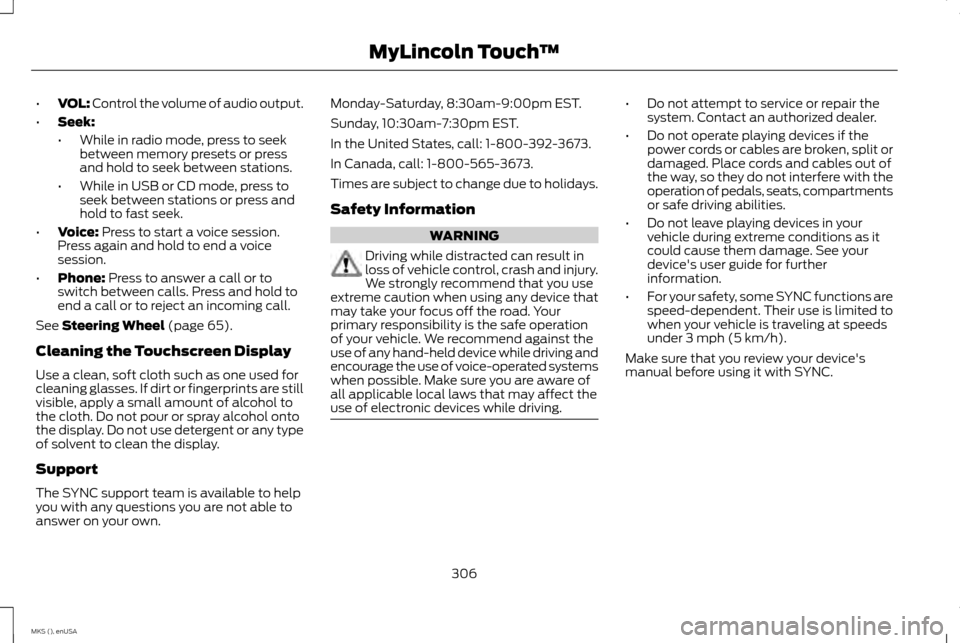
•
VOL: Control the volume of audio output.
• Seek:
•While in radio mode, press to seek
between memory presets or press
and hold to seek between stations.
• While in USB or CD mode, press to
seek between stations or press and
hold to fast seek.
• Voice: Press to start a voice session.
Press again and hold to end a voice
session.
• Phone:
Press to answer a call or to
switch between calls. Press and hold to
end a call or to reject an incoming call.
See
Steering Wheel (page 65).
Cleaning the Touchscreen Display
Use a clean, soft cloth such as one used for
cleaning glasses. If dirt or fingerprints are still
visible, apply a small amount of alcohol to
the cloth. Do not pour or spray alcohol onto
the display. Do not use detergent or any type
of solvent to clean the display.
Support
The SYNC support team is available to help
you with any questions you are not able to
answer on your own. Monday-Saturday, 8:30am-9:00pm EST.
Sunday, 10:30am-7:30pm EST.
In the United States, call: 1-800-392-3673.
In Canada, call: 1-800-565-3673.
Times are subject to change due to holidays.
Safety Information
WARNING
Driving while distracted can result in
loss of vehicle control, crash and injury.
We strongly recommend that you use
extreme caution when using any device that
may take your focus off the road. Your
primary responsibility is the safe operation
of your vehicle. We recommend against the
use of any hand-held device while driving and
encourage the use of voice-operated systems
when possible. Make sure you are aware of
all applicable local laws that may affect the
use of electronic devices while driving. •
Do not attempt to service or repair the
system. Contact an authorized dealer.
• Do not operate playing devices if the
power cords or cables are broken, split or
damaged. Place cords and cables out of
the way, so they do not interfere with the
operation of pedals, seats, compartments
or safe driving abilities.
• Do not leave playing devices in your
vehicle during extreme conditions as it
could cause them damage. See your
device's user guide for further
information.
• For your safety, some SYNC functions are
speed-dependent. Their use is limited to
when your vehicle is traveling at speeds
under 3 mph (5 km/h).
Make sure that you review your device's
manual before using it with SYNC.
306
MKS (), enUSA MyLincoln Touch
™
Page 315 of 424
•
Interaction Mode
• Confirmation Prompts
• Media Candidate Lists
• Phone Candidate Lists
• Voice Control Volume.
To access these settings using voice
commands:
1. Press the voice icon. Wait for the prompt
"Please say a command". Another tone
sounds to let you know the system is
listening.
2. Say any of the following commands: Voice settings using voice commands
"Confirmation prompts off""Confirmation prompts on"
"Interaction mode advanced" "Interaction mode novice"
"Media candidate lists off" "Media candidate lists on" Voice settings using voice commands
"Phone candidate lists off""Phone candidate lists on" "Help"
Using Voice Commands with the
Touchscreen Options
Your voice system has a dual mode feature
which allows you to switch between using
voice commands and making on-screen
selections. This is available only when the
system displays a list of candidates
generated during a voice session. For
example, when entering in a street address
or trying to call a contact from the phone you
paired to the system. Privacy Notice for GPS Mapping with
MyLincoln Mobile in the United
States and Canada
MyLincoln Mobile allows for GPS mapping
when a vehicle is registered to a MyLincoln
Mobile account. To remove the vehicle from
the account, thereby removing GPS mapping
ability, preform a Master Reset in the vehicle.
See Settings (page 313).
Prior to transferring ownership of a vehicle,
owners may choose to execute a Master
Reset or Factory Reset (completed via the
MyLincoln Mobile website). Either method
removes the vehicle from all MyLincoln
Mobile accounts.
we recommend that new owners conduct a
Master Reset upon taking possession of the
vehicle to remove it from any existing
MyLincoln Mobile accounts. The new owner
can activate a MyLincoln Mobile account by
completing the registration process at: Web Address
http://support.lincoln.com/owner-services/ mylincoln-mobile-app.
312
MKS (), enUSA MyLincoln Touch
™
Page 334 of 424
Potential station issues
Action
Cause
Issues
No action required. This is a broadcast issue.
This is poor time alignment by the radio
broadcaster.
Echo, stutter, skip or repeat in audio.
Increase or decrease in audio volume.
No action required. The reception issue may
clear up as you continue to drive.
The radio is shifting between analog and
digital audio.
Sound fading or blending in and out.
No action required. This is normal behavior.
Wait until the audio is available.
The digital multicast is not available until the
HD Radio broadcast is decoded. Once
decoded, the audio is available.
There is an audio mute delay when selecting
HD2 or HD3, multicast preset or Direct Tune.
No action required. The station is not available
in your current location.
The previously stored multicast preset or direct
tune is not available in your current reception
area.
Cannot access HD2 or HD3 multicast channel
when recalling a preset or from a direct tune.
Fill out the station issue form at website listed
below.*
Data service issue by the radio broadcaster.
Text information does not match currently
playing audio.
Fill out the station issue form at website listed
below.*
Data service issue by the radio broadcaster.
There is no text information shown for
currently selected frequency.
No action required. This is normal behavior.
Pressing
Scan disables HD2-HD7 channel
search.
HD2-HD7 stations not found when Scan is
pressed.
* http://www.ibiquity.com/automotive/report_radio_station_experiences
331
MKS (), enUSA MyLincoln Touch
™
Page 337 of 424
Set Category for Seek/Scan
This allows you to select a category of music
you would like to search for. You can then
choose to either seek or scan for the stations
playing that category.
Parental Lockout
This allows you to lock and unlock channels,
change or reset your PIN or unlock all
channels. To use this feature, you need your
initial PIN, which is 1234.
Artist/Title/Team Alerts
This feature allows you to select Artists,
Titles and Teams that you would like the
system to alert you to when they are playing
on other channels. Press Edit Alerts to delete
or turn off alerts. You can also set all alerts
to on or off. When an alert appears on the
screen, you can choose to Tune to the
channel, to Cancel the alert or to Disable
Alerts. If you are listening to a sporting event,
you can save your favorite teams so that the
system can alert you when they are playing
on a satellite radio channel.
Note:
Sirius does not support the Alert feature
on all channels. Ford Motor Company shall not
be responsible for Alert feature variation. Electronic Serial Number (ESN)
Sirius requires this number when
communicating with you about your account.
Direct Tune
Touch this button to enter the desired
satellite channel number manually. Touch
Enter when you are done.
Browse
Touch this button to view a list of all available
stations. Scroll to see more categories. Touch
the station you want to listen to.
Touch
Skip if you want to skip this channel.
Touch
Lock if you do not want anyone to
listen to this channel.
Touch
Title or Artist to see song and artists
on other stations.
Sirius Satellite Radio Information
Note: Sirius reserves the unrestricted right to
change, rearrange, add or delete programming
including canceling, moving or adding
particular channels, and its prices, at any time,
with or without notice to you. Ford Motor
Company shall not be responsible for any such
programming changes. Sirius satellite radio is a subscription-based
satellite radio service that broadcasts a
variety of music, sports, news, weather, traffic
and entertainment programming. Your
factory-installed Sirius satellite radio system
includes hardware and a limited subscription
term that begins on the date of sale or lease
of your vehicle. See an authorized dealer for
availability.
For more information on extended
subscription terms (a service fee is required),
the online media player and a list of Sirius
satellite radio channels, and other features,
please visit www.siriusxm.com in the United
States, www.sirius.ca in Canada, or call Sirius
at 1-888-539-7474.
Note:
This receiver includes the eCos
real-time operating system. eCos is published
under the eCos License.
334
MKS (), enUSA MyLincoln Touch
™E142593
Page 339 of 424
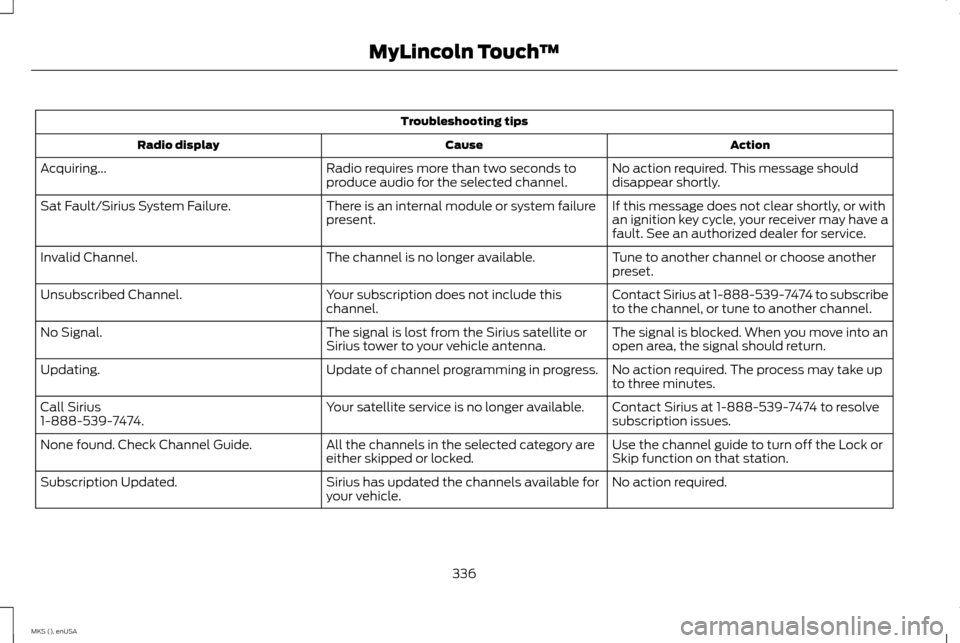
Troubleshooting tips
Action
Cause
Radio display
No action required. This message should
disappear shortly.
Radio requires more than two seconds to
produce audio for the selected channel.
Acquiring...
If this message does not clear shortly, or with
an ignition key cycle, your receiver may have a
fault. See an authorized dealer for service.
There is an internal module or system failure
present.
Sat Fault/Sirius System Failure.
Tune to another channel or choose another
preset.
The channel is no longer available.
Invalid Channel.
Contact Sirius at 1-888-539-7474 to subscribe
to the channel, or tune to another channel.
Your subscription does not include this
channel.
Unsubscribed Channel.
The signal is blocked. When you move into an
open area, the signal should return.
The signal is lost from the Sirius satellite or
Sirius tower to your vehicle antenna.
No Signal.
No action required. The process may take up
to three minutes.
Update of channel programming in progress.
Updating.
Contact Sirius at 1-888-539-7474 to resolve
subscription issues.
Your satellite service is no longer available.
Call Sirius
1-888-539-7474.
Use the channel guide to turn off the Lock or
Skip function on that station.
All the channels in the selected category are
either skipped or locked.
None found. Check Channel Guide.
No action required.
Sirius has updated the channels available for
your vehicle.
Subscription Updated.
336
MKS (), enUSA MyLincoln Touch
™