ignition LINCOLN MKS 2015 Repair Manual
[x] Cancel search | Manufacturer: LINCOLN, Model Year: 2015, Model line: MKS, Model: LINCOLN MKS 2015Pages: 424, PDF Size: 3.96 MB
Page 211 of 424
driving, logging, autocross and any other form
of off-road use. Well maintained roads and
surfaces help ensure safe travel for the
Supplier, and allow their representatives to
perform service as per the standard operating
procedures.
In Remote Locations
If our supplier cannot take your vehicle by
road to the nearest authorized dealership,
transportation by rail or water may be
necessary. The program covers a tow to the
dock or rail terminal and also to the
dealership at the end of the trip.
For rail or water transportation, however,
contact your authorized dealer to confirm if
you are eligible for additional coverage before
you authorize or pay for the service.
Call the Lincoln Roadside Assistance at
1-800-387-9333 for additional information.
Vehicles Sold In Canada: Using
Roadside Assistance
Canadian Roadside coverage and benefits
may differ from the United States coverage.
Please refer to your warranty information or
visit our website at www.lincolncanada.com
for information on Canadian services and
benefits.
Canadian clients who need to obtain roadside
information, call 1-800-387-9333 or visit our
website at www.lincolncanada.com.
HAZARD WARNING FLASHERS
Note:
If used when the vehicle is not running,
the battery will lose charge. There may be
insufficient power to restart your vehicle. The hazard warning button is
located on the instrument panel.
Use it when your vehicle is creating
a safety hazard for other motorists.
• Press the button to turn on the hazard
warning function, and the front and rear
direction indicators will flash.
• Press the button again to turn them off.
FUEL SHUTOFF WARNING
Failure to inspect and, if necessary,
repair fuel leaks after a collision may
increase the risk of fire and serious
injury. Ford Motor Company recommends
that the fuel system be inspected by an
authorized dealer after any collision. In the event of a moderate to severe collision,
this vehicle includes a fuel pump shutoff
feature that stops the flow of fuel to the
engine. Not every impact will cause a shutoff.
Should your vehicle shut off after a collision,
you may restart your vehicle. For vehicles
equipped with a key system:
1. Switch off the ignition.
2. Switch on the ignition.
3.
Repeat Steps 1 and 2 to re-enable the fuel
pump.
For vehicles equipped with a push button
start system:
1. Press the START/STOP button to
switch off the ignition.
2. Press the brake pedal and press the START/STOP
button to start the
vehicle.
3. Remove your foot from the brake pedal and press the
START/STOP button to
switch off the ignition.
4. You can either attempt to start the engine
by pressing the brake pedal and the
START/STOP
button, or switch on the
ignition only by pressing the
START/STOP
button without pressing
the brake pedal. Both ways re-enable the
fuel system.
208
MKS (), enUSA Roadside Emergencies
Page 226 of 424
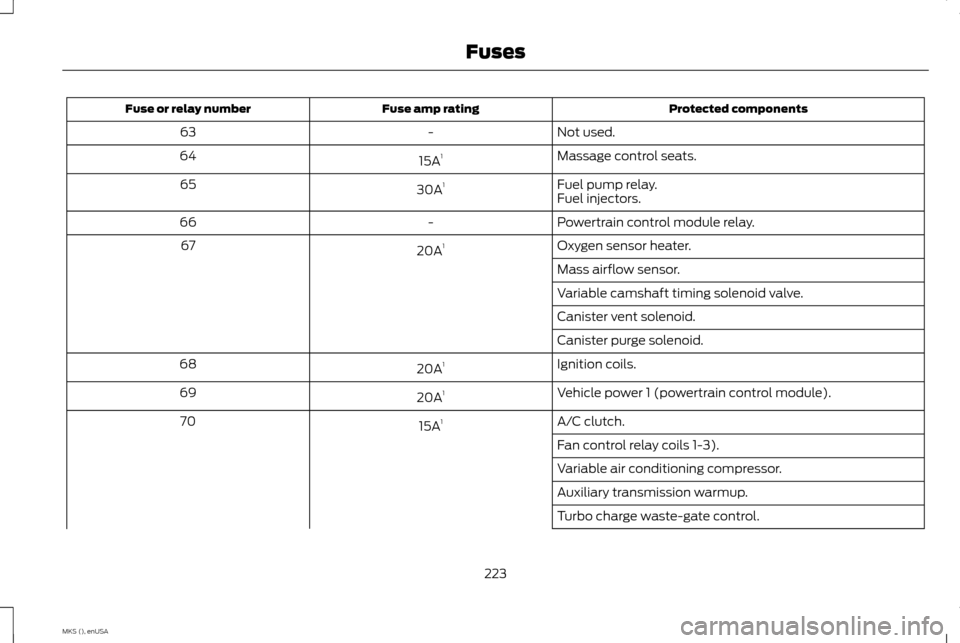
Protected components
Fuse amp rating
Fuse or relay number
Not used.
-
63
Massage control seats.
15A 1
64
Fuel pump relay.
30A 1
65
Fuel injectors.
Powertrain control module relay.
-
66
Oxygen sensor heater.
20A 1
67
Mass airflow sensor.
Variable camshaft timing solenoid valve.
Canister vent solenoid.
Canister purge solenoid.
Ignition coils.
20A 1
68
Vehicle power 1 (powertrain control module).
20A 1
69
A/C clutch.
15A 1
70
Fan control relay coils 1-3).
Variable air conditioning compressor.
Auxiliary transmission warmup.
Turbo charge waste-gate control.
223
MKS (), enUSA Fuses
Page 233 of 424
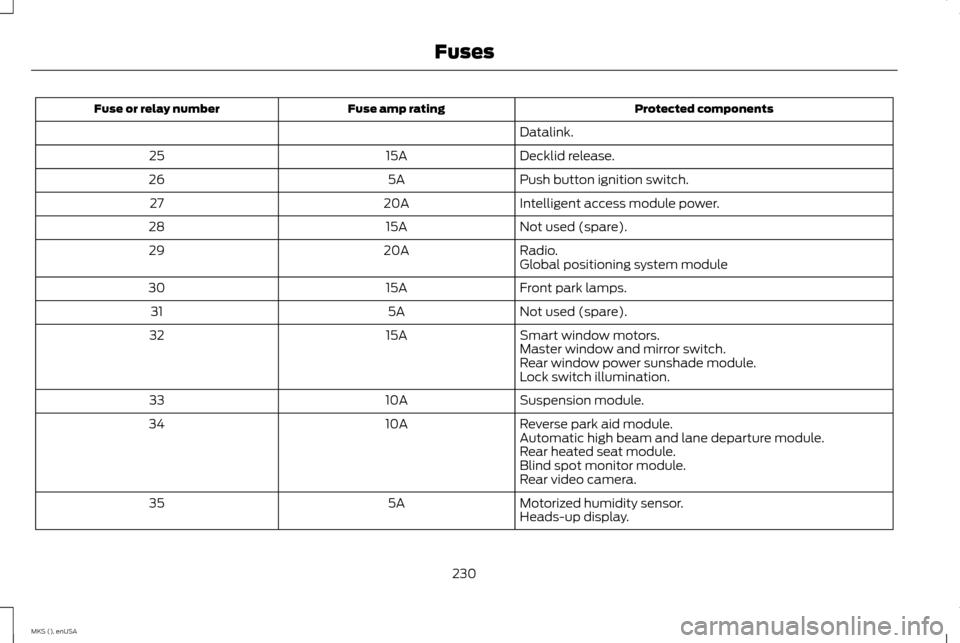
Protected components
Fuse amp rating
Fuse or relay number
Datalink.
Decklid release.
15A
25
Push button ignition switch.
5A
26
Intelligent access module power.
20A
27
Not used (spare).
15A
28
Radio.
20A
29
Global positioning system module
Front park lamps.
15A
30
Not used (spare).
5A
31
Smart window motors.
15A
32
Master window and mirror switch.
Rear window power sunshade module.
Lock switch illumination.
Suspension module.
10A
33
Reverse park aid module.
10A
34
Automatic high beam and lane departure module.
Rear heated seat module.
Blind spot monitor module.
Rear video camera.
Motorized humidity sensor.
5A
35
Heads-up display.
230
MKS (), enUSA Fuses
Page 253 of 424
Always dispose of automotive batteries
in a responsible manner. Follow your
local authorized standards for disposal.
Call your local authorized recycling
center to find out more about recycling
automotive batteries.
Battery Management System (If
Equipped)
The battery management system (BMS)
monitors battery conditions and takes
actions to extend battery life. If excessive
battery drain is detected, the system may
temporarily disable certain electrical features
to protect the battery. Those electrical
accessories affected include the rear defrost,
heated/cooled seats, climate control fan,
heated steering wheel, audio and navigation
system. A message may be shown in the
information displays to alert the driver that
battery protection actions are active. These
messages are only for notification that an
action is taking place, and not intended to
indicate an electrical problem or that the
battery requires replacement.
Electrical accessory installation
To ensure proper operation of the Battery
Management System, any electrical devices
that are added to your vehicle should not
have their ground connection made directly
at the negative battery post. A connection at
the negative battery post can cause
inaccurate measurements of the battery
condition and potential incorrect system
operation.
Note:
Electrical or electronic accessories
added to your vehicle by the dealer or the
owner, may adversely affect battery
performance and durability, and may affect
the performance of other electrical systems
in your vehicle.
When a battery replacement is required, the
battery should only be replaced with a
Ford-recommended replacement battery
that matches the electrical requirements of
your vehicle. After battery replacement, or in
some cases after charging the battery with
the external charger, the Battery
Management System requires eight hours of
vehicle sleep time (key off with doors closed)
to relearn the new battery state of charge.
Prior to relearning the state of charge, the
Battery Management System may disable
electrical features (to protect the battery)
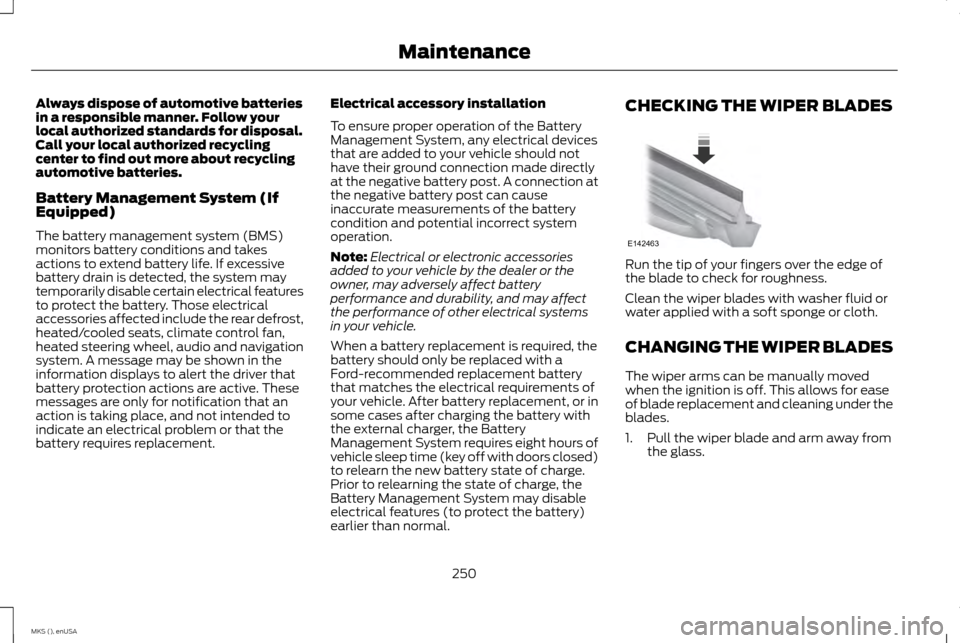
earlier than normal. CHECKING THE WIPER BLADES
Run the tip of your fingers over the edge of
the blade to check for roughness.
Clean the wiper blades with washer fluid or
water applied with a soft sponge or cloth.
CHANGING THE WIPER BLADES
The wiper arms can be manually moved
when the ignition is off. This allows for ease
of blade replacement and cleaning under the
blades.
1. Pull the wiper blade and arm away from
the glass.
250
MKS (), enUSA MaintenanceE142463
Page 254 of 424
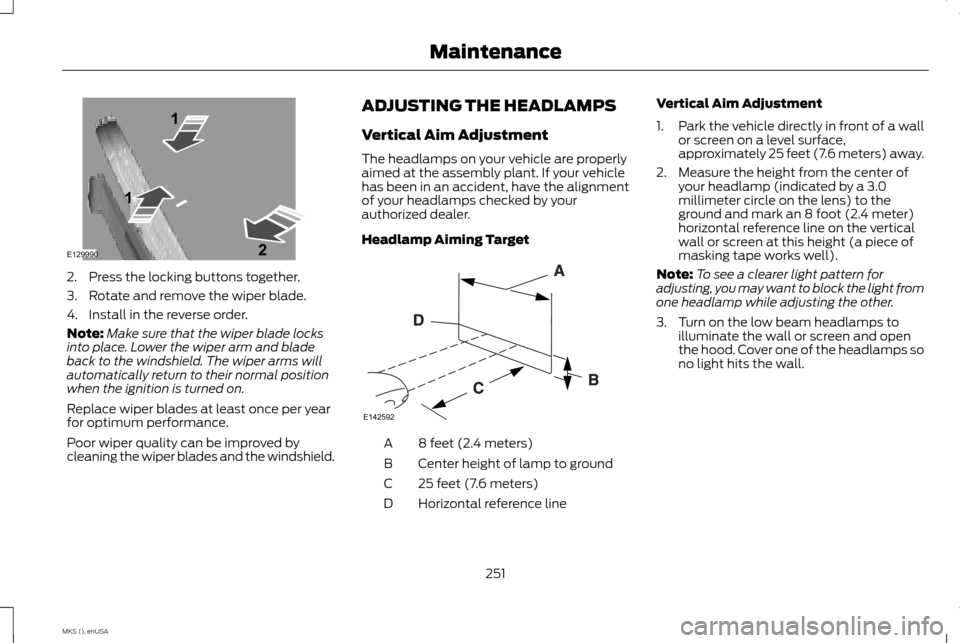
2. Press the locking buttons together.
3. Rotate and remove the wiper blade.
4. Install in the reverse order.
Note:
Make sure that the wiper blade locks
into place. Lower the wiper arm and blade
back to the windshield. The wiper arms will
automatically return to their normal position
when the ignition is turned on.
Replace wiper blades at least once per year
for optimum performance.
Poor wiper quality can be improved by
cleaning the wiper blades and the windshield. ADJUSTING THE HEADLAMPS
Vertical Aim Adjustment
The headlamps on your vehicle are properly
aimed at the assembly plant. If your vehicle
has been in an accident, have the alignment
of your headlamps checked by your
authorized dealer.
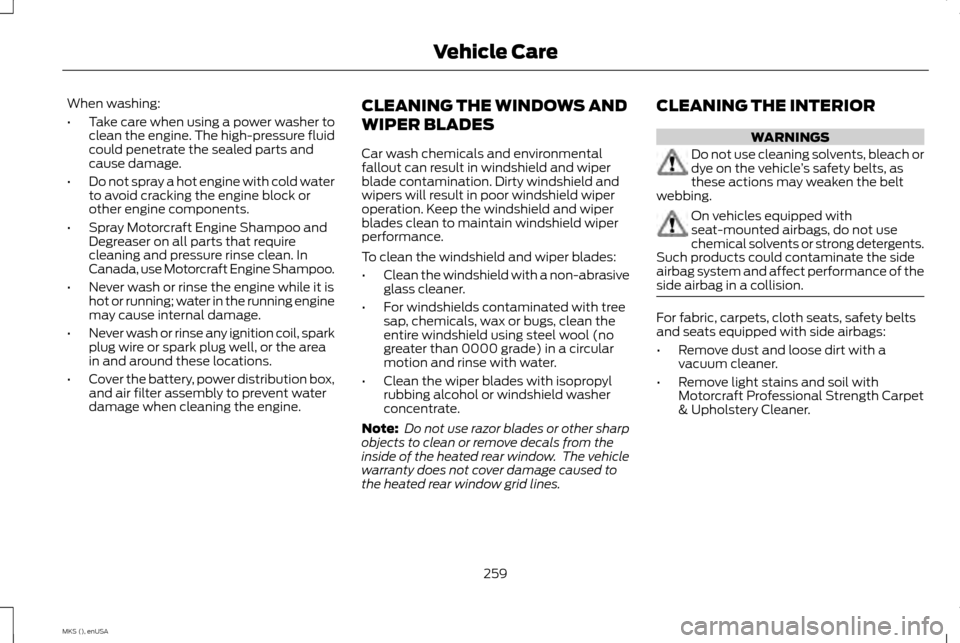
Headlamp Aiming Target
8 feet (2.4 meters)
A
Center height of lamp to ground
B
25 feet (7.6 meters)
C
Horizontal reference line
D Vertical Aim Adjustment
1.
Park the vehicle directly in front of a wall
or screen on a level surface,
approximately 25 feet (7.6 meters) away.
2. Measure the height from the center of your headlamp (indicated by a 3.0
millimeter circle on the lens) to the
ground and mark an 8 foot (2.4 meter)
horizontal reference line on the vertical
wall or screen at this height (a piece of
masking tape works well).
Note: To see a clearer light pattern for
adjusting, you may want to block the light from
one headlamp while adjusting the other.
3. Turn on the low beam headlamps to illuminate the wall or screen and open
the hood. Cover one of the headlamps so
no light hits the wall.
251
MKS (), enUSA MaintenanceE129990
1
1 2 E142592
Page 262 of 424
When washing:
•
Take care when using a power washer to
clean the engine. The high-pressure fluid
could penetrate the sealed parts and
cause damage.
• Do not spray a hot engine with cold water
to avoid cracking the engine block or
other engine components.
• Spray Motorcraft Engine Shampoo and
Degreaser on all parts that require
cleaning and pressure rinse clean. In
Canada, use Motorcraft Engine Shampoo.
• Never wash or rinse the engine while it is
hot or running; water in the running engine
may cause internal damage.
• Never wash or rinse any ignition coil, spark
plug wire or spark plug well, or the area
in and around these locations.
• Cover the battery, power distribution box,
and air filter assembly to prevent water
damage when cleaning the engine. CLEANING THE WINDOWS AND
WIPER BLADES
Car wash chemicals and environmental
fallout can result in windshield and wiper
blade contamination. Dirty windshield and
wipers will result in poor windshield wiper
operation. Keep the windshield and wiper
blades clean to maintain windshield wiper
performance.
To clean the windshield and wiper blades:
•
Clean the windshield with a non-abrasive
glass cleaner.
• For windshields contaminated with tree
sap, chemicals, wax or bugs, clean the
entire windshield using steel wool (no
greater than 0000 grade) in a circular
motion and rinse with water.
• Clean the wiper blades with isopropyl
rubbing alcohol or windshield washer
concentrate.
Note: Do not use razor blades or other sharp
objects to clean or remove decals from the
inside of the heated rear window. The vehicle
warranty does not cover damage caused to
the heated rear window grid lines. CLEANING THE INTERIOR WARNINGS
Do not use cleaning solvents, bleach or
dye on the vehicle
’s safety belts, as
these actions may weaken the belt
webbing. On vehicles equipped with
seat-mounted airbags, do not use
chemical solvents or strong detergents.
Such products could contaminate the side
airbag system and affect performance of the
side airbag in a collision. For fabric, carpets, cloth seats, safety belts
and seats equipped with side airbags:
•
Remove dust and loose dirt with a
vacuum cleaner.
• Remove light stains and soil with
Motorcraft Professional Strength Carpet
& Upholstery Cleaner.
259
MKS (), enUSA Vehicle Care
Page 293 of 424
ENGINE SPECIFICATIONS
3.7 V6
3.5L V6 Ecoboost
Engine
226
214
Cubic inches
Minimum 87 octane
Minimum 87 octane
Required fuel
1-4-2-5-3-6
1-4-2-5-3-6
Firing order
Coil on plug
Coil on plug
Ignition system
.049-.053 in. (1.25-1.35 mm)
.030-.033 in. (.75-.85 mm)
Spark plug gap
10.5:1
10.0:1
Compression ratio
Drivebelt Routing
3.5L and 3.7L V6 Ecoboost Engines with
A/C 290
MKS (), enUSA Capacities and SpecificationsE146428
Page 307 of 424
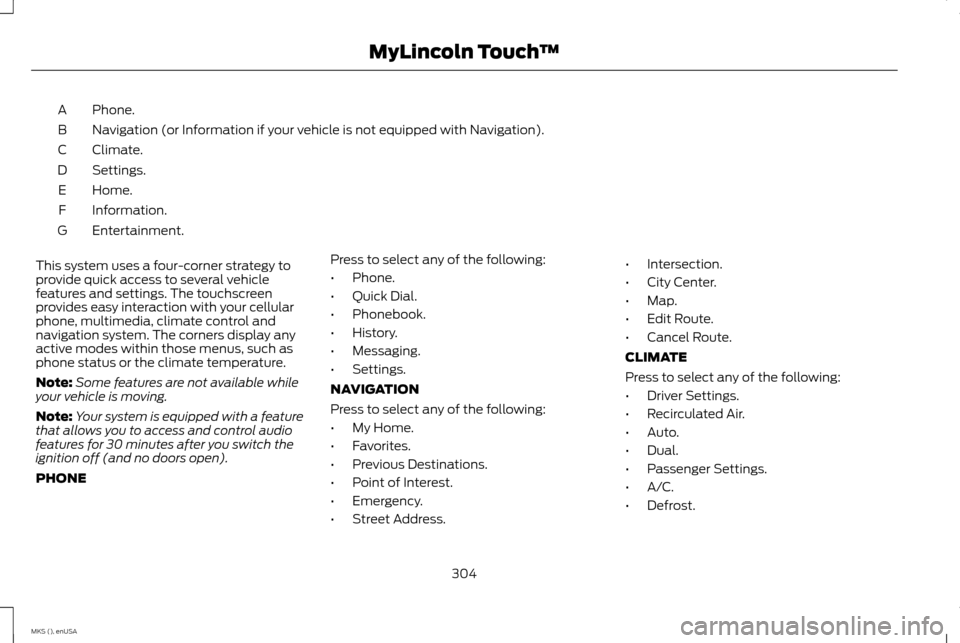
Phone.
A
Navigation (or Information if your vehicle is not equipped with Navigation).
B
Climate.
C
Settings.
D
Home.
E
Information.
F
Entertainment.
G
This system uses a four-corner strategy to
provide quick access to several vehicle
features and settings. The touchscreen
provides easy interaction with your cellular
phone, multimedia, climate control and
navigation system. The corners display any
active modes within those menus, such as
phone status or the climate temperature.
Note: Some features are not available while
your vehicle is moving.
Note: Your system is equipped with a feature
that allows you to access and control audio
features for 30 minutes after you switch the
ignition off (and no doors open).
PHONE Press to select any of the following:
•
Phone.
• Quick Dial.
• Phonebook.
• History.
• Messaging.
• Settings.
NAVIGATION
Press to select any of the following:
• My Home.
• Favorites.
• Previous Destinations.
• Point of Interest.
• Emergency.
• Street Address. •
Intersection.
• City Center.
• Map.
• Edit Route.
• Cancel Route.
CLIMATE
Press to select any of the following:
• Driver Settings.
• Recirculated Air.
• Auto.
• Dual.
• Passenger Settings.
• A/C.
• Defrost.
304
MKS (), enUSA MyLincoln Touch
™
Page 321 of 424
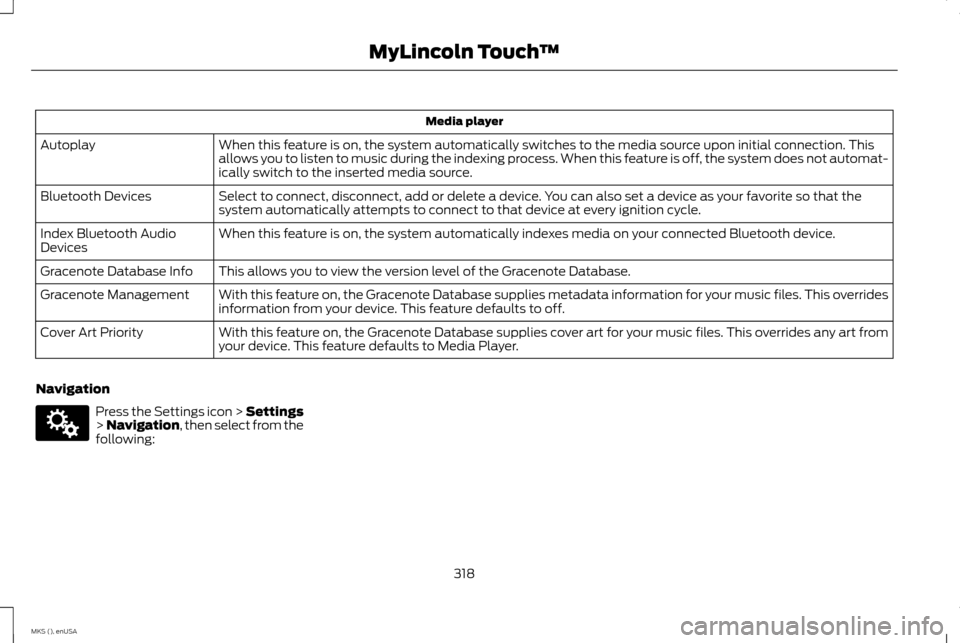
Media player
When this feature is on, the system automatically switches to the media source upon initial connection. This
allows you to listen to music during the indexing process. When this feature is off, the system does not automat-
ically switch to the inserted media source.
Autoplay
Select to connect, disconnect, add or delete a device. You can also set a device as your favorite so that the
system automatically attempts to connect to that device at every ignition cycle.
Bluetooth Devices
When this feature is on, the system automatically indexes media on your connected Bluetooth device.
Index Bluetooth Audio
Devices
This allows you to view the version level of the Gracenote Database.
Gracenote Database Info
With this feature on, the Gracenote Database supplies metadata information for your music files. This overrides
information from your device. This feature defaults to off.
Gracenote Management
With this feature on, the Gracenote Database supplies cover art for your music files. This overrides any art from
your device. This feature defaults to Media Player.
Cover Art Priority
Navigation Press the Settings icon > Settings
> Navigation, then select from the
following:
318
MKS (), enUSA MyLincoln Touch
™E142607
Page 339 of 424
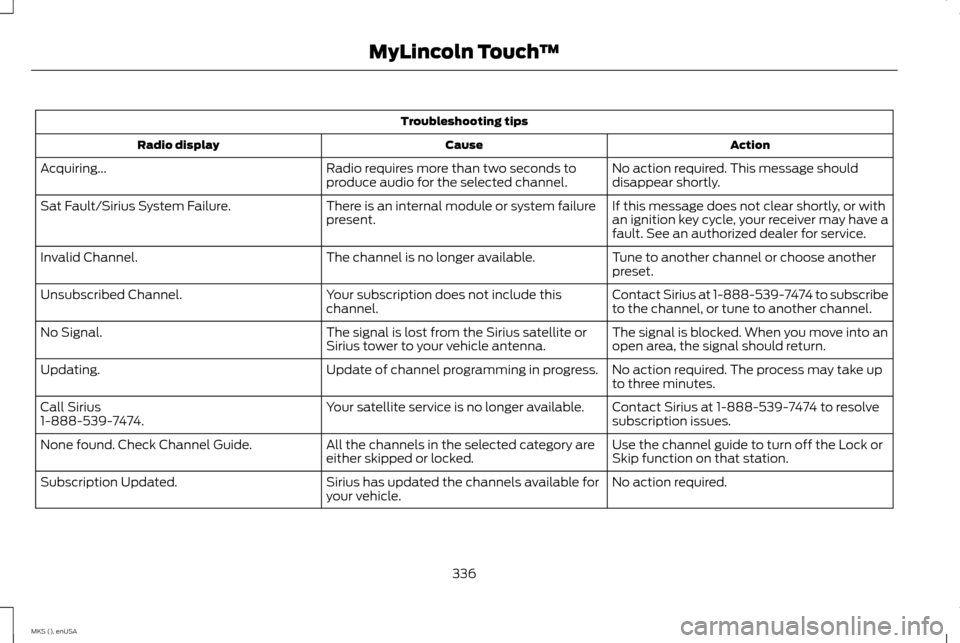
Troubleshooting tips
Action
Cause
Radio display
No action required. This message should
disappear shortly.
Radio requires more than two seconds to
produce audio for the selected channel.
Acquiring...
If this message does not clear shortly, or with
an ignition key cycle, your receiver may have a
fault. See an authorized dealer for service.
There is an internal module or system failure
present.
Sat Fault/Sirius System Failure.
Tune to another channel or choose another
preset.
The channel is no longer available.
Invalid Channel.
Contact Sirius at 1-888-539-7474 to subscribe
to the channel, or tune to another channel.
Your subscription does not include this
channel.
Unsubscribed Channel.
The signal is blocked. When you move into an
open area, the signal should return.
The signal is lost from the Sirius satellite or
Sirius tower to your vehicle antenna.
No Signal.
No action required. The process may take up
to three minutes.
Update of channel programming in progress.
Updating.
Contact Sirius at 1-888-539-7474 to resolve
subscription issues.
Your satellite service is no longer available.
Call Sirius
1-888-539-7474.
Use the channel guide to turn off the Lock or
Skip function on that station.
All the channels in the selected category are
either skipped or locked.
None found. Check Channel Guide.
No action required.
Sirius has updated the channels available for
your vehicle.
Subscription Updated.
336
MKS (), enUSA MyLincoln Touch
™