rear ac control LINCOLN MKT 2014 Owner's Guide
[x] Cancel search | Manufacturer: LINCOLN, Model Year: 2014, Model line: MKT, Model: LINCOLN MKT 2014Pages: 498, PDF Size: 7.3 MB
Page 154 of 498
Power Fold and Tumble Seat (If Equipped)
WARNING:Make sure that the seat is unoccupied when folding
it down. Folding the seat while occupied could result in occupant
injury or damage to the seat.
This feature is available for the right-hand seat on seven-passenger
vehicles and on both sides for six-passenger vehicles.
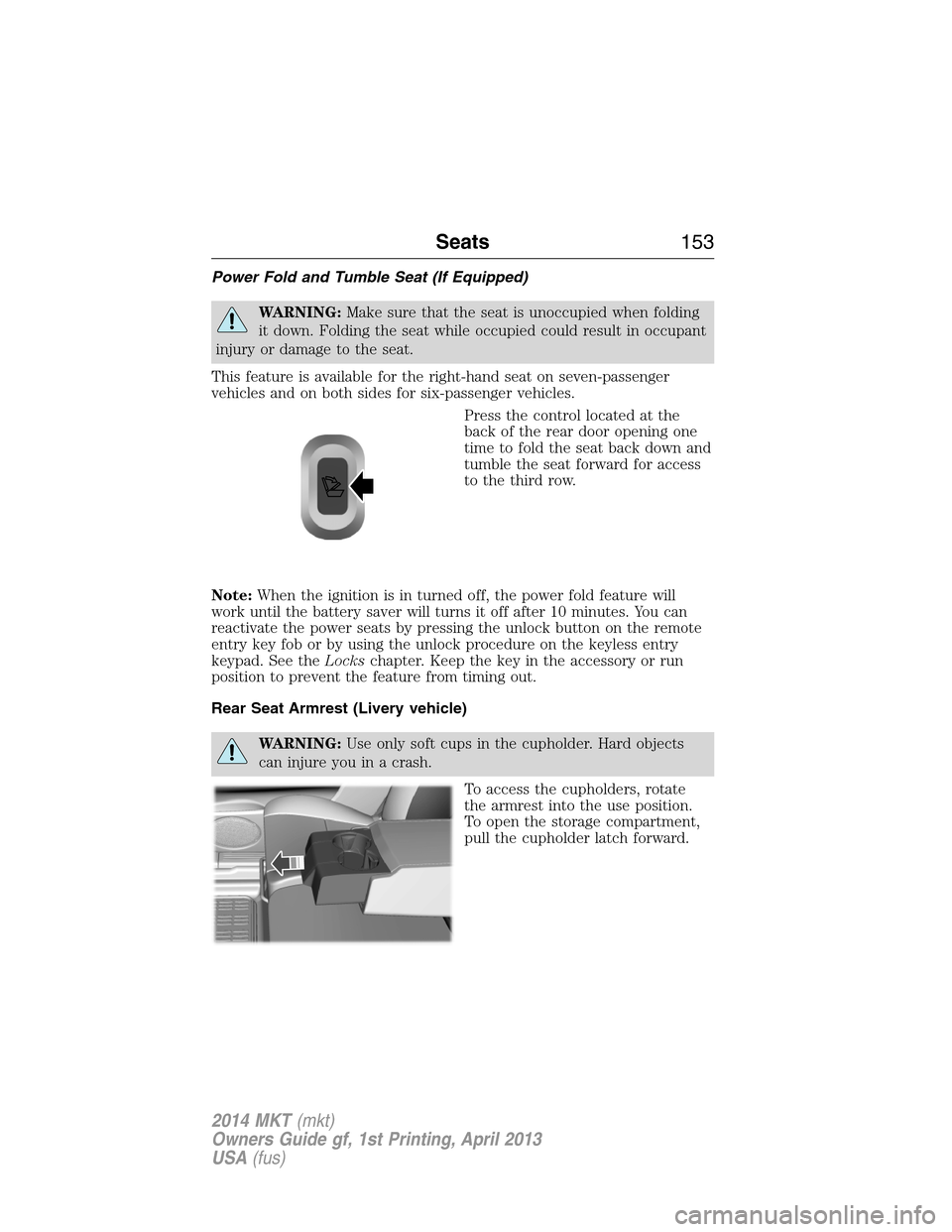
Press the control located at the
back of the rear door opening one
time to fold the seat back down and
tumble the seat forward for access
to the third row.
Note:When the ignition is in turned off, the power fold feature will
work until the battery saver will turns it off after 10 minutes. You can
reactivate the power seats by pressing the unlock button on the remote
entry key fob or by using the unlock procedure on the keyless entry
keypad. See theLockschapter. Keep the key in the accessory or run
position to prevent the feature from timing out.
Rear Seat Armrest (Livery vehicle)
WARNING:Use only soft cups in the cupholder. Hard objects
can injure you in a crash.
To access the cupholders, rotate
the armrest into the use position.
To open the storage compartment,
pull the cupholder latch forward.
Seats153
2014 MKT(mkt)
Owners Guide gf, 1st Printing, April 2013
USA(fus)
Page 171 of 498
CENTER CONSOLE
Stow items in the cupholder carefully as items may become loose during
hard braking, acceleration or collisions, including hot drinks which may
spill.
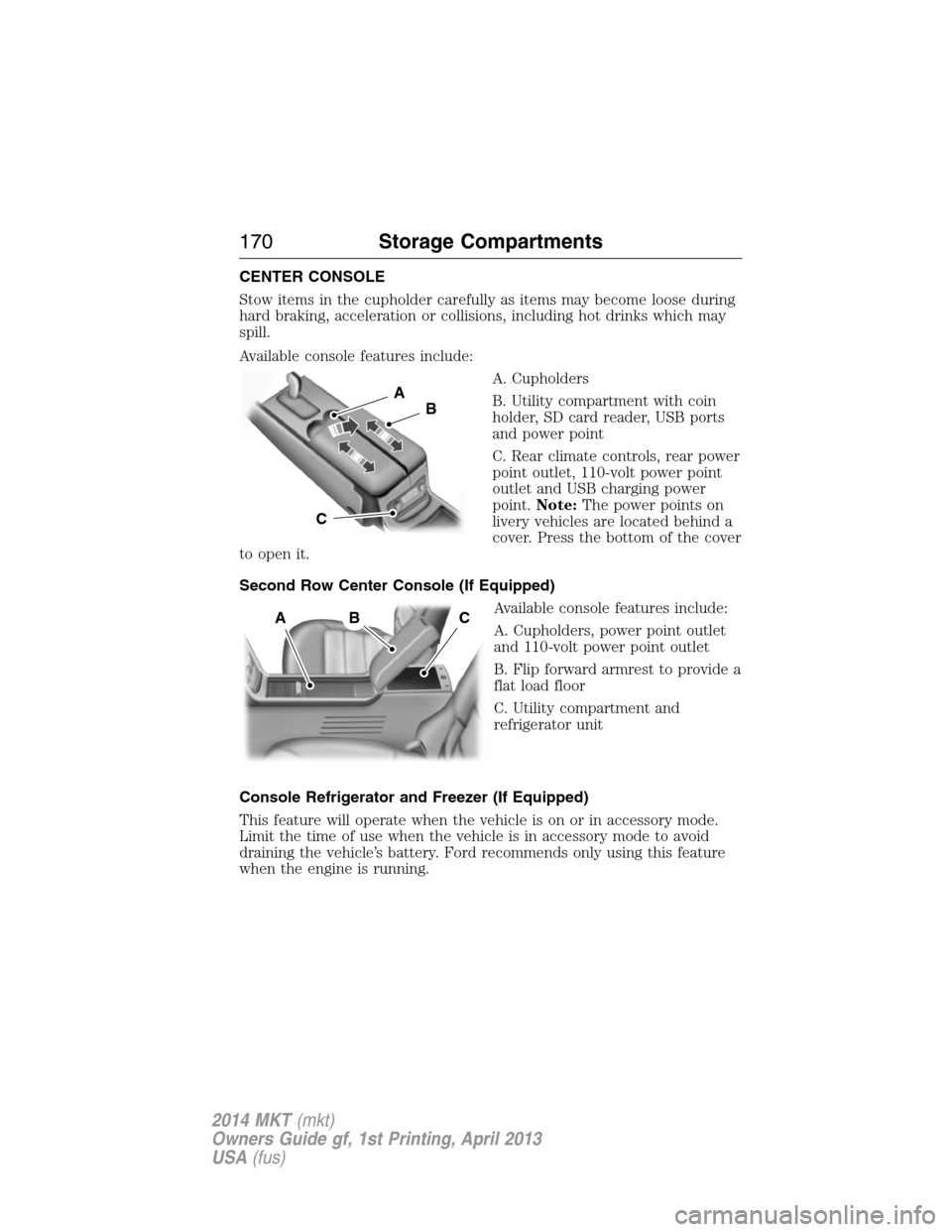
Available console features include:
A. Cupholders
B. Utility compartment with coin
holder, SD card reader, USB ports
and power point
C. Rear climate controls, rear power
point outlet, 110-volt power point
outlet and USB charging power
point.Note:The power points on
livery vehicles are located behind a
cover. Press the bottom of the cover
to open it.
Second Row Center Console (If Equipped)
Available console features include:
A. Cupholders, power point outlet
and 110-volt power point outlet
B. Flip forward armrest to provide a
flat load floor
C. Utility compartment and
refrigerator unit
Console Refrigerator and Freezer (If Equipped)
This feature will operate when the vehicle is on or in accessory mode.
Limit the time of use when the vehicle is in accessory mode to avoid
draining the vehicle’s battery. Ford recommends only using this feature
when the engine is running.
A
B
C
ABC
170Storage Compartments
2014 MKT(mkt)
Owners Guide gf, 1st Printing, April 2013
USA(fus)
Page 197 of 498
To resume normal AWD function as soon as possible, stop the vehicle in
a safe location and stop the engine for at least 10 minutes. After the
engine has been restarted and the AWD system has adequately cooled,
the AWD Off message will turn off and normal AWD function will return.
In the event the engine is not stopped, the AWD Off message will turn
off when the system cools and normal AWD function returns.
When driving at slow speeds in deep sand under high outside
temperatures, use L (Low) gear when possible. L (Low) gear operation
will maximize the engine and transmission cooling capability.
Under severe operating conditions, the A/C may cycle on and off to
protect overheating of the engine.
Avoid driving at excessive speeds, this causes vehicle momentum to
work against you and your vehicle could become stuck to the point that
assistance may be required from another vehicle. Remember, you may be
able to back out the way you came if you proceed with caution.
Mud and Water
If you must drive through high water, drive slowly. Traction or brake
capability may be limited.
When driving through water, determine the depth; avoid water higher
than the bottom of the wheel rims (for cars) or the bottom of the hubs
(for trucks) (if possible) and proceed slowly. If the ignition system gets
wet, the vehicle may stall.
Once through water, always try the brakes. Wet brakes do not stop the
vehicle as effectively as dry brakes. Drying can be improved by moving
your vehicle slowly while applying light pressure on the brake pedal.
Be cautious of sudden changes in vehicle speed or direction when you
are driving in mud. Even AWD vehicles can lose traction in slick mud.
As when you are driving over sand, apply the accelerator slowly and
avoid spinning your wheels. If the vehicle does slide, steer in the
direction of the slide until you regain control of the vehicle.
After driving through mud, clean off residue stuck to rotating driveshafts
and tires. Excess mud stuck on tires and rotating driveshafts causes an
imbalance that could damage drive components.
Note:Driving through deep water may damage the transmission.
If the front or rear axle is submerged in water, the axle lubricant and
PTU (power transfer unit) lubricant should be checked and changed if
necessary.
196All-Wheel Drive (If Equipped)
2014 MKT(mkt)
Owners Guide gf, 1st Printing, April 2013
USA(fus)
Page 199 of 498
Driving on Snow and Ice
WARNING:If you are driving in slippery conditions that require
tire chains or cables, then it is critical that you drive cautiously.
Keep speeds down, allow for longer stopping distances and avoid
aggressive steering to reduce the chances of a loss of vehicle control
which can lead to serious injury or death. If the rear end of the vehicle
slides while cornering, steer in the direction of the slide until you
regain control of the vehicle.
Note:Excessive tire slippage can cause transmission damage.
AWD vehicles have advantages over 2WD vehicles in snow and ice but
can skid like any other vehicle.
Should you start to slide while driving on snowy or icy roads, turn the
steering wheel in the direction of the slide until you regain control.
Avoid sudden applications of power and quick changes of direction on
snow and ice. Apply the accelerator slowly and steadily when starting
from a full stop.
Avoid sudden braking as well. Although an AWD vehicle may accelerate
better than a two-wheel drive vehicle in snow and ice, it won’t stop any
faster, because as in other vehicles, braking occurs at all four wheels.
Do not become overconfident as to road conditions.
Make sure you allow sufficient distance between you and other vehicles
for stopping. Drive slower than usual and consider using one of the lower
gears. In emergency stopping situations, apply the brake steadily. Since
your vehicle is equipped with a four wheel anti-lock brake system (ABS),
do not “pump” the brakes. Refer to theBrakeschapter for additional
information on the operation of the anti-lock brake system.
198All-Wheel Drive (If Equipped)
2014 MKT(mkt)
Owners Guide gf, 1st Printing, April 2013
USA(fus)
Page 207 of 498
If a fault is present in the system, a warning message appears in the
information display and does not allow the driver to switch the faulted
system on.
Note:If your vehicle is equipped with MyKey®, it is possible to prevent
turning the sensing system off. Refer to theMyKey®chapter.
Using the Rear Sensing System
The rear sensors are only active when the transmission is inR.Asthe
vehicle moves closer to the obstacle, the rate of the audible warning
increases. When the obstacle is fewer than 12 inches (30 centimeters)
away, the warning sounds continuously. If a stationary or receding object
is detected farther than 12 inches (30 centimeters) from the side of the
vehicle, the tone sounds for only three seconds. Once the system detects
an object approaching, the warning sounds again.
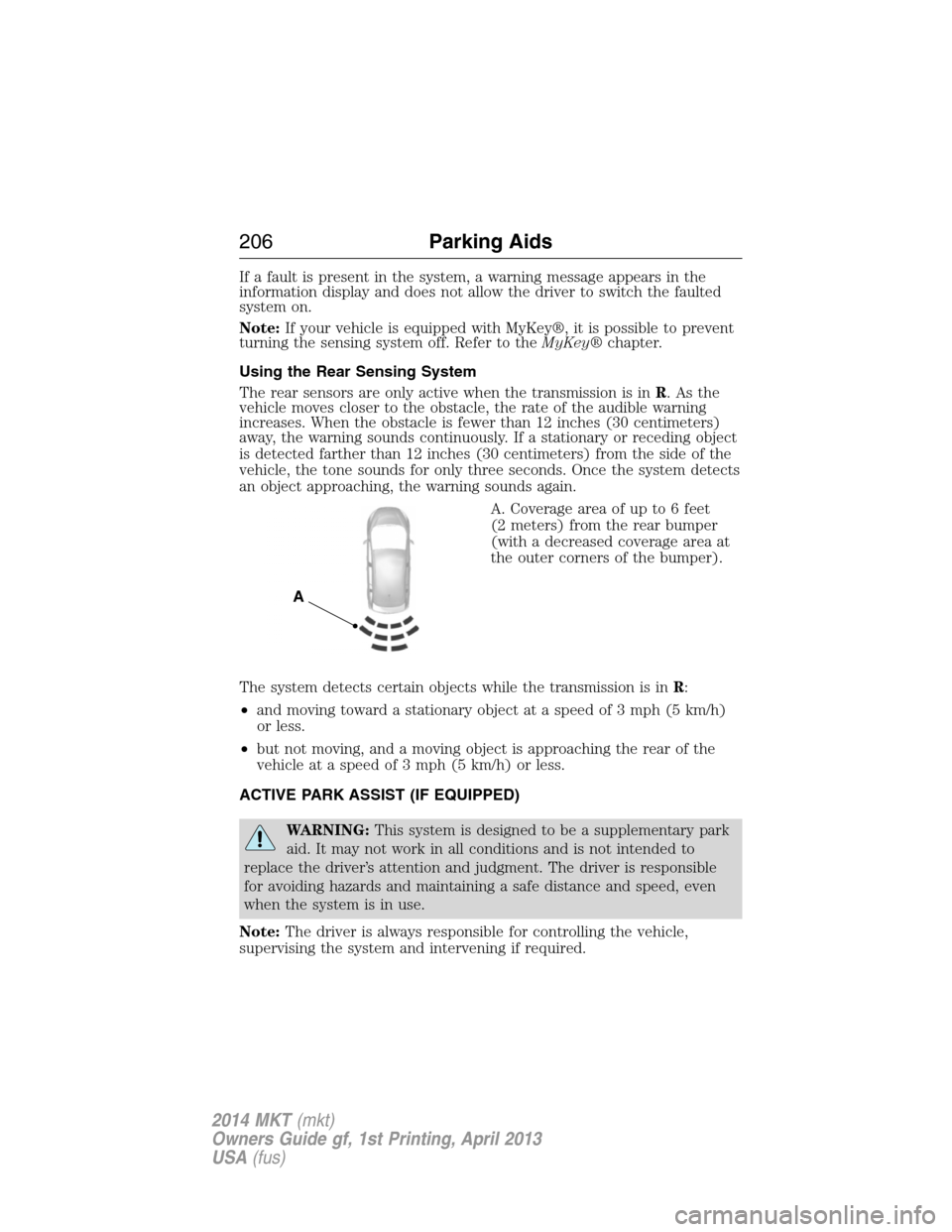
A. Coverage area of up to 6 feet
(2 meters) from the rear bumper
(with a decreased coverage area at
the outer corners of the bumper).
The system detects certain objects while the transmission is inR:
•and moving toward a stationary object at a speed of 3 mph (5 km/h)
or less.
•but not moving, and a moving object is approaching the rear of the
vehicle at a speed of 3 mph (5 km/h) or less.
ACTIVE PARK ASSIST (IF EQUIPPED)
WARNING:This system is designed to be a supplementary park
aid. It may not work in all conditions and is not intended to
replace the driver’s attention and judgment. The driver is responsible
for avoiding hazards and maintaining a safe distance and speed, even
when the system is in use.
Note:The driver is always responsible for controlling the vehicle,
supervising the system and intervening if required.
A
206Parking Aids
2014 MKT(mkt)
Owners Guide gf, 1st Printing, April 2013
USA(fus)
Page 208 of 498
The system detects an available parallel parking space and automatically
steers the vehicle into the space (hands-free) while you control the
accelerator, gearshift and brakes. The system visually and/or audibly
instructs the driver to park the vehicle.
The system may not function correctly if something passes between the
front bumper and the parking space (i.e. a pedestrian or cyclist) or if the
edge of the neighboring parked vehicle is high from the ground (i.e. a
bus, tow truck or flatbed truck).
Note:The sensors may not detect objects in heavy rain or other
conditions that cause disruptive reflections.
Note:The sensors may not detect objects with surfaces that absorb
ultrasonic waves.
Note:After a tire change the system will go through a relearning
procedure. During this time the system performance may deteriorate.
The system should not be used if:
•a foreign object (i.e. bike rack or trailer) is attached to the front or
rear of the vehicle or at another location close to the sensors.
•an overhanging object (i.e. surfboard) is attached to the roof.
•the front bumper or side sensors are damaged (i.e. in a collision) or
obstructed by a foreign object (i.e. front bumper cover).
•a mini-spare tire is in use.
Using Active Park Assist
Press the button; the touch screen
displays a message and a
corresponding graphic to indicate
it’s searching for a parking space.
Use the turn signal to indicate
which side of the vehicle you want
the system to search on.
Note:If the turn signal is not on, the system automatically searches on
the vehicle’s passenger side.
Parking Aids207
2014 MKT(mkt)
Owners Guide gf, 1st Printing, April 2013
USA(fus)
Page 237 of 498
System Errors
If either system senses a problem with the left or right sensor, the
BLIS® indicator in the information display will illuminate and remain on.
Also,BLIND SPOT SYSTEM FAULTorCROSS TRAFFIC SYSTEM
FAULTmessage will appear. When problems that may cause the left or
right indicator not to illuminate, only the information display message
faults appear.
Switching the Systems Off and On
One or both systems can be switched off temporarily by using the
information display control; refer to theInformation Displaychapter.
When the BLIS® is switched off, the driver does not receive alerts and
the information display shows BLIND SPOT SYS OFF and/or CTA
SYSTEM OFF. The system switches back on whenever the ignition is
switched on.
One or both systems can also be switched off permanently at your
authorized dealer. Once switched off, switching it back on must also be
done at the dealership.
COLLISION WARNING SYSTEM (IF EQUIPPED)
WARNING:This system is designed to be a supplementary
driving aid. It is not intended to replace the driver’s attention,
and judgment, or the need to apply the brakes. This system does NOT
activate the brakes automatically. Failure to press the brake pedal to
activate the brakes may result in a collision.
WARNING:The collision warning system with brake support
cannot help prevent all collisions. Do not rely on this system to
replace driver judgment and the need to maintain distance and speed.
Note:The system does not detect, warn or respond to potential
collisions with vehicles to the rear or sides of the vehicle.
Note:The collision warning system is active at speeds above
approximately 5 mph (8 km/h).
236Driving Aids
2014 MKT(mkt)
Owners Guide gf, 1st Printing, April 2013
USA(fus)
Page 268 of 498
U.S. Lincoln vehicle customers who require Roadside Assistance, call
1-800-521-4140.
If you need to arrange roadside assistance for yourself, Ford Motor
Company will reimburse a reasonable amount for towing to the nearest
dealership within 35 miles (56 km). To obtain reimbursement
information, U.S. Lincoln vehicle customers call 1-800-521-4140.
Customers will be asked to submit their original receipts.
Vehicles Sold in Canada: Getting Roadside Assistance
Canadian customers who require roadside assistance, call
1–800–665–2006.
Vehicles Sold in Canada: Using Roadside Assistance
For your convenience, you may complete the roadside assistance
identification card found in the centerfold of this warranty guide and
retain for future reference.
Canadian roadside coverage and benefits may differ from the U.S.
coverage. If you require more information, please refer to the coverage
section of your warranty guide, call us in Canada at 1-800-665-2006, or
visit our website at www.ford.ca.
HAZARD WARNING FLASHERS
The hazard flasher control is located on the instrument panel
by the radio. Use it when your vehicle is disabled and is
creating a safety hazard for other motorists.
•Press the flasher control and all front and rear direction signals will
flash.
•Press the flasher control again to turn them off.
Note:With extended use, the flashers may run down your 12–volt
battery.
FUEL CUT-OFF SWITCH
WARNING:Failure to inspect and if necessary repair fuel leaks
after a collision may increase the risk of fire and serious injury.
Ford Motor Company recommends that the fuel system be inspected by
an authorized dealer after any collision.
In the event of a moderate to severe collision, this vehicle is equipped
with a fuel pump shut-off feature that stops the flow of fuel to the
engine. Not every impact will cause a shut-off.
Roadside Emergencies267
2014 MKT(mkt)
Owners Guide gf, 1st Printing, April 2013
USA(fus)
Page 283 of 498
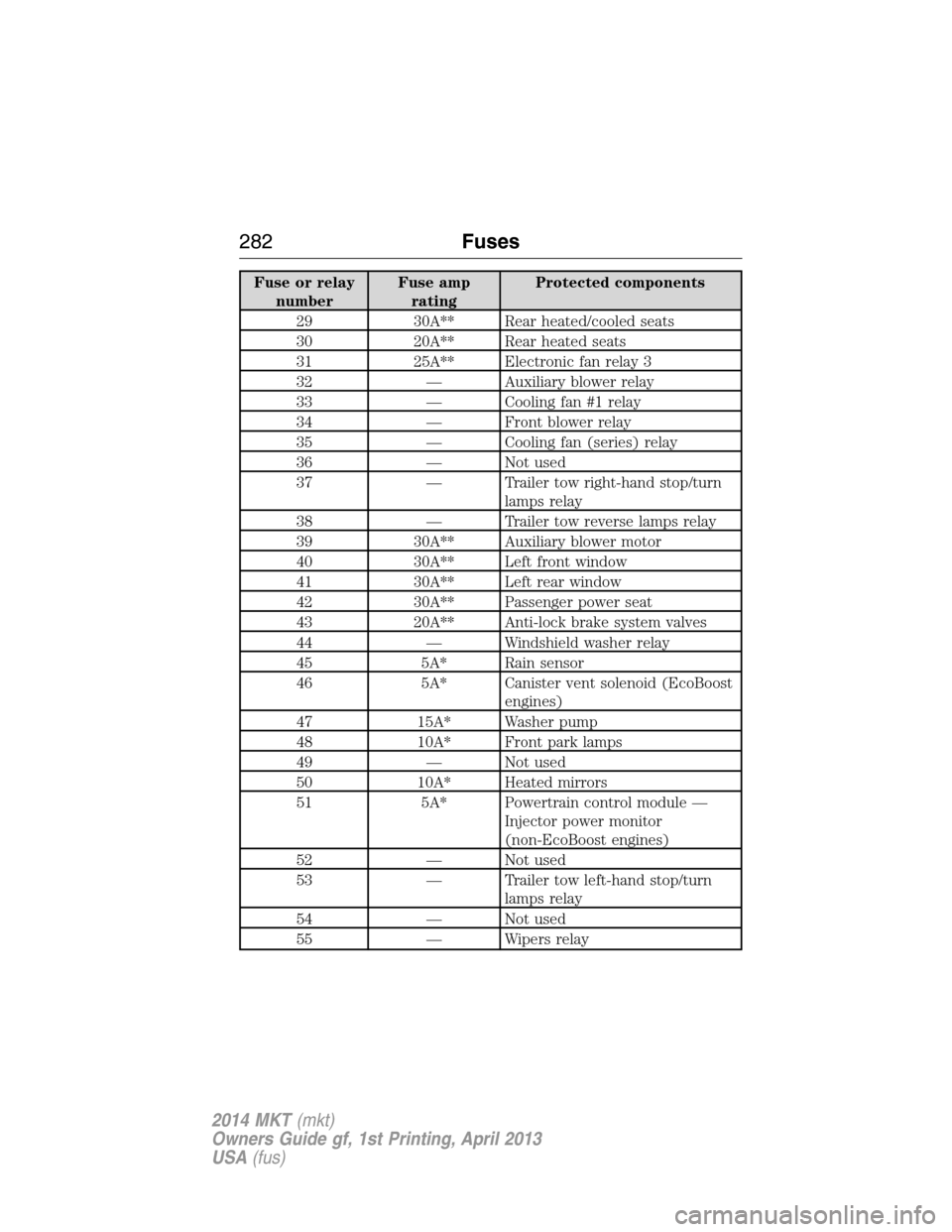
Fuse or relay
numberFuse amp
ratingProtected components
29 30A** Rear heated/cooled seats
30 20A** Rear heated seats
31 25A** Electronic fan relay 3
32 — Auxiliary blower relay
33 — Cooling fan #1 relay
34 — Front blower relay
35 — Cooling fan (series) relay
36 — Not used
37 — Trailer tow right-hand stop/turn
lamps relay
38 — Trailer tow reverse lamps relay
39 30A** Auxiliary blower motor
40 30A** Left front window
41 30A** Left rear window
42 30A** Passenger power seat
43 20A** Anti-lock brake system valves
44 — Windshield washer relay
45 5A* Rain sensor
46 5A* Canister vent solenoid (EcoBoost
engines)
47 15A* Washer pump
48 10A* Front park lamps
49 — Not used
50 10A* Heated mirrors
51 5A* Powertrain control module —
Injector power monitor
(non-EcoBoost engines)
52 — Not used
53 — Trailer tow left-hand stop/turn
lamps relay
54 — Not used
55 — Wipers relay
282Fuses
2014 MKT(mkt)
Owners Guide gf, 1st Printing, April 2013
USA(fus)
Page 284 of 498
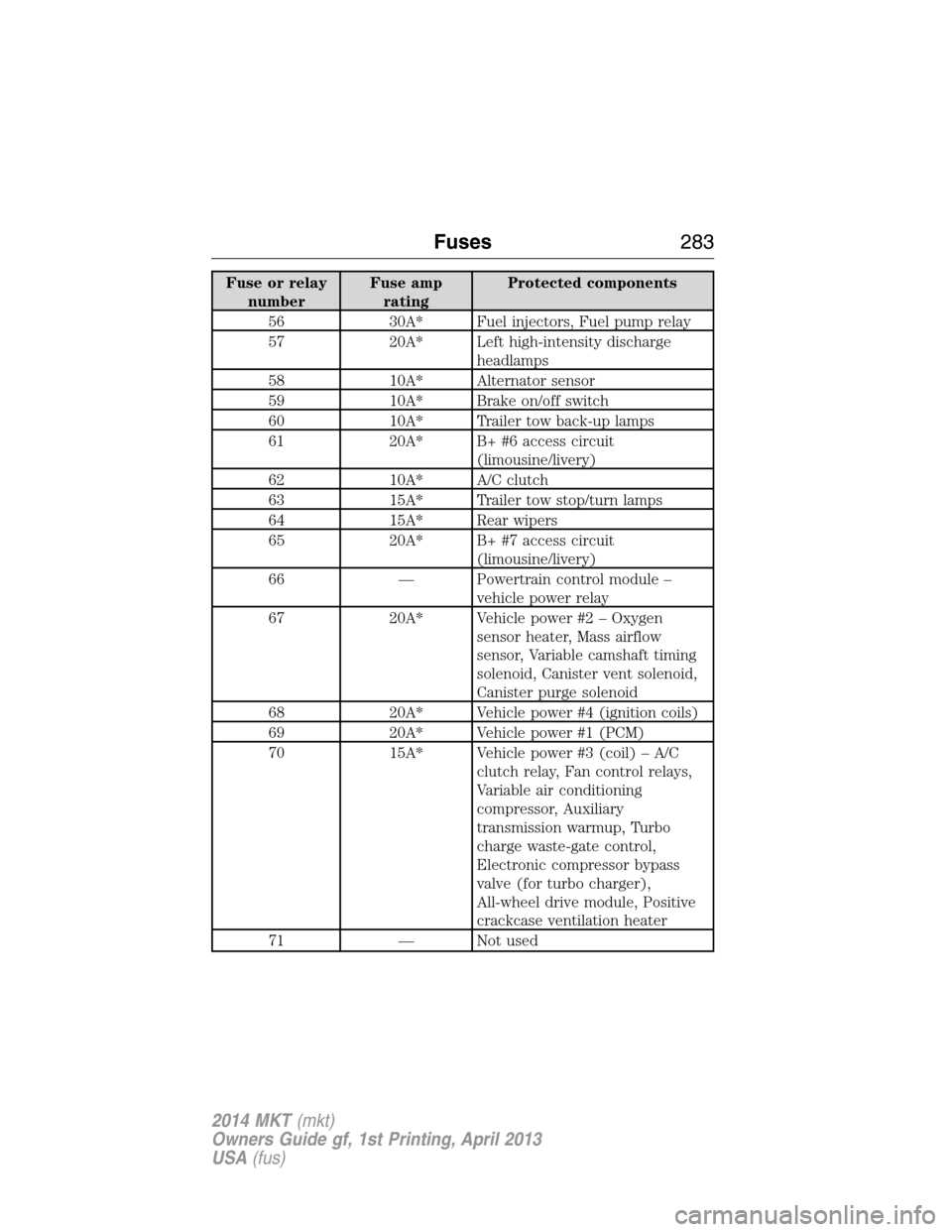
Fuse or relay
numberFuse amp
ratingProtected components
56 30A* Fuel injectors, Fuel pump relay
57 20A* Left high-intensity discharge
headlamps
58 10A* Alternator sensor
59 10A* Brake on/off switch
60 10A* Trailer tow back-up lamps
61 20A* B+ #6 access circuit
(limousine/livery)
62 10A* A/C clutch
63 15A* Trailer tow stop/turn lamps
64 15A* Rear wipers
65 20A* B+ #7 access circuit
(limousine/livery)
66 — Powertrain control module –
vehicle power relay
67 20A* Vehicle power #2 – Oxygen
sensor heater, Mass airflow
sensor, Variable camshaft timing
solenoid, Canister vent solenoid,
Canister purge solenoid
68 20A* Vehicle power #4 (ignition coils)
69 20A* Vehicle power #1 (PCM)
70 15A* Vehicle power #3 (coil) – A/C
clutch relay, Fan control relays,
Variable air conditioning
compressor, Auxiliary
transmission warmup, Turbo
charge waste-gate control,
Electronic compressor bypass
valve (for turbo charger),
All-wheel drive module, Positive
crackcase ventilation heater
71 — Not used
Fuses283
2014 MKT(mkt)
Owners Guide gf, 1st Printing, April 2013
USA(fus)