rear ac control LINCOLN MKT 2014 Service Manual
[x] Cancel search | Manufacturer: LINCOLN, Model Year: 2014, Model line: MKT, Model: LINCOLN MKT 2014Pages: 498, PDF Size: 7.3 MB
Page 285 of 498
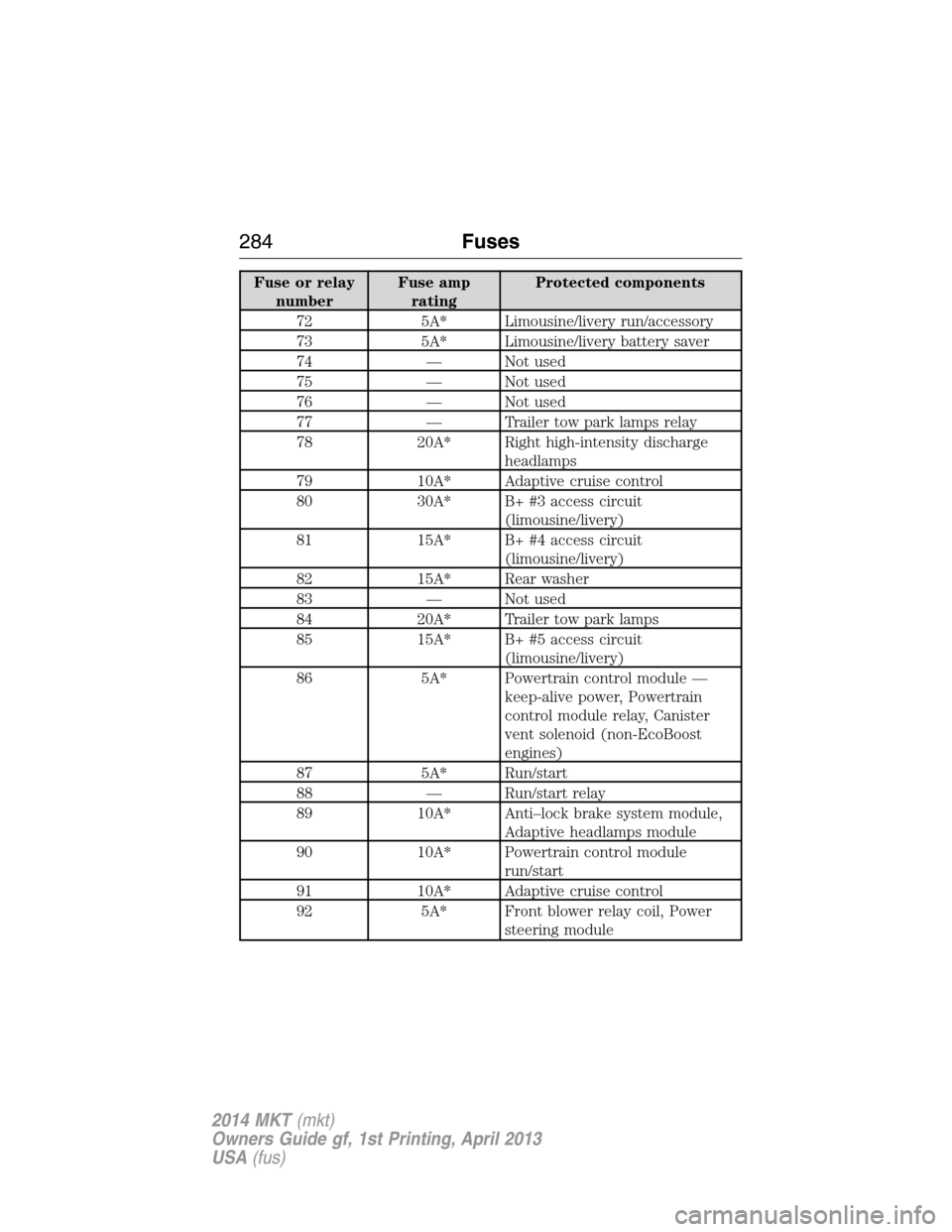
Fuse or relay
numberFuse amp
ratingProtected components
72 5A* Limousine/livery run/accessory
73 5A* Limousine/livery battery saver
74 — Not used
75 — Not used
76 — Not used
77 — Trailer tow park lamps relay
78 20A* Right high-intensity discharge
headlamps
79 10A* Adaptive cruise control
80 30A* B+ #3 access circuit
(limousine/livery)
81 15A* B+ #4 access circuit
(limousine/livery)
82 15A* Rear washer
83 — Not used
84 20A* Trailer tow park lamps
85 15A* B+ #5 access circuit
(limousine/livery)
86 5A* Powertrain control module —
keep-alive power, Powertrain
control module relay, Canister
vent solenoid (non-EcoBoost
engines)
87 5A* Run/start
88 — Run/start relay
89 10A* Anti–lock brake system module,
Adaptive headlamps module
90 10A* Powertrain control module
run/start
91 10A* Adaptive cruise control
92 5A* Front blower relay coil, Power
steering module
284Fuses
2014 MKT(mkt)
Owners Guide gf, 1st Printing, April 2013
USA(fus)
Page 286 of 498
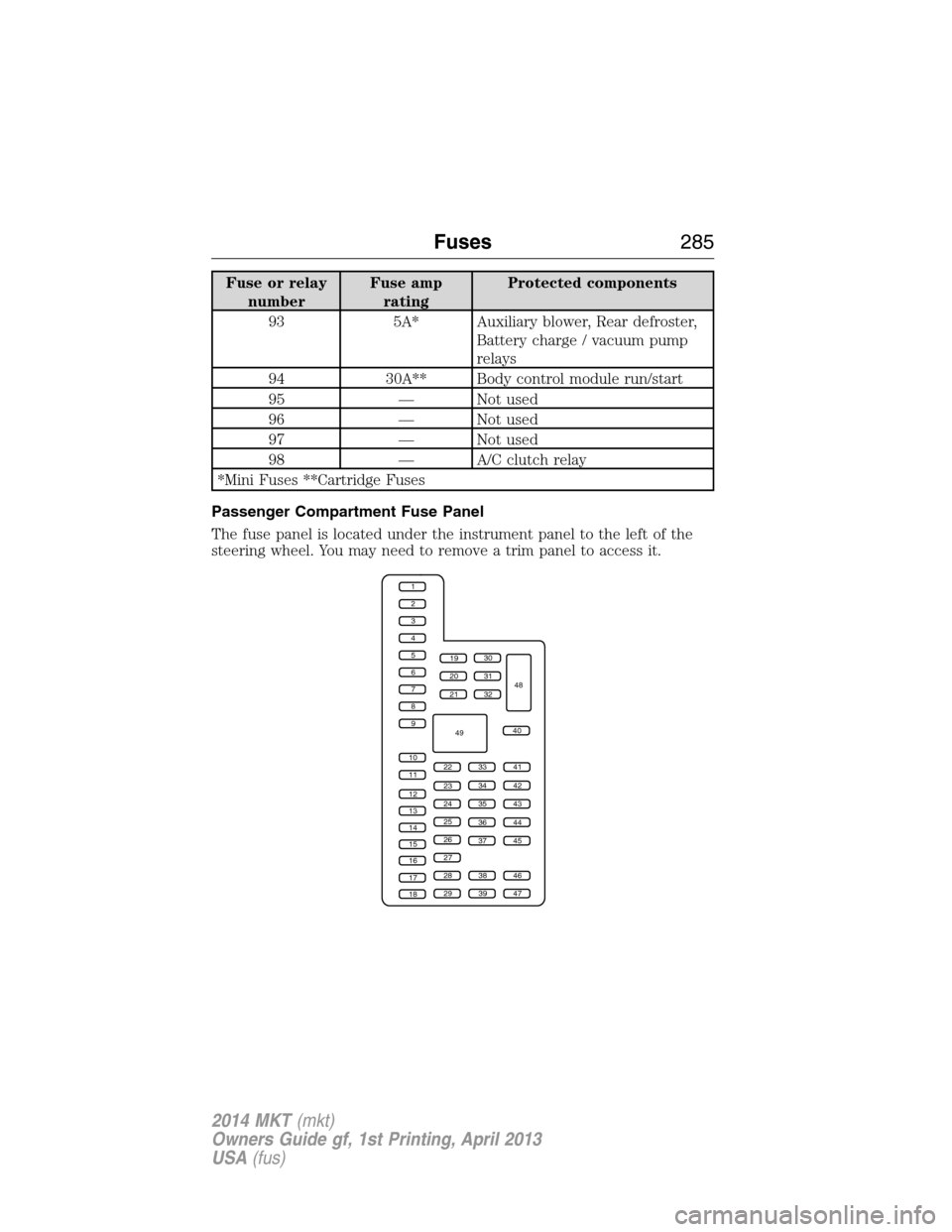
Fuse or relay
numberFuse amp
ratingProtected components
93 5A* Auxiliary blower, Rear defroster,
Battery charge / vacuum pump
relays
94 30A** Body control module run/start
95 — Not used
96 — Not used
97 — Not used
98 — A/C clutch relay
*Mini Fuses **Cartridge Fuses
Passenger Compartment Fuse Panel
The fuse panel is located under the instrument panel to the left of the
steering wheel. You may need to remove a trim panel to access it.
1
2
3
4
5
6
7
8
9
10
11
12
13
14
15
16
17
18
19
20
21
223341
42
43
44
45
34
35
36
37
23
24
25
26
27
283846
394729
32
40
31
30
48
49
Fuses285
2014 MKT(mkt)
Owners Guide gf, 1st Printing, April 2013
USA(fus)
Page 287 of 498
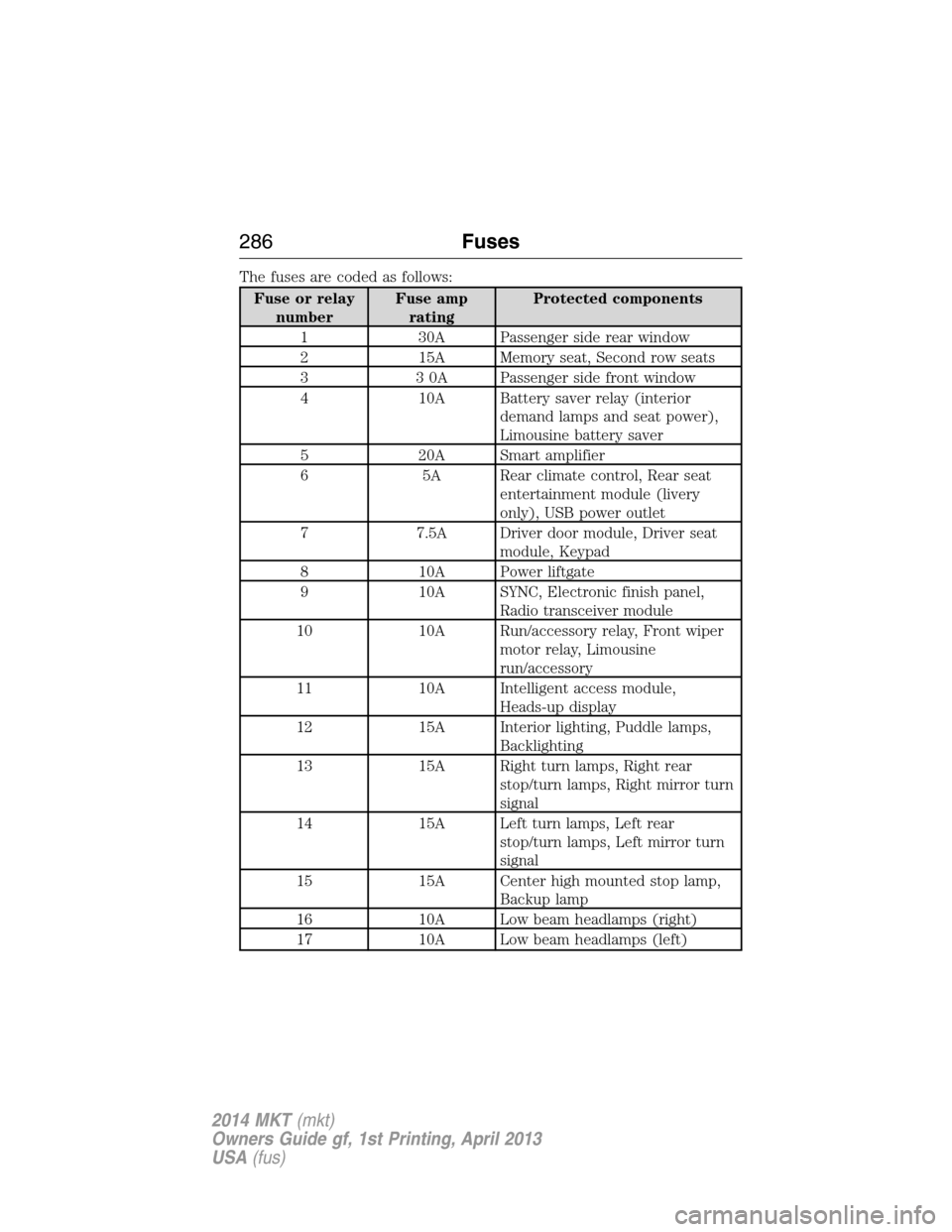
The fuses are coded as follows:
Fuse or relay
numberFuse amp
ratingProtected components
1 30A Passenger side rear window
2 15A Memory seat, Second row seats
3 3 0A Passenger side front window
4 10A Battery saver relay (interior
demand lamps and seat power),
Limousine battery saver
5 20A Smart amplifier
6 5A Rear climate control, Rear seat
entertainment module (livery
only), USB power outlet
7 7.5A Driver door module, Driver seat
module, Keypad
8 10A Power liftgate
9 10A SYNC, Electronic finish panel,
Radio transceiver module
10 10A Run/accessory relay, Front wiper
motor relay, Limousine
run/accessory
11 10A Intelligent access module,
Heads-up display
12 15A Interior lighting, Puddle lamps,
Backlighting
13 15A Right turn lamps, Right rear
stop/turn lamps, Right mirror turn
signal
14 15A Left turn lamps, Left rear
stop/turn lamps, Left mirror turn
signal
15 15A Center high mounted stop lamp,
Backup lamp
16 10A Low beam headlamps (right)
17 10A Low beam headlamps (left)
286Fuses
2014 MKT(mkt)
Owners Guide gf, 1st Printing, April 2013
USA(fus)
Page 288 of 498
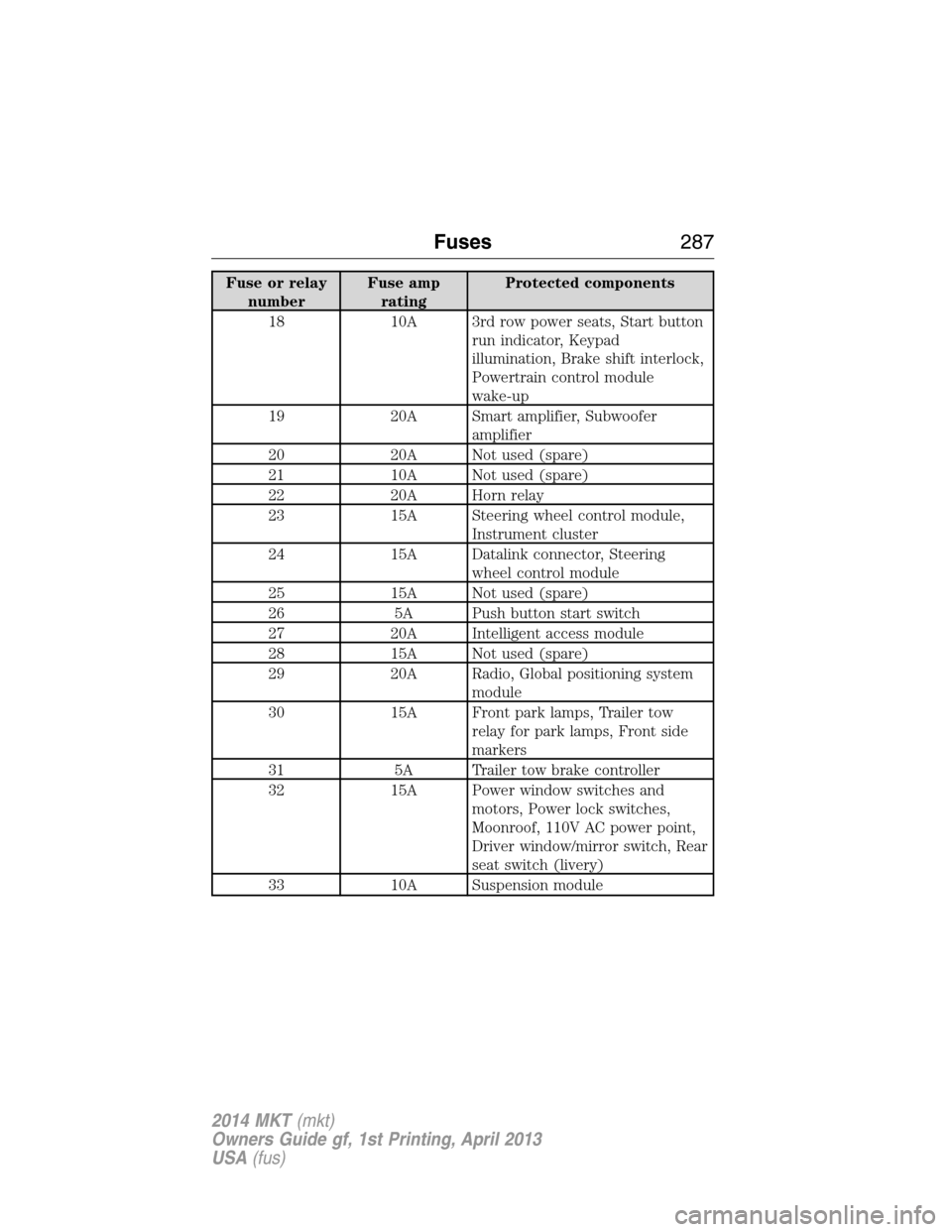
Fuse or relay
numberFuse amp
ratingProtected components
18 10A 3rd row power seats, Start button
run indicator, Keypad
illumination, Brake shift interlock,
Powertrain control module
wake-up
19 20A Smart amplifier, Subwoofer
amplifier
20 20A Not used (spare)
21 10A Not used (spare)
22 20A Horn relay
23 15A Steering wheel control module,
Instrument cluster
24 15A Datalink connector, Steering
wheel control module
25 15A Not used (spare)
26 5A Push button start switch
27 20A Intelligent access module
28 15A Not used (spare)
29 20A Radio, Global positioning system
module
30 15A Front park lamps, Trailer tow
relay for park lamps, Front side
markers
31 5A Trailer tow brake controller
32 15A Power window switches and
motors, Power lock switches,
Moonroof, 110V AC power point,
Driver window/mirror switch, Rear
seat switch (livery)
33 10A Suspension module
Fuses287
2014 MKT(mkt)
Owners Guide gf, 1st Printing, April 2013
USA(fus)
Page 289 of 498
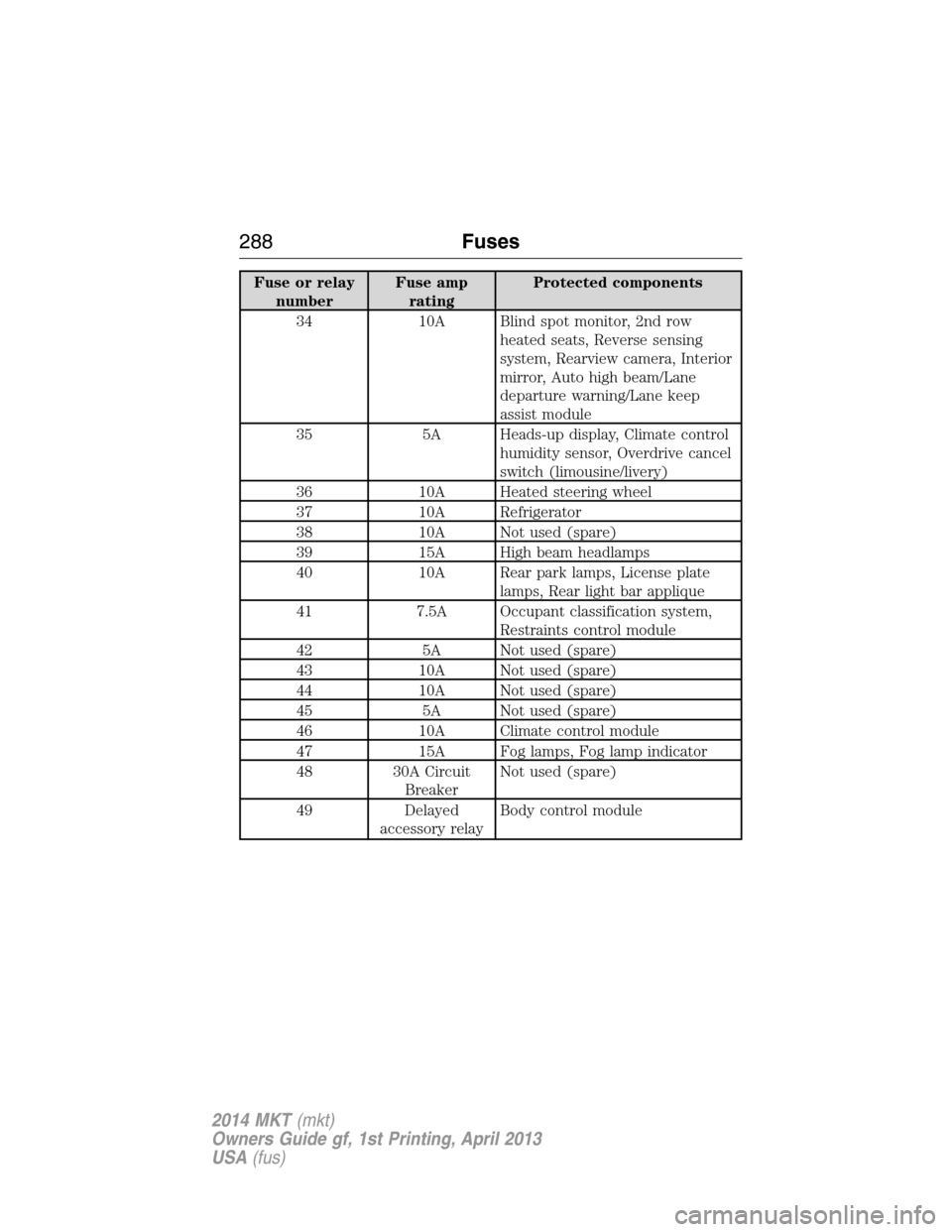
Fuse or relay
numberFuse amp
ratingProtected components
34 10A Blind spot monitor, 2nd row
heated seats, Reverse sensing
system, Rearview camera, Interior
mirror, Auto high beam/Lane
departure warning/Lane keep
assist module
35 5A Heads-up display, Climate control
humidity sensor, Overdrive cancel
switch (limousine/livery)
36 10A Heated steering wheel
37 10A Refrigerator
38 10A Not used (spare)
39 15A High beam headlamps
40 10A Rear park lamps, License plate
lamps, Rear light bar applique
41 7.5A Occupant classification system,
Restraints control module
42 5A Not used (spare)
43 10A Not used (spare)
44 10A Not used (spare)
45 5A Not used (spare)
46 10A Climate control module
47 15A Fog lamps, Fog lamp indicator
48 30A Circuit
BreakerNot used (spare)
49 Delayed
accessory relayBody control module
288Fuses
2014 MKT(mkt)
Owners Guide gf, 1st Printing, April 2013
USA(fus)
Page 345 of 498
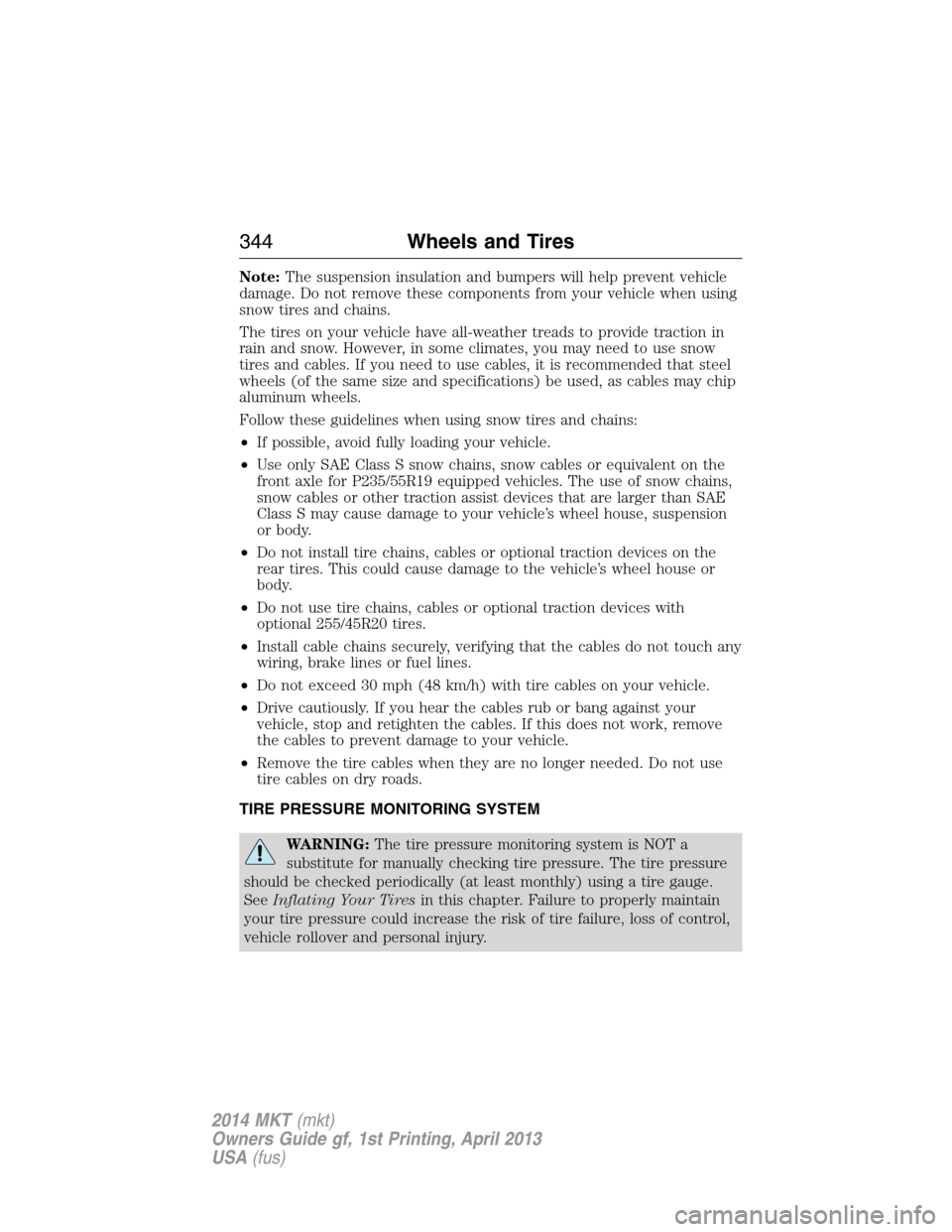
Note:The suspension insulation and bumpers will help prevent vehicle
damage. Do not remove these components from your vehicle when using
snow tires and chains.
The tires on your vehicle have all-weather treads to provide traction in
rain and snow. However, in some climates, you may need to use snow
tires and cables. If you need to use cables, it is recommended that steel
wheels (of the same size and specifications) be used, as cables may chip
aluminum wheels.
Follow these guidelines when using snow tires and chains:
•If possible, avoid fully loading your vehicle.
•Use only SAE Class S snow chains, snow cables or equivalent on the
front axle for P235/55R19 equipped vehicles. The use of snow chains,
snow cables or other traction assist devices that are larger than SAE
Class S may cause damage to your vehicle’s wheel house, suspension
or body.
•Do not install tire chains, cables or optional traction devices on the
rear tires. This could cause damage to the vehicle’s wheel house or
body.
•Do not use tire chains, cables or optional traction devices with
optional 255/45R20 tires.
•Install cable chains securely, verifying that the cables do not touch any
wiring, brake lines or fuel lines.
•Do not exceed 30 mph (48 km/h) with tire cables on your vehicle.
•Drive cautiously. If you hear the cables rub or bang against your
vehicle, stop and retighten the cables. If this does not work, remove
the cables to prevent damage to your vehicle.
•Remove the tire cables when they are no longer needed. Do not use
tire cables on dry roads.
TIRE PRESSURE MONITORING SYSTEM
WARNING:The tire pressure monitoring system is NOT a
substitute for manually checking tire pressure. The tire pressure
should be checked periodically (at least monthly) using a tire gauge.
SeeInflating Your Tiresin this chapter. Failure to properly maintain
your tire pressure could increase the risk of tire failure, loss of control,
vehicle rollover and personal injury.
344Wheels and Tires
2014 MKT(mkt)
Owners Guide gf, 1st Printing, April 2013
USA(fus)
Page 357 of 498
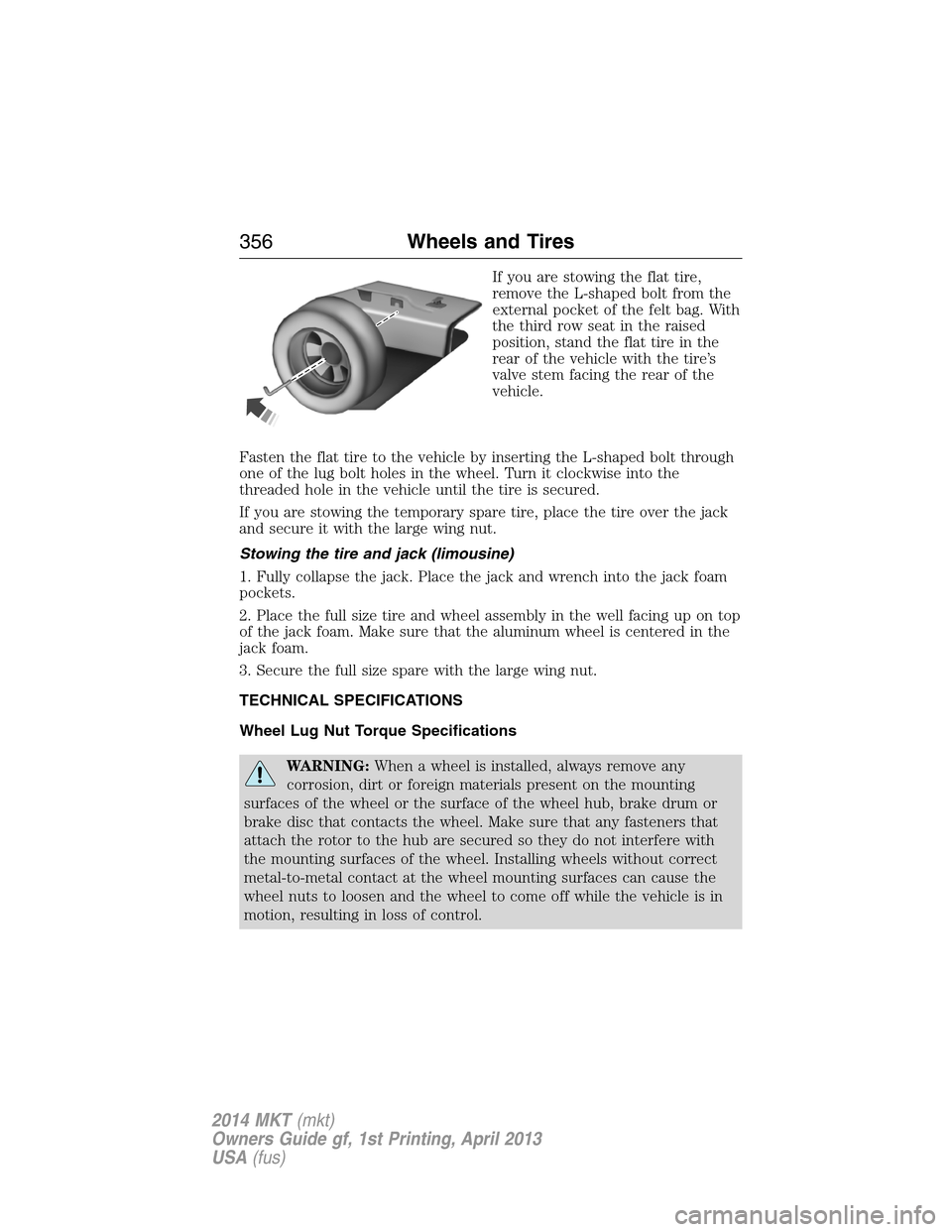
If you are stowing the flat tire,
remove the L-shaped bolt from the
external pocket of the felt bag. With
the third row seat in the raised
position, stand the flat tire in the
rear of the vehicle with the tire’s
valve stem facing the rear of the
vehicle.
Fasten the flat tire to the vehicle by inserting the L-shaped bolt through
one of the lug bolt holes in the wheel. Turn it clockwise into the
threaded hole in the vehicle until the tire is secured.
If you are stowing the temporary spare tire, place the tire over the jack
and secure it with the large wing nut.
Stowing the tire and jack (limousine)
1. Fully collapse the jack. Place the jack and wrench into the jack foam
pockets.
2. Place the full size tire and wheel assembly in the well facing up on top
of the jack foam. Make sure that the aluminum wheel is centered in the
jack foam.
3. Secure the full size spare with the large wing nut.
TECHNICAL SPECIFICATIONS
Wheel Lug Nut Torque Specifications
WARNING:When a wheel is installed, always remove any
corrosion, dirt or foreign materials present on the mounting
surfaces of the wheel or the surface of the wheel hub, brake drum or
brake disc that contacts the wheel. Make sure that any fasteners that
attach the rotor to the hub are secured so they do not interfere with
the mounting surfaces of the wheel. Installing wheels without correct
metal-to-metal contact at the wheel mounting surfaces can cause the
wheel nuts to loosen and the wheel to come off while the vehicle is in
motion, resulting in loss of control.
356Wheels and Tires
2014 MKT(mkt)
Owners Guide gf, 1st Printing, April 2013
USA(fus)
Page 376 of 498
D.TUNE + and TUNE - :
•In radio mode, press these buttons to manually search through the
radio frequency band.
•In Sirius mode, press these buttons to find the next or previous
available satellite radio station.
E.Volume:Press the right or left side of the slider, or slide your finger
across the control, to adjust the volume.
F.Power:Press this button to switch the system off and on.
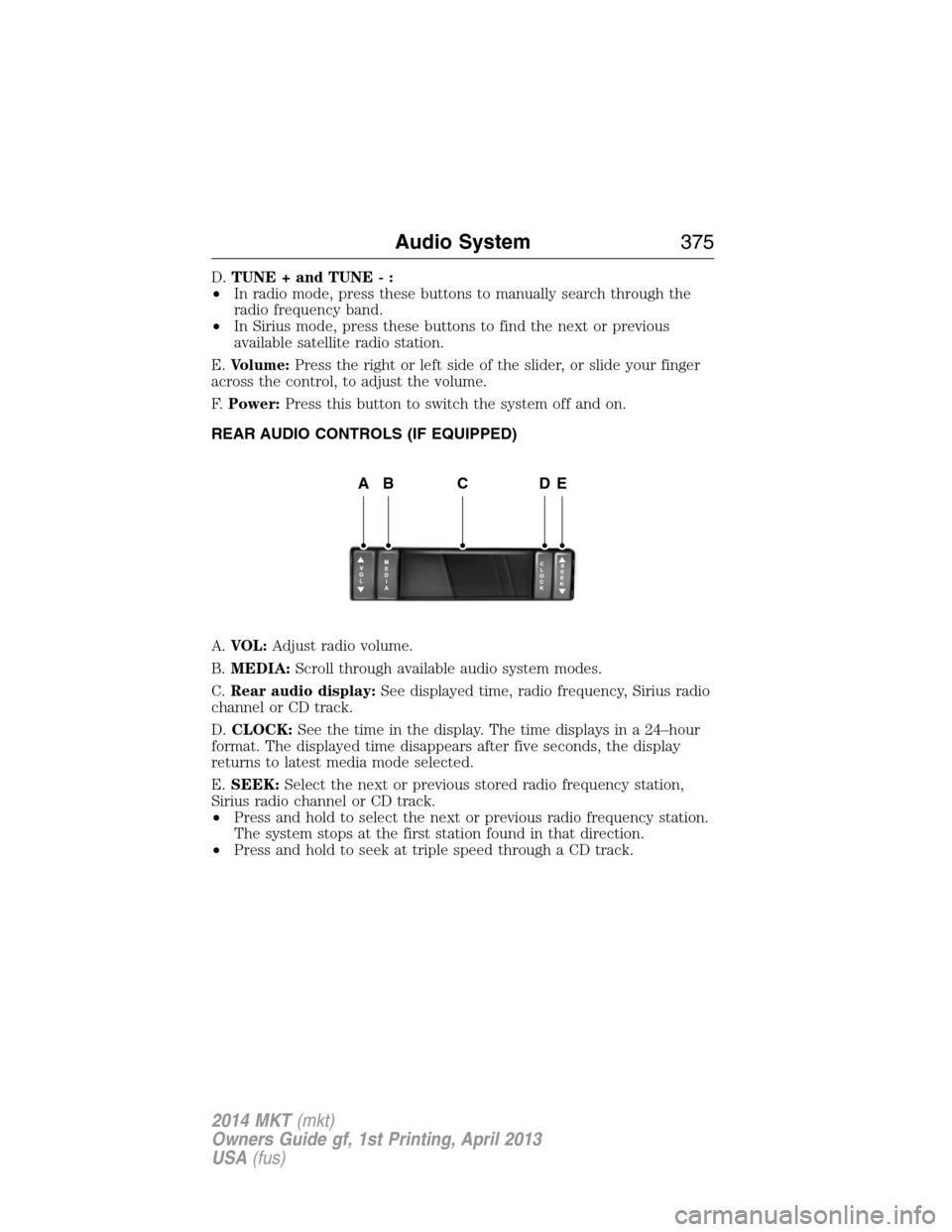
REAR AUDIO CONTROLS (IF EQUIPPED)
A.VOL:Adjust radio volume.
B.MEDIA:Scroll through available audio system modes.
C.Rear audio display:See displayed time, radio frequency, Sirius radio
channel or CD track.
D.CLOCK:See the time in the display. The time displays in a 24–hour
format. The displayed time disappears after five seconds, the display
returns to latest media mode selected.
E.SEEK:Select the next or previous stored radio frequency station,
Sirius radio channel or CD track.
•Press and hold to select the next or previous radio frequency station.
The system stops at the first station found in that direction.
•Press and hold to seek at triple speed through a CD track.
ABCDE
Audio System375
2014 MKT(mkt)
Owners Guide gf, 1st Printing, April 2013
USA(fus)
Page 381 of 498
Using the Touch-sensitive Controls on Your System
To turn a feature on and off, just touch the graphic with your finger.
To get the best performance from the touch-sensitive controls, keep in
mind:
•Do not press hard on the controls. They are sensitive to light touch.
•Use your bare finger to touch the center of a touch-control graphic.
Touching off-center of the graphic may affect operation of a nearby
control.
•Make sure your hands are clean and dry.
•
Keep metal and other conductive material away from the surface of
the touchscreen as this may cause electronic interference (for example,
inadvertently turning on a feature other than the one you meant to
turn on).
Depending on your vehicle and option package, you may also have these
controls on your bezel:
•Power: Switch the media or climate features off and on.
•VOLand fan slider bars: Slide your finger over the rear slider area to
control the volume of playing media or the climate system fan.
•Seek and Tune buttons: Use as you normally would in media modes.
•Eject: Eject a CD from the entertainment system.
•SOURCE:Touch the word repeatedly to see all available media
modes. The screen does not change, but you see the media change in
the lower left status bar.
•SOUND:Touch the word to access the Sound menu where you can
adjust settings such as: Bass, Treble, Midrange, Balance and Fade,
THX Deep note Demo, DSP (Digital Signal Processing), Occupancy
Mode and Speed Compensated Volume. (Your vehicle may not have
all of these sound options.)
•Hazard flasher: Switch the hazard flashers off and on.
Cleaning the Touchscreen Display
Use a clean, soft cloth such as one used for cleaning glasses. If dirt or
fingerprints are still visible, apply a small amount of alcohol to the cloth.
Do not pour or spray alcohol onto the display. Do not use detergent or
any type of solvent to clean the display.
Support
The SYNC support team is available to help you with any questions you
aren’t able to answer on your own.
Monday-Saturday, 8:30 am-8pm EST
In the United States, call: 1–888–270–1055
380MyLincoln Touch™
2014 MKT(mkt)
Owners Guide gf, 1st Printing, April 2013
USA(fus)
Page 441 of 498
To access Help using the voice commands, press the voice button, then,
after the tone, say “Help”. The system provides allowable voice
commands for the current mode.
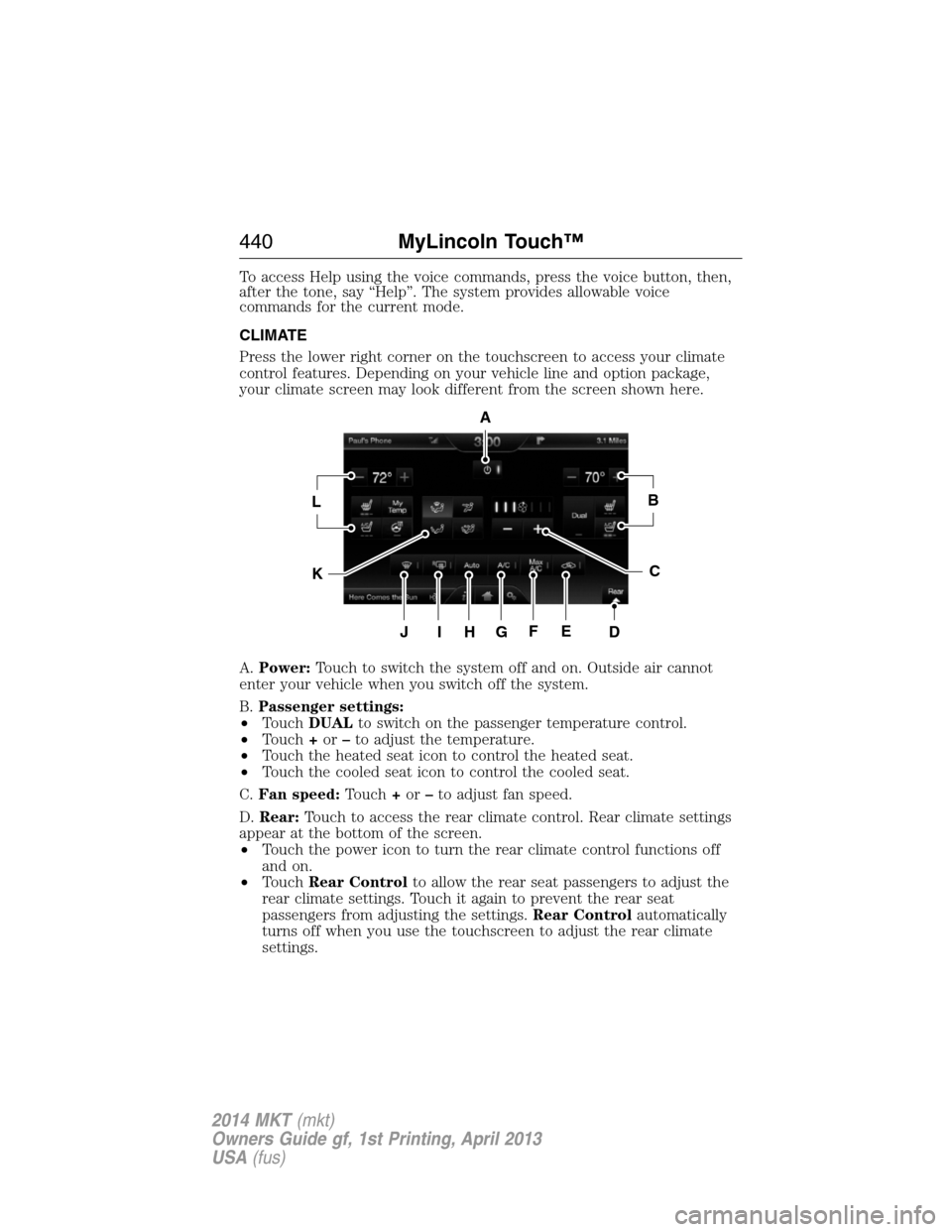
CLIMATE
Press the lower right corner on the touchscreen to access your climate
control features. Depending on your vehicle line and option package,
your climate screen may look different from the screen shown here.
A.Power:Touch to switch the system off and on. Outside air cannot
enter your vehicle when you switch off the system.
B.Passenger settings:
•TouchDUALto switch on the passenger temperature control.
•Touch+or–to adjust the temperature.
•Touch the heated seat icon to control the heated seat.
•Touch the cooled seat icon to control the cooled seat.
C.Fan speed:Touch+or–to adjust fan speed.
D.Rear:Touch to access the rear climate control. Rear climate settings
appear at the bottom of the screen.
•Touch the power icon to turn the rear climate control functions off
and on.
•TouchRear Controlto allow the rear seat passengers to adjust the
rear climate settings. Touch it again to prevent the rear seat
passengers from adjusting the settings.Rear Controlautomatically
turns off when you use the touchscreen to adjust the rear climate
settings.
A
LB
KC
JIHGFED
440MyLincoln Touch™
2014 MKT(mkt)
Owners Guide gf, 1st Printing, April 2013
USA(fus)