display LINCOLN MKT 2019 User Guide
[x] Cancel search | Manufacturer: LINCOLN, Model Year: 2019, Model line: MKT, Model: LINCOLN MKT 2019Pages: 575, PDF Size: 4.66 MB
Page 90 of 575
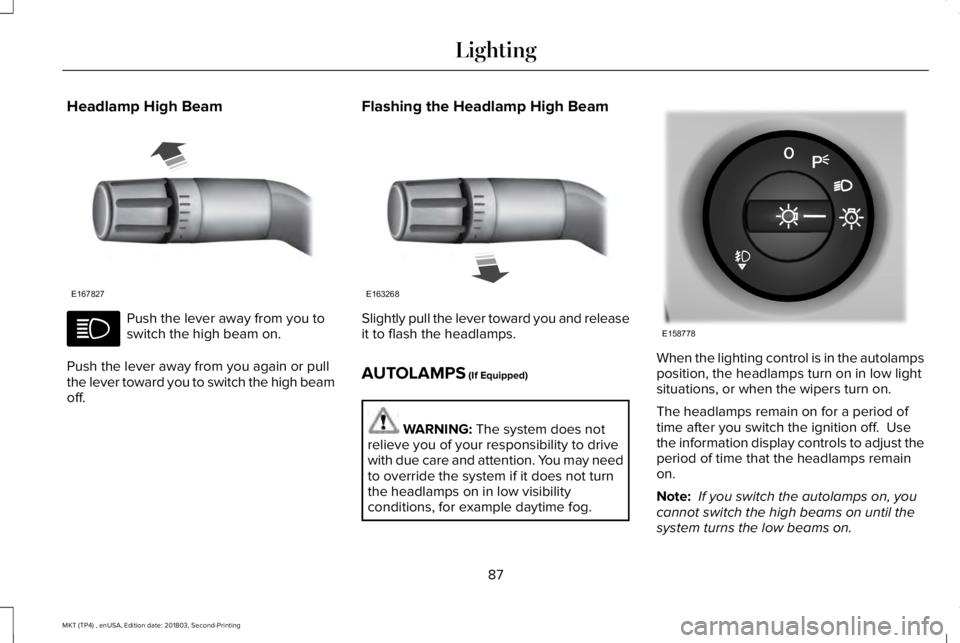
Headlamp High Beam
Push the lever away from you toswitch the high beam on.
Push the lever away from you again or pullthe lever toward you to switch the high beamoff.
Flashing the Headlamp High Beam
Slightly pull the lever toward you and releaseit to flash the headlamps.
AUTOLAMPS (If Equipped)
WARNING: The system does notrelieve you of your responsibility to drivewith due care and attention. You may needto override the system if it does not turnthe headlamps on in low visibilityconditions, for example daytime fog.
When the lighting control is in the autolampsposition, the headlamps turn on in low lightsituations, or when the wipers turn on.
The headlamps remain on for a period oftime after you switch the ignition off. Usethe information display controls to adjust theperiod of time that the headlamps remainon.
Note: If you switch the autolamps on, youcannot switch the high beams on until thesystem turns the low beams on.
87
MKT (TP4) , enUSA, Edition date: 201803, Second-Printing
LightingE167827 E163268 E158778
Page 92 of 575
3. Switch the lighting control to the offposition.
4. Switch the ignition on.
5. Switch the ignition off.
6. Select the autolamp position on thelighting control. The headlamps andparking lamps turn on.
7. Switch the lighting control to the offposition when reaching the requireddelay time. The headlamps and parkinglamps turn off.
Set the headlamp exit delay to one of thefollowing settings:
•Off.
•10 seconds.
•20 seconds.
•120 seconds.
Note:Adjust the time delay using the displaycontrols in the information display. SeeInformation Displays (page 105).
DAYTIME RUNNING LAMPS (If
Equipped)
WARNING: The daytime runninglamps system does not activate the rearlamps and may not provide adequatelighting during low visibility drivingconditions. Make sure you switch theheadlamps on, as appropriate, during alllow visibility conditions. Failure to do somay result in a crash.
The system turns the lamps on in daylightconditions.
To switch the system on, switch the lightingcontrol to any position except headlamps.
AUTOMATIC HIGH BEAM
CONTROL (If Equipped)
WARNING: The system does notrelieve you of your responsibility to drivewith due care and attention. You may needto override the system if it does not turnthe high beams on or off.
The system turns on high beams if it is darkenough and no other traffic is present. If itdetects an approaching vehicle’s headlampsor tail lamps, or street lighting ahead, thesystem turns off high beams before they candistract other road users. Low beams remainon.
Note:The system may not operate properlyif the sensor is blocked. Keep the windshieldfree from obstruction or damage.
Note:The system may not operate properlyin cold or inclement conditions. You canswitch on the high beams by overriding thesystem.
89
MKT (TP4) , enUSA, Edition date: 201803, Second-Printing
Lighting
Page 93 of 575
Note:If the system detects a blockage, forexample bird droppings, bug splatter, snowor ice, the system goes into low beam modeuntil you clear the blockage. A message mayappear in the information display if thecamera is blocked.
Note:Using much larger tires or equippingvehicle accessories such as snowplows canmodify your vehicle's ride height anddegrade automatic high beam controlperformance.
A camera sensor, centrally mounted behindthe windshield of your vehicle, continuouslymonitors conditions to turn the high beamson and off.
Once the system is active, the high beamsturn on if:
•The ambient light level is low enough.
•There is no traffic in front of your vehicle.
•The vehicle speed is greater thanapproximately 32 mph (51 km/h).
The system turns the high beams off if:
•The ambient light level is high enoughthat high beams are not required.
•The system detects an approachingvehicle's headlamps or tail lamps.
•The vehicle speed falls belowapproximately 27 mph (43 km/h).
•The system detects severe rain, snow orfog.
•The camera is blocked.
Switching the System On and Off
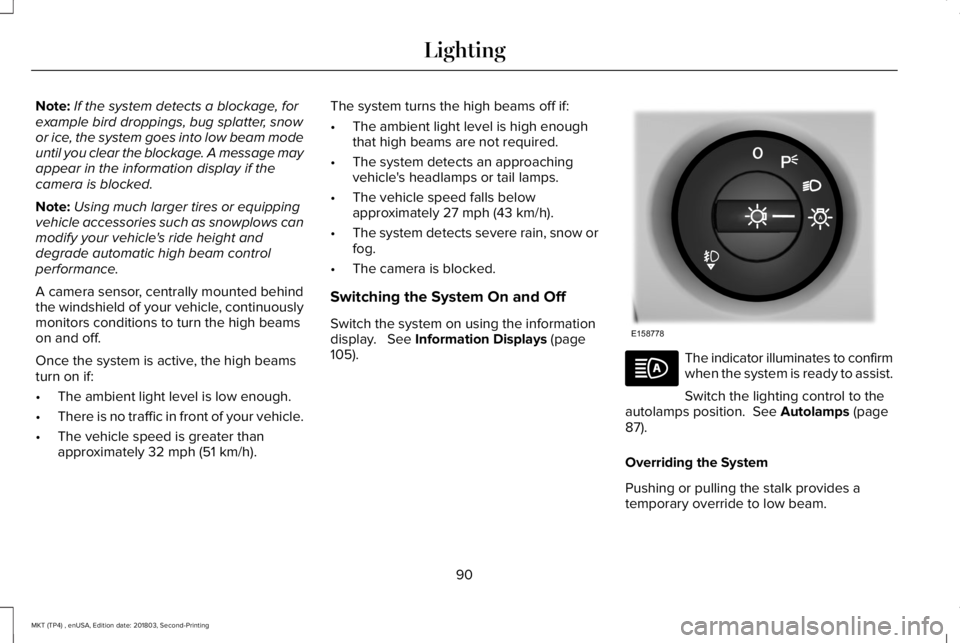
Switch the system on using the informationdisplay. See Information Displays (page105).The indicator illuminates to confirmwhen the system is ready to assist.
Switch the lighting control to theautolamps position. See Autolamps (page87).
Overriding the System
Pushing or pulling the stalk provides atemporary override to low beam.
90
MKT (TP4) , enUSA, Edition date: 201803, Second-Printing
LightingE158778
Page 94 of 575
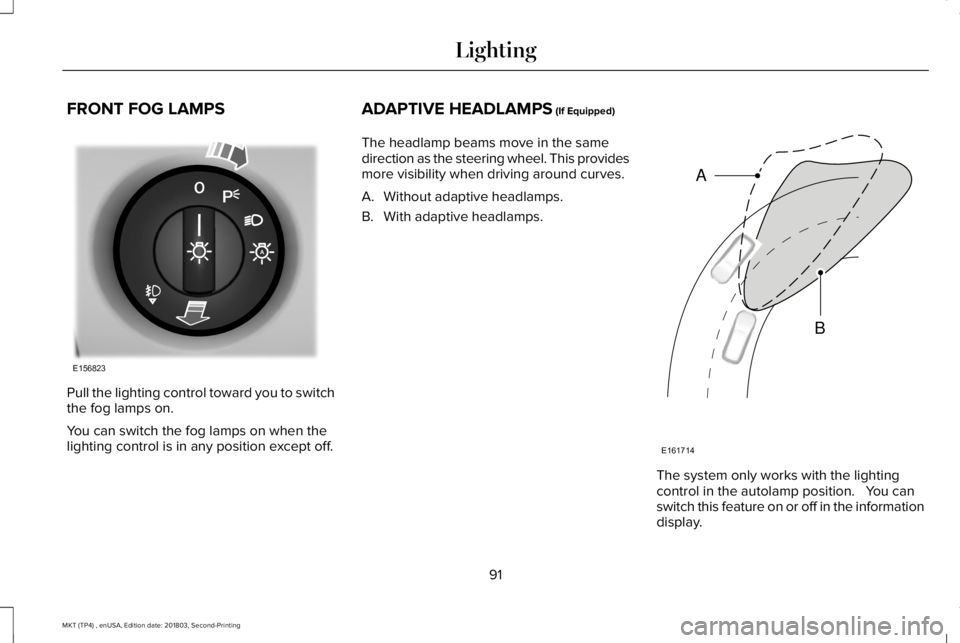
FRONT FOG LAMPS
Pull the lighting control toward you to switchthe fog lamps on.
You can switch the fog lamps on when thelighting control is in any position except off.
ADAPTIVE HEADLAMPS (If Equipped)
The headlamp beams move in the samedirection as the steering wheel. This providesmore visibility when driving around curves.
A. Without adaptive headlamps.
B. With adaptive headlamps.
The system only works with the lightingcontrol in the autolamp position. You canswitch this feature on or off in the informationdisplay.
91
MKT (TP4) , enUSA, Edition date: 201803, Second-Printing
LightingE156823 E161714
B
A
Page 98 of 575
Accessory Delay
The window switches remain operational forseveral minutes when you switch the ignitionoff or until you open either front door.
GLOBAL OPENING AND CLOSING
You can use the remote control to operatethe windows with the ignition off.
Note:You can enable or disable this featurein the information display or see anauthorized dealer. See General Information(page 105).
Note:To operate this feature, accessorydelay must not be active.
Opening the Windows
You can only open the windows for a shorttime after you unlock your vehicle with theremote control. After you unlock your vehicle,press and hold the remote control unlockbutton to open the windows and vent themoonroof. Release the button oncemovement starts. Press the lock or unlockbutton to stop movement.
Closing the Windows
WARNING: When closing thewindows and moonroof, you should verifythey are free of obstructions and makesure that children and pets are not in theproximity of the window openings.
To close the windows and moonroof, pressand hold the remote control lock button.Release the button once movement starts.Press the lock or unlock button to stopmovement.
EXTERIOR MIRRORS
Power Exterior Mirrors
WARNING: Do not adjust the mirrorswhen your vehicle is moving.
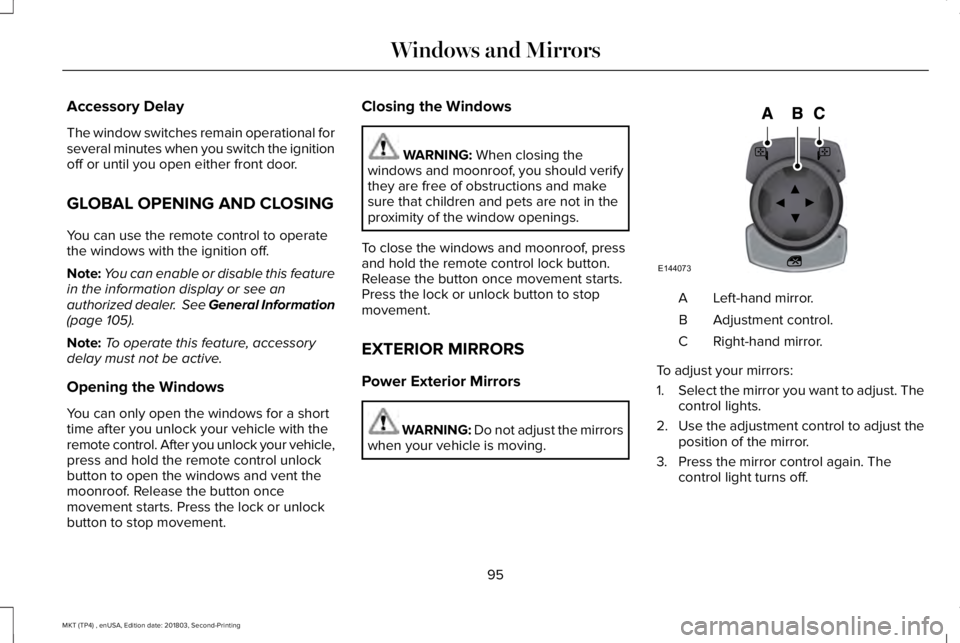
Left-hand mirror.A
Adjustment control.B
Right-hand mirror.C
To adjust your mirrors:
1.Select the mirror you want to adjust. Thecontrol lights.
2.Use the adjustment control to adjust theposition of the mirror.
3. Press the mirror control again. Thecontrol light turns off.
95
MKT (TP4) , enUSA, Edition date: 201803, Second-Printing
Windows and MirrorsE144073
Page 104 of 575
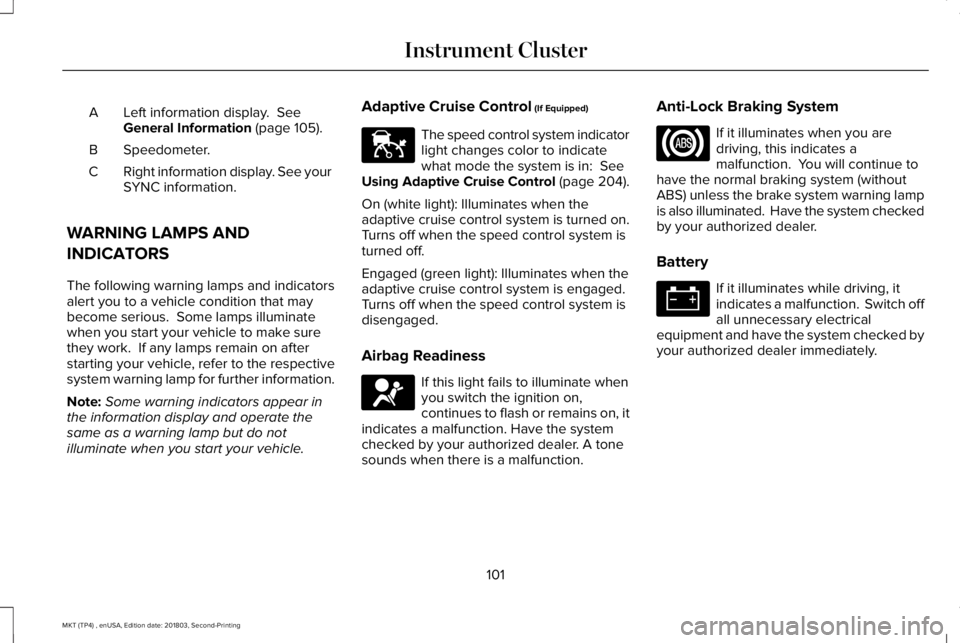
Left information display. SeeGeneral Information (page 105).A
Speedometer.B
Right information display. See yourSYNC information.C
WARNING LAMPS AND
INDICATORS
The following warning lamps and indicatorsalert you to a vehicle condition that maybecome serious. Some lamps illuminatewhen you start your vehicle to make surethey work. If any lamps remain on afterstarting your vehicle, refer to the respectivesystem warning lamp for further information.
Note:Some warning indicators appear inthe information display and operate thesame as a warning lamp but do notilluminate when you start your vehicle.
Adaptive Cruise Control (If Equipped)
The speed control system indicatorlight changes color to indicatewhat mode the system is in: SeeUsing Adaptive Cruise Control (page 204).
On (white light): Illuminates when theadaptive cruise control system is turned on.Turns off when the speed control system isturned off.
Engaged (green light): Illuminates when theadaptive cruise control system is engaged.Turns off when the speed control system isdisengaged.
Airbag Readiness
If this light fails to illuminate whenyou switch the ignition on,continues to flash or remains on, itindicates a malfunction. Have the systemchecked by your authorized dealer. A tonesounds when there is a malfunction.
Anti-Lock Braking System
If it illuminates when you aredriving, this indicates amalfunction. You will continue tohave the normal braking system (withoutABS) unless the brake system warning lampis also illuminated. Have the system checkedby your authorized dealer.
Battery
If it illuminates while driving, itindicates a malfunction. Switch offall unnecessary electricalequipment and have the system checked byyour authorized dealer immediately.
101
MKT (TP4) , enUSA, Edition date: 201803, Second-Printing
Instrument ClusterE144524 E67017
Page 105 of 575
Brake System Warning Light
WARNING: Driving your vehicle withthe warning lamp on is dangerous. Asignificant decrease in brakingperformance may occur. It may take youlonger to stop your vehicle. Have yourvehicle checked as soon as possible.Driving extended distances with theparking brake engaged can cause brakefailure and the risk of personal injury.
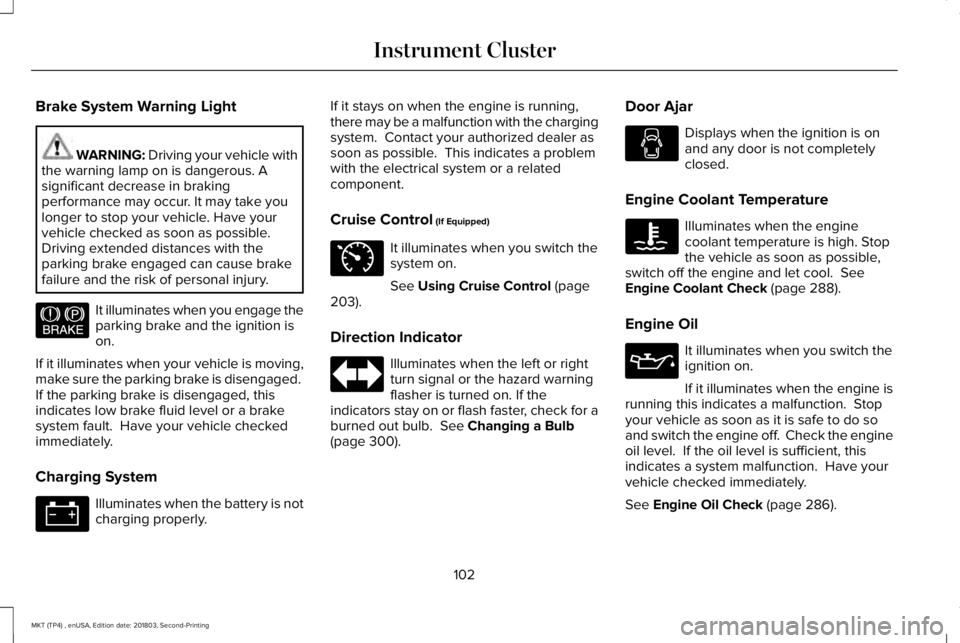
It illuminates when you engage theparking brake and the ignition ison.
If it illuminates when your vehicle is moving,make sure the parking brake is disengaged. If the parking brake is disengaged, thisindicates low brake fluid level or a brakesystem fault. Have your vehicle checkedimmediately.
Charging System
Illuminates when the battery is notcharging properly.
If it stays on when the engine is running,there may be a malfunction with the chargingsystem. Contact your authorized dealer assoon as possible. This indicates a problemwith the electrical system or a relatedcomponent.
Cruise Control (If Equipped)
It illuminates when you switch thesystem on.
See Using Cruise Control (page203).
Direction Indicator
Illuminates when the left or rightturn signal or the hazard warningflasher is turned on. If theindicators stay on or flash faster, check for aburned out bulb. See Changing a Bulb(page 300).
Door Ajar
Displays when the ignition is onand any door is not completelyclosed.
Engine Coolant Temperature
Illuminates when the enginecoolant temperature is high. Stopthe vehicle as soon as possible,switch off the engine and let cool. SeeEngine Coolant Check (page 288).
Engine Oil
It illuminates when you switch theignition on.
If it illuminates when the engine isrunning this indicates a malfunction. Stopyour vehicle as soon as it is safe to do soand switch the engine off. Check the engineoil level. If the oil level is sufficient, thisindicates a system malfunction. Have yourvehicle checked immediately.
See Engine Oil Check (page 286).
102
MKT (TP4) , enUSA, Edition date: 201803, Second-Printing
Instrument ClusterE144522 E71340
Page 106 of 575
Fasten Seatbelt Warning Lamp
It illuminates and a chime soundsuntil you fasten the seatbelts.
Front Fog Lamps
Lights when you switch the frontfog lamps on.
Head Up Display (If Equipped)
A red beam of lights will illuminateon the windshield in certaininstances when using adaptivecruise control and/or the collision warningsystem. It will also illuminate momentarilywhen you start your vehicle to make sure thedisplay works.
High Beam
It will illuminate when you switchthe high beam headlamps on. Itwill flash when you use theheadlamp flasher.
Liftgate Ajar
Illuminates when you do notcompletely close the liftgate.
Low Fuel Level
It will illuminate when the fuel levelis low or the fuel tank is nearlyempty. Refuel as soon as possible.
Low Tire Pressure Warning
It illuminates if the tire pressure inone or more tires is below thecorrect tire pressure.
It also illuminates momentarily when youswitch the ignition on to confirm the lamp isfunctional. If it does not illuminate when youswitch the ignition on, or begins to flash atany time, have the system checked by yourauthorized dealer.
Low Washer Fluid
It will illuminate when thewindshield washer fluid is low.
Parking Lamps
It will illuminate when you switchthe parking lamps on.
Powertrain Malfunction/ReducedPower
Illuminates when a powertrain oran AWD fault has been detected. Contact your authorized dealer assoon as possible.
Service Engine Soon
If it illuminates when the engine isrunning this indicates amalfunction. The On BoardDiagnostics system has detected amalfunction of the vehicle emission controlsystem.
If it flashes, engine misfire may be occurring. Increased exhaust gas temperatures coulddamage the catalytic converter or othervehicle components. Drive in a moderatefashion (avoid heavy acceleration anddeceleration) and have your vehicleimmediately serviced.
103
MKT (TP4) , enUSA, Edition date: 201803, Second-Printing
Instrument ClusterE71880 E156133 E162453 E132353
Page 108 of 575
GENERAL INFORMATION
WARNING: Driving while distractedcan result in loss of vehicle control, crashand injury. We strongly recommend thatyou use extreme caution when using anydevice that may take your focus off theroad. Your primary responsibility is the safeoperation of your vehicle. We recommendagainst the use of any hand-held devicewhile driving and encourage the use ofvoice-operated systems when possible.Make sure you are aware of all applicablelocal laws that may affect the use ofelectronic devices while driving.
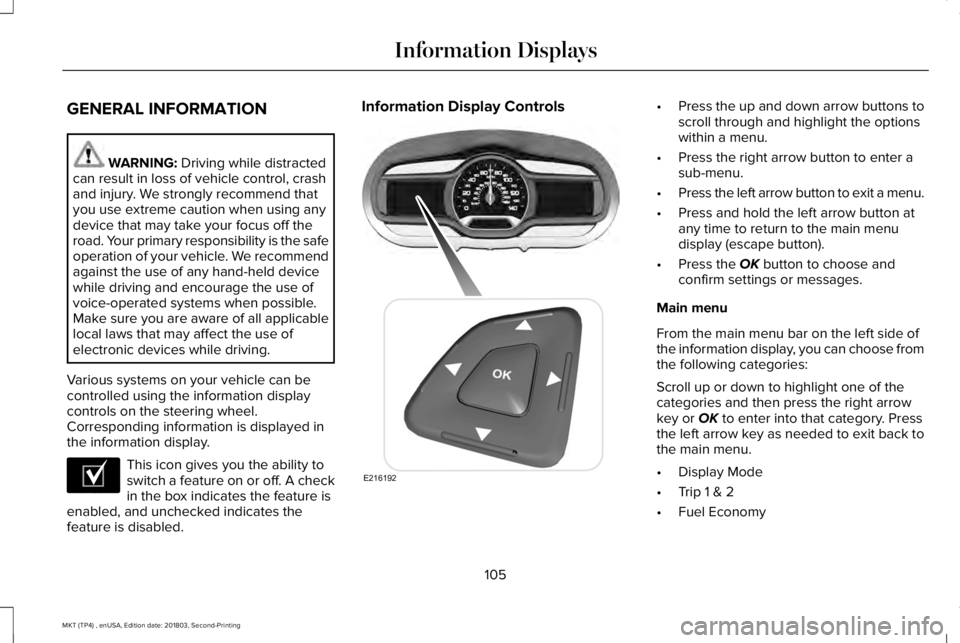
Various systems on your vehicle can becontrolled using the information displaycontrols on the steering wheel.Corresponding information is displayed inthe information display.
This icon gives you the ability toswitch a feature on or off. A checkin the box indicates the feature isenabled, and unchecked indicates thefeature is disabled.
Information Display Controls•Press the up and down arrow buttons toscroll through and highlight the optionswithin a menu.
•Press the right arrow button to enter asub-menu.
•Press the left arrow button to exit a menu.
•Press and hold the left arrow button atany time to return to the main menudisplay (escape button).
•Press the OK button to choose andconfirm settings or messages.
Main menu
From the main menu bar on the left side ofthe information display, you can choose fromthe following categories:
Scroll up or down to highlight one of thecategories and then press the right arrowkey or OK to enter into that category. Pressthe left arrow key as needed to exit back tothe main menu.
•Display Mode
•Trip 1 & 2
•Fuel Economy
105
MKT (TP4) , enUSA, Edition date: 201803, Second-Printing
Information DisplaysE204495 E216192
Page 109 of 575
•Driver Assist
•Settings
Display Mode
Use the up or down arrow buttons to choosebetween the following display options.
Display Mode
XXX mi (km) to empty, Fuel gauge and Total odometerOption 1
Round tachometer, Fuel gauge and Total odometerOption 2
Round tachometer, Engine coolant temp gauge, Fuel gauge and Total odometerOption 3
Digital speedometer, Fuel gauge and Total odometerOption 4
Regardless of display mode chosen, when you use the SelectShift Automatic™ transmission (SST), the cluster will change to the roundtachometer if not already selected.
XXX mi (km) to empty
Shows approximate fuel level before the fueltank reaches empty. The value is dynamicand can change (raise or lower) dependingon driving style.
Fuel gauge
Switch the ignition on. The fuel gauge willindicate approximately how much fuel is inthe fuel tank. The arrow next to the fuelpump symbol shows the fuel filler door sideof your vehicle. When the fuel level becomeslow, the level indicator will change to amber.When the fuel level becomes critically low,the level indicator will change to red.
Note:The fuel gauge level may vary slightlywhen your vehicle is moving or when drivingon a slope.
Note:When a MyKey® is in use, low fuelwarnings will display earlier.
106
MKT (TP4) , enUSA, Edition date: 201803, Second-Printing
Information Displays