climate control LINCOLN MKZ 2013 User Guide
[x] Cancel search | Manufacturer: LINCOLN, Model Year: 2013, Model line: MKZ, Model: LINCOLN MKZ 2013Pages: 474, PDF Size: 3.79 MB
Page 235 of 474
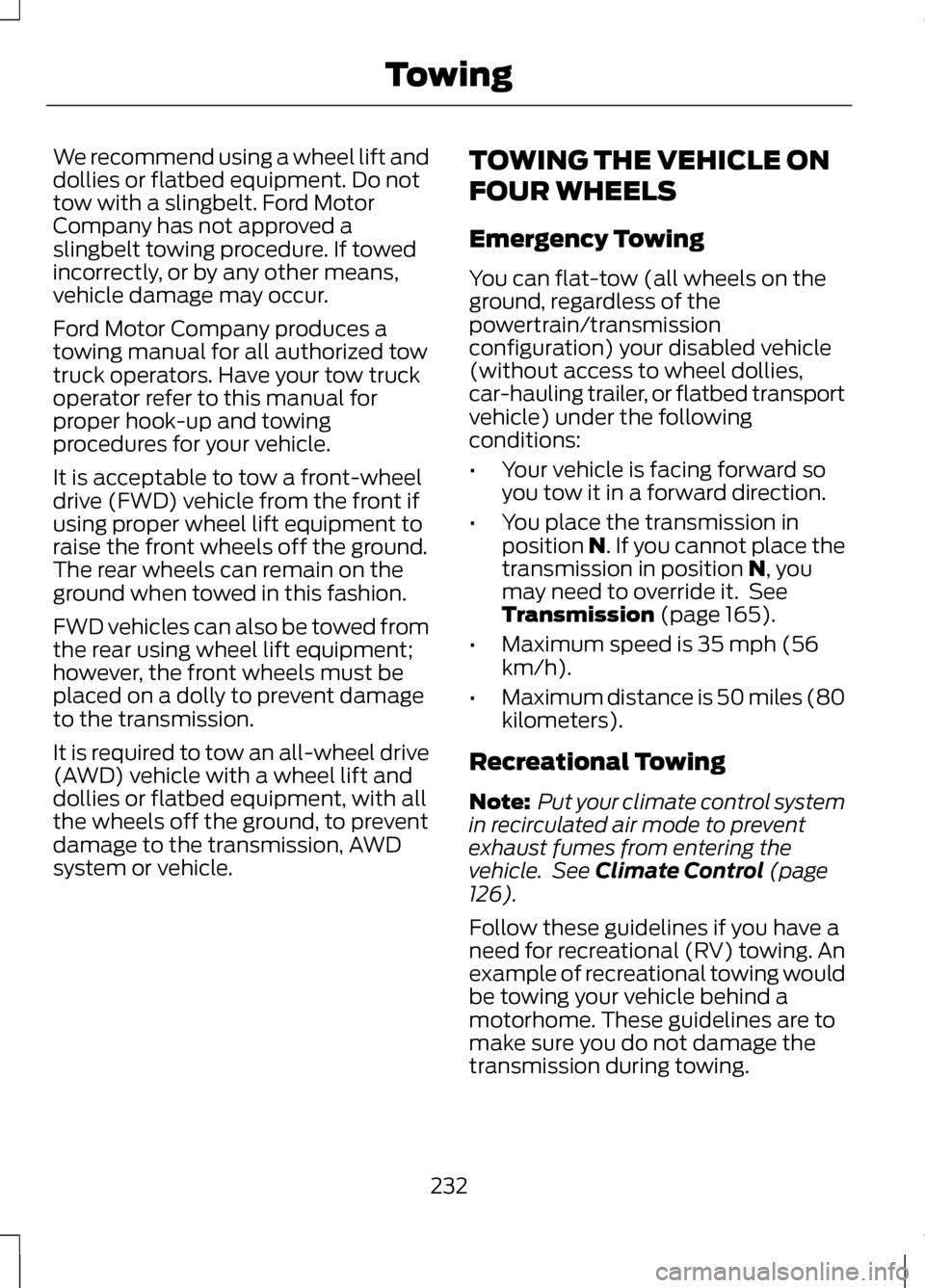
We recommend using a wheel lift and
dollies or flatbed equipment. Do not
tow with a slingbelt. Ford Motor
Company has not approved a
slingbelt towing procedure. If towed
incorrectly, or by any other means,
vehicle damage may occur.
Ford Motor Company produces a
towing manual for all authorized tow
truck operators. Have your tow truck
operator refer to this manual for
proper hook-up and towing
procedures for your vehicle.
It is acceptable to tow a front-wheel
drive (FWD) vehicle from the front if
using proper wheel lift equipment to
raise the front wheels off the ground.
The rear wheels can remain on the
ground when towed in this fashion.
FWD vehicles can also be towed from
the rear using wheel lift equipment;
however, the front wheels must be
placed on a dolly to prevent damage
to the transmission.
It is required to tow an all-wheel drive
(AWD) vehicle with a wheel lift and
dollies or flatbed equipment, with all
the wheels off the ground, to prevent
damage to the transmission, AWD
system or vehicle.
TOWING THE VEHICLE ON
FOUR WHEELS
Emergency Towing
You can flat-tow (all wheels on the
ground, regardless of the
powertrain/transmission
configuration) your disabled vehicle
(without access to wheel dollies,
car-hauling trailer, or flatbed transport
vehicle) under the following
conditions:
•
Your vehicle is facing forward so
you tow it in a forward direction.
• You place the transmission in
position N. If you cannot place the
transmission in position N, you
may need to override it. See
Transmission
(page 165).
• Maximum speed is 35 mph (56
km/h).
• Maximum distance is 50 miles (80
kilometers).
Recreational Towing
Note: Put your climate control system
in recirculated air mode to prevent
exhaust fumes from entering the
vehicle. See
Climate Control (page
126).
Follow these guidelines if you have a
need for recreational (RV) towing. An
example of recreational towing would
be towing your vehicle behind a
motorhome. These guidelines are to
make sure you do not damage the
transmission during towing.
232
Towing
Page 261 of 474
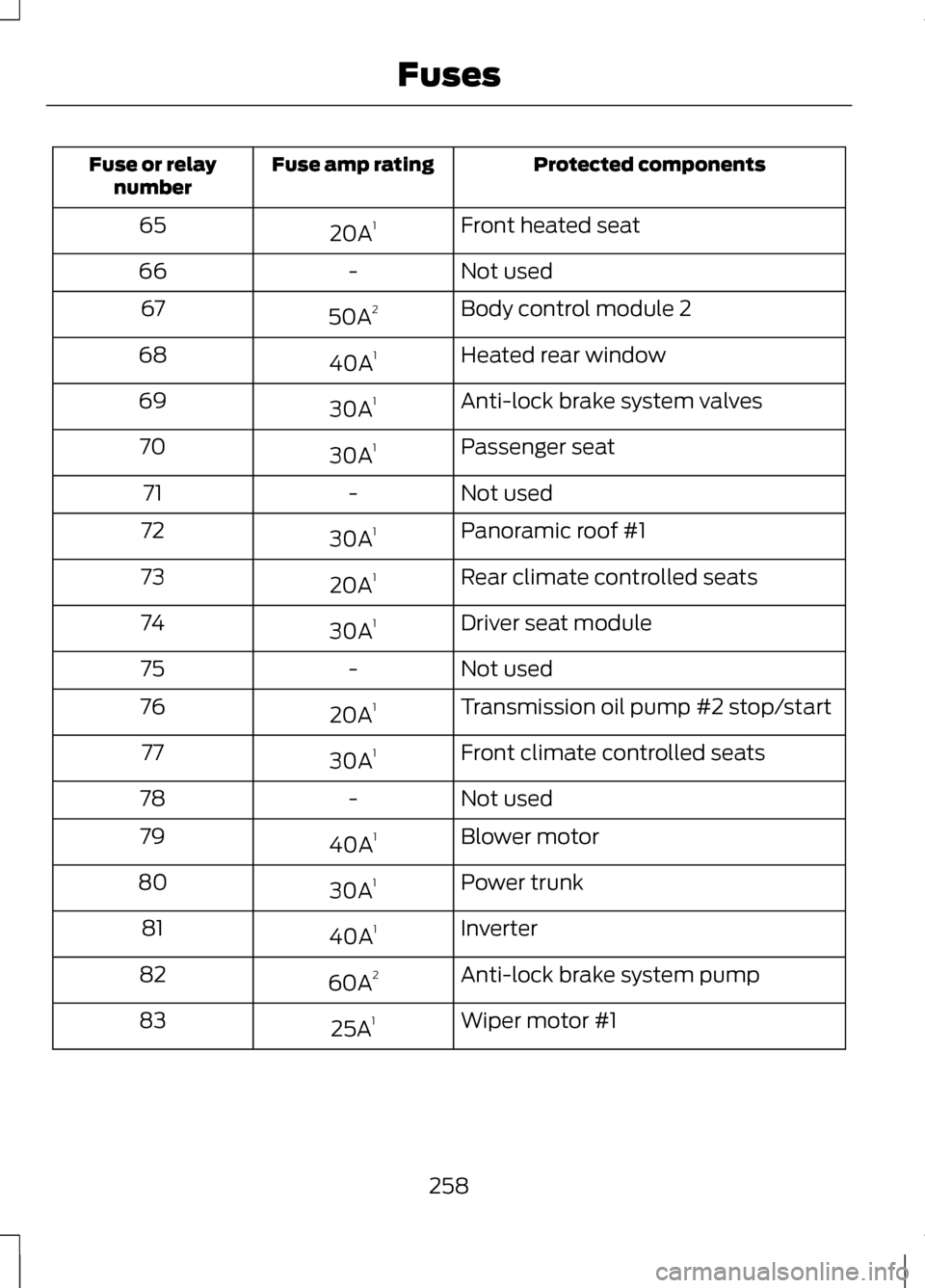
Protected components
Fuse amp rating
Fuse or relay
number
Front heated seat
20A 1
65
Not used
-
66
Body control module 2
50A 2
67
Heated rear window
40A 1
68
Anti-lock brake system valves
30A 1
69
Passenger seat
30A 1
70
Not used
-
71
Panoramic roof #1
30A 1
72
Rear climate controlled seats
20A 1
73
Driver seat module
30A 1
74
Not used
-
75
Transmission oil pump #2 stop/start
20A 1
76
Front climate controlled seats
30A 1
77
Not used
-
78
Blower motor
40A 1
79
Power trunk
30A 1
80
Inverter
40A 1
81
Anti-lock brake system pump
60A 2
82
Wiper motor #1
25A 1
83
258
Fuses
Page 263 of 474
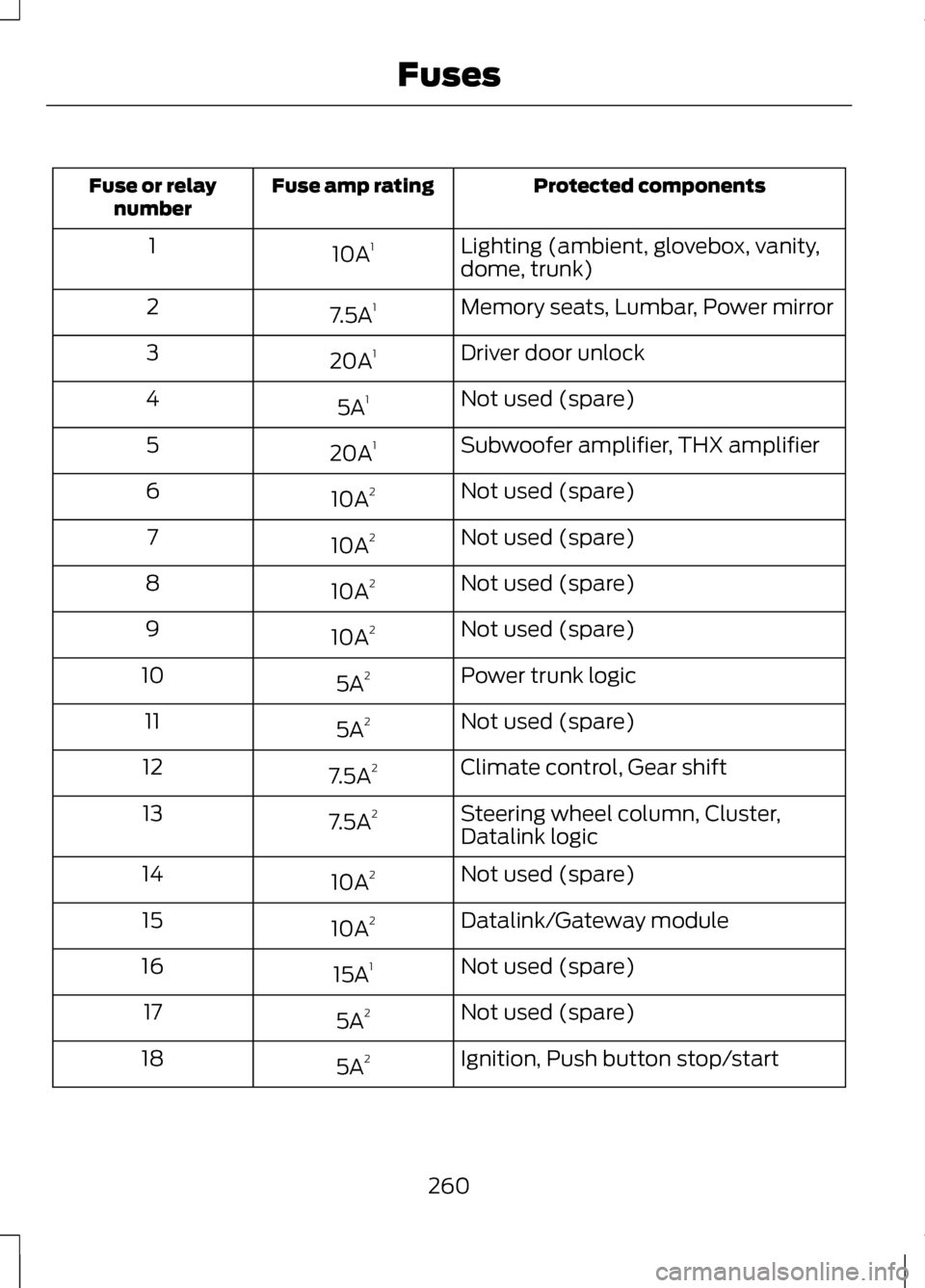
Protected components
Fuse amp rating
Fuse or relay
number
Lighting (ambient, glovebox, vanity,
dome, trunk)
10A
1
1
Memory seats, Lumbar, Power mirror
7.5A 1
2
Driver door unlock
20A 1
3
Not used (spare)
5A 1
4
Subwoofer amplifier, THX amplifier
20A 1
5
Not used (spare)
10A 2
6
Not used (spare)
10A 2
7
Not used (spare)
10A 2
8
Not used (spare)
10A 2
9
Power trunk logic
5A 2
10
Not used (spare)
5A 2
11
Climate control, Gear shift
7.5A 2
12
Steering wheel column, Cluster,
Datalink logic
7.5A
2
13
Not used (spare)
10A 2
14
Datalink/Gateway module
10A 2
15
Not used (spare)
15A 1
16
Not used (spare)
5A 2
17
Ignition, Push button stop/start
5A 2
18
260
Fuses
Page 264 of 474
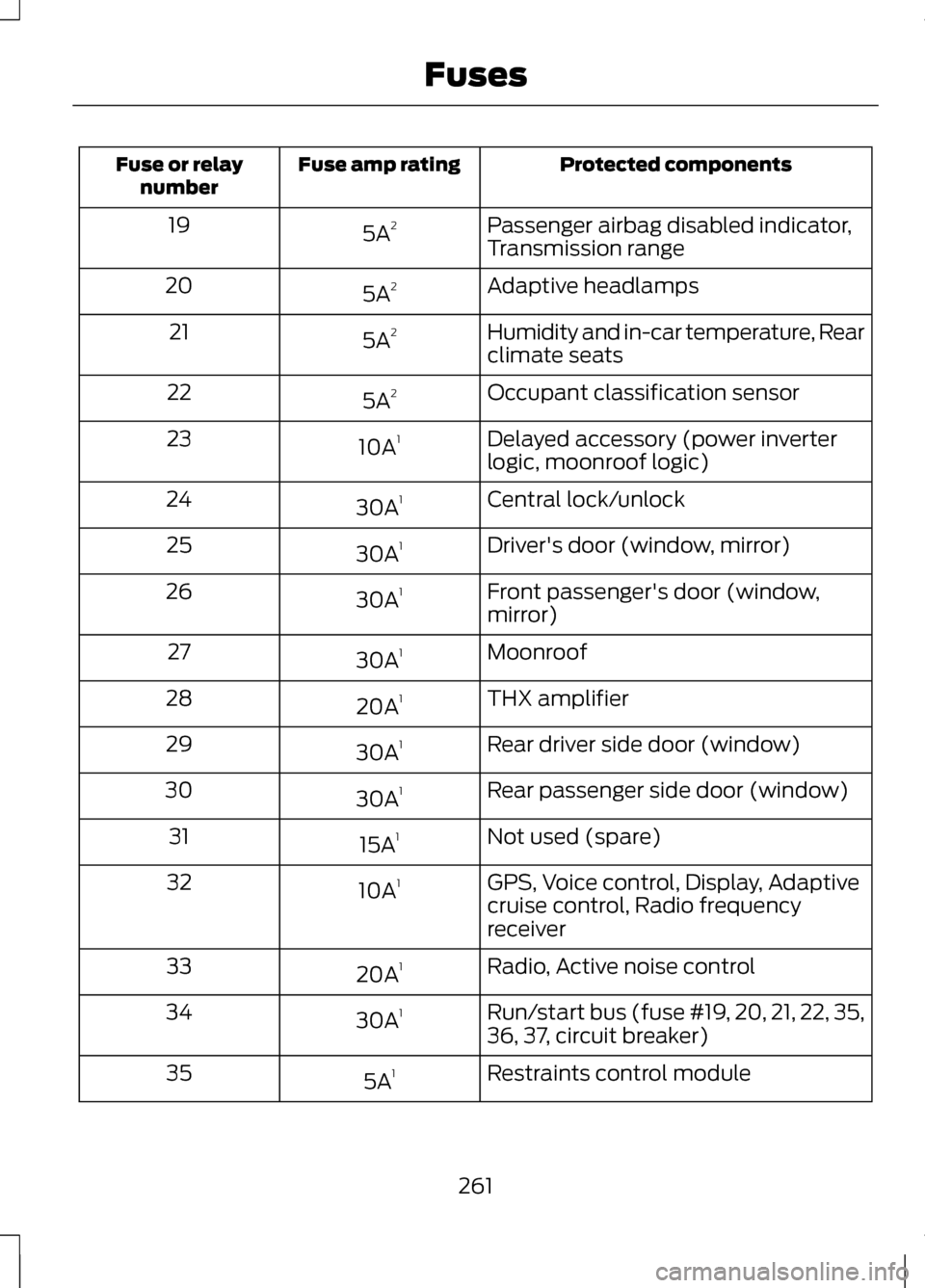
Protected components
Fuse amp rating
Fuse or relay
number
Passenger airbag disabled indicator,
Transmission range
5A
2
19
Adaptive headlamps
5A 2
20
Humidity and in-car temperature, Rear
climate seats
5A
2
21
Occupant classification sensor
5A 2
22
Delayed accessory (power inverter
logic, moonroof logic)
10A
1
23
Central lock/unlock
30A 1
24
Driver's door (window, mirror)
30A 1
25
Front passenger's door (window,
mirror)
30A
1
26
Moonroof
30A 1
27
THX amplifier
20A 1
28
Rear driver side door (window)
30A 1
29
Rear passenger side door (window)
30A 1
30
Not used (spare)
15A 1
31
GPS, Voice control, Display, Adaptive
cruise control, Radio frequency
receiver
10A
1
32
Radio, Active noise control
20A 1
33
Run/start bus (fuse #19, 20, 21, 22, 35,
36, 37, circuit breaker)
30A
1
34
Restraints control module
5A 1
35
261
Fuses
Page 308 of 474
Treadwear
The treadwear grade is a comparative
rating based on the wear rate of the
tire when tested under controlled
conditions on a specified government
test course. For example, a tire graded
150 would wear one and one-half (1
½) times as well on the government
course as a tire graded 100. The
relative performance of tires depends
upon the actual conditions of their
use, however, and may depart
significantly from the norm due to
variations in driving habits, service
practices, and differences in road
characteristics and climate.
Traction AA A B C
WARNING
The traction grade assigned to
this tire is based on
straight-ahead braking traction tests,
and does not include acceleration,
cornering, hydroplaning or peak
traction characteristics. The traction grades, from highest to
lowest are AA, A, B, and C. The grades
represent the tire
’s ability to stop on
wet pavement as measured under
controlled conditions on specified
government test surfaces of asphalt
and concrete. A tire marked C may
have poor traction performance. Temperature A B C WARNING
The temperature grade for this
tire is established for a tire that
is properly inflated and not
overloaded. Excessive speed,
underinflation, or excessive loading,
either separately or in combination,
can cause heat buildup and possible
tire failure. The temperature grades are A (the
highest), B and C, representing the
tire
’s resistance to the generation of
heat and its ability to dissipate heat
when tested under controlled
conditions on a specified indoor
laboratory test wheel. Sustained high
temperature can cause the material
of the tire to degenerate and reduce
tire life, and excessive temperature
can lead to sudden tire failure. The
grade C corresponds to a level of
performance which all passenger car
tires must meet under the Federal
Motor Vehicle Safety Standard No.
139. Grades B and A represent higher
levels of performance on the
laboratory test wheel than the
minimum required by law.
305
Wheels and Tires
Page 340 of 474
GENERAL INFORMATION
WARNING
Driving while distracted can
result in loss of vehicle control,
accident and injury. Ford strongly
recommends that drivers use extreme
caution when using any device or
feature that may take their focus off
the road. Your primary responsibility
is the safe operation of the vehicle.
We recommend against the use of any
handheld device while driving,
encourage the use of voice-operated
systems when possible and that you
become aware of applicable state
and local laws that may affect use of
electronic devices while driving. Note:
Some features are not available
while the vehicle is moving.
Note: Your system is equipped with a
feature that allows you to access and
control audio features for 30 minutes
after the ignition has been turned off
(as long as no doors are opened).
This system uses a four-corner
strategy to provide quick access to
vehicle features and settings. The
comprehensive touchscreen provides
easy interaction with your cellular
phone, multimedia, climate control
and navigation system. The corners
display any active modes within those
menus, such as your phone being
connected or the climate
temperature. SETTINGS Press to select any of the following:
•
Clock
• Display
• Sound
• Vehicle
• Settings
• Help INFORMATION
Press to select any of the following:
• Services
• Travel Link
• Alerts
• Calendar
• Apps
PHONE
Press to select any of the following:
• Phone
• Quick Dial
• Phonebook
• History
• Messaging
• Settings
NAVIGATION
Press to select any of the following:
• My Home
• Favorites
• Previous Destinations
• Point of Interest
• Emergency
• Previous Starting Point
• Latitude/Longitude
337
MyLincoln Touch
™E142607 E142608
Page 341 of 474
•
Street Address
• Intersection
• City Center
• Map
• Edit Route Cancel Route
• Freeway Entrance/Exit
ENTERTAINMENT
Press to select any of the following:
• AM
• FM
• SIRIUS
• CD
• USB
• BT Stereo
• SD Card
• A/V In
CLIMATE
Press to select any of the following:
• Driver Settings
• Recirculated Air
• Auto
• Dual
• Passenger Settings
• A/C
• Defrost HOME Press to access your home screen.
Depending on your vehicle
’s option
package and software, your screens
may vary in appearance from the
screens shown in this section. Your
features may also be limited
depending on your market. Check with
your authorized dealer for availability.
Using the Touch-Sensitive
Controls on Your System
To turn a feature on and off, just touch
the graphic with your finger. To get the
best performance from the
touch-sensitive controls:
• Make sure your hands are clean
and dry.
• Since the touchscreen operates
based on the touch of a finger, you
may have trouble using it if you are
wearing gloves.
• Use your bare finger to touch the
center of a touch-control graphic.
Touching off-center of the graphic
may cause a nearby control to turn
on or off.
• Do not press hard on the controls.
They are sensitive to light touch.
• Metal and other conductive
material should be kept away from
the surface of the touchscreen as
this may cause electronic
interference (i.e. control
activation).
338
MyLincoln Touch
™E142613
Page 342 of 474
Depending on your vehicle and option
package, you may also have these
controls on your bezel:
•
Power: Turn the media (or climate
features) on or off.
• VOL: Increase or decrease the
volume.
• Fan: Increase or decrease the fan
speed.
• Seek and Tune buttons: Use as you
normally would in media modes.
• Eject: Eject a CD.
• SOURCE: Touch the word
repeatedly to see all available
media modes. The screen does not
change, but you see the media
change in the lower left status bar.
• SOUND: Touch the word to access
the Sound menu where you can
make adjustments to settings such
as: Bass, Midrange, Treble, Balance
and Fade, THX Deep Note Demo
(if equipped), DSP (if equipped),
Occupancy Mode (if equipped)
and Speed Compensated Volume.
• Hazard flasher: Press the button
to turn the hazard flashers on or
off.
Cleaning the Touchscreen
Display
Clean the display with a clean, soft
cloth such as one used for cleaning
glasses. If dirt or finger prints are still
visible, apply a small amount of
alcohol to the cloth. Do not pour or
spray alcohol onto the display. Do not
use detergent or any type of solvent
to clean the display. Support
The SYNC support team is available
to help you with any questions you are
not able to answer on your own.
Monday-Saturday, 8:30am-8:00pm.
In the United States, call:
1-888-270-1055
In Canada, call: 1-800-565-3673
Times are subject to change due to
holidays.
SYNC Owner Account
Why do I need a SYNC owner
account?
•
Required to activate Vehicle
Health Report and to view the
reports online.
• Required to activate the
subscription-based SYNC Services
and to personalize your Saved
Points and Favorites.
• Essential for keeping up with the
latest software downloads
available for SYNC.
• Access to customer support for
any questions you may have.
339
MyLincoln Touch
™
Page 346 of 474
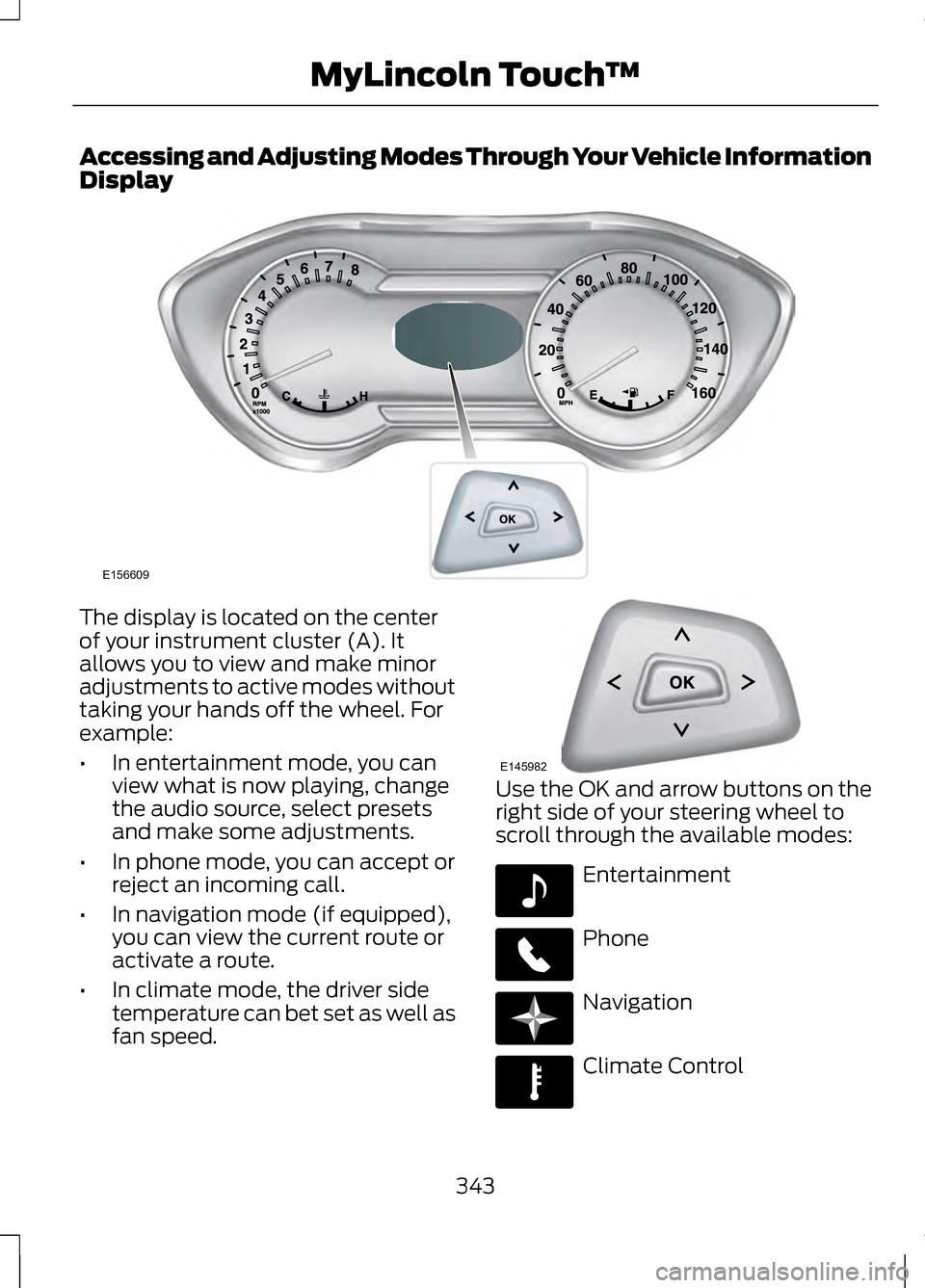
Accessing and Adjusting Modes Through Your Vehicle Information
Display
The display is located on the center
of your instrument cluster (A). It
allows you to view and make minor
adjustments to active modes without
taking your hands off the wheel. For
example:
•
In entertainment mode, you can
view what is now playing, change
the audio source, select presets
and make some adjustments.
• In phone mode, you can accept or
reject an incoming call.
• In navigation mode (if equipped),
you can view the current route or
activate a route.
• In climate mode, the driver side
temperature can bet set as well as
fan speed. Use the OK and arrow buttons on the
right side of your steering wheel to
scroll through the available modes:
Entertainment
Phone
Navigation
Climate Control
343
MyLincoln Touch
™E156609 E145982 E142611 E142609 E142610 E142612
Page 349 of 474
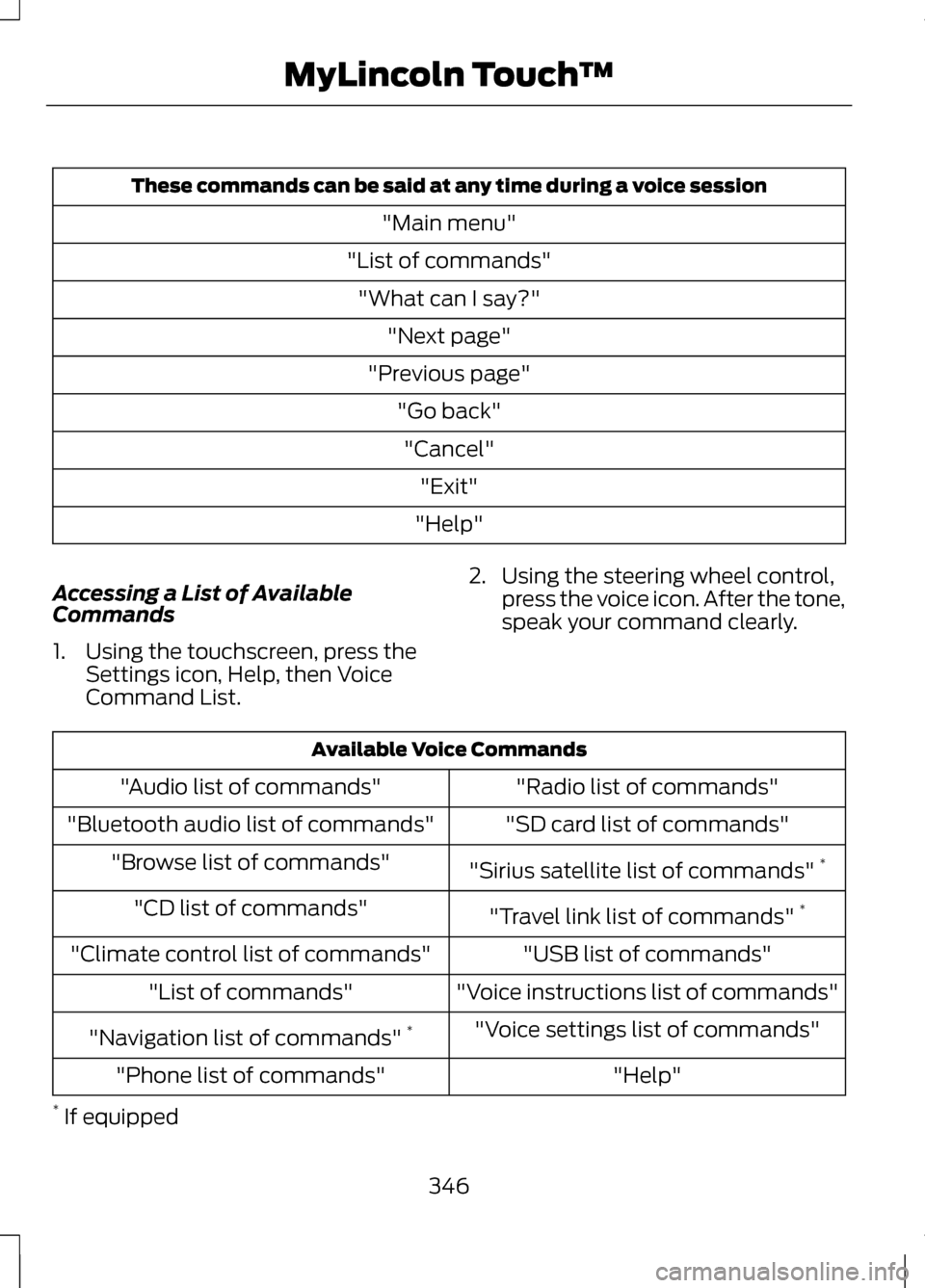
These commands can be said at any time during a voice session
"Main menu"
"List of commands" "What can I say?" "Next page"
"Previous page" "Go back""Cancel" "Exit"
"Help"
Accessing a List of Available
Commands
1. Using the touchscreen, press the Settings icon, Help, then Voice
Command List. 2. Using the steering wheel control,
press the voice icon. After the tone,
speak your command clearly. Available Voice Commands
"Radio list of commands"
"Audio list of commands"
"SD card list of commands"
"Bluetooth audio list of commands"
"Sirius satellite list of commands" *
"Browse list of commands"
"Travel link list of commands" *
"CD list of commands"
"USB list of commands"
"Climate control list of commands"
"Voice instructions list of commands"
"List of commands"
"Voice settings list of commands"
"Navigation list of commands" *
"Help"
"Phone list of commands"
* If equipped
346
MyLincoln Touch
™