engine LINCOLN MKZ 2013 Owner's Manual
[x] Cancel search | Manufacturer: LINCOLN, Model Year: 2013, Model line: MKZ, Model: LINCOLN MKZ 2013Pages: 474, PDF Size: 3.79 MB
Page 114 of 474
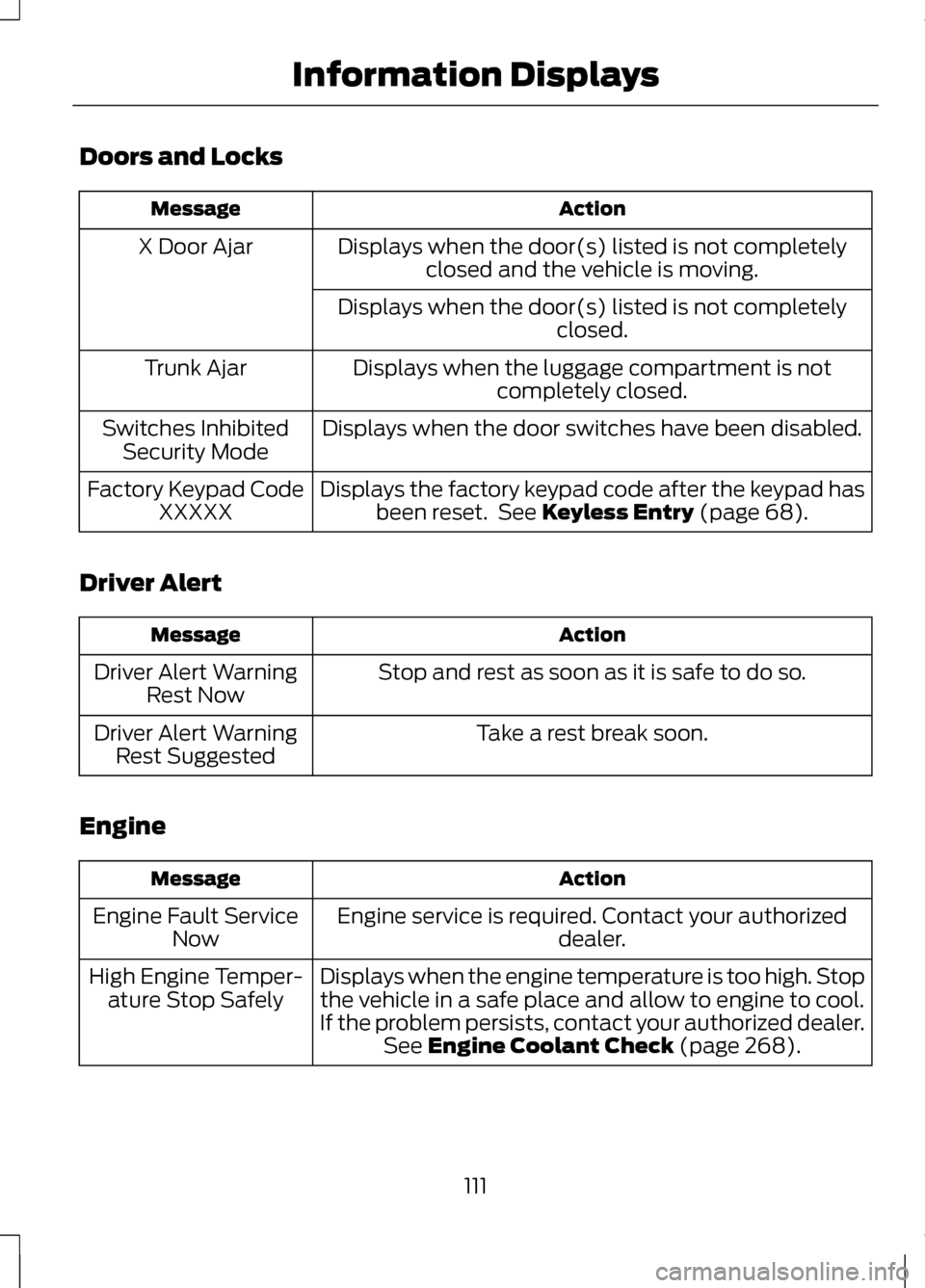
Doors and Locks
Action
Message
Displays when the door(s) listed is not completelyclosed and the vehicle is moving.
X Door Ajar
Displays when the door(s) listed is not completely closed.
Displays when the luggage compartment is not completely closed.
Trunk Ajar
Displays when the door switches have been disabled.
Switches Inhibited
Security Mode
Displays the factory keypad code after the keypad hasbeen reset. See Keyless Entry (page 68).
Factory Keypad Code
XXXXX
Driver Alert Action
Message
Stop and rest as soon as it is safe to do so.
Driver Alert Warning
Rest Now
Take a rest break soon.
Driver Alert Warning
Rest Suggested
Engine Action
Message
Engine service is required. Contact your authorized dealer.
Engine Fault Service
Now
Displays when the engine temperature is too high. Stopthe vehicle in a safe place and allow to engine to cool.
If the problem persists, contact your authorized dealer. See
Engine Coolant Check (page 268).
High Engine Temper-
ature Stop Safely
111
Information Displays
Page 115 of 474
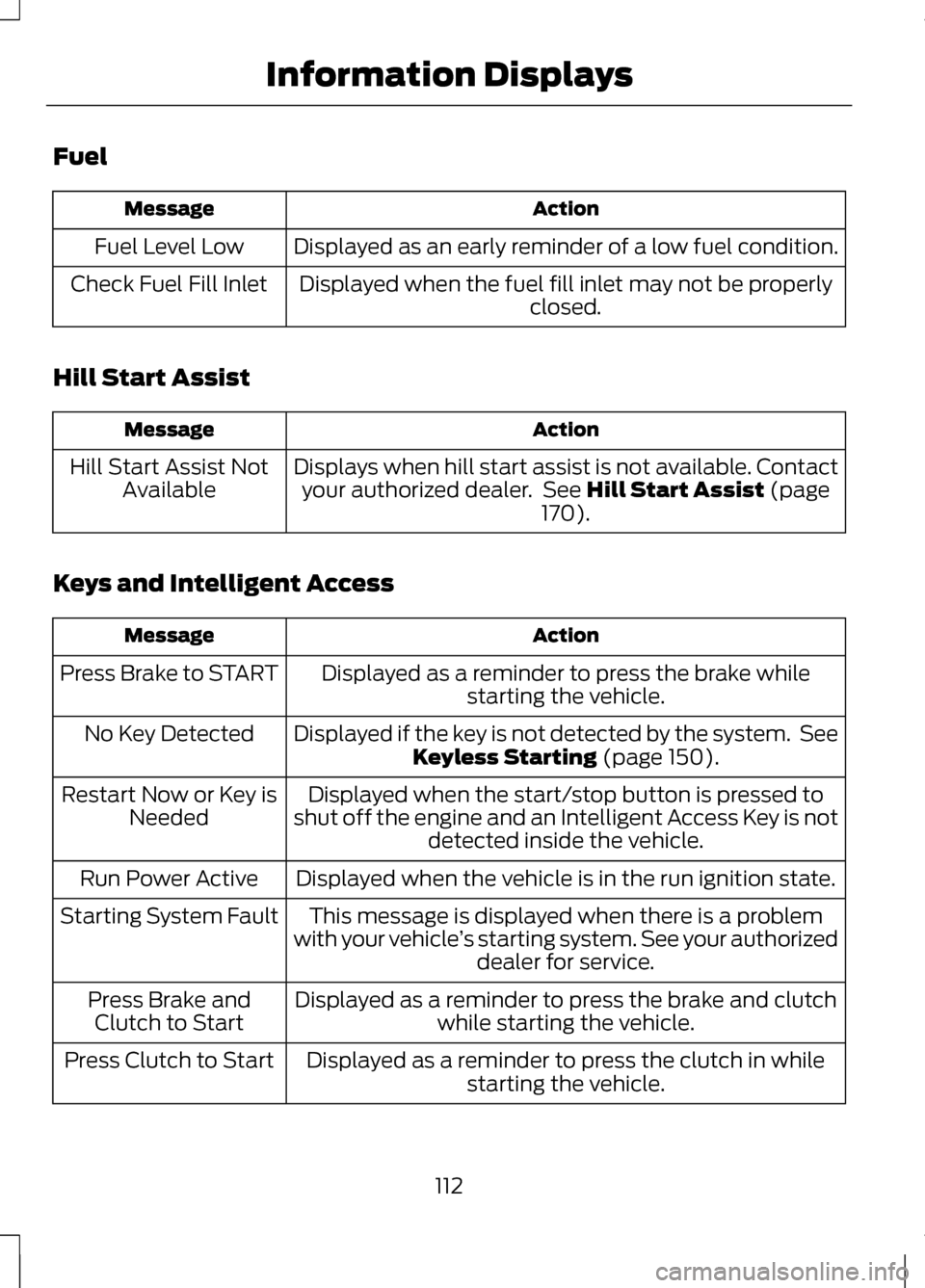
Fuel
Action
Message
Displayed as an early reminder of a low fuel condition.
Fuel Level Low
Displayed when the fuel fill inlet may not be properly closed.
Check Fuel Fill Inlet
Hill Start Assist Action
Message
Displays when hill start assist is not available. Contactyour authorized dealer. See Hill Start Assist (page
170).
Hill Start Assist Not
Available
Keys and Intelligent Access Action
Message
Displayed as a reminder to press the brake whilestarting the vehicle.
Press Brake to START
Displayed if the key is not detected by the system. SeeKeyless Starting
(page 150).
No Key Detected
Displayed when the start/stop button is pressed to
shut off the engine and an Intelligent Access Key is not detected inside the vehicle.
Restart Now or Key is
Needed
Displayed when the vehicle is in the run ignition state.
Run Power Active
This message is displayed when there is a problem
with your vehicle ’s starting system. See your authorized
dealer for service.
Starting System Fault
Displayed as a reminder to press the brake and clutchwhile starting the vehicle.
Press Brake and
Clutch to Start
Displayed as a reminder to press the clutch in whilestarting the vehicle.
Press Clutch to Start
112
Information Displays
Page 116 of 474
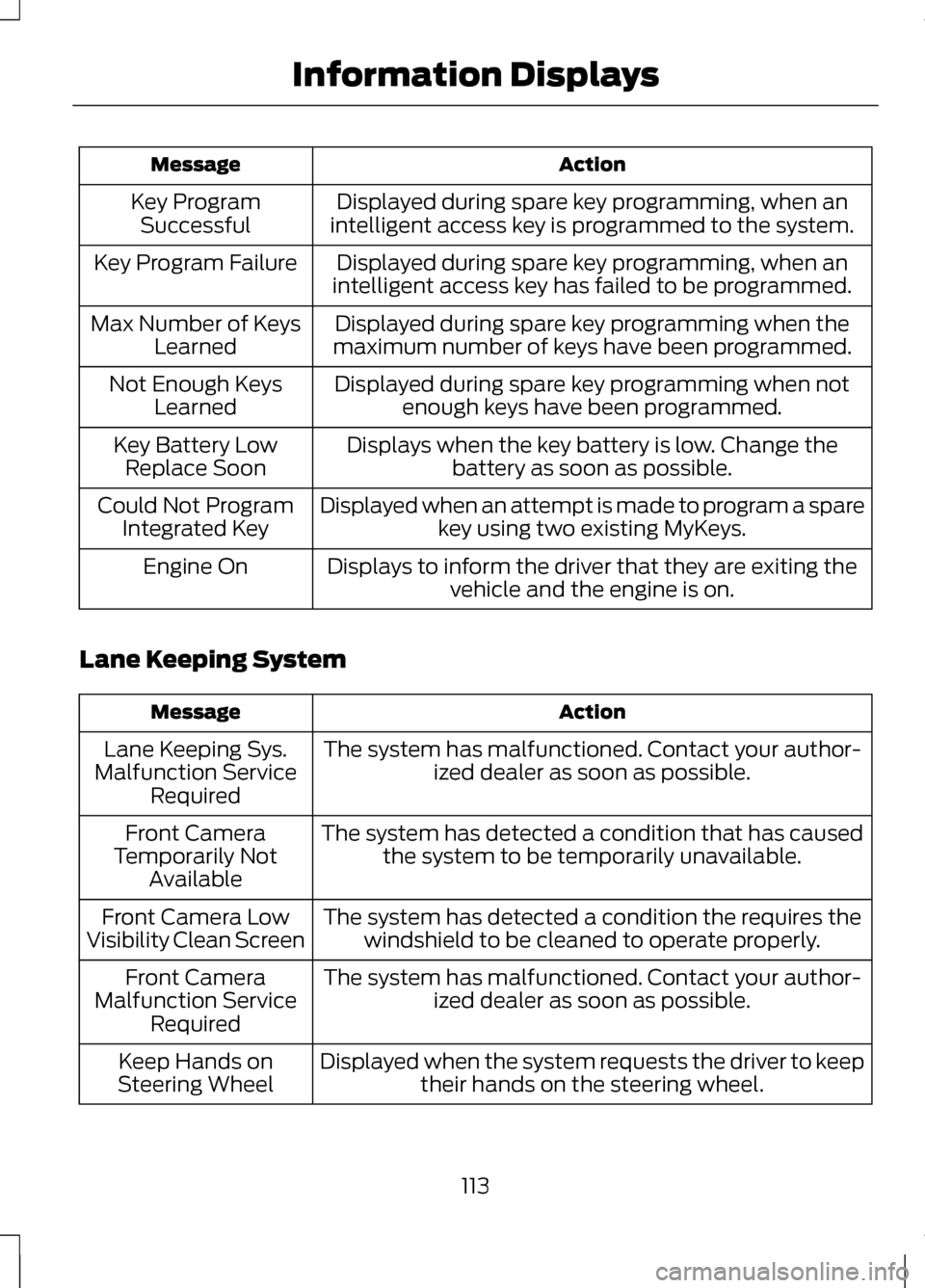
Action
Message
Displayed during spare key programming, when an
intelligent access key is programmed to the system.
Key Program
Successful
Displayed during spare key programming, when an
intelligent access key has failed to be programmed.
Key Program Failure
Displayed during spare key programming when the
maximum number of keys have been programmed.
Max Number of Keys
Learned
Displayed during spare key programming when notenough keys have been programmed.
Not Enough Keys
Learned
Displays when the key battery is low. Change thebattery as soon as possible.
Key Battery Low
Replace Soon
Displayed when an attempt is made to program a sparekey using two existing MyKeys.
Could Not Program
Integrated Key
Displays to inform the driver that they are exiting thevehicle and the engine is on.
Engine On
Lane Keeping System Action
Message
The system has malfunctioned. Contact your author-ized dealer as soon as possible.
Lane Keeping Sys.
Malfunction Service Required
The system has detected a condition that has causedthe system to be temporarily unavailable.
Front Camera
Temporarily Not Available
The system has detected a condition the requires thewindshield to be cleaned to operate properly.
Front Camera Low
Visibility Clean Screen
The system has malfunctioned. Contact your author-ized dealer as soon as possible.
Front Camera
Malfunction Service Required
Displayed when the system requests the driver to keeptheir hands on the steering wheel.
Keep Hands on
Steering Wheel
113
Information Displays
Page 117 of 474
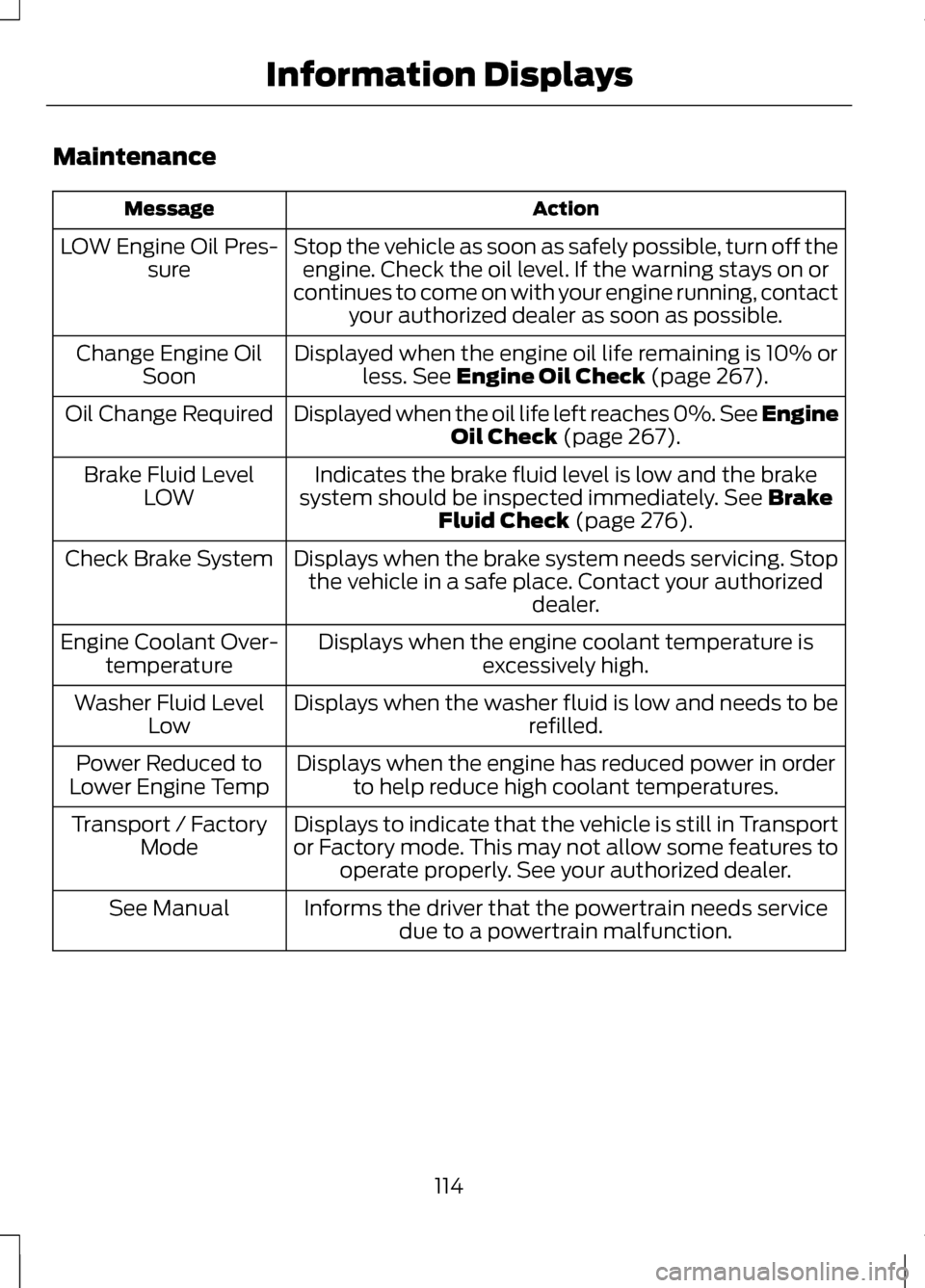
Maintenance
Action
Message
Stop the vehicle as soon as safely possible, turn off theengine. Check the oil level. If the warning stays on or
continues to come on with your engine running, contact your authorized dealer as soon as possible.
LOW Engine Oil Pres-
sure
Displayed when the engine oil life remaining is 10% orless. See Engine Oil Check (page 267).
Change Engine Oil
Soon
Displayed when the oil life left reaches 0%. See Engine Oil Check
(page 267).
Oil Change Required
Indicates the brake fluid level is low and the brake
system should be inspected immediately.
See Brake
Fluid Check (page 276).
Brake Fluid Level
LOW
Displays when the brake system needs servicing. Stopthe vehicle in a safe place. Contact your authorized dealer.
Check Brake System
Displays when the engine coolant temperature isexcessively high.
Engine Coolant Over-
temperature
Displays when the washer fluid is low and needs to be refilled.
Washer Fluid Level
Low
Displays when the engine has reduced power in orderto help reduce high coolant temperatures.
Power Reduced to
Lower Engine Temp
Displays to indicate that the vehicle is still in Transport
or Factory mode. This may not allow some features tooperate properly. See your authorized dealer.
Transport / Factory
Mode
Informs the driver that the powertrain needs servicedue to a powertrain malfunction.
See Manual
114
Information Displays
Page 119 of 474
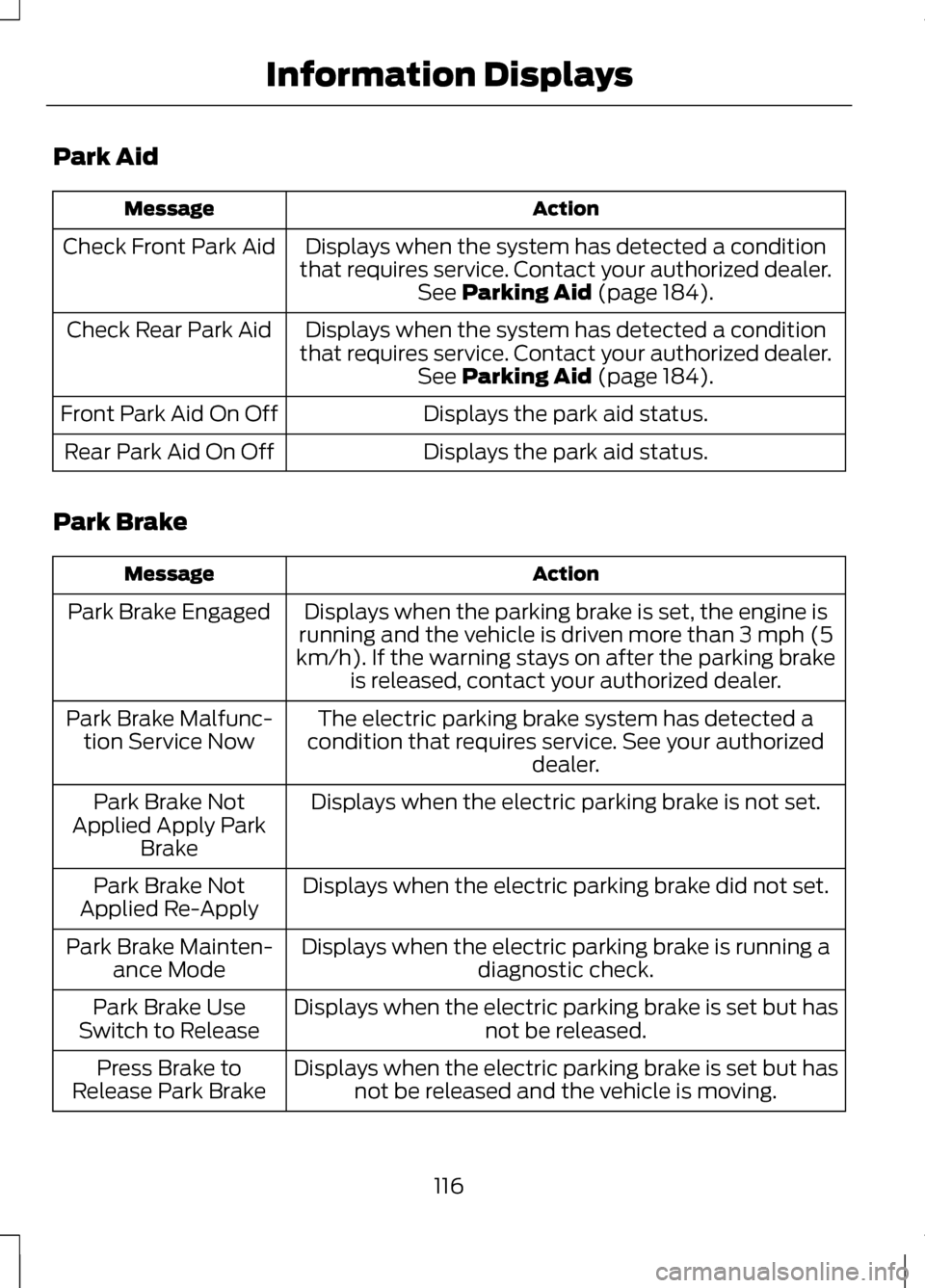
Park Aid
Action
Message
Displays when the system has detected a condition
that requires service. Contact your authorized dealer. See Parking Aid (page 184).
Check Front Park Aid
Displays when the system has detected a condition
that requires service. Contact your authorized dealer. See
Parking Aid (page 184).
Check Rear Park Aid
Displays the park aid status.
Front Park Aid On Off
Displays the park aid status.
Rear Park Aid On Off
Park Brake Action
Message
Displays when the parking brake is set, the engine is
running and the vehicle is driven more than 3 mph (5
km/h). If the warning stays on after the parking brake is released, contact your authorized dealer.
Park Brake Engaged
The electric parking brake system has detected a
condition that requires service. See your authorized dealer.
Park Brake Malfunc-
tion Service Now
Displays when the electric parking brake is not set.
Park Brake Not
Applied Apply Park Brake
Displays when the electric parking brake did not set.
Park Brake Not
Applied Re-Apply
Displays when the electric parking brake is running adiagnostic check.
Park Brake Mainten-
ance Mode
Displays when the electric parking brake is set but has not be released.
Park Brake Use
Switch to Release
Displays when the electric parking brake is set but hasnot be released and the vehicle is moving.
Press Brake to
Release Park Brake
116
Information Displays
Page 121 of 474
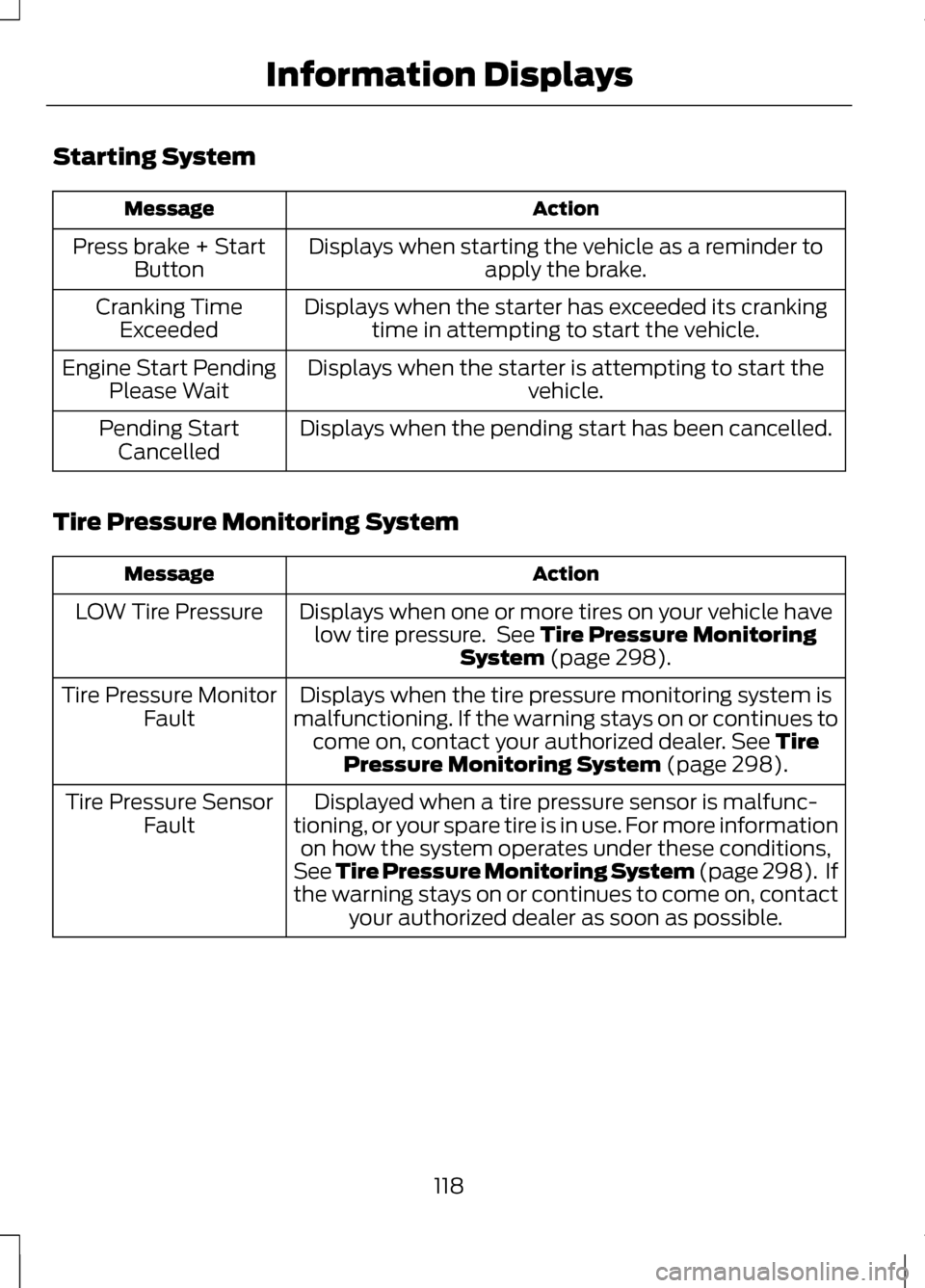
Starting System
Action
Message
Displays when starting the vehicle as a reminder toapply the brake.
Press brake + Start
Button
Displays when the starter has exceeded its crankingtime in attempting to start the vehicle.
Cranking Time
Exceeded
Displays when the starter is attempting to start the vehicle.
Engine Start Pending
Please Wait
Displays when the pending start has been cancelled.
Pending Start
Cancelled
Tire Pressure Monitoring System Action
Message
Displays when one or more tires on your vehicle havelow tire pressure. See Tire Pressure Monitoring
System (page 298).
LOW Tire Pressure
Displays when the tire pressure monitoring system is
malfunctioning. If the warning stays on or continues to come on, contact your authorized dealer.
See Tire
Pressure Monitoring System (page 298).
Tire Pressure Monitor
Fault
Displayed when a tire pressure sensor is malfunc-
tioning, or your spare tire is in use. For more information on how the system operates under these conditions,
See Tire Pressure Monitoring System (page 298). If
the warning stays on or continues to come on, contact your authorized dealer as soon as possible.
Tire Pressure Sensor
Fault
118
Information Displays
Page 130 of 474
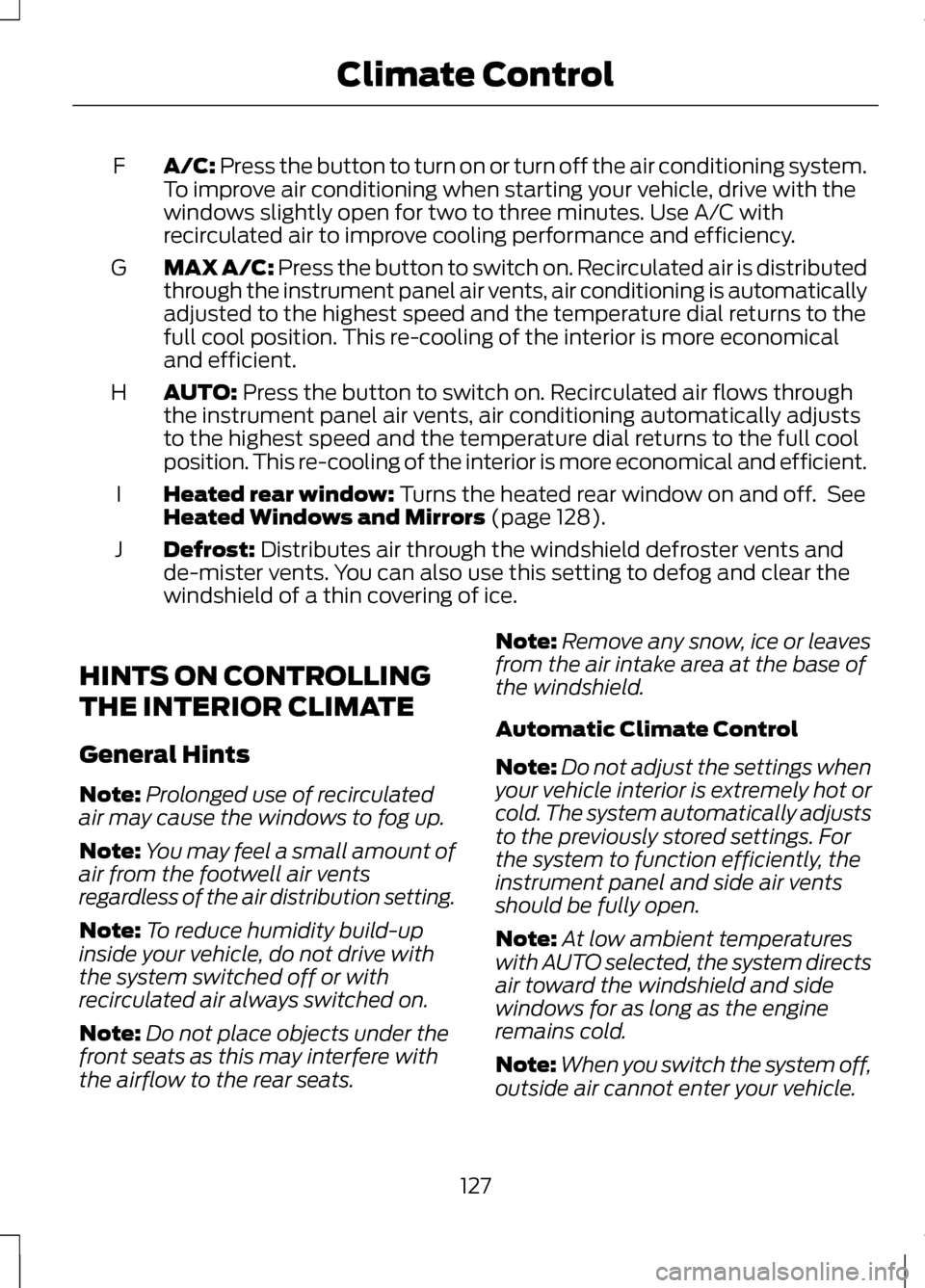
A/C: Press the button to turn on or turn off the air conditioning system.
To improve air conditioning when starting your vehicle, drive with the
windows slightly open for two to three minutes. Use A/C with
recirculated air to improve cooling performance and efficiency.
F
MAX A/C:
Press the button to switch on. Recirculated air is distributed
through the instrument panel air vents, air conditioning is automatically
adjusted to the highest speed and the temperature dial returns to the
full cool position. This re-cooling of the interior is more economical
and efficient.
G
AUTO:
Press the button to switch on. Recirculated air flows through
the instrument panel air vents, air conditioning automatically adjusts
to the highest speed and the temperature dial returns to the full cool
position. This re-cooling of the interior is more economical and efficient.
H
Heated rear window:
Turns the heated rear window on and off. See
Heated Windows and Mirrors (page 128).
I
Defrost:
Distributes air through the windshield defroster vents and
de-mister vents. You can also use this setting to defog and clear the
windshield of a thin covering of ice.
J
HINTS ON CONTROLLING
THE INTERIOR CLIMATE
General Hints
Note: Prolonged use of recirculated
air may cause the windows to fog up.
Note: You may feel a small amount of
air from the footwell air vents
regardless of the air distribution setting.
Note: To reduce humidity build-up
inside your vehicle, do not drive with
the system switched off or with
recirculated air always switched on.
Note: Do not place objects under the
front seats as this may interfere with
the airflow to the rear seats. Note:
Remove any snow, ice or leaves
from the air intake area at the base of
the windshield.
Automatic Climate Control
Note: Do not adjust the settings when
your vehicle interior is extremely hot or
cold. The system automatically adjusts
to the previously stored settings. For
the system to function efficiently, the
instrument panel and side air vents
should be fully open.
Note: At low ambient temperatures
with AUTO selected, the system directs
air toward the windshield and side
windows for as long as the engine
remains cold.
Note: When you switch the system off,
outside air cannot enter your vehicle.
127
Climate Control
Page 137 of 474
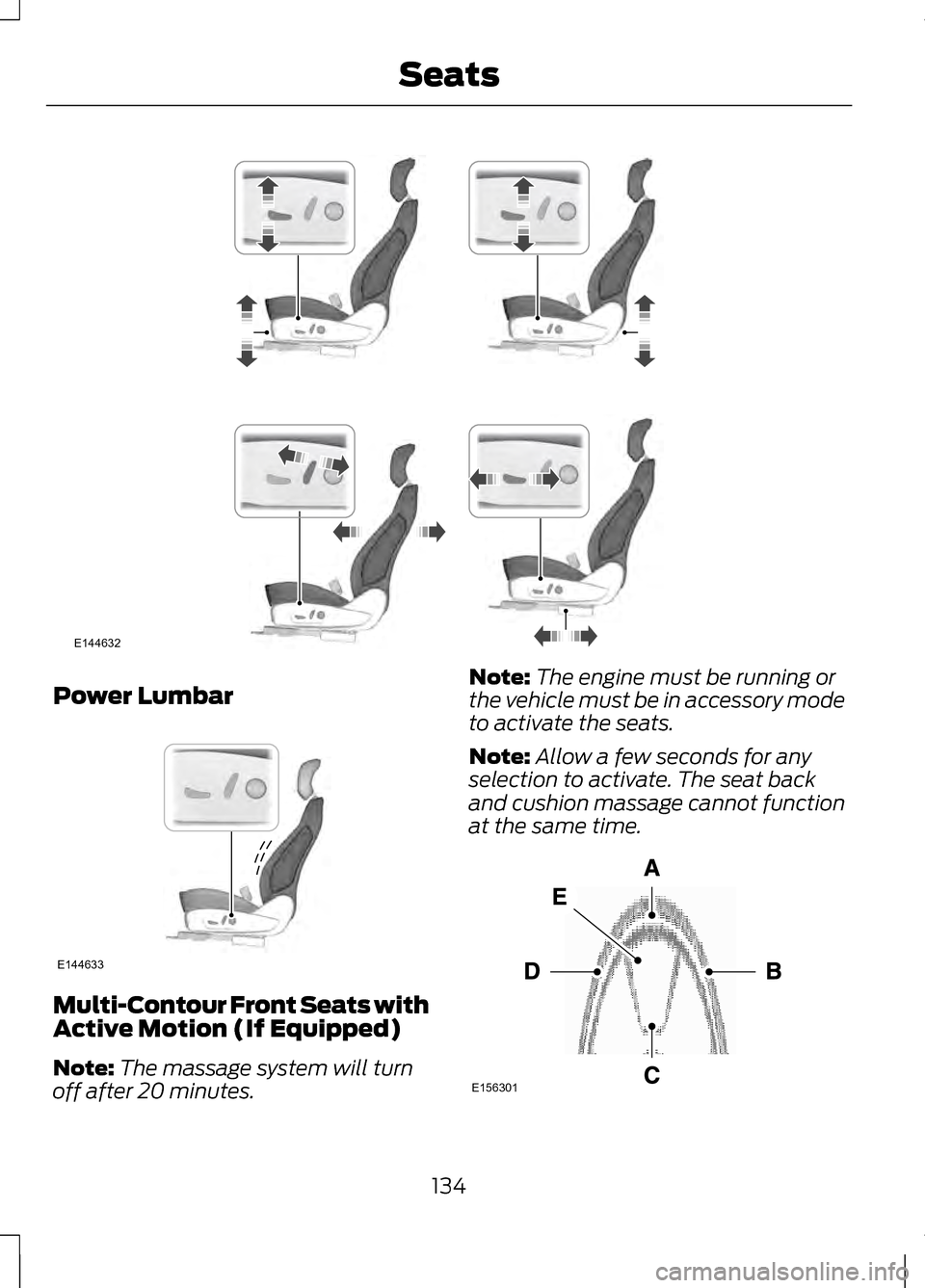
Power Lumbar
Multi-Contour Front Seats with
Active Motion (If Equipped)
Note:
The massage system will turn
off after 20 minutes. Note:
The engine must be running or
the vehicle must be in accessory mode
to activate the seats.
Note: Allow a few seconds for any
selection to activate. The seat back
and cushion massage cannot function
at the same time. 134
SeatsE144632 E144633 E156301
Page 141 of 474
WARNING
People who are unable to feel
pain to their skin because of
advanced age, chronic illness,
diabetes, spinal cord injury,
medication, alcohol use, exhaustion
or other physical conditions, must
exercise care when using the heated
seat. The heated seat may cause
burns even at low temperatures,
especially if used for long periods of
time. Do not place anything on the
seat that insulates against heat, such
as a blanket or cushion. This may
cause the heated seat to overheat. Do
not puncture the seat with pins,
needles or other pointed objects. This
may damage the heating element
which may cause the heated seat to
overheat. An overheated seat may
cause serious personal injury. Do not do the following:
•
Place heavy objects on the seat.
• Operate the heated seat if water
or any other liquid is spilled on the
seat. Allow the seat to dry
thoroughly.
• Operate the heated seats unless
the engine is running. Doing so can
cause the battery to lose charge. Press the heated seat symbol to cycle
through the various heat settings and
off. Warmer settings are indicated by
more indicator lights.
Rear Heated Seats (If Equipped)
WARNING
Persons who are unable to feel
pain to the skin because of
advanced age, chronic illness,
diabetes, spinal cord injury,
medication, alcohol use, exhaustion,
or other physical conditions, must
exercise care when using the seat
heater. The seat heater may cause
burns even at low temperatures,
especially if used for long periods of
time. Do not place anything on the
seat that insulates against heat, such
as a blanket or cushion, because this
may cause the seat heater to
overheat. Do not puncture the seat
with pins, needles, or other pointed
objects because this may damage the
heating element which may cause the
seat heater to overheat. An
overheated seat may cause serious
personal injury. Note:
Do not do the following:
• Place heavy objects on the seat.
• Operate the seat heater if water or
any other liquid is spilled on the
seat. Allow the seat to dry
thoroughly.
The rear seat heat controls are
located on the rear of the center
console.
138
SeatsE146322
Page 142 of 474
The heated seats only operate when
the ignition is on.
•
Press the heated seat
symbol/button to cycle through
the various heat settings and off.
Warmer settings are indicated by
more indicator lights.
• Press again to deactivate.
The heated seat module resets at
every ignition run cycle. While the
ignition is on, activating the high or low
heated seat switch enables heating
mode. When activated, they will turn
off automatically when the engine is
turned off.
VENTILATED SEATS (IF
EQUIPPED)
The cooled seats will only function
when the engine is running.
To operate the cooled seats: Press the cooled seat symbol to cycle
through the various cooling settings
and off. Cooler settings are indicated
by more indicator lights.
If the engine falls below 350 rpms
while the cooled seats are on, the
feature will turn itself off and will need
to be reactivated.
Heated and cooled seat air
filter replacement (if
equipped)
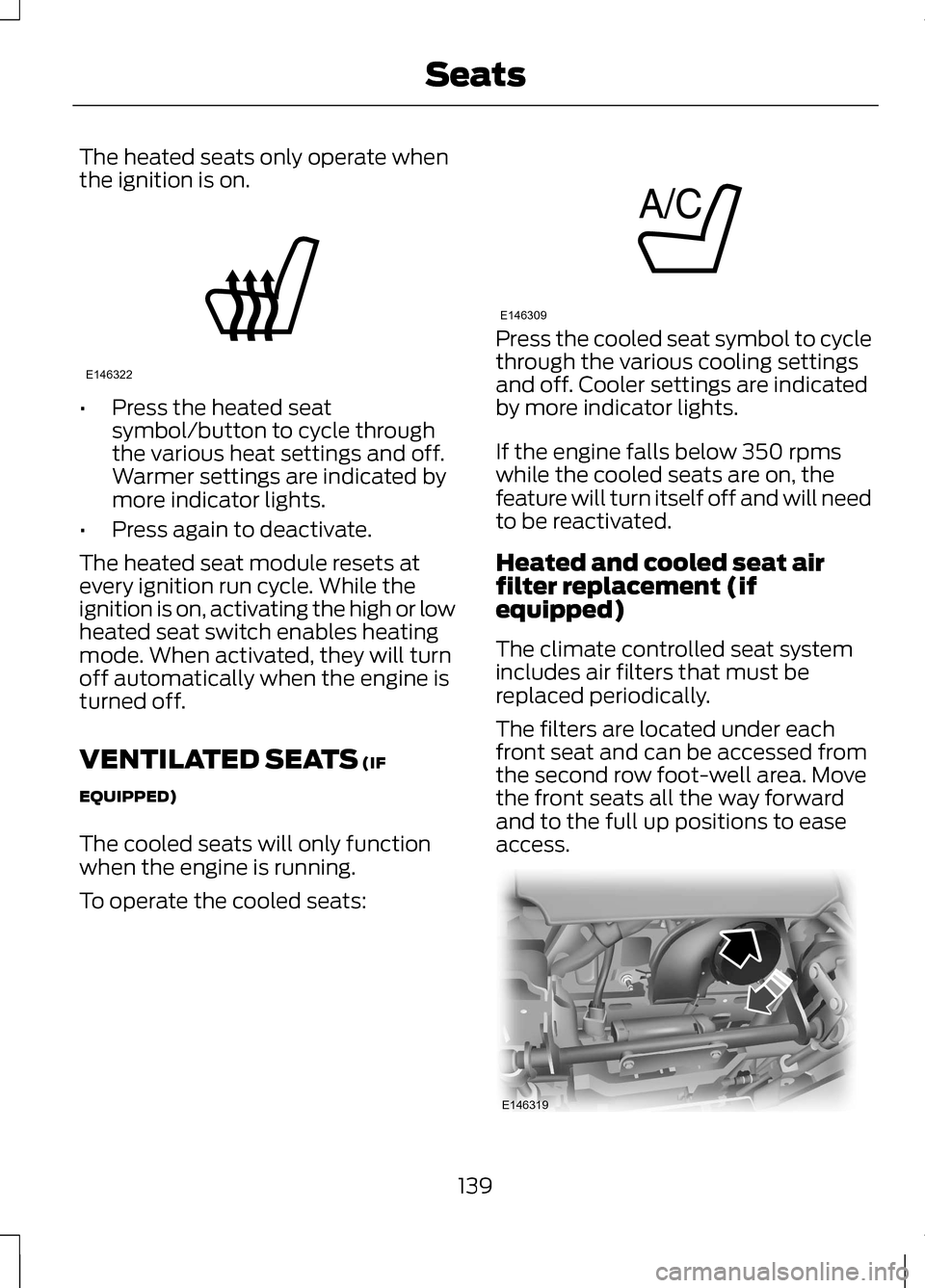
The climate controlled seat system
includes air filters that must be
replaced periodically.
The filters are located under each
front seat and can be accessed from
the second row foot-well area. Move
the front seats all the way forward
and to the full up positions to ease
access.
139
SeatsE146322 E146309 E146319