ignition LINCOLN MKZ 2013 Repair Manual
[x] Cancel search | Manufacturer: LINCOLN, Model Year: 2013, Model line: MKZ, Model: LINCOLN MKZ 2013Pages: 474, PDF Size: 3.79 MB
Page 218 of 474
Note:
It is possible to get a blockage
warning with no blockage present; this
is rare and known as a false blockage
warning. A false blocked condition
either self-corrects or clears after a key
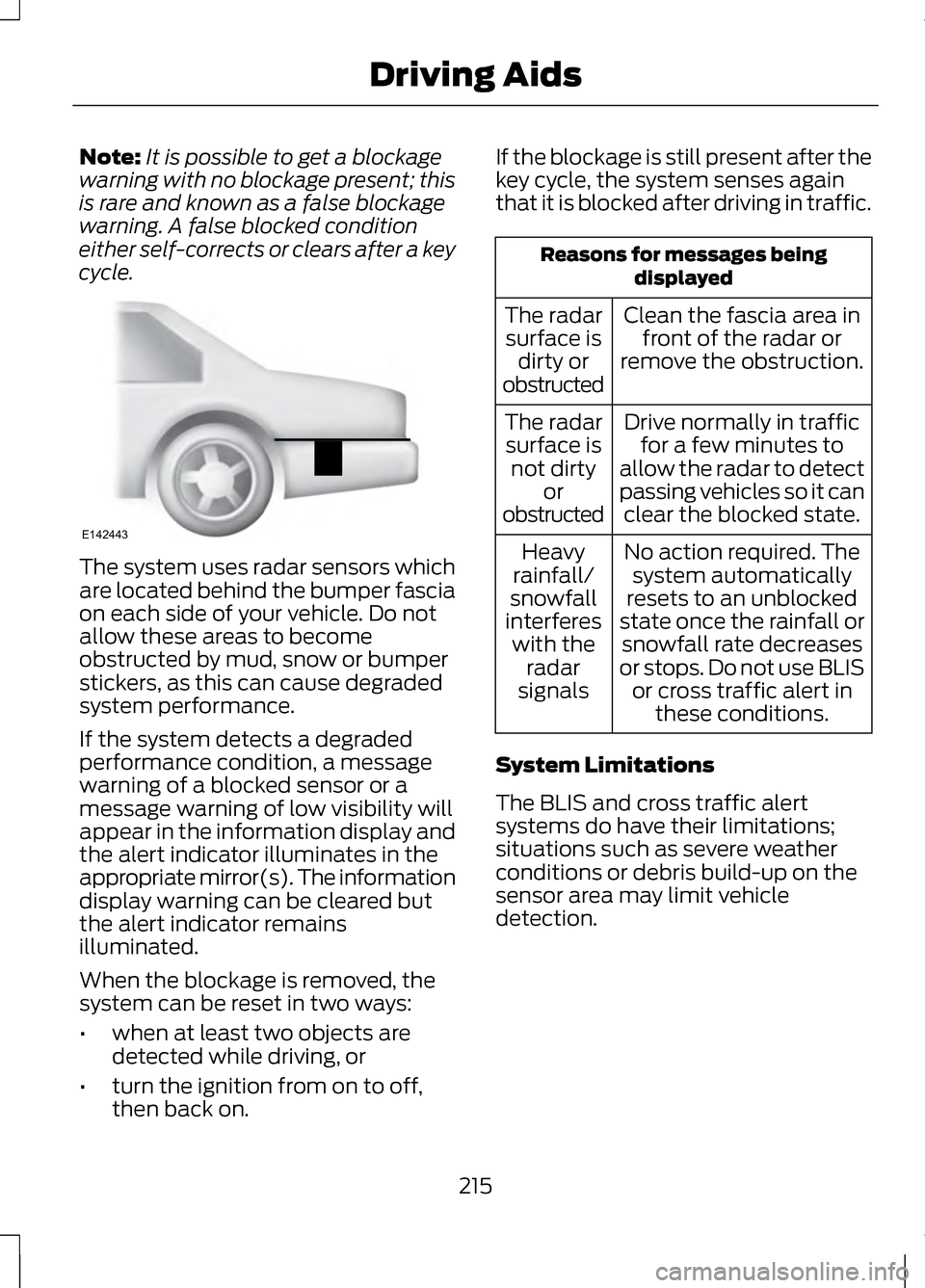
cycle. The system uses radar sensors which
are located behind the bumper fascia
on each side of your vehicle. Do not
allow these areas to become
obstructed by mud, snow or bumper
stickers, as this can cause degraded
system performance.
If the system detects a degraded
performance condition, a message
warning of a blocked sensor or a
message warning of low visibility will
appear in the information display and
the alert indicator illuminates in the
appropriate mirror(s). The information
display warning can be cleared but
the alert indicator remains
illuminated.
When the blockage is removed, the
system can be reset in two ways:
•
when at least two objects are
detected while driving, or
• turn the ignition from on to off,
then back on. If the blockage is still present after the
key cycle, the system senses again
that it is blocked after driving in traffic. Reasons for messages being
displayed
Clean the fascia area in front of the radar or
remove the obstruction.
The radar
surface is dirty or
obstructed
Drive normally in trafficfor a few minutes to
allow the radar to detect
passing vehicles so it can clear the blocked state.
The radar
surface is not dirty or
obstructed
No action required. Thesystem automatically
resets to an unblocked
state once the rainfall or snowfall rate decreases
or stops. Do not use BLIS or cross traffic alert in these conditions.
Heavy
rainfall/
snowfall
interferes with the radar
signals
System Limitations
The BLIS and cross traffic alert
systems do have their limitations;
situations such as severe weather
conditions or debris build-up on the
sensor area may limit vehicle
detection.
215
Driving AidsE142443
Page 219 of 474
The following are other situations that
may limit the BLIS:
•
Certain maneuvering of vehicles
entering and exiting the blind zone.
• Vehicles passing through the blind
zone at very fast rates.
• When several vehicles forming a
convoy pass through the blind
zone.
The following are other situations that
may limit the cross traffic alert
system:
• Adjacently parked vehicles or
objects obstructing the sensors.
• Approaching vehicles passing at
speeds greater than 15 mph (24
km/h).
• Driving in reverse faster than 5
mph (8 km/h).
• Backing out of an angled parking
spot.
False Alerts
Note: If a trailer is connected to the
vehicle the BLIS system may detect the
trailer causing a false alert. You may
want to turn the BLIS off manually.
There may be certain instances when
either the BLIS or cross traffic alert
systems illuminate the alert indicator
with no vehicle in the coverage zone;
this is known as a false alert. Some
amount of false alerts are normal;
they are temporary and self-correct. System Errors
If either system senses a problem with
the left or right sensor, the BLIS
telltale will illuminate and a message
will appear in the information display.
All other system faults will only be
displayed by a message in the
information display.
Switching the Systems Off and On
One or both systems can be switched
off temporarily by using the
information display control. See
General Information (page 100).
When the BLIS is switched off, you will
not receive alerts and a telltale
illuminates in the information display.
Note: The CTA system always
switches on whenever the ignition is
switched on. However, the BLIS system
will remember the last selected on or
off setting.
One or both systems cannot be
switched off when MyKey is used. See
General Information
(page 337).
One or both systems can also be
switched off permanently at your
authorized dealer. Once switched off,
switching it back on must also be
done at your authorized dealer.
216
Driving Aids
Page 220 of 474
STEERING
Electric Power Steering
WARNING
Obtain immediate service if a
system error is detected. You
may not notice any difference in the
feel of your steering, but a serious
condition may exist. Failure to do so
may result in loss of steering control. Note:
Your vehicle is equipped with an
electric power-assisted steering
system. There is no fluid reservoir to
check or fill.
The electric power steering system
has diagnostic checks that
continuously monitor the system to
ensure proper operation of the
electronic system. When an electronic
error is detected, a message will be
displayed in the information display.
If this happens, stop the vehicle in a
safe place, and turn off the engine.
After at least 10 seconds, reset the
system by restarting the engine, and
watch the information display for a
steering message. If a steering
message returns, or returns while
driving, take the vehicle to your dealer
to have it checked. If your vehicle loses electrical power
while you are driving (or if the ignition
is turned off), you can steer the
vehicle manually, but it takes more
effort. Extreme continuous steering
may increase the effort it takes for you
to steer. This occurs to prevent
internal overheating and permanent
damage to your steering system. If this
should occur, you will neither lose the
ability to steer the vehicle manually
nor will it cause permanent damage.
Typical steering and driving
maneuvers will allow the system to
cool and steering assist will return to
normal.
Steering Tips
If the steering wanders or pulls, check
for:
•
an improperly inflated tire
• uneven tire wear
• loose or worn suspension
components
• loose or worn steering
components
• improper vehicle alignment
A high crown in the road or high
crosswinds may also make the
steering seem to wander or pull.
217
Driving Aids
Page 236 of 474
Vehicles Equipped with a 2.0L
Engine
Front-wheel drive (FWD) vehicles
CANNOT be flat-towed (all wheels
on the ground) as vehicle or
transmission damage may occur. You
must place the front wheels on a
two-wheel tow dolly. If you are using
a tow dolly, follow the instructions
specified by the equipment provider.
All-wheel drive (AWD) vehicles
CANNOT
be flat-towed (all wheels
on the ground), as vehicle or
transmission damage may occur. It is
recommended to tow your vehicle
with all four (4) wheels off the ground
such as when using a car-hauling
trailer. Otherwise, you cannot tow your
vehicle.
Vehicles Equipped with a 3.7L
Engine
You can tow your vehicle with all four
wheels on the ground using the
Neutral Tow feature, or with all four
wheels off the ground using a vehicle
transport trailer. If you are using a
vehicle transport trailer, follow the
instruction specified by the equipment
provider.
If you tow your vehicle with all four
wheels on the ground:
• Tow only in the forward direction.
• Release the parking brake.
Neutral Tow
Enter Neutral Tow mode by doing the
following: 1.
Put the ignition in accessory mode
by pressing the engine START
button without pressing the brake
pedal.
2. Select
Neutral Tow under the
Vehicle Settings menu in the
information display. See General
Information (page 100).
3. Press and hold the OK button to start the neutral tow process.
4. Press the brake pedal and select N
on the push-button
transmission.
5. Turn the ignition off by pressing the
engine START button without
pressing the brake pedal.
If the process is completes
successfully:
• the
N on the push-button
transmission blinks slowly
• Neutral Tow Engaged turn
ignition off for towing
appears
in the information display.
Note: If the parking brake is applied,
Neutral Tow remove park brake for
towing
appears in the information
display.
Note: Do not exceed 65 mph (105
km/h).
Note: Start the engine and allow it to
run for five minutes at the beginning of
each day and every six hours (or fewer).
Shut the engine off and verify that
Neutral tow engaged
appears in the
display before continuing to tow.
233
Towing
Page 237 of 474
Exit Neutral Tow mode, make sure the
ignition is on (engine can be on or off),
press the brake pedal and select P on
the push-button transmission.
If the process is completed
successfully,
Neutral Tow
disengaged appears in the
information display and both the
instrument cluster and push-button
transmission display
P.
234
Towing
Page 243 of 474
1. Turn the ignition off.
2. Turn the ignition to crank.
3. Turn the ignition off.
4. Turn the ignition on again to
re-enable the fuel pump.
For vehicles equipped with a push
button start system:
1. Press the START/STOP button
to turn the ignition off.
2. Press the brake pedal and press the
START/STOP button (crank
attempt).
3. Remove your foot from the brake pedal and press the
START/STOP
button (ignition
off).
4. Press the
START/STOP button
again to re-enable the fuel system.
JUMP-STARTING THE
VEHICLE WARNINGS
The gases around the battery
can explode if exposed to
flames, sparks, or lit cigarettes. An
explosion could result in injury or
vehicle damage. Batteries contain sulfuric acid
which can burn skin, eyes and
clothing, if contacted. Only use an adequate sized
cable with insulated clamps. Preparing Your Vehicle
Note:
Use only a 12-volt supply to start
your vehicle.
Note: Do not disconnect the battery
of the disabled vehicle as this could
damage the vehicle's electrical system.
Park the booster vehicle close to the
hood of the disabled vehicle, making
sure the two vehicles do not touch.
Turn all accessories off.
Connecting the Jumper Cables WARNING
Do not attach the cables to fuel
lines, engine rocker covers, the
intake manifold or electrical
components as grounding points. Stay
clear of moving parts. Note:
In the illustration, the vehicle on
the bottom is used to designate the
booster vehicle.
240
Roadside Emergencies
Page 263 of 474
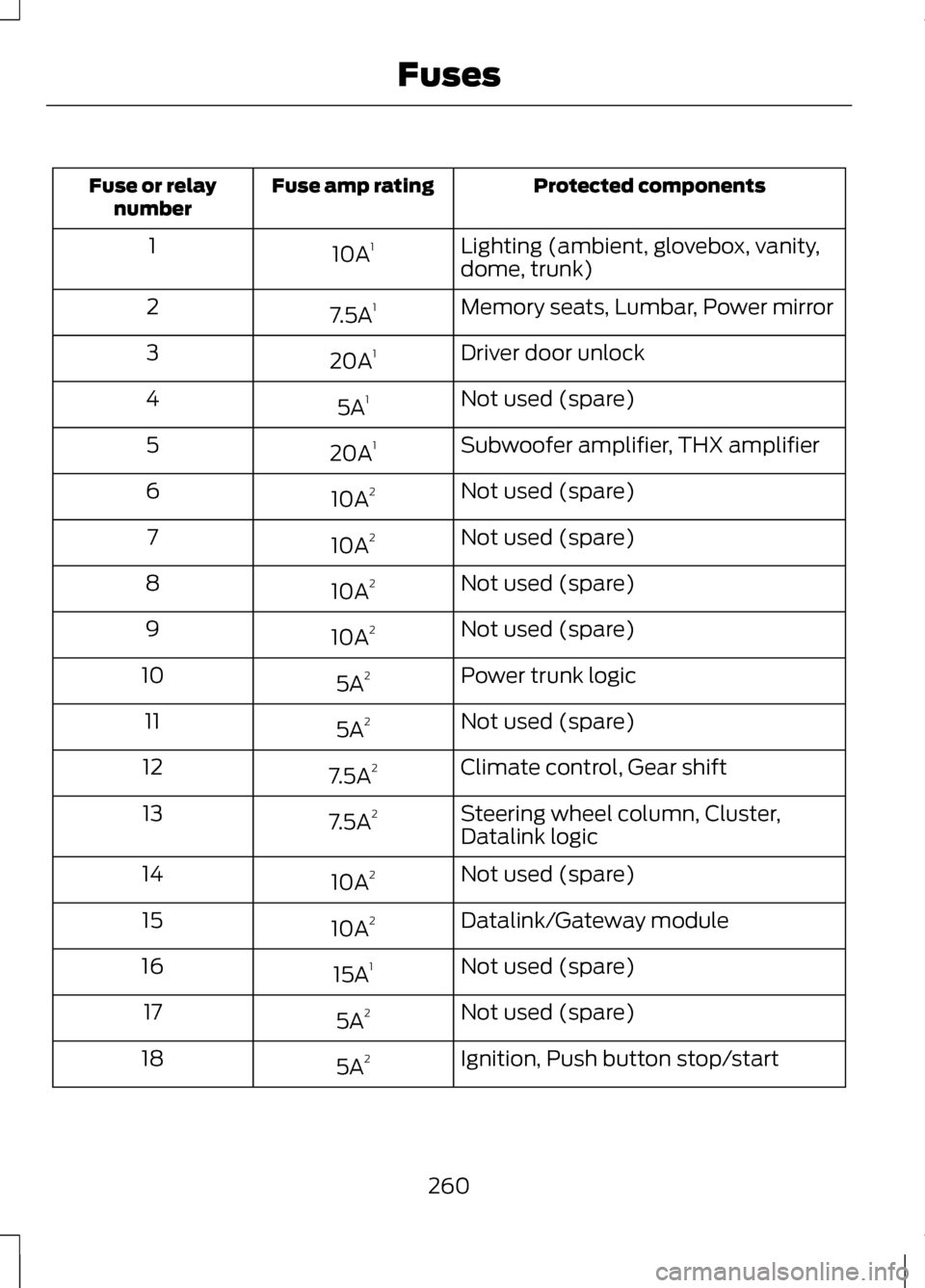
Protected components
Fuse amp rating
Fuse or relay
number
Lighting (ambient, glovebox, vanity,
dome, trunk)
10A
1
1
Memory seats, Lumbar, Power mirror
7.5A 1
2
Driver door unlock
20A 1
3
Not used (spare)
5A 1
4
Subwoofer amplifier, THX amplifier
20A 1
5
Not used (spare)
10A 2
6
Not used (spare)
10A 2
7
Not used (spare)
10A 2
8
Not used (spare)
10A 2
9
Power trunk logic
5A 2
10
Not used (spare)
5A 2
11
Climate control, Gear shift
7.5A 2
12
Steering wheel column, Cluster,
Datalink logic
7.5A
2
13
Not used (spare)
10A 2
14
Datalink/Gateway module
10A 2
15
Not used (spare)
15A 1
16
Not used (spare)
5A 2
17
Ignition, Push button stop/start
5A 2
18
260
Fuses
Page 271 of 474
Only use oils certified for gasoline
engines by the American Petroleum
Institute (API). An oil with this
trademark symbol conforms to the
current engine and emission system
protection standards and fuel
economy requirements of the
International Lubricants Specification
Advisory Council (ILSAC), comprised
of U.S. and Japanese automobile
manufacturers.
1. Remove the filler cap.
2.
Add engine oil that meets the Ford
specifications. See Capacities
and Specifications (page 325).
3. Replace the filler cap. Turn it until you feel a strong resistance.
Resetting the Oil Life
Monitoring System
Note: Reset the oil life monitoring only
after an oil change.
1. Turn the ignition key to the on position. Do not start the engine.
For vehicles with push-button
start, press and hold the start
button for two seconds without
pressing the brake pedal. Do not
attempt to start the engine.
2. Press both the accelerator and brake pedals at the same time.
3. Keep both pedals fully pressed.
4. After three seconds, the Service: Oil reset in prog. message will be
displayed.
5. After 25 seconds, the Service: Oil reset complete message will be
displayed. 6.
Release both the accelerator and
brake pedals.
7. The Service: Oil reset complete message will no longer be
displayed.
8. Rotate the key to the off position.
For vehicles with push-button
start, press the start button to turn
the vehicle off completely.
ENGINE COOLANT CHECK -
2.0L ECOBOOST™/3.7L
Checking the Engine Coolant
When the engine is cold, check the
concentration and level of the engine
coolant at the intervals listed in the
scheduled maintenance information.
See Scheduled Maintenance (page
440
).
Note: Make sure that the level is
between the MIN and MAX marks on
the coolant reservoir.
Note: Coolant expands when it is hot.
The level may extend beyond the MAX
mark
Note: If the level is at the MIN mark,
below the MIN mark, or empty, add
coolant immediately. See
Adding
Engine Coolant in this chapter.
The coolant concentration should be
maintained within 48% to 50%,
which equates to a freeze point
between -30 F degrees (-34 C) and
-34 F (-37 C).
268
Maintenance
Page 282 of 474
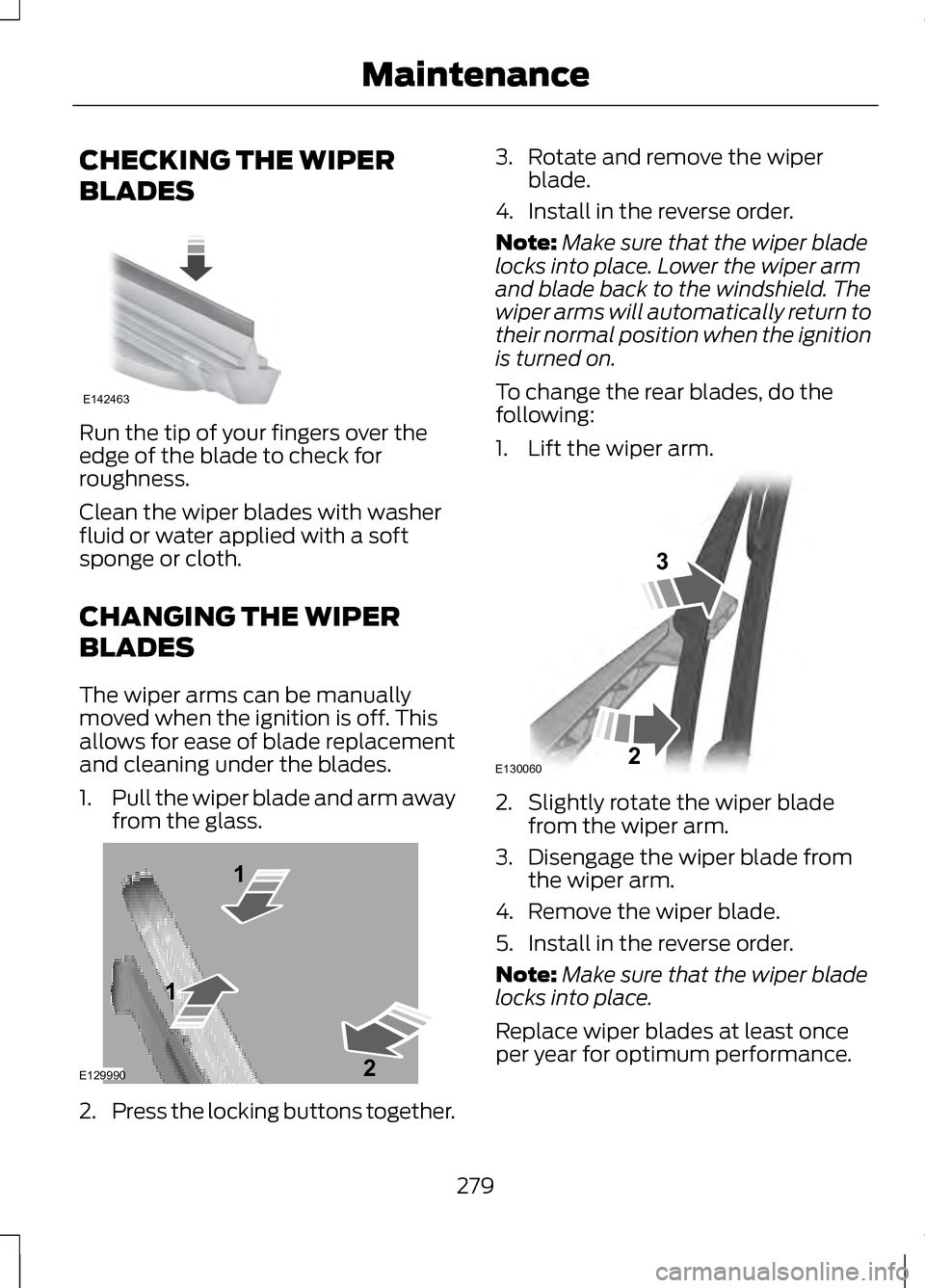
CHECKING THE WIPER
BLADES
Run the tip of your fingers over the
edge of the blade to check for
roughness.
Clean the wiper blades with washer
fluid or water applied with a soft
sponge or cloth.
CHANGING THE WIPER
BLADES
The wiper arms can be manually
moved when the ignition is off. This
allows for ease of blade replacement
and cleaning under the blades.
1.
Pull the wiper blade and arm away
from the glass. 2.
Press the locking buttons together. 3. Rotate and remove the wiper
blade.
4. Install in the reverse order.
Note: Make sure that the wiper blade
locks into place. Lower the wiper arm
and blade back to the windshield. The
wiper arms will automatically return to
their normal position when the ignition
is turned on.
To change the rear blades, do the
following:
1. Lift the wiper arm. 2. Slightly rotate the wiper blade
from the wiper arm.
3. Disengage the wiper blade from the wiper arm.
4. Remove the wiper blade.
5. Install in the reverse order.
Note: Make sure that the wiper blade
locks into place.
Replace wiper blades at least once
per year for optimum performance.
279
MaintenanceE142463 E129990
1
1 2 E130060
3
2
Page 289 of 474
CLEANING THE ENGINE
Engines are more efficient when they
are clean because grease and dirt
buildup keep the engine warmer than
normal.
When washing:
•
Take care when using a power
washer to clean the engine. The
high-pressure fluid could penetrate
the sealed parts and cause
damage.
• Do not spray a hot engine with cold
water to avoid cracking the engine
block or other engine components.
• Spray Motorcraft® Engine
Shampoo and Degreaser on all
parts that require cleaning and
pressure rinse clean. In Canada,
use Motorcraft® Engine Shampoo.
• Never wash or rinse the engine
while it is hot or running; water in
the running engine may cause
internal damage.
• Never wash or rinse any ignition
coil, spark plug wire or spark plug
well, or the area in and around
these locations.
• Cover the battery, power
distribution box, and air filter
assembly to prevent water
damage when cleaning the engine. CLEANING THE WINDOWS
AND WIPER BLADES
The windows and wiper blades should
be cleaned regularly. If the wipers do
not wipe properly, substances on the
vehicle
’s glass or the wiper blades
may cause squeaking or chatter noise
from the blades, and streaking and
smearing of the windshield.
To clean these items, follow these
tips:
• The windows may be cleaned with
a non-abrasive cleaner such as
Motorcraft® Ultra-Clear Spray
Glass Cleaner.
• The wiper blades can be cleaned
with isopropyl (rubbing) alcohol or
Motorcraft® Premium Windshield
Washer Concentrate in the U.S., or
Premium Quality Windshield
Washer Fluid in Canada. Be sure
to replace wiper blades when they
appear worn or do not function
properly.
• Do not use abrasives, as they may
cause scratches
• Do not use fuel, kerosene, or paint
thinner to clean any parts.
286
Vehicle Care