manual transmission LINCOLN MKZ 2013 Owners Manual
[x] Cancel search | Manufacturer: LINCOLN, Model Year: 2013, Model line: MKZ, Model: LINCOLN MKZ 2013Pages: 474, PDF Size: 3.79 MB
Page 42 of 474
Deactivating and Activating the
Belt-Minder Feature
WARNING
While the system allows you to
deactivate it, this system is
designed to improve your chances of
being safely belted and surviving an
accident. We recommend you leave
the system activated for yourself and
others who may use the vehicle. To
reduce the risk of injury, do not
deactivate or activate the system
while driving the vehicle. Note:
The driver and front passenger
warning are deactivated and activated
independently. When deactivating or
activating one seating position, do not
buckle the other position as this will
terminate the process.
Read Steps 1 - 4 thoroughly before
proceeding with the deactivation or
activation programming procedure.
The system can be deactivated or
activated by performing the following
procedure:
Before following the procedure, make
sure that:
• the parking brake is set
• the transmission selector lever is
in position P (automatic
transmission) or N (manual
transmission)
• the ignition is off
• the driver and front passenger
safety belts are unbuckled.
1. Turn the ignition on. DO NOT START THE ENGINE. 2. Wait until the safety belt warning
light turns off (approximately one
minute). After Step 2, wait an
additional five seconds before
proceeding with Step 3. Once Step
3 is started, the procedure must be
completed within 30 seconds.
3. For the seating position being disabled, buckle then unbuckle the
safety belt three times at a
moderate speed, ending in the
unbuckled state. After Step 3, the
safety belt warning light will turn
on.
4. While the safety belt warning light
is on, buckle and then unbuckle the
safety belt. After Step 4, the safety
belt warning light will flash for
confirmation.
• This will disable the feature for
that seating position if it is
currently enabled.
• This will enable the feature for that
seating position if it is currently
disabled.
39
Safety Belts
Page 94 of 474
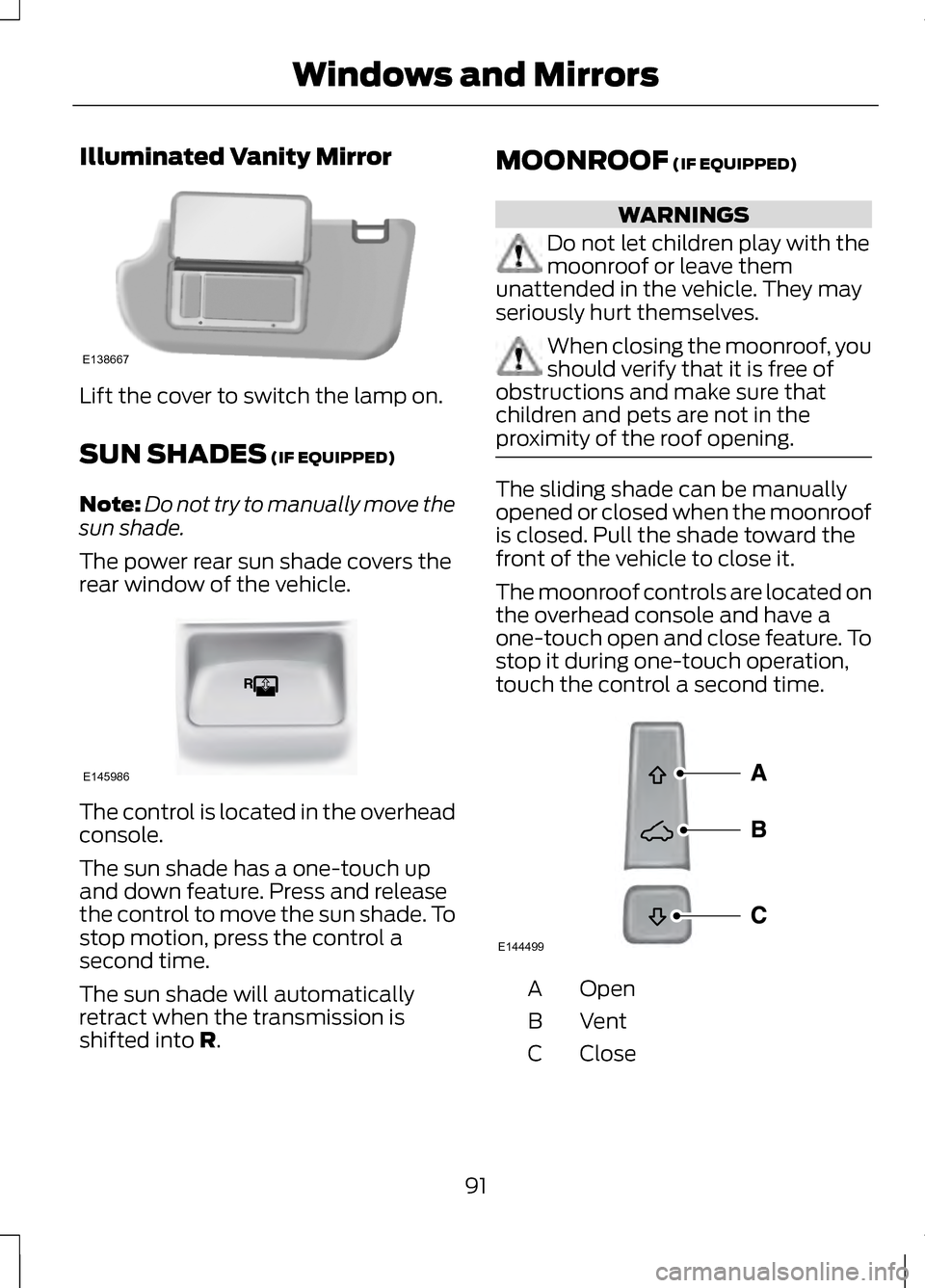
Illuminated Vanity Mirror
Lift the cover to switch the lamp on.
SUN SHADES (IF EQUIPPED)
Note: Do not try to manually move the
sun shade.
The power rear sun shade covers the
rear window of the vehicle. The control is located in the overhead
console.
The sun shade has a one-touch up
and down feature. Press and release
the control to move the sun shade. To
stop motion, press the control a
second time.
The sun shade will automatically
retract when the transmission is
shifted into
R. MOONROOF
(IF EQUIPPED) WARNINGS
Do not let children play with the
moonroof or leave them
unattended in the vehicle. They may
seriously hurt themselves. When closing the moonroof, you
should verify that it is free of
obstructions and make sure that
children and pets are not in the
proximity of the roof opening. The sliding shade can be manually
opened or closed when the moonroof
is closed. Pull the shade toward the
front of the vehicle to close it.
The moonroof controls are located on
the overhead console and have a
one-touch open and close feature. To
stop it during one-touch operation,
touch the control a second time.
Open
A
VentB
Close
C
91
Windows and MirrorsE138667 E145986 E144499
Page 109 of 474
Adaptive Cruise Control
Action
Message
Displayed when a radar malfunction is preventing theACC from engaging. See Using Adaptive Cruise
Control (page 196).
Adaptive Cruise
Malfunction
Displayed when conditions exist such that the adaptive
cruise cannot function properly. See Using AdaptiveCruise Control
(page 196).
Adaptive Cruise Not
Available
Displayed when the radar is blocked because of poorradar visibility due to bad weather or ice/mud/water
in front of radar. Driver can typically clean the sensor
to resolve. See Using Adaptive Cruise Control
(page
196).
Adaptive Cruise Not
Available Sensor
Blocked See Manual
Displayed when the automatic braking has beendisabled.
Cruise Control Auto-
matic Braking Turned Off
Displayed when a radar malfunction is preventing the ACC from engaging.
Front Sensor Not
Aligned
Displayed when the adaptive cruise has reinstatedcontrols to the driver.
Adaptive Cruise -
Driver Resume Control
Displays when the vehicle speed is too slow to activate the adaptive cruise.
Adaptive Cruise
Speed Too Low to Activate
Displays when the adaptive cruise is automatically
adjusting the gap distance and the driver needs to shift the transmission into a lower gear.
Adaptive Cruise Shift
Down
106
Information Displays
Page 122 of 474
Traction Control
Action
Message
Displays when the traction control system has been
switched off or on. See Using Traction Control (page 181).
Traction Control Off /
Traction Control On
Displays when a spinout has occurred and the hazardare activated.
Spinout Detected
Hazards Activated
Transmission Action
Message
See your authorized dealer.
Transmission
Malfunction Service Now
The transmission is overheating and needs to cool.Stop in a safe place as soon as it’ s possible.
Transmission Over-
heating Stop Safely
The transmission has overheated and needs to cool.Stop in a safe place as soon as it’ s possible.
Transmission Over-
temperature Stop Safely
See your authorized dealer.
Transmission Service
Required
Transmission is getting hot. Stop to let it cool.
Transmission Too Hot
Press Brake
Displays when the transmission has overheated and
has limited functionality. See
Automatic Transmis-
sion (page 165).
Transmission Limited
Function See Manual
Transmission is too cold. Wait for it to warm up beforeyou drive.
Transmission
Warming Up Please Wait
Displays as a reminder to shift into park.
Transmission Not in
Park
Displays when the transmission has adjusted the shift strategy.
Transmission
Adjusted
119
Information Displays
Page 123 of 474
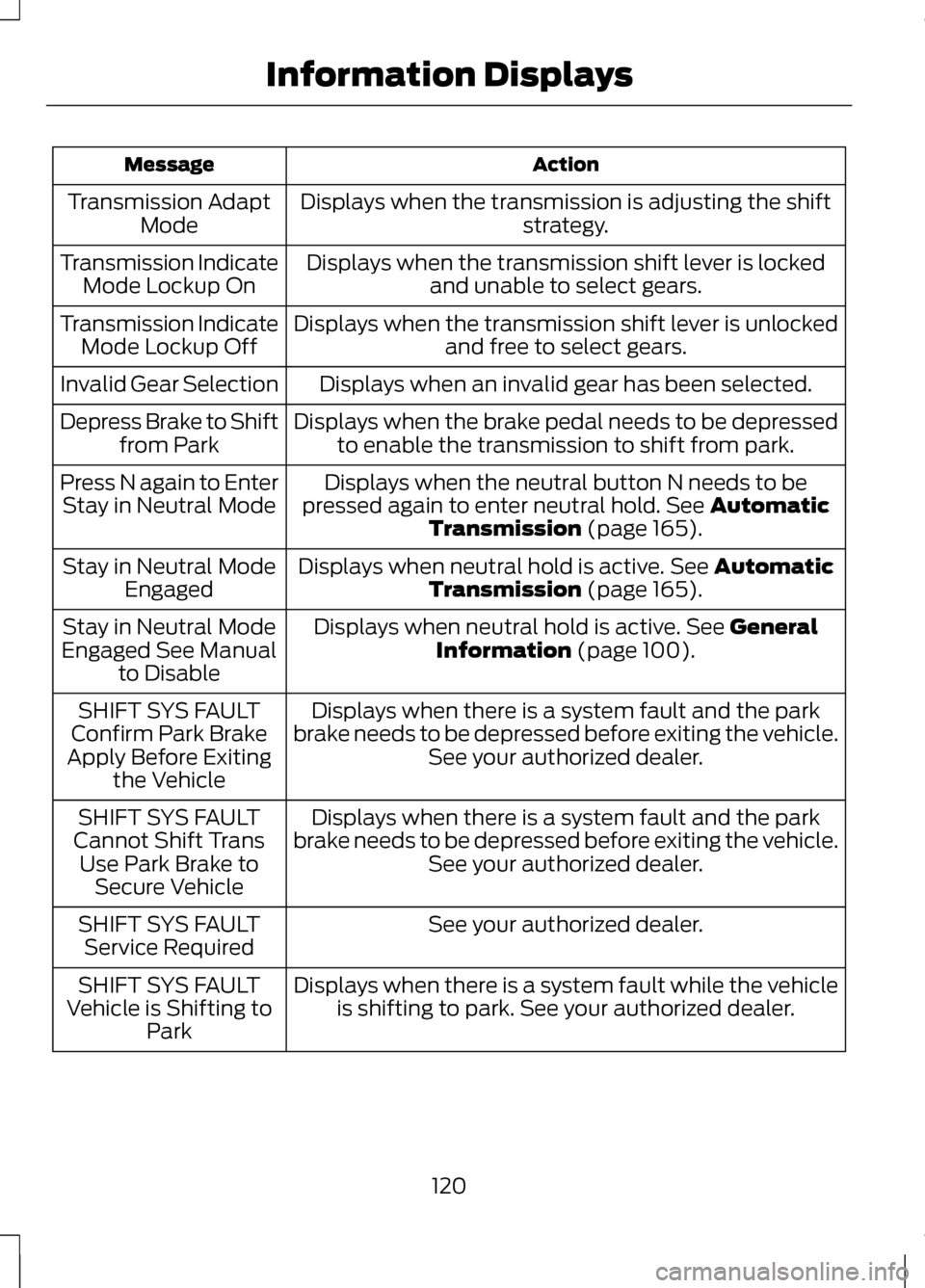
Action
Message
Displays when the transmission is adjusting the shift strategy.
Transmission Adapt
Mode
Displays when the transmission shift lever is lockedand unable to select gears.
Transmission Indicate
Mode Lockup On
Displays when the transmission shift lever is unlockedand free to select gears.
Transmission Indicate
Mode Lockup Off
Displays when an invalid gear has been selected.
Invalid Gear Selection
Displays when the brake pedal needs to be depressedto enable the transmission to shift from park.
Depress Brake to Shift
from Park
Displays when the neutral button N needs to be
pressed again to enter neutral hold. See Automatic
Transmission (page 165).
Press N again to Enter
Stay in Neutral Mode
Displays when neutral hold is active.
See Automatic
Transmission (page 165).
Stay in Neutral Mode
Engaged
Displays when neutral hold is active.
See General
Information (page 100).
Stay in Neutral Mode
Engaged See Manual to Disable
Displays when there is a system fault and the park
brake needs to be depressed before exiting the vehicle. See your authorized dealer.
SHIFT SYS FAULT
Confirm Park Brake
Apply Before Exiting the Vehicle
Displays when there is a system fault and the park
brake needs to be depressed before exiting the vehicle. See your authorized dealer.
SHIFT SYS FAULT
Cannot Shift Trans Use Park Brake to Secure Vehicle
See your authorized dealer.
SHIFT SYS FAULT
Service Required
Displays when there is a system fault while the vehicleis shifting to park. See your authorized dealer.
SHIFT SYS FAULT
Vehicle is Shifting to Park
120
Information Displays
Page 169 of 474
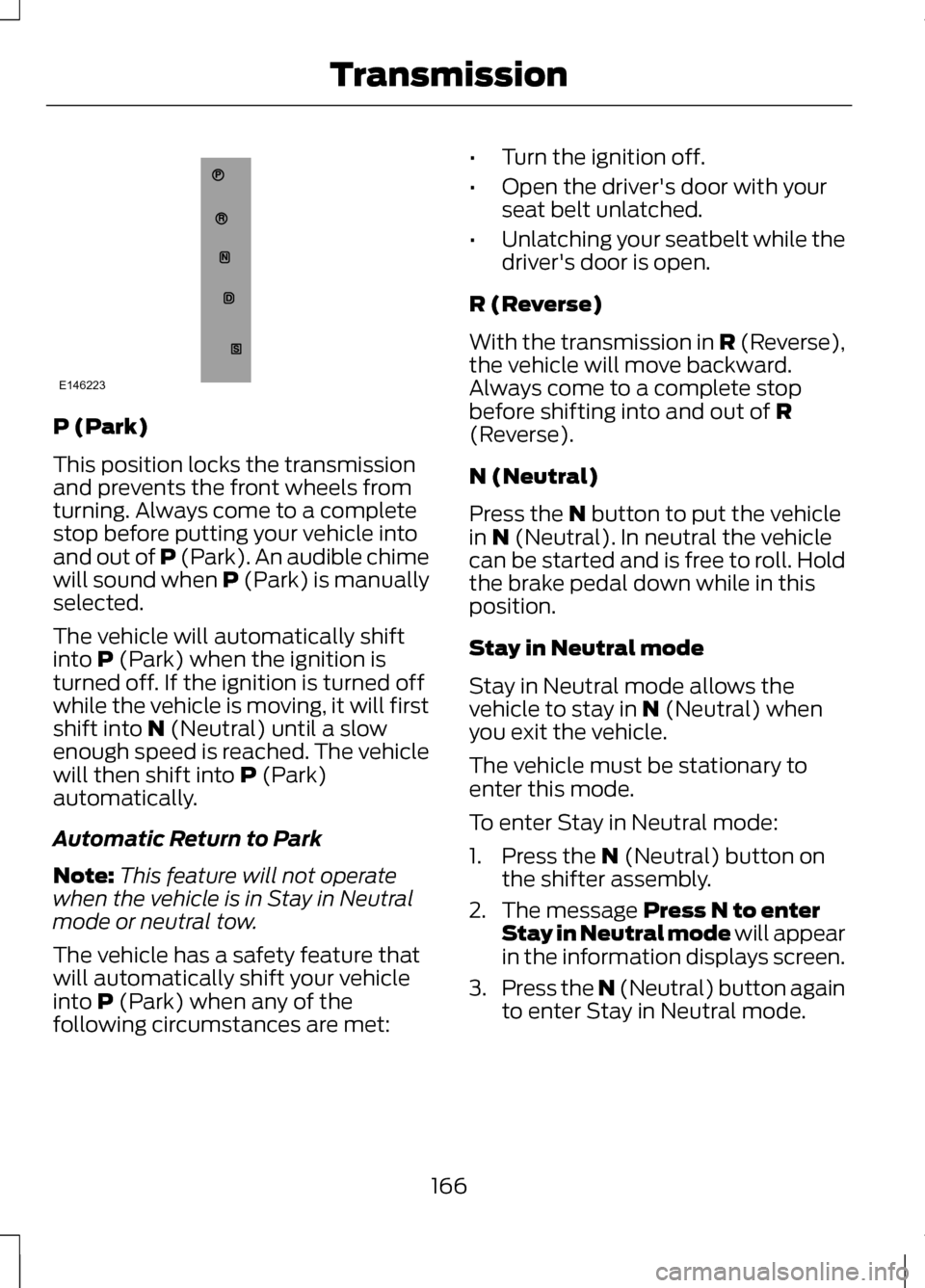
P (Park)
This position locks the transmission
and prevents the front wheels from
turning. Always come to a complete
stop before putting your vehicle into
and out of P (Park). An audible chime
will sound when P (Park) is manually
selected.
The vehicle will automatically shift
into P (Park) when the ignition is
turned off. If the ignition is turned off
while the vehicle is moving, it will first
shift into
N (Neutral) until a slow
enough speed is reached. The vehicle
will then shift into
P (Park)
automatically.
Automatic Return to Park
Note: This feature will not operate
when the vehicle is in Stay in Neutral
mode or neutral tow.
The vehicle has a safety feature that
will automatically shift your vehicle
into
P (Park) when any of the
following circumstances are met: •
Turn the ignition off.
• Open the driver's door with your
seat belt unlatched.
• Unlatching your seatbelt while the
driver's door is open.
R (Reverse)
With the transmission in
R (Reverse),
the vehicle will move backward.
Always come to a complete stop
before shifting into and out of
R
(Reverse).
N (Neutral)
Press the
N button to put the vehicle
in N (Neutral). In neutral the vehicle
can be started and is free to roll. Hold
the brake pedal down while in this
position.
Stay in Neutral mode
Stay in Neutral mode allows the
vehicle to stay in
N (Neutral) when
you exit the vehicle.
The vehicle must be stationary to
enter this mode.
To enter Stay in Neutral mode:
1. Press the
N (Neutral) button on
the shifter assembly.
2. The message
Press N to enter
Stay in Neutral mode will appear
in the information displays screen.
3. Press the N (Neutral) button again
to enter Stay in Neutral mode.
166
TransmissionE146223
Page 170 of 474
The message Stay in Neutral mode
engaged will appear in the
information display screen when the
vehicle has entered Stay in Neutral
mode.
Note: During this mode the
N button
will flash continuously and the
instrument cluster will display N as the
selected gear.
Exiting Stay in Neutral mode
To disable Stay in Neutral mode put
the vehicle in another gear. See the
Putting the Vehicle in Gear
for
instructions on how to do this.
Entering a Carwash
Note: Always put the vehicle in Stay
in Neutral mode when entering an
automatic car wash. Failure to do this
could result in vehicle damage that
may not be covered by warranty.
D (Drive)
The normal driving position for the
best fuel economy.
S (Sport)
Putting the vehicle in
S (Sport): •
Provides additional engine braking
and extends lower gear operation
to enhance performance for uphill
climbs, hilly terrain or mountainous
areas. This will increase engine
RPM during engine braking.
• Provides additional lower gear
operation through the automatic
transmission shift strategy.
• Gears are selected more quickly
and at higher engine speeds.
SelectShift Automatic®
Transmission
Your SelectShift automatic
transmission gives you the ability to
manually change gears if you'd like.
Paddle Shifters
The paddle shifters allow you to shift
gears quickly, without taking your
hands off the steering wheel.
Temporary manual control is provided
when pulling the paddles with the
vehicle in the
D (Drive). The system
will determine when temporary
manual control is no longer desired
and reverts back to automatic control.
Extensive manual control can be
achieved by pressing the
S (Sport)
button. The system will stay in manual
control until the vehicle is put in
another gear.
• Pull the right paddle (+) to upshift.
• Pull the left paddle (
–) to
downshift.
167
Transmission
Page 192 of 474
When automatic steering is finished,
the touch screen displays a message
indicating that the active park assist
process is done. The driver is
responsible for checking the parking
job and making any necessary
corrections before putting the
transmission in P (Park).
Deactivating the Park Assist
Feature
The system can be deactivated
manually by:
•
pressing the active park assist
button
• grabbing the steering wheel
• driving above approximately 20
mph (35 km/h) for 30 seconds
during an active park search •
driving above 6 mph (10 km/h)
during automatic steering
• turning off the traction control
system.
Certain vehicle conditions can also
deactivate the system, such as:
• Traction control has activated on
a slippery or loose surface.
• There is an anti-lock brake system
activation or failure.
• Something touches the steering
wheel.
If a problem occurs with the system,
a warning message is displayed,
followed by a chime. Occasional
system messages may occur in
normal operation. For recurring or
frequent system faults, contact an
authorized dealer to have your vehicle
serviced.
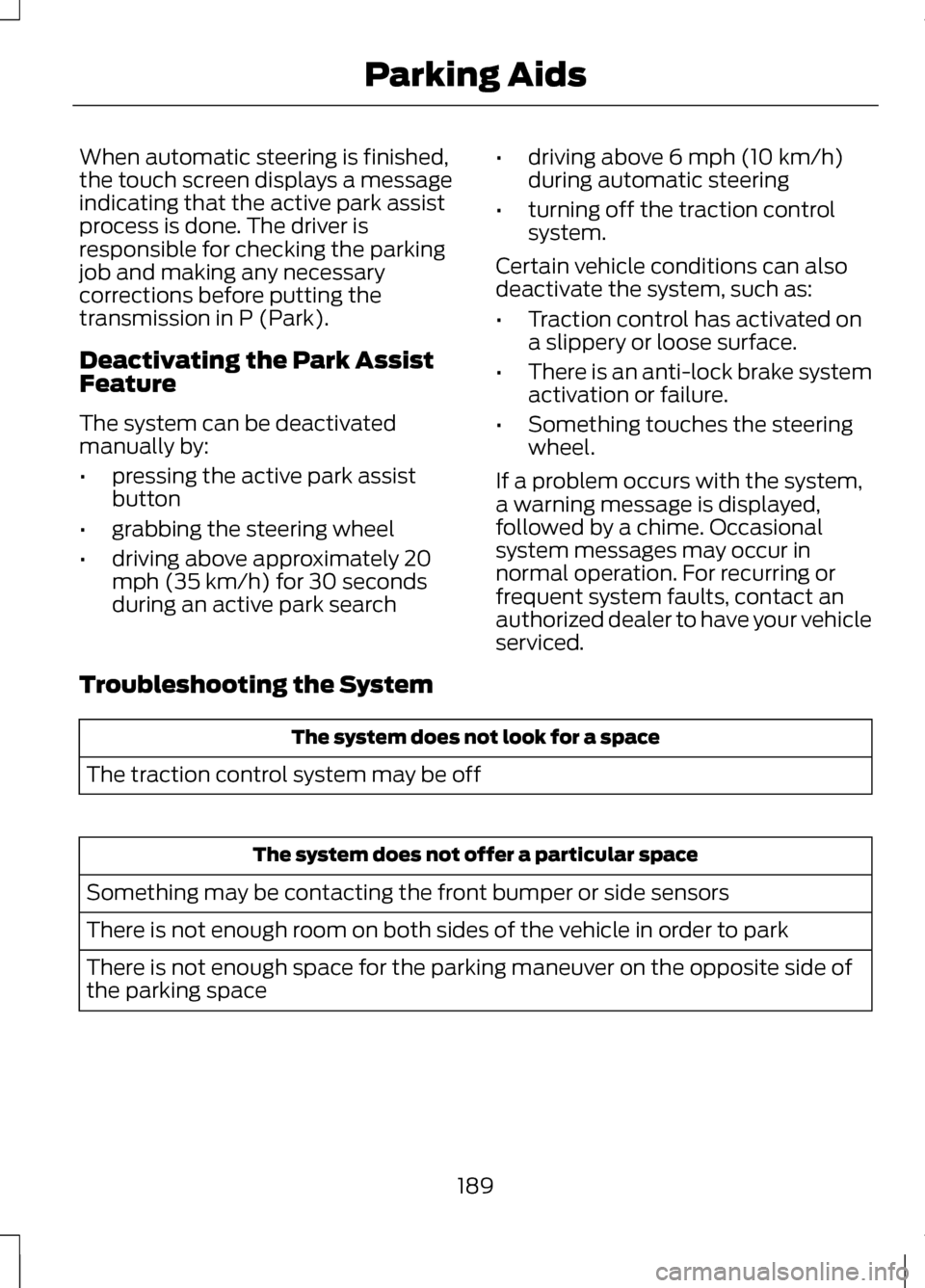
Troubleshooting the System The system does not look for a space
The traction control system may be off The system does not offer a particular space
Something may be contacting the front bumper or side sensors
There is not enough room on both sides of the vehicle in order to park
There is not enough space for the parking maneuver on the opposite side of
the parking space
189
Parking Aids
Page 196 of 474
Active guidelines are only shown with
fixed guidelines. To use active
guidelines, turn the steering wheel to
point the guidelines toward an
intended path. If the steering wheel
position is changed while reversing,
the vehicle might deviate from the
original intended path.
The fixed and active guidelines fade
in and out depending on the steering
wheel position. The active guidelines
are not shown when the steering
wheel position is straight.
Always use caution while reversing.
Objects in the red zone are closest to
your vehicle and objects in the green
zone are farther away. Objects are
getting closer to your vehicle as they
move from the green zone to the
yellow or red zones. Use the side view
mirrors and rear view mirror to get
better coverage on both sides and rear
of the vehicle.
Selectable settings for this feature are
ACTIVE + FIXED, FIXED and OFF.
Visual Park Aid Alert
Note:
Visual park alert is only available
when the transmission is in R
(Reverse).
Note: The reverse sensing system is
not effective at speeds above 3 mph
(5 km/h) and may not detect certain
angular or moving objects. The system uses red, yellow and green
highlights which appear on top of the
video image when an object is
detected by the reverse sensing
system. The alert highlights the
closest object detected. The reverse
sensing alert can be disabled and if
visual park aid alert is enabled,
highlighted areas are still displayed.
Selectable settings for this feature are
ON and OFF.
Manual Zoom
WARNING
When manual zoom is on, the
full area behind the vehicle is not
shown. Be aware of your surroundings
when using the manual zoom feature. Note:
Manual zoom is only available
when the transmission is in R
(Reverse).
Note: When manual zoom is enabled,
only the centerline is shown.
This allows you to get a closer view of
an object behind the vehicle. The
zoomed image keeps the bumper in
the image to provide a reference. The
zoom is only active while the
transmission is in R (Reverse). When
the transmission is shifted out of R
(Reverse), the feature automatically
turns off and must be reset when it is
used again.
193
Parking Aids
Page 197 of 474
Selectable settings for this feature are
OFF, Level 1, Level 2 or Level 3. Press
the up and down arrows to change
the view. The selection level appears
between the buttons (i.e. Level 1). The
default setting for the manual zoom
is OFF.
Rear Camera Delay
When shifting the transmission out of
R (Reverse) and into any gear other
than P (Park), the camera image
remains in the display until the vehicle
speed reaches 5 mph (8 km/h). This
occurs when the rear camera delay
feature is on, or until a radio button is
selected.
Selectable settings for this feature are
ON and OFF. The default setting for
the rear camera delay is OFF.
194
Parking Aids