buttons LINCOLN MKZ 2014 User Guide
[x] Cancel search | Manufacturer: LINCOLN, Model Year: 2014, Model line: MKZ, Model: LINCOLN MKZ 2014Pages: 468, PDF Size: 4.49 MB
Page 148 of 468
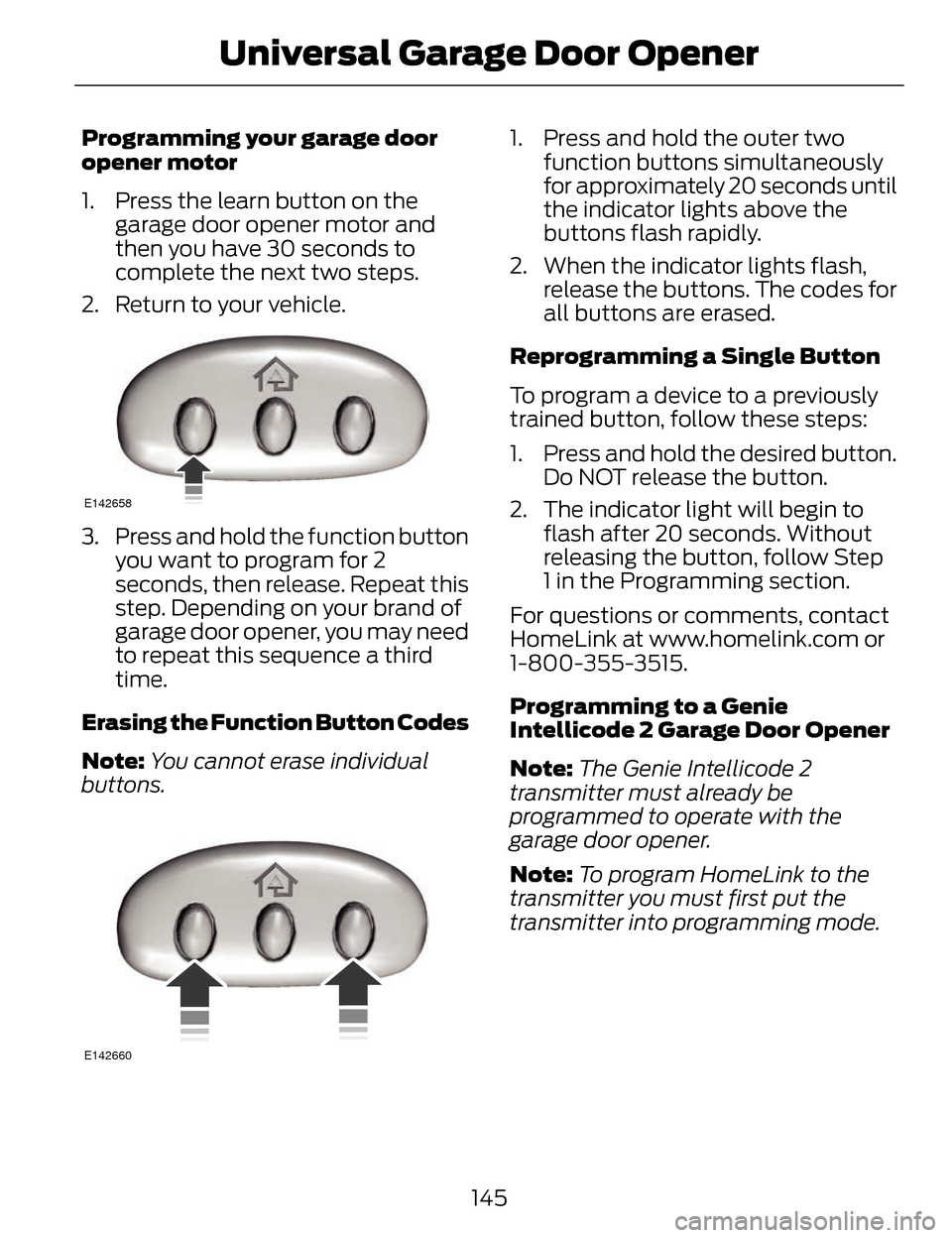
Programming your garage door
opener motor
1. Press the learn button on the garage door opener motor and
then you have 30 seconds to
complete the next two steps.
2. Return to your vehicle.
E142658
3. Press and hold the function button you want to program for 2
seconds, then release. Repeat this
step. Depending on your brand of
garage door opener, you may need
to repeat this sequence a third
time.
Erasing the Function Button Codes
Note: You cannot erase individual
buttons.
E142660
1. Press and hold the outer two function buttons simultaneously
for approximately 20 seconds until
the indicator lights above the
buttons flash rapidly.
2. When the indicator lights flash, release the buttons. The codes for
all buttons are erased.
Reprogramming a Single Button
To program a device to a previously
trained button, follow these steps:
1. Press and hold the desired button. Do NOT release the button.
2. The indicator light will begin to flash after 20 seconds. Without
releasing the button, follow Step
1 in the Programming section.
For questions or comments, contact
HomeLink at www.homelink.com or
1-800-355-3515.
Programming to a Genie
Intellicode 2 Garage Door Opener
Note: The Genie Intellicode 2
transmitter must already be
programmed to operate with the
garage door opener.
Note: To program HomeLink to the
transmitter you must first put the
transmitter into programming mode.
145
Universal Garage Door Opener
Page 149 of 468
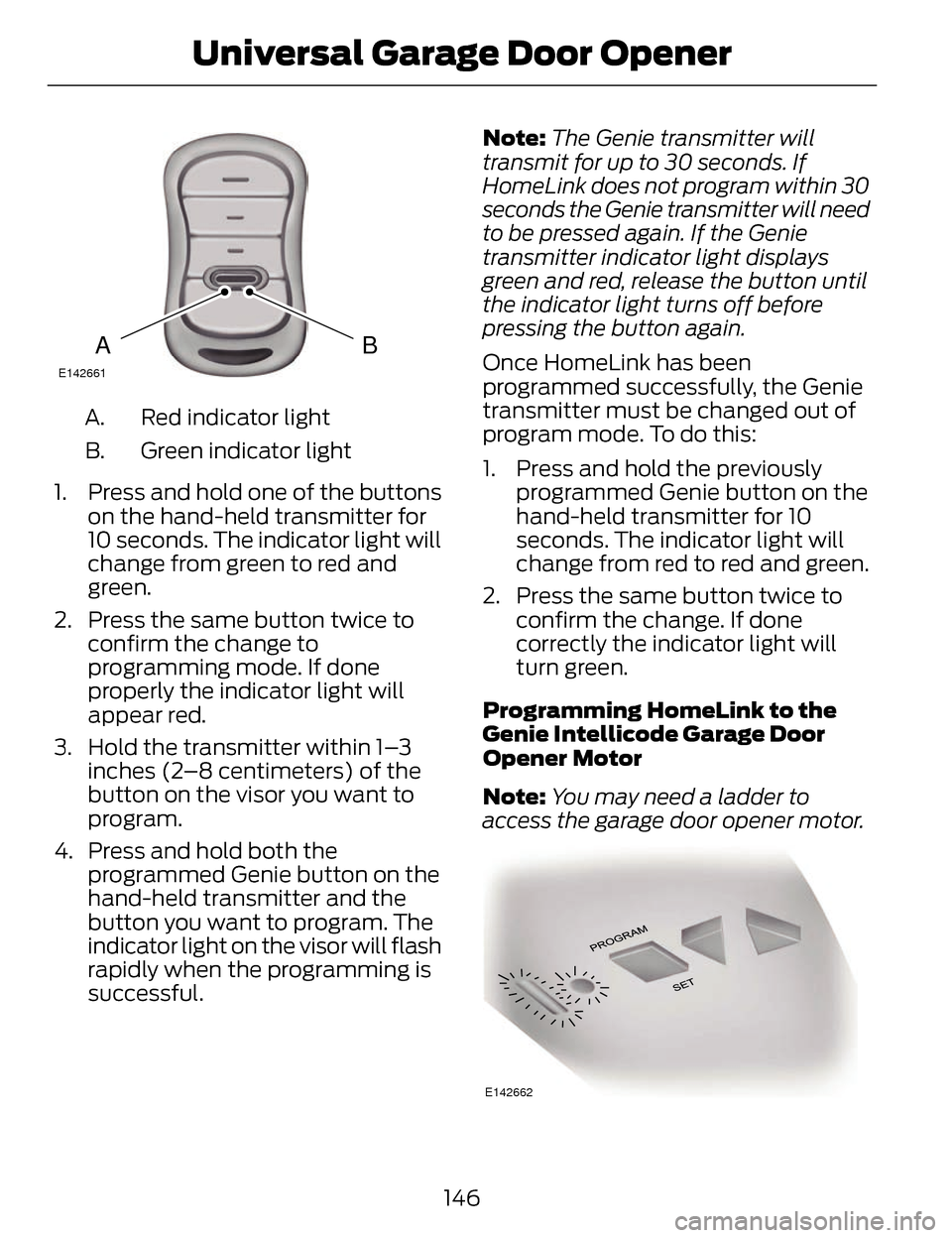
BAE142661
Red indicator light
A.
Green indicator light
B.
1. Press and hold one of the buttons on the hand-held transmitter for
10 seconds. The indicator light will
change from green to red and
green.
2. Press the same button twice to confirm the change to
programming mode. If done
properly the indicator light will
appear red.
3. Hold the transmitter within 1–3 inches (2–8 centimeters) of the
button on the visor you want to
program.
4. Press and hold both the programmed Genie button on the
hand-held transmitter and the
button you want to program. The
indicator light on the visor will flash
rapidly when the programming is
successful. Note:
The Genie transmitter will
transmit for up to 30 seconds. If
HomeLink does not program within 30
seconds the Genie transmitter will need
to be pressed again. If the Genie
transmitter indicator light displays
green and red, release the button until
the indicator light turns off before
pressing the button again.
Once HomeLink has been
programmed successfully, the Genie
transmitter must be changed out of
program mode. To do this:
1. Press and hold the previously programmed Genie button on the
hand-held transmitter for 10
seconds. The indicator light will
change from red to red and green.
2. Press the same button twice to confirm the change. If done
correctly the indicator light will
turn green.
Programming HomeLink to the
Genie Intellicode Garage Door
Opener Motor
Note: You may need a ladder to
access the garage door opener motor.
E142662
146
Universal Garage Door Opener
Page 150 of 468
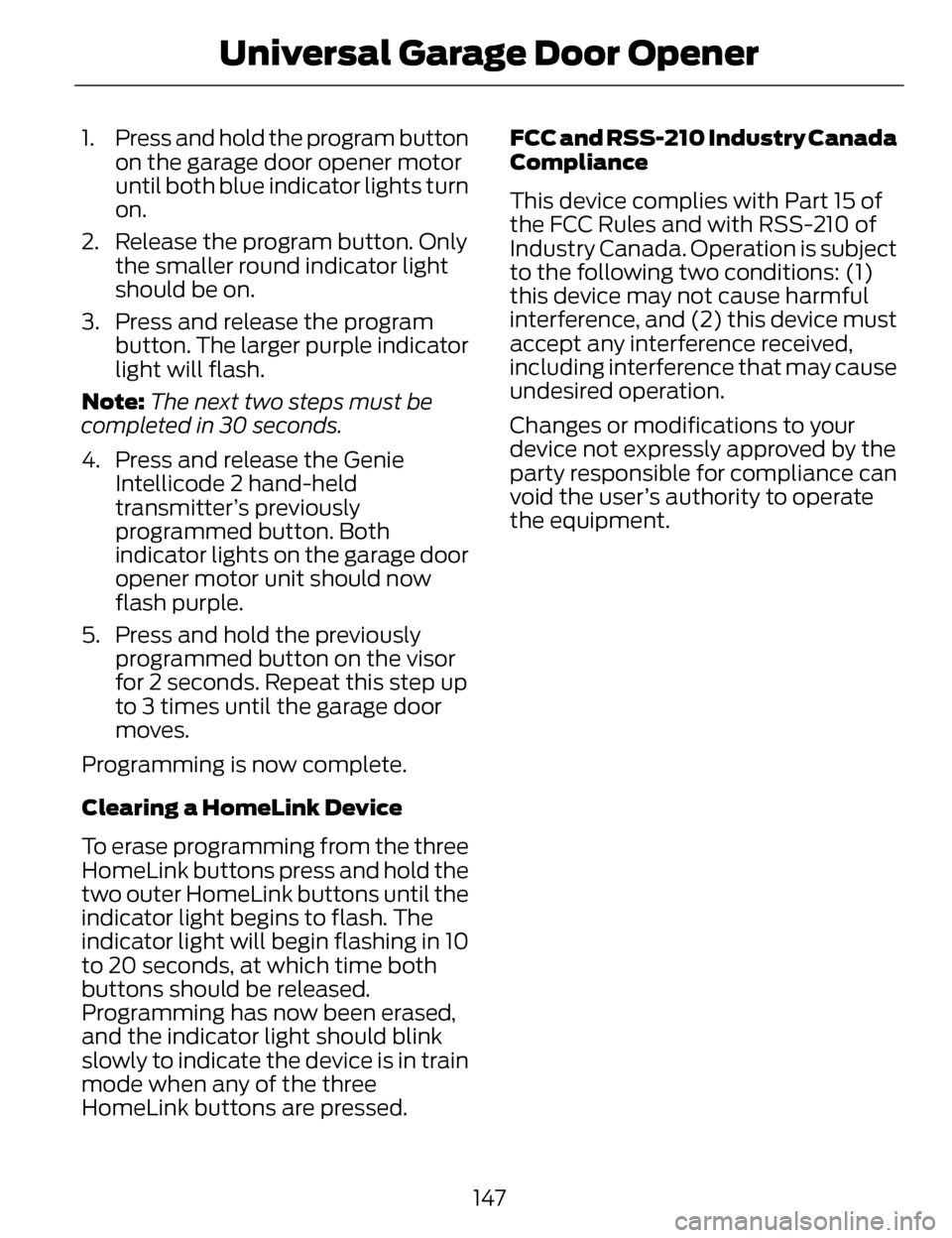
1. Press and hold the program buttonon the garage door opener motor
until both blue indicator lights turn
on.
2. Release the program button. Only the smaller round indicator light
should be on.
3. Press and release the program button. The larger purple indicator
light will flash.
Note: The next two steps must be
completed in 30 seconds.
4. Press and release the Genie Intellicode 2 hand-held
transmitter’s previously
programmed button. Both
indicator lights on the garage door
opener motor unit should now
flash purple.
5. Press and hold the previously programmed button on the visor
for 2 seconds. Repeat this step up
to 3 times until the garage door
moves.
Programming is now complete.
Clearing a HomeLink Device
To erase programming from the three
HomeLink buttons press and hold the
two outer HomeLink buttons until the
indicator light begins to flash. The
indicator light will begin flashing in 10
to 20 seconds, at which time both
buttons should be released.
Programming has now been erased,
and the indicator light should blink
slowly to indicate the device is in train
mode when any of the three
HomeLink buttons are pressed. FCC and RSS-210 Industry Canada
Compliance
This device complies with Part 15 of
the FCC Rules and with RSS-210 of
Industry Canada. Operation is subject
to the following two conditions: (1)
this device may not cause harmful
interference, and (2) this device must
accept any interference received,
including interference that may cause
undesired operation.
Changes or modifications to your
device not expressly approved by the
party responsible for compliance can
void the user’s authority to operate
the equipment.
147
Universal Garage Door Opener
Page 170 of 468
AUTOMATIC
TRANSMISSION
WARNINGS
Always set the parking brake
fully and make sure your vehicle
is in P (Park). Turn the ignition off
whenever you leave your vehicle.
Do not apply the brake pedal and
accelerator pedal
simultaneously. Applying both pedals
simultaneously for more than three
seconds will limit engine rpm, which
may result in difficulty maintaining
speed in traffic and could lead to
serious injury.
Push Button Shift
Transmission
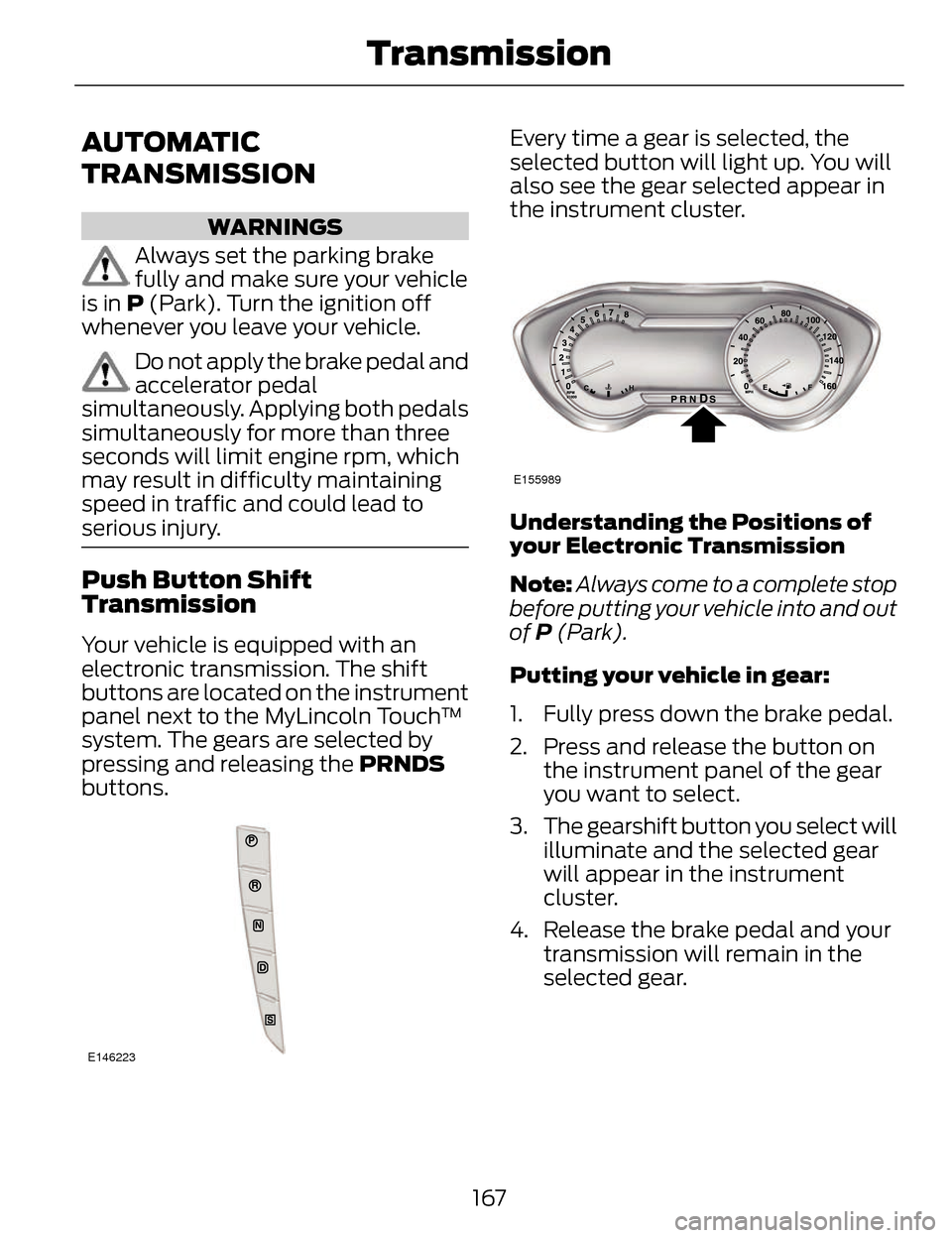
Your vehicle is equipped with an
electronic transmission. The shift
buttons are located on the instrument
panel next to the MyLincoln Touch™
system. The gears are selected by
pressing and releasing the PRNDS
buttons.
E146223
Every time a gear is selected, the
selected button will light up. You will
also see the gear selected appear in
the instrument cluster.
E155989
Understanding the Positions of
your Electronic Transmission
Note: Always come to a complete stop
before putting your vehicle into and out
of P (Park).
Putting your vehicle in gear:
1. Fully press down the brake pedal.
2. Press and release the button on the instrument panel of the gear
you want to select.
3. The gearshift button you select will illuminate and the selected gear
will appear in the instrument
cluster.
4. Release the brake pedal and your transmission will remain in the
selected gear.
167
Transmission
Page 174 of 468
WARNINGS
If the parking brake is fully
released, but the brake warning
lamp remains illuminated, the brakes
may not be working properly. See your
authorized dealer.
Note: See your authorized dealer as
soon as possible if this procedure is
used.
Note: For some markets this feature
is disabled.
Note: This feature will only function if
your 12-volt battery has power.
Use the brake-shift interlock override
to move your transmission from the
park position in the event of an
electrical malfunction or if your
vehicle has a dead battery.
1. Apply the parking brake and turn your ignition off before performing
this procedure.
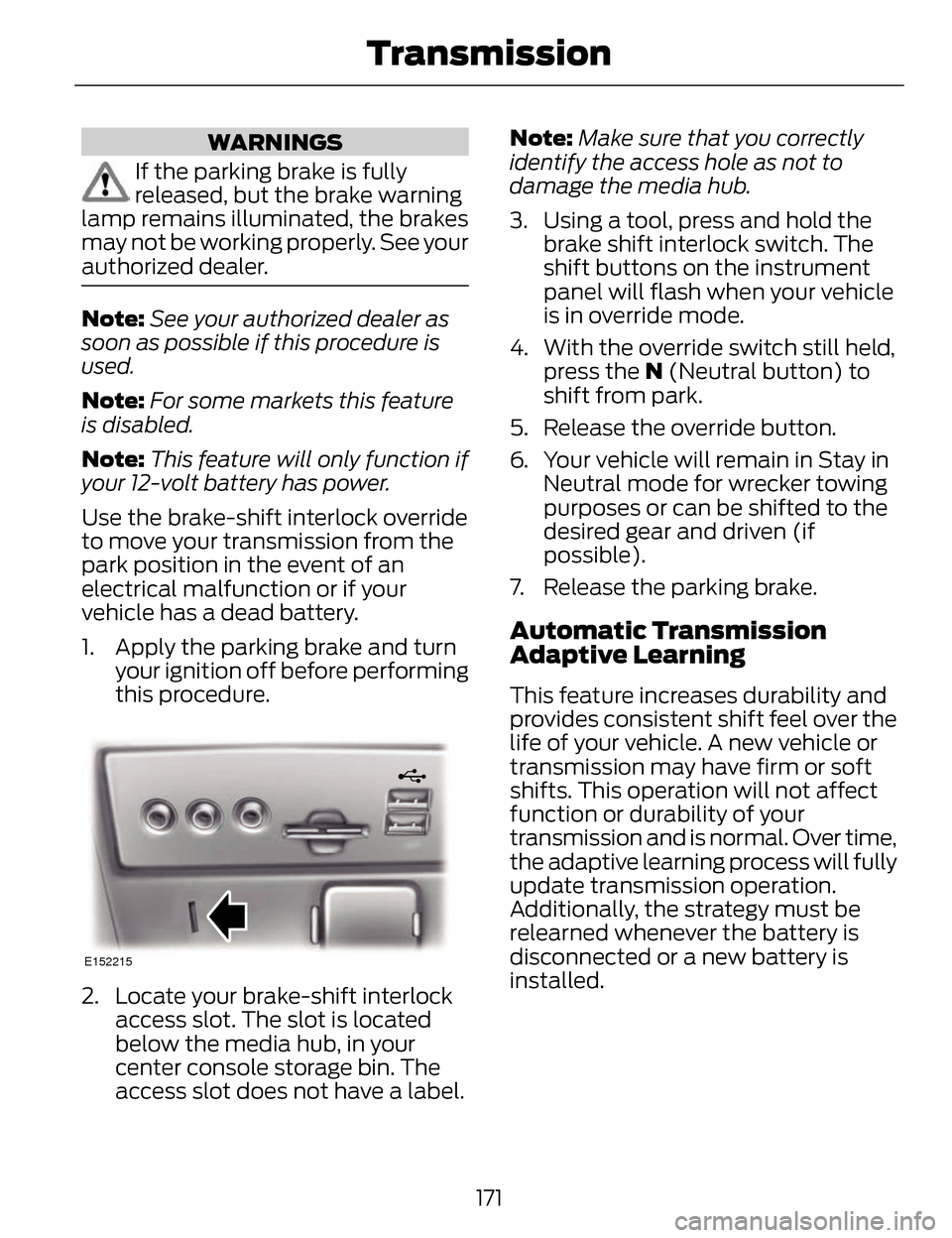
E152215
2. Locate your brake-shift interlockaccess slot. The slot is located
below the media hub, in your
center console storage bin. The
access slot does not have a label. Note:
Make sure that you correctly
identify the access hole as not to
damage the media hub.
3. Using a tool, press and hold the brake shift interlock switch. The
shift buttons on the instrument
panel will flash when your vehicle
is in override mode.
4. With the override switch still held, press the N (Neutral button) to
shift from park.
5. Release the override button.
6. Your vehicle will remain in Stay in Neutral mode for wrecker towing
purposes or can be shifted to the
desired gear and driven (if
possible).
7. Release the parking brake.
Automatic Transmission
Adaptive Learning
This feature increases durability and
provides consistent shift feel over the
life of your vehicle. A new vehicle or
transmission may have firm or soft
shifts. This operation will not affect
function or durability of your
transmission and is normal. Over time,
the adaptive learning process will fully
update transmission operation.
Additionally, the strategy must be
relearned whenever the battery is
disconnected or a new battery is
installed.
171
Transmission
Page 286 of 468
Note:It is recommended that the
negative battery cable terminal be
disconnected from the battery if you
plan to store your vehicle for an
extended period of time.
CHECKING THE WIPER
BLADES
E142463
Run the tip of your fingers over the
edge of the blade to check for
roughness.
Clean the wiper blades with washer
fluid or water applied with a soft
sponge or cloth.
CHANGING THE WIPER
BLADES
The wiper arms can be manually
moved when the ignition is off. This
allows for ease of blade replacement
and cleaning under the blades.
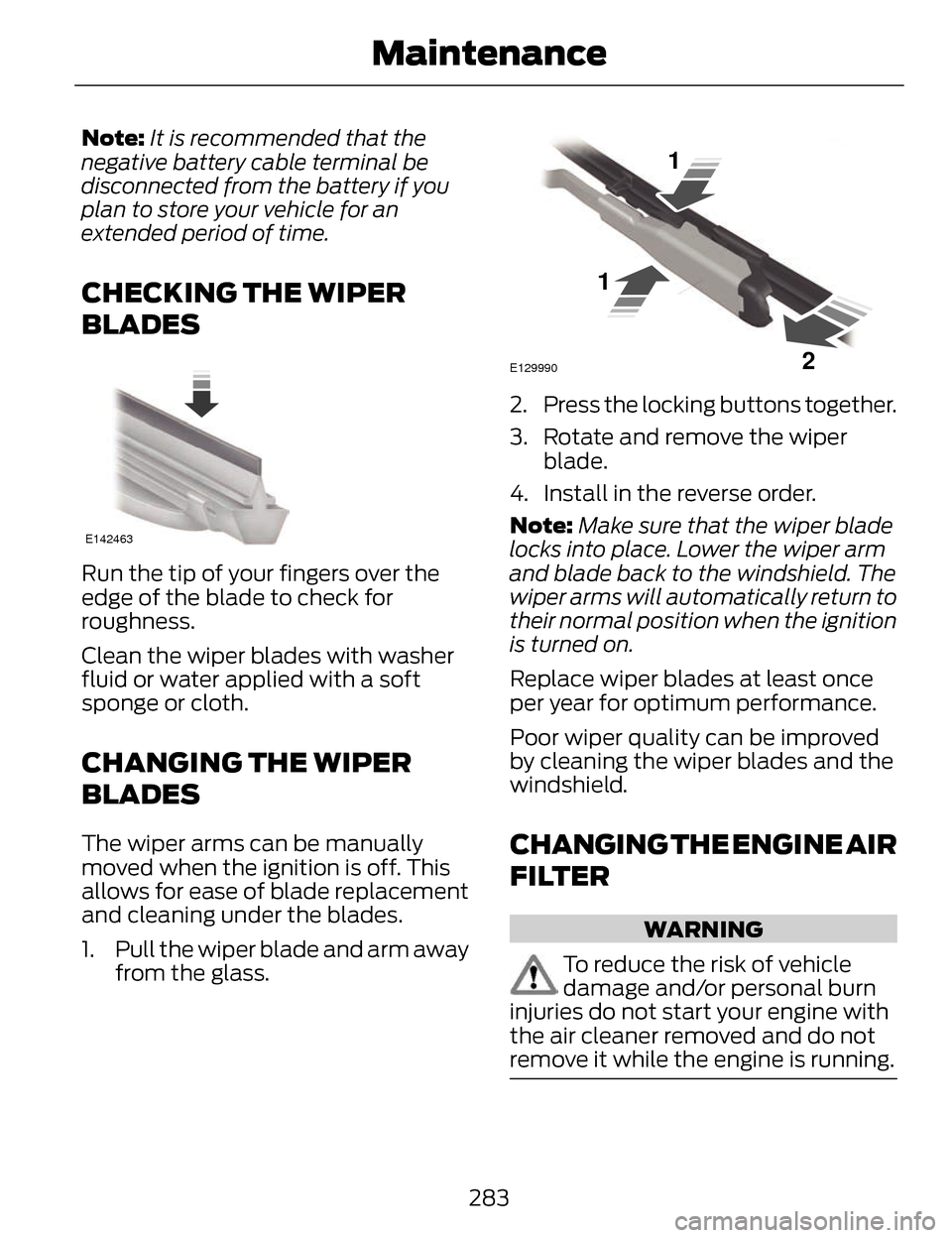
1. Pull the wiper blade and arm away from the glass.
E129990
1
1 2
2. Press the locking buttons together.
3. Rotate and remove the wiperblade.
4. Install in the reverse order.
Note: Make sure that the wiper blade
locks into place. Lower the wiper arm
and blade back to the windshield. The
wiper arms will automatically return to
their normal position when the ignition
is turned on.
Replace wiper blades at least once
per year for optimum performance.
Poor wiper quality can be improved
by cleaning the wiper blades and the
windshield.
CHANGING THE ENGINE AIR
FILTER
WARNING
To reduce the risk of vehicle
damage and/or personal burn
injuries do not start your engine with
the air cleaner removed and do not
remove it while the engine is running.
283
Maintenance
Page 347 of 468
Press to access your home screen.
Depending on your vehicle’s option
package and software, your screens
may vary in appearance from the
descriptions in this section. Your
features may also be limited
depending on your market. Check with
an authorized dealer for availability.
E142608
INFORMATION
Press to select any of the following:
• Services
• Travel Link
• Alerts
• Calendar
• Apps
ENTERTAINMENT
Press to select any of the following:
•AM
•FM
• SIRIUS
•CD
•USB
• BT Stereo
• SD Card
• A/V In
Using the Touch-Sensitive
Controls on Your System
To turn a feature on and off, just touch
the graphic with your finger. To get the
best performance from the
touch-sensitive controls:
• Do not press hard on the controls. They are sensitive to light touch.
• Use your bare finger to touch the center of a touch-control graphic.
Touching off-center of the graphic
may affect operation of a nearby
control.
• Make sure your hands are clean and dry.
• Since the touchscreen operates based on the touch of a finger, you
may have trouble using it if you are
wearing gloves.
• Keep metal and other conductive material away from the surface of
the touchscreen as this may cause
electronic interference (for
example, inadvertently turning on
a feature other than the one you
meant to turn on).
Depending on your vehicle and option
package, you may also have these
controls on your bezel:
• Power: Switch the media or climate features off and on.
• VOL: Control the volume of
playing media.
• Fan: Control the speed of the climate system fan.
• Seek and Tune buttons: Use as you normally would in media modes.
344
MyLincoln Touch™
Page 351 of 468
access the information independently
of Ford Motor Company and Ford of
Canada. For further privacyinformation, see the sections on 911
Assist, Vehicle Health Report, and
Traffic, Directions and Information.
Accessing and Adjusting Modes through Your Vehicle Information
Display
E156609
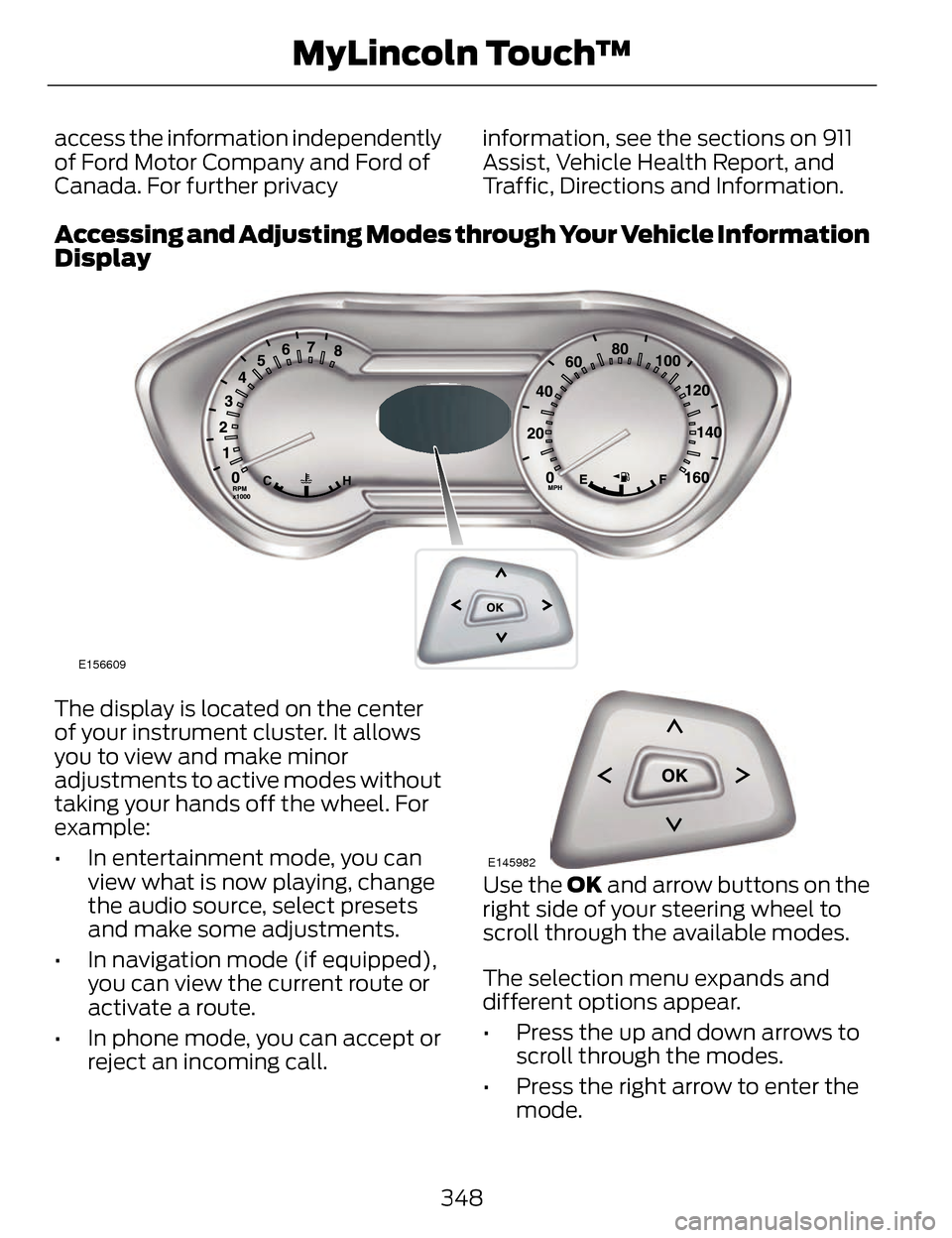
The display is located on the center
of your instrument cluster. It allows
you to view and make minor
adjustments to active modes without
taking your hands off the wheel. For
example:
• In entertainment mode, you can
view what is now playing, change
the audio source, select presets
and make some adjustments.
• In navigation mode (if equipped), you can view the current route or
activate a route.
• In phone mode, you can accept or reject an incoming call.
E145982
Use the OK and arrow buttons on the
right side of your steering wheel to
scroll through the available modes.
The selection menu expands and
different options appear.
• Press the up and down arrows to scroll through the modes.
• Press the right arrow to enter the mode.
348
MyLincoln Touch™
Page 366 of 468
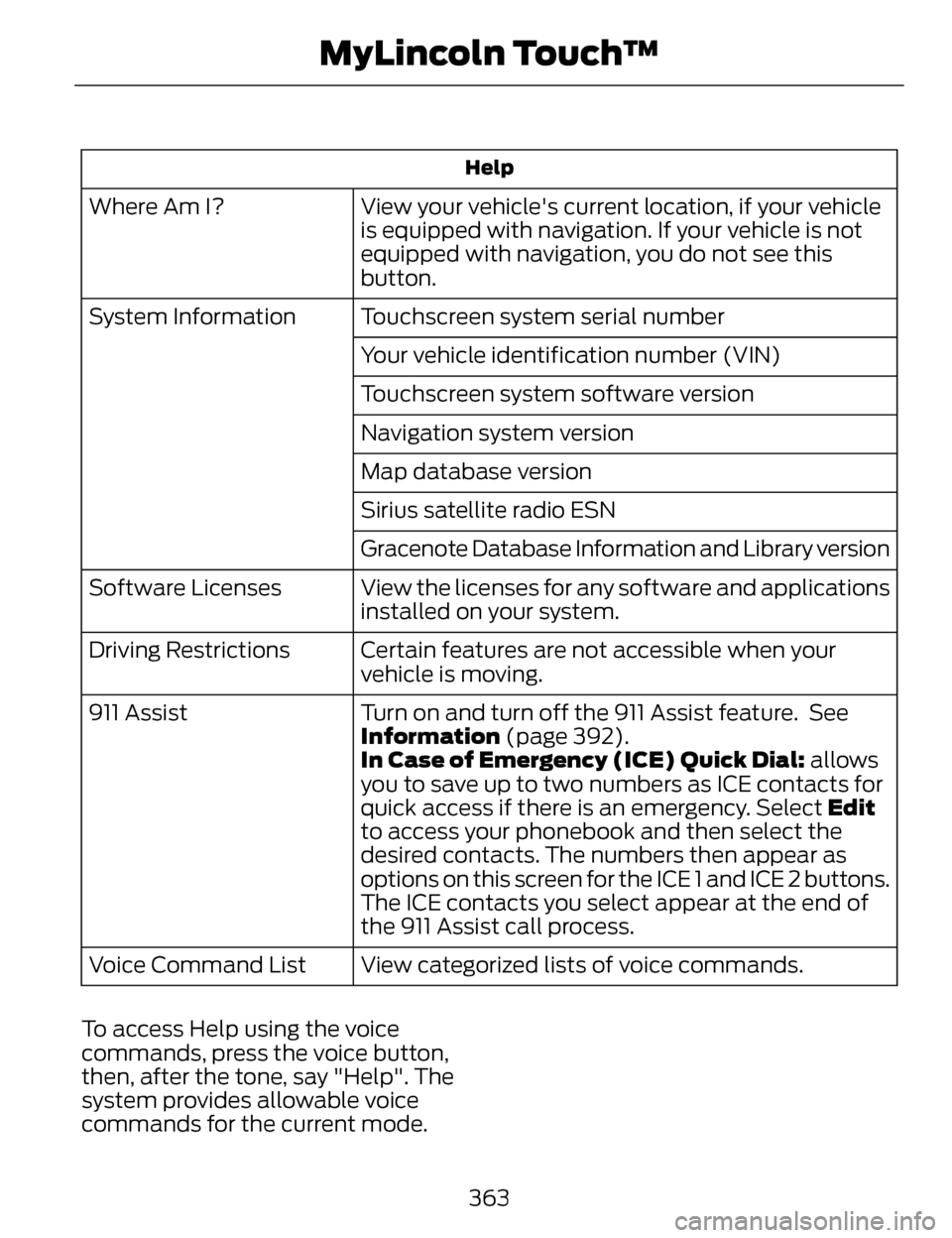
Help
View your vehicle's current location, if your vehicle
is equipped with navigation. If your vehicle is not
equipped with navigation, you do not see this
button.
Where Am I?
Touchscreen system serial number
System Information
Your vehicle identification number (VIN)
Touchscreen system software version
Navigation system version
Map database version
Sirius satellite radio ESN
Gracenote Database Information and Library version
View the licenses for any software and applications
installed on your system.
Software Licenses
Certain features are not accessible when your
vehicle is moving.
Driving Restrictions
Turn on and turn off the 911 Assist feature. See
Information (page 392).
911 Assist
In Case of Emergency (ICE) Quick Dial: allows
you to save up to two numbers as ICE contacts for
quick access if there is an emergency. Select Edit
to access your phonebook and then select the
desired contacts. The numbers then appear as
options on this screen for the ICE 1 and ICE 2 buttons.
The ICE contacts you select appear at the end of
the 911 Assist call process.
View categorized lists of voice commands.
Voice Command List
To access Help using the voice
commands, press the voice button,
then, after the tone, say "Help". The
system provides allowable voice
commands for the current mode.
363
MyLincoln Touch™
Page 367 of 468
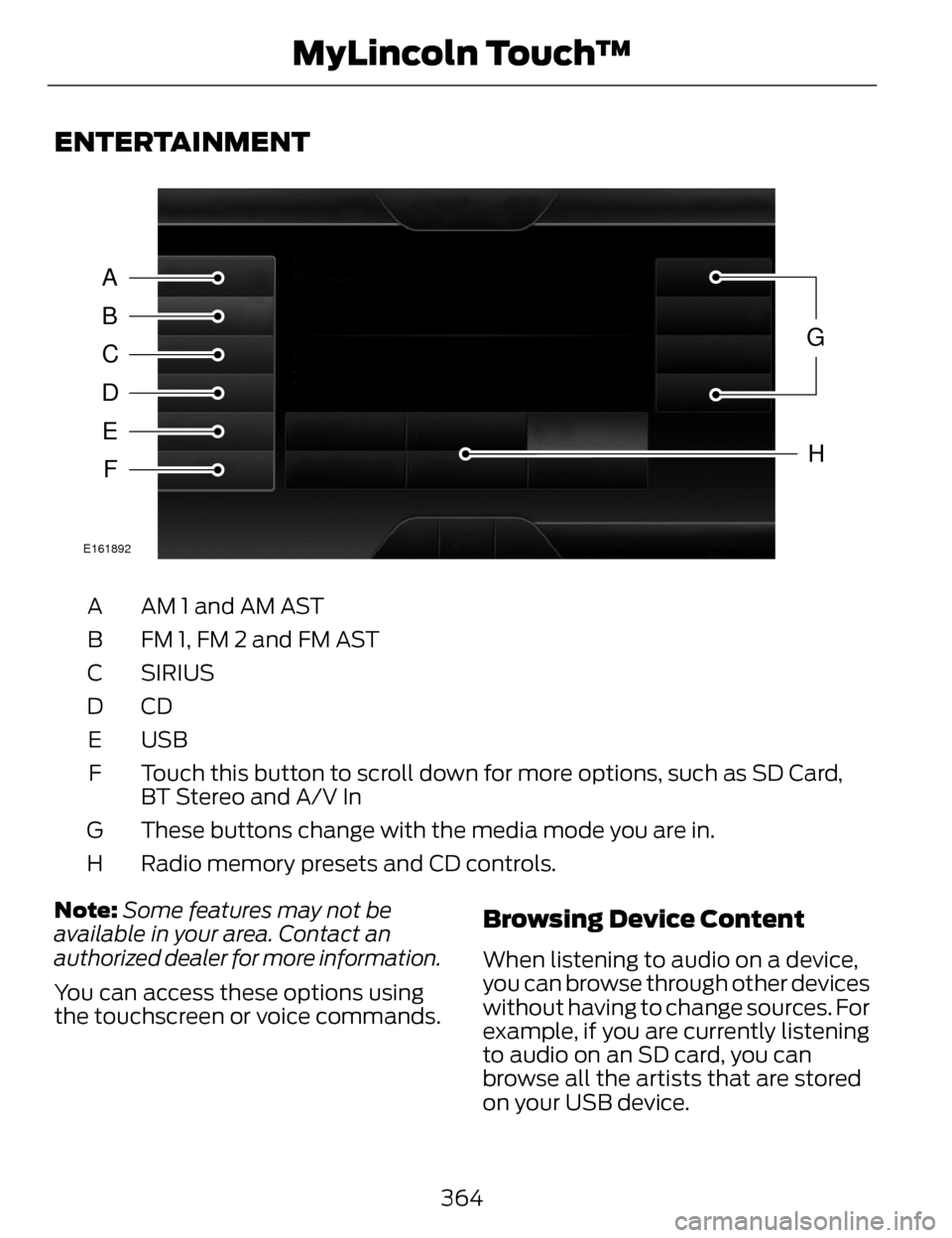
ENTERTAINMENT
A
B
C
D
E
F
G
H
E161892
AM 1 and AM AST
A
FM 1, FM 2 and FM AST
B
SIRIUS
C
CDD
USB
E
Touch this button to scroll down for more options, such as SD Card,
BT Stereo and A/V In
F
These buttons change with the media mode you are in.
G
Radio memory presets and CD controls.
H
Note: Some features may not be
available in your area. Contact an
authorized dealer for more information.
You can access these options using
the touchscreen or voice commands.
Browsing Device Content
When listening to audio on a device,
you can browse through other devices
without having to change sources. For
example, if you are currently listening
to audio on an SD card, you can
browse all the artists that are stored
on your USB device.
364
MyLincoln Touch™