trunk LINCOLN MKZ 2014 Owners Manual
[x] Cancel search | Manufacturer: LINCOLN, Model Year: 2014, Model line: MKZ, Model: LINCOLN MKZ 2014Pages: 468, PDF Size: 4.49 MB
Page 65 of 468
LOCKING AND UNLOCKING
You can use the power door lock
control or the remote control to lock
and unlock your vehicle.
Power Door Locks
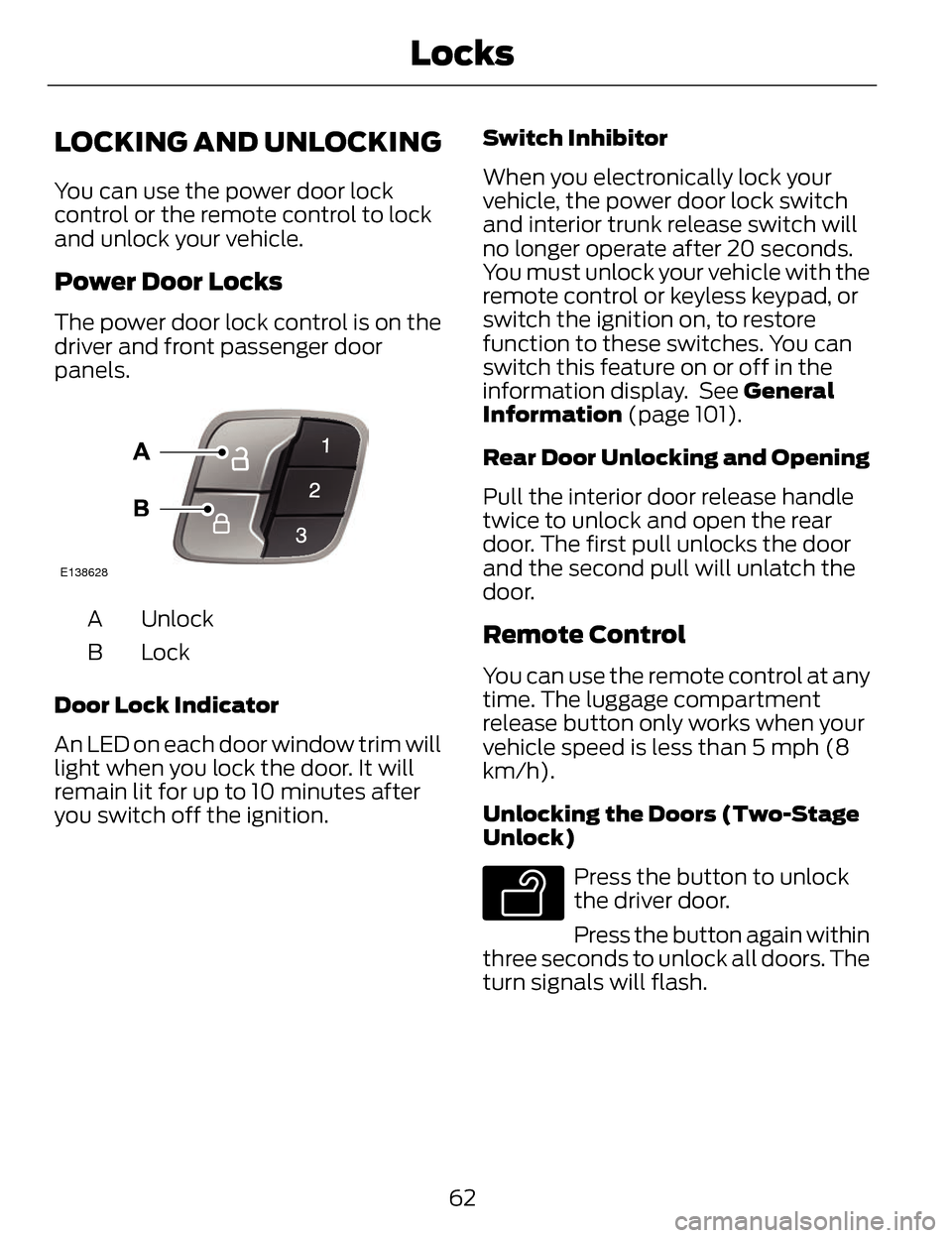
The power door lock control is on the
driver and front passenger door
panels.
E138628
Unlock
A
LockB
Door Lock Indicator
An LED on each door window trim will
light when you lock the door. It will
remain lit for up to 10 minutes after
you switch off the ignition. Switch Inhibitor
When you electronically lock your
vehicle, the power door lock switch
and interior trunk release switch will
no longer operate after 20 seconds.
You must unlock your vehicle with the
remote control or keyless keypad, or
switch the ignition on, to restore
function to these switches. You can
switch this feature on or off in the
information display. See General
Information (page 101).
Rear Door Unlocking and Opening
Pull the interior door release handle
twice to unlock and open the rear
door. The first pull unlocks the door
and the second pull will unlatch the
door.Remote Control
You can use the remote control at any
time. The luggage compartment
release button only works when your
vehicle speed is less than 5 mph (8
km/h).
Unlocking the Doors (Two-Stage
Unlock)
E138629
Press the button to unlock
the driver door.
Press the button again within
three seconds to unlock all doors. The
turn signals will flash.
62
Locks
Page 69 of 468
Accessory Mode Battery Saver for
Intelligent Access Keys
If you leave your vehicle in the run
ignition state, it will shut off once it
detects a certain amount of battery
drain or after 45 minutes.
Luggage Compartment
From Inside Your Vehicle
E138633
Press the button on the
instrument panel to unlatch
the trunk.
With the Remote Control
E138630
Press twice within three
seconds to unlatch the trunk.
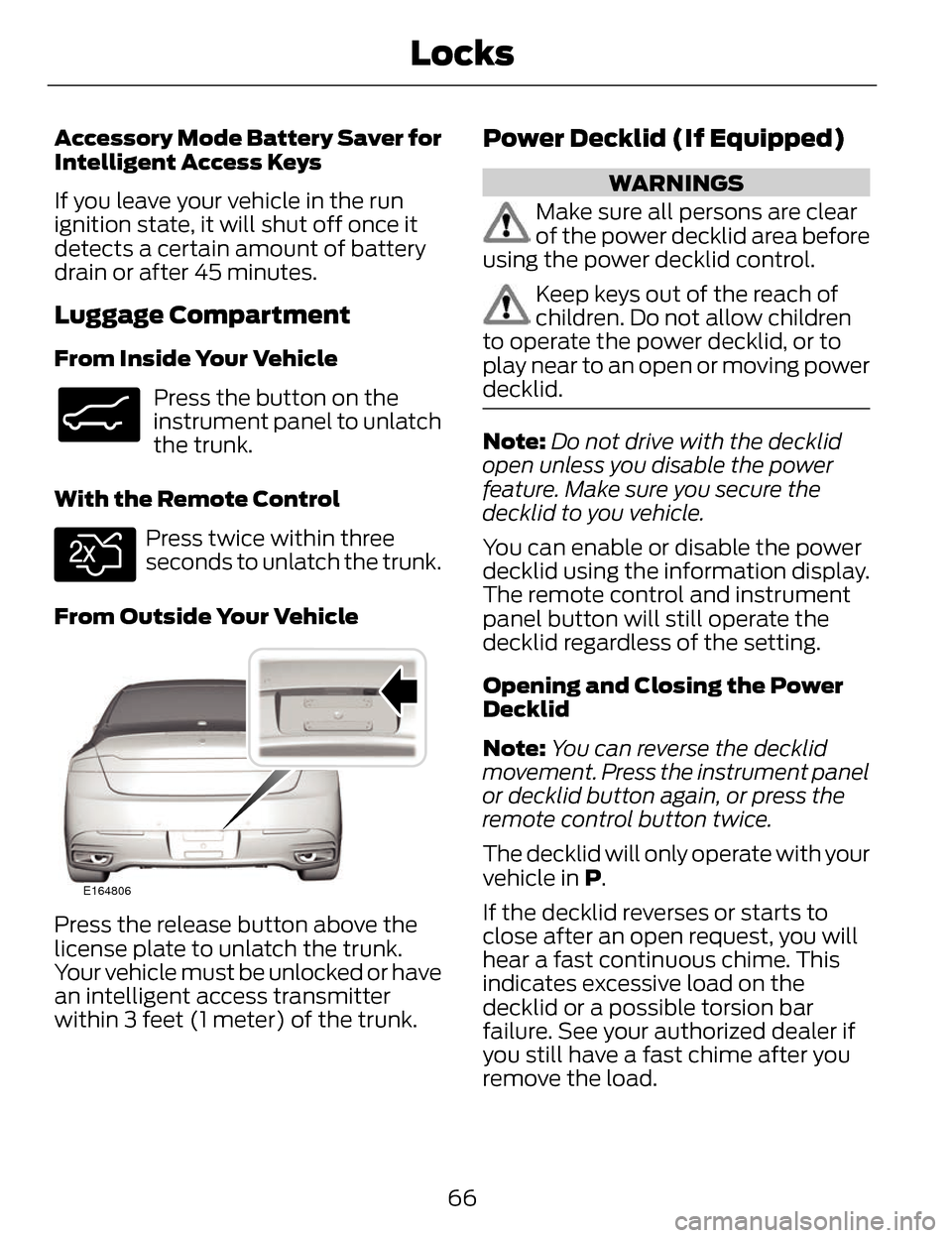
From Outside Your Vehicle
E164806
Press the release button above the
license plate to unlatch the trunk.
Your vehicle must be unlocked or have
an intelligent access transmitter
within 3 feet (1 meter) of the trunk.
Power Decklid (If Equipped)
WARNINGS
Make sure all persons are clear
of the power decklid area before
using the power decklid control.
Keep keys out of the reach of
children. Do not allow children
to operate the power decklid, or to
play near to an open or moving power
decklid.
Note: Do not drive with the decklid
open unless you disable the power
feature. Make sure you secure the
decklid to you vehicle.
You can enable or disable the power
decklid using the information display.
The remote control and instrument
panel button will still operate the
decklid regardless of the setting.
Opening and Closing the Power
Decklid
Note: You can reverse the decklid
movement. Press the instrument panel
or decklid button again, or press the
remote control button twice.
The decklid will only operate with your
vehicle in P.
If the decklid reverses or starts to
close after an open request, you will
hear a fast continuous chime. This
indicates excessive load on the
decklid or a possible torsion bar
failure. See your authorized dealer if
you still have a fast chime after you
remove the load.
66
Locks
Page 70 of 468
From Inside Your Vehicle
E138633
Press the button on the
instrument panel.
With the Remote Control
E138630
Press twice within three
seconds.
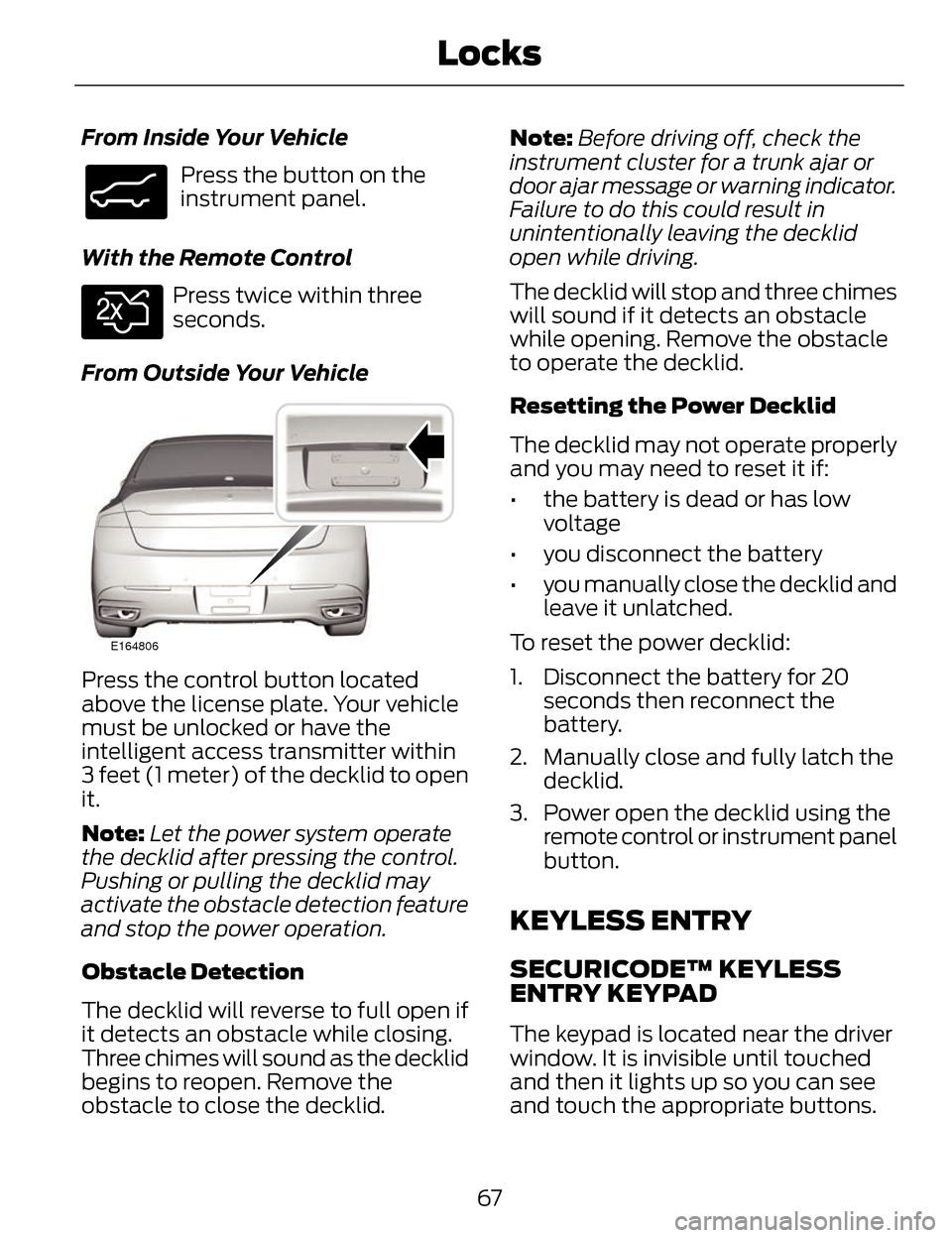
From Outside Your Vehicle
E164806
Press the control button located
above the license plate. Your vehicle
must be unlocked or have the
intelligent access transmitter within
3 feet (1 meter) of the decklid to open
it.
Note: Let the power system operate
the decklid after pressing the control.
Pushing or pulling the decklid may
activate the obstacle detection feature
and stop the power operation.
Obstacle Detection
The decklid will reverse to full open if
it detects an obstacle while closing.
Three chimes will sound as the decklid
begins to reopen. Remove the
obstacle to close the decklid. Note:
Before driving off, check the
instrument cluster for a trunk ajar or
door ajar message or warning indicator.
Failure to do this could result in
unintentionally leaving the decklid
open while driving.
The decklid will stop and three chimes
will sound if it detects an obstacle
while opening. Remove the obstacle
to operate the decklid.
Resetting the Power Decklid
The decklid may not operate properly
and you may need to reset it if:
• the battery is dead or has low voltage
• you disconnect the battery
• you manually close the decklid and leave it unlatched.
To reset the power decklid:
1. Disconnect the battery for 20 seconds then reconnect the
battery.
2. Manually close and fully latch the decklid.
3. Power open the decklid using the remote control or instrument panel
button.
KEYLESS ENTRY
SECURICODE™ KEYLESS
ENTRY KEYPAD
The keypad is located near the driver
window. It is invisible until touched
and then it lights up so you can see
and touch the appropriate buttons.
67
Locks
Page 71 of 468
Note:If you enter your entry code too
fast on the keypad, the unlock function
may not work. Re-enter your entry code
more slowly.
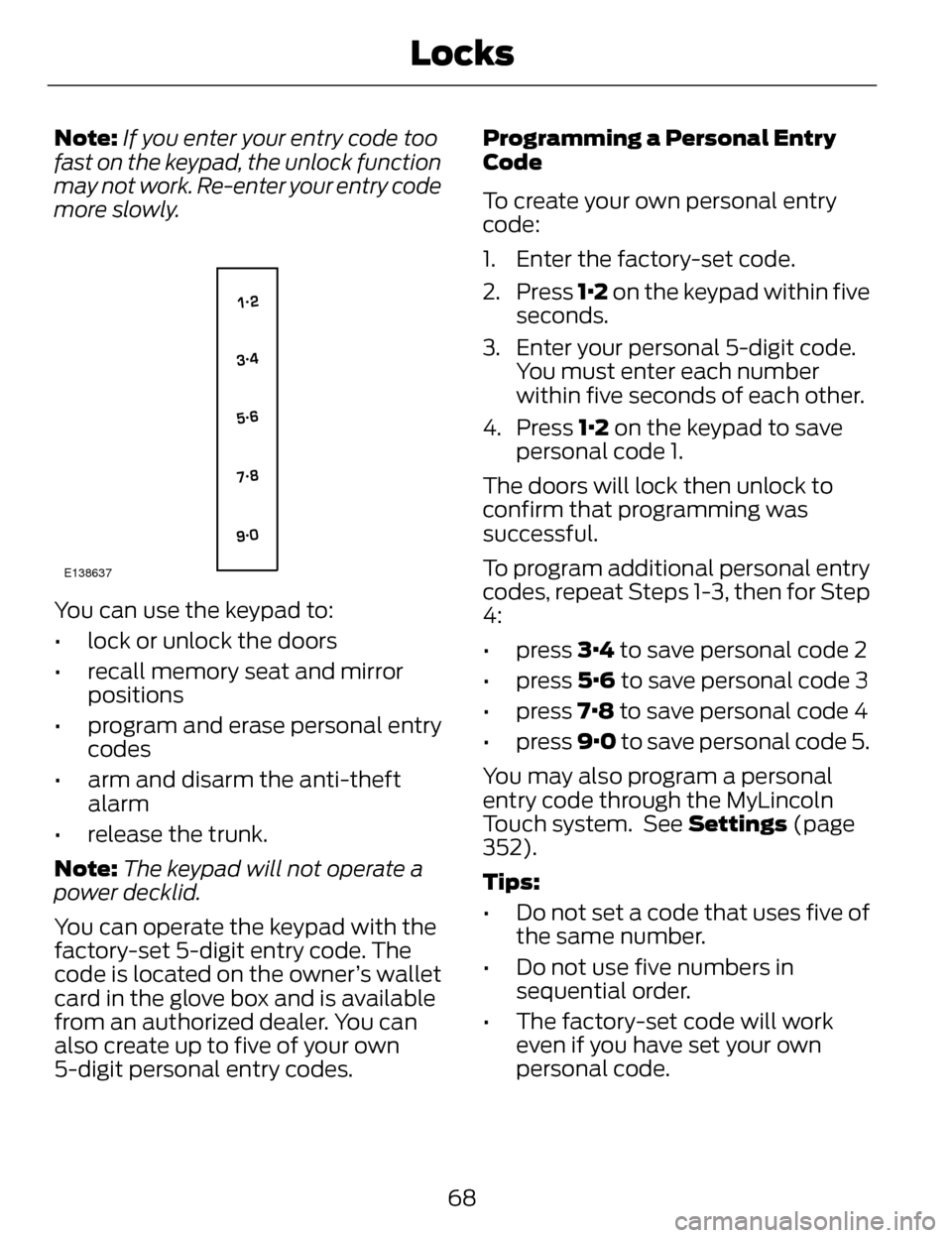
E138637
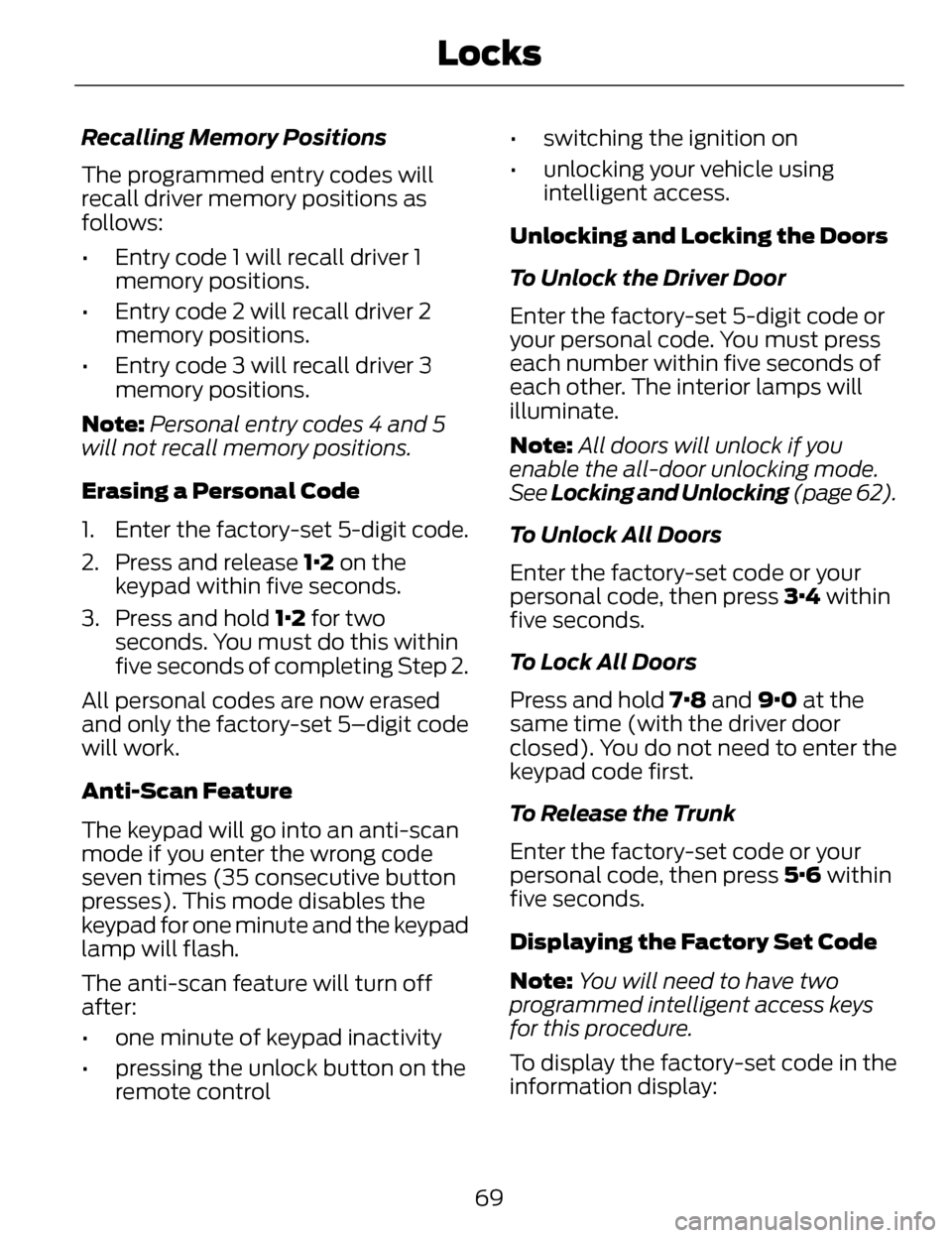
You can use the keypad to:
• lock or unlock the doors
• recall memory seat and mirror positions
• program and erase personal entry codes
• arm and disarm the anti-theft alarm
• release the trunk.
Note: The keypad will not operate a
power decklid.
You can operate the keypad with the
factory-set 5-digit entry code. The
code is located on the owner’s wallet
card in the glove box and is available
from an authorized dealer. You can
also create up to five of your own
5-digit personal entry codes. Programming a Personal Entry
Code
To create your own personal entry
code:
1. Enter the factory-set code.
2. Press
1·2 on the keypad within five
seconds.
3. Enter your personal 5-digit code. You must enter each number
within five seconds of each other.
4. Press 1·2 on the keypad to save
personal code 1.
The doors will lock then unlock to
confirm that programming was
successful.
To program additional personal entry
codes, repeat Steps 1-3, then for Step
4:
• press 3·4 to save personal code 2
• press 5·6 to save personal code 3
• press 7·8 to save personal code 4
• press 9·0 to save personal code 5.
You may also program a personal
entry code through the MyLincoln
Touch system. See Settings (page
352).
Tips:
• Do not set a code that uses five of the same number.
• Do not use five numbers in sequential order.
• The factory-set code will work even if you have set your own
personal code.
68
Locks
Page 72 of 468
Recalling Memory Positions
The programmed entry codes will
recall driver memory positions as
follows:
• Entry code 1 will recall driver 1memory positions.
• Entry code 2 will recall driver 2 memory positions.
• Entry code 3 will recall driver 3 memory positions.
Note: Personal entry codes 4 and 5
will not recall memory positions.
Erasing a Personal Code
1. Enter the factory-set 5-digit code.
2. Press and release 1·2 on the keypad within five seconds.
3. Press and hold 1·2 for two seconds. You must do this within
five seconds of completing Step 2.
All personal codes are now erased
and only the factory-set 5–digit code
will work.
Anti-Scan Feature
The keypad will go into an anti-scan
mode if you enter the wrong code
seven times (35 consecutive button
presses). This mode disables the
keypad for one minute and the keypad
lamp will flash.
The anti-scan feature will turn off
after:
• one minute of keypad inactivity
• pressing the unlock button on the remote control • switching the ignition on
• unlocking your vehicle using
intelligent access.
Unlocking and Locking the Doors
To Unlock the Driver Door
Enter the factory-set 5-digit code or
your personal code. You must press
each number within five seconds of
each other. The interior lamps will
illuminate.
Note: All doors will unlock if you
enable the all-door unlocking mode.
See Locking and Unlocking (page 62).
To Unlock All Doors
Enter the factory-set code or your
personal code, then press 3·4 within
five seconds.
To Lock All Doors
Press and hold 7·8 and 9·0 at the
same time (with the driver door
closed). You do not need to enter the
keypad code first.
To Release the Trunk
Enter the factory-set code or your
personal code, then press 5·6 within
five seconds.
Displaying the Factory Set Code
Note: You will need to have two
programmed intelligent access keys
for this procedure.
To display the factory-set code in the
information display:
69
Locks
Page 73 of 468
E155835
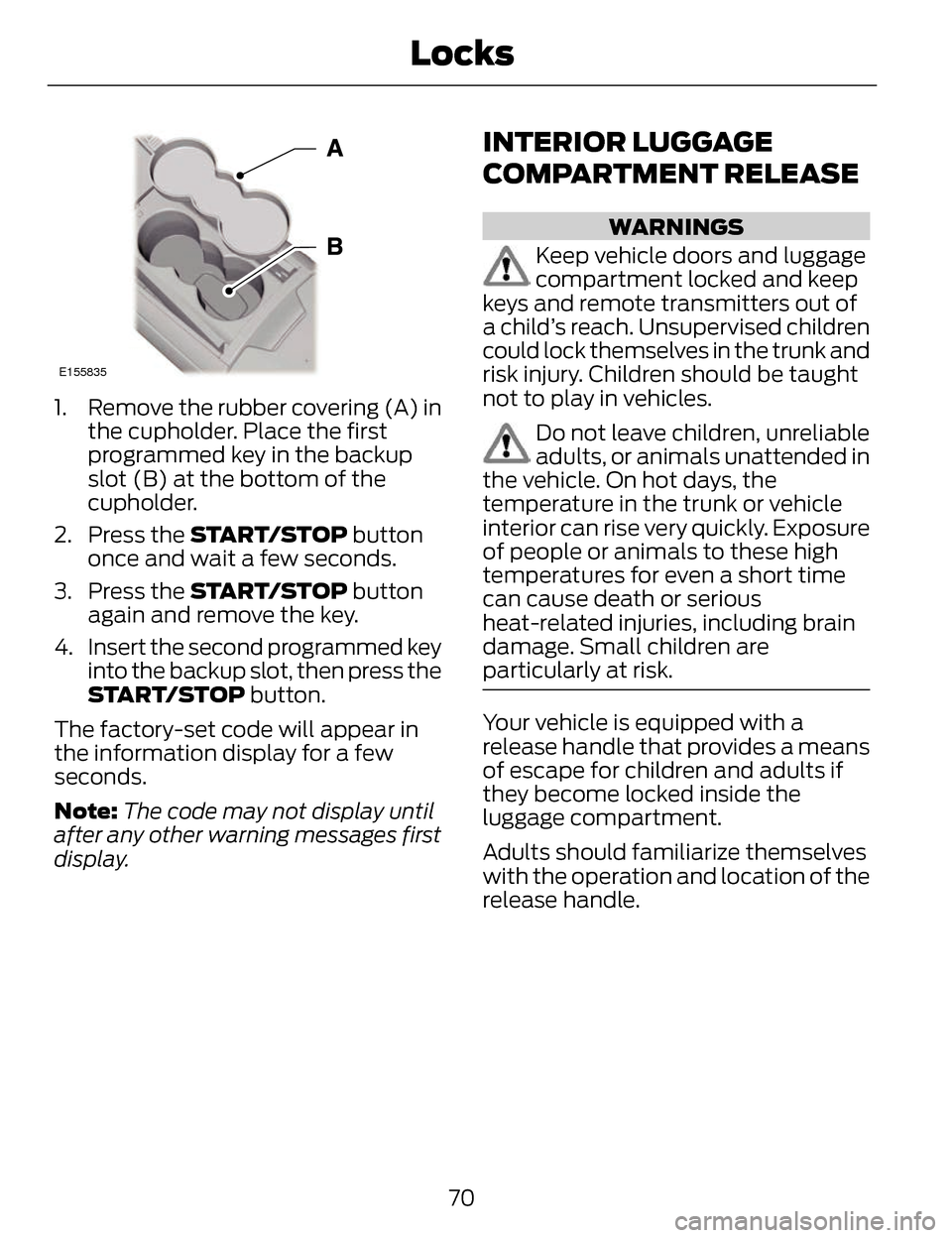
1. Remove the rubber covering (A) inthe cupholder. Place the first
programmed key in the backup
slot (B) at the bottom of the
cupholder.
2. Press the START/STOP button
once and wait a few seconds.
3. Press the START/STOP button
again and remove the key.
4. Insert the second programmed key into the backup slot, then press the
START/STOP button.
The factory-set code will appear in
the information display for a few
seconds.
Note: The code may not display until
after any other warning messages first
display.
INTERIOR LUGGAGE
COMPARTMENT RELEASE
WARNINGS
Keep vehicle doors and luggage
compartment locked and keep
keys and remote transmitters out of
a child’s reach. Unsupervised children
could lock themselves in the trunk and
risk injury. Children should be taught
not to play in vehicles.
Do not leave children, unreliable
adults, or animals unattended in
the vehicle. On hot days, the
temperature in the trunk or vehicle
interior can rise very quickly. Exposure
of people or animals to these high
temperatures for even a short time
can cause death or serious
heat-related injuries, including brain
damage. Small children are
particularly at risk.
Your vehicle is equipped with a
release handle that provides a means
of escape for children and adults if
they become locked inside the
luggage compartment.
Adults should familiarize themselves
with the operation and location of the
release handle.
70
Locks
Page 103 of 468
Stability Control Off
It will illuminate when you
switch the system off. It will
go out when you switch the
system back on or when you switch
the ignition off. See Using Stability
Control (page 186).
Trunk Ajar
E159323
Displays when the ignition is
on and the trunk is not
completely closed.
AUDIBLE WARNINGS AND
INDICATORS
Key in Ignition Warning Chime
Sounds when you open the driver's
door and you have left the key in the
ignition with it in the off or accessory
position.
Keyless Warning Alert (If Equipped)
Chirps the horn twice when you exit
the vehicle with the intelligent access
key and the keyless vehicle is in RUN,
indicating the vehicle is still on.
Headlamps On Warning Chime
Sounds when you remove the key
from the ignition and open the driver's
door and you have left the headlamps
or parking lamps on.
Parking Brake On Warning
Chime
Sounds when you have left the
parking brake on and drive your
vehicle. If the warning chime remains
on after you have released the parking
brake, have the system checked by
your authorized dealer immediately.
100
Instrument Cluster
Page 115 of 468
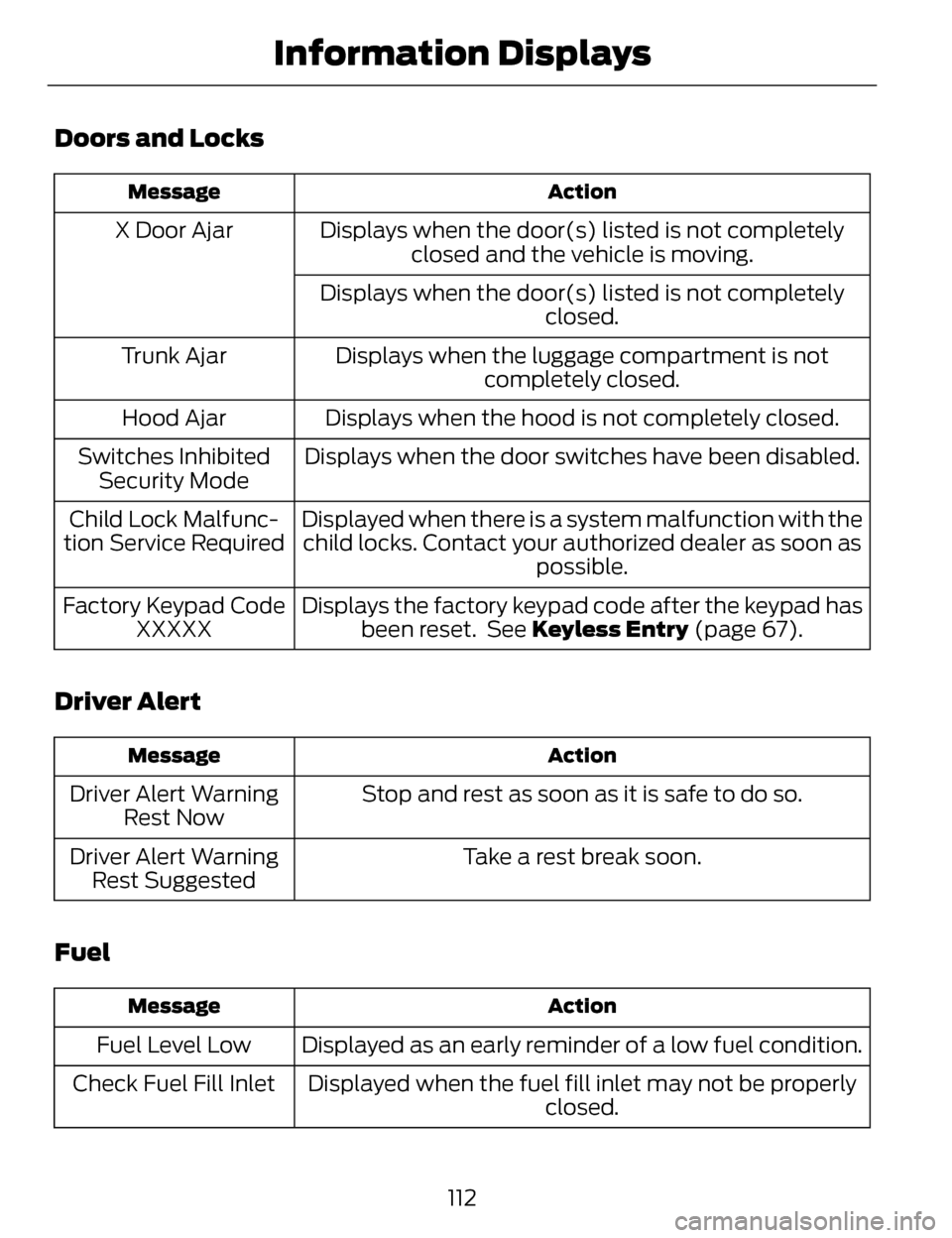
Doors and Locks
Action
Message
Displays when the door(s) listed is not completely
closed and the vehicle is moving.
X Door Ajar
Displays when the door(s) listed is not completely closed.
Displays when the luggage compartment is not completely closed.
Trunk Ajar
Displays when the hood is not completely closed.
Hood Ajar
Displays when the door switches have been disabled.
Switches Inhibited
Security Mode
Displayed when there is a system malfunction with thechild locks. Contact your authorized dealer as soon as possible.
Child Lock Malfunc-
tion Service Required
Displays the factory keypad code after the keypad hasbeen reset. See Keyless Entry (page 67).
Factory Keypad Code
XXXXX
Driver Alert
Action
Message
Stop and rest as soon as it is safe to do so.
Driver Alert Warning
Rest Now
Take a rest break soon.
Driver Alert Warning
Rest Suggested
Fuel
Action
Message
Displayed as an early reminder of a low fuel condition.
Fuel Level Low
Displayed when the fuel fill inlet may not be properly closed.
Check Fuel Fill Inlet
112
Information Displays
Page 197 of 468
REAR VIEW CAMERA (IF
EQUIPPED)
WARNINGS
The rear view camera system is
a reverse aid supplement device
that still requires the driver to use it in
conjunction with the interior and
exterior mirrors for maximum
coverage.
Objects that are close to either
corner of the bumper or under
the bumper, might not be seen on the
screen due to the limited coverage of
the camera system.
Back up as slow as possible
since higher speeds might limit
your reaction time to stop the vehicle.
Use caution when using the rear
video camera and the trunk is
ajar. If the trunk is ajar, the camera will
be out of position and the video image
may be incorrect. All guidelines (if
enabled) have been removed when
the trunk is ajar.
Use caution when turning
camera features on or off while
in R (Reverse). Make sure the vehicle
is not moving.
The rear view camera system provides
a video image of the area behind the
vehicle. The image will be displayed
in either in the rear view mirror or the
display in the center of the instrument
panel. During operation, lines appear in the
display which represent your vehicle’s
path and proximity to objects behind
the vehicle.
E152548
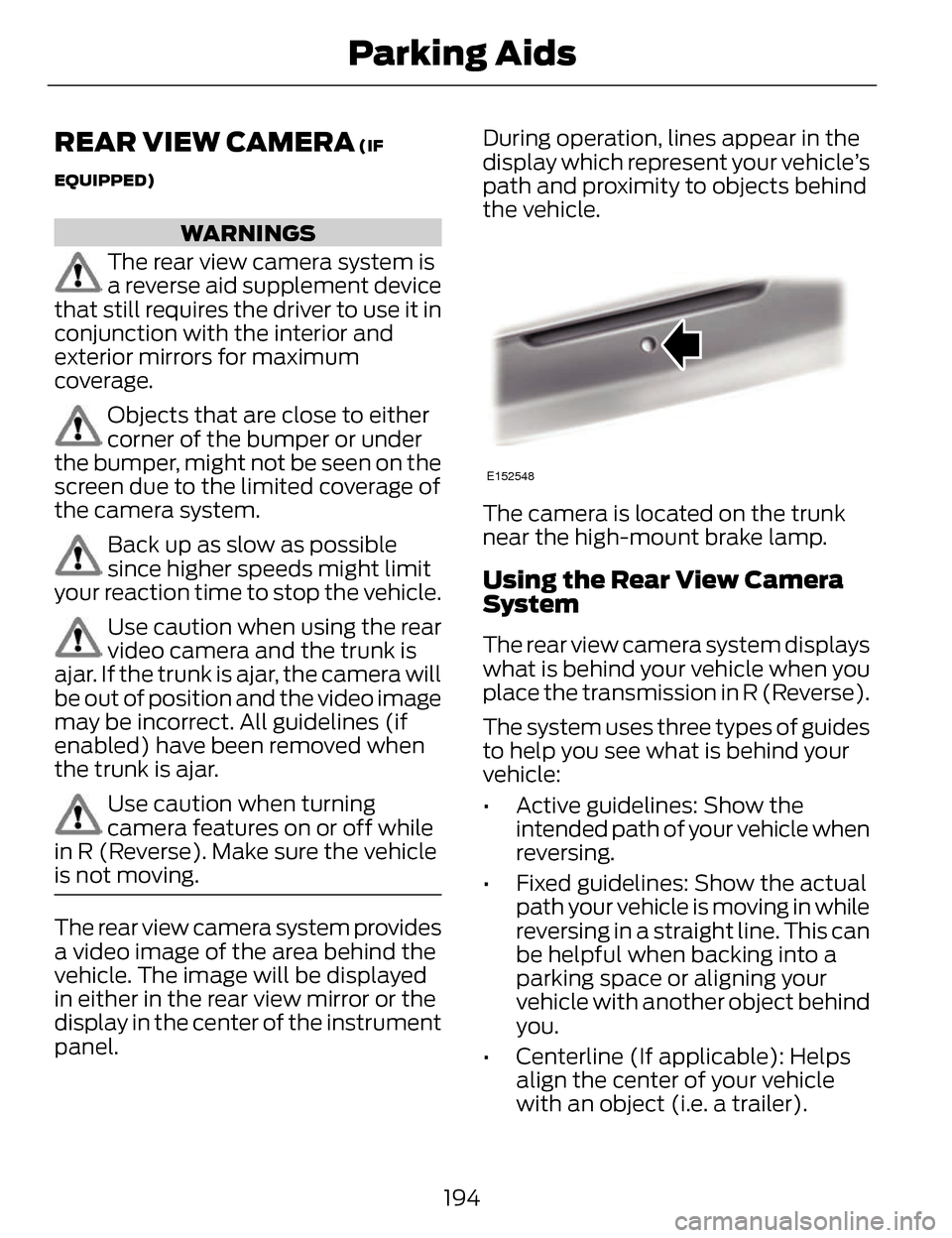
The camera is located on the trunk
near the high-mount brake lamp.
Using the Rear View Camera
System
The rear view camera system displays
what is behind your vehicle when you
place the transmission in R (Reverse).
The system uses three types of guides
to help you see what is behind your
vehicle:
• Active guidelines: Show the
intended path of your vehicle when
reversing.
• Fixed guidelines: Show the actual path your vehicle is moving in while
reversing in a straight line. This can
be helpful when backing into a
parking space or aligning your
vehicle with another object behind
you.
• Centerline (If applicable): Helps align the center of your vehicle
with an object (i.e. a trailer).
194
Parking Aids
Page 265 of 468
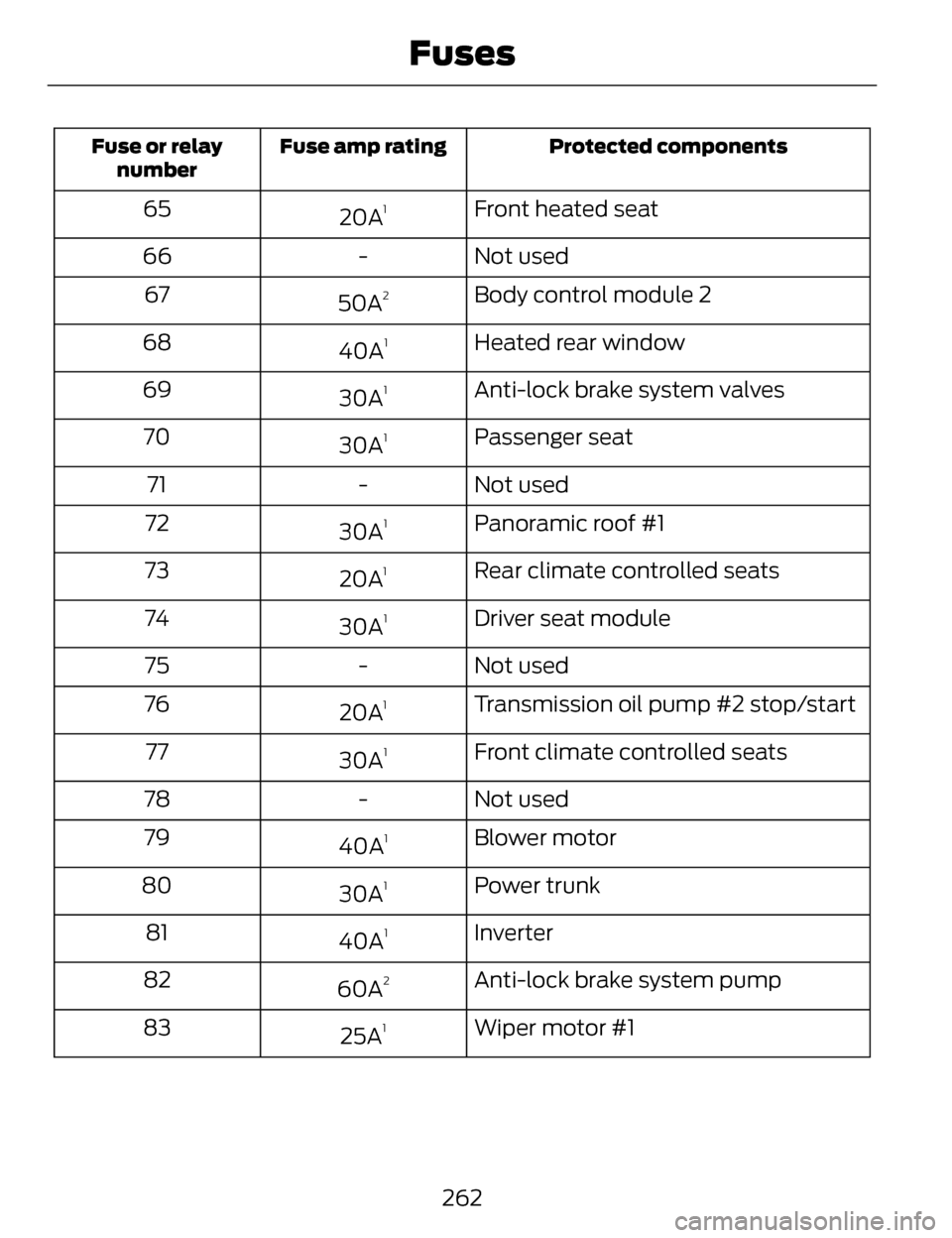
Protected components
Fuse amp rating
Fuse or relay
number
Front heated seat
20A165
Not used
-
66
Body control module 2
50A
267
Heated rear window
40A
168
Anti-lock brake system valves
30A
169
Passenger seat
30A
170
Not used
-
71
Panoramic roof #1
30A
172
Rear climate controlled seats
20A
173
Driver seat module
30A
174
Not used
-
75
Transmission oil pump #2 stop/start
20A
176
Front climate controlled seats
30A
177
Not used
-
78
Blower motor
40A
179
Power trunk
30A
180
Inverter
40A
181
Anti-lock brake system pump
60A
282
Wiper motor #1
25A
183
262
Fuses