climate control LINCOLN MKZ 2014 User Guide
[x] Cancel search | Manufacturer: LINCOLN, Model Year: 2014, Model line: MKZ, Model: LINCOLN MKZ 2014Pages: 468, PDF Size: 4.49 MB
Page 265 of 468
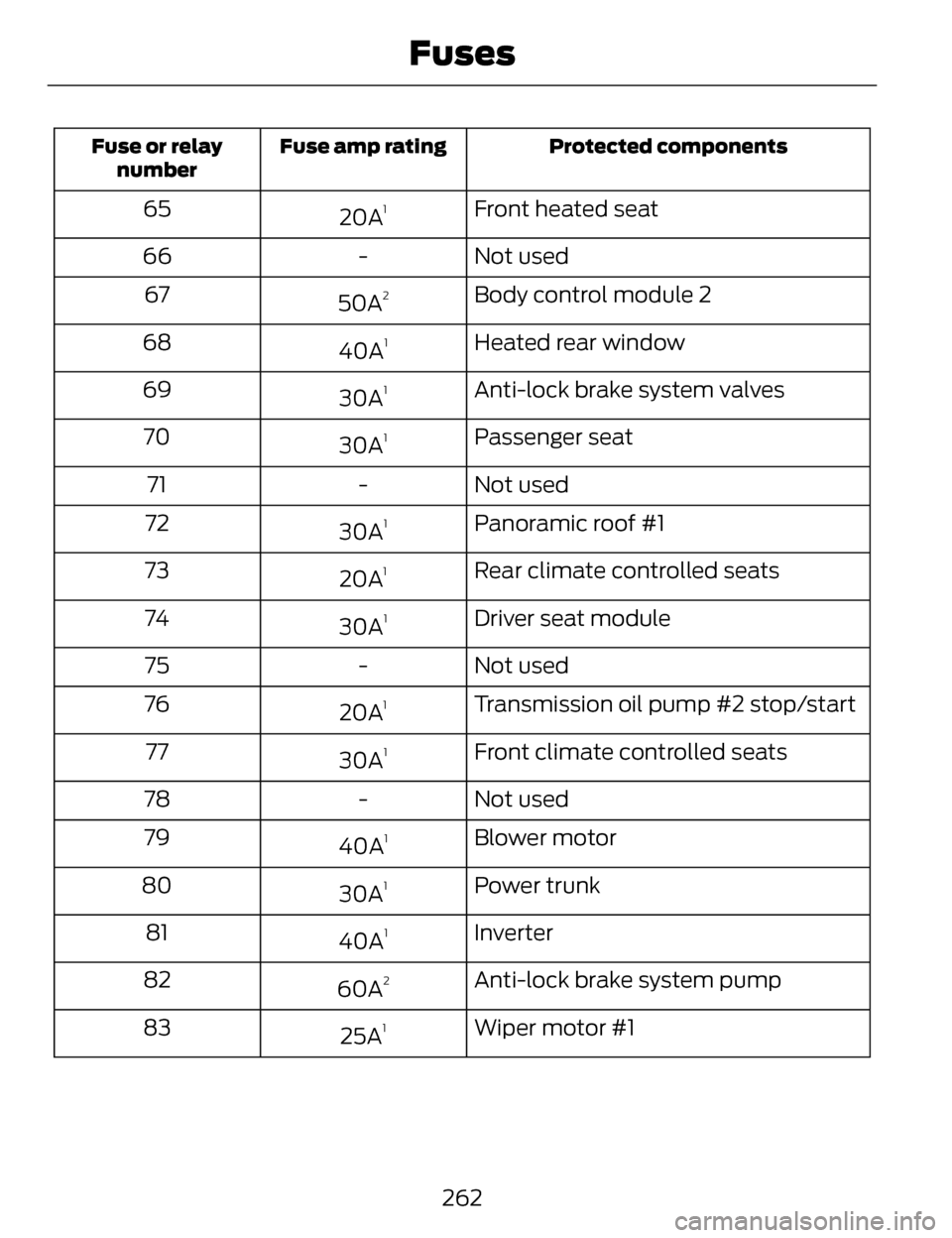
Protected components
Fuse amp rating
Fuse or relay
number
Front heated seat
20A165
Not used
-
66
Body control module 2
50A
267
Heated rear window
40A
168
Anti-lock brake system valves
30A
169
Passenger seat
30A
170
Not used
-
71
Panoramic roof #1
30A
172
Rear climate controlled seats
20A
173
Driver seat module
30A
174
Not used
-
75
Transmission oil pump #2 stop/start
20A
176
Front climate controlled seats
30A
177
Not used
-
78
Blower motor
40A
179
Power trunk
30A
180
Inverter
40A
181
Anti-lock brake system pump
60A
282
Wiper motor #1
25A
183
262
Fuses
Page 267 of 468
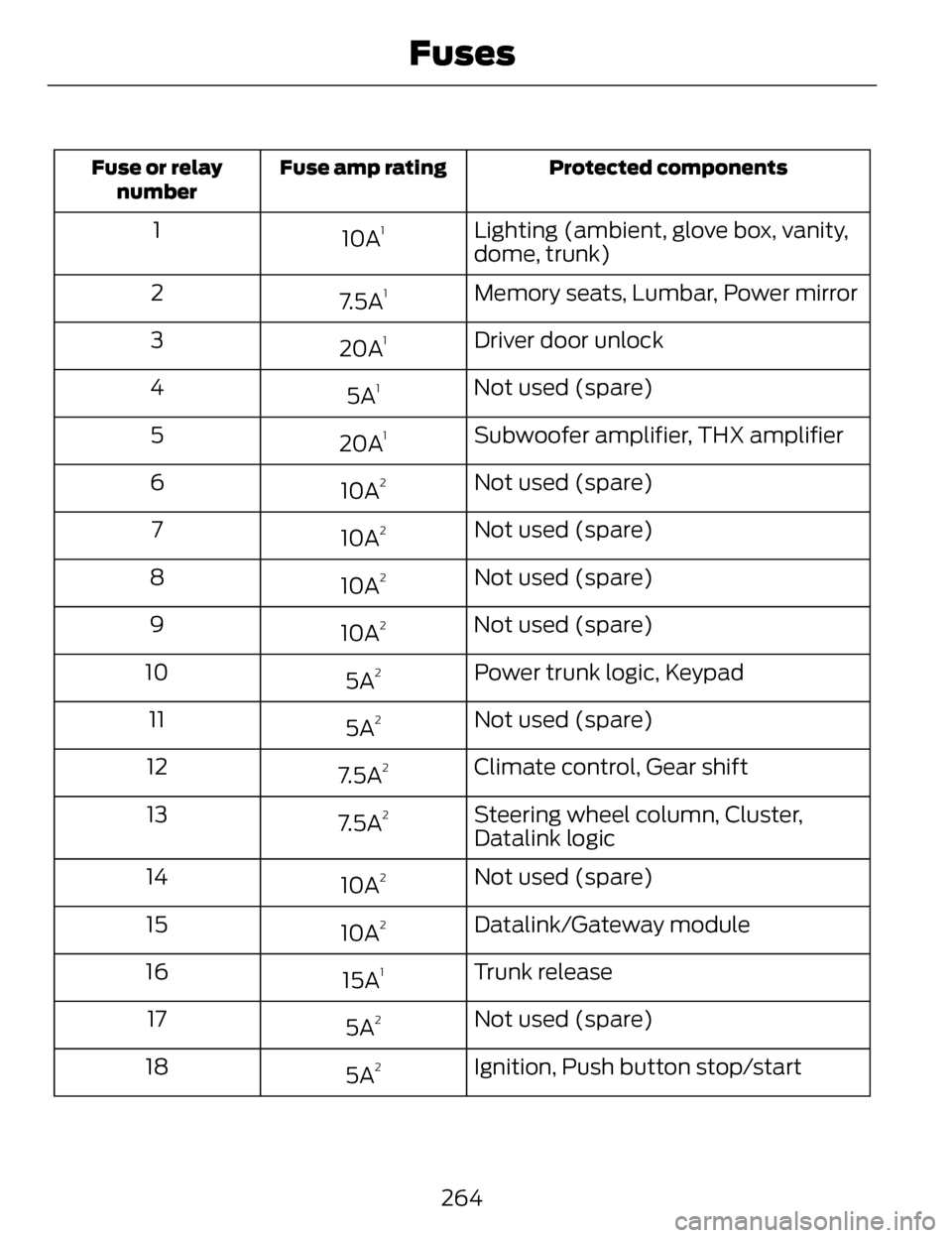
Protected components
Fuse amp rating
Fuse or relay
number
Lighting (ambient, glove box, vanity,
dome, trunk)
10A11
Memory seats, Lumbar, Power mirror
7.5A
12
Driver door unlock
20A
13
Not used (spare)
5A
14
Subwoofer amplifier, THX amplifier
20A
15
Not used (spare)
10A
26
Not used (spare)
10A
27
Not used (spare)
10A
28
Not used (spare)
10A
29
Power trunk logic, Keypad
5A
210
Not used (spare)
5A
211
Climate control, Gear shift
7.5A
212
Steering wheel column, Cluster,
Datalink logic
7.5A
213
Not used (spare)
10A
214
Datalink/Gateway module
10A
215
Trunk release
15A
116
Not used (spare)
5A
217
Ignition, Push button stop/start
5A
218
264
Fuses
Page 268 of 468
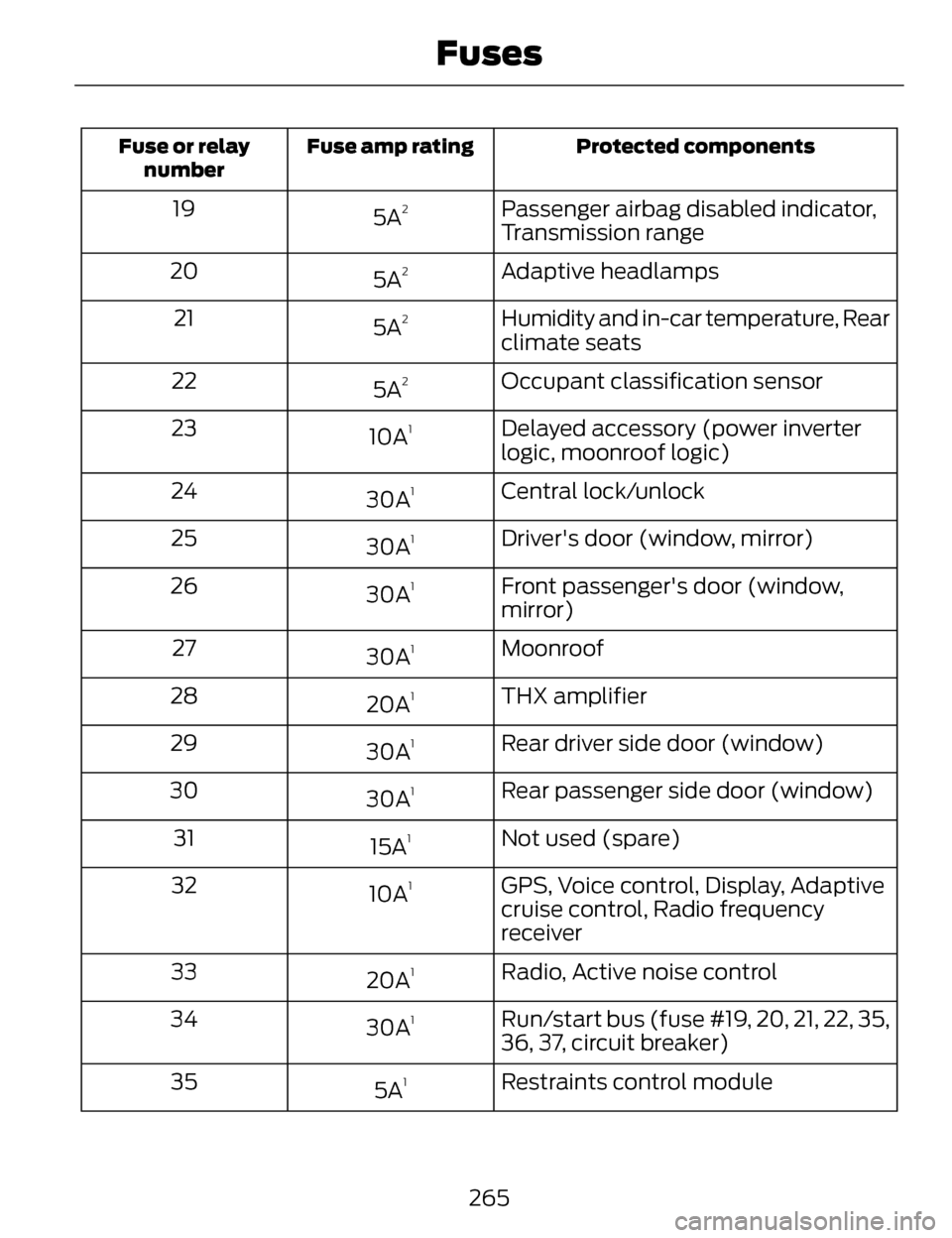
Protected components
Fuse amp rating
Fuse or relay
number
Passenger airbag disabled indicator,
Transmission range
5A219
Adaptive headlamps
5A
220
Humidity and in-car temperature, Rear
climate seats
5A
221
Occupant classification sensor
5A
222
Delayed accessory (power inverter
logic, moonroof logic)
10A
123
Central lock/unlock
30A
124
Driver's door (window, mirror)
30A
125
Front passenger's door (window,
mirror)
30A
126
Moonroof
30A
127
THX amplifier
20A
128
Rear driver side door (window)
30A
129
Rear passenger side door (window)
30A
130
Not used (spare)
15A
131
GPS, Voice control, Display, Adaptive
cruise control, Radio frequency
receiver
10A
132
Radio, Active noise control
20A
133
Run/start bus (fuse #19, 20, 21, 22, 35,
36, 37, circuit breaker)
30A
134
Restraints control module
5A
135
265
Fuses
Page 311 of 468
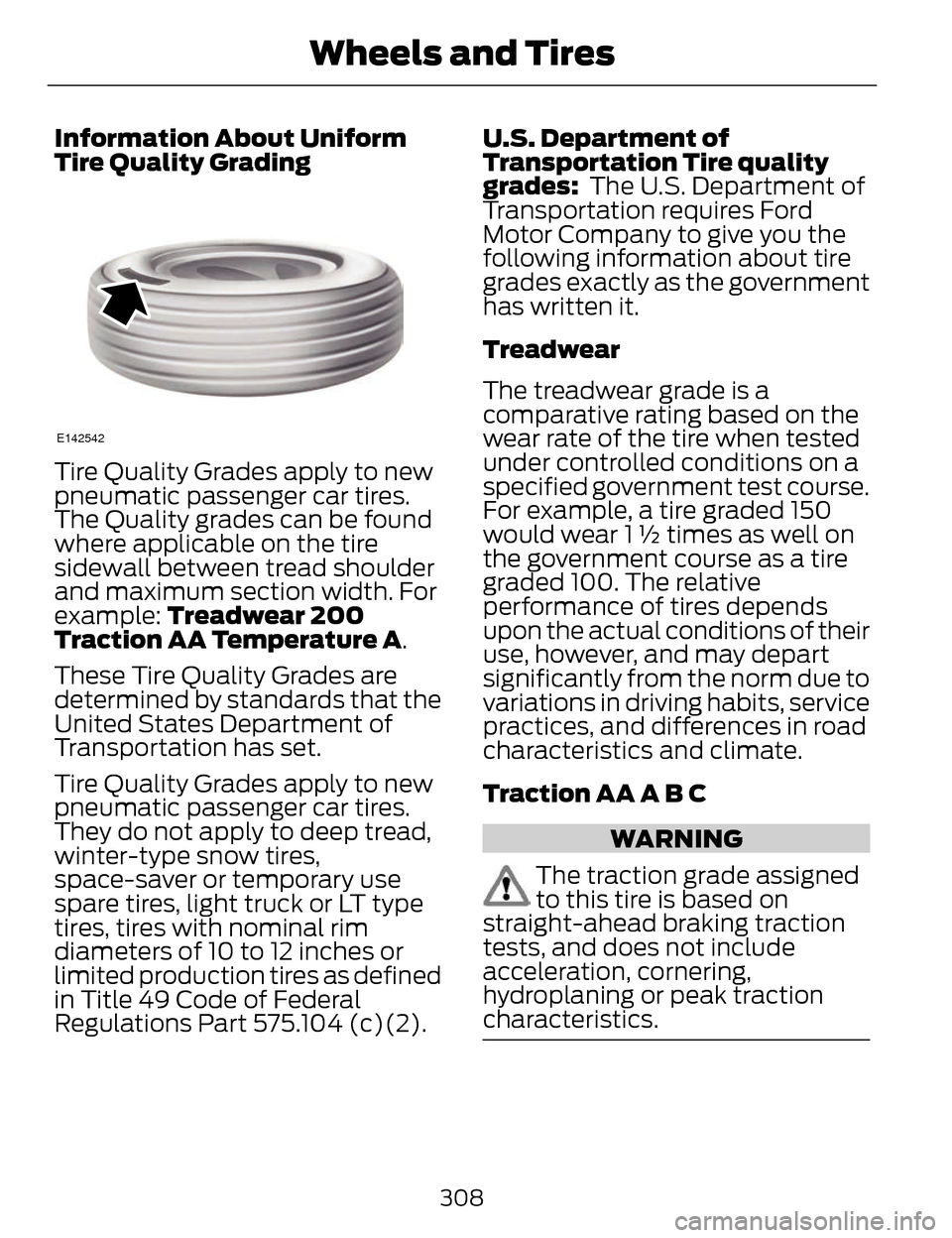
Information About Uniform
Tire Quality Grading
E142542
Tire Quality Grades apply to new
pneumatic passenger car tires.
The Quality grades can be found
where applicable on the tire
sidewall between tread shoulder
and maximum section width. For
example: Treadwear 200
Traction AA Temperature A.
These Tire Quality Grades are
determined by standards that the
United States Department of
Transportation has set.
Tire Quality Grades apply to new
pneumatic passenger car tires.
They do not apply to deep tread,
winter-type snow tires,
space-saver or temporary use
spare tires, light truck or LT type
tires, tires with nominal rim
diameters of 10 to 12 inches or
limited production tires as defined
in Title 49 Code of Federal
Regulations Part 575.104 (c)(2). U.S. Department of
Transportation Tire quality
grades:
The U.S. Department of
Transportation requires Ford
Motor Company to give you the
following information about tire
grades exactly as the government
has written it.
Treadwear
The treadwear grade is a
comparative rating based on the
wear rate of the tire when tested
under controlled conditions on a
specified government test course.
For example, a tire graded 150
would wear 1 ½ times as well on
the government course as a tire
graded 100. The relative
performance of tires depends
upon the actual conditions of their
use, however, and may depart
significantly from the norm due to
variations in driving habits, service
practices, and differences in road
characteristics and climate.
Traction AA A B C
WARNING
The traction grade assigned
to this tire is based on
straight-ahead braking traction
tests, and does not include
acceleration, cornering,
hydroplaning or peak traction
characteristics.
308
Wheels and Tires
Page 345 of 468
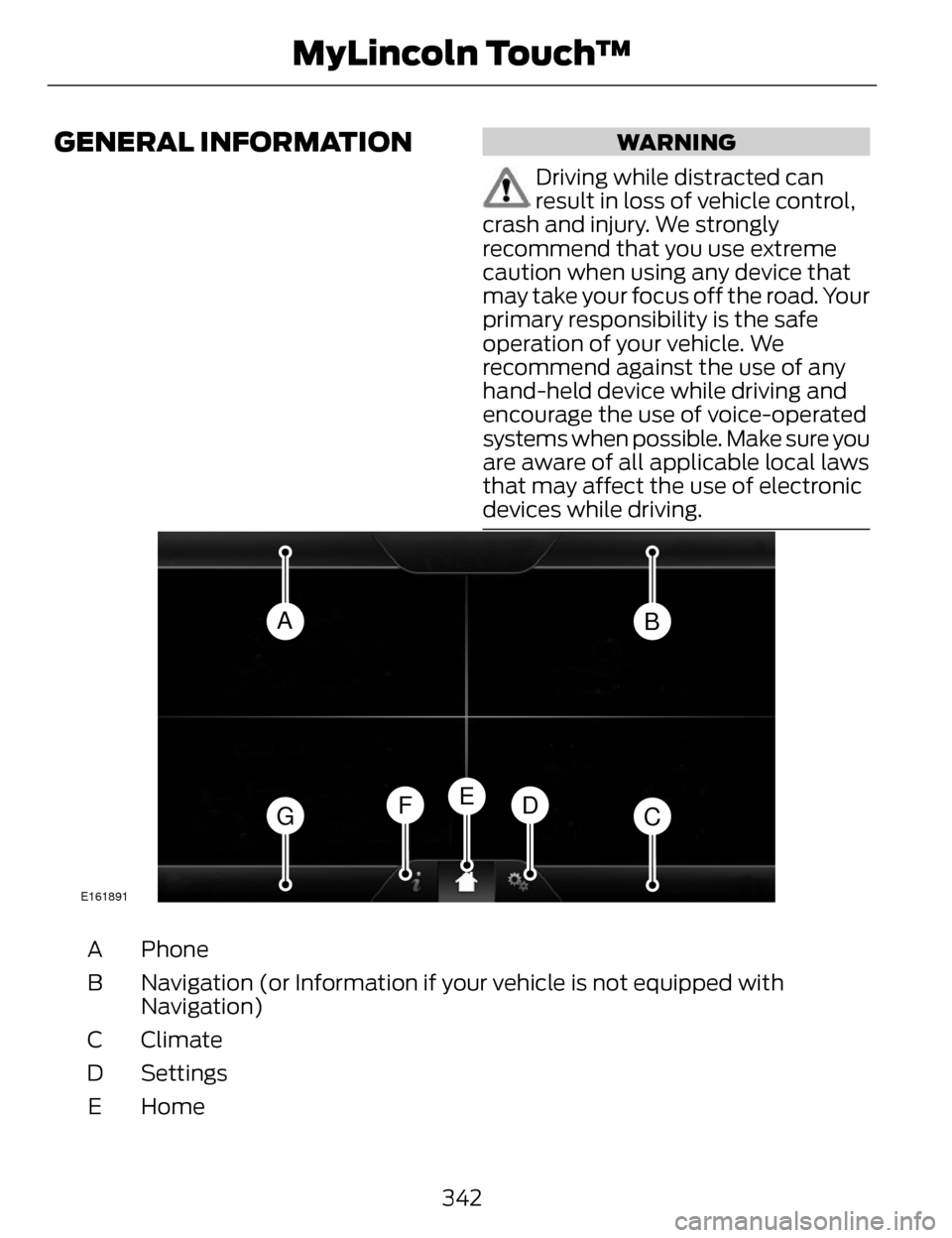
GENERAL INFORMATIONWARNING
Driving while distracted can
result in loss of vehicle control,
crash and injury. We strongly
recommend that you use extreme
caution when using any device that
may take your focus off the road. Your
primary responsibility is the safe
operation of your vehicle. We
recommend against the use of any
hand-held device while driving and
encourage the use of voice-operated
systems when possible. Make sure you
are aware of all applicable local laws
that may affect the use of electronic
devices while driving.
AB
GCDFE
E161891
Phone
A
Navigation (or Information if your vehicle is not equipped with
Navigation)
B
Climate
C
Settings
D
Home
E
342
MyLincoln Touch™
Page 346 of 468
Information
F
Entertainment
G
This system uses a four-corner
strategy to provide quick access to
several vehicle features and settings.
The touchscreen provides easy
interaction with your cellular phone,
multimedia, climate control and
navigation system. The corners
display any active modes within those
menus, such as phone status or the
climate temperature.
Note: Some features are not available
while your vehicle is moving.
Note: Your system is equipped with a
feature that allows you to access and
control audio features for 30 minutes
after you switch the ignition off (and
no doors open).
PHONE
Press to select any of the following:
• Phone
• Quick Dial
• Phonebook
• History
• Messaging
• Settings
NAVIGATION
Press to select any of the following:
• My Home
• Favorites
• Previous Destinations
• Point of Interest
• Emergency • Street Address
• Intersection
• City Center
• Map
• Edit Route Cancel Route
CLIMATE
Press to select any of the following:
• Driver Settings
• Recirculated Air
• Auto
•Dual
• Passenger Settings
•A/C
• Defrost
E142607
SETTINGS
Press to select any of the following:
• Clock
• Display
• Sound
• Vehicle
• Settings
• Help
E142613
HOME
343
MyLincoln Touch™
Page 347 of 468
Press to access your home screen.
Depending on your vehicle’s option
package and software, your screens
may vary in appearance from the
descriptions in this section. Your
features may also be limited
depending on your market. Check with
an authorized dealer for availability.
E142608
INFORMATION
Press to select any of the following:
• Services
• Travel Link
• Alerts
• Calendar
• Apps
ENTERTAINMENT
Press to select any of the following:
•AM
•FM
• SIRIUS
•CD
•USB
• BT Stereo
• SD Card
• A/V In
Using the Touch-Sensitive
Controls on Your System
To turn a feature on and off, just touch
the graphic with your finger. To get the
best performance from the
touch-sensitive controls:
• Do not press hard on the controls. They are sensitive to light touch.
• Use your bare finger to touch the center of a touch-control graphic.
Touching off-center of the graphic
may affect operation of a nearby
control.
• Make sure your hands are clean and dry.
• Since the touchscreen operates based on the touch of a finger, you
may have trouble using it if you are
wearing gloves.
• Keep metal and other conductive material away from the surface of
the touchscreen as this may cause
electronic interference (for
example, inadvertently turning on
a feature other than the one you
meant to turn on).
Depending on your vehicle and option
package, you may also have these
controls on your bezel:
• Power: Switch the media or climate features off and on.
• VOL: Control the volume of
playing media.
• Fan: Control the speed of the climate system fan.
• Seek and Tune buttons: Use as you normally would in media modes.
344
MyLincoln Touch™
Page 353 of 468
Helpful Hints
• Make sure the interior of yourvehicle is as quiet as possible.
Wind noise from open windows
and road vibrations may prevent
the system from correctly
recognizing spoken commands.
• After pressing the voice icon, wait until after the tone sounds and
Listening appears before saying a
command. Any command spoken
before this does not register with
the system.
• Speak naturally, without long pauses between words.
• At any time, you can interrupt the system while it is speaking by
pressing the voice icon.
Accessing a List of Available
Commands
• If you use the touchscreen, press the Settings icon > Help > Voice
Command List.
• If you use the steering wheel control, press the voice icon. After
the tone, speak your command
clearly.
Available voice commands
"Audio list of commands"
"Bluetooth audio list of commands" "Browse list of commands""CD list of commands"
"Climate control list of commands" "List of commands"
Available voice commands
"Navigation list of commands" *
"Phone list of commands""Radio list of commands"
"SD card list of commands"
"Sirius satellite list of commands"
**
"Travel link list of commands" *
"USB list of commands"
"Voice instructions list of commands"
"Voice settings list of commands" "Help"
* This command is only available when
your vehicle is equipped with the
navigation system, and the navigation
system SD card is in the card slot.
** This command is only available
when you have an active SIRIUS
satellite radio subscription.
Voice Settings
Voice settings allow you to customize
the level of system interaction, help
and feedback. The system defaults
to standard interaction that uses
candidate lists and confirmation
prompts as these provide the highest
level of guidance and feedback.
350
MyLincoln Touch™
Page 407 of 468
Vehicle Health Report Privacy
Notice
When you create a Vehicle Health
Report, Ford Motor Company may
collect your cellular phone number
(to process your report request) and
diagnostic information about your
vehicle. Certain versions or updates
to Vehicle Health Report may also
collect more vehicle information. Ford
may use your vehicle information it
collects for any purpose. If you do not
want to disclose your cellular phone
number or vehicle information, do not
run the feature or set up your VehicleHealth Report profile at
www.SYNCMyRide.com. See
www.SYNCMyRide.com (Vehicle
Health Report Terms and Conditions,
and Privacy Statement) for more
information.
CLIMATE
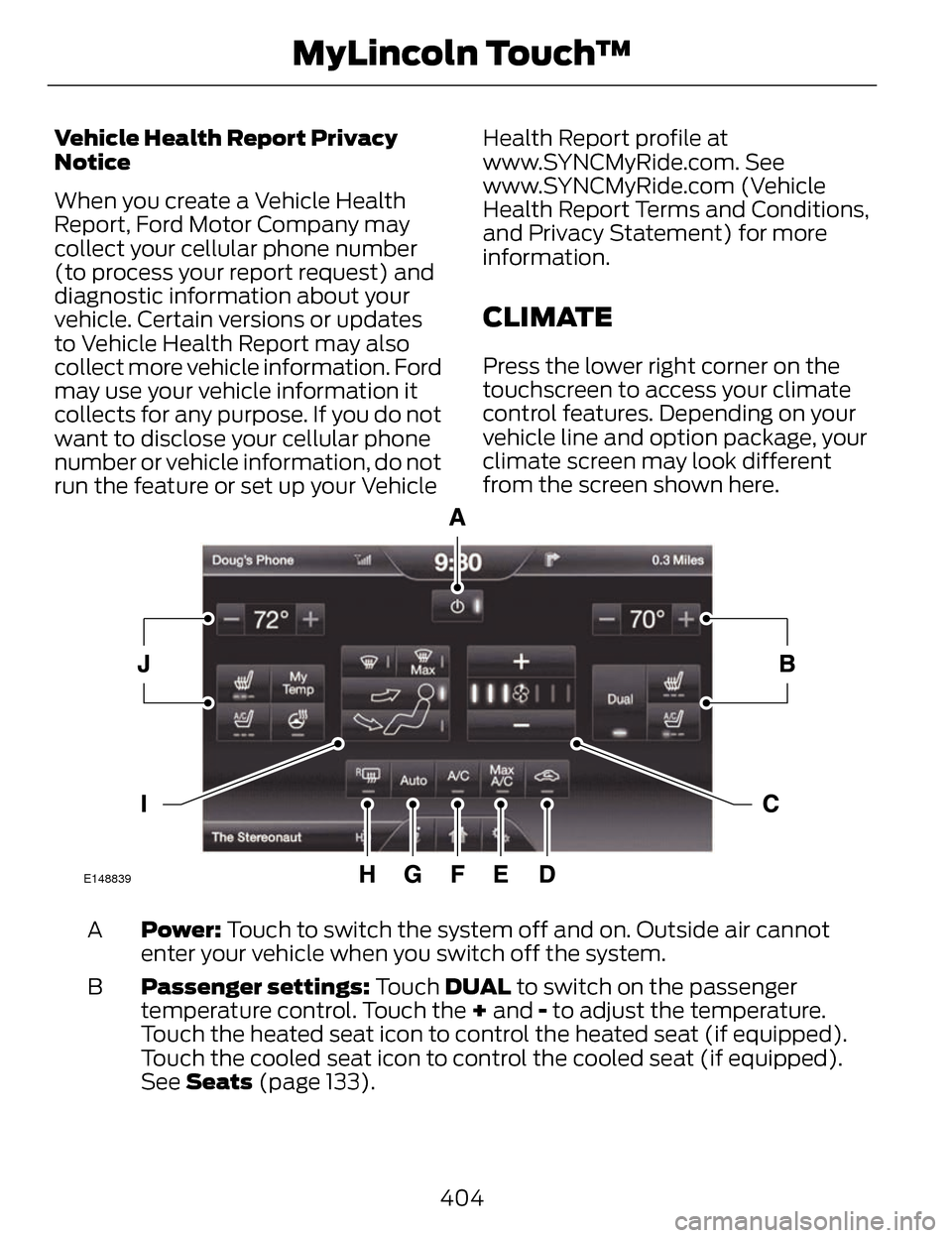
Press the lower right corner on the
touchscreen to access your climate
control features. Depending on your
vehicle line and option package, your
climate screen may look different
from the screen shown here.
E148839
Power: Touch to switch the system off and on. Outside air cannot
enter your vehicle when you switch off the system.
A
Passenger settings: Touch DUAL to switch on the passenger
temperature control. Touch the + and - to adjust the temperature.
Touch the heated seat icon to control the heated seat (if equipped).
Touch the cooled seat icon to control the cooled seat (if equipped).
See Seats (page 133).
B
404
MyLincoln Touch™
Page 409 of 468
Manual airflow distribution controls:Floor/Defrost: Distributes
air through the windshield defroster vents, demister vents, floor vents
and rear seat floor vents, and provides outside air to reduce window
fogging. Panel: Distributes air through the instrument panel vents.
Panel/Floor: Distributes air through the instrument panel vents,
demister vents, floor vents and rear seat floor vents. Floor: Distributes
air through the demister vents, floor vents and rear seat floor vents.
Defrost: Touch to clear the windshield of fog and thin ice. Touch again
to return to the previous airflow selection. When switched on, defrost
distributes outside air through the windshield defroster vents and
demister vents to reduce window fogging.
I
Driver settings: Depending on your vehicle and option package, you
may have the following features: Touch the + and - to adjust the
temperature. Touch the heated seat icon to control the heated seat
(if equipped). Touch the cooled seat icon to control the cooled seat
(if equipped). See Seats (page 133). Touch MyTemp to select your
previously pre-set temperature setpoint. Touch and hold MyTemp to
store a new pre-set for temperature setpoint. Touch the heated steering
wheel icon (if equipped) to warm the steering wheel.
J
Note: If your vehicle is equipped with
a wood-trimmed steering wheel, it
does not heat between the 10 o'clock
and 2 o'clock positions.
Climate Control Voice
Commands
E142599
Press the voice button on the
steering wheel controls.
When prompted, say any of
the following commands:
Climate control commands
"Climate automatic"
"Climate my temperature" "Climate off""Climate on"
Climate control commands
"Climate temperature <15.5-29.5> degrees"
"Climate temperature <60-85> degrees"
"Help"
There are additional climate control
commands but in order to access
them, you have to say "Climate" first.
When the system is ready to listen,
you may say any of the following
commands:
406
MyLincoln Touch™