climate settings LINCOLN MKZ 2014 User Guide
[x] Cancel search | Manufacturer: LINCOLN, Model Year: 2014, Model line: MKZ, Model: LINCOLN MKZ 2014Pages: 468, PDF Size: 4.49 MB
Page 358 of 468
• Rear Camera Delay
• Visual Park Aid Alert
• Guidelines.
You can find more information on the
rear view camera in another chapter.
See Rear View Camera (page 194).
Enable Valet Mode
Note: If the system locks, and you
need to reset the PIN, enter 3681 and
the system unlocks.
Valet mode allows you to lock the
system. No information is accessible
until the system is unlocked with the
correct PIN.
E142607
1. Press the Settings icon > Vehicle > Enable Valet Mode.
2. When prompted, enter a four-digit PIN.
After you press Continue, the system
locks until you enter the PIN again.
Settings
Access and adjust system settings,
voice features, as well as phone,
navigation and wireless settings.
System
E142607
Press the Settings icon >
Settings > System , then
select from the following:
System
Select to have the touchscreen display in English,
Spanish or French.
Language
Select to display units in kilometers or miles.
Distance
Select to display units in Celsius or Fahrenheit.
Temperature
Adjust the volume of voice prompts from the
system.
System Prompt Volume
Select to have the system beep to confirm choices
made through the touchscreen.
Touch Screen Button
Beep
Select to have the system beep to confirm button
choices made through the climate or audio system.
Touch Panel Button
Beep
355
MyLincoln Touch™
Page 407 of 468
Vehicle Health Report Privacy
Notice
When you create a Vehicle Health
Report, Ford Motor Company may
collect your cellular phone number
(to process your report request) and
diagnostic information about your
vehicle. Certain versions or updates
to Vehicle Health Report may also
collect more vehicle information. Ford
may use your vehicle information it
collects for any purpose. If you do not
want to disclose your cellular phone
number or vehicle information, do not
run the feature or set up your VehicleHealth Report profile at
www.SYNCMyRide.com. See
www.SYNCMyRide.com (Vehicle
Health Report Terms and Conditions,
and Privacy Statement) for more
information.
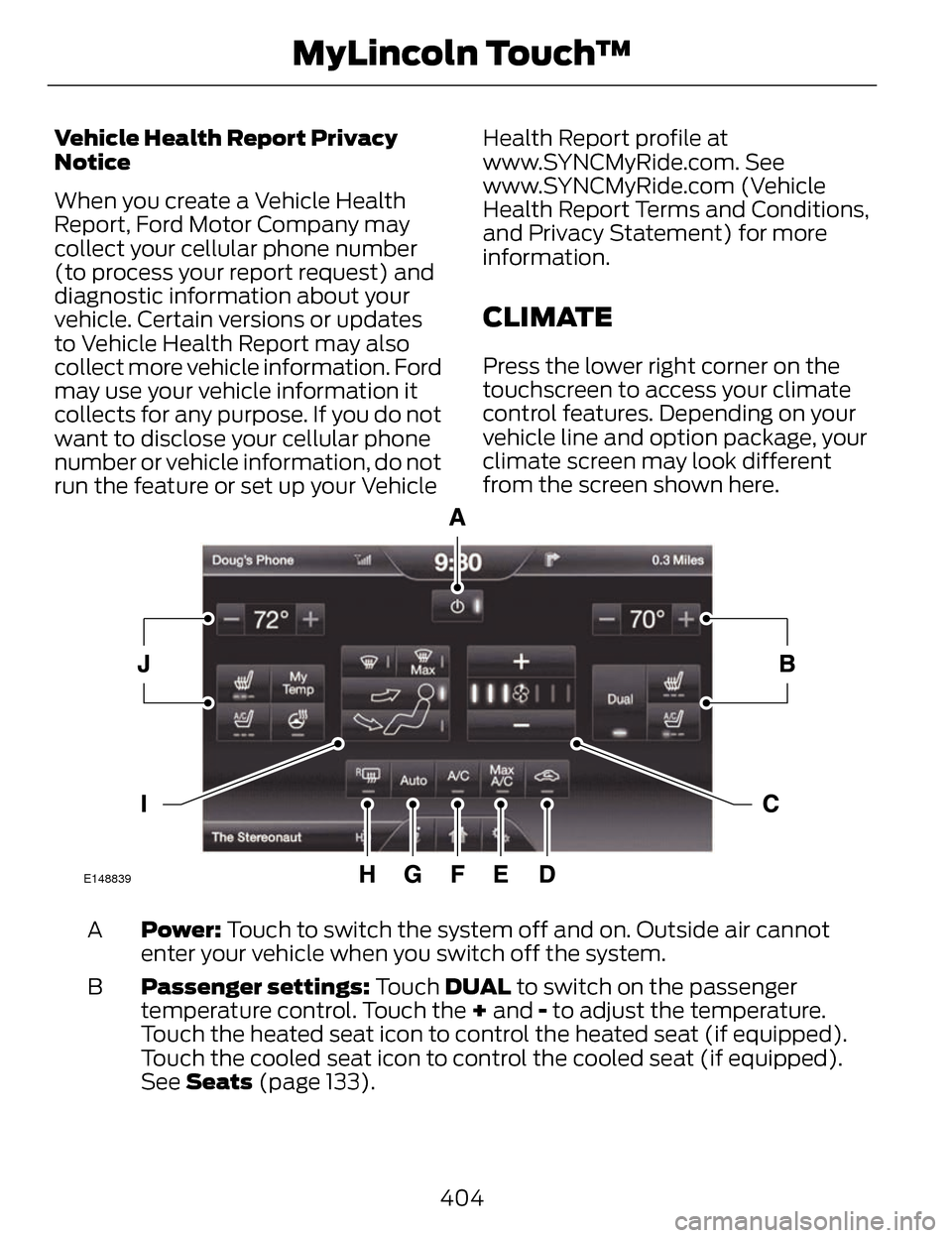
CLIMATE
Press the lower right corner on the
touchscreen to access your climate
control features. Depending on your
vehicle line and option package, your
climate screen may look different
from the screen shown here.
E148839
Power: Touch to switch the system off and on. Outside air cannot
enter your vehicle when you switch off the system.
A
Passenger settings: Touch DUAL to switch on the passenger
temperature control. Touch the + and - to adjust the temperature.
Touch the heated seat icon to control the heated seat (if equipped).
Touch the cooled seat icon to control the cooled seat (if equipped).
See Seats (page 133).
B
404
MyLincoln Touch™
Page 409 of 468
Manual airflow distribution controls:Floor/Defrost: Distributes
air through the windshield defroster vents, demister vents, floor vents
and rear seat floor vents, and provides outside air to reduce window
fogging. Panel: Distributes air through the instrument panel vents.
Panel/Floor: Distributes air through the instrument panel vents,
demister vents, floor vents and rear seat floor vents. Floor: Distributes
air through the demister vents, floor vents and rear seat floor vents.
Defrost: Touch to clear the windshield of fog and thin ice. Touch again
to return to the previous airflow selection. When switched on, defrost
distributes outside air through the windshield defroster vents and
demister vents to reduce window fogging.
I
Driver settings: Depending on your vehicle and option package, you
may have the following features: Touch the + and - to adjust the
temperature. Touch the heated seat icon to control the heated seat
(if equipped). Touch the cooled seat icon to control the cooled seat
(if equipped). See Seats (page 133). Touch MyTemp to select your
previously pre-set temperature setpoint. Touch and hold MyTemp to
store a new pre-set for temperature setpoint. Touch the heated steering
wheel icon (if equipped) to warm the steering wheel.
J
Note: If your vehicle is equipped with
a wood-trimmed steering wheel, it
does not heat between the 10 o'clock
and 2 o'clock positions.
Climate Control Voice
Commands
E142599
Press the voice button on the
steering wheel controls.
When prompted, say any of
the following commands:
Climate control commands
"Climate automatic"
"Climate my temperature" "Climate off""Climate on"
Climate control commands
"Climate temperature <15.5-29.5> degrees"
"Climate temperature <60-85> degrees"
"Help"
There are additional climate control
commands but in order to access
them, you have to say "Climate" first.
When the system is ready to listen,
you may say any of the following
commands:
406
MyLincoln Touch™
Page 458 of 468
Creating a MyKey..................................58Programming/Changing ConfigurableSettings.....................................................58
Cruise Control.........................................77Principle of Operation............................198
Type 1...............................................................77
Type 2..............................................................77
Cruise controlSee: Using Cruise Control.....................198
Customer Assistance.......................248
D
Data Recording........................................9Event Data Recording................................10
Service Data Recording..............................9
Daytime Running Lamps...................83
Direction Indicators..............................85
Drive Control.........................................222
LINCOLN DRIVE CONTROL.................222
Driver Alert............................................207Using Driver Alert.....................................207
Driver and Passenger Airbags..........43Children and Airbags................................44
Proper Driver and Front PassengerSeating Adjustment..............................44
Driving Aids...........................................207
Driving Hints.........................................240
Driving Through Water.......................241
DRL
See: Daytime Running Lamps...............83
E
Economical Driving...........................240 Electric Parking Brake.......................180
Applying the electric parking
brake.........................................................180
Applying the electric parking brake when the vehicle is moving...............181
Battery With No Charge.........................182
Releasing the electric parking brake..........................................................181
Emission Control System................164On-Board Diagnostics (OBD-II).........165
Readiness for Inspection/Maintenance(I/M) Testing..........................................165
End User License Agreement.........418SYNC® End User License Agreement(EULA).....................................................418
Engine Block Heater...........................155Using the Engine Block Heater............156
Engine Coolant Check.......................272Adding Engine Coolant..........................272
Checking the Engine Coolant..............272
Recycled Engine Coolant......................274
Severe Climates........................................274
What You Should Know AboutFail-Safe Cooling.................................274
Engine ImmobilizerSee: Passive Anti-Theft System...........72
Engine Oil Check..................................271Adding Engine Oil......................................271
Engine Oil Dipstick - 2.0LEcoBoost™..........................................271
Engine Oil Dipstick - 3.7L...................271
Engine Specifications.......................329
Drivebelt Routing.....................................329
455
Index
Page 460 of 468
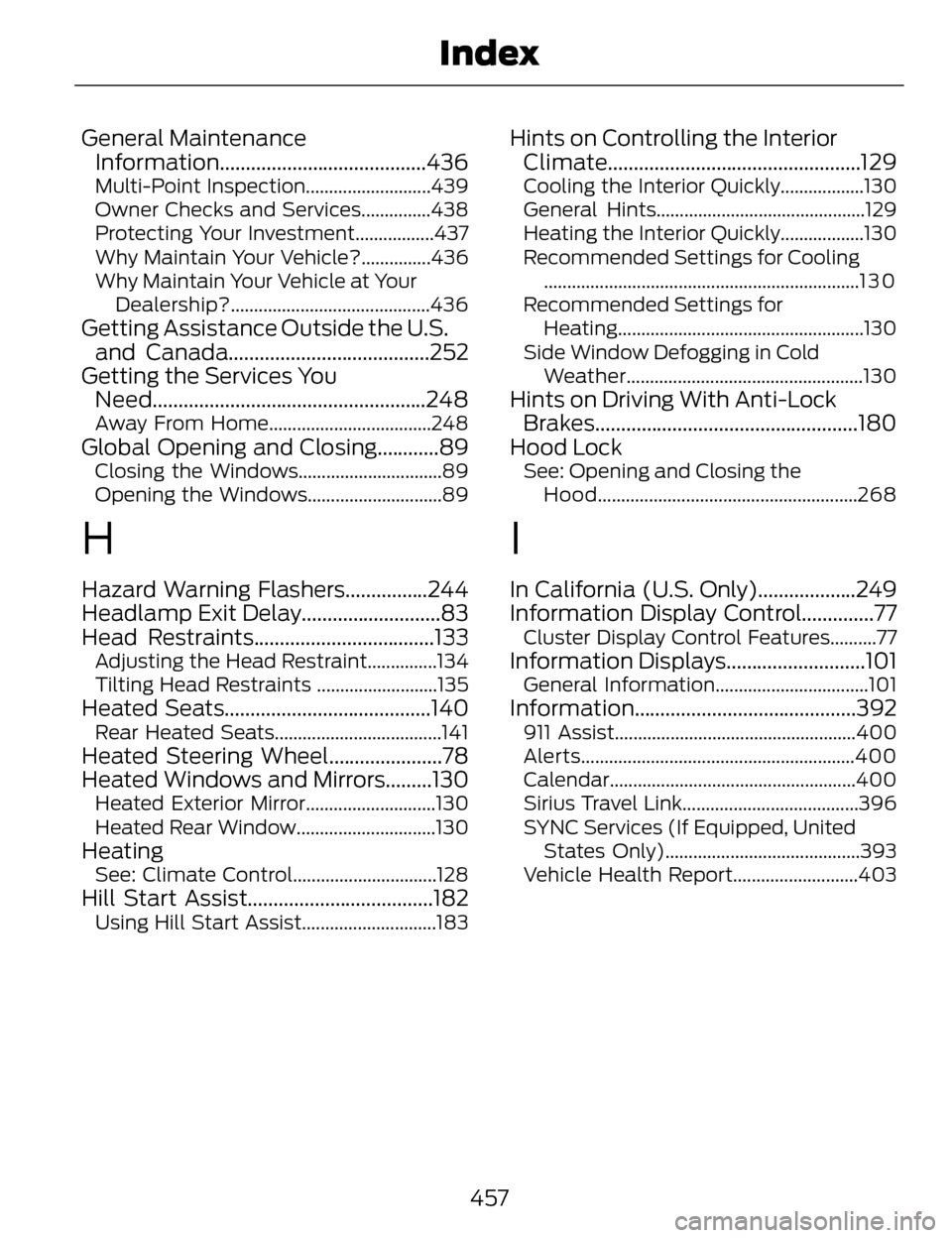
General MaintenanceInformation........................................436
Multi-Point Inspection...........................439
Owner Checks and Services...............438
Protecting Your Investment.................437
Why Maintain Your Vehicle?...............436
Why Maintain Your Vehicle at Your
Dealership?...........................................436
Getting Assistance Outside the U.S.and Canada.......................................252
Getting the Services You Need.....................................................248
Away From Home...................................248
Global Opening and Closing............89Closing the Windows...............................89
Opening the Windows.............................89
H
Hazard Warning Flashers................244
Headlamp Exit Delay...........................83
Head Restraints...................................133
Adjusting the Head Restraint...............134
Tilting Head Restraints ..........................135
Heated Seats........................................140Rear Heated Seats....................................141
Heated Steering Wheel......................78
Heated Windows and Mirrors.........130
Heated Exterior Mirror............................130
Heated Rear Window..............................130
HeatingSee: Climate Control...............................128
Hill Start Assist....................................182Using Hill Start Assist.............................183
Hints on Controlling the InteriorClimate.................................................129
Cooling the Interior Quickly..................130
General Hints.............................................129
Heating the Interior Quickly..................130
Recommended Settings for Cooling
....................................................................1 3 0
Recommended Settings for Heating.....................................................130
Side Window Defogging in Cold Weather...................................................130
Hints on Driving With Anti-LockBrakes...................................................180
Hood Lock
See: Opening and Closing the
Hood........................................................268
I
In California (U.S. Only)...................249
Information Display Control..............77
Cluster Display Control Features..........77
Information Displays...........................101General Information.................................101
Information ...........................................392911 Assist....................................................400
Alerts...........................................................400
Calendar.....................................................400
Sirius Travel Link......................................396
SYNC Services (If Equipped, United
States Only)..........................................393
Vehicle Health Report...........................403
457
Index